
Giving should be straightforward, but often donors face a common hurdle: wanting to support a different campaign than the one they initially landed on.
This usually means leaving the page, searching for the right campaign, and starting over – a process that frequently leads to missed donations.
For instance, if a donor is on the “Holiday Toy Drive” page, but then remembers they wanted to support your “Scholarship Fund” instead. Previously, they’d have to hit the back button, hunt through your site for the other campaign, and go through the entire process again.
With the release of Charitable Pro 1.8.12, we are excited to introduce the Campaign Selector. This innovative feature eliminates those frustrating navigation steps by allowing your donors to effortlessly switch between any of your active campaigns directly within the donation form. The form updates instantly with the new campaign’s details, all without a single page reload, ensuring a seamless and efficient giving experience that empowers your supporters to contribute where it matters most to them.
How It Works: Effortless Donor Choice with the Campaign Selector
The Campaign Selector is incredibly simple! On your donation forms, donors will now see a smart dropdown menu.
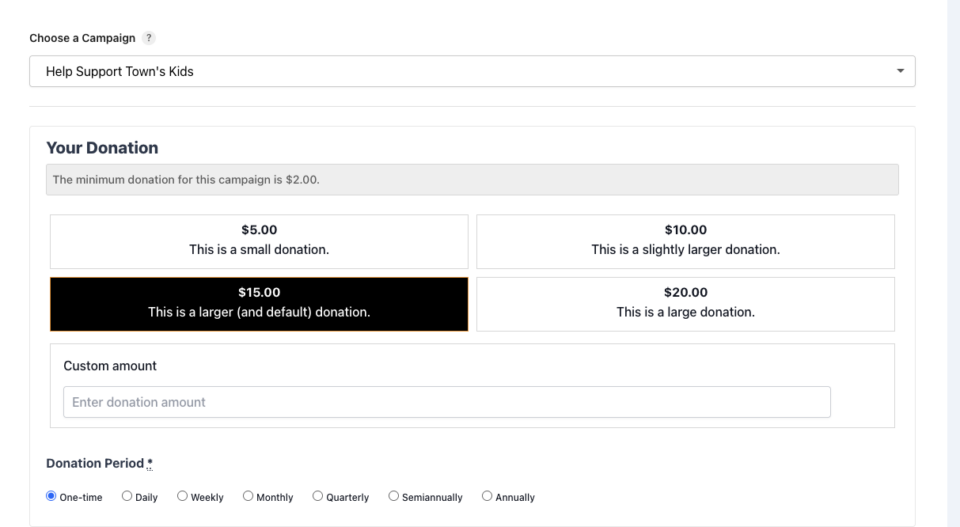
This intuitive menu gives them the power to choose their preferred campaign at the exact moment they’re ready to give.
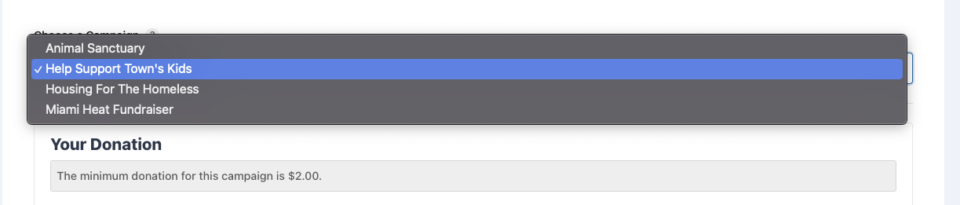
No more hitting the back button or hunting through your site – everything they need is right there. When a donor selects a different campaign from this list, the form instantly updates.
This means donation amounts, custom fields, and any campaign-specific messages refresh automatically, providing a truly dynamic and frustration-free experience for your generous supporters.
Key Features of the Campaign Selector:
- Smart Filtering: The selector is smart enough to automatically exclude campaigns that have ended or are already fully funded, ensuring donors only see active needs.
- Organized for Impact: If you manage dozens of causes, you can group campaigns by category (e.g., “Emergency Relief” vs. “Education”) to help donors find their preferred cause quickly.
- Memory & Persistence: The system can remember a donor’s last selection for up to 7 days, providing a personalized experience for returning supporters.
- Total Control: You decide exactly which campaigns appear in the dropdown and which forms should display the selector.
Getting Started with the Campaign Selector
Setting up the Campaign Selector takes less than a minute. Once you’ve updated to Charitable Pro 1.8.12, you can enable it globally or for specific campaigns under your Donation Form settings.
It works seamlessly with shortcodes, widgets, and even modal (popup) forms.
Plus, it’s built to be developer-friendly with a suite of hooks and filters, allowing you to customize the display logic or the campaign list programmatically.
Ready to Try It Today and Transform Your Donor Experience?
The Campaign Selector is available now for all Charitable Pro users. To get started, ensure you are running Charitable Core 1.8.0+ and Pro 1.8.12+.
Need more help? Check out our full documentation to see how to enable the selector on your site.
Not Yet on Charitable Pro? Unlock Powerful Features
The Campaign Selector is just one example of how Charitable Pro empowers you to raise more funds with less effort. If you’re impressed by how this new feature streamlines giving and are looking for even more powerful tools to boost your fundraising success, then it’s time to consider upgrading to Charitable Pro.
You’ll get access to features like:
- Customizable Forms
- Templates + Visual Builder
- Donation Management
- Readymade Reports
- PDF Receipts
- Donor Dashboard
- Comments & Leaderboards
- Recurring Donations
- Fee Relief
- Email Integrations
- Peer-to-Peer & Crowdfunding
…and so much more! Ready to give Charitable Pro a try?
Sign up today and get up to 50% off on your plan. We’re confident you’ll love raising funds with Charitable. If for any reason Charitable is not the right fit for you, we’ll refund your purchase with our 14-day money back guarantee
Charitable Has 1+ Million Downloads!
Trusted by millions to power successful fundraising campaigns. Try Charitable risk-free today.
✅ 14-day money-back guarantee
✅ Transparent pricing
✅ Code-free setup
Stay Connected for More Nonprofit Resources
For more tutorials and videos tailored to nonprofits, subscribe to our YouTube channel. We regularly publish expert tips, step-by-step guides on online donations, fundraising strategies, and practical resources to help your organization succeed.
🗞️ Get weekly tips and exclusive guides in your inbox
Join our newsletter →
🎥 Watch step-by-step tutorials and success stories
Subscribe to our YouTube channel →
👩🏽💻 Connect with our community and get daily nonprofit insights
Follow us on LinkedIn →
🥳 Fun reels and non-profit insights
Follow us on Instagram →
👀 Insightful & fun videos to help you grow your cause
Follow us on TikTok→
🌎 Subscribe and follow for general fundraiser tips
Get Fundraiser Tips on TikTok →
Powerful Fundraising Resources
⬇️ Download proven strategies, campaign ideas, and expert tools
Get the Fundraising Kit →
💸 Get Free Fundraising Resources
Head to the Charitable Fundraising Hub →
🤔 Got questions about Charitable?
Charitable FAQs →
🏎️ Take Charitable for a spin
Create your Charitable Demo →
Understand non-profit terms and jargon
Non-Profit Glossary →
% Looking for non-profit deals and discounts?
Best Non-Profit Deals and Discounts →







Leave a Reply