
Campaign Updates are here! This is a brand-new feature for Charitable Pro that gives you a powerful, beautifully simple way to keep donors informed, engaged, and connected to the causes they care about.
With Campaign Updates, you can:
- Publish progress posts directly to your campaign pages
- Automatically notify opted-in donors by email
- Build the kind of ongoing donor relationships that fuel long-term fundraising success.
It’s transparent, compliance-friendly, and most importantly, it works the way you do!
Campaign Updates is available now with Charitable Pro via the Campaign Updates extension on supported plans.
Want to skip ahead? Jump to the documentation or explore Charitable Pro to get started today.
Ready to see what it can do? Here’s everything you need to know. 👇
What’s in This Update?
- Why Staying in Touch After the Donation Changes Everything
- See It In Action
- Three Types of Updates, One Featured Spotlight
- Put Your Best Update Front and Center
- Add Updates Anywhere – No Code Required
- Donors Opt In and You Stay Compliant
- Send Emails When It Suits You
- Draft First, Publish When Ready
- For Agencies and Developers
- Get Started with Campaign Updates
- Charitable Has 1+ Million Downloads!
- Stay Connected for More Nonprofit Resources
Why Staying in Touch After the Donation Changes Everything
A donation is the start of a relationship – not the end.
But for too many nonprofits, the donor experience looks something like this: a supporter finds a campaign they believe in, gives generously, receives a receipt email… and then hears nothing. No updates. No milestones. No sense of whether their gift made any difference at all.
That silence is costly. Not just in missed opportunities, but in trust.
What happens after a donation determines everything.
📬 Do donors hear from you again, or does their generosity disappear into a black hole?
🤝 Do they feel like partners in your mission, or just a transaction?
🔄 Do they give again next year – or forget you exist?
The data is clear. Donors who receive meaningful updates after their gift are significantly more likely to give again. They share campaigns with friends. They become advocates. They stop being one-time contributors and start becoming believers.
The problem? Until now, staying in touch with donors – in a way that’s personal, transparent, and compliant – has been harder than it should be.
That changes today.
With the launch of Campaign Updates for Charitable Pro, you can publish progress posts for your campaigns, display them beautifully on your campaign pages, and email opted-in donors automatically or on your own schedule.
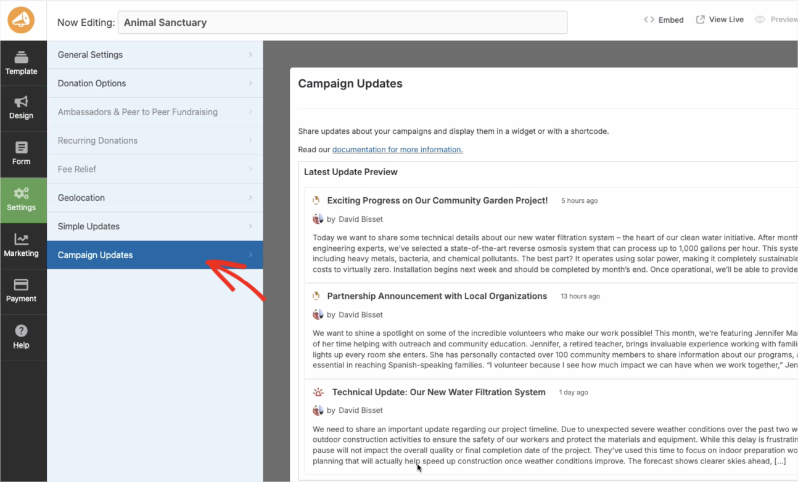
It’s designed for trust, built for transparency, and engineered to turn the moment after the donation into the beginning of something lasting. You’ll find the new Campaign Updates feature available inside the campaign editor under Settings » Campaign Updates:
Campaign Updates helps you bridge that gap in three powerful ways:
- Keep donors engaged: Share milestones, thank-you stories, and behind-the-scenes progress so supporters feel like part of the journey, not just a line item in your donor report.
- Build trust through transparency: Show exactly how funds are being used and what’s been achieved. Donors who see the impact of their gift are far more likely to become repeat givers.
- Re-engage at exactly the right moment: Use targeted update types to highlight matching campaigns, final pushes, or major milestones and invite people back when it matters most.
The best part? It’s all built with compliance at its core. Donors opt in at donation time, every email includes a one-click unsubscribe link, and everything stays clean, auditable, and respectful of donor preferences.
The new Campaign Updates feature is available in Charitable Pro. Simply update to the latest version to start using it. Not yet on Charitable Pro?
And if Charitable isn’t the right fit? No problem. We offer a 14-day money-back guarantee – no questions asked. 💪
See It In Action
Three Types of Updates, One Featured Spotlight
Not every update carries the same weight – and Campaign Updates gets that.
That’s why it gives you three distinct update types, each designed to signal something different to your donors:
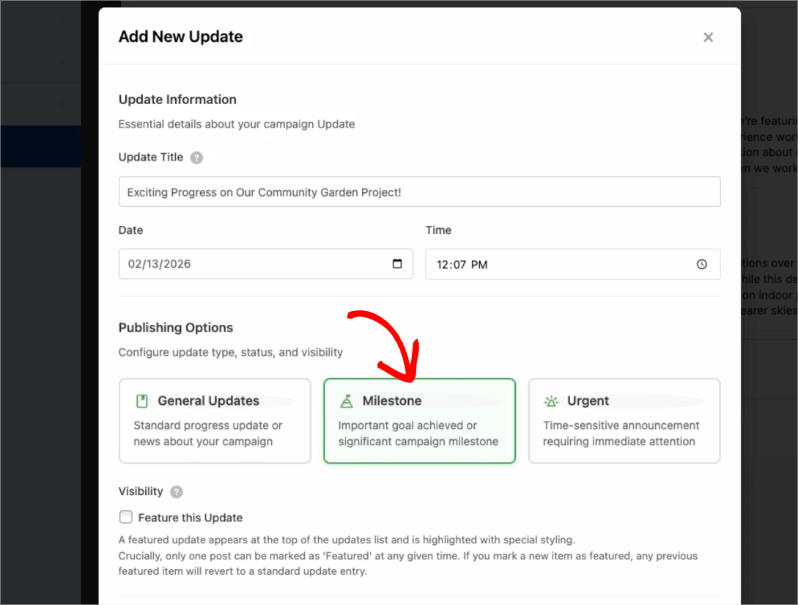
- 📝 General: Your go-to for steady, ongoing communication. Regular progress reports, thank-you stories, news from the field, the kind of updates that keep donors feeling connected between the big moments.
- 🏆 Milestone: Major achievements deserve special treatment. Goal reached? Stretch target hit? Key project phase completed? Milestone updates stand out visually, giving donors a moment to celebrate alongside you.
- 🚨 Urgent: Time-sensitive and critical news: matching campaigns, fundraising deadlines, emergency appeals. Designed to get attention fast, without feeling like spam.
Put Your Best Update Front and Center
On top of the three update types, you can feature one update at a time. The featured update appears at the top of your campaign page with special styling, perfect for your current headline moment. Think “We hit 75%!” or “Final 48 hours to double your impact.”
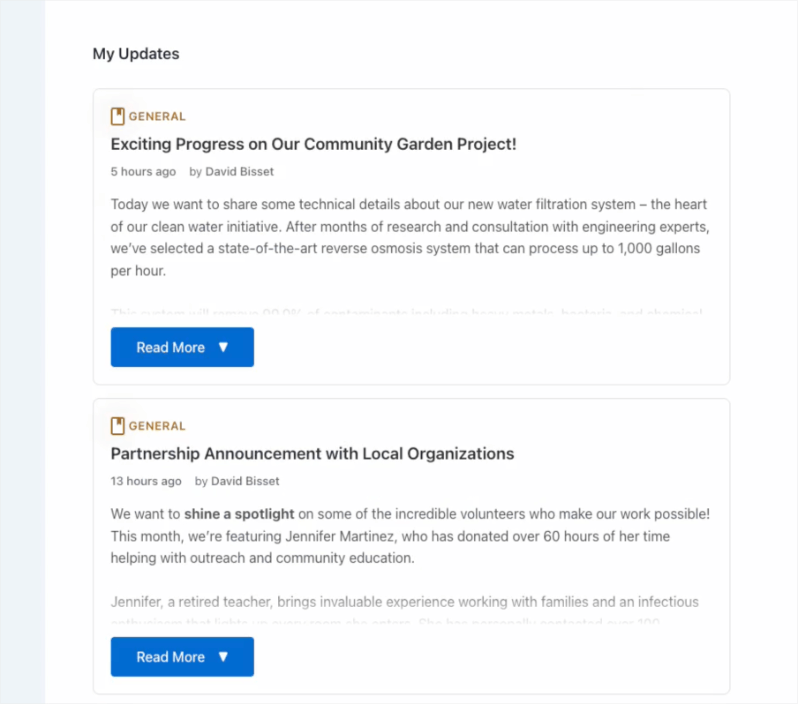
Only one update per campaign can be featured at once. When you feature a new update, the previous one automatically steps back into the standard list, keeping your campaign page fresh and focused without any extra work on your end.
Add Updates Anywhere – No Code Required
Once you’ve published an update, getting it in front of donors is effortless. Campaign Updates gives you three flexible ways to display updates on your site. Remember, there is no coding required at all!
🏗️ Campaign Builder: Add the Campaign Updates field to your campaign layout from the Design panel. Updates appear automatically, and you can choose from Carousel, List, or Feed view to match your page design.
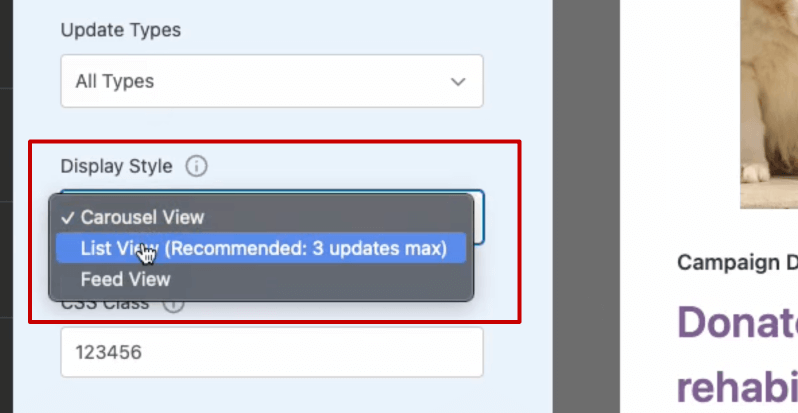
🧱 Block Editor (Gutenberg): Search for the “Campaign Updates” block and drop it onto any page or post. Configure the display limit, style, and filters right in the sidebar – with a live preview so you can see exactly how it looks before you publish.
🔧 Shortcode: Need maximum flexibility? Use the shortcode in widgets, theme templates, or your favorite page builder to place updates exactly where you want them.
If you’re building sites for clients or working with custom themes, Campaign Updates fits right into your existing workflow. The same shortcode and block attributes are available everywhere, so you can standardize behavior across multiple sites and deployments without reinventing the wheel each time.
No code required for everyday users. Full control available for those who want it. That’s the Campaign Updates way. ✅
Donors Opt In and You Stay Compliant
Trust is everything in fundraising. Campaign Updates is built from the ground up to respect donor preferences – and to keep you on the right side of compliance.
A Simple, Clear Opt-In
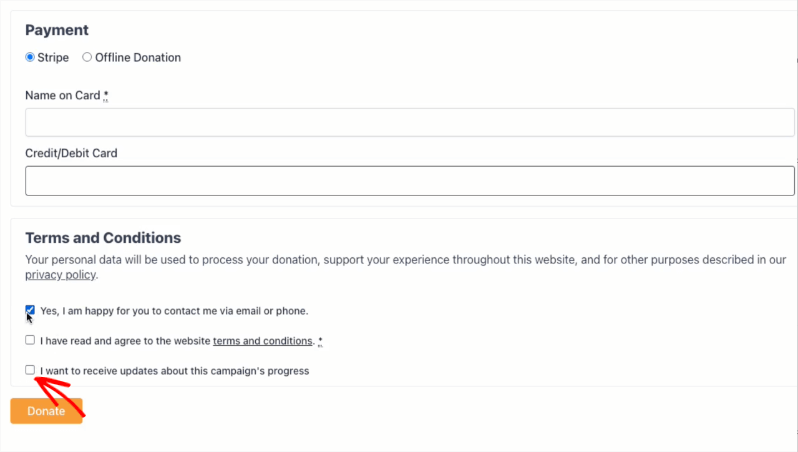
When a donor makes a gift, they’ll see a clear, optional checkbox on the donation form: “I want to receive updates about this campaign’s progress.” Check it – they’re in. Leave it blank, they aren’t. No ambiguity, no dark patterns, no fine print.
Easy, Hassle-Free Unsubscribing
Every update email includes a one-click unsubscribe link that’s specific to that campaign.
Donors who unsubscribe see a confirmation page and can re-subscribe just as easily if they change their mind. And if a donor makes a new donation to that campaign later, they’re automatically re-subscribed, because a new gift is a new expression of interest.
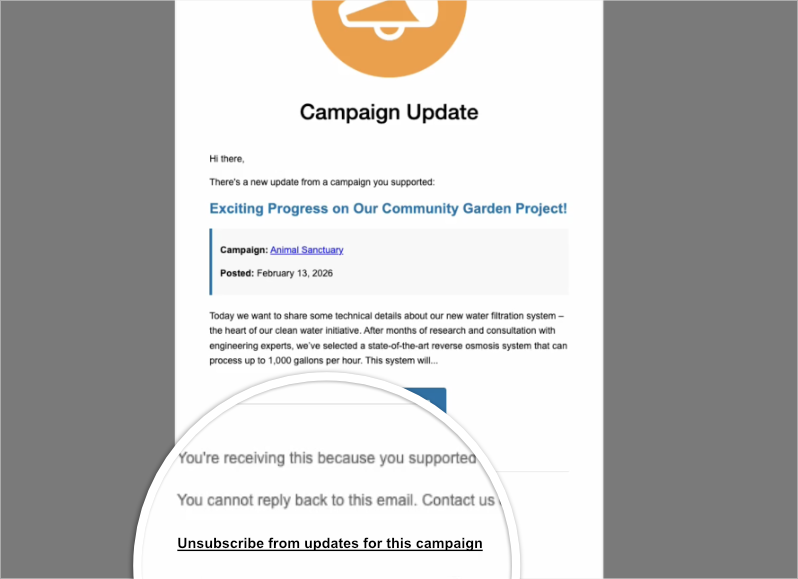
For compatible email clients, standard List-Unsubscribe headers are included in every email, good for deliverability and even better for donor peace of mind.
Getting the opt-in checkbox to appear involves a short, straightforward checklist:
- ✅ Campaign Updates must be enabled for the campaign
- ✅ Contact consent must be enabled in Charitable → Settings → Privacy
- ✅ The donation form must include the Privacy Policy field via the Visual Form Builder
Our documentation walks you through every step – so you can get it right the first time, every time, across as many client sites as you need.
Send Emails When It Suits You
Publishing a great update is only half the story – getting it into your donors’ inboxes is where the magic happens. Campaign Updates gives you full control over how and when emails go out.
Three Sending Modes to Match Your Workflow
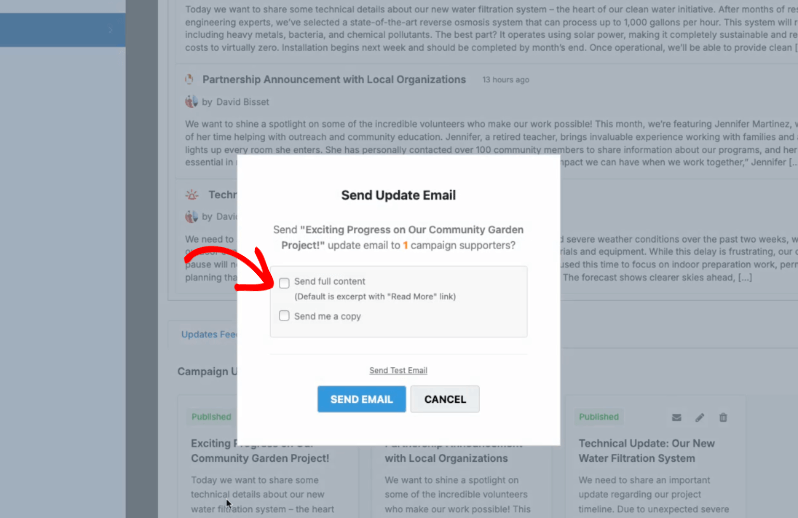
📧 Manual only: Click the envelope icon next to any update to send it to all opted-in subscribers whenever you’re ready. Perfect for teams who want full control over timing and messaging.
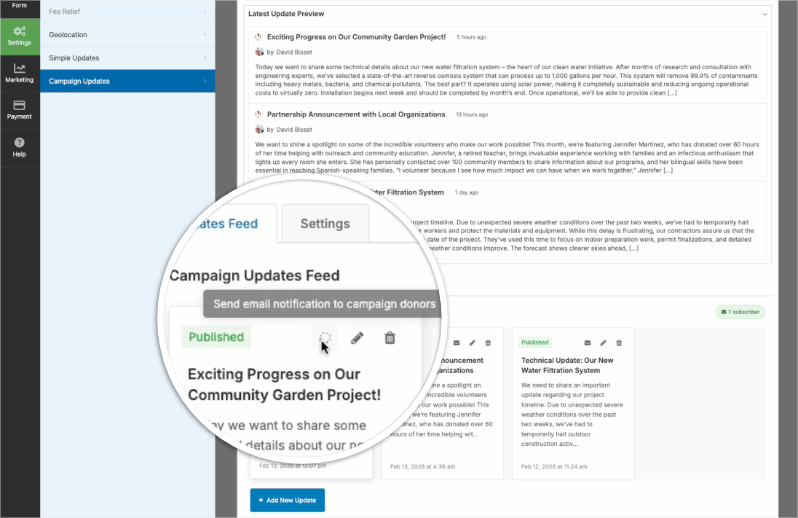
By default, Charitable will send the recepient an email with an excerpt of your update along with a “Read More” link that will direct them back to your campaign. We recommend this if you want your donors to come back to your website.
If you’d like for them to be able to read the full update right inside their email, then you can send the full content. You can also send yourself a copy.
⭐ Auto for featured updates: When you publish an update and mark it as Featured, an email goes out automatically. A great middle ground – automated, but intentional.
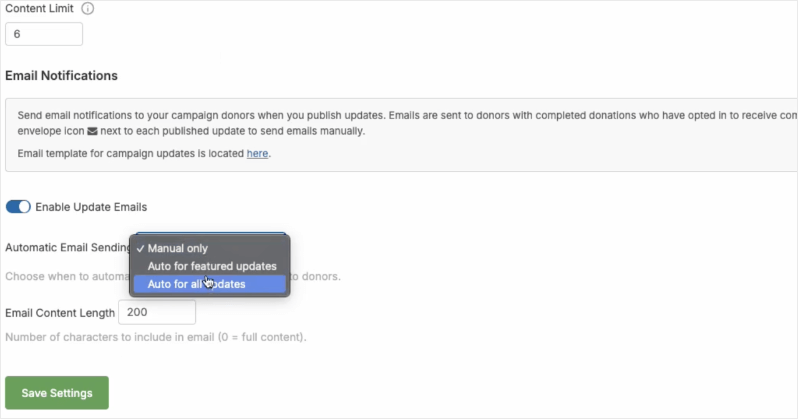
🚀 Auto for all updates: Every time you publish an update, subscribers get an email. Ideal for active campaigns where momentum and frequency matter.
Test Before You Send
Before any email goes out to donors, you can send a test email to yourself directly from the same dialog – so you can check design, formatting, and content with confidence. You can also opt to receive an admin copy whenever an email goes out to donors, so you always know exactly what your supporters are seeing.
Make It Your Own
The Campaign Update email template is fully editable under Charitable → Settings → Emails. Use merge tags for the update title, content, campaign name, donor name, and more – so every email feels on-brand and personal, whether you’re running one campaign or fifty.
Draft First, Publish When Ready
Great updates don’t always come together in one sitting, and that’s perfectly okay. Campaign Updates lets you save updates as drafts so you can refine your message before it ever reaches your donors.
Drafts are completely private. They won’t appear on your campaign page and won’t trigger any emails, so you can take your time, come back to it, and get it just right before you hit publish.
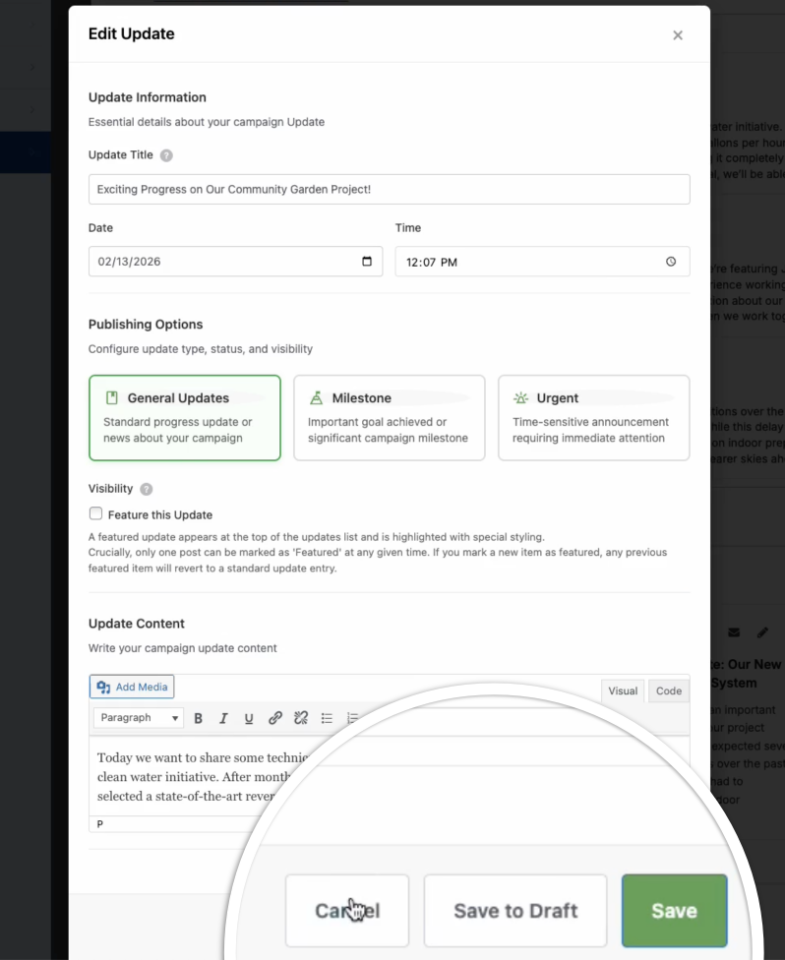
The add/edit modal keeps your whole workflow streamlined and focused. From a single screen you can:
- ✏️ Set your title and date/time
- 🏷️ Choose your update type (General, Milestone, or Urgent)
- ⭐ Mark it as Featured if it deserves the spotlight
- 📝 Write and format your content with a full rich-text editor
When you’re ready, switch the status to Publish and your update goes live – appearing on your campaign page and triggering emails to opted-in donors based on your sending settings. Not quite there yet? Hit Save to Draft and keep refining.
Simple, flexible, and completely in your control. 🎯
For Agencies and Developers
Campaign Updates isn’t just built for site owners. It’s built to fit seamlessly into professional workflows and to be extended however you need.
Hooks, Filters, and Full Customization
WordPress filters and hooks give you granular control over virtually every aspect of the feature:
- 🎛️ Customize consent labels and default checkbox state
- 🏷️ Modify update types and content limits
- 🎨 Control container and item CSS classes
- ✂️ Adjust excerpt length and display behavior
Full lists of available filters and hooks are documented in the Campaign Updates documentation.
Template Overrides
Want full control over markup and styling? Place template overrides in your theme under charitable/campaign-updates/ – for example, campaign-updates.php or campaign-update-item.php – and take complete ownership of how updates look and behave. The unsubscribe and resubscribe confirmation pages can also be overridden for consistent, on-brand experiences across every touchpoint.
Built for Multi-Site and Client Deployments
Campaign Updates plugs directly into Charitable’s existing contact consent and donor tables. Enabling contact consent in Privacy settings and following the recommended form setup keeps opt-in and list management consistent, auditable, and scalable, whether you’re managing one site or rolling out across an entire client portfolio.
The same shortcode attributes and block settings work everywhere, so you can standardize behavior across sites without custom workarounds. Build it once, deploy it everywhere. 🚀
Get Started with Campaign Updates
Ready to put Campaign Updates to work for your donors? Getting up and running is straightforward.
Campaign Updates is available now with Charitable Pro on supported plans. Once the Campaign Updates extension is installed and activated, you’re just three steps away:
- Enable it: Head to the Campaign Builder and turn on Campaign Updates under Settings → Campaign Updates for each campaign you want to use it with.
- Display it: Add the Campaign Updates field, block, or shortcode wherever you want updates to appear on your campaign pages.
- Start publishing: Create your first update, choose your type, and share your story.
For a full walkthrough, including how to configure the Settings tab, when the opt-in checkbox appears, and how to use the Gutenberg block and shortcode, check out the Campaign Updates documentation.
Not Yet a Charitable Pro User?
There’s never been a better time to join. Sign up today and see how Campaign Updates – alongside everything else Charitable Pro has to offer – can help you raise more, build stronger donor relationships, and turn one-time givers into lifelong supporters.
And if Charitable isn’t the right fit? No problem. We offer a 14-day money-back guarantee – no questions asked. 💪
Charitable Has 1+ Million Downloads!
Trusted by millions to power successful fundraising campaigns. Try Charitable risk-free today.
✅ 14-day money-back guarantee
✅ Transparent pricing
✅ Code-free setup
We’d love to hear how you’re using Campaign Updates.
Contact Us with your feedback to help us build better fundraising tools – together.
Stay Connected for More Nonprofit Resources
For more tutorials and videos tailored to nonprofits, subscribe to our YouTube channel. We regularly publish expert tips, step-by-step guides on migrations like this GiveWP to Charitable switch, fundraising strategies, and practical resources to help your organization succeed.
🗞️ Get weekly tips and exclusive guides in your inbox
Join our newsletter →
🎥 Watch step-by-stsep tutorials and success stories
Subscribe to our YouTube channel →
👩🏽💻 Connect with our community and get daily nonprofit insights
Follow us on LinkedIn →
🥳 Fun reels and non-profit insights
Follow us on Instagram →
👀 Insightful & fun videos to help you grow your cause
Follow us on TikTok→
🌎 Subscribe and follow for general fundraiser tips
Get Fundraiser Tips on TikTok →





Leave a Reply