
La plupart de vos donateurs donnent depuis un téléphone, et sur un téléphone, la partie la plus difficile de tout don est de taper un numéro de carte. Chaque champ supplémentaire est une occasion de perdre un soutien qui avait l'intention de donner.
Avec Charitable Mollie 1.1.0, vos donateurs peuvent éviter tout cela.
✨ Apple Pay et Google Pay sont désormais pris en charge via le paiement hébergé de Mollie ! ✨
Vos donateurs peuvent confirmer un don par une empreinte digitale, une reconnaissance faciale ou une seule pression.
Si vous utilisez Mollie, ou envisagez de passer à Mollie, Apple Pay et Google Pay sont désormais intégrés directement dans votre processus de paiement.
Voici comment cela fonctionne et pourquoi il est intéressant de l'activer dès aujourd'hui.
Pourquoi les portefeuilles en un clic changent le résultat
Imaginez une donatrice consultant Instagram un samedi matin. Elle voit la publication de fin d'année d'une association locale de protection des animaux, clique sur le lien et arrive sur la page de don. Elle est prête à donner 25 $ tout de suite, pendant qu'elle y pense.
Ensuite, le formulaire demande un numéro de carte, une date d'expiration et un CVC. Elle commence à taper, son téléphone vibre avec un message, elle détourne le regard et ne revient jamais. Ce n'est pas une donatrice qui ne voulait pas donner. C'est une donatrice qui a manqué de patience avec le formulaire qui se trouvait entre elle et la cause.
Apple Pay et Google Pay suppriment entièrement cette friction.
La carte est déjà stockée, cryptée et vérifiée sur l'appareil du donateur, il n'y a donc rien à taper et rien à rechercher.
Elle touche le bouton Apple Pay, confirme avec Face ID, et le don est effectué en quelques secondes. 🎉
Pour une base de donateurs axée sur le mobile, cette différence est celle qui sépare un don complété d'un don abandonné.
Cela est particulièrement important partout où un donateur donne spontanément plutôt que de s'asseoir pour remplir un formulaire : liens sur les réseaux sociaux, pages de collecte de fonds peer-to-peer partagées par un soutien, campagnes de texte-à-don, et les fenêtres courtes et à fort trafic autour des dons de fin d'année ou du GivingTuesday.
Partout où un donateur est sur son téléphone et en mouvement rapide, un portefeuille en un clic l'empêche de décrocher.
Quand vous ressentirez la différence
Si la majorité de votre trafic provient déjà d'un donateur sur ordinateur remplissant un formulaire à son rythme, cette mise à jour est un plus appréciable. Si vos donateurs proviennent de partages sur les réseaux sociaux, d'e-mails sur leur téléphone, de pages peer-to-peer ou d'un QR code sur un dépliant, c'est bien plus que cela.
- Campagnes peer-to-peer et Ambassadeurs : Les soutiens partagent des liens directement avec leurs amis et leur famille, qui les ouvrent presque toujours sur leur téléphone.
- Campagnes du Giving Tuesday et de fin d'année : Le trafic augmente rapidement, et chaque seconde qu'un donateur passe à taper est une seconde pendant laquelle il pourrait fermer l'onglet.
- Campagnes par QR code : Ces donateurs ont déjà leur téléphone en main. Un bouton de portefeuille les rencontre exactement là où ils sont.
- Acquisition de donateurs récurrents : Un premier don plus rapide signifie plus de donateurs qui restent assez longtemps pour devenir récurrents.
Ce que le support Apple Pay et Google Pay peut faire
Voici un aperçu rapide de tout ce que cette mise à jour ajoute, la plupart sans que vous ayez à toucher un seul formulaire de don.
- ⚡ Confirmation en un clic : Les donateurs confirment avec Face ID, Touch ID ou une empreinte digitale au lieu de saisir les détails de leur carte.
- 🎯 Correspondance automatique des appareils : Apple Pay apparaît sur Safari et iOS, Google Pay apparaît sur Chrome et Android, sans rien à configurer sur vos formulaires.
- 👁️ Panneau de statut en direct : Un nouveau panneau Apple Pay et Google Pay dans les paramètres de votre passerelle Mollie indique exactement quels portefeuilles sont actifs sur votre compte.
- 🧩 Un coup de pouce quand quelque chose ne va pas : Si un portefeuille n'est pas encore activé, vous recevez un lien direct pour l'activer dans votre Tableau de bord Mollie, directement depuis Charitable.
- 🔄 Actualisation à la demande : Un lien « Actualiser depuis Mollie » vérifie à nouveau l'état de votre compte à tout moment, afin que vous ne consultiez jamais d'informations obsolètes.
- 🤝 Annulations prévisibles : Un donateur qui annule un paiement Mollie atterrit désormais sur votre page d'annulation de don au lieu d'une destination inattendue.
- 🛠️ Routage personnalisé des annulations pour les développeurs : Le nouveau filtre
charitable_mollie_cancel_urlvous permet d'envoyer les donateurs annulés vers n'importe quelle URL de votre choix, avec l'objet de don disponible pour le contexte. - 💰 Aucune charge PCI supplémentaire : Comme les portefeuilles passent par le paiement hébergé de Mollie, il n'y a aucun travail de conformité supplémentaire ni de configuration de domaine de votre côté.
Premiers pas : Activer Apple Pay et Google Pay
Voici tout ce qu'il faut, et rien de tout cela n'affecte votre formulaire de don.
- Allez dans Charitable » Paramètres » Passerelles de paiement et activez la passerelle Mollie.
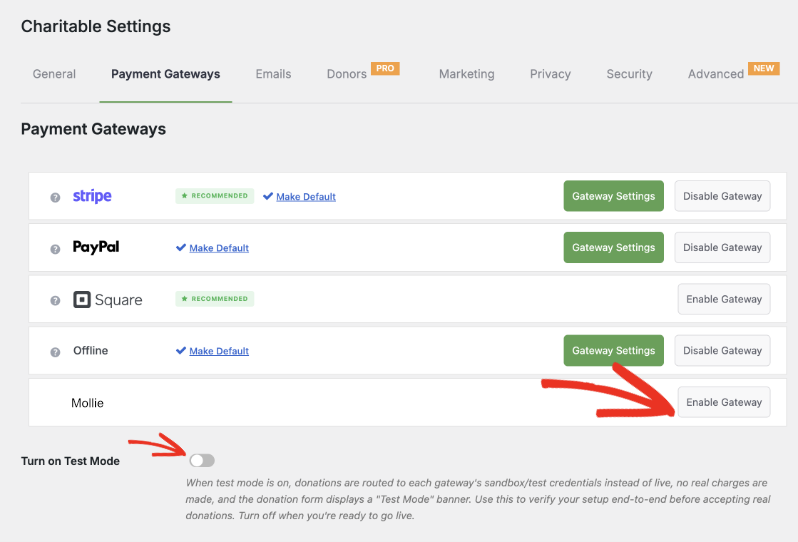
Ouvrez les paramètres de la passerelle Mollie, saisissez vos clés API Mollie et établissez la connexion. Utilisez le Mode test pendant que vous configurez cela, afin de pouvoir confirmer que tout fonctionne avant d'accepter un don réel.
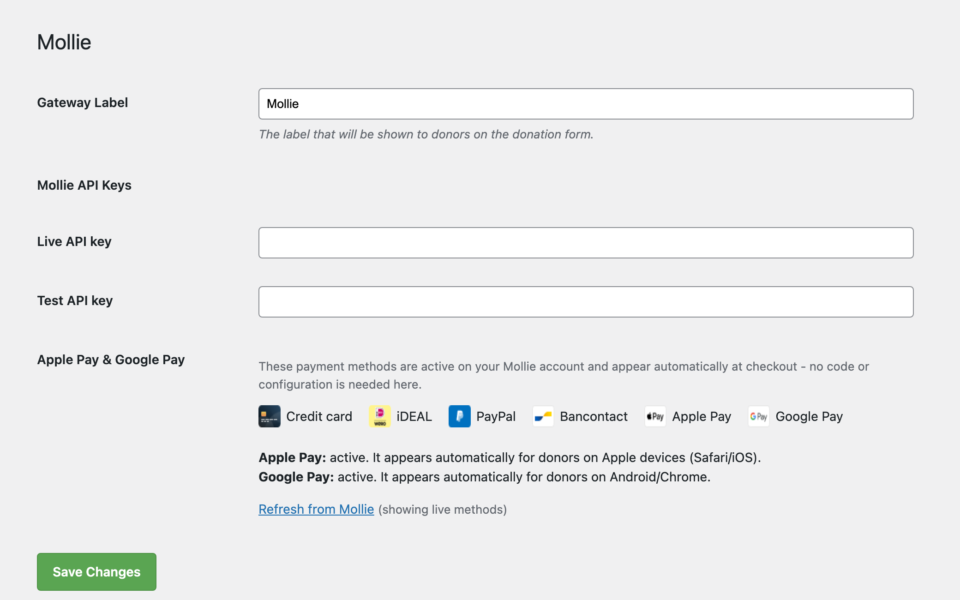
Connectez-vous à votre Tableau de bord Mollie et activez Apple Pay et Google Pay sous vos méthodes de paiement. C'est la partie qui mérite d'être bien comprise : Apple Pay et Google Pay sont activés et affichés du côté de Mollie. Mollie gère l'affichage du bouton de portefeuille et la vérification du donateur ; le rôle de Charitable est simplement de soumettre le don à Mollie une fois qu'ils l'ont confirmé. Vous n'ajoutez rien à votre formulaire de don pour que cela fonctionne.
De retour dans Charitable » Paramètres » Passerelles de paiement » Mollie, vérifiez le nouveau panneau Apple Pay et Google Pay pour confirmer que les deux portefeuilles sont actifs. Si l'un d'eux n'est pas encore actif, cliquez sur le lien fourni pour accéder directement à ce paramètre dans votre Tableau de bord Mollie.
Une fois que les deux portefeuilles apparaissent comme actifs dans ce panneau et que vous avez confirmé qu'un don test fonctionne, désactivez le Mode test. Apple Pay et Google Pay s'afficheront désormais automatiquement pour les bons visiteurs : aucun développeur nécessaire, et rien d'autre à configurer.
Pourquoi vous allez adorer ça
La configuration prend quelques minutes. L'impact, non.
🧭 Vous savez toujours ce qui est actif, directement depuis le tableau de bord Charitable, avec un lien pour corriger tout ce qui ne l'est pas.
🚀 Moins de dons abandonnés par les visiteurs mobiles qui ne veulent pas taper un numéro de carte.
🔒 Les donateurs font confiance aux paiements par portefeuille qu'ils utilisent déjà tous les jours, ce qui en incite davantage à finaliser leur don.
🕐 La configuration se fait dans votre tableau de bord Mollie et les paramètres de Charitable, rien ne change sur votre formulaire de don.
Pour les agences et les développeurs
Page d'annulation personnalisée
Besoin de rediriger les paiements annulés vers un endroit spécifique, comme une page personnalisée « nous aimerions toujours votre soutien » ? Le nouveau filtre charitable_mollie_cancel_url vous permet de définir une URL d'annulation personnalisée par don, avec l'objet de don disponible pour le contexte.
Basé sur le paiement hébergé de Mollie
Comme Apple Pay et Google Pay fonctionnent via le paiement hébergé de Mollie, il n'y a pas de charge PCI supplémentaire ni de configuration d'appareil ou de domaine de votre côté. Mollie gère la connexion des portefeuilles, et Charitable affiche le statut pour que vous gardiez le contrôle.
Questions fréquemment posées
Dois-je modifier mes formulaires de don pour prendre en charge Apple Pay et Google Pay ?
Non. Une fois les portefeuilles activés dans votre tableau de bord Mollie, ils apparaissent automatiquement au moment du paiement sur le bon appareil. Il n'y a rien à ajouter ou à configurer dans votre constructeur de formulaire de don.
Quels navigateurs et appareils affichent Apple Pay par rapport à Google Pay ?
Apple Pay apparaît pour les visiteurs sur Safari et iOS. Google Pay apparaît pour les visiteurs sur Chrome et Android. Mollie détecte l'appareil et affiche la bonne option ; un donateur sur un navigateur non pris en charge voit simplement vos autres méthodes de paiement à la place.
Y a-t-il des travaux supplémentaires de conformité PCI impliqués ?
Non. Apple Pay et Google Pay fonctionnent entièrement via le paiement hébergé de Mollie, de sorte que les données de carte ne touchent jamais votre serveur. Il n'y a aucun travail de conformité supplémentaire ni vérification de domaine requis de votre part.
Puis-je tester cela avant d'accepter des dons en direct ?
Oui. Utilisez le mode test dans vos paramètres de passerelle Mollie pendant que vous configurez tout, confirmez que les portefeuilles s'affichent comme actifs dans le panneau Apple Pay et Google Pay, et effectuez un don test avant de passer aux paiements en direct.
Que se passe-t-il si un donateur annule un paiement par portefeuille ?
Ils sont renvoyés vers votre page d'annulation de don au lieu d'une destination inattendue, de sorte que l'expérience reste prévisible même lorsqu'un donateur change d'avis en cours de route.
Les développeurs peuvent-ils personnaliser où les donateurs annulés atterrissent ?
Oui. Le filtre charitable_mollie_cancel_url vous permet d'envoyer les donateurs annulés à n'importe quelle URL de votre choix, avec l'objet de don disponible pour le contexte.
Commencez avec Apple Pay et Google Pay
Mollie est disponible en tant que passerelle de paiement dans tous les plans Charitable Pro, Basic, Plus, Pro et Elite.
Si vous utilisez déjà Mollie, mettez à jour vers la version 1.1.0, ajoutez vos clés API dans les paramètres de la passerelle et activez Apple Pay et Google Pay dans votre tableau de bord Mollie.
Lire la documentation de configuration Apple Pay et Google Pay »
Lire la documentation de la passerelle Mollie »
Pas encore sur Charitable Pro ? Vous pouvez obtenir jusqu’à 50 % de réduction lorsque vous vous inscrivez ou passez à Charitable Pro. Nous voulons nous assurer que vous puissiez essayer les fonctionnalités de collecte de fonds avancées comme les dons récurrents, la récupération des dons, et plus encore à un coût considérablement réduit.
Rejoignez plus d’un million d’utilisateurs satisfaits de Charitable Pro aujourd’hui. Chaque achat est accompagné d’une garantie de remboursement de 14 jours, vous assurant un soutien à chaque étape.
Si vous avez des questions ou besoin d’aide, notre équipe de support est prête à vous aider à tirer le meilleur parti de ces nouvelles fonctionnalités.
Restez connecté pour plus de ressources pour les organisations à but non lucratif
Pour plus de tutoriels et de vidéos adaptés aux organisations à but non lucratif, abonnez-vous à notre chaîne YouTube. Nous publions régulièrement des conseils d'experts, des guides étape par étape sur les dons en ligne, des stratégies de collecte de fonds et des ressources pratiques pour aider votre organisation à réussir.
🗞️ Recevez des conseils hebdomadaires et des guides exclusifs dans votre boîte de réception
Rejoignez notre newsletter →
🎥 Regardez des tutoriels étape par étape et des histoires de réussite
Abonnez-vous à notre chaîne YouTube →
👩🏽💻 Connectez-vous avec notre communauté et obtenez des informations quotidiennes sur les organisations à but non lucratif
Suivez-nous sur LinkedIn →
🥳 Reels amusants et informations sur les organisations à but non lucratif
Suivez-nous sur Instagram →
👀 Vidéos perspicaces et amusantes pour vous aider à développer votre cause
Suivez-nous sur TikTok→
🌎 Abonnez-vous et suivez pour des conseils généraux sur la collecte de fonds
Obtenez des conseils sur la collecte de fonds sur TikTok →
Ressources puissantes pour la collecte de fonds
🤖 Utilisez Charitable avec votre assistant IA
⬇️ Téléchargez des stratégies éprouvées, des idées de campagnes et des outils d'experts
Obtenez le kit de collecte de fonds →
💸 Obtenez des ressources gratuites pour la collecte de fonds
Rendez-vous sur le Hub de collecte de fonds Charitable →
🤔 Des questions sur Charitable ?
FAQ Charitable →
🏎️ Essayez Charitable
Créez votre démo Charitable →
Comprendre les termes et le jargon des organisations à but non lucratif
Glossaire des organisations à but non lucratif→
% Vous recherchez des offres et des réductions pour les organisations à but non lucratif ?
Meilleures offres et réductions pour les organisations à but non lucratif →
Charitable a plus d'un million de téléchargements !
Faites confiance à des millions de personnes pour mener à bien vos campagnes de collecte de fonds. Essayez Charitable sans risque dès aujourd'hui.
✅ Garantie de remboursement de 14 jours
✅ Tarification transparente
✅ Configuration sans code









Laisser un commentaire