
Requis : Charitable Pro 1.8.16+ Charitable Ambassadors 3.1.0+
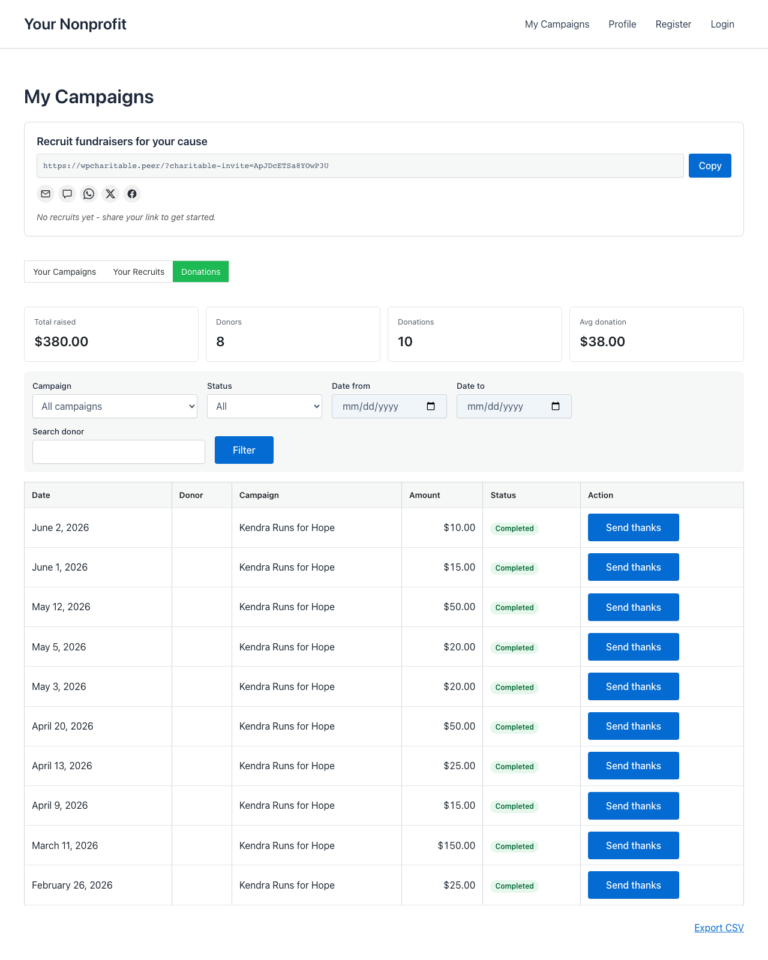
L'onglet Dons de la page Mes campagnes permet à chaque créateur de campagne de voir chaque don à sa propre collecte de fonds, de filtrer et trier la liste, d'exporter un CSV, et éventuellement d'envoyer un mot de remerciement personnalisé à chaque donateur. Rien de tout cela ne nécessite un accès administrateur WordPress – l'ensemble du processus se déroule sur le tableau de bord de l'ambassadeur, côté front-end.
Pour les organisations à but non lucratif qui gèrent des programmes de pair-à-pair, le gain est double. Les créateurs obtiennent l'outil de reconnaissance qu'ils demandent sans cesse (« puis-je remercier mes donateurs moi-même ? »), et les administrateurs conservent la relation maître avec le donateur intacte (les réponses sont acheminées vers le créateur, pas vers la boîte de réception de l'administrateur).
Quand l'utiliser
- Donner aux créateurs la propriété des relations avec les donateurs. La plupart des ambassadeurs *veulent* remercier les personnes qui ont soutenu leur collecte de fonds – ils ont juste besoin d'un outil qui le rend possible en un clic.
- Réduire la charge de travail administrative. Si les créateurs peuvent remercier les donateurs eux-mêmes, vos administrateurs cessent d'être le goulot d'étranglement pour chaque accusé de réception personnalisé.
- Exporter les données par collecte de fonds sans exposer la table complète des dons du site. Chaque créateur obtient un CSV limité à sa propre collecte de fonds.
- Gérer la communication récurrente dirigée par les créateurs. Les dons récurrents actifs s'affichent dans la barre d'indicateurs clés de performance afin qu'un créateur puisse voir qui le soutient mois après mois.
Comment les créateurs en bénéficient
Un don arrive à 15h. L'ambassadeur avait l'habitude d'attendre que vous (l'administrateur) envoyiez un e-mail de remerciement générique plus tard dans la soirée, ou il ne vérifiait rien car il n'avait aucune visibilité. Maintenant, l'ambassadeur ouvre Mes campagnes > Dons, voit le nouveau don en haut de la liste et clique sur Envoyer un remerciement. Le donateur reçoit un mot personnel de l'ambassadeur en quelques minutes, avec la réponse du donateur acheminée vers la boîte de réception de l'ambassadeur – pas la vôtre.
Le changement de comportement est important. Les donateurs qui reçoivent un mot de remerciement personnalisé dans les 24 heures sont considérablement plus susceptibles de donner à nouveau, et de donner des montants plus importants lorsqu'ils le font. En rapprochant l'accusé de réception de l'événement de don, et en le personnalisant par l'intermédiaire du créateur réel, vous multipliez la bonne volonté que le don lui-même a générée.
Où le trouver
Front-end de l'ambassadeur > Mes campagnes > Onglet Dons
Une fois que vous avez activé les Dons dans l'administration (voir ci-dessous), chaque ambassadeur voit un nouvel onglet sur sa page Mes campagnes à côté de « Mes campagnes » lui-même. La barre d'onglets est accessible au clavier (utilisez les touches fléchées pour naviguer entre les onglets).

Ce que les créateurs voient
En haut de l'onglet Dons se trouve une barre d'indicateurs clés de performance – cinq chiffres qui résument l'activité de collecte de fonds du créateur en un coup d'œil :
| Indicateur clé de performance | Signification en langage clair |
|---|---|
| Total collecté | Le montant total que les collectes de fonds du créateur ont rapporté. Les dons remboursés et en attente sont exclus. |
| Donateurs | Nombre unique de donateurs. Un donateur qui a donné deux fois compte toujours comme un seul. |
| Dons | Nombre total de dons complétés. |
| Don moyen | Total collecté divisé par le nombre de dons. |
| Récurrent actif | Nombre de plans de dons récurrents toujours actifs. S'affiche uniquement lorsque le module complémentaire Dons récurrents est activé. |
Envoyer des remerciements – e-mails de remerciement personnalisés

Filtrage et tri
La barre d'outils au-dessus de la liste contient deux contrôles :
| Contrôle | Options |
|---|---|
| Plage de dates | Toutes périodes, 7 derniers jours, 30 derniers jours, 90 derniers jours. |
| Statut | Terminé, En attente, Échoué, Remboursé. Par défaut : Terminé. |
La pagination respecte le filtre actuel, ainsi un créateur filtrant sur « 7 derniers jours, Terminé » ne verra que ces lignes sur toutes les pages.
Exportation d'un CSV
Le bouton Exporter CSV en haut de la liste diffuse un CSV des dons actuellement filtrés vers le navigateur du créateur. Le fichier inclut les mêmes colonnes que la liste à l'écran, plus l'ID du don et l'e-mail du donateur lorsque celui-ci n'était pas anonyme.
L'export CSV est sécurisé contre l'injection de formules – toute cellule commençant par =, +, -, @, ou un caractère de contrôle est précédée d'une apostrophe afin qu'Excel et Google Sheets la traitent comme du texte plutôt que de l'évaluer comme une formule.
Envoyer des remerciements – e-mails de remerciement personnels
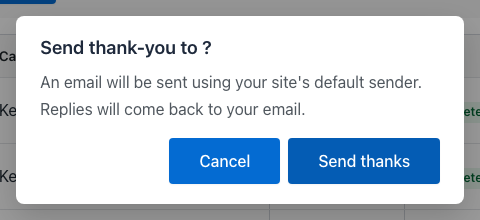
Si vous (l'administrateur) activez les e-mails de remerciement, chaque ligne de don obtient un bouton Envoyer des remerciements. Cliquer dessus ouvre une fenêtre modale avec un e-mail modèle que le créateur peut réviser et envoyer.
Ce que le créateur peut faire dans la fenêtre modale :
- Réviser l'objet et le corps du modèle (configuré par l'administrateur – voir ci-dessous).
- Modifier le corps avant l'envoi. Les balises intelligentes comme
{donor_name}et{campaign_title}sont déjà substituées à ce stade – ce que le créateur voit est ce que le donateur verra. - Envoyer. L'e-mail est envoyé immédiatement. Le bouton sur la ligne du don se transforme en un badge vert « Remercié » afin que le créateur puisse voir d'un coup d'œil à quels donateurs il a déjà tendu la main.
Quelques garde-fous pratiques sont intégrés :
- Protection contre les accès concurrents. Si le créateur clique deux fois sur « Envoyer des remerciements » en succession rapide, seul le premier envoi est traité – le second est ignoré silencieusement. Pas de doublons d'e-mails.
- Limitation du débit. Un créateur peut envoyer au maximum un e-mail de remerciement par don, et au maximum 60 e-mails de remerciement par heure. Au-delà, le bouton affiche un message sympathique « veuillez ralentir ».
- Routage des réponses. L'en-tête
Reply-Tode l'e-mail est défini sur l'adresse e-mail du créateur, de sorte que toute réponse atterrit dans la boîte de réception du créateur, pas celle de l'administrateur. L'adresseFromreste l'expéditeur par défaut de votre site.
Configuration administrateur
L'ensemble de la fonctionnalité est désactivé par défaut. Pour l'activer :
Admin WordPress > Charitable > Ambassadeurs > Paramètres > Mes campagnes
Deux paramètres régissent cette fonctionnalité :
| Paramètre | Ce qu'il contrôle |
|---|---|
| Afficher l'onglet Dons | Détermine si l'onglet Dons apparaît ou non sur la page Mes campagnes. Désactivé par défaut ; activez-le pour activer l'onglet. |
| Permettre aux créateurs d'envoyer des remerciements | Détermine si le bouton Envoyer des remerciements apparaît sur chaque ligne de don. Désactivé par défaut ; activez-le uniquement après avoir examiné le modèle d'e-mail (section suivante). |
Ensuite, le modèle d'e-mail :
Admin WordPress > Charitable > Ambassadeurs > Paramètres > E-mails
Recherchez la ligne Remerciement du créateur. Cliquez pour modifier l'objet et le corps. Le modèle prend en charge les balises intelligentes suivantes :
| Balise | Remplace par |
|---|---|
{donor_name} | Le nom d'affichage du donateur, ou « Anonyme » s'il a choisi de ne pas être identifié. |
{donor_first_name} | Le prénom du donateur uniquement. |
{donation_amount} | Le montant du don avec le symbole de la devise. |
{campaign_title} | La campagne à laquelle le don a été effectué. |
{creator_name} | Le nom du propriétaire de la campagne de financement. Utilisé dans les signatures. |
{site_name} | Le nom de votre site. |
Un modèle par défaut raisonnable est fourni avec le plugin, vous n'avez donc pas besoin d'en écrire un à partir de zéro. Vérifiez la formulation, ajustez le ton pour qu'il corresponde à votre marque, enregistrez.

Conseils
- Déployez progressivement. Activez d'abord l'onglet Dons et laissez les créateurs voir leurs listes de donateurs pendant une semaine ou deux. Seulement après cela, activez l'envoi des remerciements. Cela donne aux créateurs le temps d'assimiler la nouvelle visibilité avant de leur donner un bouton d'envoi.
- Définissez les attentes dans votre e-mail d'intégration. Lorsqu'un nouvel ambassadeur s'inscrit, informez-le de l'onglet Dons. Il le trouvera éventuellement par lui-même, mais un avertissement rendra son expérience de première semaine meilleure.
- Modifiez le modèle, ne le remplacez pas. Le corps par défaut utilise des balises intelligentes dans des endroits qui correspondent à la façon dont les donateurs s'attendent à ce qu'un remerciement soit lu. Modifiez la formulation, mais conservez la structure (salutation, gratitude, ce que le don permet, signature).
- Surveillez les premiers remerciements. Pendant la première semaine après l'activation de l'envoi des remerciements, examinez quelques e-mails envoyés pour le ton. Si un créateur est trop décontracté ou ne correspond pas à la marque, une petite remarque gentille (« Hé, juste pour que vous sachiez – nos supporters ont tendance à s'attendre à un ton légèrement plus formel ») est beaucoup plus facile que de revenir en arrière sur la fonctionnalité.
Gestion de l'anonymat
Les donateurs peuvent marquer un don comme anonyme lors du paiement. Lorsqu'ils le font :
- Leur nom apparaît comme « Anonyme » dans la liste des dons du créateur et dans l'exportation CSV.
- Leur e-mail est omis du CSV.
- Le bouton Envoyer des remerciements est masqué pour cette ligne – il n’y a aucun moyen pour le créateur d’envoyer un e-mail à un donateur anonyme via cet outil.
- L’identité du donateur est également masquée de l’autocomplétion de recherche de donateurs utilisée ailleurs dans le plugin.
L’anonymat est appliqué au niveau d’accès aux données, pas seulement à l’interface utilisateur, de sorte qu’un créateur ne peut pas le contourner en inspectant le code source de la page ou en accédant directement au point de terminaison AJAX.
Référence du développeur
Comportement du shortcode
L’onglet Dons est rendu à l’intérieur du shortcode existant [charitable_my_campaigns] – il n’y a pas de shortcode séparé. La barre d’onglets bascule entre deux modes d’affichage via un argument de requête cap_view :
?cap_view=campaigns(par défaut) : la liste d’origine des campagnes du créateur.?cap_view=donations: la nouvelle vue des dons.
Le shortcode lit le paramètre Afficher l’onglet Dons avant de rendre la barre ; avec le paramètre désactivé, seule la vue d’origine s’affiche.
Filtres
| Filtre | Défaut | Objectif |
|---|---|---|
charitable_ambassadors_creator_donations_enabled | lit le paramètre | Interrupteur principal pour l’ensemble de la fonctionnalité. Retourne false pour la masquer. |
charitable_ambassadors_creator_donations_send_thanks_enabled | lit le paramètre | Interrupteur pour le bouton Envoyer des remerciements. |
charitable_ambassadors_creator_donations_per_page | 20 | Taille de la page pour la liste des dons. |
charitable_ambassadors_creator_donations_rate_limit | 60 | Nombre maximum d’e-mails de remerciement qu’un créateur peut envoyer par heure. |
charitable_ambassadors_creator_donations_date_window_years | 10 | Jusqu’où les filtres peuvent remonter. Augmentez si vous avez besoin d’exportations historiques au-delà de 10 ans. |
charitable_ambassadors_creator_donations_csv_columns | tableau | La liste des colonnes CSV. Ajoutez ou supprimez des colonnes en filtrant le tableau. |
charitable_ambassadors_creator_thank_you_smart_tags | tableau | Ajoutez des balises intelligentes personnalisées. Retournez un tableau indexé par nom de balise avec un callback pour la substitution. |
Actions
| Action | Se déclenche lorsque | Args |
|---|---|---|
charitable_ambassadors_creator_thank_you_sent | Le créateur envoie avec succès un e-mail de remerciement. | $donation_id, $creator_id, $donor_id |
charitable_ambassadors_creator_donations_csv_exported | Un créateur exporte un CSV de ses dons. | $creator_id, $filter_args, $row_count |
Classes et points d'accès AJAX
| Symbole | Rôle |
|---|---|
Charitable_Ambassadors_Creator_Donations_Repo | Classe d'accès aux données. Possède les méthodes query(), aggregates() et owns_donation(). Tout le masquage de l'anonymat se fait ici. |
Charitable_Ambassadors_Creator_Donations_Ajax | Routeur AJAX. Gère les requêtes de filtre, de pagination, d'envoi de remerciements et d'exportation CSV. |
Charitable_Ambassadors_Email_Creator_Thank_You | La sous-classe Charitable_Email pour le modèle de remerciement. Ajoute la couche d'étiquettes intelligentes par-dessus la plomberie standard des e-mails de Charitable. |
wp_ajax_charitable_ambassadors_creator_donations_query | Action AJAX : liste filtrée + paginée. |
wp_ajax_charitable_ambassadors_creator_donations_export | Action AJAX : flux CSV. |
wp_ajax_charitable_ambassadors_creator_donations_thank | Action AJAX : envoyer un e-mail de remerciement unique. |
Les trois points d'accès AJAX vérifient is_user_logged_in() + vérifient que l'utilisateur actuel possède la ou les campagnes sur lesquelles les lignes de dons sont limitées. L'anonymat est appliqué au niveau du dépôt ; les points d'accès AJAX sont de minces wrappers.
Substitutions de modèles
Le shortcode est rendu via des substitutions de modèles Charitable standard. Pour personnaliser l'interface utilisateur de l'onglet Dons depuis votre thème :
your-theme/charitable-pro/charitable-ambassadors/shortcodes/my-campaigns/donations-tab.php
your-theme/charitable-pro/charitable-ambassadors/emails/creator-thank-you.php
Exemples de personnalisation
Autoriser uniquement les ambassadeurs vérifiés à envoyer des remerciements :
add_filter( 'charitable_ambassadors_creator_donations_send_thanks_enabled', function ( $enabled ) {
    if ( ! $enabled ) {
        return false;
    }
    return (bool) get_user_meta( get_current_user_id(), '_charitable_user_verified', true );
} );
Augmenter la limite de taux de remerciement à 200 par heure :
add_filter( 'charitable_ambassadors_creator_donations_rate_limit', function () {
    return 200;
} );
Ajouter une étiquette intelligente personnalisée pour la ville du donateur :
add_filter( 'charitable_ambassadors_creator_thank_you_smart_tags', function ( $tags ) {
    $tags['donor_city'] = array(
        'description' => __( 'The donor city, from billing address.', 'your-theme' ),
        'callback'    => function ( $donation ) {
            return (string) get_post_meta( $donation->ID, 'donor_address_city', true );
        },
    );
    return $tags;
} );
Ajouter une colonne CSV pour la passerelle de don :
add_filter( 'charitable_ambassadors_creator_donations_csv_columns', function ( $columns ) {
    $columns['gateway'] = array(
        'header'   => __( 'Gateway', 'your-theme' ),
        'callback' => function ( $donation ) {
            return (string) get_post_meta( $donation->ID, 'donation_gateway', true );
        },
    );
    return $columns;
} );
Connexes
- Mes Campagnes – Le Tableau de Bord de l'Ambassadeur – la page parente qui héberge l'onglet Dons.
- Modèles d'e-mail – la liste complète des e-mails transactionnels envoyés par les Ambassadeurs.
- Exportations CSV – toutes les exportations CSV du plugin, y compris celle-ci.
- Permissions – quelle capacité contrôle quoi.
Liste des ressources (pour l'éditeur de documentation)
| Nom de fichier | Ce qu'il faut capturer | Texte alternatif suggéré |
|---|---|---|
01-donations-tab.png | L'onglet Dons sur Mes campagnes, bande d'indicateurs clés de performance + 4-5 premières lignes de dons visibles. | L'onglet Dons sur la page Mes campagnes, montrant les indicateurs clés de performance en haut et une liste filtrable de dons en dessous |
02-tab-strip.png | Gros plan de la bande d'onglets Mes campagnes, onglet « Dons » mis en surbrillance. | La page Mes campagnes affichant maintenant deux onglets : Mes campagnes et Dons |
03-donation-row.png | Gros plan d'une seule ligne de don, bouton Envoyer remerciements visible à droite. | Une ligne de don avec le nom du donateur, le montant, la date, la campagne, le statut et un bouton Envoyer remerciements à droite |
04-send-thanks-modal.png | La fenêtre modale Envoyer remerciements ouverte sur la liste des dons, sujet + corps visibles. | La fenêtre modale Envoyer remerciements, avec le nom du donateur pré-rempli, la ligne d'objet et le corps de l'e-mail modifiable |
05-email-template.png | L'éditeur de modèle d'e-mail de remerciement du créateur dans l'administration (Paramètres > E-mails). | L'éditeur de modèle d'e-mail de remerciement du créateur dans l'administration, montrant les champs sujet et corps avec des références à des balises intelligentes |
Remarques
Les cinq captures d'écran nécessitent que le banc d'essai ait :
- L'onglet Dons + les paramètres Envoyer remerciements tous deux activés dans Ambassadeurs > Paramètres > Mes campagnes.
- Au moins un compte d'ambassadeur connecté avec 3 dons complétés ou plus sur sa propre collecte de fonds.
- Un modèle d'e-mail de remerciement du créateur configuré (les valeurs par défaut fonctionnent ; capturez tel quel).
- Au moins un don anonyme dans la liste pour que le document puisse montrer comment cette ligne s'affiche (facultatif mais idéal).
05-email-template.png est côté admin ; les quatre autres sont prises pendant que vous êtes connecté en tant qu'ambassadeur (utilisez le changement d'utilisateur pour passer de l'admin à un ambassadeur amorcé).


