
In Charitable können Sie zwischen zwei vorgefertigten Spendenformularvorlagen wählen. Diese Vorlagen sind so konzipiert, dass sie alle erforderlichen Felder enthalten, die Sie für Ihr Spendenformular benötigen.
Sie können wählen, ob Sie eine Standardvorlage oder eine minimale Ansicht anzeigen möchten. Diese Anleitung zeigt Ihnen, wie Sie Ihre Spendenformularvorlagen finden und wechseln.
Voraussetzungen
Sie müssen Version 1.8.3.6 (oder höher) von Charitable auf Ihrer WordPress-Website installiert und aktiviert haben.
Spendenformularvorlagen wechseln
Öffnen Sie in Ihrem WordPress-Dashboard den Tab Charitable » Einstellungen. Unter dem Tab Allgemein öffnen Sie die Seite Spendenformular.
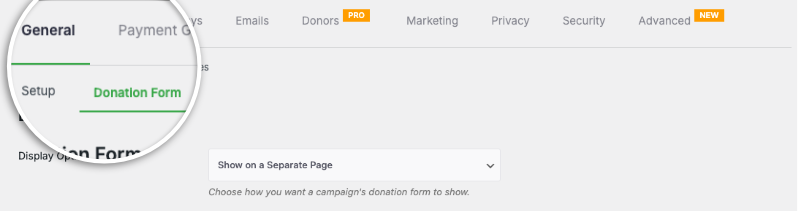
Hier sehen Sie das Feld Formularvorlage, in dem Sie Vorlagen über das Dropdown-Menü wechseln können.
Standardmäßig zeigt Charitable die Vorlage Standard an.
Die minimale Ansicht versucht, den Platzbedarf des Spendenformulars zu reduzieren. Sie ist so konzipiert, dass Sie ein kompakteres Spendenformular erhalten.

Die minimale Ansicht eignet sich am besten, wenn sich das Spendenformular auf einer separaten Seite befindet.
Sobald Sie Ihre Auswahl getroffen haben, scrollen Sie nach unten und klicken Sie auf die Schaltfläche Änderungen speichern.
So machen Sie das Spendenformular kürzer
Wenn Sie das Spendenformular auf Ihrer Website länger als gewünscht finden, gibt es auf derselben Einstellungsseite, direkt unter den Optionen für die Spendenformularvorlage, ein Feld „Nur erforderliche Felder anzeigen“.
Stellen Sie dies auf „Ja“.
Dadurch wird das Spendenformular von Charitable zu einem „Kurzformular“.
Sie sind sich nicht sicher, wie Sie ein Spendenformular erstellen?
Sehen Sie sich hier unser Tutorial an:
Tipps und Ratschläge für Spendenaktionen
Wir teilen regelmäßig praktische Anleitungen, bewährte Strategien und Insider-Tipps, um Ihnen zu helfen, mehr Spenden zu sammeln und stärkere Spenderbeziehungen aufzubauen. Schließen Sie sich Tausenden von gemeinnützigen Organisationen an, die unsere besten Inhalte direkt erhalten:
- Abonnieren Sie unseren Newsletter – Erhalten Sie wöchentliche Tipps und exklusive Anleitungen in Ihrem Posteingang
- Abonnieren Sie unseren YouTube-Kanal – Sehen Sie sich Schritt-für-Schritt-Anleitungen und Erfolgsgeschichten an
- Folgen Sie uns auf LinkedIn – Vernetzen Sie sich mit unserer Community und erhalten Sie tägliche Einblicke in Non-Profit-Organisationen
- Folgen Sie uns auf TikTok – Aufschlussreiche & unterhaltsame Videos, die Ihnen helfen, Ihre Sache voranzubringen
FAQs zu Charitable Spendenformular-Vorlagen
Welche Spendenformular-Vorlagen sind in Charitable verfügbar?
In Charitable können Sie zwischen zwei vorgefertigten Spendenformularvorlagen wählen: der Standardvorlage und der Vorlage für die minimale Ansicht.
Wie kann ich in Charitable zwischen Spendenformularvorlagen wechseln?
Um Vorlagen zu wechseln, navigieren Sie zum WordPress-Dashboard und gehen Sie zu Charitable » Einstellungen. Unter dem Tab Allgemein öffnen Sie die Seite Spendenformular und verwenden Sie das Dropdown-Menü Formularvorlage, um Ihre gewünschte Vorlage auszuwählen.
Was ist der Unterschied zwischen der Standard- und der Minimalvorlage?
Die Standardvorlage enthält alle erforderlichen Felder in einem umfangreicheren Layout. Die minimale Ansicht ist ein kompakteres Design, das Platz spart und sich ideal für Spendenformulare eignet, die auf separaten Seiten platziert werden.
Welche Version von Charitable benötige ich, um diese Vorlagen zu verwenden?
Sie benötigen Version 1.8.3.6 oder höher von Charitable, die auf Ihrer WordPress-Website installiert und aktiviert ist.
Wie kann ich das Spendenformular kürzer machen?
Auf derselben Einstellungsseite, auf der Sie die Vorlage auswählen, gibt es unter den Optionen für die Spendenformularvorlage die Option „Nur erforderliche Felder anzeigen“. Setzen Sie diese Option auf „Ja“, um das Spendenformular von Charitable in eine kürzere Version umzuwandeln.
Kann ich das Erscheinungsbild meiner Spendenformulare anpassen?
Ja. Sie können Farben, Formularvorlagen (Standard oder Minimal) und Optionen für die Feldanzeige anpassen. Sie können auch benutzerdefiniertes CSS und Code-Snippets verwenden.
Ich habe Einstellungen geändert, aber sie werden nicht angezeigt. Was soll ich tun?
Klicken Sie immer auf „Änderungen speichern“, nachdem Sie Änderungen vorgenommen haben. Wenn die Änderungen immer noch nicht angezeigt werden, versuchen Sie, Ihren Website-Cache zu leeren, wenn Sie ein Caching-Plugin verwenden.
Was ist der Unterschied zwischen der Anzeige von Spendenformularen „auf derselben Seite“ und „auf einer separaten Seite“?
- Gleiche Seite: Das Spendenformular erscheint direkt auf Ihrer Kampagnenseite
- Separate Seite: Spender werden zu einer speziellen Spendenseite weitergeleitet
- Modal: Das Formular erscheint in einer Popup-Überlagerung
Wählen Sie basierend auf Ihrer Präferenz für Benutzererfahrung und Seitendesign.
Ich bin neu bei Charitable. Wo soll ich anfangen?
Folgen Sie dieser Einrichtungsanleitung hier und beginnen Sie mit dem Einrichtungsassistenten, der beim ersten Installieren von Charitable erscheint. Er dauert etwa 5 Minuten und führt Sie durch die wesentlichen Konfigurationsschritte, einschließlich der Zahlungsabwicklung und der Erstellung Ihrer ersten Kampagne. Wenn Sie den Assistenten verpasst haben, können Sie alle diese Einstellungen manuell über Charitable » Einstellungen aufrufen.
Wo erhalte ich Unterstützung, wenn ich Probleme habe?
- Kostenlose Benutzer: Nutzen Sie die Support-Foren von WordPress.org
- Pro-Benutzer: Kontaktieren Sie den Support direkt für prioritäre Unterstützung
- Dokumentation: Sehen Sie sich die umfassende Dokumentationsbibliothek an
- Community: Treten Sie dem Newsletter bei und folgen Sie den sozialen Kanälen für Tipps und Updates
Gibt es Video-Tutorials?
Ja! Abonnieren Sie den Charitable YouTube-Kanal für Schritt-für-Schritt-Anleitungen und Erfolgsgeschichten.
Wir hoffen, diese FAQs helfen Ihnen weiter!
Benötigen Sie Unterstützung? Haben Sie eine Frage? Wenn Sie ein Lite-/kostenloser Benutzer von Charitable sind, können Sie sich an unser Team in den Support-Foren von WordPress.org wenden, und unser Team wird zeitnah antworten. Wenn Sie eine aktive Lizenz haben, können Sie sich gerne direkt an uns wenden, um Prioritätsunterstützung zu erhalten.


