
Oft möchten Ersteller von Spendenkampagnen ihre Spendenformulare anpassen. Die häufigste Anpassung ist das Hinzufügen eines zusätzlichen Feldes zum Formular, z. B. eines Textfeldes zur Eingabe eines bestimmten Codes oder einer alternativen E-Mail-Adresse. Manchmal ist es eine Checkbox, um zu bestätigen, ob der Spender über zusätzliche Dienstleistungen informiert werden möchte.
Es ist möglich, benutzerdefinierte Felder zu einem Spendenformular hinzuzufügen. Dies kann durch leicht modifizierbare Code-Schnipsel erfolgen, die zur functions.php-Datei oder einem speziellen Plugin hinzugefügt werden können. Aber für diejenigen, die keine Entwickler sind oder sich mit Code nicht wohlfühlen, gibt es eine einfachere und schnellere Methode, Code-Schnipsel in Charitable mit WPCode hinzuzufügen und zu aktivieren.
Voraussetzungen
Stellen Sie sicher, dass Sie Charitable Version 1.8.1.7 oder höher verwenden.
In dieser Anleitung
WPCode installieren
Der erste Schritt ist die Installation von WPCode selbst. Sie können die kostenlose Version genauso installieren und aktivieren wie jedes andere WordPress-Plugin. Charitable bietet jedoch einen einfacheren, integrierten Prozess.
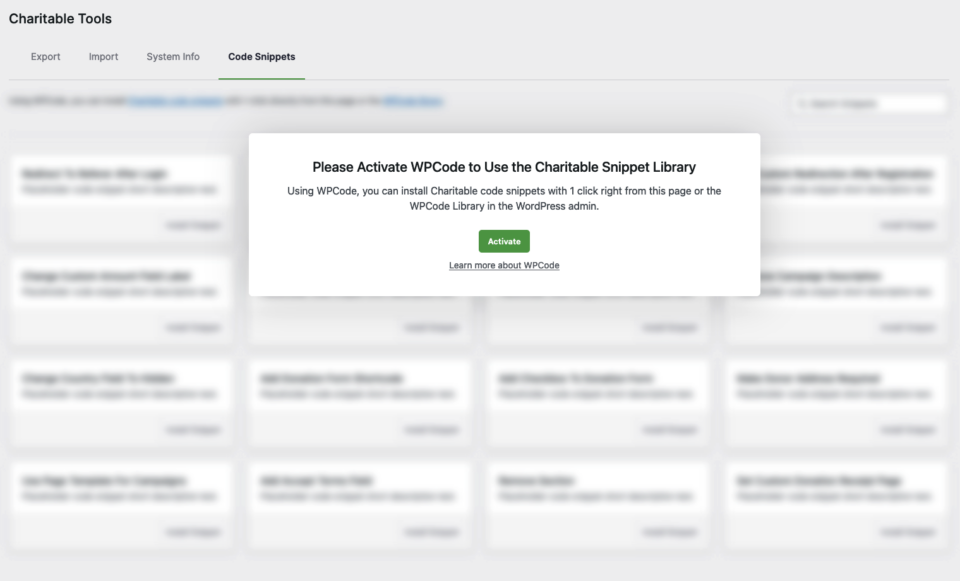
Gehen Sie zu „Werkzeuge“ und klicken Sie dann auf den Tab „Code-Schnipsel“.
Wenn Sie WPCode noch nicht installiert haben, sehen Sie eine Aufforderung, mit der Sie das Plugin direkt dort installieren und aktivieren können.
Code-Schnipsel aktivieren
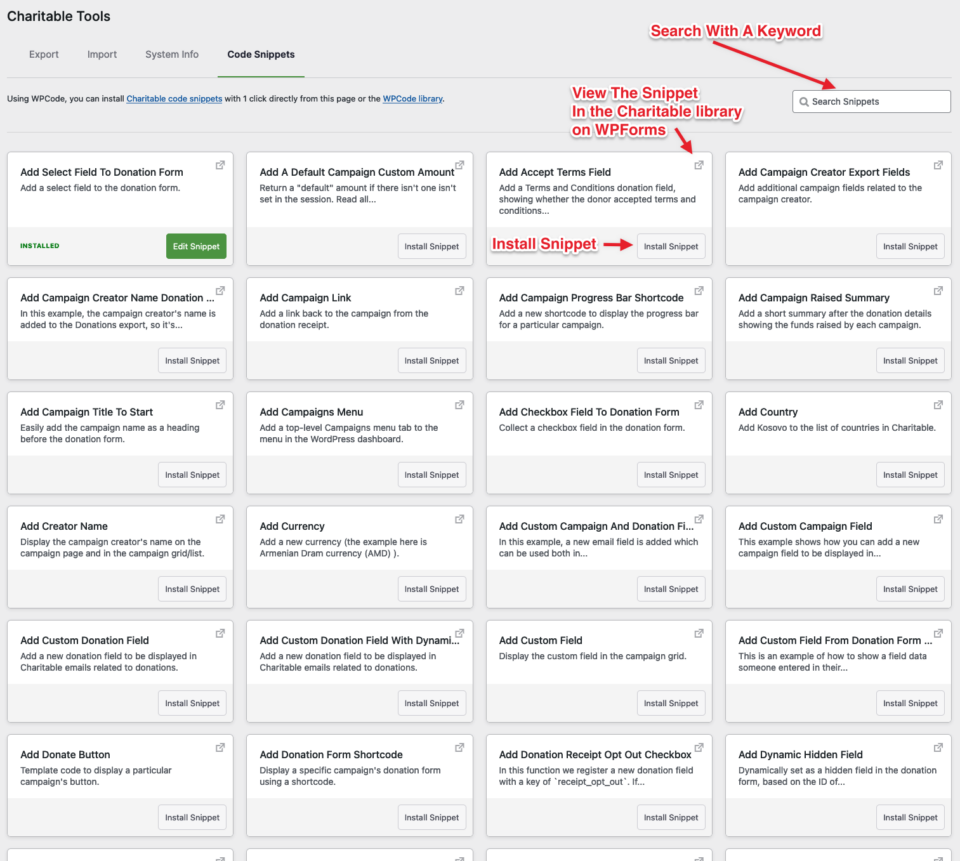
Sobald dies erfolgreich war, wird derselbe Tab mit Code-Schnipseln gefüllt. Jede Box auf der Seite enthält den Titel, eine kurze Beschreibung, einen Link zum Speicherort des Schnipsels auf WPCode und eine Schaltfläche zum Installieren.
Wenn Sie beispielsweise ein benutzerdefiniertes Textfeld zu einem Spendenformular hinzufügen möchten, suchen Sie im Suchfeld nach „Textfeld“ und die Seite wird mit Ergebnissen aktualisiert, die diesem Schlüsselwort entsprechen. Sie können ein Beispielskript finden und auf Installieren klicken. Dieses Skript wird automatisch kopiert und Ihrer WPCode-Schnipselbibliothek hinzugefügt.
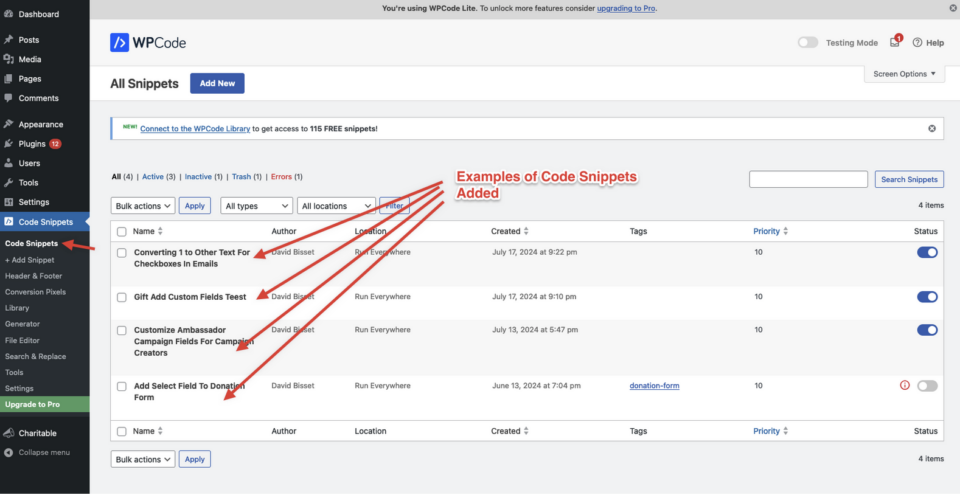
Code-Schnipsel für Charitable anpassen
Oft enthalten installierte Code-Schnipsel Kommentare und Dokumentationen, sodass Sie den Schnipsel anpassen können. Wenn ich beispielsweise ein Textfeld für einen Spender haben wollte, um mitzuteilen, wie er von der Kampagne erfahren hat, könnte dieser „Textfeld zum Spendenformular hinzufügen“-Schnipsel wie hier gezeigt modifiziert werden:
/**
 * Collect a textarea field in the donation form.
 *
 * This snippet only works in Charitable 1.5 or above.
 *
 */
function wpchar_charitable_register_new_textarea_field() {
    /**
     * Define a new textarea field.
     */

	if ( ! class_exists("Charitable_Donation_Field" ) ) {
		return;
	};

    $field_1 = new Charitable_Donation_Field( 'textarea_example', array(
        'label' => __( 'How did you learn about this campaign?', 'charitable' ),
        'data_type' => 'user',
        'donation_form' => array(
            'type' => 'textarea',
			'show_after' => 'phone', // adjust to where you want this to show up
                        'required'   => false,
             ),
        'admin_form' => false,
        'show_in_meta' => false,
        'show_in_export' => false,
        'email_tag' => array(
            'description' => __( 'How did you learn...' , 'charitable' ),
        ),
    ) );

    /**
     * Register the textarea fields.
     */
	charitable()->donation_fields()->register_field( $field_1 );

}

add_action( 'init', 'wpchar_charitable_register_new_textarea_field' );
Es gibt viele andere Schnipsel, die über die Erstellung eines Textfeldes in einem Spendenformular hinausgehen und Ihre Kampagnen und Spendenformulare noch weiter anpassen. Erkunden Sie die Bibliothek gerne entweder auf der Website von WPCode oder im Bildschirm im Charitable-Plugin.
Haben Sie eine Idee für einen Code-Schnipsel, der noch nicht existiert? Kontaktieren Sie uns und wir werden ihn hinzufügen!
Möglicherweise sind Sie auch an der Dokumentation von WPCode interessiert, um mehr darüber zu erfahren, wie ihr Plugin funktioniert und welche zusätzlichen Funktionen Sie Code-Schnipseln zuweisen können, einschließlich Charitable-Code-Schnipseln.
Erhalten Sie Fundraising-Tipps & Ratschläge für gemeinnützige Organisationen
Wir teilen regelmäßig praktische Anleitungen, bewährte Strategien und Insider-Tipps, um Ihnen zu helfen, mehr Spenden zu sammeln und stärkere Spenderbeziehungen aufzubauen. Schließen Sie sich Tausenden von gemeinnützigen Organisationen an, die unsere besten Inhalte direkt erhalten:
- Abonnieren Sie unseren Newsletter – Erhalten Sie wöchentliche Tipps und exklusive Anleitungen in Ihrem Posteingang
- Abonnieren Sie unseren YouTube-Kanal – Sehen Sie sich Schritt-für-Schritt-Anleitungen und Erfolgsgeschichten an
- Folgen Sie uns auf LinkedIn – Vernetzen Sie sich mit unserer Community und erhalten Sie tägliche Einblicke in Non-Profit-Organisationen
- Folgen Sie uns auf TikTok – Aufschlussreiche & unterhaltsame Videos, die Ihnen helfen, Ihre Sache voranzubringen
- Folgen Sie uns auf Instagram – Lustige Reels und Tipps für gemeinnützige Organisationen
Kein Schnickschnack, nur umsetzbare Ratschläge von Menschen, die die Herausforderungen verstehen, denen Sie täglich gegenüberstehen.
FAQs: Hinzufügen benutzerdefinierter Felder zu Charitable-Spendenformularen
Was sind benutzerdefinierte Felder und warum brauche ich sie?
Benutzerdefinierte Felder ermöglichen es Ihnen, zusätzliche Informationen von Spendern zu sammeln, die über den Standardnamen, die E-Mail-Adresse und den Spendenbetrag hinausgehen. Häufige Anwendungsfälle sind:
- Sammeln von Empfehlungs- oder Aktionscodes
- Hinzufügen von Feldern für „Zum Gedenken an“ oder Widmungen
- Sammeln von Feedback, wie Spender von Ihrer Kampagne erfahren haben
- Einbeziehung von Kontrollkästchen für Newsletter-Abonnements
- Hinzufügen von Unternehmensinformationen für Firmenspender
Benötige ich Programmierkenntnisse, um benutzerdefinierte Felder hinzuzufügen?
Nein. Obwohl benutzerdefinierte Felder per Code hinzugefügt werden können, bietet WPCode eine benutzerfreundliche Lösung, die keine Programmierkenntnisse erfordert. Sie können vorgefertigte Snippets mit nur wenigen Klicks installieren.
Beeinflusst das Hinzufügen benutzerdefinierter Felder meine Spenden-Konversionsraten?
Das hängt von der Implementierung ab. Optionale Felder haben normalerweise minimale Auswirkungen, während zu viele unnötige Pflichtfelder möglicherweise die Konversionen reduzieren. Wir empfehlen:
- Zusätzliche Felder nach Möglichkeit optional machen
- Formulare kurz und benutzerfreundlich halten
- Verschiedene Konfigurationen testen, um zu sehen, was für Ihr Publikum funktioniert
Ist WPCode kostenlos?
Ja! WPCode bietet eine kostenlose Version, die Zugriff auf viele Code-Snippets bietet. Es gibt auch eine Premium-Version mit zusätzlichen Funktionen, aber die kostenlose Version reicht für die meisten Anforderungen an benutzerdefinierte Felder aus.
Funktionieren benutzerdefinierte Felder mit meinem WordPress-Theme?
Benutzerdefinierte Felder sollten mit jedem ordnungsgemäß codierten WordPress-Theme funktionieren. Möglicherweise müssen Sie jedoch benutzerdefiniertes CSS hinzufügen, um das Design Ihres Themes anzupassen. Wenn Anzeigeprobleme auftreten, wenden Sie sich an unser Support-Team.
Wie installiere ich WPCode?
- Gehen Sie zu Charitable → Tools → Code Snippets
- Wenn WPCode nicht installiert ist, sehen Sie eine Installationsaufforderung
- Klicken Sie auf die Schaltfläche „Installieren“, um WPCode automatisch zu installieren und zu aktivieren
- Nach der Aktivierung sehen Sie verfügbare Code-Snippets
Ich sehe den Tab „Code-Snippets“ nicht. Was ist falsch?
Das bedeutet normalerweise:
- Ihre Charitable-Version ist veraltet (aktualisieren Sie auf 1.8.1.7+)
- Sie haben keine Administratorberechtigungen
- Es gibt einen Plugin-Konflikt (versuchen Sie, andere Plugins vorübergehend zu deaktivieren)
Wie finde ich das richtige Code-Snippet für meine Bedürfnisse?
Verwenden Sie die Suchfunktion im Tab „Code-Snippets“. Suchen Sie nach Begriffen wie:
- „Textfeld“ für zusätzliche Texteingaben
- „Checkbox“ für Opt-in-Optionen
- „Dropdown“ für Auswahlmenüs
- „Textarea“ für längere Texteingaben
Kann ich die Code-Snippets ändern?
Absolut! Die meisten Snippets enthalten Kommentare und Dokumentationen, die Sie bei der Anpassung unterstützen. Sie können ändern:
- Feldbezeichnungen und Beschreibungen
- Feldpositionierung im Formular
- Ob Felder erforderlich oder optional sind
- Feldtypen (Text, Textarea, Dropdown usw.)
Wo erscheinen benutzerdefinierte Feldübermittlungen?
Benutzerdefinierte Felddaten erscheinen in:
- Spendendetails in Ihrem WordPress-Adminbereich
- E-Mail-Benachrichtigungen (falls konfiguriert)
- Exportberichte (falls in den Snippet-Einstellungen aktiviert)
Kann ich mehrere benutzerdefinierte Felder zu einem Formular hinzufügen?
Ja! Sie können mehrere Code-Snippets installieren und aktivieren, um Ihrer Spendenformularen mehrere benutzerdefinierte Felder hinzuzufügen.
Mein benutzerdefiniertes Feld wird nicht im Spendenformular angezeigt. Was ist falsch?
Überprüfen Sie diese häufigen Probleme:
- Stellen Sie sicher, dass das Code-Snippet in WPCode aktiviert ist
- Überprüfen Sie, ob Ihre Charitable-Version die Anforderungen erfüllt
- Leeren Sie alle Caching-Plugins
- Prüfen Sie, ob das Feld so eingestellt ist, dass es an der richtigen Stelle angezeigt wird
Das Feld erscheint, sieht aber seltsam aus oder passt nicht zu meinem Theme.
Dies ist normalerweise ein Styling-Problem. Möglicherweise müssen Sie benutzerdefiniertes CSS hinzufügen. Kontaktieren Sie unser Support-Team für Unterstützung bei Theme-spezifischem Styling.
Kann ich ein benutzerdefiniertes Feld nach dem Hinzufügen entfernen?
Ja! Deaktivieren oder löschen Sie einfach das Code-Snippet in WPCode. Beachten Sie, dass Daten aus zuvor übermittelten Formularen in Ihrer Datenbank verbleiben.
Ich habe ein Snippet aktiviert, aber es verursacht Fehler auf meiner Website.
Deaktivieren Sie das Snippet sofort in WPCode. Dies löst normalerweise das Problem. Wenn Probleme weiterhin bestehen:
- Auf Plugin-Konflikte prüfen
- Stellen Sie sicher, dass Ihre WordPress- und Charitable-Versionen auf dem neuesten Stand sind
- Kontaktieren Sie den Support mit spezifischen Fehlermeldungen
Wo kann ich mehr über WPCode erfahren?
Besuchen Sie die WPCode-Dokumentation , um erweiterte Funktionen wie Snippet-Zeitplanung, Geräteausrichtung und bedingte Logik zu erkunden.
Gibt es Video-Tutorials?
Ja! Abonnieren Sie den Charitable YouTube-Kanal für Schritt-für-Schritt-Anleitungen und Erfolgsgeschichten.
Benötigen Sie Unterstützung? Haben Sie eine Frage? Wenn Sie ein Lite-/kostenloser Benutzer von Charitable sind, können Sie sich an unser Team in den Support-Foren von WordPress.org wenden, und unser Team wird zeitnah antworten. Wenn Sie eine aktive Lizenz haben, können Sie sich gerne direkt an uns wenden, um Prioritätsunterstützung zu erhalten.


