Charitable Blog

Everything you need to know about Charitable and our team.

Ambassadors 2.0 Sneak Peek: Fundraising Teams & Multi-Level Peer to Peer Campaigns

Last updated on

  • By

We have been quietly plugging away on a major upgrade to Charitable Ambassadors, our popular peer-to-peer fundraising solution for non-profits.

Curious to see what the future of peer-to-peer fundraising with WordPress looks like? Read on!

Multi-level WordPress peer-to-peer fundraising campaigns

One fundraising campaign. Lots of fundraisers.
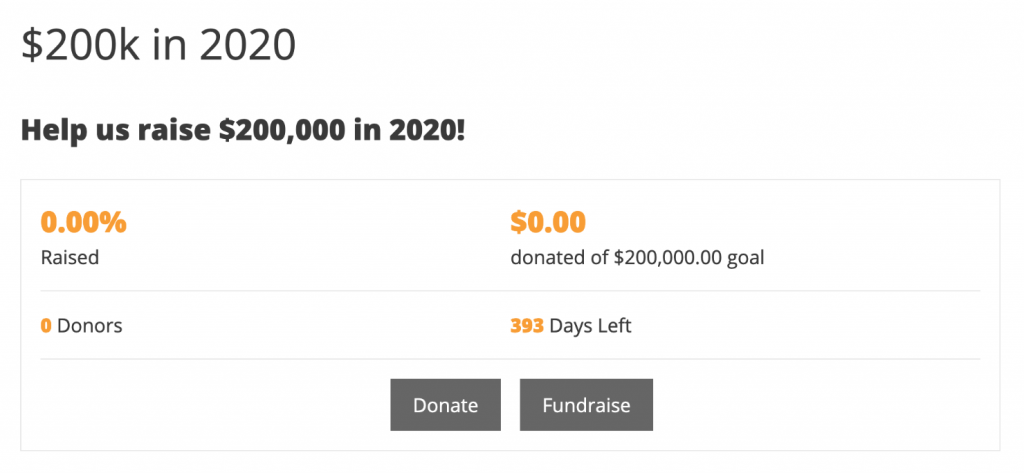
A parent fundraising campaign in Charitable

That’s the basic premise of multi-level fundraising campaigns. Unlike a setup where every campaign created by your Ambassadors is a new top-level campaign, with multi-level fundraising you allow your Ambassadors to create a fundraiser for an existing campaign.
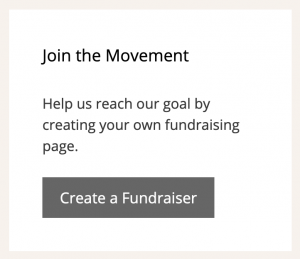
Ask people to fundraise with the Fundraise Button widget

Think of the main campaign as an umbrella campaign.

When someone starts a fundraiser for that umbrella campaign, all their donations will automatically be counted towards the umbrella campaign’s fundraising totals. The fundraiser’s own campaign will also show the amount they raised personally, providing your Ambassadors with a powerful incentive to raise more for your organization.

Now you can create a campaign for your organization’s next fun run or other fundraising event and give your participants the ability to create ca fundraising page for your organization that they can share with their friends and family.

Team fundraising for WordPress
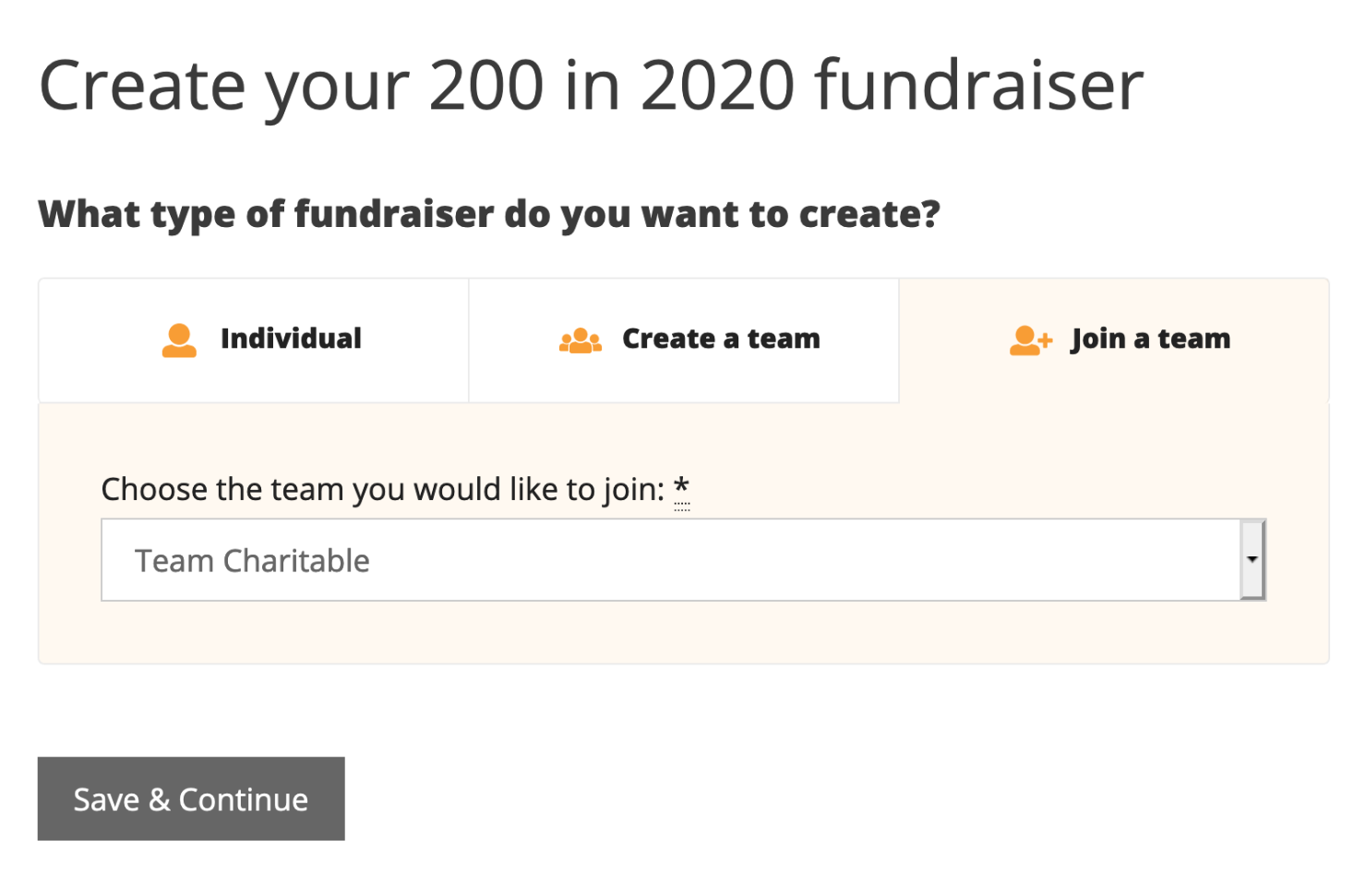
Screenshot of the fundraiser setup page
Supporters can fundraise on their own or in a team

We’ve heard you. Again, again, and again, you’ve asked how your Ambassadors can create fundraising teams.

With Ambassadors 2.0, they can
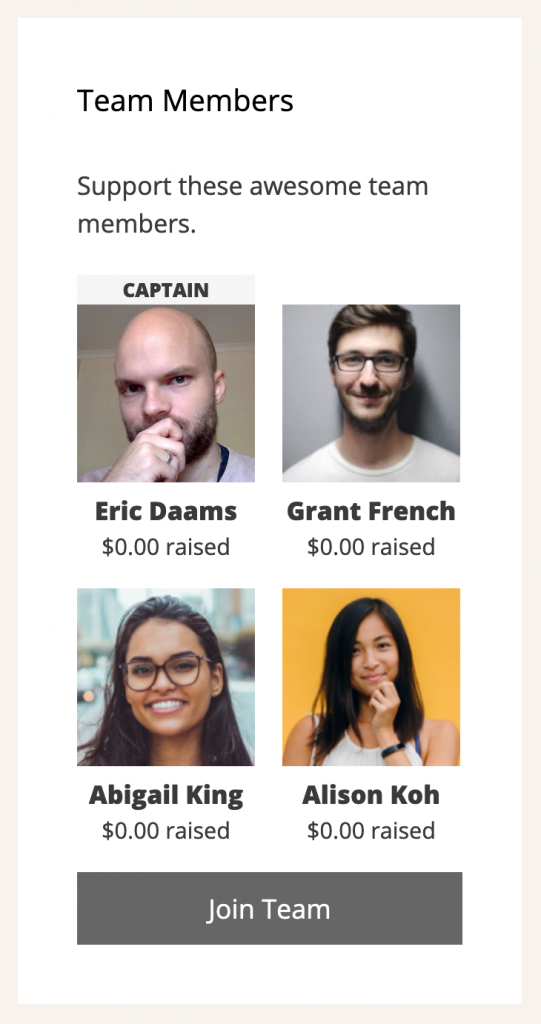
Screenshot of the Team Members Widget in Charitable Ambassadors.

When your Ambassadors create a fundraiser for one of your campaigns, they can choose whether they would like to create a fundraiser on their own, or whether they’d like to do it as part of a team.

Creating a new team is simple. Just fill out a few fields, give your team a name and then add a few team members.

Invites are sent automatically. All your team members have to do is accept the invitation, and their fundraiser will be created.

You can also join existing teams. Creating a fundraiser as part of a team is easy, with a condensed version of the fundraiser form.

Ambassadors 2.0 includes new widgets and shortcodes to help you display team members and add fundraising buttons.

More goodies coming in Ambassadors 2.0

Team fundraising and multi-level campaign support are the headline events in Ambassadors 2.0, but they’re far from the only thing we’ve been working on:

  • Create email marketing campaigns for your campaign creators, using the Newsletter Connect extension.
  • Easier customization of the campaign form with some handy settings for configuring different fields.
  • A suite of new emails for admin, campaign creators and team members.
  • A completely revised flow for campaign creators setting up a campaign without first registering or logging in.
  • Add, edit and remove fields from the campaign form using the Campaign Fields API.
author avatar
Eric Daams

Disclosure: Our content is reader-supported. This means if you click on some of our links, then we may earn a commission. We only recommend products that we believe will add value to our readers.

6 responses to “Ambassadors 2.0 Sneak Peek: Fundraising Teams & Multi-Level Peer to Peer Campaigns”

  1. Chris Weickert Avatar
    Chris Weickert

    Very excited to see this release. Estimated Date?

    1. ericnicolaas Avatar
      ericnicolaas

      Hi Chris,

      We don’t have a firm ETA for release yet, but definitely aiming to have this out in January.

      Cheers,
      Eric

  2. Catherine Colling Avatar
    Catherine Colling

    Is this out yet?

  3. Lauren Haas Avatar
    Lauren Haas

    How do I make a feature request? What I really need is peer-to-peer fundraising that focus on recurring gifts. Very few fundraising platforms offer that (only one that I’ve found).

    1. ericnicolaas Avatar
      ericnicolaas

      Hi Lauren,

      You can combine Ambassadors together with our Recurring Donations extension and achieve that. If you set up a main/parent campaign with recurring donations enabled for it, all fundraisers for that campaign will also have recurring donations enabled for them.

      Cheers,
      Eric

Leave a Reply

Your email address will not be published. Required fields are marked *

Get free tips and resources right in your inbox, along with 60,000+ others

Join our Newsletter

We won’t spam you. We only send an email when we think it will genuinely help you. Unsubscribe at any time!

Featured Video:

Watch more videos on our YouTube channel.

What's New In Charitable

🔔 Subscribe to get our latest updates
📧 Subscribe to Emails

Email Subscription

Join our Newsletter

We won’t spam you. We only send an email when we think it will genuinely help you. Unsubscribe at any time!

donation form New

👉🏻 New Campaign Selector For Donation Forms

Take your campaign management to the next level. Find the perfect fundraiser for any page and stay in your creative flow with our new Campaign Selector integration.

The Ultimate Selection Tool

No more hunting for IDs or creating one page for every donation form. Use the new Campaign Selector to allow users to switch to a campaign with no code.

⚡ Instant Search: Quickly find any campaign leaving your page or post.

⚙️ Editor Agnostic: Whether you’re using the Block Editor, Elementor, or WPBakery, selecting your campaigns is now a unified experience.

🚀 Real-Time Previews: See exactly which campaign you’ve selected instantly, ensuring your donors always see the right cause.

author avatar
Eric Daams
Integration New

WordPress Command Palette Integration

Take your fundraising workflow to the next level. Speed up your site management and stay in your creative flow with our new WordPress Command Palette integration.

Supercharge Your Workflow
Navigate your fundraising dashboard faster than ever.

The Ultimate Keyboard Shortcut Hit Cmd + K (or Ctrl + K) to launch the Command Palette and manage your campaigns instantly.

⚡ Instant Navigation: Jump directly to your Campaigns, Donations, or Settings from anywhere in the editor.

➕ Quick Create: Start a new fundraising campaign or add a manual donation with a single command.

Efficiency Redefined
The tools you need, exactly when you need them.

⚙️ Contextual Actions: See relevant Charitable commands based on whether you’re editing a page or viewing your reports.

🚀 Seamless Integration: Built directly into the WordPress core experience for a lightweight, native feel.

author avatar
Eric Daams
Improvement New Security

📣 New Security Features

We’ve introduced a suite of new security tools to give you total control over who accesses your forms, plus a new way to tidy up your database.

Advanced Security Suite

Layered protection: Cloudflare, ReCAPTCHA, IP Controls, and Rate Limiting.

We have overhauled our security settings to stop bots without blocking real donors.

  • 🤖 Flexible Protection: Choose between Google reCAPTCHA v3 or the privacy-first Cloudflare Turnstile to block bots invisible.

  • 🚦 Rate limiting: Stop spam floods by limiting how many submissions an IP address can make in a set timeframe.

  • 🛑 Total control: Use the new IP Blacklist to block bad actors instantly, or the IP Whitelist to let your team bypass checks during testing.

The Clean Donation Tool

Go from “Testing” to “Live” in seconds.

Finished setting up your site and need to get rid of all those test transactions?

  • 🧹 Sweep it clean: Bulk delete test donations and donor records with a single click.

  • 📉 Accurate reporting: Ensure your revenue stats are 100% accurate for launch day.

  • ⚙️ Reset sequences: Automatically resets sequential invoice numbering.

author avatar
Eric Daams
donation form New

🏗️ Visual Donation Form Builder

Building the perfect donation form just got easier. We have completely reimagined how you create forms with a new drag-and-drop interface.

Design Visually, in Real-Time

No coding, no guessing. Just point, click, and build.

Say goodbye to confusing settings pages. You can now edit your form and see exactly what your donors will see, instantly.

  • 🖱️ Drag & Drop: Easily add fields like names, addresses, or file uploads by dragging them exactly where you want them.

  • 🎨 Customize everything: Click any field to tweak labels, placeholders, and requirement settings on the fly.

  • 👁️ Live preview: See your changes immediately as you make them—ensure your form flows perfectly before you hit publish.

Flexible & Powerful

Works with all your existing campaigns.

  • 🧩 Deep customization: Add custom HTML, shortcodes, or CSS classes for advanced branding.

  • ⚙️ Smart fields: Collect exactly what you need with support for dropdowns, checkboxes, dates, and hidden fields.

author avatar
Eric Daams
Leaderboards New

🏆 Donor Leaderboards!

Turn your fundraising into a community event. Recognize your most generous supporters and inspire friendly competition with our new leaderboard tools.

Gamify Your Fundraising

Celebrate your top donors and encourage others to climb the ranks.

Create a public “Hall of Fame” to give your donors the recognition they deserve.

  • 🎨 Two stunning layouts: Choose the List View for a clean, data-rich table or the Card View for a modern, visual grid with avatars.

  • 🥇 Automatic highlights: The top 3 supporters get special Trophy and Crown icons to make them stand out.

  • 🧩 Place it anywhere: Add it to any page using the new Gutenberg Block, or drop it directly into your campaign using the Visual Builder.

Total Customization

You decide what to show and what to hide.

  • ⚙️ Flexible data: Choose to display or hide donation amounts, donor counts, or avatars.

  • 🔄 Lifetime stats: Works seamlessly with Recurring Donations to show a donor’s all-time total impact.

author avatar
Eric Daams