
Charitable Blog

Everything you need to know about Charitable and our team.

SCA-ready online donations with Charitable & Stripe

Last updated on

  • By

Charitable Stripe 1.4 comes out today and implements two new Stripe APIs designed to smoothly handle new Strong Customer Authentication (SCA) rules in Europe.

We strongly recommend updating to the latest version as soon as possible, particularly if you are based in Europe or accept donations from European donors.

How will Strong Customer Authentication affect online donations?

Strong Customer Authentication (SCA) is a new European requirement designed to improve the security of online payments. Where SCA applies, it will require the donor to provide a second form of authentication to confirm their payment.

Currently, most online transactions using Stripe require just a single form of authentication: the card number and CVC verification code. With SCA, an additional form of verification will be required in addition to this.

To provide this additional form of verification, Stripe is introducing support for 3D Secure 2, a revamped version of the original 3D Secure, which you may have used yourself as Visa Secure or Mastercard Identity Check.

3D Secure 2 is better at handling SCA requirements in a consistent way. When SCA is required for a particular donation, the 3D Secure modal will pop up for the donor to complete; their donation will not be processed until they have completed the 3D Secure check.

SCA will be effective from September 14, though it is likely to be gradually introduced as countries within the EU follow a phased introduction.

Let’s see how Charitable’s implementation works

Updating Charitable’s Stripe integration with SCA compatibility required implementing several new aspects of the Stripe payments API. While we’ll try to leave the technical details out of this as much as possible, there were some necessary visual adjustments which mean that the donation experience is a little different.

Welcoming the new Checkout

Stripe has created a revamped Checkout experience, and it’s a significant update. The old Checkout used a modal window, which would pop up as soon as you click to donate; the new Checkout redirects to a Stripe-hosted page where payment is completed and the 3D Secure check is handled, if necessary.
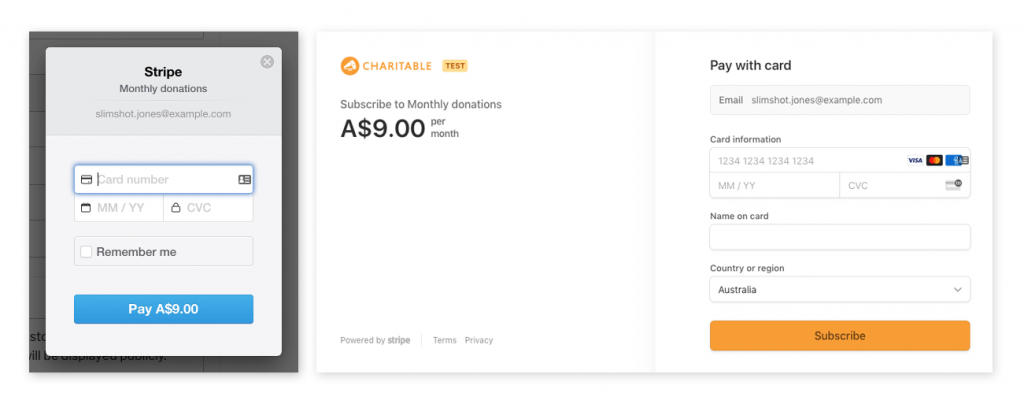
Before and after On the left the old Stripe Checkout modal on the right the new SCA ready hosted Checkout payment page

A slicker, more secure credit card field

For those who aren’t using Checkout, the credit card portion of the donation form will look a little different too.

Charitable now uses a credit card field hosted by Stripe itself (part of its Stripe Elements API), which combines the card number, CVC verification, expiry and, in some cases, the post/zip code fields into a single form field. Benefits of loading the credit card from Stripe’s servers include real-time validation of credit card details, improved security, and easier PCI compliance (since no sensitive data hits your website’s servers).
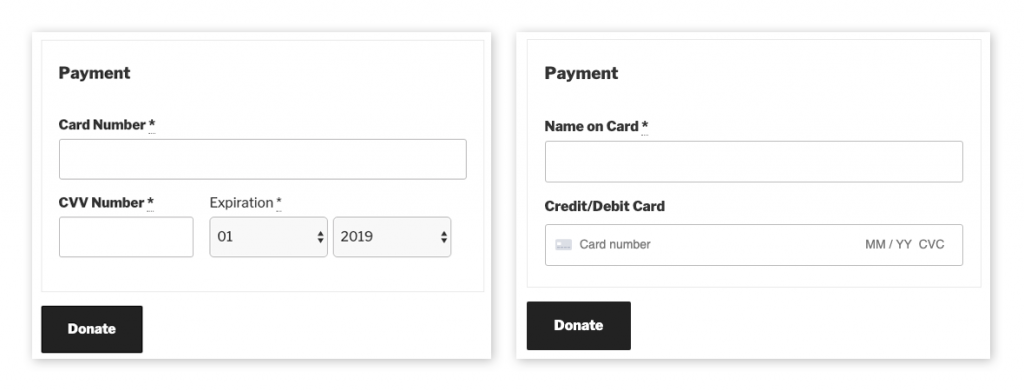
Spot the difference The old credit card fields left have been replaced by a single CreditDebit Card field providing inline validation and improved security

Under the hood, credit card payments are handled using Stripe’s Payment Intents API, which is an SCA-ready method for accepting payments.

Bonus feature: customize the statement descriptor

SCA-readiness is the focus of this release, but we also sneaked in a bonus feature. You can now customize the statement descriptor from the Stripe settings page in Charitable’s settings area.

Upgrade to SCA-readiness

If you are already using Charitable Stripe, you should see an option to update to the latest version in your WordPress dashboard. Be sure to set your license key if you have not already.

For those who have modified the default plugin behaviour using code, including code snippets provided by us through our support channel, we recommend reading the upgrade notes as some changes may affect you.


author avatar
Eric Daams

Disclosure: Our content is reader-supported. This means if you click on some of our links, then we may earn a commission. We only recommend products that we believe will add value to our readers.

Leave a Reply

Your email address will not be published. Required fields are marked *

Get free tips and resources right in your inbox, along with 60,000+ others

Join our Newsletter

We won’t spam you. We only send an email when we think it will genuinely help you. Unsubscribe at any time!

Featured Video:

Watch more videos on our YouTube channel.

What's New In Charitable

🔔 Subscribe to get our latest updates
📧 Subscribe to Emails

Email Subscription

Join our Newsletter

We won’t spam you. We only send an email when we think it will genuinely help you. Unsubscribe at any time!

donation form New

👉🏻 New Campaign Selector For Donation Forms

Take your campaign management to the next level. Find the perfect fundraiser for any page and stay in your creative flow with our new Campaign Selector integration.

The Ultimate Selection Tool

No more hunting for IDs or creating one page for every donation form. Use the new Campaign Selector to allow users to switch to a campaign with no code.

⚡ Instant Search: Quickly find any campaign leaving your page or post.

⚙️ Editor Agnostic: Whether you’re using the Block Editor, Elementor, or WPBakery, selecting your campaigns is now a unified experience.

🚀 Real-Time Previews: See exactly which campaign you’ve selected instantly, ensuring your donors always see the right cause.

author avatar
Eric Daams
Integration New

WordPress Command Palette Integration

Take your fundraising workflow to the next level. Speed up your site management and stay in your creative flow with our new WordPress Command Palette integration.

Supercharge Your Workflow
Navigate your fundraising dashboard faster than ever.

The Ultimate Keyboard Shortcut Hit Cmd + K (or Ctrl + K) to launch the Command Palette and manage your campaigns instantly.

⚡ Instant Navigation: Jump directly to your Campaigns, Donations, or Settings from anywhere in the editor.

➕ Quick Create: Start a new fundraising campaign or add a manual donation with a single command.

Efficiency Redefined
The tools you need, exactly when you need them.

⚙️ Contextual Actions: See relevant Charitable commands based on whether you’re editing a page or viewing your reports.

🚀 Seamless Integration: Built directly into the WordPress core experience for a lightweight, native feel.

author avatar
Eric Daams
Improvement New Security

📣 New Security Features

We’ve introduced a suite of new security tools to give you total control over who accesses your forms, plus a new way to tidy up your database.

Advanced Security Suite

Layered protection: Cloudflare, ReCAPTCHA, IP Controls, and Rate Limiting.

We have overhauled our security settings to stop bots without blocking real donors.

  • 🤖 Flexible Protection: Choose between Google reCAPTCHA v3 or the privacy-first Cloudflare Turnstile to block bots invisible.

  • 🚦 Rate limiting: Stop spam floods by limiting how many submissions an IP address can make in a set timeframe.

  • 🛑 Total control: Use the new IP Blacklist to block bad actors instantly, or the IP Whitelist to let your team bypass checks during testing.

The Clean Donation Tool

Go from “Testing” to “Live” in seconds.

Finished setting up your site and need to get rid of all those test transactions?

  • 🧹 Sweep it clean: Bulk delete test donations and donor records with a single click.

  • 📉 Accurate reporting: Ensure your revenue stats are 100% accurate for launch day.

  • ⚙️ Reset sequences: Automatically resets sequential invoice numbering.

author avatar
Eric Daams
donation form New

🏗️ Visual Donation Form Builder

Building the perfect donation form just got easier. We have completely reimagined how you create forms with a new drag-and-drop interface.

Design Visually, in Real-Time

No coding, no guessing. Just point, click, and build.

Say goodbye to confusing settings pages. You can now edit your form and see exactly what your donors will see, instantly.

  • 🖱️ Drag & Drop: Easily add fields like names, addresses, or file uploads by dragging them exactly where you want them.

  • 🎨 Customize everything: Click any field to tweak labels, placeholders, and requirement settings on the fly.

  • 👁️ Live preview: See your changes immediately as you make them—ensure your form flows perfectly before you hit publish.

Flexible & Powerful

Works with all your existing campaigns.

  • 🧩 Deep customization: Add custom HTML, shortcodes, or CSS classes for advanced branding.

  • ⚙️ Smart fields: Collect exactly what you need with support for dropdowns, checkboxes, dates, and hidden fields.

author avatar
Eric Daams
Leaderboards New

🏆 Donor Leaderboards!

Turn your fundraising into a community event. Recognize your most generous supporters and inspire friendly competition with our new leaderboard tools.

Gamify Your Fundraising

Celebrate your top donors and encourage others to climb the ranks.

Create a public “Hall of Fame” to give your donors the recognition they deserve.

  • 🎨 Two stunning layouts: Choose the List View for a clean, data-rich table or the Card View for a modern, visual grid with avatars.

  • 🥇 Automatic highlights: The top 3 supporters get special Trophy and Crown icons to make them stand out.

  • 🧩 Place it anywhere: Add it to any page using the new Gutenberg Block, or drop it directly into your campaign using the Visual Builder.

Total Customization

You decide what to show and what to hide.

  • ⚙️ Flexible data: Choose to display or hide donation amounts, donor counts, or avatars.

  • 🔄 Lifetime stats: Works seamlessly with Recurring Donations to show a donor’s all-time total impact.

author avatar
Eric Daams


