
Presenting The New WPCharitable Campaign Visual Builder!

Welcome to a new era of effortless and captivating fundraising with Charitable v1.8.0!
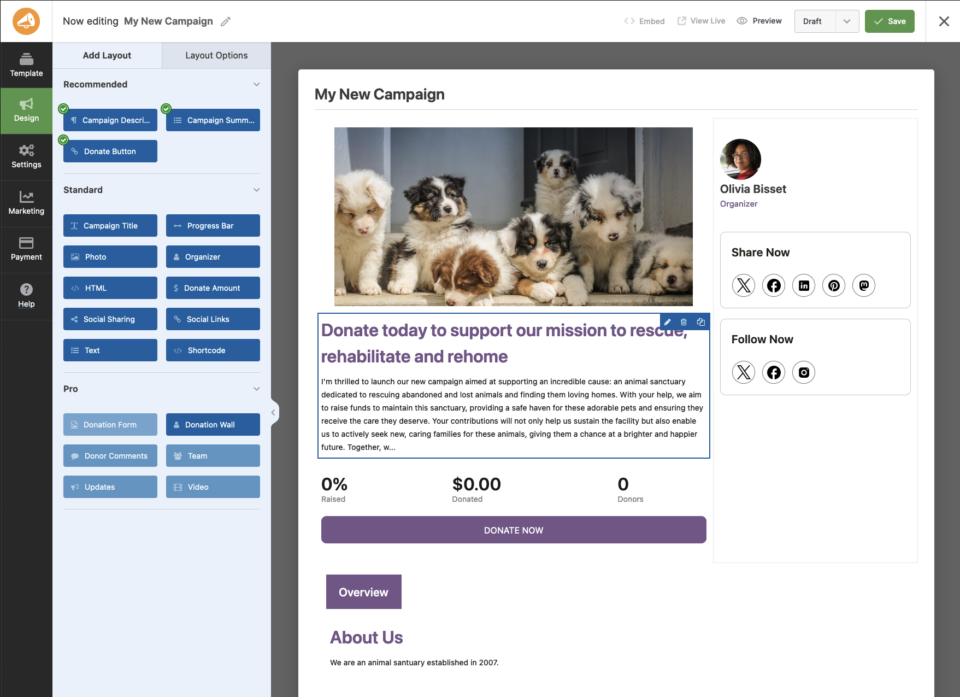
Charitable is offering a visual campaign builder currently a new feature in 180

Creating campaign pages has never been this fast or easy!

Our team is thrilled to introduce an innovative feature that will revolutionize the way you craft and showcase your campaigns. At Charitable, we understand the heart and soul of any successful fundraising lies in its presentation, and with this new tool, we’re putting the power of creativity and customization directly into your hands. Add text, photos, donation buttons, a bio, progress bar and more to customize each of your campaigns uniquely for maximum effectiveness.

Drag and Drop Blocks

Charitable offers default blocks in the core plugin – from high recommended blocks we feel everyone should probably have on a campaign page… to some great standard ones to take advantage of. Our pro fields – some included in our adds with our paid plans – offer even greater potential and creativity.

Here’s some of the common blocks you’ll have available to you:
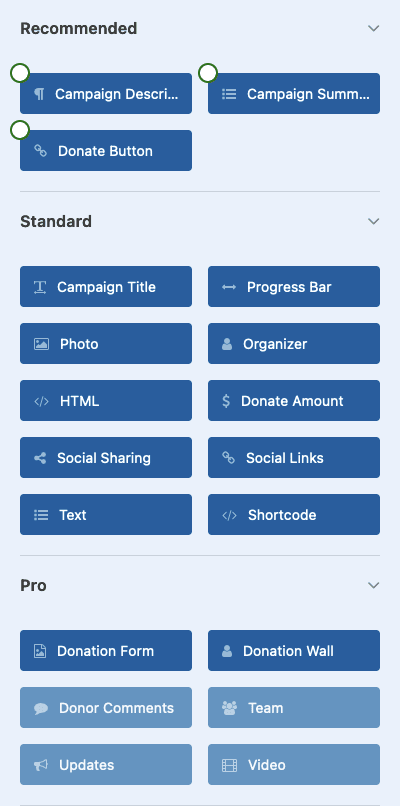
Campaign Title – Show the campaign title (perhaps in a header area if your theme doesn’t show the campaign title on the page) in your campaign. Automatically changes if you update the title anywhere in Charitable.

Campaign Description – Update your campaign description using this block. We’ve combined all description fields into one easy to use and understand area, and you can use this to go into some detail about the campaign. Place it in a tab or up front and visible at the top of the page.

Donate Button – Add a donate button with any custom label.

Progress Bar – Add a progress bar that can also show how much has been donated and what your campaign goal is (if applicable).

Photo – Upload and/or add a photo easily through the WordPress Media library.

Organizer – Add a campaign organizer (author) with their name, title, picture, and a customizable description.

HTML – Add an area of customizable HTML.

Donate Amount – Add ability for a user to select a default or custom donation amount before they donate.

Social Sharing – Add social sharing links (Twitter, Facebook, etc.) right on your campaign page.

Social Links – Link to other social networks (like maybe your company’s or campaign’s Twitter, Instagram, LinkedIn, TikTok, or Mastodon account).

Text – Add generic text (with a headline) for when you want to add statements, testimonials or other kinds of text on your page.

Campaign Summary – Shows current contribution totals to your campaign.

Shortcode – Insert a shortcode into your campaign page.

Donation Form – Insert the entire form into your campaign page.

Donation Wall – Add a donation wall (similar to our donation wall shortcode) into your campaign page.

Other addons: We are adding compatibly from other Charitable addons into the builder. For example, the Video Addon when activated can currently add a video block which gives you the ability to add a video easily anywhere in your campaign page. With each Charitable update we hope to keep adding and tweaking the addons to make adding functionality and abilities as quick and easy as possible.

Start From Scratch From Simple Layouts…
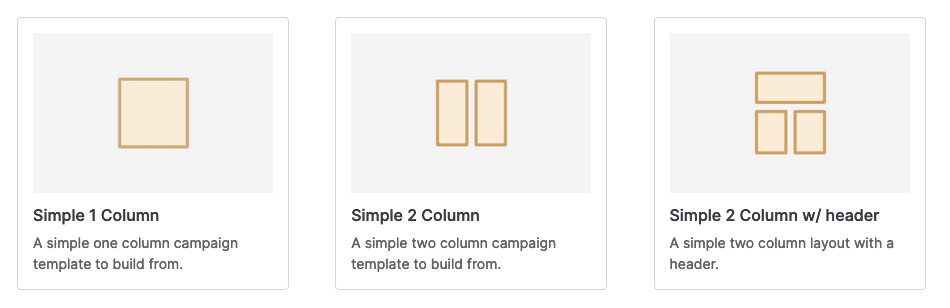
You can build a simple custom campaign page in a few minutes!

Building and customizing a simple campaign page in minutes.

Building a custom campaign page is now faster because we take care of the overall layout and block for you. Just select a simple template and start picking what blocks you’ll want on your page… and then drag and drop them over. Customize headlines, colors, alignment, and even add a custom CSS class where you need it. We have made it so creating a campaign page from scratch is easy but not overwhelming.

Creating and publishing a custom campaign page can happen in 5 minutes or less!

…or choose from an existing template for your campaign.
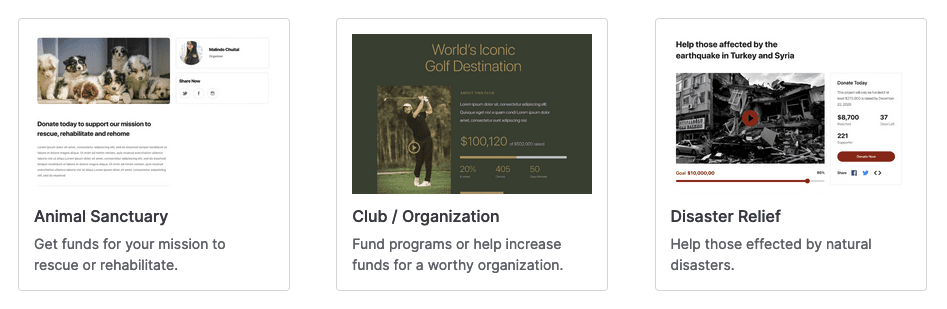
You could have a quality campaign page up in about 60 seconds!

Using an existing template to quickly create a professional campaign.

On the other hand, if you want to have a professional look from the start – you can choose from a pre-made template and literally have a polished campaign page up in about 60 seconds! Charitable v1.8.0 comes with nine templates for various types of campaigns, but you can edit these to match what your needs.

Expanded Features for Enhanced Efficiency

Along with this update, Charitable has provided some useful tools and options to give you the control you want from your campaigns after they are created. We have provided easier methods to embed a single campaign into your site (via shortcode or with the new embed wizard). You can also now change the publish status quicker and easier as well – with more enhancements coming in future updates.

Give it a try!

We invite you to give the campaign builder a try for new campaigns (for existing campaigns we have our legacy campaign builder so you can continue to edit and maintain your current campaigns quickly just like before).

Let us know what you think and what you feel we could add in terms of templates and new integrations. This is a new feature for admins creating new campaigns at this time (Ambassadors creating campaigns on the front-end will be as they have always been). We will be making updates to it to make it better. You can always reach out to us for feedback and questions.

You can download the zip file on WordPress.org.

Get free tips and resources right in your inbox, along with 60,000+ others

Join our Newsletter

We won’t spam you. We only send an email when we think it will genuinely help you. Unsubscribe at any time!

Featured Video:

Watch more videos on our YouTube channel.

What's New In Charitable

🔔 Subscribe to get our latest updates
📧 Subscribe to Emails

Email Subscription

Join our Newsletter

We won’t spam you. We only send an email when we think it will genuinely help you. Unsubscribe at any time!

Integration New

👉🏻 New Divi Integration In Charitable Pro

Bring the power of Charitable directly into your favorite page builder and maintain total creative control with our brand-new Divi integration.

The Ultimate Design Experience

No more switching back and forth or relying on complex shortcodes. Use dedicated Divi modules to build, style, and launch high-converting donation pages without ever leaving the Divi Builder.

⚡ Native Divi Modules: Effortlessly drag and drop your donation forms, progress bars, and campaign details exactly where you want them.

⚙️ Visual Customization: Tweak colors, fonts, and spacing using Divi’s familiar design settings to ensure your fundraiser matches your brand perfectly.

🚀 Live Visual Editing: See your changes in real-time. What you see in the builder is exactly what your donors will see, ensuring a seamless giving experience every time.

donation form New

👉🏻 New Campaign Selector For Donation Forms

Take your campaign management to the next level. Find the perfect fundraiser for any page and stay in your creative flow with our new Campaign Selector integration.

The Ultimate Selection Tool

No more hunting for IDs or creating one page for every donation form. Use the new Campaign Selector to allow users to switch to a campaign with no code.

⚡ Instant Search: Quickly find any campaign leaving your page or post.

⚙️ Editor Agnostic: Whether you’re using the Block Editor, Elementor, or WPBakery, selecting your campaigns is now a unified experience.

🚀 Real-Time Previews: See exactly which campaign you’ve selected instantly, ensuring your donors always see the right cause.

Integration New

WordPress Command Palette Integration

Take your fundraising workflow to the next level. Speed up your site management and stay in your creative flow with our new WordPress Command Palette integration.

Supercharge Your Workflow
Navigate your fundraising dashboard faster than ever.

The Ultimate Keyboard Shortcut Hit Cmd + K (or Ctrl + K) to launch the Command Palette and manage your campaigns instantly.

⚡ Instant Navigation: Jump directly to your Campaigns, Donations, or Settings from anywhere in the editor.

➕ Quick Create: Start a new fundraising campaign or add a manual donation with a single command.

Efficiency Redefined
The tools you need, exactly when you need them.

⚙️ Contextual Actions: See relevant Charitable commands based on whether you’re editing a page or viewing your reports.

🚀 Seamless Integration: Built directly into the WordPress core experience for a lightweight, native feel.

Improvement New Security

📣 New Security Features

We’ve introduced a suite of new security tools to give you total control over who accesses your forms, plus a new way to tidy up your database.

Advanced Security Suite

Layered protection: Cloudflare, ReCAPTCHA, IP Controls, and Rate Limiting.

We have overhauled our security settings to stop bots without blocking real donors.

  • 🤖 Flexible Protection: Choose between Google reCAPTCHA v3 or the privacy-first Cloudflare Turnstile to block bots invisible.

  • 🚦 Rate limiting: Stop spam floods by limiting how many submissions an IP address can make in a set timeframe.

  • 🛑 Total control: Use the new IP Blacklist to block bad actors instantly, or the IP Whitelist to let your team bypass checks during testing.

The Clean Donation Tool

Go from “Testing” to “Live” in seconds.

Finished setting up your site and need to get rid of all those test transactions?

  • 🧹 Sweep it clean: Bulk delete test donations and donor records with a single click.

  • 📉 Accurate reporting: Ensure your revenue stats are 100% accurate for launch day.

  • ⚙️ Reset sequences: Automatically resets sequential invoice numbering.

donation form New

🏗️ Visual Donation Form Builder

Building the perfect donation form just got easier. We have completely reimagined how you create forms with a new drag-and-drop interface.

Design Visually, in Real-Time

No coding, no guessing. Just point, click, and build.

Say goodbye to confusing settings pages. You can now edit your form and see exactly what your donors will see, instantly.

  • 🖱️ Drag & Drop: Easily add fields like names, addresses, or file uploads by dragging them exactly where you want them.

  • 🎨 Customize everything: Click any field to tweak labels, placeholders, and requirement settings on the fly.

  • 👁️ Live preview: See your changes immediately as you make them—ensure your form flows perfectly before you hit publish.

Flexible & Powerful

Works with all your existing campaigns.

  • 🧩 Deep customization: Add custom HTML, shortcodes, or CSS classes for advanced branding.

  • ⚙️ Smart fields: Collect exactly what you need with support for dropdowns, checkboxes, dates, and hidden fields.




