
Lorsqu'un don arrive, des tâches telles que la mise à jour des fiches de contact, l'envoi de notifications Slack, l'ajout de lignes dans des feuilles de calcul et le déclenchement de séquences de remerciement ne nécessitent plus d'embaucher un développeur, d'écrire du code personnalisé ou de bricoler des solutions de contournement fragiles.
Avec Automation Connect 2.0, nous avons rationalisé l'ensemble du processus. Un système complet d'automatisation par webhook est désormais intégré directement dans Charitable – aucun plugin tiers ni expertise technique requis.
Que votre équipe soit composée d'un seul coordinateur ou d'un personnel complet, cette mise à niveau permet à toute organisation à but non lucratif de mettre plus facilement que jamais l'automatisation au service de sa mission.
Le nouveau Automation Connect 2.0 est maintenant disponible dans Charitable Pro.
Pas encore utilisateur de Charitable Pro ? Inscrivez-vous aujourd'hui et bénéficiez jusqu'à 50 % de réduction sur votre plan. Nous sommes convaincus que vous aimerez collecter des fonds avec Charitable. Si, pour une raison quelconque, Charitable ne vous convient pas, nous vous rembourserons votre achat grâce à notre garantie de remboursement de 14 jours. Obtenez Charitable Pro dès maintenant »
« Attendez – Je ne suis pas développeur. Est-ce pour moi ? »
Oui. Vraiment.
Les webhooks semblent techniques, mais l'idée derrière Automation Connect est magnifiquement simple : lorsqu'un don se produit sur votre site, vos autres outils doivent automatiquement en être informés. Pas d'exportations manuelles. Pas de copier-coller. Pas d'attente jusqu'à ce que quelqu'un se souvienne de mettre à jour la feuille de calcul.
Pensez à ce qui se passe après un don aujourd'hui. Quelqu'un rejoint votre liste d'e-mails – est-ce que Mailchimp a été informé ? Un donateur majeur vient de donner 5 000 $ – votre équipe a-t-elle reçu un message Slack ? Un donateur récurrent a annulé – quelqu'un est-il au courant ? Si la réponse implique qu'un humain vérifie un rapport plus tard, c'est une lacune qu'Automation Connect comble.
Voici comment cela fonctionne en pratique : vous connectez Charitable à un outil comme Zapier ou Make.com (les deux ont des plans gratuits et ne nécessitent aucun codage). Vous dites à Automation Connect quel événement surveiller – par exemple, un nouveau don – et il envoie toutes les données pertinentes à Zapier au moment où il se produit. Zapier fait ensuite ce que vous avez configuré : ajouter le donateur à Mailchimp, publier sur Slack, enregistrer dans Google Sheets, créer un contact HubSpot. Tout cela. Automatiquement.
Vous le configurez une fois. Il s'exécute à chaque fois.
Quelques éléments que les non-développeurs peuvent construire en moins d'une heure :
- 📬 Ajout automatique des donateurs à votre liste d'e-mails – uniquement ceux qui ont consenti, grâce aux conditions intégrées
- 💬 Notifications Slack pour votre équipe – « Sarah vient de donner 250 $ pour la campagne de printemps ! »
- 📊 Journal des donateurs en temps réel sur Google Sheets pour les rapports du conseil d'administration, mis à jour en temps réel
- 🤝 Nouveaux enregistrements de donateurs dans votre CRM – HubSpot, ActiveCampaign, Salesforce via Zapier
- 🔄 Alertes lorsqu'un donateur récurrent annule – pour que vous puissiez faire un suivi personnalisé
Si vous avez déjà souhaité que Charitable puisse « simplement parler » à un autre outil que vous utilisez, voici comment.
Voyez-le en action
Quoi de neuf ?
17 Événements. Possibilités infinies.
Automation Connect se déclenche sur 17 événements distincts concernant les dons, les campagnes et les dons récurrents – couvrant le cycle de vie complet d'une relation avec un donateur.
⚡ Cycle de vie du don :
Déclenchement sur donation_created, donation_updated, donation_status_changed, donation_trashed, donation_restored, et donor_created (se déclenche lors du premier don d'un donateur).
🔁 Dons récurrents :
Envoyez des webhooks lors de la création de plans, des paiements de renouvellement, des mises à jour et des événements de suppression/restauration via les slugs recurring_donation_*.
📣 Jalons de campagne :
Déclenchement sur campaign_created, campaign_updated, campaign_ended, campaign_goal_reached, et les événements de suppression/restauration.
Chaque événement inclut une charge utile de données complète afin que vos outils connectés disposent toujours du contexte nécessaire.
Conditions : Envoyez des Webhooks quand ça compte
Tous les événements ne nécessitent pas de déclencher tous les webhooks. Le moteur de logique conditionnelle d'Automation Connect vous permet de filtrer les livraisons pour correspondre exactement au scénario qui vous intéresse.
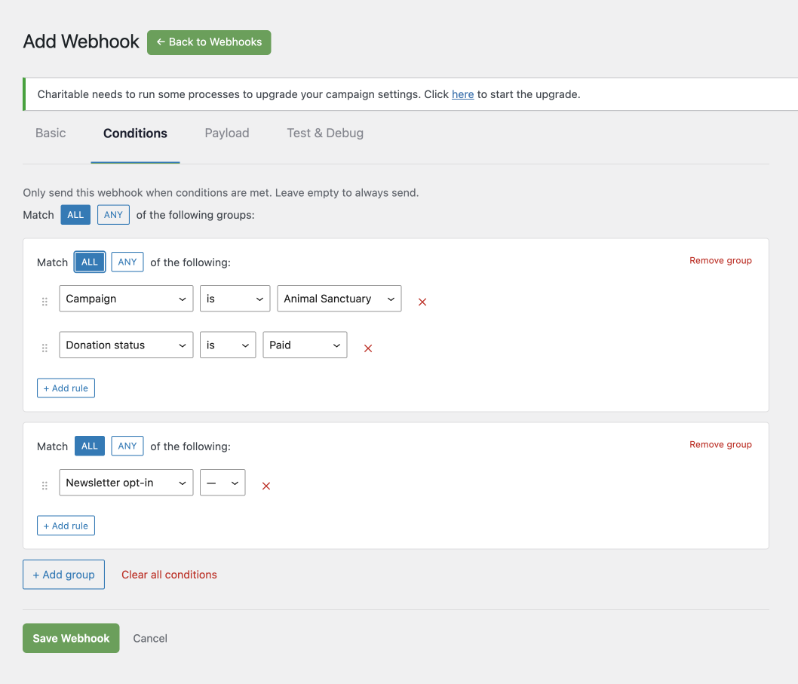
🎯 Filtrer par n'importe quoi : Écrivez des conditions sur 11 champs – montant du don, statut, passerelle de paiement, pays du donateur, inscription à la newsletter, campagne, champs personnalisés, et plus encore.
🧩 Logique ET/OU : Combinez des conditions avec la logique ET au sein d'un groupe, et la logique OU entre les groupes – la même structure flexible utilisée dans les outils d'automatisation du marketing.
✅ Test en un clic : Envoyez une charge utile de test depuis l'éditeur et visualisez le code de réponse, le corps et le temps de livraison avant que votre abonnement ne soit actif.
Contrôle total de votre charge utile
Vos applications connectées doivent recevoir les données dont elles ont besoin, rien de plus. L'onglet Charge utile vous permet de sélectionner parmi plus de 80 champs disponibles sur les métadonnées du donateur, du don, de la campagne, récurrentes et du site – et de désélectionner tout ce qui est non pertinent pour maintenir des charges utiles propres et rapides.
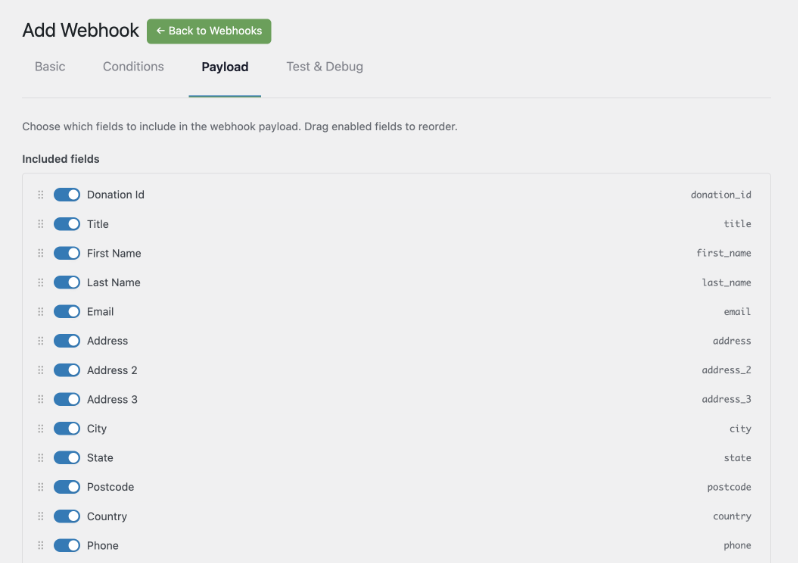
💰 Données du donateur : Nom, e-mail, adresse, total des dons à vie, nombre de dons.
👁️ Données du don : Montant, statut, passerelle, ID de transaction, associations de campagne.
📊 Données de campagne : Objectif, montant collecté, pourcentage, nombre de donateurs, dates de début et de fin.
Chaque requête sortante est signée avec HMAC-SHA256, afin que votre point de terminaison puisse vérifier que la charge utile provient de votre site.
Commencez en quelques minutes avec les modèles de plateforme
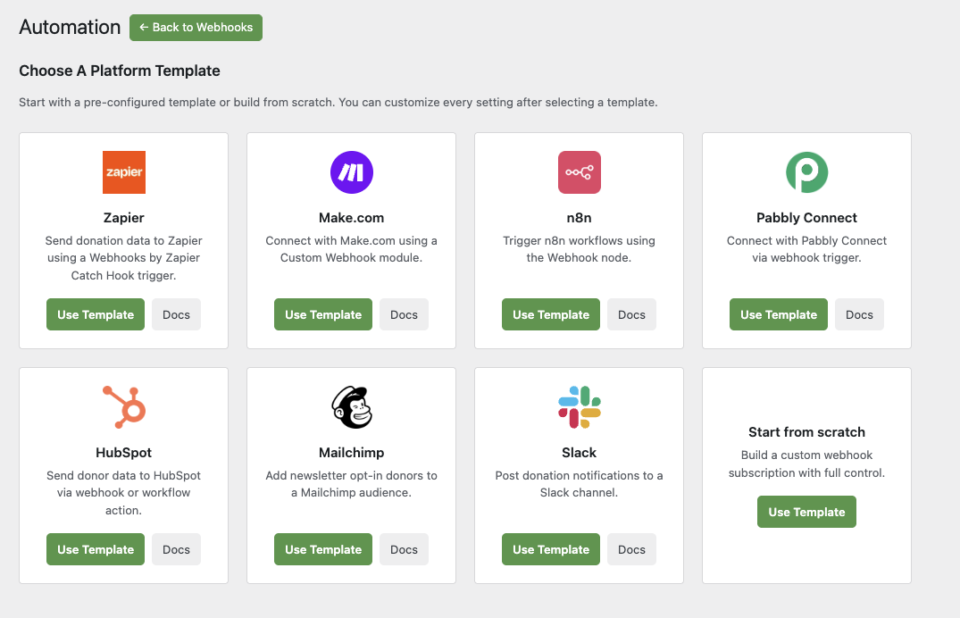
Automation Connect est livré avec 8 modèles de plateforme pré-configurés, vous n'avez donc pas à tout configurer à partir de zéro.
🚀 Zapier : Pré-configuré pour un déclencheur Catch Hook de Webhooks by Zapier.
🛠️ Make.com : Prêt pour un module Webhook personnalisé.
⚙️ n8n : Pointe directement vers votre nœud Webhook n8n.
🤝 HubSpot, Mailchimp, Pabbly, Slack : Chaque modèle définit des paramètres par défaut raisonnables pour sa plateforme, y compris une condition d'inscription à la newsletter pour le modèle Mailchimp.
Sélectionnez un modèle, collez votre URL de webhook et enregistrez. Vous pouvez personnaliser tous les paramètres par la suite.
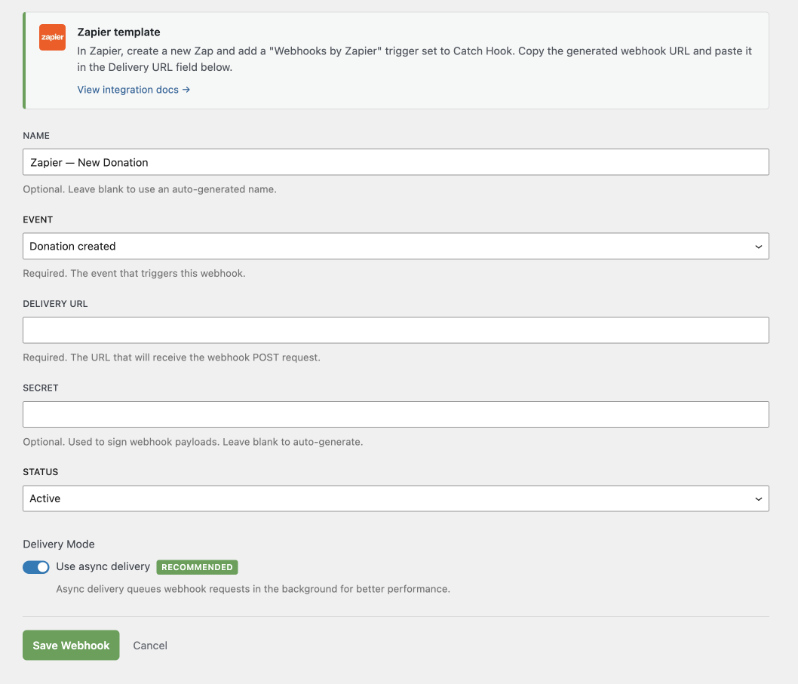
C'est fait ! Vous êtes prêt à automatiser vos tâches d'administration et de collecte de fonds.
Pour les agences et les développeurs
Hooks, filtres et personnalisation complète
Automation Connect expose un ensemble complet de filtres WordPress pour chaque couche du système. Enregistrez des champs de charge utile personnalisés, ajoutez de nouveaux événements de déclenchement, injectez des conditions personnalisées et modifiez les charges utile avant la livraison – le tout sans toucher aux fichiers principaux du plugin.
add_filter( 'charitable_automation_connect_payload_fields', function( $fields ) {
    $fields['my_custom_field'] = array(
        'label'   => __( 'My Custom Field', 'my-plugin' ),
        'group'   => 'donor',
        'resolve' => function( $event_data ) {
            return get_user_meta( $event_data['donor_user_id'], 'my_meta_key', true );
        },
    );
    return $fields;
} );
Livraison fiable à grande échelle
Les livraisons échouées sont automatiquement retentées via WordPress Action Scheduler avec une mise à l'échelle exponentielle, de sorte que les erreurs d'extrémité transitoires ne signifient pas de perte de données. Chaque tentative de livraison est enregistrée dans le système de journalisation de Charitable, accessible via Outils » Journaux.
Conçu pour les déploiements multi-sites et clients
Automation Connect fonctionne proprement dans les environnements multisites. Chaque site gère ses propres abonnements indépendamment, et la vérification de la licence respecte le statut du plan Pro par site.
Commencez avec Automation Connect 2.0
Automation Connect 2.0 est maintenant disponible pour tous les utilisateurs de Charitable Pro ayant le plan Pro ou supérieur.
Mettez à jour vers Charitable Pro 1.8.13, activez l'extension depuis Charitable » Extensions, et créez votre premier abonnement en quelques minutes.
Lire la documentation d'Automation Connect »
Pas encore utilisateur de Charitable Pro ?
Charitable a été téléchargé plus d'un million de fois et soutient la collecte de fonds pour des organisations à but non lucratif, des écoles et des causes dans le monde entier. Charitable Pro ajoute des fonctionnalités avancées comme Automation Connect, des reçus de dons PDF, des dons récurrents et un support prioritaire.
Charitable a plus d'un million de téléchargements !
Faites confiance à des millions de personnes pour mener à bien vos campagnes de collecte de fonds. Essayez Charitable sans risque dès aujourd'hui.
✅ Garantie de remboursement de 14 jours
✅ Tarification transparente
✅ Configuration sans code
Restez connecté pour plus de ressources pour les organisations à but non lucratif
Pour plus de tutoriels et de vidéos adaptés aux organisations à but non lucratif, abonnez-vous à notre chaîne YouTube. Nous publions régulièrement des conseils d'experts, des guides étape par étape sur les dons en ligne, des stratégies de collecte de fonds et des ressources pratiques pour aider votre organisation à réussir.
🗞️ Recevez des conseils hebdomadaires et des guides exclusifs dans votre boîte de réception
Rejoignez notre newsletter →
🎥 Regardez des tutoriels étape par étape et des histoires de réussite
Abonnez-vous à notre chaîne YouTube →
👩🏽💻 Connectez-vous avec notre communauté et obtenez des informations quotidiennes sur les organisations à but non lucratif
Suivez-nous sur LinkedIn →
🥳 Reels amusants et informations sur les organisations à but non lucratif
Suivez-nous sur Instagram →
👀 Vidéos perspicaces et amusantes pour vous aider à développer votre cause
Suivez-nous sur TikTok→
🌎 Abonnez-vous et suivez pour des conseils généraux sur la collecte de fonds
Obtenez des conseils sur la collecte de fonds sur TikTok →
Ressources puissantes pour la collecte de fonds
⬇️ Téléchargez des stratégies éprouvées, des idées de campagnes et des outils d'experts
Obtenez le kit de collecte de fonds →
💸 Obtenez des ressources gratuites pour la collecte de fonds
Rendez-vous sur le Hub de collecte de fonds Charitable →
🤔 Des questions sur Charitable ?
FAQ Charitable →
🏎️ Essayez Charitable
Créez votre démo Charitable →
Comprendre les termes et le jargon des organisations à but non lucratif
Glossaire des organisations à but non lucratif→
% Vous recherchez des offres et des réductions pour les organisations à but non lucratif ?
Meilleures offres et réductions pour les organisations à but non lucratif →







Laisser un commentaire