

Instagram est considéré comme un moyen créatif pour de superbes photographies, des photos de vacances et le mème occasionnel. Mais c’est bien plus que cela : des organisations du monde entier exploitent ce réseau pour partager des nouvelles et promouvoir leurs services. Les organisations à but non lucratif commencent également à en reconnaître la valeur, en créant du contenu autour de causes importantes et en montrant aux publics comment ils peuvent aider.
Ci-dessous, nous aborderons la valeur d’Instagram pour les organisations à but non lucratif, ainsi que quelques conseils pour faire passer votre cause auprès des gens sur la plateforme.
Pourquoi les organisations à but non lucratif devraient-elles utiliser Instagram ?
La plupart des réseaux sociaux sont utiles pour les organisations à but non lucratif, mais Instagram se démarque par son accent mis sur le visuel.
Ce n’est pas seulement un endroit pour publier des photos, mais un endroit pour partager des initiatives, faire passer le message et mener des campagnes. Grâce aux types de contenu que vous pouvez publier – des publications d’images et d’albums aux vidéos, Stories et même filtres IA – le contenu peut être enrichi de manière créative et déployé stratégiquement auprès des personnes que vous souhaitez atteindre.
Et il convient de noter que les initiatives de collecte de fonds peer-to-peer peuvent être pilotées nativement via Instagram, en particulier lorsque les gens peuvent partager comment ils aident et solliciter des dons auprès de leur propre public.
En fin de compte, Instagram peut vous aider à :
- Gagner en visibilité auprès d’une gamme de communautés et de publics – en particulier les jeunes donateurs.
- Accroître la notoriété du travail que vous accomplissez.
- Compléter les techniques de collecte de fonds des organisations à but non lucratif, telles que la collecte de fonds peer-to-peer.
- Positionner votre organisation à but non lucratif comme une marque de confiance, afin d’établir la confiance et de devenir reconnaissable parmi les autres.
6 étapes pour commencer à utiliser Instagram pour votre organisation à but non lucratif
1. S’inscrire en tant que profil professionnel
La configuration de votre profil est importante — c’est la première chose que les spectateurs verront lorsqu’ils visiteront votre page. Une fois que vous vous inscrivez en tant que profil professionnel, vous pourrez vous identifier comme une organisation à but non lucratif, ce que votre public devrait savoir, surtout si vous demandez des dons.
Instagram pourra alors offrir des informations sur les principales métriques des médias sociaux : impressions, engagement et portée de toutes vos publications et stories. Si vous décidez de publier une publicité ou une publication sponsorisée, Instagram vous aidera également à analyser votre portée et vous proposera quelques conseils pour que vos publications aient encore plus d’impact.
2. Inclure un lien dans votre profil
Instagram doit être utilisé comme un outil créatif pour soutenir vos causes, il est donc important de les diriger vers un lien où ils peuvent voir de quoi parle votre page et en apprendre davantage. Dans vos stories et légendes de publication, vous pouvez encourager les spectateurs à accéder à ce lien en disant « rendez-vous sur notre lien en bio ». De là, ils peuvent accéder à votre site Web pour comprendre ce que représente votre organisation à but non lucratif et pourquoi elle mérite d’être soutenue.
3. Définir vos objectifs
L'opportunité inégalée d'Instagram pour atteindre et connecter avec les gens est quelque chose que vous devriez essayer d'exploiter autant que possible. Il est logique de développer les objectifs de votre organisation et de décider quels objectifs comptent le plus pour vous. Que voulez-vous retirer de cette plateforme ?
Voici quelques objectifs courants pour les organisations à but non lucratif sur Instagram :
- Notoriété de la marque — qui vous, votre association ou ONG êtes – et ce que vous valorisez.
- Gestion ou engagement communautaire — tendre la main à la communauté élargie et se connecter avec des personnes qui se soucieront des mêmes causes que vous.
- Collecte de fonds et dons — collecter des fonds pour votre association.
- Recrutement de bénévoles — intégrer des bénévoles pour aider à vos missions.
Il est possible que vous ayez plus d'un objectif, mais assurez-vous de savoir lesquels conviennent à votre compte Instagram. Par exemple, si l'un de vos objectifs principaux est de collecter des dons, vous pouvez diffuser une publicité sur votre publication pour montrer comment vous aidez les gens et inclure un bouton d'appel à l'action « Faire un don maintenant », afin que votre public comprenne immédiatement comment il peut s'impliquer.
4. Créez une stratégie pour atteindre vos objectifs
Selon votre objectif, il est bon de réfléchir à des tactiques pour atteindre votre public.
Par exemple, si l'un de vos objectifs principaux dans l'utilisation d'Instagram est de recruter des bénévoles, il y a beaucoup de choses que vous pouvez faire en matière de contenu et de stratégie pour faire entendre votre mission.
- Créez du contenu vidéo autour des bénévoles existants qui ont participé à des missions – écoutez leurs histoires et montrez comment ils aident.
- Créez des publications infographiques sur les opportunités à venir.
- Créez des publicités payantes pour inviter les gens à en savoir plus sur votre mission.
- Republiez les Stories Instagram de bénévoles sur votre page pour créer un sentiment d'authenticité.
D'un autre côté, si votre objectif principal est de collecter des fonds, ces tactiques sont plus efficaces pour atteindre les donateurs.
- Créez des vidéos qui montrent comment l'argent est dépensé et où.
- Organisez une publication en direct ou sur Instagram TV pour répondre aux questions courantes sur l'importance de cette initiative.
- Créez des publicités payantes et ciblez les personnes les plus susceptibles de faire un don en utilisant l'outil Audience.
- Créez des publications et des Stories sur le fil d'actualité Instagram présentant le travail de mission avant et après.
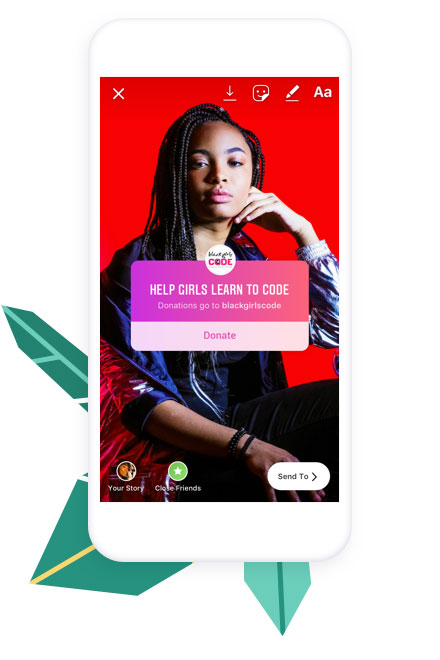
Instagram soutient activement les organisations à but non lucratif et veille à ce qu'elles reçoivent 100 % des dons collectés via leur plateforme. Il vaut vraiment la peine d'utiliser les Stories pour encourager les gens à faire un don, car vous pouvez ajouter l'autocollant de don dans les Stories pour créer directement une collecte de fonds.
5. Suivez les hashtags pour rester informé
Lorsque vous publiez du contenu avec des hashtags, votre contenu apparaîtra dans les publications tendances utilisant les mêmes hashtags. De même, vous pouvez suivre d'autres hashtags, et ceux-ci commenceront à apparaître dans votre fil d'actualité Instagram, mélangés aux publications régulières des comptes que vous suivez.
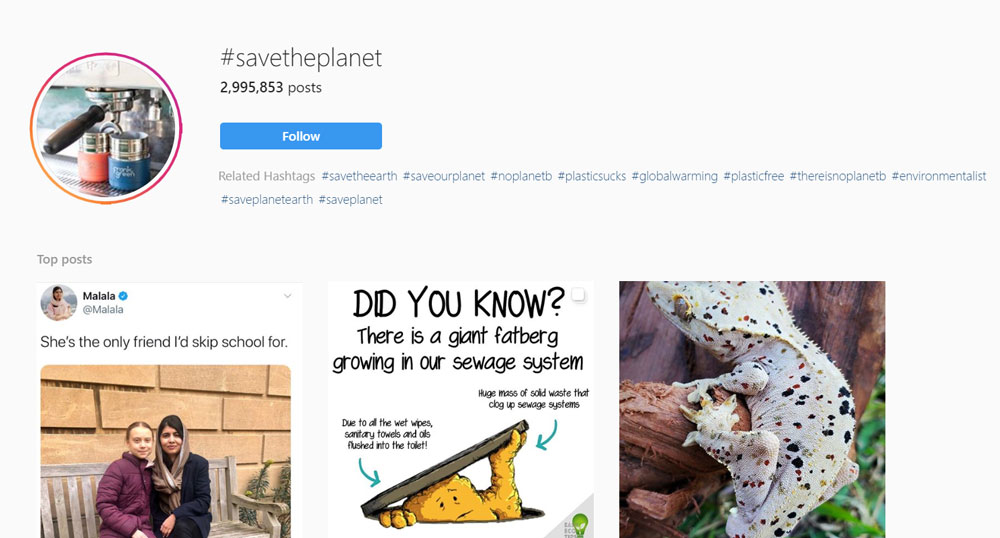
Au lieu de voir un nom d'utilisateur dans le fil d'actualité, vous verrez le hashtag répertorié à côté de la photo actuelle pour ce hashtag et le symbole de hashtag coloré. L'utilisateur qui a téléchargé la publication sur le hashtag et tout tag de lieu utilisé sont répertoriés sous le hashtag lui-même.
Les hashtags peuvent également être ajoutés aux stories Instagram, mais il est conseillé de s’assurer que la police est suffisamment grande, car l’algorithme de la plateforme ne reconnaît pas les hashtags trop petits.
6. Utilisez ce qui suit comme source d’inspiration pour le style et l’ambiance de votre contenu
Des images et des messages forts – ainsi qu’une marque et un ton cohérents – montreront aux gens les causes qui vous tiennent à cœur et qui vous êtes en tant qu’organisation à but non lucratif. Cela augmentera finalement votre portée sur Instagram et créera des liens plus profonds avec les donateurs et les sympathisants.
Découvrez quelques excellents exemples d’organisations à but non lucratif utilisant différentes approches de contenu pour sensibiliser.
PETA
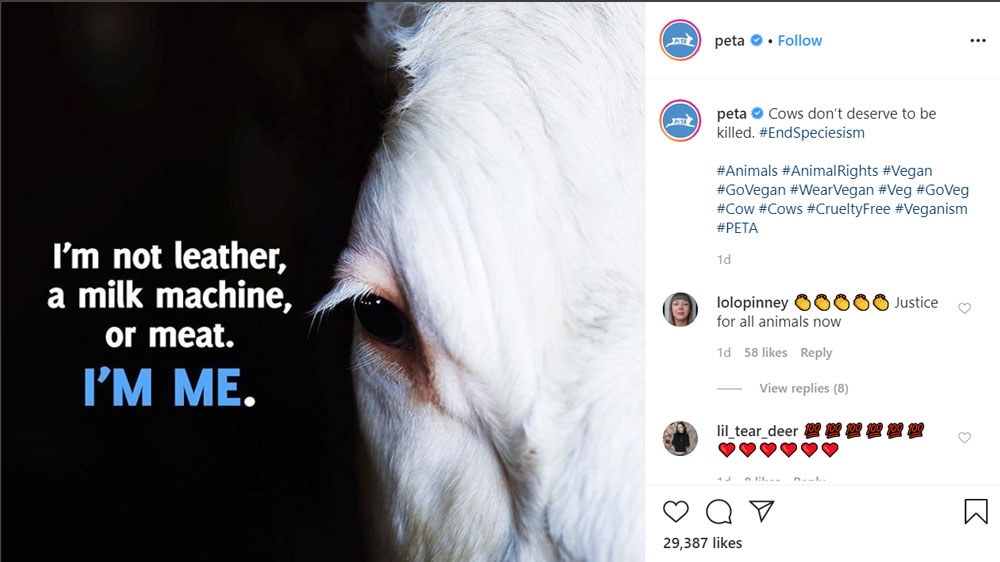
PETA (People for the Ethical Treatment of Animals) est la plus grande organisation de défense des droits des animaux au monde, avec plus de 6,5 millions de membres et de sympathisants.
PETA place généralement le texte directement sur ses images, fusionnant un appel à l’action dans le cadre de la conception. De cette façon, les défenseurs peuvent partager leurs campagnes tout en conservant le message original.
L'Armée du Salut (Australie)
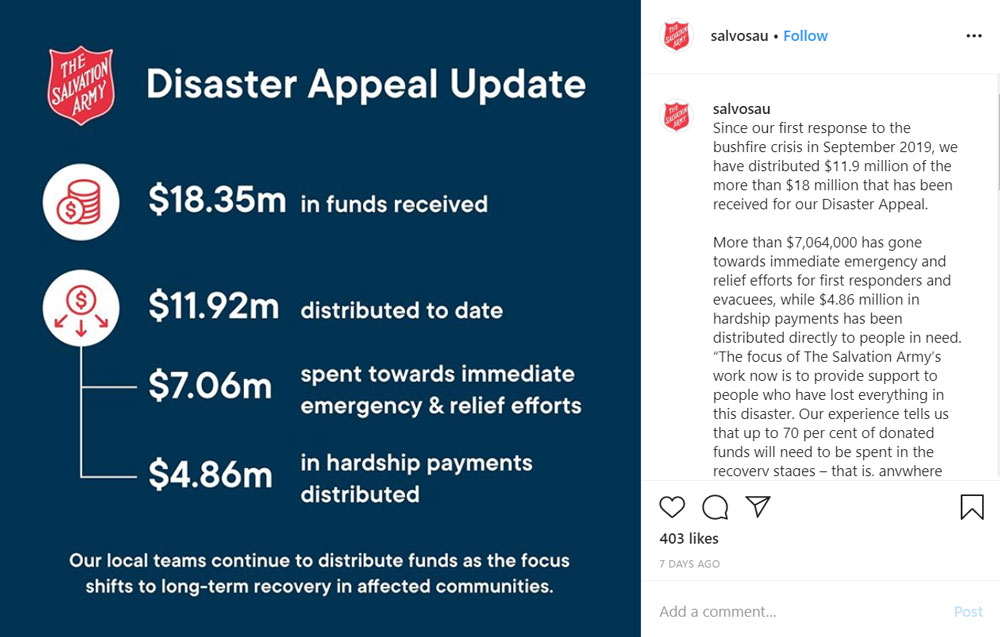
L’organisation caritative internationale, l’Armée du Salut, utilise également sa marque et son texte dans le cadre de ses images – dans cet exemple, en énonçant des faits et des chiffres importants concernant ses efforts de secours. Il est particulièrement important de tenir les publics informés de l’endroit où vont leurs dons et de qui ils aident.
Direct Relief
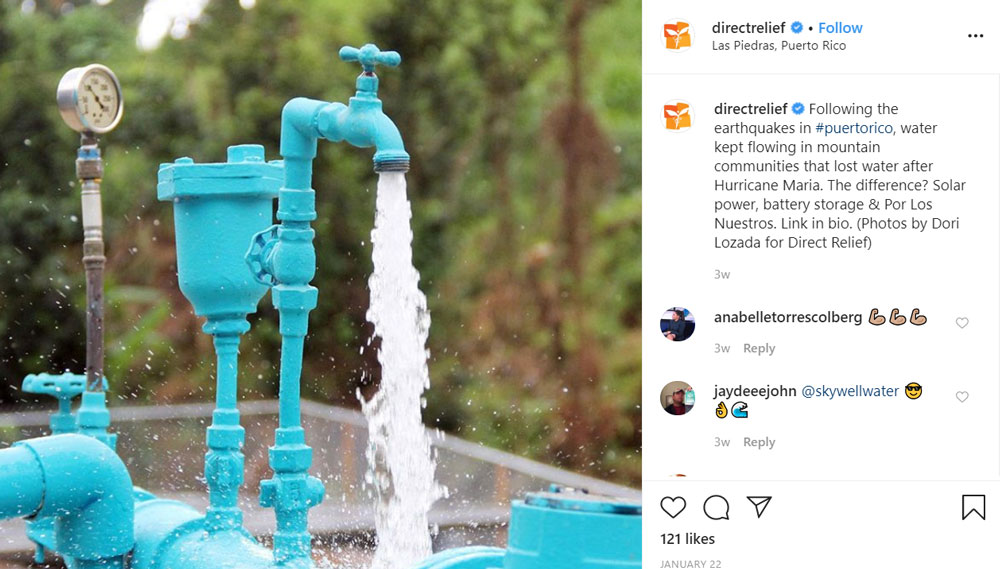
La mission de Direct Relief est d’améliorer la santé et la vie des personnes touchées par la pauvreté et les catastrophes, tant aux États-Unis qu’à l’international. Au lieu d’utiliser des designs de marque dans les images elles-mêmes, ils ont utilisé des photographies de haute qualité pour représenter le travail qu’ils accomplissent. Ici, ils ont montré des pompes à eau qu’ils ont installées dans cette communauté portoricaine.
Mayo Clinic
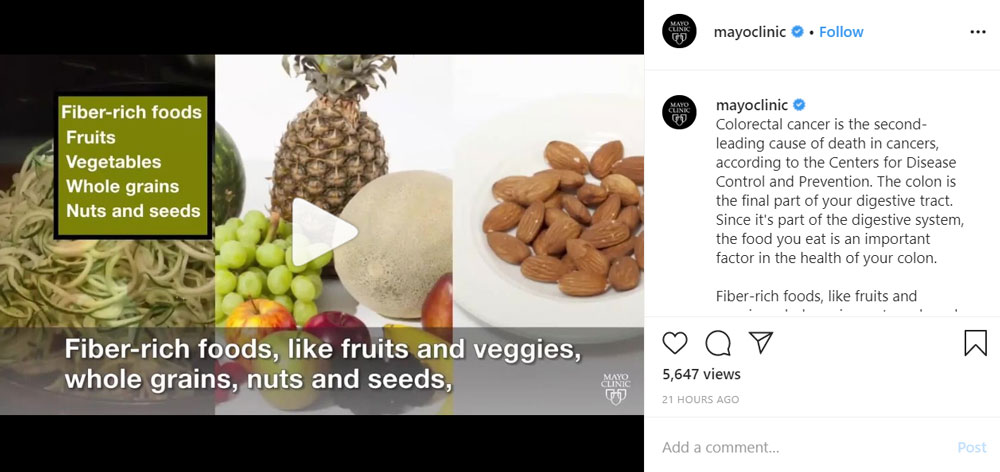
La Mayo Clinic est un centre médical universitaire américain à but non lucratif basé aux États-Unis, axé sur la pratique clinique intégrée, l’éducation et la recherche. Et c’est exactement ce que fait ce post Instagram – dans ce cas, une vidéo plutôt qu’une image. En utilisant des légendes d’actifs audacieuses pour capturer les détails clés sur les sujets de santé, ils utilisent leur contenu pour informer et inspirer de manière créative leur public à mieux manger.
Human Rights Watch
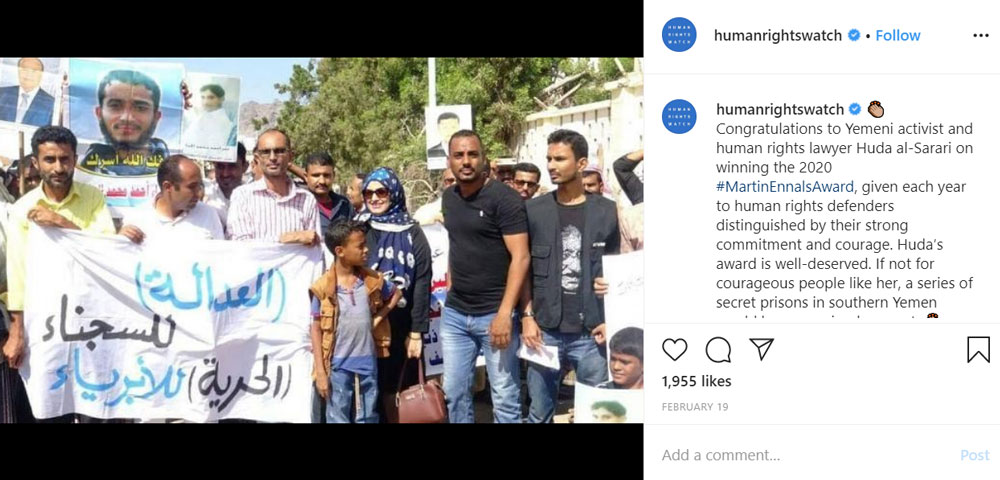
Human Rights Watch est une ONG qui défend les droits de l’homme. Le groupe fait pression sur certains gouvernements, décideurs politiques et auteurs de violations des droits de l’homme pour qu’ils dénoncent les abus et respectent les droits de l’homme, et le groupe travaille souvent au nom des réfugiés, des enfants, des migrants et des prisonniers politiques. Ils ont également opté pour des images qui parlent de leurs causes sans design supplémentaire – ici, vous les voyez créditer des avocats au Yémen qui luttent contre la détention dans des prisons secrètes.
Conclusion
Nous espérons que cet article vous a fourni des conseils sur la façon dont les organisations à but non lucratif peuvent tirer parti d’Instagram pour faire avancer leurs causes.
Rappelez-vous que pour collecter des fonds efficacement, vous devez investir dans la communauté sociale — par le biais de contenu de qualité et d'une stratégie, qu'il s'agisse de publicités payantes ou de l'exploitation des tendances caritatives. Restez connecté avec votre public en suivant les tendances, en répondant aux commentaires et en créant du contenu attrayant – et suivez notre blog pour en savoir plus.
Vous avez apprécié cet article ? Lisez ceci ensuite :





Laisser un commentaire