Documentation Charitable

Apprenez à tirer le meilleur parti de Charitable grâce à des instructions claires, étape par étape.

Charitable Ambassadors [legacy]

This documentation applies to Charitable Ambassadors versions before 2.0. For the current documentation, see:

Ambassadeurs Charitable

Charitable Ambassadors transforms your website into a peer-to-peer fundraising or crowdfunding platform.

Installation

Installing Charitable Ambassadors is the same as installing any other Charitable extension. If you’re not sure how to do that, we recommend first reading our guide to installing Charitable extensions.

Creating the Ambassador Pages

Once Charitable Ambassadors is installed, you need to create two new pages. In addition, you should set up the login, registration and profile pages.

Campaign Submission Page

  1. Click Pages Add New.
  2. Inside the content area of your page, add this shortcode: [charitable_submit_campaign]
  3. Add a title to your page and click Publish.
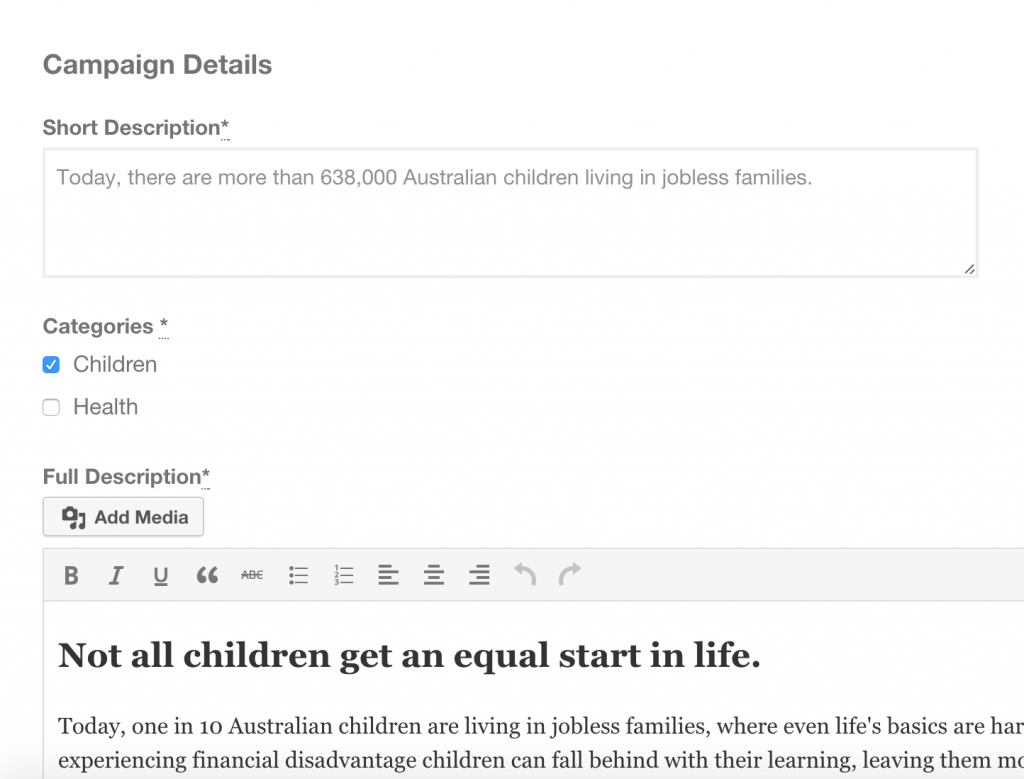
Campaign submission form
The frontend submission form added with charitable submit campaign

My Campaigns Page

This creates a page that will be accessible to logged in users and allows them to see a list of their campaigns.

  1. Click Pages > Add New.
  2. Inside the content area of your page, add this shortcode: [charitable_my_campaigns]
  3. Add a title to your page and click Publish.
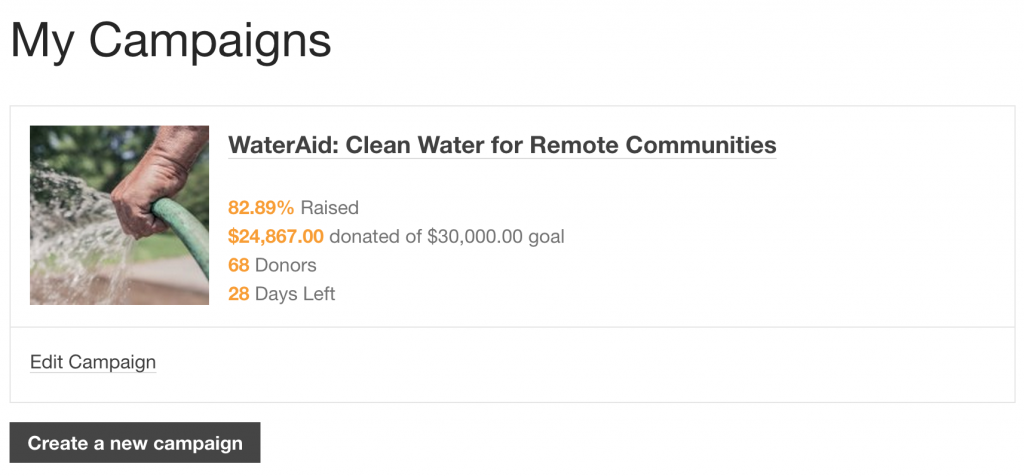
Fundraiser dashboard
The fundraisers list of campaigns added with the charitable my campaigns shortcode

My Donations Received Page

This creates a page that will be accessible to logged in users and allows them to see a list of donations they have received towards their campaigns.

  1. Click Pages > Add New.
  2. Inside the content area of your page, add this shortcode: [charitable_creator_donations]
  3. Add a title to your page and click Publish.

Update Charitable Settings

After creating all of these pages, you can go to the Charitable settings area to link each of them to their corresponding setting.

  1. Go to Charitable > Settings.
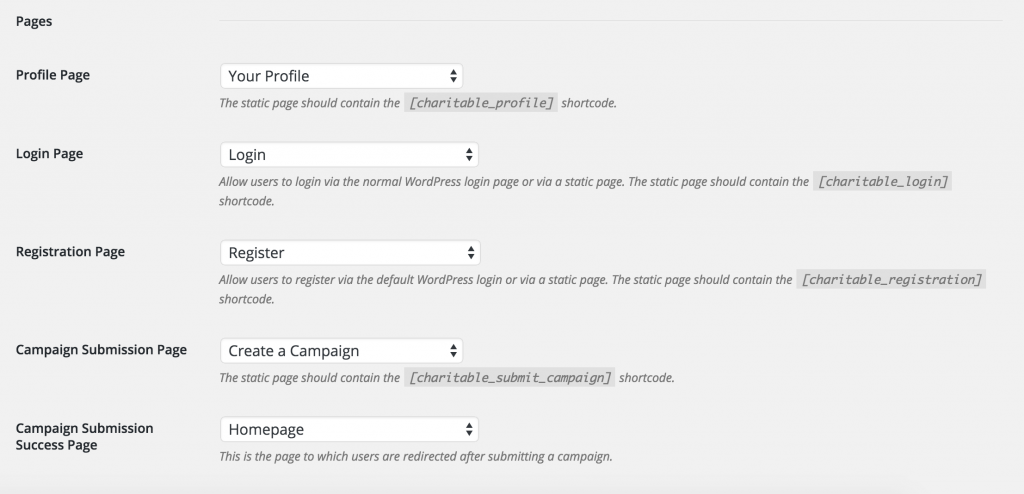
  2. Inside the General tab, scroll down to the Pages section. For each setting, select the page you just created. For the “Campaign Submission Success Page” section, choose a page that you would like your users to be redirected to after submitting a campaign.
  3. Click Save Changes.
Charitable page settings

Submission Form Settings

After setting up your pages, you can set up rules for your campaign creators.

  1. Still within the Charitable settings area, click on the Ambassadors tab.
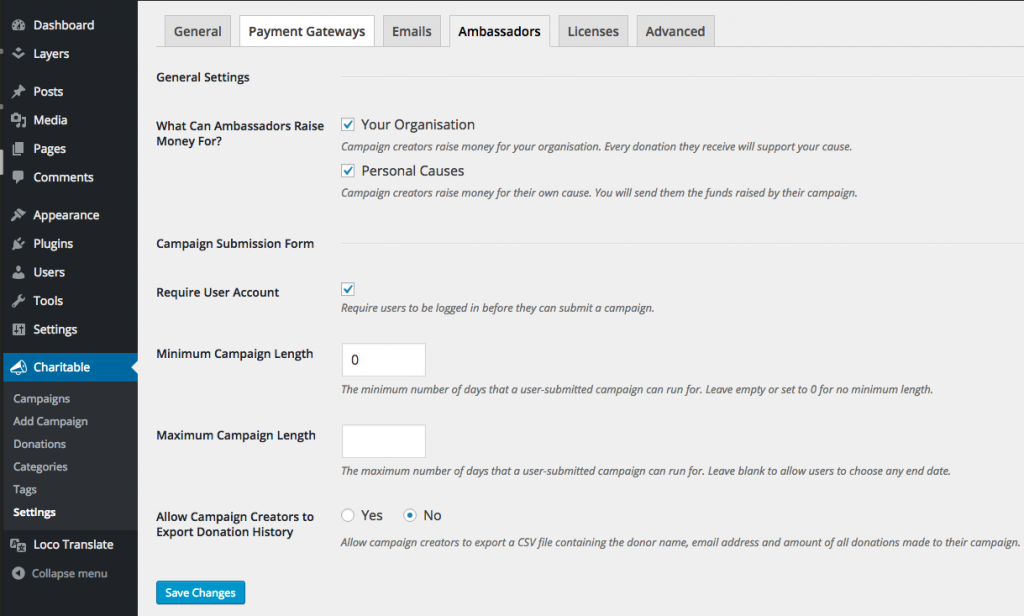
  2. You will see settings like what is pictured below:
    Charitable Ambassadors settings page
  3. After updating your settings, click Save Changes.

Vous avez encore des questions ? Nous sommes là pour vous aider !

Dernière modification :

Quoi de neuf dans Charitable

Voir les dernières mises à jour
🔔 Abonnez-vous pour recevoir nos dernières mises à jour
📧 Abonnez-vous aux e-mails

Abonnement par e-mail

Rejoignez notre newsletter

Nous ne vous enverrons pas de spam. Nous envoyons un e-mail uniquement lorsque nous pensons qu'il vous sera réellement utile. Désabonnez-vous à tout moment !

ambassadors improved Nouveau

Moderation and Directory Screens In Ambassadors 3.0

Ambassadors 3.0 has new features: moderation and directory screens… now easily see those who are earning donations on your peer to peer network – including campaign creators that might need to be verified – all in one place. Generate reports, email ambassadors and campaign creators directly and more.

🚀 See when campaign creators and ambassadors have updated their campaigns, what donors/donation they have brought in and more.

🎉 Manually add ambassadors and campaign creators, and approve them in one-click!

Visitez cette page pour en savoir plus.

Nouveau Paiements

⚡ Unlock India-Based Donations: Meet Charitable’s Native Razorpay Integration

Trying to collect donations in India? Charitable’s native Razorpay integration features:

⚡ Instant UPI Integration: Accept fast, local donations directly inside your form via apps like PhonePe, Google Pay, Paytm, and BHIM without sending donors away from your site.

📲 Auto-Generated Campaign QRs: Instantly render scannable QR codes encoding a UPI deep link directly on your public campaign pages and sidebars for an effortless “scan-to-give” experience.

💰 Dual Local & Global Reach: Headline your campaigns in INR while seamlessly accepting major international currencies like USD, EUR, GBP, and CAD to maximize global support.

🔁 Seamless Recurring Giving: Fully integrates with the Charitable Recurring addon to manage automatic monthly subscriptions directly through Razorpay without extra code.

↩️ Automatic Two-Way Sync: Keep your books perfectly clean with two-way refund syncing—issue a refund inside WordPress or your Razorpay dashboard and both sides update automatically.

🔒 Webhook-Verified Security: Automatically protect your donation records using HMAC-signed webhook verification to ensure every status update represents real money cleared on the rails.

Visitez cette page pour en savoir plus.

Intégration Nouveau

🎉 New Built-in PushEngage Integration

Struggling with falling email open rates and rising ad costs just to keep your supporters engaged? Charitable’s built-in PushEngage integration features:

🔔 Zero-Fee Direct Messaging: Deliver crisp, instant pop-up notifications straight to your donors’ desktops and mobile devices.

⏱️ Four Smart Automated Triggers: Automatically send updates for immediate donation thank yous, full-list campaign launches, urgent “ending soon” alerts, and goal milestone celebrations.

📈 Group Momentum Broadcasts: Turn private milestones into public wins by automatically broadcasting alerts to your entire subscriber list the moment a campaign hits 50%, 75%, or 100% of its goal.

📊 Automatic Analytics Tracking: Monitor exactly where your incoming notification traffic is coming from with built-in attribution that requires zero complex configuration.

Visitez cette page pour en savoir plus.

Nouveau Sécurité

💂‍♂️ DonationGuard nouveau 🛡️ Protège automatiquement vos dons !

Vous craignez les attaques de test de cartes ou les bots de spam qui inondent vos formulaires de don, mais vous ne voulez pas gâcher l'expérience de don pour vos vrais supporters ? Les fonctionnalités DonationGuard de Charitable :

🛡️ Détection de bots en temps réel : surveille activement chaque soumission de don pour cinq signaux d'attaque distincts sans ralentir vos donateurs humains.

📊 Score de trafic intelligent : évalue instantanément l'activité par rapport à une base de référence apprise des rythmes de don normaux de votre site pour détecter les tests de cartes sournois et lents.

🚨 Alertes par niveaux de gravité : ouvre immédiatement des « enregistrements d'attaques » structurés et vous informe par e-mail et alertes d'administration dès qu'une campagne commence à être attaquée.

🎯 Défense en un clic : déployez une sécurité instantanée en utilisant le préréglage « Paramètres recommandés » pour activer simultanément les modules Honeypot, Time Trap et Rate Limit.

🚫 Listes de blocage automatisées : arrêtez définitivement les récidivistes en bloquant automatiquement les adresses e-mail suspectes en fonction de vos règles personnalisées.

Visitez cette page pour en savoir plus.

GiveWP Migrations Nouveau

🧤 Service de migration White Glove pour GiveWP

Vous envisagez de passer de GiveWP à Charitable pour votre plateforme de collecte de fonds, mais vous ne voulez pas risquer de perdre vos données ni gérer vous-même une configuration technique complexe ? Le service de migration "White Glove" de Charitable comprend :

👥 Cartographie parfaite des donateurs : transférez en toute sécurité toute votre base de données de supporters sans aucune perte de données.

📊 Historique financier complet : préservez méticuleusement chaque transaction historique pour des rapports continus et précis.

🔄 Dons récurrents transparents : transférez en toute sécurité les abonnements récurrents actifs sans perturber vos revenus entrants ni obliger vos donateurs à mettre à jour leurs informations.

💳 Aucune interruption de passerelle : continuez à utiliser Stripe, PayPal ou tout autre processeur compatible avec GiveWP que vous utilisez déjà.

🚀 Configuration technique experte : détendez-vous pendant que notre équipe s'occupe du travail le plus difficile pour installer et configurer vos formulaires — de plus, les utilisateurs éligibles reçoivent une année complète de Charitable Pro gratuitement.

Visitez cette page pour en savoir plus.