

Aujourd'hui, nous publions Charitable 1.5, la première version majeure de 2017. Il s'agit d'une mise à jour importante pour Charitable, car elle ajoute des fonctionnalités très demandées et améliore de nombreux aspects de Charitable, tant visibles qu'invisibles.
Lisez ci-dessous pour découvrir les nouveautés.
Contributeurs
Tout d'abord, je tiens à remercier les personnes qui ont apporté des modifications dans cette version. Sans ordre particulier : Jeroen Sormani, Rafe Colton, Kathy Darling, Nick Ciske, B. Scott et dsoares. Merci à tous !
Bien sûr, le code n'est pas le seul moyen de contribuer à Charitable. À tous ceux qui ont laissé un commentaire sur un problème, signalé un bug ou aidé à la traduction de Charitable, merci !
Top 9 des nouvelles fonctionnalités de Charitable 1.5
69 problèmes ont été résolus dans cette version (soit un peu plus de 23 % de tous les problèmes jamais signalés pour Charitable) et une bonne partie d'entre eux concernaient de nouvelles fonctionnalités. Je vais couvrir neuf des nouvelles fonctionnalités les plus importantes ci-dessous, mais pour un aperçu complet de toutes les nouveautés, lisez le journal des modifications.
Créer et modifier des dons dans le tableau de bord WordPress
Parmi toutes les nouvelles fonctionnalités de Charitable 1.5, c'est celle qui a été la plus souvent demandée. Vous pouvez maintenant ajouter de nouveaux dons directement depuis votre tableau de bord WordPress.
Les dons existants peuvent être modifiés avec la même interface.
Pour en savoir plus, lisez la documentation détaillée.
Renvoyer les reçus de dons (et autres e-mails) depuis le tableau de bord
Un donateur a-t-il déjà perdu son reçu de don ?
Vous pouvez désormais renvoyer facilement un reçu de donateur via le tableau de bord WordPress. Allez simplement au don, sélectionnez l'e-mail dans les Actions de don que vous souhaitez renvoyer et cliquez sur le bouton « Renvoyer l'e-mail ».
Lisez la documentation pour un guide étape par étape sur le renvoi d'e-mails.
Soit dit en passant, la boîte méta Actions de don est un nouvel ajout dans la version 1.5. Pour le moment, elle est utilisée exclusivement pour le renvoi d'e-mails, mais nous prévoyons d'ajouter d'autres options à l'avenir.
Ajoutez votre formulaire de don à une page
Une autre demande populaire était un moyen simple d'intégrer un formulaire de don dans une page. C'est maintenant possible avec le shortcode [charitable_donation_form] :
[charitable_donation_form campaign_id=123]
Assez facile, non ? Si vous avez besoin de plus de détails, lisez la documentation.
Nouveaux e-mails pour les dons hors ligne
Un problème de longue date pour certains utilisateurs de Charitable était l'absence d'un bon système de notification par e-mail pour les dons hors ligne. Le reçu et la notification d'administration pour les dons ne sont envoyés que lorsqu'un don est marqué comme Payé, ce qui se produit automatiquement pour toutes les passerelles, sauf pour le hors ligne.
Les dons hors ligne restent en attente jusqu'à ce qu'ils aient été marqués comme Payés par un administrateur.
Rafe Colton a résolu ce problème en introduisant deux nouveaux e-mails, le Reçu de don hors ligne et la Notification de don hors ligne. Ces e-mails ne sont envoyés que pour les dons hors ligne en attente. Dans le reçu de don, vous pouvez également afficher les instructions de paiement hors ligne pour aider votre donateur à savoir comment compléter son don.
Cliquez ici pour plus de détails sur les e-mails.
Visualisez les informations importantes de la campagne en un coup d'œil
Le tableau des campagnes dans le tableau de bord WordPress a été repensé pour être adapté aux campagnes. En un coup d'œil, vous pouvez maintenant voir combien une campagne a rapporté, quand elle se termine et, si elle est terminée, si elle a été réussie.
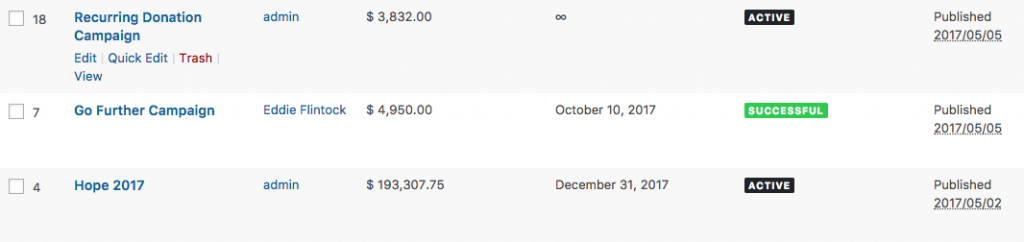
Vous verrez également l'ID de la campagne dans la colonne de gauche, ce qui est utile lorsque vous avez besoin de connaître l'ID d'une campagne particulière dans un shortcode tel que [charitable_donation_form], [charitable_donors] ou [campaigns], qui acceptent tous des paramètres de campagne.
Affichez les donateurs n'importe où avec un shortcode
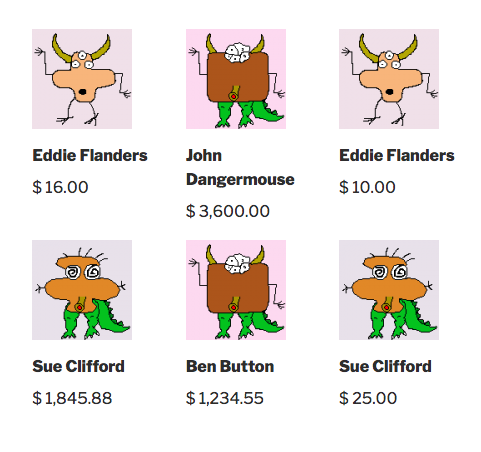
Vous pouvez désormais afficher une liste de vos donateurs n'importe où sur votre site avec le shortcode [charitable_donors]. Le shortcode vous permet d'afficher les donateurs de toutes les campagnes ou d'une campagne spécifique, et vous pouvez également contrôler ce qui s'affiche pour chaque donateur. Par défaut, il affichera l'avatar (ou Gravatar) du donateur, son nom et le montant qu'il a donné :
Comptes donateurs améliorés avec vérification par e-mail
Depuis la version 1.4, Charitable inclut un shortcode [charitable_my_donations], qui a fourni un moyen facile pour les donateurs de consulter leur historique de dons.
Mais il y avait un problème : cela n'affichait que les dons que vous aviez faits en étant connecté. Si vous aviez fait des dons sans être connecté mais avec la même adresse e-mail que votre compte, ceux-ci n'apparaissaient pas.
Pour résoudre ce problème, nous avons mis en place un processus de vérification d'e-mail de base pour les utilisateurs enregistrés, qui garantit qu'ils ont accès à l'adresse e-mail avec laquelle ils se sont enregistrés avant d'afficher tous les dons associés à cette adresse. Confirmer votre adresse e-mail est un processus rapide et facile : il suffit de cliquer sur un lien et c'est fait.
Ajouter un lien de déconnexion avec un shortcode
Charitable a toujours inclus des formulaires de connexion, d'inscription et de profil. Dans la version 1.4, nous avons également ajouté un processus de réinitialisation de mot de passe. Mais il manquait encore un moyen intégré d'ajouter un lien de déconnexion.
Heureusement, il existe maintenant un shortcode simple pour cela :
[charitable_logout]
Lisez la documentation pour plus de détails sur l'utilisation du shortcode de déconnexion.
Profitez pleinement de Varnish Cache avec Charitable
Varnish est un mécanisme de mise en cache populaire utilisé par les principaux hébergeurs web comme WP Engine et SiteGround. Vous l'utilisez peut-être sans le savoir. Et il vous a peut-être causé des maux de tête avec Charitable.
Le problème principal que nous avons rencontré avec Varnish est qu'il pouvait empêcher les sessions utilisateur de fonctionner comme prévu. Un sous-produit particulièrement désagréable était que les donateurs voyaient un message « Vous n'avez pas accès à ce reçu de don » immédiatement après avoir fait un don. Difficile de laisser cette impression aux donateurs.
Charitable 1.5 résout ce problème en chargeant dynamiquement le contenu (via AJAX) lorsque nous détectons que les sessions utilisateur ne fonctionnent pas. Cela signifie que vous pouvez maintenant profiter pleinement de Varnish pour accélérer votre site web, sans impacter négativement l'expérience de vos donateurs.
Mises à jour pour les développeurs
Tous les changements ne sont pas visibles par l'utilisateur, et Charitable 1.5 inclut une série d'améliorations conçues pour faciliter la vie des développeurs et ouvrir de nouvelles opportunités pour la création d'expériences de collecte de fonds en ligne avec Charitable.
Enregistrez de nouveaux champs de don avec l'API des champs de don
Avant cette version, si vous vouliez ajouter un nouveau champ à votre formulaire de don et afficher la valeur dans les e-mails, les métadonnées d'administration et les exportations de dons, vous deviez utiliser cinq hooks distincts, avec une fonction différente pour chacun. En plus d'être une corvée, cela laissait beaucoup de place à l'erreur, en particulier pour les utilisateurs moins expérimentés qui ont ajouté des champs personnalisés avec peu ou pas de connaissances en développement.
Dans Charitable 1.5, vous pouvez enregistrer un nouveau champ de don en une seule fonction appelée sur le hook init :
function ed_charitable_register_new_donation_field() {
    $field = new Charitable_Donation_Field( 'national_id_number', array(
        'label'          => __( 'National ID Number', 'charitable' );
        'data_type'      => 'user',
        'donation_form'  => array(
            'show_after' => 'phone',
            'required'   => false,
        ),
        'admin_form'     => array(
            'show_after' => 'phone',
            'required'   => false,
        ),
        'show_in_meta'   => true,
        'show_in_export' => true,
        'email_tag'      => array(
            'description' => __( 'The donor\'s national ID number' , 'charitable' ),
        )
    ) );

    charitable()->donation_fields()->register_field( $field );
}

add_action( 'init', 'ed_charitable_register_new_donation_field' );
Voir le code complet, abondamment commenté pour un aperçu détaillé de toutes les options disponibles.
Obtenez facilement les décomptes de donateurs et de dons avec les classes Charitable_Query
La classe Charitable_Query est la base de Charitable_Donations_Query et Charitable_Donor_Query, qui vous permettent d'obtenir des collections de dons et de donateurs, respectivement. Mais parfois, vous n'avez pas besoin d'obtenir la collection complète ; vous avez juste besoin du nombre de résultats.
Nous avons ajouté une nouvelle option à Charitable_Query qui vous permet d'obtenir facilement le décompte. Définissez simplement output sur count et formez le reste de votre requête comme d'habitude. Par exemple, voici une requête qui obtiendra le nombre de dons effectués par le donateur ID 123 à la campagne ID 4 :
$query = new Charitable_Donations_Query( array(
    'campaign' => 4,
    'donor_id' => 123,
    'output' => 'count'
) );
$query->count();
Cliquez ici pour plus d'exemples.
Ajouter de nouveaux champs d'e-mail avec l'API des champs d'e-mail
Nous avons découvert un énorme problème de performance lié à la façon dont les champs d'e-mail étaient configurés précédemment, nous avons donc saisi l'opportunité de réécrire complètement la façon dont les champs d'e-mail fonctionnent. Cela a résolu le problème de performance (des pages de configuration qui pouvaient prendre plus de 15 secondes à charger en moins d'une seconde) et a également ouvert une manière plus flexible d'ajouter et de modifier les champs d'e-mail.
function ed_charitable_email_campaign_field_callback( $value, $args, $email ) {
    $campaign = $email->get_campaign();
    return $campaign->get( 'some_field' );
}

function ed_charitable_add_email_campaign_field( $fields ) {
    $fields['some_field'] = array(
        'description' => 'A description of this field',
        'preview'     => 'Placeholder value',
        'callback'    => 'ed_charitable_email_campaign_field_callback',
    );

    return $fields;
}

add_filter( 'charitable_email_campaign_fields', 'ed_charitable_add_email_campaign_field' );
Cliquez ici pour la documentation complète.
Définir un montant de don minimum
Vous pouvez maintenant définir un montant de don minimum pour toutes les campagnes avec le filtre charitable_minimum_donation_amount. Par exemple, pour définir un montant de don minimum de 2 $ :
function ed_charitable_set_minimum_donation_amount() {
    return 2;
 }

add_filter( 'charitable_minimum_donation_amount', 'ed_charitable_set_minimum_donation_amount' );
Commentaires de documentation détaillés pour les hooks et les filtres
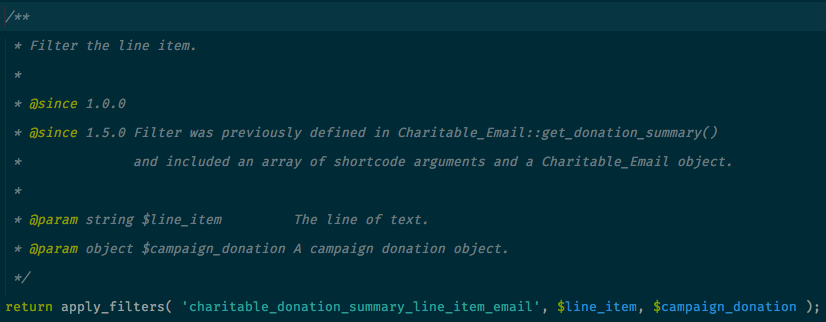
Nous avons toujours été assez stricts en matière de documentation en ligne, mais avec cette version, nous avons vraiment intensifié nos efforts. De nombreux hooks d'action et de filtre incluent désormais des commentaires de documentation détaillés montrant quand le hook a été introduit et les paramètres qu'il envoie. Voici un exemple :
Autres changements :
- Un autoloader a été ajouté. Merci à Kathy Darling pour celui-ci !
- Définir si une campagne peut recevoir des dons avec le filtre
charitable_campaign_can_receive_donations. - Utilisez le filtre
charitable_monetary_amountpour un contrôle précis de l'affichage des montants monétaires. - Ajout de l'API de vue de formulaire. Celle-ci sépare la manière dont les formulaires sont rendus de la manière dont ils sont configurés. Elle améliore également les performances.
- Ajout de l'API d'endpoint, qui vous permet d'enregistrer de nouveaux endpoints via Charitable.
Qu'en pensez-vous ?
Comme vous pouvez le constater, il s'agit d'une mise à jour énorme pour Charitable. Il nous a fallu beaucoup plus de temps que prévu pour y parvenir, mais je suis immensément fier des améliorations apportées. Bon nombre de ces problèmes étaient des points de friction de longue date pour les utilisateurs, et c'est formidable d'avoir enfin une solution solide à ces problèmes.
Si ce n'est pas déjà fait, mettez à jour Charitable via votre tableau de bord dès aujourd'hui et dites-nous ce que vous en pensez. La plupart de ces améliorations sont nées des commentaires des utilisateurs, et comme toujours, nous voulons savoir ce que vous pensez de ces mises à jour.
Partagez vos réflexions dans les commentaires ci-dessous !






Laisser un commentaire