

GiveWP est un choix populaire pour de nombreuses organisations à but non lucratif et collecteurs de fonds. Mais ce n’est pas toujours la solution idéale pour tout le monde. Vous recherchez peut-être des fonctionnalités différentes, une option plus abordable, ou vous souhaitez simplement explorer ce qui existe d’autre. Vous êtes au bon endroit.
Dans cet article, nous allons examiner les meilleures alternatives à GiveWP.
J’ai passé d’innombrables heures à tester et comparer divers plugins de dons, et je suis là pour partager mes idées avec vous. Nous explorerons des options qui répondent à différents besoins – des boutons de don simples et directs aux plateformes riches en fonctionnalités qui peuvent gérer des campagnes de collecte de fonds complexes.
Nous examinerons la facilité d’utilisation, les options de personnalisation, les intégrations de passerelles de paiement et, bien sûr, les prix.
Prêt à découvrir un plugin de dons qui pourrait faire passer vos efforts de collecte de fonds au niveau supérieur ? Plongeons et explorons les meilleures alternatives à GiveWP qui pourraient être exactement ce que vous recherchez !
1. Charitable

Charitable est le meilleur plugin de dons tout-en-un pour WordPress. Il est simple de créer, personnaliser et lancer des collectes de fonds en quelques minutes. Il existe de nombreux modèles parmi lesquels choisir, puis vous disposez d’un constructeur visuel par glisser-déposer pour apporter les modifications dont vous avez besoin. Vous pouvez ajouter des boutons de don, des barres de progression, des photos, des vidéos, des cases à cocher, et plus encore. C’est tellement facile, vous vous demanderez pourquoi vous vous en êtes déjà soucié auparavant !
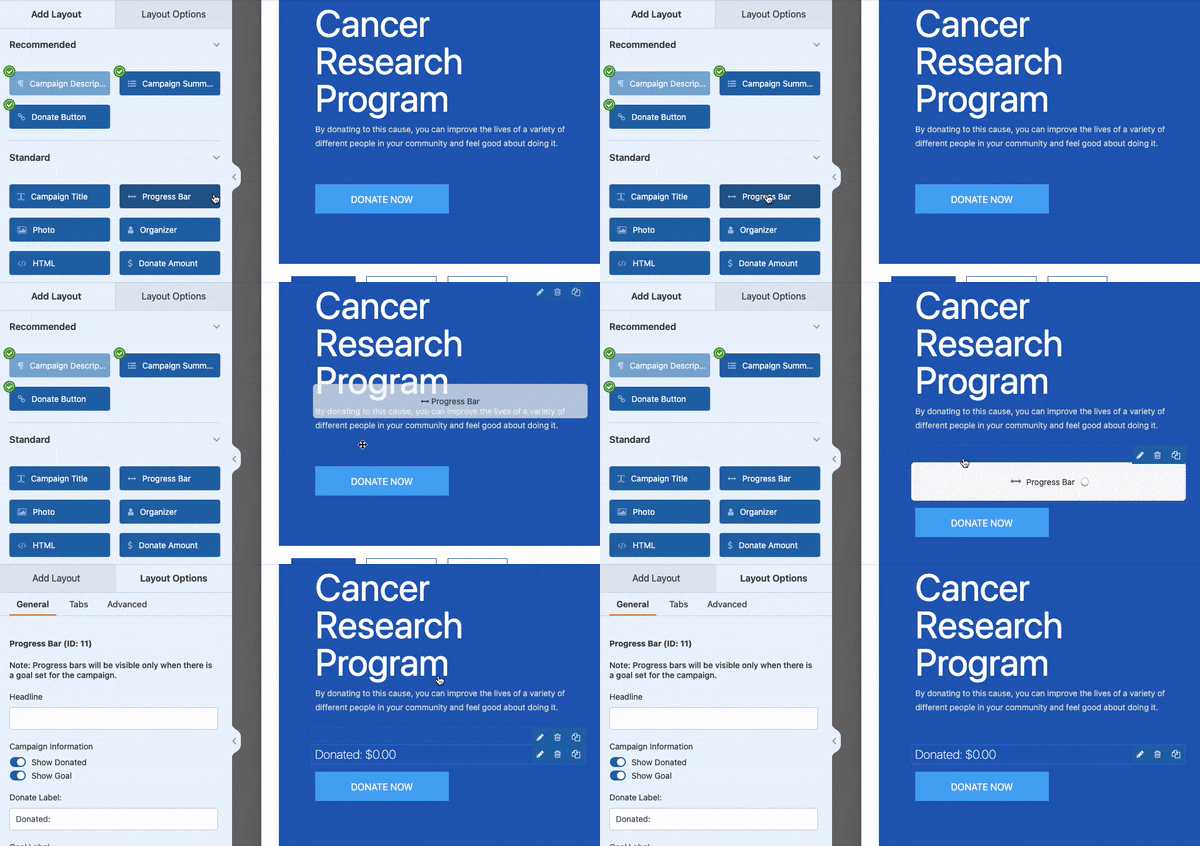
Maintenant, chaque centime compte pour votre cause, c’est pourquoi Charitable ne facture aucun frais de transaction. Les seuls frais que vous verrez proviennent de votre passerelle de paiement, et même ceux-ci peuvent être couverts par les donateurs s’ils le choisissent.
En parlant de paiements, Charitable vous offre toutes les options – cartes de crédit, PayPal, ACH, Apple Pay, Google Pay, et même les dons hors ligne. Vos donateurs peuvent contribuer comme ils se sentent le plus à l’aise. Mais il y a plus…
Charitable est conçu pour être un système de gestion des dons tout-en-un directement dans votre tableau de bord WordPress. Vous pourrez collecter des fonds, suivre les dons, gérer les donateurs et obtenir des rapports détaillés pour vous aider à prendre des décisions intelligentes et basées sur les données.
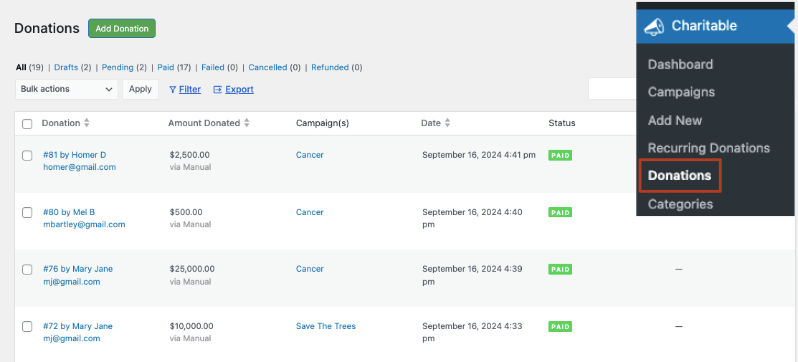
De plus, comme l’équipe de Charitable sait que vous êtes occupé à changer le monde, ils ont automatisé les tâches fastidieuses.
Avez-vous besoin de reçus fiscaux ? Générez-les en quelques secondes.
Vous souhaitez recevoir des alertes par e-mail ou envoyer des mises à jour par e-mail aux donateurs ? Configurez-les une fois et les e-mails seront envoyés automatiquement selon vos règles. C’est si facile !
Charitable s’intègre également bien avec d’autres outils, s’intégrant de manière transparente avec vos services d’e-mail et de marketing préférés pour que vos campagnes se déroulent sans problème.
Voici les fonctionnalités de Charitable que vous allez adorer :
- Formulaires de dons personnalisables : Créez des formulaires attrayants avec un constructeur par glisser-déposer, plusieurs modèles et des champs personnalisés pour les informations des donateurs.
- Options de paiement flexibles : Acceptez les dons via diverses passerelles, y compris PayPal, Stripe, et les méthodes hors ligne, avec la prise en charge des dons uniques et récurrents.
- Gestion de campagne : Configurez des campagnes de collecte de fonds illimitées avec des objectifs, des échéances, des barres de progression et des collectes de fonds d'équipe.
- Gestion des donateurs : Base de données intégrée pour suivre les profils des donateurs, l'historique des dons et permettre une communication facile avec les sympathisants.
- Prise en charge des frais : Donnez aux donateurs la possibilité de couvrir les frais de transaction lors de leur don.
- Rapports et analyses : Générez des rapports de dons complets et des analyses de performance de campagne avec des capacités d'exportation.
- Fonctionnalités d'e-mail : Envoyez des reçus de don automatisés, personnalisez des modèles d'e-mail et intégrez-vous aux plateformes de marketing par e-mail populaires.
- Dons récurrents : Offrez des intervalles récurrents flexibles et fournissez un portail donateur pour que les abonnés gèrent leurs dons.
- Adaptabilité mobile : Tous les formulaires et processus de don sont optimisés pour divers appareils et tailles d'écran.
- Prise en charge multidevise : Acceptez et convertissez automatiquement les dons dans plusieurs devises pour répondre à un public mondial.
- Génération de reçus fiscaux : Créez et envoyez automatiquement des reçus déductibles des impôts avec des modèles personnalisables.
Pour une comparaison plus détaillée, voir comment GiveWP se compare à Charitable »
Le meilleur ? Vous pouvez essayer Charitable gratuitement. Lorsque vous serez prêt à débloquer les fonctionnalités premium, les forfaits commencent à seulement 69 $ par an. Charitable offre également une garantie de remboursement de 14 jours.
Rejoignez les plus de 10 000 organisations qui utilisent déjà Charitable et commencez à maximiser vos dons dès aujourd'hui. Il est temps de rendre la collecte de fonds plus facile, plus efficace et plus amusante !
2. WP Simple Pay

WP Simple Pay est le meilleur plugin de paiement pour WordPress qui vous permet d'accepter des paiements rapidement sans processus de configuration complexe. C'est de loin la solution la plus simple de cette liste pour accepter des dons en ligne.
Donc, si vous n'avez pas besoin de configurer une plateforme de dons complète mais que vous souhaitez simplement un moyen simple pour les donateurs d'envoyer de l'argent, c'est le bon plugin pour vous.
L'une des fonctionnalités remarquables est son intégration transparente avec Stripe. Si vous utilisez déjà Stripe ou le préférez en tant que processeur de paiement, WP Simple Pay facilite incroyablement la connexion et l'acceptation des paiements. Le plugin gère toute la complexité du traitement sécurisé des paiements, ce qui est un grand avantage pour les propriétaires de sites qui ne veulent pas se soucier des problèmes de sécurité des paiements.
Vous pouvez créer et lancer un formulaire de don en quelques minutes comme ceci :
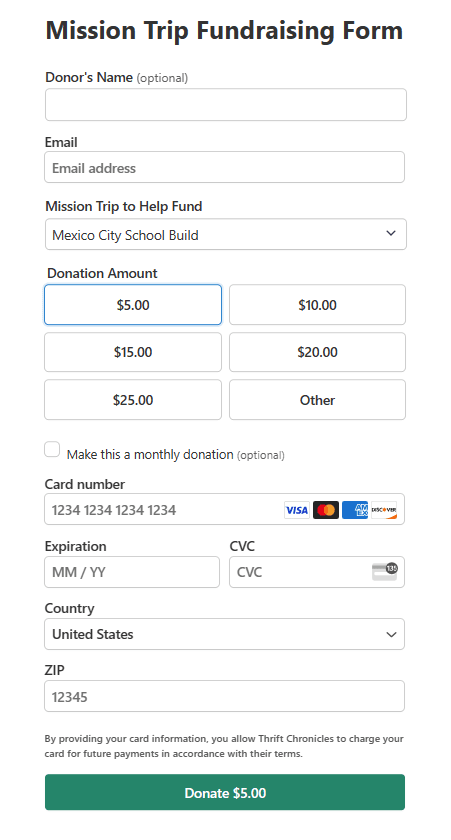
Vous pouvez définir vos montants de don ou permettre aux utilisateurs de choisir un montant personnalisé. Tous vos paramètres peuvent être configurés en un clic. Vous n'avez jamais à utiliser de code ni à vous soucier des aspects techniques.
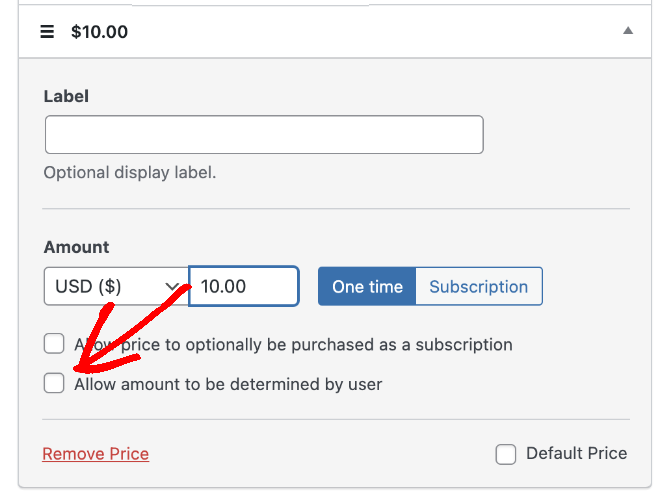
Le plugin prend également en charge les paiements récurrents, ce qui est idéal pour collecter des dons récurrents, les sites d'adhésion ou les services par abonnement.
La version gratuite est entièrement fonctionnelle, mais vous devrez peut-être passer à la version pro pour accéder à des fonctionnalités telles que les champs personnalisés, les paiements récurrents et d'autres styles de boutons de paiement. Les prix sont raisonnables, mais c'est quelque chose à garder à l'esprit si votre budget est serré.
Un domaine où WP Simple Pay excelle vraiment, c'est son approche conviviale pour les développeurs. Si vous êtes à l'aise avec le code, vous pouvez personnaliser pas mal de choses en utilisant des hooks et des filtres. Cela m'a permis d'adapter l'expérience de paiement à des besoins clients très spécifiques.
En termes de support, j'ai trouvé la documentation complète, et les quelques fois où j'ai eu besoin de contacter leur équipe de support, ils ont été réactifs et serviables.
Voici une liste des fonctionnalités clés qui font de WP Simple Pay une alternative notable à GiveWP :
- Intégration Stripe : Connexion transparente avec Stripe pour un traitement sécurisé des paiements.
- Formulaires de paiement personnalisés : Créez et personnalisez des formulaires de paiement sans codage.
- Paiements uniques et récurrents : Prise en charge des paiements uniques et par abonnement.
- Prise en charge de plusieurs devises : Acceptez les paiements dans diverses devises.
- Modèles de formulaires de paiement : Modèles prédéfinis pour une configuration rapide.
- Prise en charge d'Apple Pay et Google Pay : Activez les méthodes de paiement modernes pour faciliter les dons.
- Codes promotionnels : Créez et gérez des codes de réduction pour des promotions spéciales.
- Prise en charge des taux de taxe : Ajoutez des calculs de taxe aux paiements si nécessaire.
- E-mails de confirmation de paiement : Envoyez automatiquement des reçus aux donateurs.
- Outils de conformité RGPD : Fonctionnalités pour aider à respecter les réglementations de protection des données.
Dans l'ensemble, WP Simple Pay est un excellent choix si vous avez besoin d'un moyen fiable et simple d'accepter des paiements ou des dons sur votre site WordPress, surtout si vous utilisez déjà Stripe. Ce n'est pas le plugin de don le plus riche en fonctionnalités, mais pour de nombreux sites, sa simplicité et sa facilité d'utilisation en font la solution parfaite.
3. WPForms

WPForms est le meilleur plugin de création de formulaires pour WordPress et il vous permet de créer n'importe quel type de formulaire pour votre site, y compris les formulaires de contact, de connexion et d'inscription, de réservation d'événements, de dons, de sondages et de quiz, et plus encore.
Créer un formulaire de don est simple. Il y a des modèles à choisir et un constructeur par glisser-déposer pour les personnaliser à votre guise. Vous pouvez ajouter des espaces pour les informations du donateur, laisser les gens choisir combien donner, et même proposer différentes options de don.
Ce que j'aime chez WPForms, c'est que vous pouvez personnaliser le formulaire et même ajouter des images à chaque montant de don personnalisé. Voici un exemple de formulaire que j'ai créé juste pour vous montrer ce que vous pouvez faire avec ce plugin :
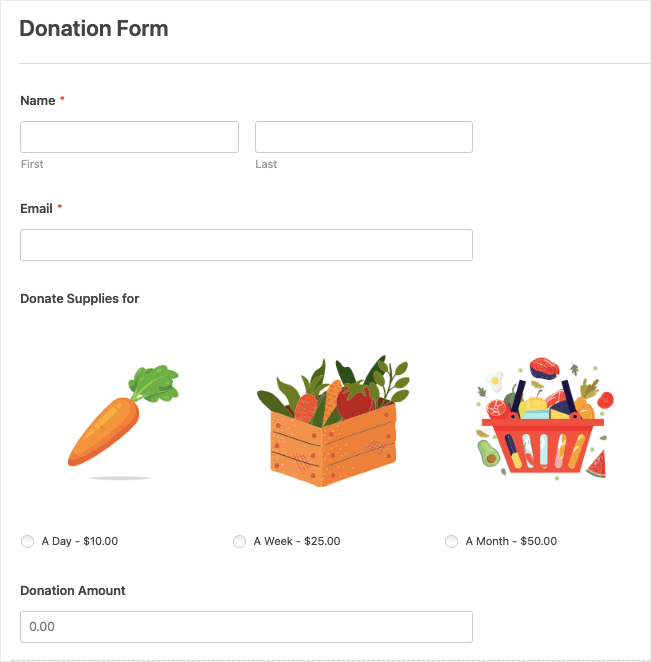
Pour les organisations à but non lucratif, vous pourriez avoir besoin de formulaires multipages si vous devez collecter plus d'informations auprès de vos donateurs. WPForms vous permet de diviser votre formulaire en plusieurs pages.
WPForms s'intègre bien aux passerelles de paiement populaires comme PayPal et Stripe. Le processus de configuration de ces intégrations est relativement simple, ce qui est un soulagement par rapport à certains systèmes plus complexes avec lesquels j'ai travaillé.
Il est également doté d'une gestion intégrée des entrées. Vous pouvez voir les détails des soumissions et exporter les données.
De plus, WPForms propose d'excellents modules complémentaires, comme le module complémentaire d'abandon de formulaire, par exemple, qui peut vous aider à faire un suivi auprès des donateurs potentiels qui ont commencé mais n'ont pas terminé le processus de don.
Voici ce qui distingue WPForms en tant qu'alternative à GiveWP :
- Constructeur de formulaires par glisser-déposer : Interface intuitive pour créer des formulaires de don personnalisés sans codage.
- Intégrations de paiement : Prend en charge les passerelles populaires comme PayPal et Stripe pour des transactions sécurisées.
- Formulaires multipages : Possibilité de créer des formulaires de don en plusieurs étapes pour une meilleure expérience utilisateur.
- Logique conditionnelle : Personnalisez l'expérience de don en fonction des saisies de l'utilisateur.
- Intégrations de marketing par e-mail : Connectez-vous à des services comme Mailchimp pour constituer votre liste de donateurs.
- Adaptatif mobile : Les formulaires sont superbes sur tous les appareils, augmentant le potentiel de don.
- Modèles de formulaires : Plus de 1900 modèles de formulaires de don pré-construits pour une configuration rapide.
- Téléchargements de fichiers : Permettez aux donateurs de joindre des fichiers si nécessaire (par exemple, pour les formulaires de parrainage).
- Gestion des entrées : Système intégré pour gérer et examiner les entrées de dons.
- Abandon de formulaire : Capturez les informations des tentatives de don incomplètes pour un suivi.
- Géolocalisation : Suivez l'origine de vos dons.
- Sondages et enquêtes : Recueillez les commentaires des donateurs en plus des dons.
- Analyses de formulaires : Obtenez des informations sur les performances de vos formulaires de don.
- Enregistrer et reprendre : Les donateurs peuvent enregistrer leur progression et terminer le don plus tard.
WPForms s'avère être une solution polyvalente capable de gérer les dons, les paiements en ligne et la gestion des donateurs, tout en répondant à d'autres besoins de formulaires sur votre site WordPress.
4. Donorbox

Donorbox est une plateforme de dons robuste qui s'étend au-delà de WordPress, ce qui en fait une alternative intéressante à GiveWP.
Contrairement à GiveWP, qui est spécifique à WordPress, Donorbox peut être intégré sur n'importe quelle plateforme de site Web. C'est donc un excellent choix pour les organisations qui utilisent peut-être WordPress maintenant mais qui souhaitent la flexibilité de changer de plateforme à l'avenir sans modifier leur système de dons.
Le processus de configuration est étonnamment simple. Vous n'avez pas besoin d'installer de plugin ; au lieu de cela, vous créez votre formulaire de don sur la plateforme Donorbox, puis vous l'intégrez sur votre site WordPress.
Cette approche a ses avantages et ses inconvénients. L'avantage est qu'elle réduit le superflu sur votre installation WordPress. Cependant, cela signifie également que vous dépendez d'un service externe plutôt que d'avoir tout intégré dans votre tableau de bord WordPress.
Une fonctionnalité qui m'impressionne vraiment est le générateur de formulaires de Donorbox. Il est intuitif et offre un bon éventail d'options de personnalisation. Vous pouvez facilement configurer des dons uniques et récurrents, ajouter des champs personnalisés, et même créer des montants de don suggérés. Les formulaires sont adaptatifs aux mobiles et ont un aspect professionnel dès le départ.
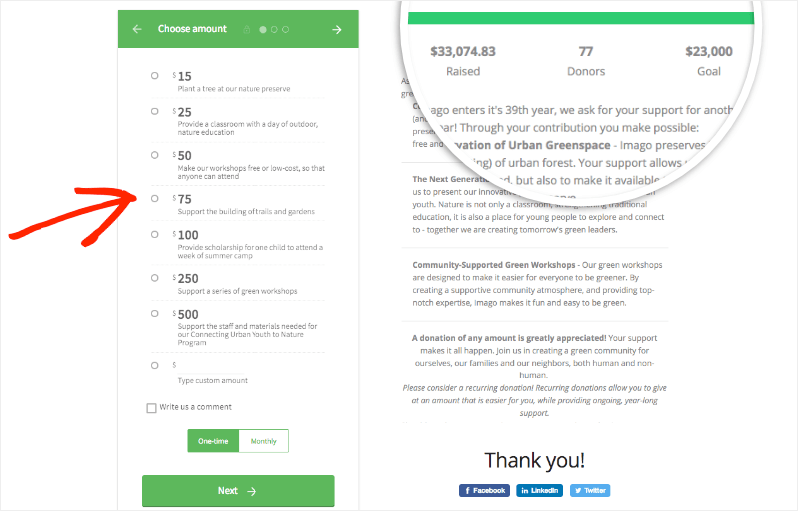
Donorbox excelle également en matière d'options de paiement. Il prend en charge un large éventail de passerelles de paiement, y compris PayPal, Stripe, et même Apple Pay et Google Pay. Cette variété peut aider à augmenter les taux de conversion, car les donateurs peuvent utiliser leur méthode de paiement préférée.
Vous pouvez également autoriser les dons récurrents, et permettre aux donateurs de mettre facilement à jour leurs informations ou d'annuler si nécessaire. Cet aspect de libre-service peut faire gagner beaucoup de temps à votre organisation à but non lucratif en matière de gestion des donateurs.
Les fonctionnalités de reporting sont assez complètes. Vous avez accès à des analyses détaillées sur vos dons, ce qui peut être crucial pour affiner vos stratégies de collecte de fonds. Il existe également un système de gestion des donateurs pour suivre les informations des donateurs et l'historique des dons.
Certainement ! Voici une liste des fonctionnalités clés qui font de Donorbox une alternative solide à GiveWP :
- Formulaires de dons intégrables : Ajoutez facilement des formulaires de dons à n'importe quel site Web, pas seulement à WordPress.
- Dons récurrents : Prise en charge d'options de dons récurrents flexibles (hebdomadaires, mensuels, annuels).
- Multiples passerelles de paiement : Intégration avec PayPal, Stripe, Apple Pay, Google Pay, et plus encore.
- Prise en charge multi-devises : Acceptez les dons dans diverses devises.
- Montants de dons suggérés : Définissez des montants de dons prédéfinis pour guider les donateurs.
- Gestion des donateurs : CRM intégré pour gérer les informations des donateurs et l'historique des dons.
- Reçus déductibles des impôts : Génération et envoi automatiques de reçus fiscaux.
- Campagnes de collecte de fonds : Créez et gérez plusieurs campagnes de collecte de fonds.
- Collecte de fonds pair-à-pair : Permettez aux supporters de créer leurs propres pages de collecte de fonds.
- Le donateur couvre les frais : Permettez aux donateurs de couvrir les frais de transaction.
- Suivi et reporting des dons : Outils d'analyse et de reporting complets.
- Intégrations e-mail : Connectez-vous avec les plateformes de marketing par e-mail populaires.
Un inconvénient potentiel est la structure tarifaire. Bien que Donorbox ne facture pas de frais mensuels pour son plan de base, il prélève un pourcentage sur chaque don (1,5 % au moment de cette évaluation). Pour certaines organisations, en particulier celles avec un volume de dons plus important, cela pourrait finir par être plus cher que le modèle de tarification forfaitaire de GiveWP.
Vous pouvez obtenir toutes ces fonctionnalités et plus encore avec Charitable pour une fraction du coût.
Découvrez la différence entre Donorbox et Charitable »
5. Dons via PayPal

Dons via PayPal est une solution légère et sans fioritures pour ajouter des boutons de don PayPal à votre site WordPress. Après des tests approfondis, voici ce que j'ai trouvé :
Premièrement, l'installation et la configuration sont simples. Vous n'avez pas besoin de connaissances techniques approfondies pour le mettre en œuvre.
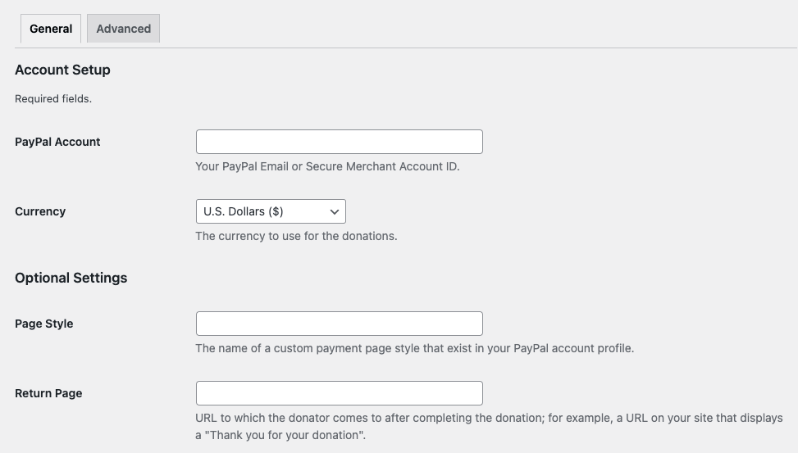
L'une des fonctionnalités clés est la possibilité de personnaliser l'apparence de votre bouton de don. Vous pouvez choisir parmi les boutons prédéfinis de PayPal ou utiliser votre propre image personnalisée. Cette flexibilité est appréciable, surtout pour maintenir la cohérence de la marque sur votre site.
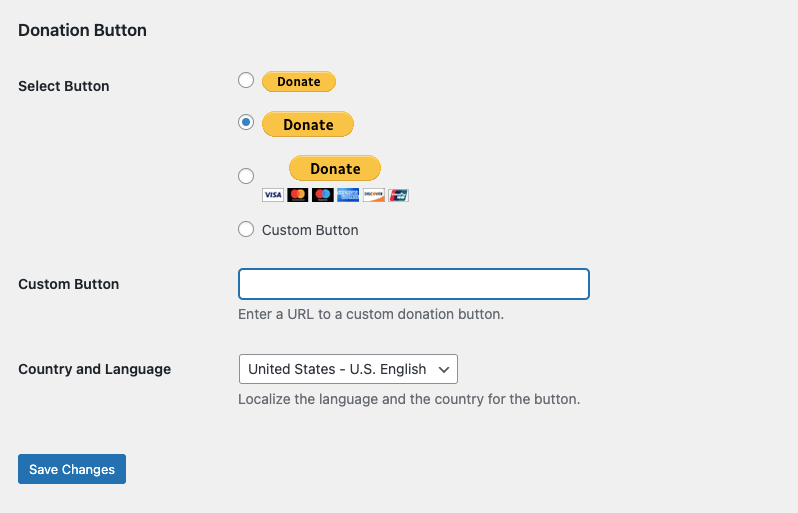
Le plugin vous permet de définir un montant de don par défaut, ce qui peut être utile pour orienter les donateurs vers une contribution suggérée. Cependant, les donateurs peuvent toujours modifier ce montant lorsqu'ils arrivent sur la page PayPal.
L'intégration avec PayPal est, bien sûr, transparente. Cela signifie que vous utilisez le système de paiement sécurisé et largement reconnu de PayPal, ce qui peut inspirer confiance à vos donateurs.
Le plugin prend également en charge plusieurs devises, ce qui est bénéfique si vous avez une base de donateurs internationale.
Cependant, il est important de noter les limitations de ce plugin par rapport à des solutions plus robustes comme GiveWP ou Charitable :
- Personnalisation limitée du formulaire : Bien que vous puissiez personnaliser le bouton, vous n'avez pas beaucoup de contrôle sur le formulaire de don lui-même, qui est hébergé sur le site de PayPal.
- Fonctionnalités de base : Ce plugin est conçu pour des dons simples et uniques. Il ne prend pas en charge nativement des fonctionnalités telles que les dons récurrents ou des campagnes de collecte de fonds plus complexes.
- Gestion minimale des donateurs : Contrairement à GiveWP, ce plugin n'offre pas d'outils de gestion des donateurs intégrés. Vous devrez vous fier à l'interface de PayPal pour les détails des transactions.
- Rapports limités : Le plugin lui-même ne fournit pas d'analyses de dons. Vous devrez utiliser les outils de reporting de PayPal ou vous intégrer à un autre système pour obtenir des informations.
- Processus de don hors site : Les donateurs sont dirigés vers le site de PayPal pour finaliser leur don.
- Aucun champ supplémentaire : Vous ne pouvez pas facilement collecter d'informations supplémentaires auprès des donateurs au-delà de ce qu'offre le formulaire standard de PayPal.
Un avantage de ce plugin est qu'il est entièrement gratuit, sans version premium à laquelle passer. Cela peut en faire une option attrayante pour les petites organisations ou les particuliers disposant d'un budget limité. En même temps, vous ne pouvez pas vous attendre à de nouvelles fonctionnalités et innovations.
En termes de mises à jour et de support, le plugin est assez bien maintenu, mais vous n'obtiendrez pas le support dédié que vous obtiendriez avec un plugin premium comme Charitable.
Dans l'ensemble, le plugin PayPal Donations peut être une bonne alternative à GiveWP pour ceux qui ont des besoins de dons très basiques et des budgets limités. Il est idéal pour les petites organisations, les blogs personnels ou les projets qui ont simplement besoin d'un moyen simple d'accepter des dons sans fioritures.
Cependant, pour les organisations ayant des besoins de collecte de fonds plus complexes, nécessitant des fonctionnalités telles que les dons récurrents, une personnalisation étendue, les dons sur site ou une gestion détaillée des donateurs, une solution plus robuste comme Charitable serait probablement plus appropriée. Le choix dépendra finalement de vos besoins spécifiques, de vos capacités techniques et de vos objectifs de collecte de fonds.
Ce sont les meilleures alternatives à GiveWP.
Quelle est la meilleure alternative à GiveWP ?
Charitable se distingue comme la meilleure alternative à GiveWP pour la plupart des utilisateurs.
Voici pourquoi :
- Riche en fonctionnalités : Charitable offre un ensemble complet de fonctionnalités qui rivalisent avec GiveWP, notamment des formulaires personnalisables, plusieurs passerelles de paiement, des dons récurrents et des rapports détaillés.
- Facile à utiliser : Son interface intuitive et son générateur de formulaires par glisser-déposer le rendent accessible aux débutants comme aux utilisateurs expérimentés.
- Rentable : Charitable ne facture aucuns frais de transaction (au-delà des frais de passerelle de paiement), ce qui peut entraîner des économies importantes, en particulier pour les grandes organisations.
- Flexibilité : Il propose des versions gratuites et premium, permettant aux utilisateurs de commencer avec des fonctionnalités de base et de passer à la version supérieure si nécessaire.
- Intégration WordPress : En tant que plugin WordPress dédié, il s'intègre parfaitement à votre site, offrant une expérience cohérente aux administrateurs et aux donateurs.
- Gestion des donateurs : Charitable offre des outils robustes de gestion des donateurs directement dans votre tableau de bord WordPress.
- Personnalisation : Le plugin permet une personnalisation étendue pour correspondre à votre marque et à vos besoins spécifiques.
- Support et mises à jour : Charitable est bien entretenu et offre un support client fiable.
Et il y a tellement plus à découvrir dans ce plugin. L'équipe derrière cet outil innove constamment pour l'améliorer, afin que vous ayez tout ce dont vous avez besoin pour collecter des fonds plus rapidement et plus efficacement.
Vous n'êtes pas sûr que ce soit le bon pour vous ? Essayez Charitable gratuitement. Lorsque vous serez prêt à débloquer les fonctionnalités premium, les plans commencent à seulement 69 $ par an. Il y a aussi une garantie de remboursement de 14 jours, sans poser de questions, donc c'est un essai sans risque.
Charitable a dépassé le million de téléchargements ! Consultez notre page d'avis et de témoignages pour savoir pourquoi !





Laisser un commentaire