
Parmi toutes les choses impliquées dans la gestion d'une organisation à but non lucratif, il y a une chose que je n'aime vraiment pas faire, c'est gérer toutes les dons reçus et les donateurs qui sont ajoutés à une liste sans cesse croissante. Il y a dix ans, mon organisation ne recevait qu'une poignée de dons, et il était facile de tout gérer manuellement.
Mais au fil des ans, à mesure que nous grandissions, le suivi des dons est rapidement devenu chaotique. Cela signifiait que toute l'équipe devait s'asseoir ensemble et passer des heures à tout rassembler, à envoyer les reçus de dons que nous avions manqués et à faire la comptabilité.
C'étaient des heures perdues que nous aurions pu consacrer à des choses plus percutantes.
Cela nous a poussés à investir dans un logiciel de gestion des donateurs, et toute l'équipe est heureuse de l'avoir fait. Le logiciel fonctionne pratiquement tout seul, et nous pouvons simplement exporter ou imprimer des rapports, des résumés et des reçus.
Le clou du spectacle ? Nos donateurs ont leurs propres profils où ils peuvent gérer leurs dons, télécharger des reçus et des relevés annuels, et personnaliser leurs profils.
Non, au cours de ce processus, j'ai appris à quel point il est difficile de trouver une bonne plateforme. Certaines offraient d'excellentes fonctionnalités, mais étaient si chères qu'elles étaient hors budget. D'autres étaient dans le budget et n'avaient pas les fonctionnalités dont nous avions besoin. Trouver celle qui était « juste ce qu'il faut » était donc une tâche difficile.
Je veux partager les meilleures que j'ai trouvées. Je partagerai mes expériences et mes opinions ici. Explorons les meilleurs logiciels de gestion des donateurs.
Ce que contient ce guide ?
Voici une table des matières pour vous aider à naviguer dans cet article :
- Avez-vous vraiment besoin d'un logiciel de gestion des donateurs ?
- Les meilleurs logiciels de gestion des donateurs examinés
- Comment choisir le bon ?
- Verdict sur le meilleur logiciel de gestion des donateurs
Tout d'abord, évaluons rapidement si vous avez vraiment besoin d'un logiciel de gestion des donateurs pour commencer.
Si vous n'avez pas encore configuré votre site WordPress, consultez d'abord ce guide facile sur Comment créer un site Web d'organisation caritative à but non lucratif.
Avez-vous vraiment besoin d'un logiciel de gestion des donateurs ?
Si vous jonglez avec plusieurs fichiers Excel ou des enregistrements manuscrits, que vous croisez constamment des données et que vous passez des heures à effectuer des mises à jour manuelles, c'est un signal d'alarme. Lorsque des tâches de base comme l'envoi de notes de remerciement ou le suivi des dons récurrents deviennent écrasantes, il est temps d'envisager une mise à niveau.
Voici les principaux signes avant-coureurs que j'ai constatés avant le logiciel de gestion des donateurs :
- Nous passions plus de 3 à 4 heures par semaine à l'administration des donateurs
- Nous avons manqué des suivis importants auprès des donateurs et des renouvellements de dons récurrents
- Nous avons eu du mal à générer les reçus fiscaux de fin d'année
- Nous étions tout simplement incapables de suivre efficacement les modèles de dons et l'historique des donateurs
Votre temps est précieux, et ces tâches administratives ne devraient pas vous prendre des heures qui pourraient être consacrées à un travail essentiel à votre mission. Si vous remplissez l'un des critères suivants, je vous recommande vivement d'investir dans un logiciel de gestion des donateurs :
- 📈 Votre organisation est en croissance et le nombre de donateurs augmente
- 💰 Vous recevez des dons par plusieurs canaux (site Web, courrier, événements)
- 📝 Vous devez générer régulièrement des reçus fiscaux et des rapports
- 🧑🏽💻 Votre équipe a besoin d'un accès partagé aux informations des donateurs
- 🔄 Vous gérez des programmes de dons récurrents
Cependant, vous n'avez peut-être pas besoin d'un logiciel dédié si vous débutez, si vous avez moins de 20 donateurs réguliers, ou si votre système actuel gère efficacement votre processus de don simple. Bien qu'il soit préférable de rationaliser vos dons dès le début. La plupart des outils vous permettent d'exporter vos données et de les emporter avec vous où que vous alliez. Vous pouvez donc toujours commencer avec un outil gratuit, puis migrer vers une plateforme plus puissante lorsque le moment sera venu.
En résumé : Un logiciel de gestion des donateurs ne sert pas seulement à s'organiser – il s'agit d'amplifier votre impact. Si vous passez plus de temps à gérer les dons qu'à établir des relations avec les donateurs, il est temps de changer. Le bon logiciel se rentabilise grâce au temps gagné et à l'amélioration des relations avec les donateurs.
Les meilleurs logiciels de gestion des donateurs examinés
1. Charitable
J'ai personnellement utilisé Charitable pendant deux ans, et il a mérité sa place de numéro 1 sur notre liste pour une bonne raison. Laissez-moi vous expliquer pourquoi.
Le plus grand avantage ? C'est l'intégration transparente avec WordPress. Lorsque nous l'avons installé pour la première fois, j'étais sceptique quant à un « simple plugin » gérant notre gestion des donateurs. Mais en quelques heures, nous avions notre premier formulaire de don opérationnel sur notre site Web. Pas de systèmes tiers compliqués, pas de redirections de donateurs confuses – tout se passe directement sur notre site.
Vous pouvez créer de magnifiques campagnes en quelques minutes. Voici un exemple de ce que j'ai créé pour cet article :
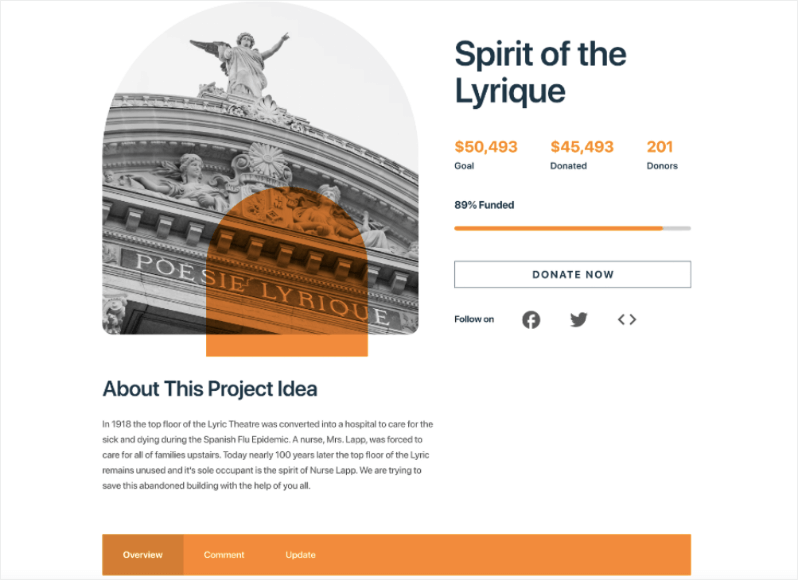
Vous pouvez ajouter des montants de don ponctuels et récurrents. Il s'intègre également à plusieurs passerelles de paiement, notamment Stripe, PayPal, PayFast, Payrexx, Mollie, Braintree, et plus encore. Il est donc facile à configurer, et il est facile pour les utilisateurs de faire un don.
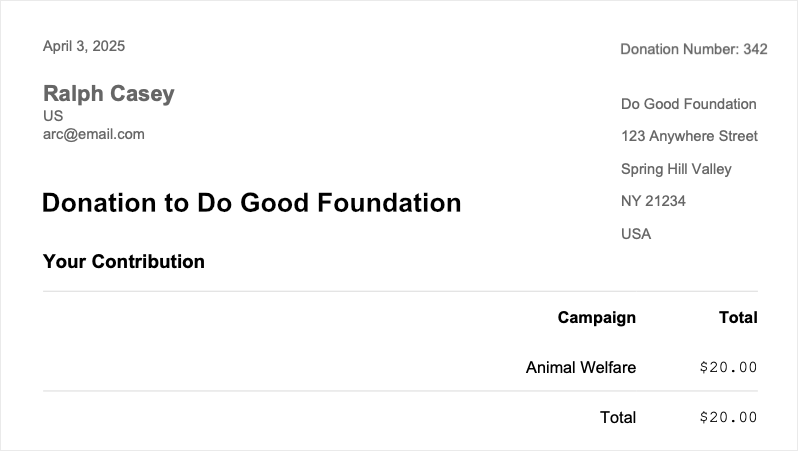
Concernant les fonctionnalités de gestion des donateurs, lorsqu'un donateur effectue un paiement, un reçu de don est automatiquement créé. Le donateur peut le télécharger ou l'envoyer par e-mail dans sa boîte de réception. Regardez comment ces reçus PDF fonctionnent »
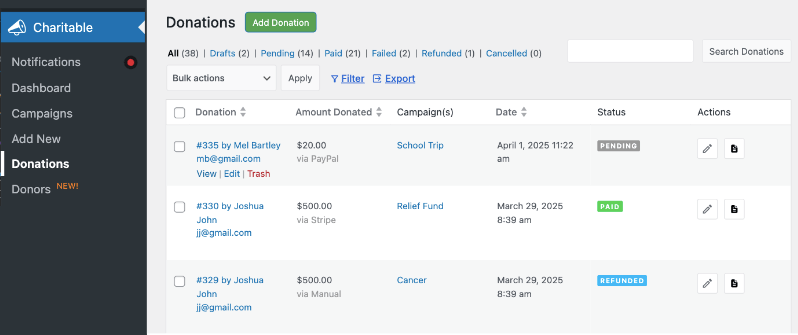
En plus de cela, un nouvel enregistrement de don est automatiquement créé pour eux. Ceci est disponible dans votre administration WordPress. Vous pouvez afficher et modifier chaque enregistrement, mettre à jour le statut du paiement, envoyer/télécharger le reçu, et bien plus encore. Ce que j'adore, c'est que je peux filtrer ces enregistrements par campagne, et je peux également exporter toute la liste. Cela a rendu les déclarations fiscales un jeu d'enfant.
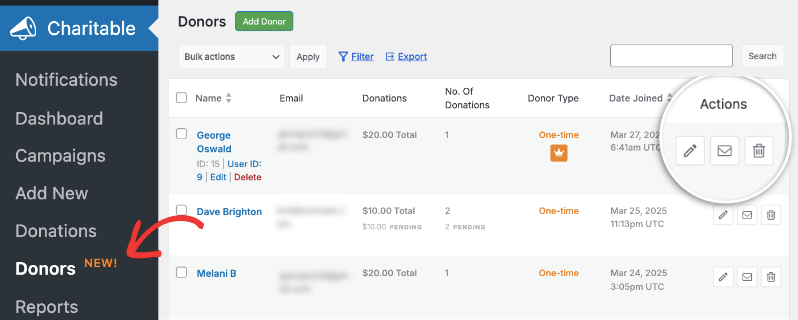
Si vous utilisez le plugin pro, vous aurez accès à la base de données des donateurs. Vous pouvez consulter le profil de chaque donateur et voir ses dons à vie. Regardez comment fonctionne la base de données des donateurs »
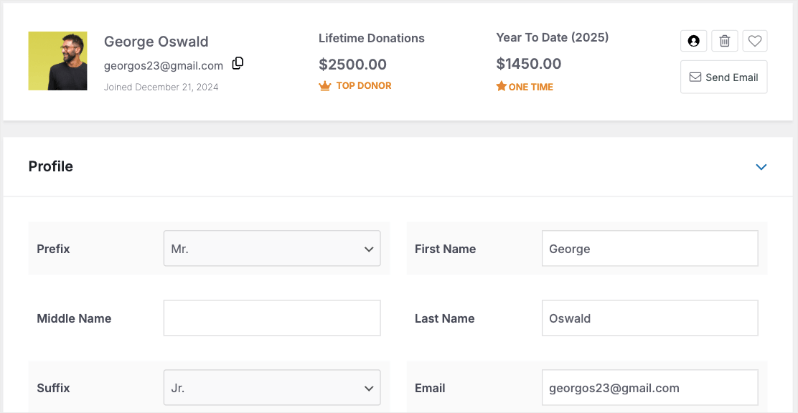
Vous pouvez modifier leurs profils, leur envoyer des e-mails, les marquer comme favoris et ajouter vos propres notes. Vous pouvez même ajouter des profils de donateurs et des enregistrements de dons. Cela nous a permis de conserver des enregistrements de dons hors ligne. Ainsi, tous nos enregistrements sont centralisés et je peux les exporter en une seule fois.
Le plugin principal est gratuit, ce qui m'a initialement rendu méfiant quant à ses capacités. Mais il inclut tout ce dont la plupart des organisations à but non lucratif de petite et moyenne taille ont besoin : formulaires de dons, gestion des donateurs et rapports détaillés. Oui, vous voudrez éventuellement les fonctionnalités premium (nous sommes passés à la version supérieure après six mois), mais vous pouvez commencer avec la version gratuite et passer à la version supérieure lorsque vous serez prêt.
Maintenant, sur la version lite, il y a des frais de transaction de 3 %. Ceux-ci disparaissent lorsque vous passez au plugin premium. Ce que j'adore, c'est le prix. Il vous offre à peu près les mêmes fonctionnalités que les autres plateformes, mais pour une fraction du coût. Le plan de base commence à 69 $ par an. Même le plan le plus élevé à 299 $ par an revient à 24 $ par mois, ce qui est toujours beaucoup moins cher que les autres plateformes.
Je recommande vivement le plan Pro à 199 $ par an. Il vous offre tout ce dont vous avez besoin, y compris les dons récurrents, la collecte de fonds pair-à-pair, les équipes de dons et les automatisations.
Cela dit, ce n'est pas parfait. Le plus grand inconvénient est que vous avez besoin d'un site Web WordPress pour l'utiliser.
Mais voici pourquoi il reste le n°1 : il fait exactement ce qu'il promet, le fait bien et ne complique pas les choses. De plus, lorsque vous prenez en compte les économies (à la fois en frais et en abonnements mensuels), il est difficile de faire mieux. Nous avons essayé trois autres plateformes avant de nous décider pour Charitable, et aucune n'a égalé sa combinaison de simplicité, de fonctionnalité et de valeur.
À qui convient-il le mieux ?
Charitable est parfait si :
- Vous êtes déjà sur WordPress ou prêt à changer
- Vous voulez éviter les frais de transaction
- Vous avez besoin de quelque chose de simple mais évolutif
- Vous en avez marre de payer des frais mensuels élevés pour des fonctionnalités que vous n'utilisez pas
- Vous voulez que les donateurs restent sur votre site Web tout au long du processus de don
Astuce Pro : commencez avec la version gratuite pour l'essayer. Si vous trouvez que vous avez besoin de plus de fonctionnalités, les plans premium sont toujours moins chers que la plupart des plateformes d'abonnement mensuel. Il y a aussi une garantie de remboursement de 14 jours !
2. Bloomerang
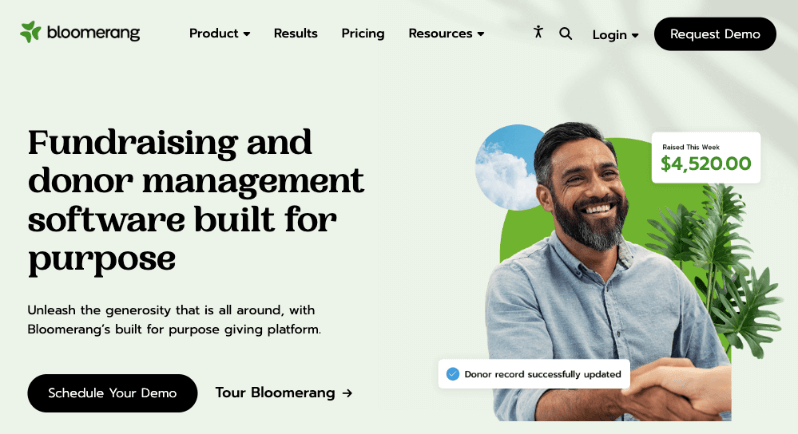
Après avoir testé Bloomerang et examiné des centaines d'avis d'utilisateurs récents, j'ai quelques aperçus honnêtes à partager. Bien qu'il soit commercialisé comme une solution complète de gestion des donateurs, la réalité est un peu plus nuancée.
Commençons par ce que les utilisateurs aiment. La fonctionnalité de chronologie des donateurs est vraiment excellente. Elle vous donne un historique clair et visuel de chaque interaction avec vos donateurs. Leurs outils de marketing par e-mail sont robustes, et l'accent mis sur la rétention des donateurs se reflète vraiment dans des fonctionnalités telles que le compteur d'engagement et les alertes automatisées pour les donateurs inactifs.
Cependant, voici où les utilisateurs (y compris moi-même) rencontrent des obstacles :
Le modèle de tarification est un point de friction majeur. Il commence à 125 $ par mois, soit 1500 $ par an ! De plus, la tarification est basée sur le nombre d'enregistrements dans votre base de données. Si votre organisation grandit, votre plan devient plus cher.
C'est peut-être une plateforme puissante, mais la courbe d'apprentissage est abrupte. J'ai trouvé que son système de reporting était beaucoup plus compliqué que ce dont nous avions besoin.
À qui convient-il le mieux ?
Bloomerang convient le mieux aux :
- Organisations disposant de gestionnaires de bases de données dédiés
- Organisations à but non lucratif axées sur les métriques de rétention des donateurs
- Équipes disposées à investir du temps dans la formation
- Organisations de taille moyenne avec des budgets élevés
- Organisations qui privilégient le suivi de la communication avec les donateurs
3. DonorPerfect
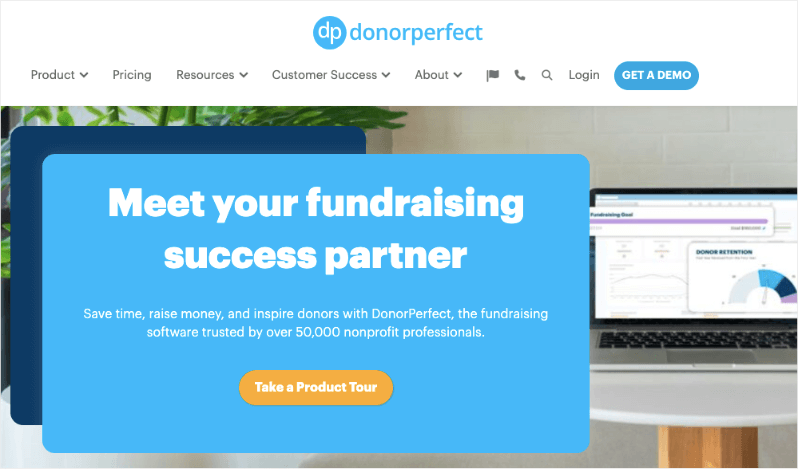
DonorPerfect est un système complet de gestion des donateurs qui existe dans l'industrie depuis plus de 30 ans. Ayant utilisé DonorPerfect dans mon organisation précédente et suite à des discussions récentes avec des utilisateurs, je peux vous dire que c'est un système complet de gestion des donateurs – puissant mais parfois trop complexe pour ses propres besoins.
Tout d'abord, j'apprécie sa profondeur. Les capacités de reporting sont incroyables si vous savez comment les utiliser. Vous pouvez analyser les données de pratiquement toutes les manières imaginables. Pour les organisations qui gèrent plusieurs canaux de collecte de fonds (subventions, événements, dons majeurs), c'est complet.
Il commence à 99 $ par mois, mais ils proposent uniquement des prix personnalisés en fonction des besoins de votre organisation.
À qui convient-il le mieux ?
DonorPerfect est idéal pour :
- Organisations en croissance avec des besoins de reporting complexes
- Organisations à but non lucratif qui ont besoin d'une intégration comptable robuste
- Organisations gérant plusieurs canaux de collecte de fonds
- Équipes nécessitant des options de personnalisation détaillées
- Organisations à but non lucratif à la recherche d'une solution évolutive à long terme
4. Donorbox (Gratuit et payant)
Donorbox est un excellent point de départ si vous avez besoin d'une solution de collecte de fonds et de gestion des donateurs gratuite avec une marge de progression.
Le processus d'installation est basé sur le navigateur, pas dans votre tableau de bord WordPress. J'ai créé un compte Donorbox gratuit, rempli quelques détails et intégré le formulaire dans une page WordPress à l'aide d'un simple shortcode. Fait en moins de 20 minutes.
C'est idéal pour ceux qui n'ont pas de compétences en conception ou développement de sites Web.
Le plan gratuit vous permet de commencer à accepter des dons en quelques minutes via un formulaire personnalisable. Donorbox prend en charge les dons récurrents, les profils de donateurs et s'intègre aux CRM comme Salesforce et aux outils comme Zapier. Leur plan payant (à partir de 26,58 $/mois) débloque des fonctionnalités supplémentaires comme le texte-don et le support prioritaire.
Donorbox prélève des frais de plateforme de 1,75 % sur les dons, sauf si vous passez à un niveau supérieur. Il manque également certains des outils d'engagement des donateurs plus approfondis que vous trouverez dans des CRM plus matures.
À qui convient-il le mieux ?
- Nouvelles organisations à but non lucratif ou campagnes de base
- Organisations souhaitant des formulaires de don simples
- Groupes qui testent les eaux avant de s'engager dans un CRM complet
- Collecteurs de fonds ayant besoin d'une intégration rapide Stripe/PayPal
Donorbox est beaucoup plus cher. Pourquoi payer des milliers par an en frais mensuels et de plateforme alors que Charitable vous offre beaucoup plus pour moins cher ? Vous conservez une plus grande partie de vos dons, profitez d'outils de collecte de fonds puissants et ne vous souciez jamais des frais cachés !
Découvrez la différence entre Donorbox et Charitable »
5. GiveWP (Modules gratuits et payants)

GiveWP est sans aucun doute le plugin de don le plus populaire pour WordPress, et pour cause. Il transforme votre site WordPress en une puissante plateforme de collecte de fonds sans avoir besoin de systèmes tiers.
Je m'attendais à un plugin de formulaire de don basique. Ce à quoi je ne m'attendais pas, c'est à quel point il était robuste et professionnel, comme s'il pouvait réellement remplacer les CRM de donateurs légers pour de nombreuses organisations de petite et moyenne taille.
Le processus d'intégration est soigné. Une fois activé, GiveWP vous guide dans la création de votre premier formulaire de don avec un assistant de configuration utile. Vous pouvez choisir parmi des modèles (comme les dons uniques ou récurrents) ou créer le vôtre.
En 30 minutes, j'avais :
- Un formulaire de don stylisé pour correspondre à mon site
- Stripe connecté pour les paiements
- Un don de test traité
- Reçus par e-mail automatisés personnalisés
GiveWP vous permet de créer de beaux formulaires de don, de suivre l'activité des donateurs, de gérer les dons récurrents et d'envoyer des reçus de don, le tout depuis votre tableau de bord WordPress. Il est également conforme au RGPD et s'intègre avec Stripe, PayPal, et plus encore.
Bien que ce soit plus fluide maintenant, ma première intégration Stripe a été confuse. J'ai dû jouer avec les webhooks et les modes de don de test avant que les choses ne se synchronisent correctement. Si vous n'êtes pas un expert en technologie, attendez-vous à vous appuyer sur leur documentation ou leur support.
Le plugin de base de GiveWP est gratuit – mais les vraies fonctionnalités (dons récurrents, tableaux de bord des donateurs, reçus PDF, collecte de fonds pair-à-pair) sont toutes payantes.
Ce n'est pas un gestionnaire complet des relations avec les donateurs. Il ne fait pas de segmentation approfondie, de parcours donateur ou d'automatisation avancée. Si vous le dépassez, vous voudrez vous connecter à une plateforme comme Bloomerang ou Kindful.
À qui convient-il le mieux ?
- Les organisations à but non lucratif WordPress qui souhaitent des outils de don natifs
- Organisations ayant besoin de formulaires et de reçus personnalisables
- Équipes qui veulent posséder leurs données et éviter les plateformes SaaS
- Collecteurs de fonds axés sur les dons uniques et récurrents
Comparez GiveWP à Charitable »
Comment choisir le bon ?
Choisir le bon logiciel de gestion des donateurs ne doit pas être compliqué. Commencez par examiner votre processus actuel de gestion des donateurs. Combien de donateurs avez-vous ? Quelles tâches vous prennent le plus de temps ? Quel est votre budget mensuel pour les logiciels ? Ces questions guideront votre décision.
Ensuite, considérez les capacités techniques de votre équipe. Certaines plateformes nécessitent une formation importante, tandis que d'autres sont plus conviviales. Si vous n'avez pas de personnel informatique dédié, vous voudrez vous tourner vers des solutions plus simples qui offrent un bon support client.
Votre budget joue un rôle crucial, mais ne vous contentez pas de regarder les frais mensuels. Considérez :
- Les coûts de mise en œuvre
- Les frais de formation
- Les frais supplémentaires pour les fonctionnalités indispensables
- Les frais de traitement des paiements
Enfin, pensez à la croissance. Bien qu'un système de base puisse fonctionner maintenant, réfléchissez à l'endroit où votre organisation se trouvera dans 2 à 3 ans. Choisissez une plateforme qui peut évoluer avec vous, même si vous n'avez pas besoin de toutes ses fonctionnalités immédiatement.
Rappelez-vous : l'option la plus chère ou la plus riche en fonctionnalités n'est pas toujours le meilleur choix. Concentrez-vous sur ce qui résout vos défis actuels tout en offrant une marge de croissance. Commencez par un essai gratuit lorsque disponible, et ne vous précipitez pas dans votre décision – changer de système plus tard peut être long et coûteux.
Verdict sur le meilleur logiciel de gestion des donateurs
Le logiciel de gestion des donateurs représente un investissement important pour toute organisation à but non lucratif, tant en termes d'argent que de temps. Après des tests approfondis et une expérience concrète, Charitable s'impose comme ma principale recommandation pour la plupart des organisations. Sa combinaison de frais de transaction nuls, d'intégration WordPress et de fonctionnalités évolutives en fait un excellent choix, en particulier pour ceux qui débutent leur parcours numérique.
Cependant, si vos besoins sont plus complexes ou si vous gérez une base de donateurs plus importante, Bloomerang et DonorPerfect offrent des solutions robustes avec des fonctionnalités avancées. L'essentiel est d'adapter le logiciel à vos besoins spécifiques plutôt que de se perdre dans des comparaisons de fonctionnalités.
Avant de prendre votre décision finale :
- Profitez des essais gratuits
- Impliquez votre équipe dans le processus de test
- Calculez le coût total de possession
- Tenez compte de vos plans de croissance pour les 2-3 prochaines années
Rappelez-vous : Le bon logiciel doit vous faciliter la vie, pas la compliquer. Que vous choisissiez une solution simple comme Charitable ou une plateforme plus complète comme DonorPerfect, l'objectif est le même : passer moins de temps sur l'administration et plus de temps sur votre mission.
Vous voudrez peut-être aussi obtenir le Kit Ultime de Collecte de Fonds contenant des conseils éprouvés pour les organisations à but non lucratif, des idées de campagnes prêtes à l'emploi, des stratégies testées au combat, des outils recommandés et des ressources gratuites pour augmenter vos dons. C'est le complément parfait à vos campagnes de Giving Tuesday ou à vos collectes de fonds de fin d'année. Téléchargez le Kit Ici »
Questions fréquemment posées
1. Qu'est-ce qu'un logiciel de gestion des donateurs ?
Le logiciel de gestion des donateurs aide les organisations à but non lucratif à suivre, engager et fidéliser les donateurs. C'est comme un CRM conçu spécifiquement pour la collecte de fonds, vous permettant de collecter des dons, de gérer les contacts, d'envoyer des reçus, de suivre l'historique des dons et d'améliorer les relations avec les sympathisants.
2. Quelle est la différence entre un plugin de dons et un CRM complet ?
Un plugin de dons (comme GiveWP ou Donorbox) se concentre sur le traitement des dons et la gestion des formulaires. Un CRM complet (comme Bloomerang ou Neon CRM) inclut une segmentation avancée des donateurs, des campagnes de communication automatisées, des rapports détaillés et le suivi du cycle de vie.
3. Existe-t-il un logiciel de gestion des donateurs véritablement gratuit ?
Oui, mais avec des limitations. Des outils comme GiveWP (version gratuite), Charitable et Donorbox proposent des versions gratuites avec un traitement de base des dons. Cependant, des fonctionnalités telles que les dons récurrents, les intégrations ou les rapports détaillés nécessitent généralement une mise à niveau payante.
4. Quel logiciel de gestion des donateurs est le meilleur pour les utilisateurs de WordPress ?
Si votre site web fonctionne sous WordPress, Charitable est la meilleure option. Il est conçu pour fonctionner directement dans votre tableau de bord WordPress, vous donnant un contrôle total sur les formulaires de dons, le style et les données des donateurs.
5. Ai-je besoin de compétences techniques pour utiliser un logiciel de gestion des donateurs ?
Pas nécessairement. De nombreux outils (comme Donorbox ou Bloomerang) sont conviviaux pour les débutants et offrent des constructeurs visuels. D'autres (comme GiveWP) offrent une personnalisation plus approfondie mais peuvent nécessiter des connaissances techniques ou de WordPress.
6. Quel est le meilleur logiciel pour les dons récurrents ?
Charitable. Il vous offre des options pour suggérer des montants et des fréquences de dons. Vous pouvez également permettre aux donateurs de faire leurs propres choix personnalisés. Il existe également un tableau de bord des donateurs où les donateurs peuvent se connecter et gérer leurs abonnements. Cela améliore la rétention et la confiance.
7. Puis-je intégrer un logiciel de gestion des donateurs avec des outils d'e-mail comme Mailchimp ou ConvertKit ?
Oui. La plupart des plateformes de dons premium offrent des intégrations intégrées ou un support Zapier pour synchroniser avec votre logiciel de marketing par e-mail comme Mailchimp. Cela vous permet d'automatiser les e-mails de remerciement, les newsletters et les séquences de fidélisation des donateurs.
8. Que rechercher dans un logiciel de gestion des donateurs à mesure que je grandis ?
À mesure que votre organisation grandit, recherchez :
- Rapports et analyses détaillés
- Accès multi-utilisateurs et permissions de rôles
- Collecte de fonds pair-à-pair ou par campagne
- Intégrations CRM ou de logiciels de comptabilité
- Outils solides de segmentation et d'automatisation des donateurs
Choisir le bon logiciel de gestion des donateurs peut faire une énorme différence dans la façon dont votre organisation à but non lucratif collecte des fonds, établit des relations et se développe au fil du temps.





Laisser un commentaire