

GiveWP es una opción popular para muchas organizaciones sin fines de lucro y recaudadores de fondos. Pero no siempre es la solución perfecta para todos. Es posible que estés buscando diferentes características, una opción más económica o simplemente quieras explorar qué más hay disponible. Estás en el lugar correcto.
En este artículo, profundizaremos en las mejores alternativas a GiveWP.
He pasado incontables horas probando y comparando varios plugins de donaciones, y estoy aquí para compartir mis ideas contigo. Exploraremos opciones que se adaptan a diferentes necesidades, desde botones de donación simples y directos hasta plataformas ricas en funciones que pueden manejar campañas de recaudación de fondos complejas.
Analizaremos la facilidad de uso, las opciones de personalización, las integraciones con pasarelas de pago y, por supuesto, los precios.
¿Listo para descubrir un plugin de donaciones que podría llevar tus esfuerzos de recaudación de fondos al siguiente nivel? ¡Vamos a sumergirnos y explorar las mejores alternativas a GiveWP que podrían ser justo lo que estás buscando!
1. Charitable

Charitable es el mejor plugin de donaciones todo en uno para WordPress. Es fácil crear, personalizar y lanzar recaudaciones de fondos en minutos. Hay muchas plantillas para elegir y luego obtienes un constructor visual de arrastrar y soltar para hacer las ediciones que necesites. Puedes agregar botones de donación, barras de progreso, fotos, videos, casillas de verificación y más. ¡Es tan fácil que te preguntarás por qué te estresaste antes!
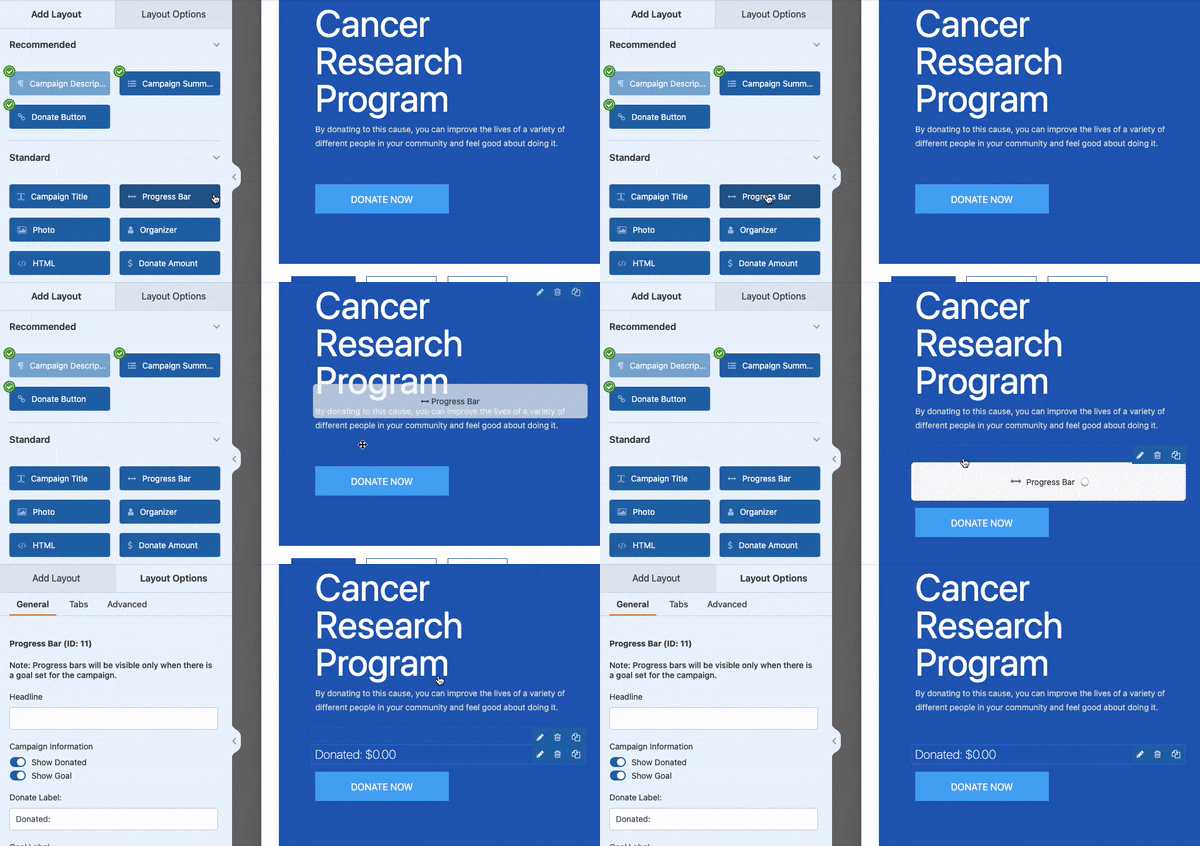
Ahora, cada céntimo cuenta para tu causa, por eso Charitable no cobra ninguna comisión por transacción. Las únicas comisiones que verás son las de tu pasarela de pago, e incluso estas pueden ser cubiertas por los donantes si así lo desean.
Hablando de pagos, Charitable te cubre con todas las opciones: tarjetas de crédito, PayPal, ACH, Apple Pay, Google Pay e incluso donaciones en efectivo. Tus donantes pueden contribuir como se sientan más cómodos. Pero hay más...
Charitable está diseñado para ser un sistema de gestión de donaciones todo en uno directamente dentro de tu panel de WordPress. Podrás recaudar fondos, rastrear donaciones, gestionar donantes y obtener informes detallados para ayudarte a tomar decisiones inteligentes basadas en datos.
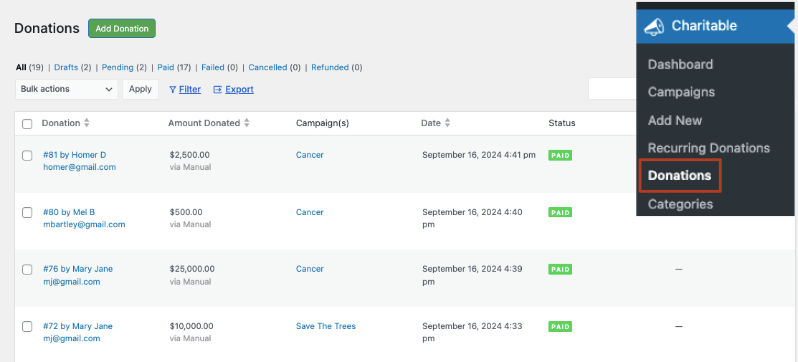
Además, como el equipo de Charitable sabe que estás ocupado cambiando el mundo, han automatizado las tareas tediosas.
¿Necesitas recibos fiscales? Genéralos en segundos.
¿Quieres recibir alertas por correo electrónico o enviar actualizaciones por correo electrónico a los donantes? Configúralos una vez y los correos electrónicos se enviarán automáticamente según tus reglas. ¡Es muy fácil!
Charitable también funciona bien con otras herramientas, integrándose perfectamente con tus servicios de correo electrónico y marketing favoritos para mantener tus campañas funcionando sin problemas.
Estas son las características de Charitable que te encantarán:
- Formularios de Donación Personalizables: Crea formularios atractivos con un constructor de arrastrar y soltar, múltiples plantillas y campos personalizados para la información del donante.
- Opciones de Pago Flexibles: Acepta donaciones a través de varias pasarelas, incluidas PayPal, Stripe y métodos en efectivo, con soporte para donaciones únicas y recurrentes.
- Gestión de campañas: Configura campañas de recaudación de fondos ilimitadas con objetivos, plazos, barras de progreso y recaudación de fondos en equipo.
- Gestión de donantes: Base de datos integrada para rastrear perfiles de donantes, historial de donaciones y facilitar la comunicación con los colaboradores.
- Alivio de comisiones: Ofrece a los donantes la opción de cubrir las comisiones de transacción al hacer su donación.
- Informes y análisis: Genera informes completos de donaciones y análisis del rendimiento de las campañas con capacidades de exportación.
- Funciones de correo electrónico: Envía recibos de donaciones automatizados, personaliza plantillas de correo electrónico e intégrate con plataformas populares de marketing por correo electrónico.
- Donaciones recurrentes: Ofrece intervalos recurrentes flexibles y proporciona un portal para donantes para que los suscriptores gestionen sus donaciones.
- Adaptabilidad móvil: Todos los formularios y procesos de donación están optimizados para diversos dispositivos y tamaños de pantalla.
- Soporte multidivisa: Acepta y convierte automáticamente donaciones en múltiples divisas para atender a una audiencia global.
- Generación de recibos fiscales: Crea y envía automáticamente recibos deducibles de impuestos con plantillas personalizables.
Para una comparación más detallada, ve cómo GiveWP se compara con Charitable »
Lo mejor de todo es que puedes probar Charitable gratis. Cuando estés listo para desbloquear funciones premium, los planes empiezan desde solo 69 $ al año. Charitable también ofrece una garantía de devolución de dinero de 14 días.
Únete a las más de 10.000 organizaciones que ya utilizan Charitable y empieza a maximizar tus donaciones hoy mismo. ¡Es hora de hacer que la recaudación de fondos sea más fácil, efectiva y divertida!
2. WP Simple Pay

WP Simple Pay es el mejor plugin de pagos para WordPress que te permite aceptar pagos rápidamente sin un proceso de configuración complejo. Esta es, con diferencia, la solución más sencilla de esta lista para aceptar donaciones en línea.
Así que, si no necesitas configurar una plataforma de donaciones completa, sino que solo quieres una forma sencilla para que los donantes envíen dinero, este es el plugin adecuado para ti.
Una de las características destacadas es su integración perfecta con Stripe. Si ya utilizas Stripe o lo prefieres como procesador de pagos, WP Simple Pay hace que sea increíblemente fácil conectarse y empezar a aceptar pagos. El plugin se encarga de todo el trabajo pesado del procesamiento seguro de pagos, lo cual es una gran ventaja para los propietarios de sitios que no quieren lidiar con problemas de seguridad de pagos.
Puedes crear y lanzar un formulario de donaciones en minutos, así:
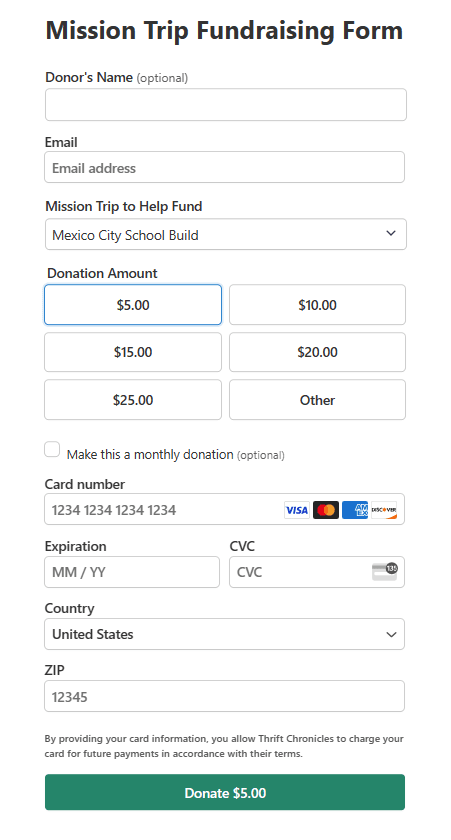
Puedes configurar tus importes de donación o permitir que los usuarios elijan un importe personalizado. Todas tus configuraciones se pueden realizar con clics del ratón. Nunca tendrás que usar código ni preocuparte por los aspectos técnicos.
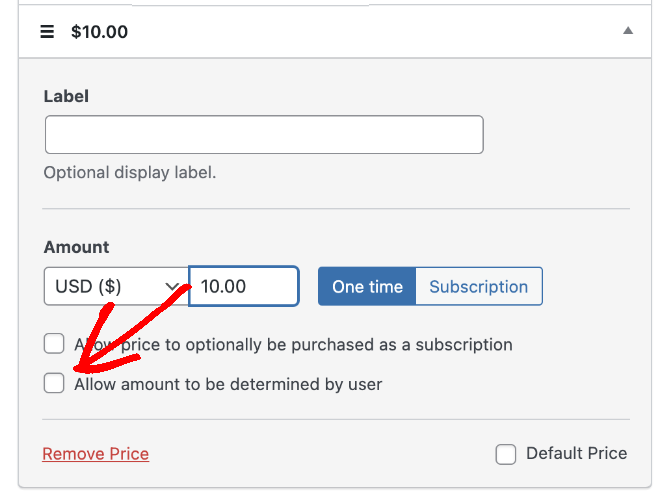
El plugin también admite pagos recurrentes, lo cual es excelente para recopilar donaciones recurrentes, sitios de membresía o servicios basados en suscripción.
La versión gratuita es completamente funcional, pero es posible que necesites actualizar a la versión pro para acceder a funciones como campos personalizados, pagos recurrentes y más estilos de botones de pago. Los precios son razonables, pero es algo a tener en cuenta si tienes un presupuesto ajustado.
Un área donde WP Simple Pay realmente brilla es su enfoque amigable para desarrolladores. Si te sientes cómodo con el código, puedes personalizar bastante usando hooks y filtros. Esto me ha permitido adaptar la experiencia de pago a necesidades muy específicas de los clientes.
En cuanto al soporte, he encontrado que la documentación es completa y, las pocas veces que he necesitado contactar a su equipo de soporte, han sido receptivos y serviciales.
Aquí tienes una lista de características clave que hacen de WP Simple Pay una alternativa notable a GiveWP:
- Integración con Stripe: Conexión perfecta con Stripe para el procesamiento seguro de pagos.
- Formularios de Pago Personalizados: Crea y personaliza formularios de pago sin necesidad de codificación.
- Pagos Únicos y Recurrentes: Soporte para pagos únicos y basados en suscripción.
- Soporte para Múltiples Divisas: Acepta pagos en diversas divisas.
- Plantillas de Formularios de Pago: Plantillas prediseñadas para una configuración rápida.
- Soporte para Apple Pay y Google Pay: Habilita métodos de pago modernos para facilitar las donaciones.
- Códigos de Cupón: Crea y gestiona códigos de descuento para promociones especiales.
- Soporte de Tasas de Impuestos: Añade cálculos de impuestos a los pagos cuando sea necesario.
- Correos Electrónicos de Confirmación de Pago: Envía recibos automáticamente a los donantes.
- Herramientas de Cumplimiento del RGPD: Funciones para ayudar a cumplir las normativas de protección de datos.
En general, WP Simple Pay es una excelente opción si necesitas una forma fiable y sencilla de aceptar pagos o donaciones en tu sitio de WordPress, especialmente si ya utilizas Stripe. No es el plugin de donaciones más rico en funciones que existe, pero para muchos sitios, su simplicidad y facilidad de uso lo convierten en la solución perfecta.
3. WPForms

WPForms es el mejor plugin constructor de formularios para WordPress y te permite crear cualquier tipo de formulario para tu sitio, incluyendo formularios de contacto, inicio y registro de sesión, reservas de eventos, formularios de donación, encuestas y sondeos, y más.
Crear un formulario de donación es sencillo. Hay plantillas para elegir y un constructor de arrastrar y soltar para personalizarlos a tu gusto. Puedes añadir campos para la información del donante, permitir que las personas elijan cuánto donar e incluso ofrecer diferentes opciones de donación.
Lo que me encanta de WPForms es que puedes personalizar el formulario e incluso añadir imágenes a cada importe de donación personalizado. Aquí tienes un ejemplo de formulario que creé solo para mostrarte lo que puedes hacer con este plugin:
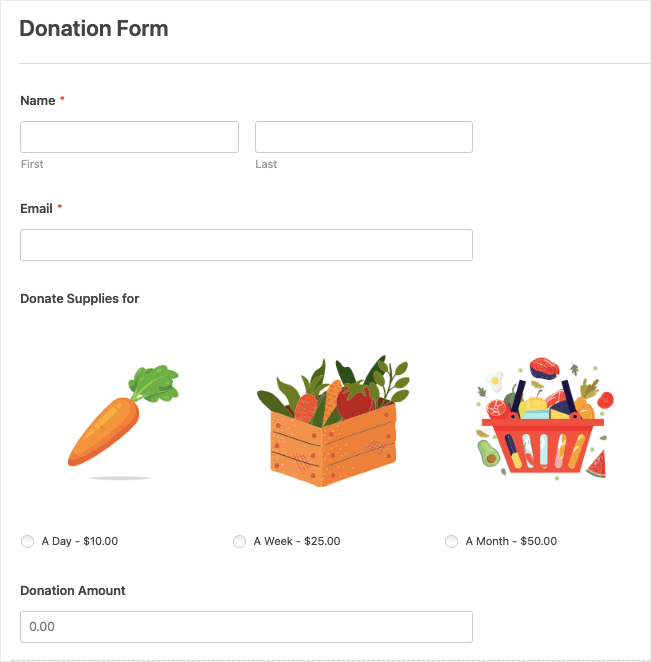
Para las organizaciones sin ánimo de lucro, es posible que necesites formularios de varias páginas si requieres recopilar más información de tus donantes. WPForms te permite dividir tu formulario en varias páginas.
WPForms se integra bien con pasarelas de pago populares como PayPal y Stripe. El proceso de configuración para estas integraciones es relativamente sencillo, lo cual es un alivio en comparación con algunos sistemas más complejos con los que he trabajado.
También viene con gestión de entradas incorporada. Puedes ver los detalles de los envíos y exportar datos.
Además, WPForms también ofrece excelentes complementos, como el complemento de Abandono de Formularios, por ejemplo, que puede ayudarte a hacer un seguimiento de los posibles donantes que iniciaron pero no completaron el proceso de donación.
Esto es lo que destaca de WPForms como alternativa a GiveWP:
- Constructor de Formularios Arrastrar y Soltar: Interfaz intuitiva para crear formularios de donación personalizados sin necesidad de codificación.
- Integraciones de Pago: Soporta pasarelas populares como PayPal y Stripe para transacciones seguras.
- Formularios de Múltiples Páginas: Capacidad para crear formularios de donación de varios pasos para una mejor experiencia de usuario.
- Lógica Condicional: Personaliza la experiencia de donación según las entradas del usuario.
- Integraciones de Marketing por Correo Electrónico: Conéctate con servicios como Mailchimp para crear tu lista de donantes.
- Diseño Adaptable a Móviles: Los formularios se ven geniales en todos los dispositivos, aumentando el potencial de donación.
- Plantillas de Formularios: Más de 1900 plantillas de formularios de donación preconstruidas para una configuración rápida.
- Cargas de Archivos: Permite a los donantes adjuntar archivos si es necesario (por ejemplo, para formularios de patrocinio).
- Gestión de Entradas: Sistema incorporado para gestionar y revisar las entradas de donaciones.
- Abandono de Formularios: Captura información de intentos de donación incompletos para seguimiento.
- Geolocalización: Rastrea de dónde provienen tus donaciones.
- Encuestas y Sondeos: Recopila comentarios de los donantes junto con las donaciones.
- Análisis de Formularios: Obtén información sobre el rendimiento de tus formularios de donación.
- Guardar y Reanudar: Los donantes pueden guardar su progreso y completar la donación más tarde.
WPForms demuestra ser una solución versátil que puede gestionar donaciones, pagos en línea y gestión de donantes, al tiempo que cubre otras necesidades de formularios en tu sitio de WordPress.
4. Donorbox

Donorbox es una plataforma de donaciones robusta que va más allá de WordPress, lo que la convierte en una alternativa interesante a GiveWP.
A diferencia de GiveWP, que es específico de WordPress, Donorbox se puede incrustar en cualquier plataforma web. Esto la convierte en una excelente opción para organizaciones que pueden usar WordPress ahora pero desean la flexibilidad de cambiar de plataforma en el futuro sin cambiar su sistema de donaciones.
El proceso de configuración es sorprendentemente sencillo. No necesitas instalar un plugin; en su lugar, creas tu formulario de donación en la plataforma Donorbox y luego lo incrustas en tu sitio de WordPress.
Este enfoque tiene sus pros y sus contras. Por un lado, significa menos carga en tu instalación de WordPress. Sin embargo, también significa que dependes de un servicio externo en lugar de tener todo integrado en tu panel de WordPress.
Una característica que realmente me impresiona es el creador de formularios de Donorbox. Es intuitivo y ofrece una buena gama de opciones de personalización. Puede configurar fácilmente donaciones únicas y recurrentes, agregar campos personalizados y crear incluso importes de donación sugeridos. Los formularios responden a dispositivos móviles y tienen un aspecto profesional desde el principio.
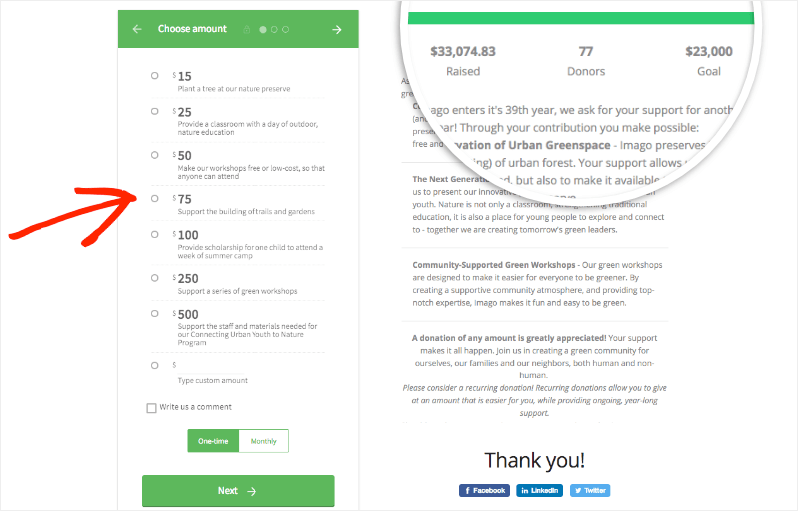
Donorbox también destaca en cuanto a opciones de pago. Admite una amplia gama de pasarelas de pago, incluidas PayPal, Stripe e incluso Apple Pay y Google Pay. Esta variedad puede ayudar a aumentar las tasas de conversión, ya que los donantes pueden utilizar su método de pago preferido.
También puede permitir donaciones recurrentes y dejar que los donantes actualicen fácilmente su información o la cancelen si es necesario. Este aspecto de autoservicio puede ahorrar a su organización sin fines de lucro mucho tiempo en la gestión de donantes.
Las funciones de informes son bastante completas. Obtiene acceso a análisis detallados sobre sus donaciones, lo que puede ser crucial para refinar sus estrategias de recaudación de fondos. También hay un sistema de gestión de donantes para realizar un seguimiento de la información del donante y el historial de donaciones.
¡Ciertamente! Aquí tienes una lista de las características clave que hacen de Donorbox una alternativa sólida a GiveWP:
- Formularios de donación incrustables: Agregue fácilmente formularios de donación a cualquier sitio web, no solo a WordPress.
- Donaciones recurrentes: Soporte para opciones flexibles de donaciones recurrentes (semanal, mensual, anual).
- Múltiples pasarelas de pago: Integración con PayPal, Stripe, Apple Pay, Google Pay y más.
- Soporte multidivisa: Acepte donaciones en varias divisas.
- Importes de donación sugeridos: Establezca importes de donación predefinidos para guiar a los donantes.
- Gestión de donantes: CRM incorporado para gestionar la información del donante y el historial de donaciones.
- Recibos deducibles de impuestos: Generación y envío automáticos de recibos de impuestos.
- Campañas de recaudación de fondos: Cree y gestione múltiples campañas de recaudación de fondos.
- Recaudación de fondos entre pares: Permita que los simpatizantes creen sus propias páginas de recaudación de fondos.
- El donante cubre las comisiones: Permita que los donantes cubran las comisiones de transacción.
- Seguimiento e informes de donaciones: Herramientas completas de análisis e informes.
- Integraciones de correo electrónico: Conéctese con plataformas populares de marketing por correo electrónico.
Una posible desventaja es la estructura de precios. Si bien Donorbox no cobra una tarifa mensual por su plan básico, sí se lleva un porcentaje de cada donación (1,5% en el momento de esta revisión). Para algunas organizaciones, especialmente aquellas con volúmenes de donaciones más grandes, esto podría resultar más caro que el modelo de precios de tarifa fija de GiveWP.
Puede obtener todas estas funciones y más con Charitable a una fracción del costo.
Ver la diferencia entre Donorbox y Charitable »
5. Donaciones a través de PayPal

Donaciones a través de PayPal es una solución ligera y sin florituras para agregar botones de donación de PayPal a su sitio de WordPress. Después de pruebas exhaustivas, esto es lo que he encontrado:
En primer lugar, la instalación y la configuración son sencillas. No necesita amplios conocimientos técnicos para ponerlo en marcha.
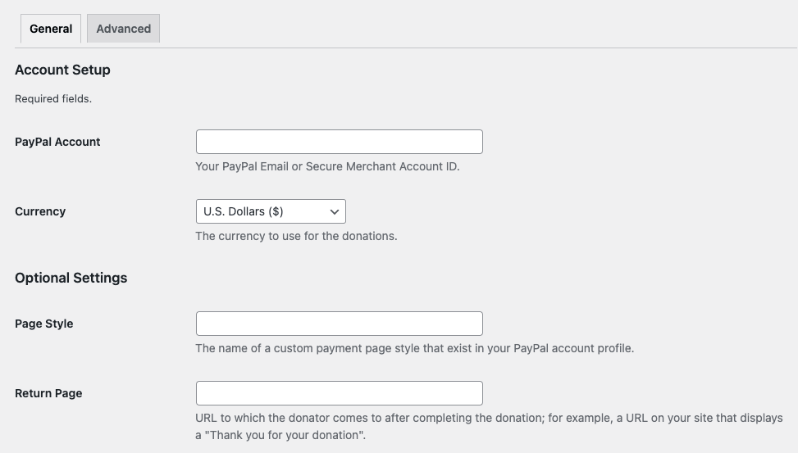
Una de las características clave es la capacidad de personalizar la apariencia de su botón de donación. Puede elegir entre los botones prediseñados de PayPal o usar su propia imagen personalizada. Esta flexibilidad es agradable, especialmente para mantener la coherencia de la marca en su sitio.
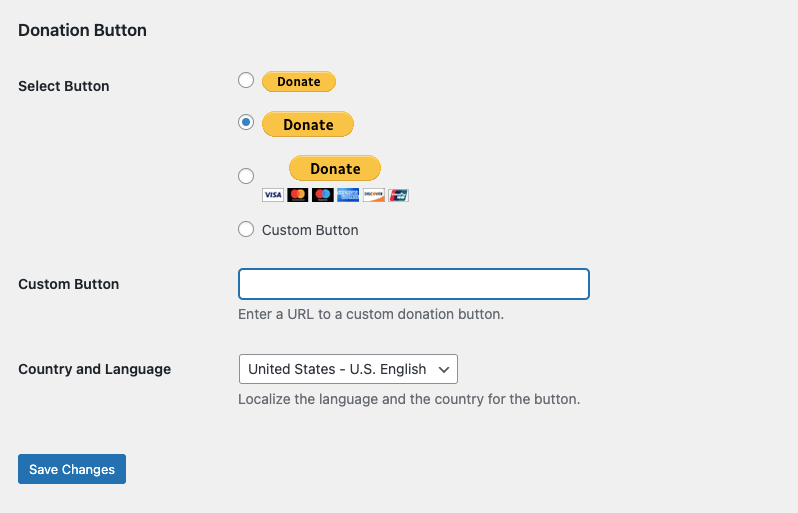
El plugin le permite establecer una cantidad de donación predeterminada, lo que puede ser útil para guiar a los donantes hacia una contribución sugerida. Sin embargo, los donantes aún pueden cambiar esta cantidad cuando llegan a la página de PayPal.
La integración con PayPal es, por supuesto, perfecta. Esto significa que está aprovechando el sistema de pago seguro y ampliamente reconocido de PayPal, lo que puede infundir confianza en sus donantes.
El plugin también admite varias monedas, lo que es beneficioso si tiene una base de donantes internacional.
Sin embargo, es importante tener en cuenta las limitaciones de este plugin en comparación con soluciones más robustas como GiveWP o Charitable:
- Personalización limitada del formulario: Si bien puede personalizar el botón, no tiene mucho control sobre el formulario de donación en sí, que se aloja en el sitio de PayPal.
- Funcionalidad básica: Este plugin está diseñado para donaciones simples y únicas. No admite funciones como donaciones recurrentes o campañas de recaudación de fondos más complejas de forma nativa.
- Gestión mínima de donantes: A diferencia de GiveWP, este plugin no ofrece herramientas de gestión de donantes integradas. Deberá confiar en la interfaz de PayPal para obtener detalles de las transacciones.
- Informes limitados: El plugin en sí no proporciona análisis de donaciones. Deberá utilizar las herramientas de informes de PayPal o integrarse con otro sistema para obtener información.
- Proceso de donación fuera del sitio: Los donantes son dirigidos al sitio de PayPal para completar su donación.
- Sin campos adicionales: No puede recopilar fácilmente información adicional de los donantes más allá de lo que ofrece el formulario estándar de PayPal.
Una ventaja de este plugin es que es completamente gratuito, sin una versión premium a la que actualizar. Esto puede convertirlo en una opción atractiva para organizaciones pequeñas o personas con un presupuesto ajustado. Al mismo tiempo, no puede esperar nuevas funciones e innovaciones.
En cuanto a actualizaciones y soporte, el plugin se mantiene bastante bien, pero no obtendrá el soporte dedicado que obtendría con un plugin premium como Charitable.
En general, el plugin PayPal Donations puede ser una buena alternativa a GiveWP para aquellos con necesidades de donación muy básicas y presupuestos limitados. Es ideal para organizaciones pequeñas, blogs personales o proyectos que solo necesitan una forma sencilla de aceptar donaciones sin florituras.
Sin embargo, para organizaciones con necesidades de recaudación de fondos más complejas, que requieren funciones como donaciones recurrentes, personalización extensiva, donaciones en el sitio o gestión detallada de donantes, una solución más robusta como Charitable probablemente sería una mejor opción. La elección depende en última instancia de sus necesidades específicas, capacidades técnicas y objetivos de recaudación de fondos.
Estas son las mejores alternativas a GiveWP.
¿Cuál es la mejor alternativa a GiveWP?
Charitable destaca como la mejor alternativa a GiveWP para la mayoría de los usuarios.
He aquí por qué:
- Rico en funciones: Charitable ofrece un conjunto completo de funciones que rivalizan con GiveWP, incluyendo formularios personalizables, múltiples pasarelas de pago, donaciones recurrentes e informes detallados.
- Fácil de usar: Su interfaz intuitiva y su creador de formularios de arrastrar y soltar lo hacen accesible tanto para principiantes como para usuarios experimentados.
- Rentable: Charitable no cobra ninguna comisión por transacción (más allá de las comisiones de la pasarela de pago), lo que puede suponer un ahorro considerable, especialmente para organizaciones más grandes.
- Flexibilidad: Ofrece versiones gratuitas y premium, lo que permite a los usuarios empezar con funciones básicas y actualizar según sea necesario.
- Integración con WordPress: Como plugin dedicado de WordPress, se integra perfectamente con tu sitio, proporcionando una experiencia coherente tanto para administradores como para donantes.
- Gestión de donantes: Charitable ofrece sólidas herramientas de gestión de donantes directamente desde tu panel de WordPress.
- Personalización: El plugin permite una amplia personalización para que coincida con tu marca y tus necesidades específicas.
- Soporte y actualizaciones: Charitable está bien mantenido y ofrece un soporte al cliente fiable.
Y hay mucho más en este plugin. El equipo detrás de esta herramienta está constantemente innovando para mejorarla, de modo que tengas todo lo que necesitas para recaudar fondos de forma más rápida y eficiente.
¿No estás seguro de si es el adecuado para ti? Prueba Charitable gratis. Cuando estés listo para desbloquear funciones premium, los planes empiezan desde solo 69 $ al año. También hay una garantía de devolución de dinero de 14 días, sin preguntas, por lo que es una prueba sin riesgos.
¡Charitable superó 1 millón de descargas! Consulta nuestra página de reseñas y testimonios para saber por qué.





Deja una respuesta