Gemeinnütziger Blog

Alles, was Sie über Charitable und unser Team wissen müssen.

Multilingual Fundraising Campaigns with TranslatePress

Zuletzt aktualisiert am

  • Von

TranslatePress is a new translation plugin for WordPress that promises to make translating your website easier. It’s not the only translation plugin out there, but it’s the first that handles translation in a way that allows you to run fully-fledged multilingual fundraising campaigns with Charitable.

In this post, I’ll take a look at how you can create multilingual fundraising campaigns by translating your Charitable campaigns with TranslatePress.

The Problem with Multilingual Fundraising Campaigns

We hear questions like this fairly often from non-profits:

I want to use a plugin like Polylang to have campaigns in English and Spanish and share the donation amount.

Translating campaigns has always been possible with plugins like Polylang and other translation plugins like WMPL. Charitable itself fully supports translation.

But there’s a problem: When you use Polylang and WPML to translate your campaign, it treats the translated version as a separate “post” with a unique ID.

That’s an issue when you attempt to calculate the total amount donated to a campaign or show the number of donors. When you view the Spanish translation of your campaign, it will only include donations to the Spanish translation. Likewise for English. What you really want is for both the Spanish and English campaign pages to show the total raised by the campaign as a whole, regardless of which language received the specific donation.

Another way people tried to work around this was by building out multi-site networks for their non-profits. This allowed them to create targeted sites for each language, but it still didn’t solve the problem with shared donation stats. Donations to a campaign in one language were treated as completely distinct from donations to the same campaign in another language.

Enter TranslatePress

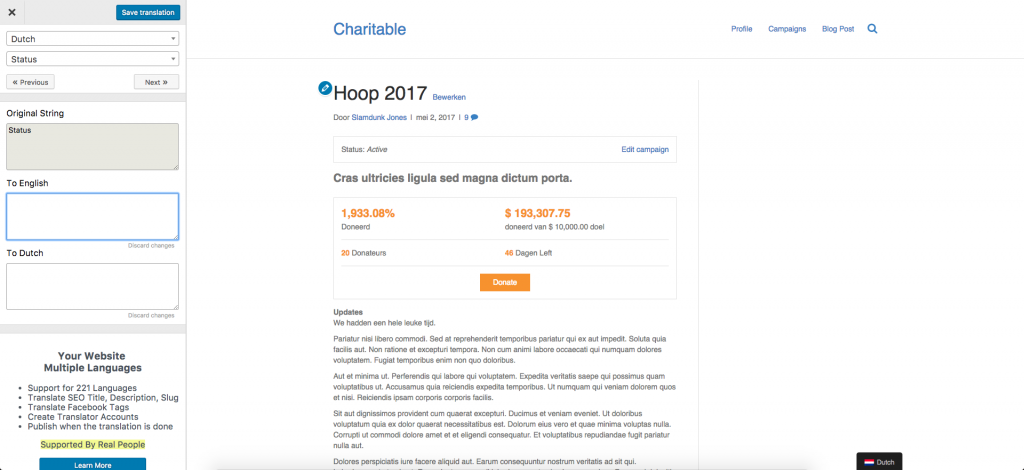
TranslatePress launched a few months ago with the goal of making it much easier to translate your website. Unlike other translation plugins, translation in TranslatePress happens on the front-end so you can see what you are translating as you translate it:

Translating a campaign page with TranslatePress

One really nice aspect of this is that it doesn’t matter what the source is of the text you’re translating — you translate everything in the same place.

Other plugins split the translation up by source. Your theme is translated here, each plugin is translated individually over here, and the content of the post is translated somewhere else again. That can lead to confusion, particularly when both your theme and plugin include some of the same phrases. For example, some people using Charitable alongside Reach experienced problems with that, as words like “goal”, “donated” and “donors” are included in both translation files. As a result, you need to have translated the words in both translation files before it takes effect everywhere.

With TranslatePress, that’s not a problem at all. All the text on the page is available for you to translate, right there in a single unified interface. It’s delightfully simple.

How TranslatePress Enables Multilingual Fundraising Campaigns

So TranslatePress is easy to use, but how does it help with our original problem of creating multilingual fundraising campaigns?

Here, TranslatePress completely sidesteps the problems that arise with other plugins. Your campaign is your campaign, and the Dutch/French/Spanish/Swahili/Hindi translation of your campaign is just that — a translation. It’s not a completely separate post, which means donations to any translations all count towards the one total. It sounds like a simple accomplishment, but it’s a good reflection of the intelligent design and choices that has gone into the plugin.

TranslatePress is still relatively young so there are the occasional rough edges, but the team are committed to improving it. When I first played around with it, I encountered a couple issues and reported those. Cristian Antohe and the rest of the team at Cozmoslabs (the company behind TranslatePress) were quick to respond and have already resolved those issues.

If you plan to run fundraising campaigns on your site in multiple languages, I definitely recommend trying out TranslatePress. The free plugin can be downloaded from WordPress.org and allows you to add one language other than the default; if you need more languages or other advanced features, their paid plans start at $79 per year. Find out more on TranslatePress.com.

What about you?

Have you tried TranslatePress? What did you think of it? How do you run multilingual fundraising campaigns on your site?

Offenlegung: Unsere Inhalte werden von unseren Lesern unterstützt. Das bedeutet, wenn Sie auf einige unserer Links klicken, können wir eine Provision verdienen. Wir empfehlen nur Produkte, von denen wir glauben, dass sie unseren Lesern einen Mehrwert bieten.

Hinterlassen Sie eine Antwort

Ihre E-Mail-Adresse wird nicht veröffentlicht. Erforderliche Felder sind markiert *

Erhalten Sie kostenlose Tipps und Ressourcen direkt in Ihren Posteingang, zusammen mit über 60.000 anderen

Abonnieren Sie unseren Newsletter

Wir werden Sie nicht spammen. Wir senden nur eine E-Mail, wenn wir glauben, dass sie Ihnen wirklich hilft. Abmeldung jederzeit möglich!

Video der Woche:

Sehen Sie sich weitere Videos auf unserem YouTube-Kanal an.

Was ist neu bei Charitable

Die neuesten Updates anzeigen
🔔 Abonnieren Sie, um unsere neuesten Updates zu erhalten
📧 E-Mails abonnieren

E-Mail-Abonnement

Abonnieren Sie unseren Newsletter

Wir werden Sie nicht spammen. Wir senden nur eine E-Mail, wenn wir glauben, dass sie Ihnen wirklich hilft. Abmeldung jederzeit möglich!

💂‍♂️ New DonationGuard 🛡️ Automatically Protects Your Donations!

Worried about card testing attacks or spam bots flooding your donation forms, but don’t want to ruin the giving experience for your real supporters? Charitable’s DonationGuard features:

🛡️ Real-Time Bot Detection: Actively monitors every donation submission for five distinct attack signals without slowing down your human donors.

📊 Smart Traffic Scoring: Instantly evaluates activity against a learned baseline of your site’s normal donation rhythms to catch sneaky, slow-drip card testing.

🚨 Severity-Tiered Alerts: Immediately opens structured “Attack Records” and notifies you via email and admin alerts the moment a campaign starts taking fire.

🎯 Single-Click Defense: Deploy instant security using the “Recommended Settings” preset to turn on Honeypot, Time Trap, and Rate Limit modules all at once.

🚫 Automated Blocklists: Permanently stop repeat offenders by automatically blocking suspicious email addresses based on your customized rules.

Besuchen Sie diese Seite, um mehr zu erfahren.

GiveWP Migrationen Neu

🧤 White Glove Migration Service for GiveWP

Erwägen Sie den Wechsel Ihrer Spendenplattform von GiveWP zu Charitable, möchten aber nicht riskieren, Ihre Daten zu verlieren oder eine komplexe technische Einrichtung selbst vorzunehmen? Der White Glove Migrationsservice von Charitable bietet:

👥 Makellose Spenderzuordnung: Übertragen Sie Ihre gesamte Unterstützerdatenbank sicher und ohne Datenverlust.

📊 Vollständige Finanzhistorie: Bewahren Sie sorgfältig jede historische Transaktion für eine kontinuierliche, genaue Berichterstattung auf.

🔄 Nahtlose wiederkehrende Spenden: Übertragen Sie aktive Dauerabonnements sicher, ohne Ihre Einnahmen zu unterbrechen oder Ihre Spender zu zwingen, ihre Informationen zu aktualisieren.

💳 Keine Gateway-Unterbrechungen: Nutzen Sie weiterhin Stripe, PayPal oder jeden anderen mit GiveWP kompatiblen Prozessor, den Sie bereits lieben.

🚀 Experten-Technik-Setup: Lehnen Sie sich zurück, während unser Team die schwere Arbeit übernimmt, Ihre Formulare zu installieren und zu konfigurieren – außerdem erhalten qualifizierte Benutzer ein ganzes Jahr lang kostenloses Charitable Pro.

Besuchen Sie diese Seite, um mehr zu erfahren.

Automatisierung Verbesserung

📢 Neue Funktion: Automation Connect 2.0 ist da! 🚀

Sie möchten Ihre Spenden-Daten mit Tools wie Mailchimp, Slack oder Google Sheets verbinden, aber keinen Entwickler einstellen oder benutzerdefinierten Code schreiben? Charitalbes neues Automatisierungs-Addon bietet:

⚡ 17 Event-Trigger: Lösen Sie sofort Webhooks für die erste Spende eines Spenders, wiederkehrende Zahlungen oder erreichte Kampagnenmeilensteine aus.

🎯 Intelligente bedingte Logik: Verwenden Sie leistungsstarke UND/ODER-Logik über 11 Felder hinweg, um Daten nur dann zu senden, wenn sie Ihren genauen Kriterien entsprechen, z. B. Newsletter-Opt-ins.

📊 Benutzerdefinierte Payload-Steuerung: Wählen Sie aus über 80 sauberen Datenfeldern für Spender-, Spenden- und Kampagnenmetadaten, damit Ihre Apps genau das erhalten, was sie benötigen.

🚀 Vorkonfigurierte Plattform-Vorlagen: Überspringen Sie die Einrichtung von Grund auf mit fertigen Vorlagen für Zapier, Make.com, n8n, HubSpot und Slack.

🛡️ Zuverlässige Entwickler-Tools: Steuern Sie Ihre Workflows mit signierten HMAC-SHA256-Payloads, vollständigen WordPress-Filtern und automatischen Wiederholungsprotokollen.

Automatisierung Verbesserung

🔌 Charitable trifft Zapier: Verbinden Sie sich mit über 7.000 Apps und automatisieren Sie Ihre Spendenaktionen

Müde vom manuellen Kopieren von Spendeninformationen in Buchhaltungsbögen oder vom Nachverfolgen neuer Spenderanmeldungen? Bringen Sie Ihre Verwaltungsaufgaben auf Autopilot. Charitable ist jetzt offiziell auf Zapier verfügbar und bietet Ihnen eine leistungsstarke No-Code-Möglichkeit, Ihre Spendenaktionen direkt mit dem Rest Ihrer bevorzugten Tools zu verbinden.

Jede Spende, jede Spenderanmeldung und jeder Kampagnenmeilenstein kann jetzt nahtlos einen automatisierten Workflow auslösen.

Was ist neu:

♾️ Verbinden Sie sich mit über 7.000 Apps: Verknüpfen Sie Ihre Charitable-Kampagnen mit alltäglichen Softwareanwendungen wie Google Sheets, QuickBooks, Slack, Mailchimp, HubSpot, Notion, Airtable und Tausenden mehr.

⚡ 12 leistungsstarke Trigger: Erstellen Sie tiefgreifende Workflows mit intelligenten Automatisierungs-Triggern, die den gesamten Spendenlebenszyklus abdecken – einschließlich Neue Spende, Neuer Spender, Abonnement gekündigt und Kampagnenziel erreicht.

📋 Vorkonfigurierte Aktionsvorlagen: Beginnen Sie in drei Minuten oder weniger mit unseren vorgefertigten Vorlagenkombinationen, wie z. B. dem automatischen Protokollieren neuer Spenden direkt in ein Google Sheet oder dem Auslösen benutzerdefinierter Spender-Willkommens-E-Mails über Gmail.

🚫 Kein Code erforderlich: Keine komplexen Webhooks oder benutzerdefinierten PHP-Skripte erforderlich. Wählen Sie einfach Ihren Trigger, wählen Sie Ihre App, ordnen Sie Ihre Felder zu und lassen Sie Zapier die Hauptarbeit erledigen.

Bereit, Stunden an Verwaltungszeit zu sparen? Holen Sie sich Charitable Pro mit dem Automation Connect Addon noch heute und starten Sie Ihren ersten Zap!

Verbesserung Zahlungen

🚀 Einführung von PayPal Commerce: Eine Verbindung, sechs Spendenmöglichkeiten

Spender erwarten moderne, flexible Zahlungsoptionen, wenn sie eine Sache unterstützen. Wenn sie ihre bevorzugte Methode nicht auf ihrem Spendenformular sehen, verschwinden sie oft ohne ein Wort. Mit PayPal Commerce bringen wir ein komplett modernisiertes Checkout-Erlebnis direkt in Ihre Kampagnen.

Genießen Sie eine einzige Integration, die Ihre Formulare verbessert, das Spenden nahtlos gestaltet und Ihnen hilft, jede einzelne Spende zu erfassen.

Was ist neu:

🔌 Ein-Klick-Verbindung: Überspringen Sie unübersichtliche API-Schlüssel und Entwicklerdokumentationen. Klicken Sie einfach auf „Mit PayPal verbinden“, melden Sie sich bei Ihrem Geschäftskonto an und Ihr modernes Formular ist in weniger als fünf Minuten live.

💳 Sechs Spendenmöglichkeiten: Bieten Sie Ihren Unterstützern sofortigen Zugriff auf PayPal-Guthaben, Venmo (US), „Später bezahlen“-Finanzierung, wichtige Kredit-/Debitkarten, Apple Pay (Safari) und Google Pay (Chrome) – alles über dasselbe Formular.

🔄 Flexible wiederkehrende Spenden: Unterstützt vollständig monatliche Spenden. Wählen Sie zwischen der PayPal-Abonnement-API (automatisch von PayPal verwaltet) oder Vault + Cron (sicher direkt auf Ihrer Website verwaltet).

💬 Freundliche Fehlerbehebung: Keine verwirrenden Browser-Warnungen mehr. Wenn eine Zahlung abgelehnt wird, sehen Spender klare, Inline-Nachrichten, die sie anleiten, wie sie das Problem beheben und ihre Spende abschließen können.

Bereit für PayPal, modernisiert? Aktualisieren Sie auf Charitable Pro 1.8.15+ (oder Charitable Lite 1.8.11+) und verbinden Sie Ihr Konto noch heute!