
Wir freuen uns, ein kleines, aber bahnbrechendes Update in Charitable hervorzuheben: die vollständige Integration mit der neuen Befehlspalette von WordPress 6.9!
Wenn Sie ein Tastatur-Experte sind, der Spenden, Kampagnen und Berichte verwaltet, können Sie damit in Sekundenschnelle zu Charitable-Bildschirmen springen – ganz ohne Maus. Sie ist direkt in den WordPress-Kern integriert, und Charitable Pro fügt jetzt unsere am häufigsten verwendeten Aktionen für blitzschnelle Navigation hinzu.
Ab sofort verfügbar in der neuesten Version von Charitable Pro 1.8.11.5+ (erfordert WordPress 6.9+).
Überspringen Sie die Menü-Navigation, erledigen Sie Dinge schneller
Wie oft klicken Sie sich durch die WordPress-Admin-Menüs, um eine neue Kampagne zu erstellen oder Ihre neuesten Spenden zu überprüfen? Mit der Befehlspaletten-Integration können Sie das Menü überspringen und mit Tastenkombinationen finden, was Sie brauchen.
Um die Befehlspalette zu öffnen, drücken Sie Cmd + K auf dem Mac oder Ctrl + K unter Windows. Geben Sie dann etwas wie „Seiten“ ein. Sie sehen eine Liste von Optionen, aus denen Sie wählen können. Wählen Sie die gewünschte aus und drücken Sie Enter, um direkt dorthin zu gelangen.
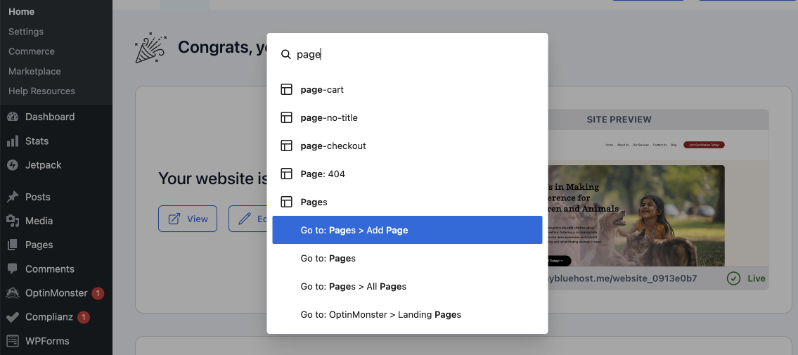
Dies macht die Navigation in Ihrem WordPress-Admin-Bereich viel schneller und einfacher.
Bei Charitable sind wir auch mit an Bord!
Wir haben Charitable-Optionen in diese Befehlspalette integriert.
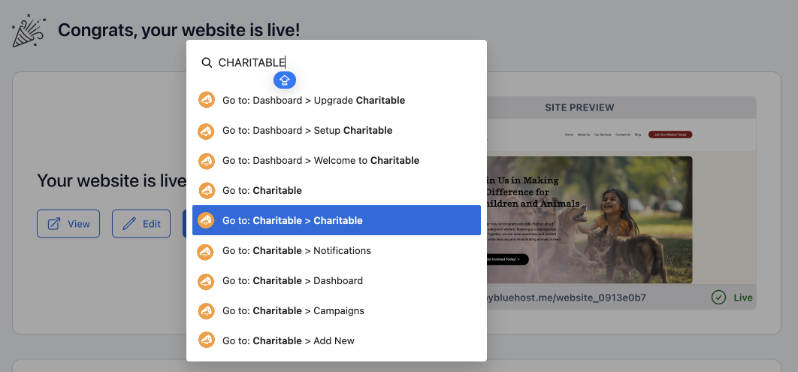
Anstatt also mit der Maus durch das Menü zu navigieren, können Sie Cmd + K auf dem Mac oder Ctrl + K unter Windows drücken.
Geben Sie „charitable“ ein und Sie sehen Optionen wie „Neue Spende erstellen“ oder Ihr Dashboard.
Der beste Weg, um diese neue Funktion kennenzulernen, ist, sie in Aktion zu sehen. Ich habe hier ein Video für Sie erstellt:
Sehen Sie es in Aktion: Neue Charitable-Optionen in der Befehlspalette verfügbar
7 wichtige Befehle auf Knopfdruck
Wir haben die am häufigsten verwendeten Charitable-Admin-Funktionen sorgfältig ausgewählt und über die Befehlspalette verfügbar gemacht.
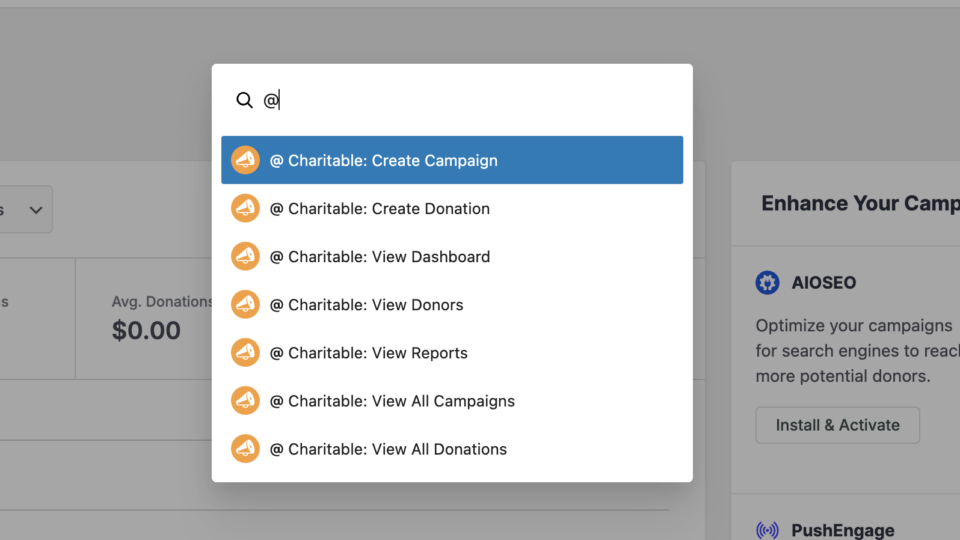
- Kampagne erstellen – Direkt zum Kampagnen-Builder springen
- Spende erstellen – Spenden manuell in Sekundenschnelle hinzufügen
- Dashboard anzeigen – Zugriff auf Ihre Spendenübersicht
- Spender anzeigen – Spenderinformationen und -historie überprüfen
- Berichte anzeigen – Ihre Spenden-Analysen überprüfen
- Alle Kampagnen anzeigen – Ihre Kampagnenliste verwalten
- Alle Spenden anzeigen – Spendenaktivitäten überwachen
Hier sind ein paar Tipps für Sie.
- Fuzzy-Suche funktioniert!: Sie müssen nicht die exakte Schreibweise eingeben. Geben Sie „Spende“ ein und Sie sehen Charitable-Spendenoptionen.
- Universeller Zugriff: Funktioniert von *jedem* WordPress-Bildschirm aus, nicht nur von Charitable.
- Keine Maus erforderlich: Verwenden Sie die Pfeiltaste nach unten zum Auswählen, drücken Sie Enter. Das war's.
- Schneller Charitable-Zugriff: Cmd/Ctrl+K dann @ (Umschalttaste+2) zeigt unsere Befehle sofort an
Entwickelt für den Workflow Ihres Teams
Unterschiedliche Teammitglieder benötigen unterschiedliche Zugriffsebenen. Die Integration der Befehlspalette respektiert Ihre vorhandenen WordPress-Berechtigungen, sodass Mitarbeiter nur die Befehle sehen, für deren Nutzung sie autorisiert sind.
- Freiwilligenkoordinatoren können Kampagnen erstellen, aber nicht auf Berichte zugreifen
- Finanzteammitglieder erhalten vollen Zugriff auf Spenden und Berichte
- Administratoren sehen jeden verfügbaren Befehl
Möchten Sie weitere großartige Funktionen wie diese?
Für noch leistungsfähigere Tools zur Steigerung Ihrer Spendenaktionen sollten Sie ein Upgrade auf Charitable Pro in Betracht ziehen. Sie erhalten Zugriff auf Funktionen wie:
- Die Sicherheitsfunktionen in Charitable Pro 1.8.11 sind Teil unseres Engagements, Fundraising-Technologie zu demokratisieren. Unser Ziel ist einfach: Wir möchten, dass Sie sich auf Ihre Mission konzentrieren können und nicht auf die Bereinigung von Spam-Spenden.
- Vorlagen + Visueller Editor
- Spendenverwaltung
- Fertige Berichte
- PDF-Belege
- Benutzerdefinierte E-Mails
- Spender-Dashboard
- Kommentare & Bestenlisten
- Wiederkehrende Spenden
- Gebührenermäßigung
- E-Mail-Integrationen
- Peer-to-Peer & Crowdfunding
...und vieles mehr! Sind Sie bereit, Charitable Pro auszuprobieren?
Melden Sie sich noch heute an und erhalten Sie bis zu 50 % Rabatt auf Ihren Plan. Wir sind zuversichtlich, dass Sie das Spenden sammeln mit Charitable lieben werden. Wenn Charitable aus irgendeinem Grund nicht das Richtige für Sie ist, erstatten wir Ihnen den Kaufpreis im Rahmen unserer 14-tägigen Geld-zurück-Garantie zurück.
Charitable hat über 1 Million Downloads!
Millionen vertrauen auf Charitable für erfolgreiche Spendenkampagnen. Probieren Sie Charitable noch heute risikofrei aus.
✅ 14-tägige Geld-zurück-Garantie
✅ Transparente Preisgestaltung
✅ Einrichtung ohne Code
Bleiben Sie verbunden für weitere Ressourcen für gemeinnützige Organisationen
Abonnieren Sie unseren YouTube-Kanal für weitere Tutorials und Videos, die speziell für Non-Profits entwickelt wurden. Wir veröffentlichen regelmäßig Expertentipps, Schritt-für-Schritt-Anleitungen für Migrationen wie diesen GiveWP zu Charitable-Wechsel, Spendenstrategien und praktische Ressourcen, die Ihrem Unternehmen zum Erfolg verhelfen.
🗞️ Erhalten Sie wöchentliche Tipps und exklusive Anleitungen in Ihrem Posteingang
Melden Sie sich für unseren Newsletter an →
🎥 Sehen Sie sich Schritt-für-Schritt-Tutorials und Erfolgsgeschichten an
Abonnieren Sie unseren YouTube-Kanal →
👩🏽💻 Vernetzen Sie sich mit unserer Community und erhalten Sie tägliche Einblicke in gemeinnützige Organisationen
Folgen Sie uns auf LinkedIn →
🥳 Lustige Reels und Einblicke in gemeinnützige Organisationen
Folgen Sie uns auf Instagram →
👀 Aufschlussreiche & unterhaltsame Videos, die Ihnen helfen, Ihre Sache voranzubringen
Folgen Sie uns auf TikTok→
🌎 Abonnieren und folgen Sie uns für allgemeine Fundraising-Tipps
Holen Sie sich Fundraising-Tipps auf TikTok →
Wir würden uns freuen, von Ihnen zu hören!
Die Sicherheitswerkzeuge in Charitable Pro 1.8.11 sind Teil unseres Engagements, Fundraising-Technologie zu demokratisieren. Unser Ziel ist einfach: Wir möchten, dass Sie sich auf Ihre Mission konzentrieren und nicht auf die Bereinigung von Spam-Spenden.
Wie funktionieren diese neuen Funktionen für Sie? Wir sind bestrebt, Charitable basierend auf Ihren realen Bedürfnissen weiterzuentwickeln. Egal, ob Sie Feedback zur neuen Befehlspaletten-Integration haben oder Ideen, was wir als Nächstes angehen sollen, kontaktieren Sie uns. Ihre Eingaben gestalten unsere Roadmap für 2026 direkt mit.







Hinterlassen Sie eine Antwort