
Wenn eine Spende eingeht, erfordern Aufgaben wie die Aktualisierung von Kontaktdaten, das Senden von Slack-Benachrichtigungen, das Hinzufügen von Tabellenzeilen und das Auslösen von Dankes-Sequenzen keine Beauftragung eines Entwicklers, das Schreiben von benutzerdefiniertem Code oder das Zusammenbasteln fragiler Workarounds mehr.
Mit Automation Connect 2.0 haben wir den gesamten Prozess optimiert. Ein vollständiges Webhook-Automatisierungssystem ist jetzt direkt in Charitable integriert – keine Plugins von Drittanbietern oder technisches Fachwissen erforderlich.
Ob Ihr Team aus einem einzelnen Koordinator oder einer vollständigen Belegschaft besteht, dieses Upgrade erleichtert es jeder gemeinnützigen Organisation wie nie zuvor, Automatisierung für ihre Mission einzusetzen.
Das neue Automation Connect 2.0 ist jetzt in Charitable Pro verfügbar.
Noch kein Charitable Pro-Benutzer? Melden Sie sich noch heute an und erhalten Sie bis zu 50 % Rabatt auf Ihren Plan. Wir sind zuversichtlich, dass Sie es lieben werden, mit Charitable Spenden zu sammeln. Wenn Charitable aus irgendeinem Grund nicht das Richtige für Sie ist, erstatten wir Ihnen den Kaufbetrag im Rahmen unserer 14-tägigen Geld-zurück-Garantie zurück. Holen Sie sich jetzt Charitable Pro »
„Moment – ich bin kein Entwickler. Ist das etwas für mich?“
Ja. Ehrlich.
Webhooks klingen technisch, aber die Idee hinter Automation Connect ist wunderschön einfach: Wenn auf Ihrer Website eine Spende eingeht, sollten Ihre anderen Tools automatisch davon erfahren. Keine manuellen Exporte. Kein Kopieren und Einfügen. Kein Warten, bis sich jemand daran erinnert, die Tabelle zu aktualisieren.
Denken Sie darüber nach, was heute passiert, nachdem eine Spende eingegangen ist. Jemand tritt Ihrer E-Mail-Liste bei – hat Mailchimp davon erfahren? Ein Großspender hat 5.000 US-Dollar gespendet – hat Ihr Team eine Slack-Nachricht erhalten? Ein wiederkehrender Spender hat gekündigt – weiß das jemand? Wenn die Antwort darin besteht, dass später ein Mensch einen Bericht prüft, ist das eine Lücke, die Automation Connect schließt.
So funktioniert es in der Praxis: Sie verbinden Charitable mit einem Tool wie Zapier oder Make.com (beide haben kostenlose Pläne und erfordern keinerlei Programmierung). Sie teilen Automation Connect mit, auf welches Ereignis es achten soll – sagen wir, eine neue Spende – und es sendet alle relevanten Daten in dem Moment, in dem sie auftreten, an Zapier. Zapier erledigt dann alles, was Sie eingerichtet haben: Fügt den Spender zu Mailchimp hinzu, postet auf Slack, protokolliert in Google Sheets, erstellt einen HubSpot-Kontakt. Alles davon. Automatisch.
Sie richten es einmal ein. Es läuft jedes Mal.
Einige Dinge, die Nicht-Entwickler in weniger als einer Stunde erstellen können:
- 📬 Spender automatisch zu Ihrer E-Mail-Liste hinzufügen – nur diejenigen, die zugestimmt haben, dank integrierter Bedingungen
- 💬 Slack-Benachrichtigungen für Ihr Team – „Sarah hat gerade 250 US-Dollar für die Frühlingskampagne gespendet!“
- 📊 Live-Google-Sheets-Spenderprotokoll für Vorstandberichte, in Echtzeit aktualisiert
- 🤝 Neue Spenderdatensätze in Ihrem CRM – HubSpot, ActiveCampaign, Salesforce über Zapier
- 🔄 Benachrichtigungen, wenn ein wiederkehrender Spender kündigt – damit Sie persönlich nachfassen können
Wenn Sie sich jemals gewünscht haben, dass Charitable „einfach mit“ einem anderen Tool sprechen könnte, das Sie verwenden, dann ist dies der Weg.
Sehen Sie es in Aktion
Was gibt es Neues?
17 Ereignisse. Unendliche Möglichkeiten.
Automation Connect löst 17 verschiedene Ereignisse bei Spenden, Kampagnen und wiederkehrenden Spenden aus – und deckt damit den gesamten Lebenszyklus einer Spenderbeziehung ab.
⚡ Spendenlebenszyklus:
Auslösen bei donation_created, donation_updated, donation_status_changed, donation_trashed, donation_restored und donor_created (wird bei der ersten Spende eines Spenders ausgelöst).
🔁 Wiederkehrende Spenden:
Webhooks bei Planerstellung, Verlängerungszahlungen, Updates und Trash/Restore-Ereignissen über recurring_donation_*-Slugs auslösen.
📣 Kampagnen-Meilensteine:
Auslösen bei campaign_created, campaign_updated, campaign_ended, campaign_goal_reached und Trash/Restore-Ereignissen.
Jedes Ereignis enthält eine vollständige Daten-Payload, damit Ihre verbundenen Tools immer den benötigten Kontext haben.
Bedingungen: Senden Sie Webhooks, wenn es darauf ankommt
Nicht jedes Ereignis muss jeden Webhook auslösen. Die bedingte Logik-Engine von Automation Connect ermöglicht es Ihnen, Lieferungen zu filtern, um genau das Szenario abzugleichen, das Ihnen wichtig ist.
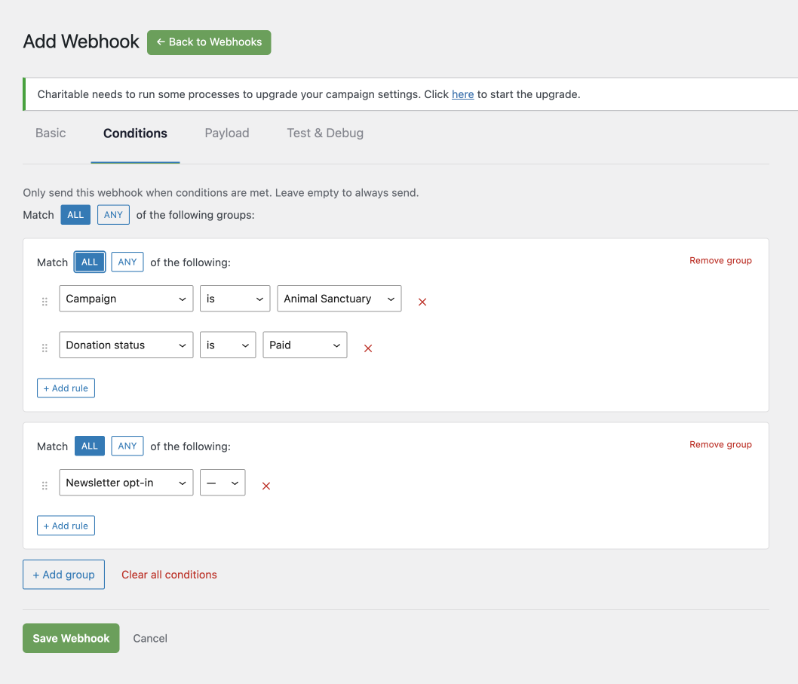
🎯 Nach Beliebigem filtern: Schreiben Sie Bedingungen für 11 Felder – Spendenbetrag, Status, Zahlungs-Gateway, Spenderland, Newsletter-Opt-in, Kampagne, benutzerdefinierte Felder und mehr.
🧩 UND/ODER-Logik: Kombinieren Sie Bedingungen mit UND-Logik innerhalb einer Gruppe und ODER-Logik über Gruppen hinweg – die gleiche flexible Struktur, die in Marketing-Automatisierungstools verwendet wird.
✅ Ein-Klick-Test: Senden Sie eine Test-Payload aus dem Editor und sehen Sie den Antwortcode, den Body und die Lieferzeit, bevor Ihr Abonnement live geht.
Volle Kontrolle über Ihre Payload
Ihre verbundenen Apps sollten die Daten erhalten, die sie benötigen, und nichts weiter. Der Payload-Tab ermöglicht es Ihnen, aus über 80 verfügbaren Feldern für Spender-, Spenden-, Kampagnen-, wiederkehrende und Website-Metadaten auszuwählen – und irrelevante Felder abzuwählen, um Payloads sauber und schnell zu halten.
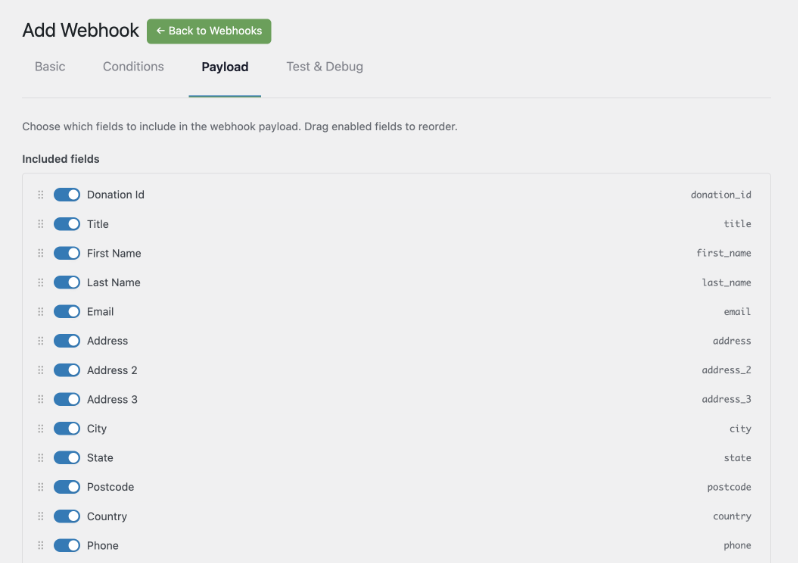
💰 Spenderdaten: Name, E-Mail, Adresse, lebenslange Spendensumme, Anzahl der Spenden.
👁️ Spandendaten: Betrag, Status, Gateway, Transaktions-ID, Kampagnenzuordnungen.
📊 Kampagnendaten: Ziel, gesammelter Betrag, Prozentsatz, Spenderanzahl, Start- und Enddatum.
Jede ausgehende Anfrage wird mit HMAC-SHA256 signiert, sodass Ihr Endpunkt überprüfen kann, ob die Payload von Ihrer Website stammt.
In wenigen Minuten mit Plattform-Vorlagen starten
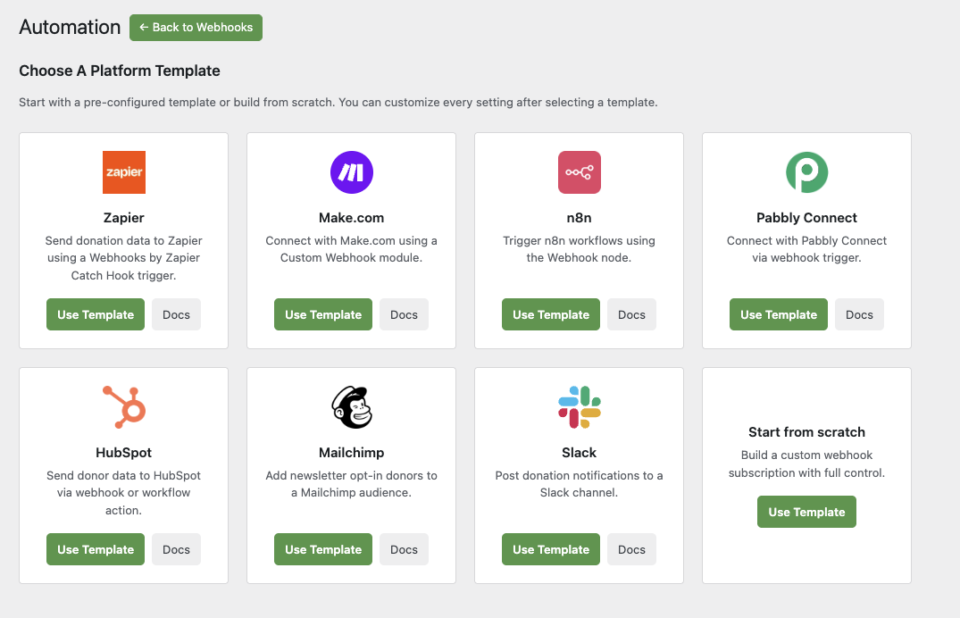
Automation Connect wird mit 8 vorab erstellten Plattform-Vorlagen geliefert, sodass Sie nicht alles von Grund auf neu konfigurieren müssen.
🚀 Zapier: Vorkonfiguriert für einen Webhooks by Zapier Catch Hook Trigger.
🛠️ Make.com: Bereit für ein Custom Webhook-Modul.
⚙️ n8n: Verweist direkt auf Ihren n8n Webhook-Knoten.
🤝 HubSpot, Mailchimp, Pabbly, Slack: Jede Vorlage legt sinnvolle Standardeinstellungen für ihre Plattform fest, einschließlich einer Newsletter-Opt-in-Bedingung für die Mailchimp-Vorlage.
Wählen Sie eine Vorlage aus, fügen Sie Ihre Webhook-URL ein und speichern Sie. Sie können alle Einstellungen danach anpassen.
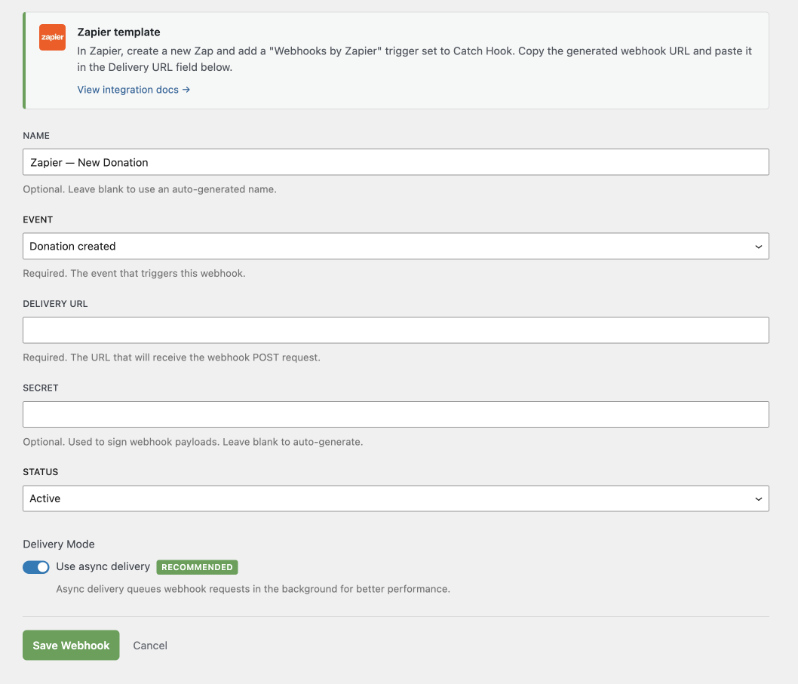
Das ist alles! Sie sind bereit, Ihre Spenden- und Verwaltungsaufgaben zu automatisieren.
Für Agenturen und Entwickler
Hooks, Filter und vollständige Anpassung
Automation Connect stellt einen vollständigen Satz von WordPress-Filtern für jede Ebene des Systems bereit. Registrieren Sie benutzerdefinierte Payload-Felder, fügen Sie neue Trigger-Ereignisse hinzu, fügen Sie benutzerdefinierte Bedingungen ein und ändern Sie Payloads vor der Zustellung – alles, ohne die Kern-Plugin-Dateien zu berühren.
add_filter( 'charitable_automation_connect_payload_fields', function( $fields ) {
    $fields['my_custom_field'] = array(
        'label'   => __( 'My Custom Field', 'my-plugin' ),
        'group'   => 'donor',
        'resolve' => function( $event_data ) {
            return get_user_meta( $event_data['donor_user_id'], 'my_meta_key', true );
        },
    );
    return $fields;
} );
Zuverlässige Zustellung in großem Maßstab
Fehlgeschlagene Zustellungen werden automatisch über den WordPress Action Scheduler mit exponentiellem Backoff erneut versucht, sodass vorübergehende Endpunktfehler nicht zu Datenverlust führen. Jeder Zustellungsversuch wird im Protokollsystem von Charitable protokolliert, das unter Werkzeuge » Protokolle zugänglich ist.
Entwickelt für Multi-Site- und Client-Bereitstellungen
Automation Connect funktioniert in Multisite-Umgebungen einwandfrei. Jede Website verwaltet ihre eigenen Abonnements unabhängig voneinander, und die Lizenzprüfung berücksichtigt den Pro-Plan-Status pro Website.
Erste Schritte mit Automation Connect 2.0
Automation Connect 2.0 ist jetzt für alle Charitable Pro-Benutzer mit dem Pro-Plan oder höher verfügbar.
Aktualisieren Sie auf Charitable Pro 1.8.13, aktivieren Sie die Erweiterung unter Charitable » Addons und erstellen Sie Ihr erstes Abonnement in wenigen Minuten.
Lesen Sie die Dokumentation zu Automation Connect »
Noch kein Charitable Pro-Benutzer?
Charitable wurde über 1 Million Mal heruntergeladen und ermöglicht Spendenaktionen für gemeinnützige Organisationen, Schulen und Anliegen auf der ganzen Welt. Charitable Pro fügt erweiterte Funktionen wie Automation Connect, PDF-Spendenquittungen, wiederkehrende Spenden und Prioritätsunterstützung hinzu.
Charitable hat über 1 Million Downloads!
Millionen vertrauen auf Charitable für erfolgreiche Spendenkampagnen. Probieren Sie Charitable noch heute risikofrei aus.
✅ 14-tägige Geld-zurück-Garantie
✅ Transparente Preisgestaltung
✅ Einrichtung ohne Code
Bleiben Sie verbunden für weitere Ressourcen für gemeinnützige Organisationen
Für weitere Tutorials und Videos, die auf gemeinnützige Organisationen zugeschnitten sind, abonnieren Sie unseren YouTube-Kanal. Wir veröffentlichen regelmäßig Expertentipps, Schritt-für-Schritt-Anleitungen zu Online-Spenden, Fundraising-Strategien und praktische Ressourcen, die Ihrer Organisation zum Erfolg verhelfen.
🗞️ Erhalten Sie wöchentliche Tipps und exklusive Anleitungen in Ihrem Posteingang
Melden Sie sich für unseren Newsletter an →
🎥 Sehen Sie sich Schritt-für-Schritt-Tutorials und Erfolgsgeschichten an
Abonnieren Sie unseren YouTube-Kanal →
👩🏽💻 Vernetzen Sie sich mit unserer Community und erhalten Sie tägliche Einblicke in gemeinnützige Organisationen
Folgen Sie uns auf LinkedIn →
🥳 Lustige Reels und Einblicke in gemeinnützige Organisationen
Folgen Sie uns auf Instagram →
👀 Aufschlussreiche & unterhaltsame Videos, die Ihnen helfen, Ihre Sache voranzubringen
Folgen Sie uns auf TikTok→
🌎 Abonnieren und folgen Sie uns für allgemeine Fundraising-Tipps
Holen Sie sich Fundraising-Tipps auf TikTok →
Leistungsstarke Fundraising-Ressourcen
⬇️ Laden Sie bewährte Strategien, Kampagnenideen und Experten-Tools herunter
Holen Sie sich das Fundraising-Kit →
💸 Holen Sie sich kostenlose Fundraising-Ressourcen
Besuchen Sie den Charitable Fundraising Hub →
🤔 Haben Sie Fragen zu Charitable?
Charitable FAQs →
🏎️ Probieren Sie Charitable aus
Erstellen Sie Ihre Charitable Demo →
Verstehen Sie Begriffe und Jargon von gemeinnützigen Organisationen
Glossar für gemeinnützige Organisationen→
% Suchen Sie nach Angeboten und Rabatten für gemeinnützige Organisationen?
Beste Angebote und Rabatte für gemeinnützige Organisationen →







Hinterlassen Sie eine Antwort