

Instagram gilt als kreativer Kanal für großartige Fotografie, Urlaubsfotos und gelegentliche Memes. Aber es ist so viel mehr als das – Organisationen auf der ganzen Welt nutzen dieses Netzwerk, um Nachrichten zu teilen und ihre Dienstleistungen zu bewerben. Auch gemeinnützige Organisationen erkennen zunehmend seinen Wert – sie erstellen Inhalte zu wichtigen Anliegen und zeigen dem Publikum, wie es helfen kann.
Im Folgenden werden wir auf den Wert von Instagram für gemeinnützige Organisationen eingehen und einige Tipps geben, wie Sie Ihre Anliegen auf der Plattform an die Menschen bringen können.
Warum sollten gemeinnützige Organisationen Instagram nutzen?
Die meisten sozialen Kanäle sind für gemeinnützige Organisationen nützlich, aber Instagram sticht durch seinen starken Fokus auf visuelle Elemente hervor.
Es ist nicht nur ein Ort, um Bilder zu posten, sondern auch, um Initiativen zu teilen, die Botschaft zu verbreiten und Kampagnen durchzuführen. Dank der Arten von Inhalten, die Sie veröffentlichen können – von Bild- und Album-Posts bis hin zu Videos, Stories und sogar KI-Filtern – können Inhalte kreativ angereichert und strategisch an die gewünschten Personen ausgeliefert werden.
Und es ist erwähnenswert, dass Peer-to-Peer-Spendeninitiativen nativ über Instagram angetrieben werden können, insbesondere wenn Menschen teilen können, wie sie helfen, und Spenden über ihre eigenen Zielgruppen sammeln.
Letztendlich kann Instagram Ihnen helfen:
- Sichtbarkeit in verschiedenen Gemeinschaften und Zielgruppen zu erlangen – insbesondere bei jüngeren Spendern.
- Das Bewusstsein für Ihre Arbeit zu schärfen.
- Spendenaktionen für gemeinnützige Organisationen zu ergänzen, wie z. B. Peer-to-Peer-Fundraising.
- Ihre gemeinnützige Organisation als vertrauenswürdige Marke zu positionieren, um Vertrauen aufzubauen und unter anderen erkennbar zu werden.
6 Schritte, um mit Instagram für Ihre gemeinnützige Organisation zu beginnen
1. Als Unternehmensprofil registrieren
Wie Ihr Profil eingerichtet ist, ist wichtig – es ist das Erste, was Betrachter sehen, wenn sie Ihre Seite besuchen. Sobald Sie sich als Unternehmensprofil registrieren, können Sie sich als gemeinnützige Organisation identifizieren, was Ihr Publikum wissen sollte, insbesondere wenn Sie um Spenden bitten.
Instagram kann Ihnen dann Einblicke in wichtige Social-Media-Kennzahlen geben: Impressionen, Engagement und Reichweite aller Ihrer Beiträge und Stories. Wenn Sie sich entscheiden, eine Anzeige oder einen gesponserten Beitrag zu schalten, hilft Ihnen Instagram auch bei der Analyse Ihrer Reichweite und gibt Ihnen einige Tipps, wie Sie Ihre Beiträge noch weiter verbreiten können.
2. Fügen Sie einen Link in Ihr Profil ein
Instagram sollte als kreatives Werkzeug zur Ergänzung Ihrer Anliegen genutzt werden. Daher ist es wichtig, dass Sie die Nutzer zu einem Link weiterleiten, auf dem sie sehen können, worum es auf Ihrer Seite geht und mehr erfahren können. In Ihren Stories und Beitragsbeschreibungen können Sie die Betrachter ermutigen, diesen Link zu besuchen, indem Sie sagen: „Gehen Sie zu unserem Link in der Bio“. Von dort aus können sie Ihre Website besuchen, um zu verstehen, worum es bei Ihrer gemeinnützigen Organisation geht und warum sie unterstützenswert ist.
3. Legen Sie Ihre Ziele fest
Instagrams beispiellose Möglichkeit, Menschen zu erreichen und mit ihnen in Kontakt zu treten, sollten Sie so gut wie möglich nutzen. Es ist sinnvoll, die Ziele Ihrer Organisation zu entwickeln und zu entscheiden, welche Ziele für Sie am wichtigsten sind. Was möchten Sie aus dieser Plattform herausholen?
Hier sind einige gängige Ziele für gemeinnützige Organisationen auf Instagram:
- Markenbekanntheit – wer Sie, Ihre Wohltätigkeitsorganisation oder NGO sind – und wofür Sie stehen.
- Community-Management oder -Engagement – die breitere Gemeinschaft erreichen und mit Menschen in Kontakt treten, denen die gleichen Anliegen am Herzen liegen wie Ihnen.
- Spenden und Fundraising – Geld für Ihre Wohltätigkeitsorganisation sammeln.
- Freiwilligenrekrutierung – Freiwillige gewinnen, die bei Ihren Missionen helfen.
Es ist möglich, dass Sie mehr als ein Ziel haben, aber stellen Sie sicher, dass Sie wissen, welche für Ihr Instagram-Konto richtig sind. Wenn es beispielsweise eines Ihrer Hauptziele ist, Spenden zu sammeln, können Sie eine Anzeige für Ihren Beitrag schalten, um zu zeigen, wie Sie Menschen helfen, und eine Schaltfläche „Jetzt spenden“ hinzufügen, damit Ihr Publikum sofort versteht, wie es sich engagieren kann.
4. Erstellen Sie eine Strategie, um Ihre Ziele zu erreichen
Abhängig von Ihrem Ziel ist es eine gute Idee, über Taktiken nachzudenken, um Ihre Zielgruppe zu erreichen.
Wenn es beispielsweise eines Ihrer Hauptziele bei der Nutzung von Instagram ist, Freiwillige zu rekrutieren, können Sie mit Inhalten und Strategien viel tun, um Ihre Mission bekannt zu machen.
- Erstellen Sie Videoinhalte über bestehende Freiwillige, die auf Missionen waren – hören Sie ihre Geschichten und zeigen Sie, wie sie helfen.
- Erstellen Sie Infografik-Beiträge über bevorstehende Möglichkeiten.
- Erstellen Sie bezahlte Anzeigen, um Leute einzuladen, mehr über Ihre Mission zu erfahren.
- Posten Sie Freiwilligen-Instagram-Stories auf Ihrer Seite neu, um ein Gefühl der Authentizität zu schaffen.
Wenn Ihr Hauptziel hingegen das Sammeln von Spenden ist, sind diese Taktiken besser geeignet, um Spender zu erreichen.
- Erstellen Sie Videos, die zeigen, wie Geld ausgegeben wird und wohin.
- Richten Sie einen Livestream oder einen Instagram-TV-Beitrag ein, um häufig gestellte Fragen zu beantworten, warum diese Initiative so wichtig ist.
- Erstellen Sie bezahlte Anzeigen und zielen Sie auf Personen ab, die mit dem Audience-Tool eher spenden.
- Erstellen Sie Instagram-Feed-Beiträge und Stories, die die Arbeit vor und nach der Mission zeigen.
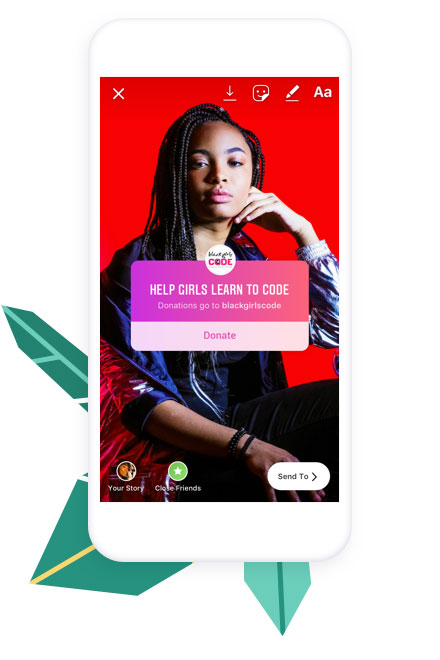
Instagram unterstützt gemeinnützige Organisationen aktiv und stellt sicher, dass diese 100 % der über ihre Plattform gesammelten Spenden erhalten. Es lohnt sich auf jeden Fall, Stories zu nutzen, um Menschen zum Spenden zu ermutigen, da Sie den Spenden-Sticker in Stories hinzufügen können, um direkt eine Spendenaktion zu erstellen.
5. Folgen Sie Hashtags, um auf dem Laufenden zu bleiben
Wenn Sie Inhalte zusammen mit Hashtags posten, werden Ihre Inhalte in trendigen Beiträgen mit denselben Hashtags angezeigt. Ebenso können Sie anderen Hashtags folgen, und diese werden in Ihrem Instagram-Feed angezeigt, gemischt mit den regulären Beiträgen der Konten, denen Sie folgen.
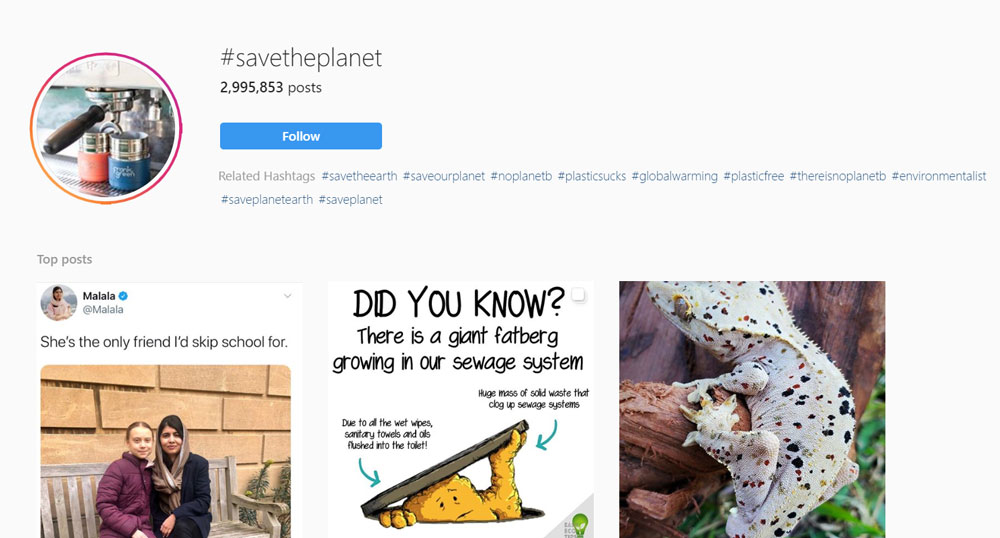
Anstatt einen Benutzernamen im Feed zu sehen, sehen Sie den Hashtag neben dem aktuellen Foto für diesen Hashtag und das farbige Hashtag-Symbol. Der Benutzer, der den Beitrag auf dem Hashtag hochgeladen hat, und jeder verwendete Standort-Tag werden unter dem Hashtag selbst aufgeführt.
Hashtags können auch zu Instagram Stories hinzugefügt werden, aber es ist ratsam, sicherzustellen, dass die Schriftart groß genug ist, da der Algorithmus der Plattform zu kleine Hashtags nicht erkennt.
6. Nutzen Sie die folgenden Beispiele als Inspiration für das Aussehen und Gefühl Ihrer Inhalte
Starke Bilder und Botschaften – zusammen mit einer konsistenten Marke und einem einheitlichen Tonfall – zeigen den Menschen, welche Anliegen Ihnen am Herzen liegen und wer Sie als gemeinnützige Organisation sind. Dies wird letztendlich Ihre Reichweite auf Instagram erhöhen und tiefere Verbindungen zu Spendern und Unterstützern schaffen.
Werfen Sie einen Blick auf einige großartige Fallbeispiele von gemeinnützigen Organisationen, die verschiedene Content-Ansätze nutzen, um das Bewusstsein zu schärfen.
PETA
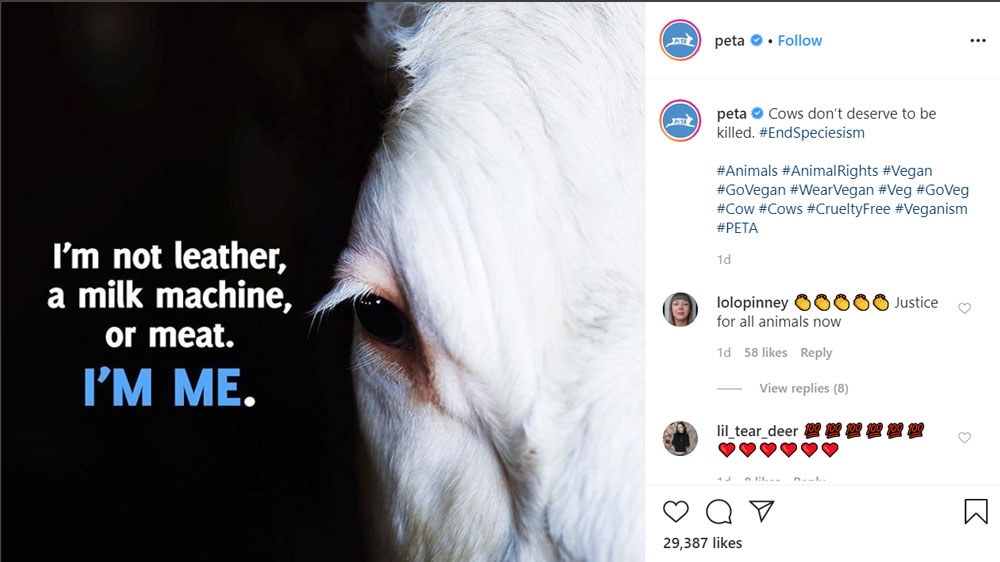
PETA (People for the Ethical Treatment of Animals) ist die größte Tierrechtsorganisation der Welt mit mehr als 6,5 Millionen Mitgliedern und Unterstützern.
PETA platziert Text normalerweise direkt auf seinen Bildern und integriert einen Aufruf zum Handeln als Teil des Designs. Auf diese Weise können Befürworter ihre Kampagnen teilen und gleichzeitig die ursprüngliche Botschaft beibehalten.
The Salvation Army (Australien)
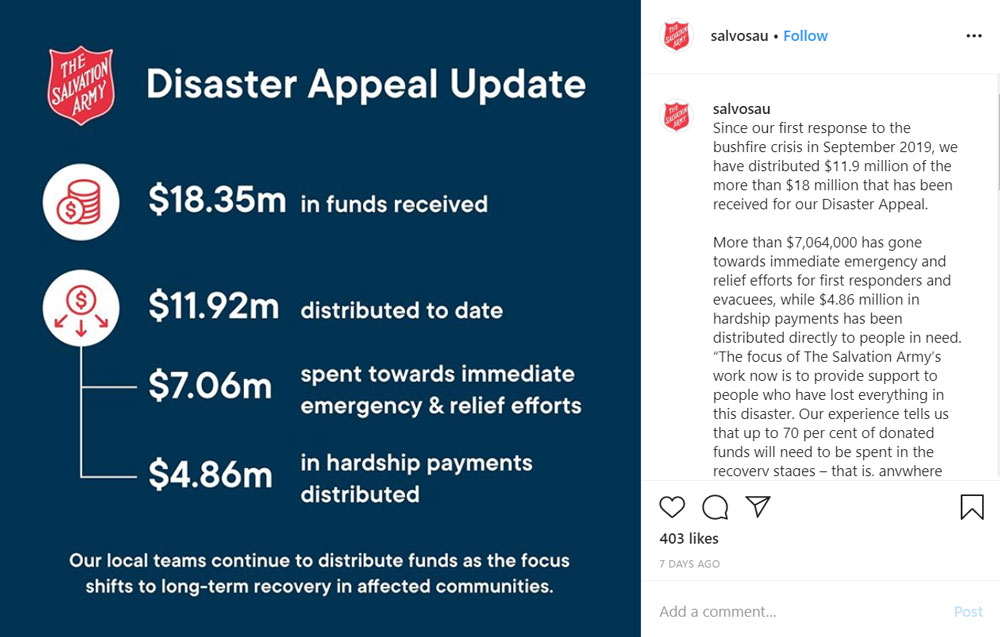
Die internationale Wohltätigkeitsorganisation Heilsarmee nutzt ebenfalls ihr Branding und ihren Text als Teil ihrer Bilder – in diesem Beispiel werden wichtige Fakten und Zahlen zu ihren Hilfsmaßnahmen genannt. Dies ist besonders wichtig, um die Öffentlichkeit darüber zu informieren, wohin ihre Spenden fließen und wem sie helfen.
Direct Relief
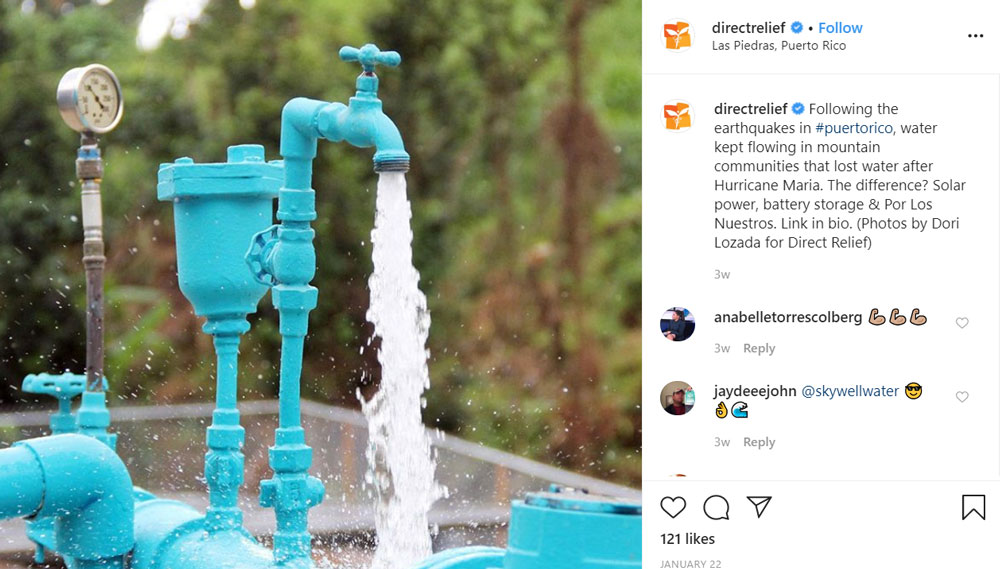
Die Mission von Direct Relief ist es, die Gesundheit und das Leben von Menschen zu verbessern, die von Armut und Katastrophen betroffen sind, sowohl in den USA als auch international. Anstatt gebrandete Designs in den Bildern selbst zu verwenden, haben sie hochwertige Fotografie eingesetzt, um die Arbeit darzustellen, die sie leisten. Hier zeigen sie Wasserpumpen, die sie in dieser Gemeinde in Puerto Rico installiert haben.
Mayo Clinic
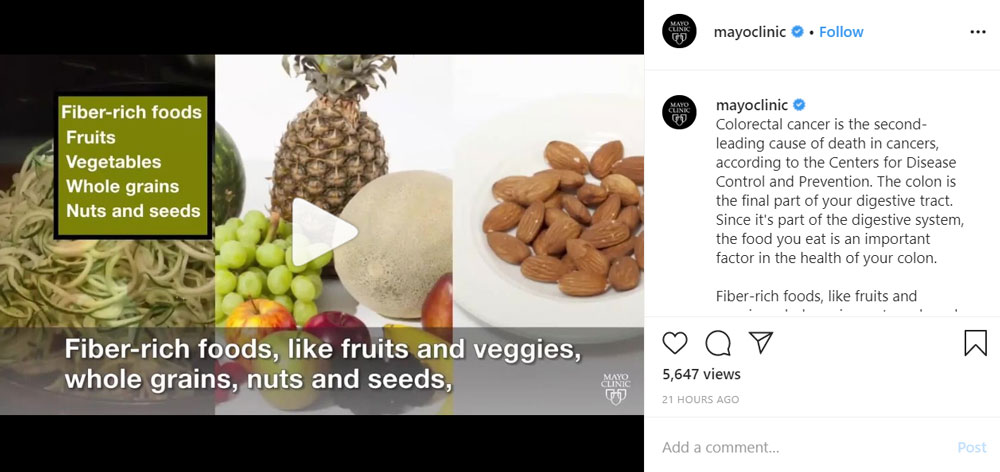
Die Mayo Clinic ist ein amerikanisches gemeinnütziges akademisches medizinisches Zentrum mit Sitz in den USA, das sich auf integrierte klinische Praxis, Ausbildung und Forschung konzentriert. Und genau das tut dieser Instagram-Post – in diesem Fall ein Video statt eines Bildes. Mit fetten Bildunterschriften, die wichtige Details zu Gesundheitsthemen erfassen, nutzen sie ihre Inhalte, um ihr Publikum kreativ zu informieren und zu inspirieren, sich besser zu ernähren.
Human Rights Watch

Human Rights Watch ist eine NGO, die sich für Menschenrechte einsetzt. Die Gruppe übt Druck auf einige Regierungen, politische Entscheidungsträger und Menschenrechtsverletzer aus, um Missbrauch anzuprangern und Menschenrechte zu achten, und die Gruppe arbeitet oft im Namen von Flüchtlingen, Kindern, Migranten und politischen Gefangenen. Sie haben sich ebenfalls für Bilder entschieden, die für ihre Anliegen sprechen, ohne zusätzliches Design – hier sehen Sie, wie sie Anwälten im Jemen, die gegen die Inhaftierung in geheimen Gefängnissen kämpfen, Anerkennung zollen.
Schlussfolgerung
Wir hoffen, dieser Artikel hat Ihnen Anleitungen gegeben, wie gemeinnützige Organisationen Instagram nutzen können, um ihre Anliegen weiter voranzutreiben.
Denken Sie daran, dass Sie, um effektiv Spenden zu sammeln, in die soziale Gemeinschaft investieren müssen – durch großartige Inhalte und eine Art von Strategie, sei es durch bezahlte Werbung oder durch die Nutzung von Wohltätigkeitstrends. Bleiben Sie mit Ihrem Publikum in Verbindung, indem Sie Trends verfolgen, auf Kommentare reagieren und ansprechende Inhalte erstellen – und folgen Sie unserem Blog für weitere Informationen.
Diesen Artikel genossen? Lesen Sie als Nächstes:





Hinterlassen Sie eine Antwort