
Der Wechsel von Spendenplattformen ist leicht zu rechtfertigen und schmerzhaft in der Ausführung. Ihre Spenderliste, Kampagnenhistorie und jahrelange Spendenaufzeichnungen leben in Donorbox – und der Umzug zu einer neuen Plattform bedeutete traditionell eines von zwei Dingen: frisch beginnen und die Historie verlieren oder Tage damit verbringen, Tabellen manuell in Form zu bringen.
Der Donorbox Importer für Charitable Pro eliminiert diesen Kompromiss.
Er liest dieselben CSV-Dateien, die Donorbox bereits zum Exportieren bereitstellt, ordnet sie dem Datenmodell von Charitable zu und führt Sie durch die gesamte Migration in einem geführten Sechs-Stufen-Assistenten. Spender, Kampagnen, Spendenhistorie und wiederkehrende Planaufzeichnungen landen alle intakt in Charitable – bereit, Ihre Dankes-E-Mails, Re-Engagement-Kampagnen und langfristigen Berichte zu befeuern.
Ein integrierter Testlaufmodus ermöglicht es Ihnen, genau zu sehen, was importiert wird, bevor ein einziger Datensatz geschrieben wird. Und wenn nach der Bestätigung etwas falsch aussieht, entfernt ein Rollback mit einem Klick alles, was der Import erstellt hat, und hinterlässt Ihre Datenbank genau so, wie sie war.
Verfügbar in Charitable Pro 1.8.14 und neuer.
Hier ist ein kleiner Vorgeschmack auf das Tool:

Was Sie in diesem Leitfaden erwartet
Was Sie mit dem Donorbox Importer erhalten
Hier ist, was diese Funktion beinhaltet:
- Sechsstufiger Assistent: Hochladen, Vorschau, Optionen, Import, Ergebnisse und optionaler Rollback.
- Importiert Spender, Kampagnen, Spenden und wiederkehrende Pläne (nur Archivierung) aus Standard-Donorbox-CSV-Exporten.
- Erkennt automatisch CSV-Spalten aus einer stabilen erlaubten Schema-Liste mit mehreren Header-Aliassen pro Feld.
- Der Testlaufmodus zeigt alles in der Vorschau an, ohne einen einzigen Datensatz zu schreiben.
- Pro Import werden mit Batch-ID-Stempeln alle Datensätze versehen, sodass ein vollständiger Rollback mit einem Klick möglich ist, wenn der Import falsch ist.
- Synchrone Rollbacks für kleine Importe und asynchrone, gebündelte Rollbacks für sehr große.
- Konfigurierbares Datumsformat (ISO, MM/TT/JJJJ, TT/MM/JJJJ) für CSVs aus verschiedenen Regionen.
- Optionales Überschreiben von doppelten Spendern und Spenden bei erneutem Import.
- Optionale Verwendung der konvertierten Beträge von Donorbox für Multi-Währungs-Websites.
- 24-Stunden-Bereinigung von abgebrochenen Importen, sodass eine geschlossene Browsertab keine Staging-Dateien zurücklässt.
- Concurrency Guard verhindert, dass zwei Importe gleichzeitig laufen.
Warum den Donorbox Importer verwenden?
Das Wegziehen von Donorbox ohne den Verlust Ihrer Historie war bisher eine manuelle Übung in Tabellenkalkulations-Wirrwarr.
Der Donorbox Importer liest dieselben CSVs, die Donorbox selbst exportiert, ordnet sie dem Datenmodell von Charitable zu und überträgt alles in einem geführten Ablauf.
Ihre Spender, Ihre Kampagnen und die Spendenhistorie, die die Beziehung beweist, landen alle in Charitable, wo sie für Dankes-E-Mails, segmentierte Re-Engagement-Kampagnen und Ihre laufende Berichterstattung genutzt werden können.
Voraussetzungen
- Charitable Pro 1.8.14 oder neuer
- PHP 7.4 oder höher (der Importer prüft und weigert sich, darunter zu laufen)
- Aktuelles Datenbank-Backup (dringend empfohlen vor jedem großen Import)
- Donorbox-Konto mit Berechtigung zum Exportieren von Spenden, Unterstützern und wiederkehrenden Plänen als CSV
Erste Schritte
Bevor Sie beginnen, melden Sie sich in Ihrem Donorbox-Dashboard an und exportieren Sie Ihre Daten als CSV mit der Option „Alle Spalten“:
- Spenden CSV (erforderlich)
- Unterstützer CSV (optional, aber empfohlen)
- Wiederkehrende Pläne CSV (optional)
Wichtig: Sichern Sie Ihre WordPress-Datenbank. Sie können ein Tool wie Duplicator verwenden, um schnell ein Backup Ihrer Website zu erstellen.
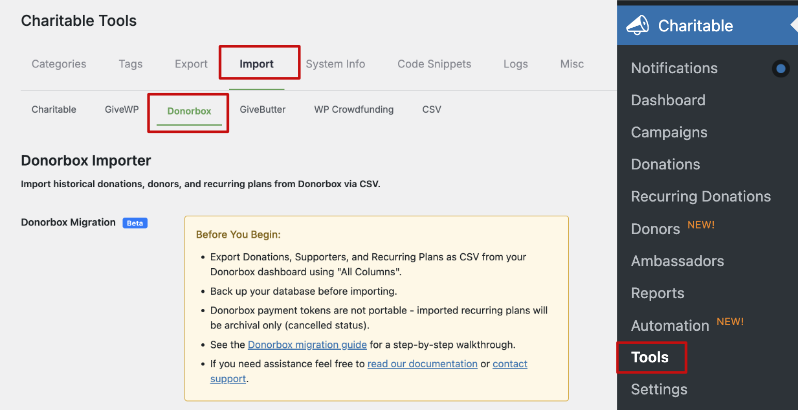
Beachten Sie, dass Donorbox-Zahlungstoken nicht übertragbar sind. Importierte wiederkehrende Pläne sind nur zur Archivierung bestimmt und kommen mit dem Status „storniert“ in Charitable an. Sie müssen die Zahlungserlaubnis von diesen Spendern erneut einholen, wenn Sie möchten, dass die wiederkehrende Abrechnung in Charitable fortgesetzt wird.
Wo Sie den Donorbox Importer finden
Gehen Sie in Ihrem WordPress-Admin zu Charitable → Tools → Import → Donorbox.
Beginnen Sie mit der Migration zu Charitable
Der Donorbox Importer ist ein sechsstufiger Assistent. Jede Stufe wartet auf explizite Bestätigung, bevor sie fortfährt, und der Testlauf kann beliebig oft wiederholt werden, bevor er abgeschlossen wird.
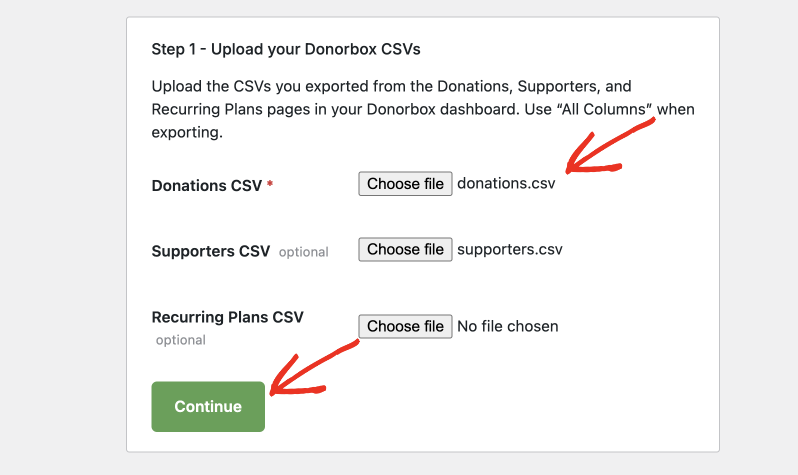
Schritt 1: CSVs hochladen
Laden Sie Ihre Donorbox Spenden CSV hoch. Die CSVs für Unterstützer und wiederkehrende Pläne sind optional, aber dringend empfohlen. Sobald Sie auf Weiter klicken, analysiert der Importer die Kopfzeilen, erkennt das Trennzeichen (Komma, Semikolon oder Tabulator) und gleicht die Spalten mit dem Donorbox-Schema ab.
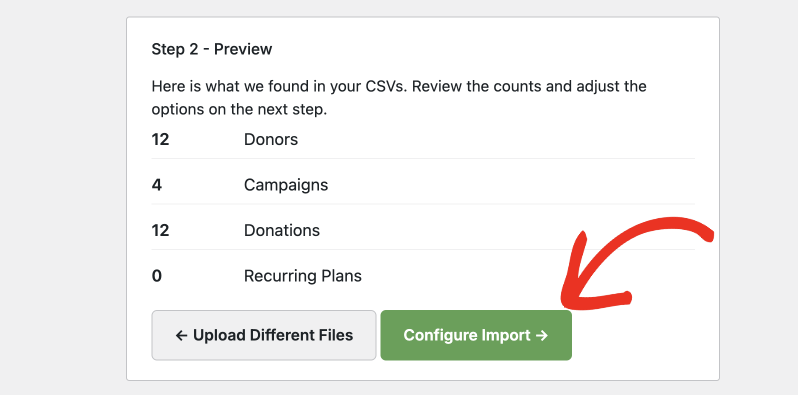
Schritt 2: Anzahl der Vorschauen
Ein Testlauf wird gegen Ihre hochgeladenen Dateien ausgeführt und meldet, wie viele Spender, Kampagnen, Spenden und wiederkehrende Pläne gefunden wurden. In dieser Phase wird nichts in Ihre Datenbank geschrieben. Verwenden Sie die Zählungen, um zu überprüfen, ob der Import das sieht, was Sie erwarten.
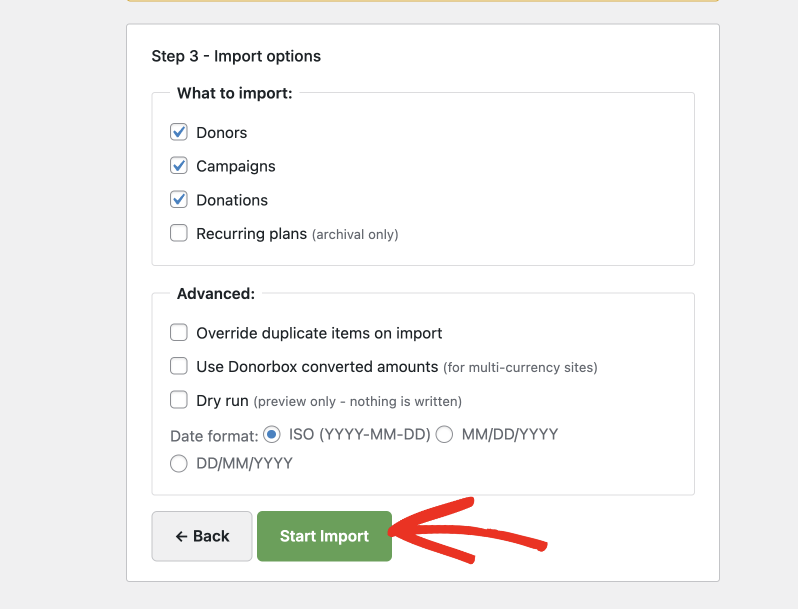
Schritt 3: Importoptionen
Wählen Sie aus, welche Entitäten importiert werden sollen, und konfigurieren Sie das erweiterte Verhalten:
- Was importiert werden soll: Spender, Kampagnen, Spenden, wiederkehrende Pläne
- Duplikate beim Import überschreiben
- Konvertierte Beträge von Donorbox verwenden (für Websites mit mehreren Währungen)
- Testlauf (nur Vorschau, es wird nichts geschrieben)
- Datumsformat: ISO (JJJJ-MM-TT), MM/TT/JJJJ oder TT/MM/JJJJ
Schritt 4: Importieren
Der Importer verarbeitet jeweils eine Phase (zuerst Spender, dann Kampagnen, dann wiederkehrende Pläne, dann Spenden) standardmäßig in Stapeln von 200 Zeilen. Der Fortschritt wird live im Browser aktualisiert, und jeder importierte Datensatz wird mit der Stapel-ID des Imports gekennzeichnet.
Schritt 5: Ergebnisse
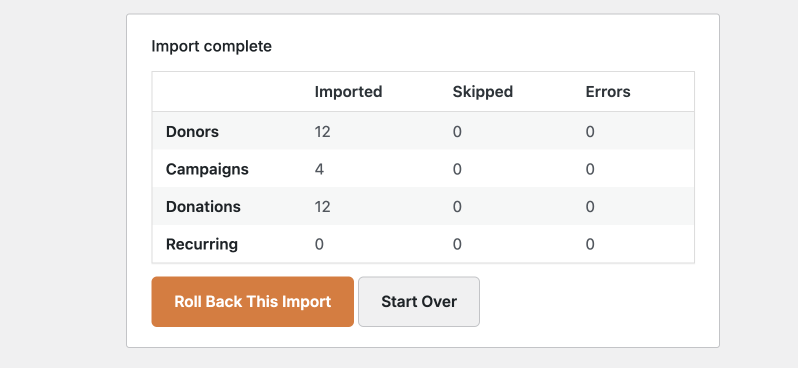
Eine Zusammenfassung zeigt die Anzahl der importierten, übersprungenen und fehlerhaften Datensätze für jede Entität sowie eventuelle Warnungen. Von hier aus können Sie den Import beibehalten oder einen Rollback auslösen.
Schritt 6: Rollback (optional)
Wenn der Import nicht Ihren Erwartungen entspricht, entfernt die Schaltfläche „Rückgängig machen“ alles, was mit der Batch-ID dieses Imports gekennzeichnet ist. Kleine Importe werden synchron ausgeführt; sehr große Importe (standardmäßig über 5.000 Datensätze) werden in Hintergrund-Batches ausgeführt.
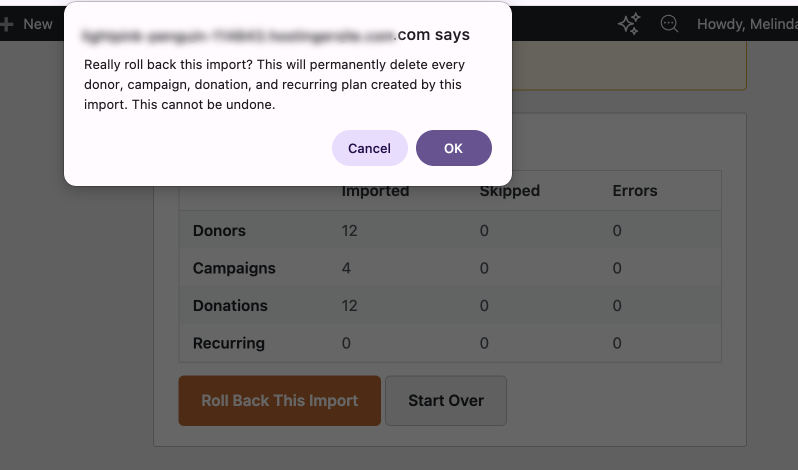
Wenn Sie die Rückgängig-Funktion verwenden, sehen Sie eine Warnmeldung, um Ihre Entscheidung zu bestätigen. So starten Sie nicht versehentlich eine Rückgängig-Operation.
Konfigurationsoptionen
Importoptionen (Schritt 3)
| Option | Typ | Standard | Beschreibung |
|---|---|---|---|
| Spender importieren | boolean | wahr | Verarbeiten Sie die Spender-CSV (nach dem Hochladen), um Spenderdatensätze zu erstellen. |
| Kampagnen importieren | boolean | wahr | Erstellen Sie Spendenkampagnen aus eindeutigen Kampagnennamen im Spendenexport. |
| Spenden importieren | boolean | wahr | Erstellen Sie Spenden-Datensätze, die mit Spendern und Kampagnen verknüpft sind. |
| Wiederkehrende Pläne importieren | boolean | wahr (wenn Pläne-CSV hochgeladen) | Erstellen Sie Archivierungsdatensätze für wiederkehrende Pläne (Status: storniert). |
| Duplikate überschreiben | boolean | false | Wenn diese Option aktiviert ist, wird ein vorhandener Datensatz beim erneuten Import aktualisiert, anstatt übersprungen zu werden. |
| Konvertierte Beträge verwenden | boolean | false | Verwenden Sie die Spalte für konvertierte Beträge von Donorbox anstelle der ursprünglichen Spendenwährung. |
| Testlauf | boolean | false | Alles lesen und parsen, ohne einen Datensatz in die Datenbank zu schreiben. |
| Datumsformat | Zeichenkette | ISO | iso (JJJJ-MM-TT), mdy (MM/TT/JJJJ) oder dmy(TT/MM/JJJJ). |
Importierte Donorbox-Felder
Spenden CSV (erforderlich)
Spenden-ID, E-Mail/Vorname/Nachname des Spenders, Betrag, konvertierter Betrag, Währung, Spendendatum, Spendenstatus, Zahlungsmethode, Stripe/PayPal-Transaktions-IDs, Bearbeitungsgebühr, Rückerstattungsbetrag, Kampagnenname und -ID, Kommentar, anonymer Flag, Gift Aid, Arbeitgeber, Beruf, wiederkehrender Flag, Plan-ID, vollständige Adresse, Telefon, UTM-Quelle/Medium/Kampagne, IP-Adresse.
Spender-CSV (optional)
E-Mail, Vorname/Nachname des Spenders, vollständige Adresse, Telefon, Arbeitgeber, Beruf, Beitrittsdatum, Donorbox-Spender-ID, Anzahl der Spenden im Leben, Gesamtbetrag im Leben.
Wiederkehrende Pläne CSV (optional)
Donorbox-Plan-ID, E-Mail, Vorname/Nachname des Spenders, Kampagnenname, Betrag, Währung, Häufigkeit, Startdatum, nächstes Abbuchungsdatum, Status, Zahlungsmethode, Anzahl der Spenden.
Der Importeur akzeptiert mehrere Aliasnamen für jedes Feld (z. B. werden email, donor_email und email_address alle dem Spender-E-Mail zugeordnet), sodass ältere oder neu benannte Exporte normalerweise ohne manuelle Bereinigung funktionieren.
Anpassung
Batch-Größe
Die Standard-Batch-Größe beträgt 200 Zeilen pro Anfrage. Definieren Sie CHARITABLE_DONORBOX_BATCH_SIZE in wp-config.php für eine umgebungsweite Überschreibung oder verwenden Sie den Filter charitable_donorbox_batch_size für eine feinere Steuerung:
add_filter( 'charitable_donorbox_batch_size', function( $size ) {
    return 500;
} );
Fehlerbehebung
„Ein weiterer Donorbox-Import ist bereits im Gange“
Der Importeur lässt nur einen Import gleichzeitig zu. Warten Sie, bis der bestehende Import abgeschlossen ist, oder verwenden Sie den Rückgängig-Flow für den bestehenden Import, bevor Sie einen neuen starten.
„PHP-Version nicht unterstützt“
Der Importeur benötigt PHP 7.4+. Aktualisieren Sie PHP in Ihrem Hosting-Kontrollpanel und laden Sie die Seite neu.
CSV-Spalten werden nicht erkannt
Exportieren Sie erneut aus Donorbox mit der Option „Alle Spalten“. Donorbox ändert gelegentlich Spaltennamen; wenn Ihr Export eine Spalte verwendet, die der Importeur nicht erkennt, hängen Sie charitable_donorbox_csv_schema an, um die Zulassungsliste zu erweitern.
Wiederkehrende Pläne werden als storniert importiert
Dies ist beabsichtigt. Donorbox-Zahlungstoken sind nicht portierbar, daher werden die Pläne als archivierte historische Aufzeichnungen übernommen. Um die wiederkehrende Abrechnung in Charitable fortzusetzen, müssen Sie die Zahlungsgenehmigung von diesen Spendern erneut einholen, indem Sie ein Formular für wiederkehrende Spenden von Charitable verwenden.
Der Import sieht falsch aus; wie kann ich ihn rückgängig machen?
Verwenden Sie die Schaltfläche „Rückgängig machen“ auf dem Ergebnisbildschirm. Der Importeur versieht jeden Datensatz, den er erstellt, mit der Stapel-ID des Imports, und die Rückgängigmachung entfernt nur diese Datensätze.
Entwicklerressourcen
Hooks & Filter
charitable_donorbox_batch_size— Ändern Sie, wie viele CSV-Zeilen pro AJAX-Anfrage verarbeitet werden (Standard 200).charitable_donorbox_csv_schema— Erweitern oder überschreiben Sie die Spaltenzulassungsliste pro Entitätstyp (donations,supporters,plans).charitable_donorbox_rollback_async_threshold— Ändern Sie die Anzahl der Datensätze, oberhalb derer die Rückgängigmachung asynchron ausgeführt wird (Standard 5.000).charitable_donorbox_verbose_logging— Aktivieren Sie die ausführliche Protokollierung für den aktiven Import.
Konstanten
CHARITABLE_DONORBOX_BATCH_SIZE— Definieren Sie inwp-config.phpeine Umgebungsebene für die Stapelgrößenüberschreibung.
Nützliche Klassen
Charitable_Donorbox_Importer— Hauptkoordinator. Phasenreihenfolge: Spender → Kampagnen → Wiederkehrende → Spenden.Charitable_Donorbox_CSV_Parser— Streaming-CSV-Parser mit Trennzeichenerkennung, Header-Normalisierung und Zulassungslisten pro Entitätsschema.
Protokollierung
Importereignisse werden mit der Quelle donorbox protokolliert und erscheinen in den Standard-Charitable-Protokollen (Charitable → Tools → Logs), filterbar nach der Quelle des Donorbox-Imports.
Häufig gestellte Fragen
Muss ich meine Donorbox-CSV vor dem Import neu formatieren?
In den meisten Fällen nein. Exportieren Sie Ihre Daten aus Donorbox mit der Option „Alle Spalten“ und laden Sie die Datei unverändert hoch. Der Importeur erkennt mehrere Header-Aliase pro Feld, sodass ältere oder neu benannte Exporte normalerweise ohne manuelle Bereinigung funktionieren.
Beeinflusst der Import meine Live-Website, während er läuft?
Der Importeur verarbeitet Datensätze in Stapeln im Hintergrund, sodass Ihre Website online bleibt. Wir empfehlen jedoch dringend, vor jedem großen Import ein vollständiges Datenbank-Backup zu erstellen, nur für den Fall.
Was passiert mit meinen wiederkehrenden Spendern?
Wiederkehrende Pläne werden als Archivdatensätze mit dem Status „storniert“ importiert. Donorbox-Zahlungstoken sind nicht portierbar, daher kann die aktive Abrechnung nicht übertragen werden. Um wiederkehrende Spenden in Charitable fortzusetzen, müssen Sie die Zahlungsgenehmigung von diesen Spendern erneut einholen, indem Sie ein Formular für wiederkehrende Spenden von Charitable verwenden.
Kann ich den Import vor der Bestätigung in der Vorschau anzeigen?
Ja. Der Testlaufmodus liest und analysiert Ihre CSV-Dateien und meldet genau, was importiert würde – Spender, Kampagnen, Spenden und wiederkehrende Pläne –, ohne einen einzigen Datensatz in Ihre Datenbank zu schreiben. Sie können ihn beliebig oft ausführen, bevor Sie die Änderungen übernehmen.
Was passiert, wenn ich versehentlich etwas importiere?
Verwenden Sie die Schaltfläche „Rückgängig machen“ auf dem Ergebnisse-Bildschirm. Der Importeur versieht jeden von ihm erstellten Datensatz mit einer eindeutigen Batch-ID, sodass durch das Rückgängigmachen nur das entfernt wird, was dieser Import erstellt hat, und nichts anderes. Kleine Importe werden sofort rückgängig gemacht; sehr große Importe führen das Rückgängigmachen im Hintergrund aus.
Kann ich den Importeur mehrmals ausführen?
Ja, aber es kann jeweils nur ein Import ausgeführt werden. Wenn Sie erneut importieren müssen, warten Sie, bis der aktuelle Import abgeschlossen ist, oder machen Sie ihn zuerst rückgängig. Aktivieren Sie die Option „Duplikate überschreiben“, wenn Sie möchten, dass erneut importierte Datensätze vorhandene aktualisieren, anstatt übersprungen zu werden.
Meine CSV-Spalten werden nicht erkannt. Was soll ich tun?
Exportieren Sie erneut aus Donorbox mit der Option „Alle Spalten“, da Donorbox gelegentlich Header-Namen ändert. Wenn das Problem weiterhin besteht, kann ein Entwickler den Filter `charitable_donorbox_csv_schema` verwenden, um nicht erkannte Spaltennamen zur Zulassungsliste hinzuzufügen.
Unterstützt der Importeur nicht-US-Datumsformate?
Ja. Sie können im Schritt „Importoptionen“ aus drei Datumsformaten wählen: ISO (JJJJ–MM–TT), MM/TT/JJJJ oder TT/MM/JJJJ, passend zu dem Format, das Ihre CSV verwendet.
Was passiert, wenn ich den Browser-Tab während des Imports schließe?
Alle verbleibenden Staging-Dateien werden automatisch nach 24 Stunden bereinigt. Die Gleichzeitigkeitsprüfung verhindert außerdem, dass ein neuer Import gestartet wird, bis der abgebrochene Import abgeschlossen ist.
Benötige ich die CSVs für Unterstützer und wiederkehrende Pläne?
Nur die Spenden-CSV ist erforderlich. Die CSVs für Unterstützer und wiederkehrende Pläne sind optional, aber dringend empfohlen – die Unterstützer-CSV liefert detailliertere Spenderprofil-Daten, und die CSV für wiederkehrende Pläne stellt sicher, dass Ihre historischen Spendenaufzeichnungen für wiederkehrende Spenden erhalten bleiben.
Welche Version von Charitable Pro benötige ich?
Der Donorbox-Importeur ist in Charitable Pro 1.8.14 und neueren Versionen verfügbar. Sie benötigen außerdem PHP 7.4 oder höher auf Ihrem Server.
Hilfreiche Links
🤝 Holen Sie sich Hilfe, wenn Sie sie brauchen
📑 Finden Sie die Anleitung, die Sie benötigen
Durchsuchen Sie den Dokumentations-Hub →
⬇️ Laden Sie bewährte Strategien, Kampagnenideen und Experten-Tools herunter
Holen Sie sich das Fundraising-Kit →
💸 Holen Sie sich kostenlose Fundraising-Ressourcen
Besuchen Sie den Charitable Fundraising Hub →
🤔 Haben Sie Fragen zu Charitable?
Charitable FAQs →
Benötigen Sie Hilfe beim Verständnis von Begriffen und Fachjargon für gemeinnützige Organisationen?
Siehe unser Glossar für gemeinnützige Organisationen→


