

TL;DR: Wir haben gerade ein riesiges Update für Charitable veröffentlicht. Highlights sind bessere Unterstützung für kleine Bildschirme, ein neuer Shortcode und ein vollständiger, benutzerorientierter Anmelde- und Registrierungsablauf.
Charitable 1.4 erscheint heute, fast sechs Monate nach der Veröffentlichung von Version 1.3. Das ist eine lange Zeit zwischen Hauptversionen – zu lang nach meinem Geschmack – aber das Ergebnis ist, dass 1.4 ein großer Schritt nach vorne für das Projekt ist. Hier ist ein Vorgeschmack auf die Neuerungen in 1.4:
- Kampagnen-Raster (wie die, die Sie mit dem
[campaigns]Shortcode hinzufügen), passen sich automatisch gut an kleinere Bildschirme an. - Das gilt auch für die Liste der vorgeschlagenen Spenden im Spendenformular.
- Sie können einen neuen Shortcode verwenden, der die Spendenhistorie eines angemeldeten Benutzers auflistet.
- Ihre registrierten Benutzer können ihr Passwort mit einem vollständig benutzerorientierten System (d. h. kein wp-login-Zugriff) ändern & zurücksetzen.
- Das Spendenformular führt jetzt einige clientseitige Validierungstests durch, um Spendern zu helfen, die ein Feld vergessen haben oder eine ungültige Kreditkartennummer eingegeben haben.
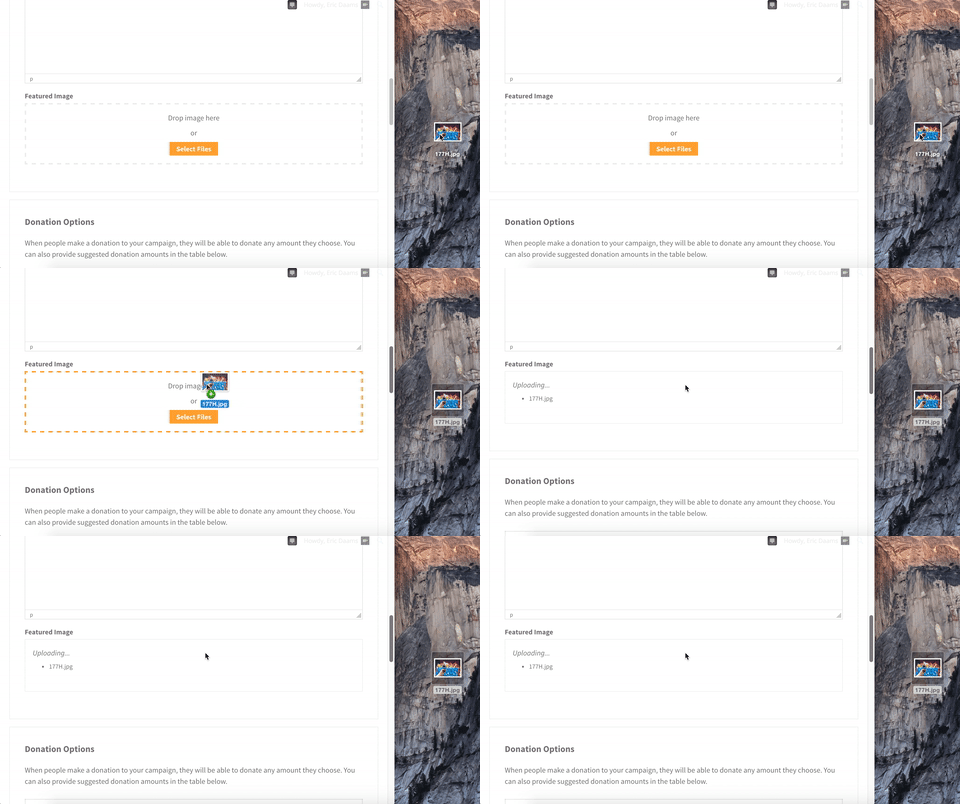
- Bildfelder in Formularen verfügen jetzt über eine nette Drag-and-Drop-Oberfläche (ein schönes Update für Leute, die Ambassadors oder User Avatar verwenden).
Werfen wir einen genaueren Blick auf einige davon.
Responsive Kampagnen-Raster
Eines der häufigsten Probleme, die die Leute mit den Kampagnen-Rastern erwähnten, war, dass sie nicht responsiv waren. Auf einem Mobiltelefon waren sie dadurch praktisch unbrauchbar. Wir haben Kunden mit einer einfachen CSS-basierten Lösung geholfen, aber die Lösung direkt in Charitable zu integrieren, ist offensichtlich ein großer Gewinn für alle.
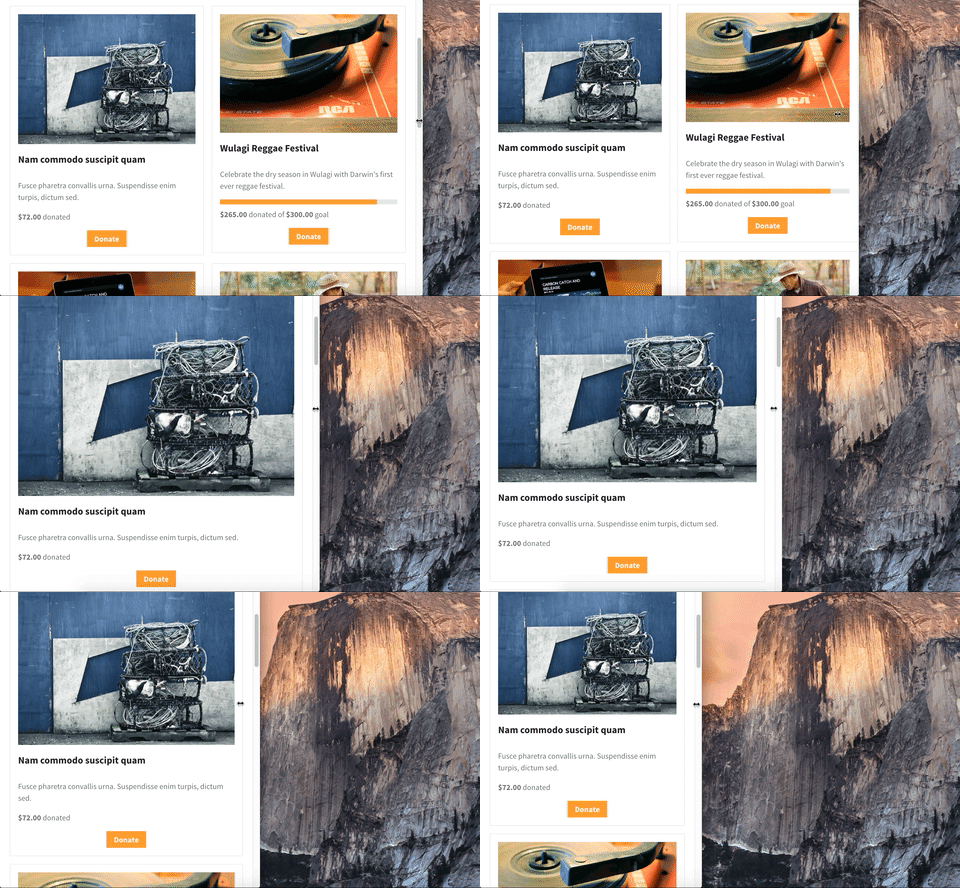
Die gesamte Magie kommt vom responsive-Parameter für den [campaigns]-Shortcode. Wenn Sie einfach die Standardeinstellungen verwenden, skaliert das Raster automatisch auf ein Ein-Spalten-Layout auf Bildschirmen, die kleiner als 768 Pixel sind (die Größe eines iPads).
Natürlich ist jedes Theme anders, daher sind 768 Pixel möglicherweise nicht der perfekte Punkt, an dem umgeschaltet werden soll. Sie haben die volle Kontrolle über den Punkt, an dem das Raster herunterskaliert. Hier ist ein Beispiel, bei dem ich bei 600 Pixel auf eine Spalte skaliere:
[kampagnen responsive=600px]
Drag-and-Drop-Bildfelder
Wenn Sie Charitable Ambassadors verwenden, um eine Peer-to-Peer-Fundraising- oder Crowdfunding-Plattform zu betreiben, wird es für Ihre Kampagnenersteller einfacher sein, ihr Kampagnenbild hinzuzufügen.
Wir sind von diesem übergegangen:

Zu diesem:
Neuer [charitable_my_donations] Shortcode
Endlich bietet Charitable eine saubere, einfache Möglichkeit für angemeldete Benutzer, eine Historie ihrer Spenden einzusehen.
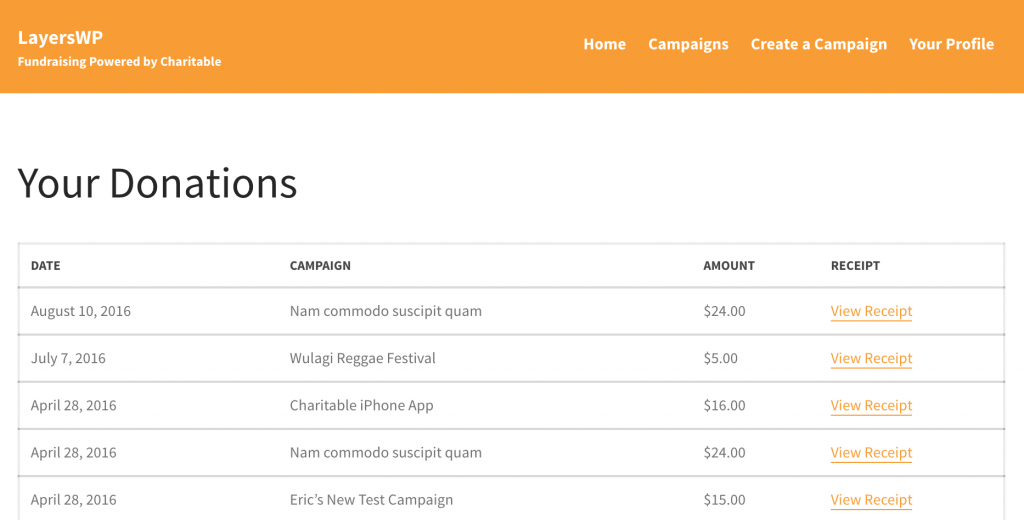
Die Einrichtung ist ganz einfach: Erstellen Sie einfach eine neue Seite und fügen Sie den [charitable_my_donations] Shortcode ein. Ihre Benutzer müssen angemeldet sein, um auf ihre Spenden zugreifen zu können.
Vollständiger, benutzerorientierter Anmelde- & Registrierungsablauf
Charitable enthielt schon immer Anmelde- und Registrierungs-Shortcodes, aber es fehlten einige Elemente:
- Um ihr Passwort zurückzusetzen, mussten Benutzer den Standard-Passwort-Reset-Prozess von WordPress durchlaufen.
- Angemeldete Spender oder Kampagnenersteller sahen die Admin-Leiste, was viele als verwirrend oder unerwünscht empfanden.
Dank eines großartigen Einsatzes von @rafecolton vom Himalayan Institute verfügt Charitable 1.4 jetzt über ein stark verbessertes Benutzermanagementsystem. Es ist perfekt, wenn Sie Botschafter verwenden, um eine Plattform zu betreiben, und Sie möchten, dass der gesamte Anmelde- und Registrierungsablauf in das Frontend integriert wird.
Personen, die zu Charitable 1.4 beigetragen haben
Einer der aufregendsten Aspekte dieser Version von Charitable ist, dass sie einige bedeutende Beiträge von Personen außerhalb unseres 2-Mann-Teams enthielt. Ich habe Rafe oben erwähnt; seine Kollegen @cyhtan und @NeptuneIllume haben ebenfalls beigetragen; und @Kathy_Darling, die an unserer Erweiterung für wiederkehrende Spenden arbeitet, hat ebenfalls einige bedeutende Änderungen vorgenommen.
Neben ihnen hatten wir auch einige großartige Beiträge zum Charitable-Übersetzungsprojekt von hugo_mv (Spanisch), mauroandres (Spanisch – Argentinien) und elstupid (Niederländisch) sowie von anderen, die zu den Übersetzungen beigetragen haben.
An alle, die geholfen haben, diese Version von Charitable zu gestalten – einschließlich Ihnen, unseren Benutzern – vielen Dank! Wir hoffen, Sie genießen diese neueste Iteration.
Änderungsprotokoll
- Skalieren Sie das Kampagnenraster auf kleineren Bildschirmen anmutig. Der
[campaigns]-Shortcode unterstützt jetzt einenresponsive-Parameter, der standardmäßig aktiviert ist. Sie können ihn auf einen bestimmten px/em-Betrag setzen, um den Breakpoint zu ändern, oder ihn auf0setzen, um das responsive Styling zu deaktivieren. #88 - Bietet auch ein angemessen responsives Styling für vorgeschlagene Spendenbeträge auf kleinen Bildschirmen. #159
- Der
[charitable_my_donations]-Shortcode wurde hinzugefügt. Verwenden Sie diesen Shortcode, um angemeldeten Benutzern zu ermöglichen, eine Historie ihrer Spenden anzuzeigen, einschließlich Links zu den Spendenquittungen. #14 - Clientseitige Validierung für das Spendenformular hinzugefügt. Dies prüft, ob Spender alle erforderlichen Felder ausgefüllt haben, ob sie mehr als 0 $ spenden (denn ernsthaft, eine Spende von 0 $ wird nicht weit reichen :)) und ob sie eine gültige Kreditkarte verwendet haben (wenn Sie unsere Stripe- oder Authorize.Net-Erweiterungen verwenden). #176 und #63
- Ein Passwort-Zurücksetzungsprozess wurde hinzugefügt, um einen vollständigen, benutzerorientierten Anmelde- und Registrierungsablauf zu bieten. #89
- Fügen Sie einen
order-Parameter für den[campaigns]-Shortcode hinzu, um die Richtung umzukehren, in der Kampagnen angezeigt werden. #64 - Erlauben Sie Kampagnen im
[campaigns]-Shortcode, nach einer derorderby-Optionen für WP_Query sortiert zu werden. - Drag-and-Drop-Unterstützung für das Bild-Formularfeld hinzugefügt, das in den Erweiterungen Benutzeravatar und Botschafter verwendet wird. #111
- Verbessert, wie das Plugin nach Updates für Charitable-Erweiterungen sucht, um das WordPress-Dashboard reibungslos laufen zu lassen. #133
- Eine Funktion
charitable_create_donation()für Entwickler hinzugefügt, die Spenden programmatisch erstellen möchten. #109 - Eine neue Klasse
Charitable_Donations_Querywurde hinzugefügt, die von Entwicklern verwendet werden kann, um Spenden aus der Datenbank abzurufen. #155 - Eine neue Klasse
Charitable_Deprecatedwurde hinzugefügt, die verwendet wird, um fehlerhafte Verwendungen von Charitable-Funktionen oder -Methoden zu protokollieren. - Umwandlung der Anzeige von Charitable-Spenden in die integrierte Admin-Seite edit.php, anstatt sich auf eine benutzerdefinierte Admin-Seite mit einer benutzerdefinierten Beitragstabelle zu verlassen. Dabei haben wir auch die Benutzeroberfläche vereinfacht und die Spendenstatus farblich gekennzeichnet. #110
- Telefonnummer, Adresse und Zahlungsmethode des Spenders in den Spendenexport-CSV aufnehmen. #154
- Wenn mehrere Gateways aktiviert sind, wird das Standard-Gateway zuerst im Spendenformular aufgeführt. #139
- Automatische Stornierung einer Spende, wenn der Spender vom Gateway zurückkehrt, bevor er sie abschließt. Dies funktioniert mit PayPal, PayUMoney und PayFast. #90 und #117
- Eine Methode
Charitable_Donor::__toString()wurde hinzugefügt, sodass das Ausgeben des Objekts einfach den Spendernamen ausgibt. - Die Funktion
charitable_sanitize_amount()wurde hinzugefügt, um Beträge vom Typ String in einen Float umzuwandeln. - Entfernen Sie das Währungssymbol aus Geldbeträgen, um zu verhindern, dass das Symbol als Teil des Betrags behandelt wird. #145
- Entfernen Sie das Währungssymbol aus den vorgeschlagenen Spendenbeträgen beim Speichern einer Kampagne. #147
- Wenn eine Spende fehlschlägt und der Benutzer zum Spendenformular zurückgeleitet wird, kann er dieselbe Spende erneut versuchen. Zuvor wäre eine neue Spende erstellt worden, die eine Phantom-Wartespendung hinterlässt. #106
- Verhindern Sie doppelte Spenden, die durch wiederholtes Klicken auf die Schaltfläche „Spenden“ verursacht werden. #164
- Fehler behoben, der sich auf leere Inhalte im Layers-Theme bezog. #9






Hinterlassen Sie eine Antwort