
Von all den Dingen, die bei der Führung einer gemeinnützigen Organisation anfallen, gibt es eine Sache, die ich wirklich nicht gerne mache, und das ist die Verwaltung aller eingehenden Spenden und der Spender, die einer ständig wachsenden Liste hinzugefügt werden. Vor zehn Jahren erhielt meine Organisation nur eine Handvoll Spenden, und es war einfach, alles manuell zu erledigen.
Aber im Laufe der Jahre, als wir wuchsen, wurde die Verfolgung von Spenden schnell chaotisch. Das bedeutete, dass das gesamte Team zusammensitzen und stundenlang alles zusammenstellen, verspätete Spendenquittungen versenden und Konten abstimmen musste.
Es waren verschwendete Stunden, die wir für wirkungsvollere Dinge hätten nutzen können.
Dies veranlasste uns, in Spendersoftware zu investieren, und das gesamte Team ist froh, dass wir das getan haben. Die Software läuft so ziemlich von selbst, und wir können einfach Berichte, Zusammenfassungen und Quittungen exportieren oder ausdrucken.
Das Sahnehäubchen? Unsere Spender haben ihre eigenen Profile, in denen sie ihre Spenden verwalten, Quittungen und Jahresabrechnungen herunterladen und ihre Profile anpassen können.
Nein, bei diesem Prozess habe ich gelernt, wie schwer es ist, eine gute Plattform zu finden. Einige bieten großartige Funktionen, waren aber so teuer, dass sie außerhalb unseres Budgets lagen. Einige waren im Budget und hatten nicht die Funktionen, die wir brauchten. Es war also eine schwierige Aufgabe, diejenige zu finden, die „genau richtig“ war.
Ich möchte die besten teilen, die ich gefunden habe. Ich werde hier meine Erfahrungen und Meinungen teilen. Lassen Sie uns die beste Spendersoftware erkunden.
Was Sie in diesem Leitfaden finden
Hier ist ein Inhaltsverzeichnis, das Ihnen hilft, diesen Beitrag zu navigieren:
- Brauchen Sie wirklich eine Spendersoftware?
- Die beste Spendersoftware im Test
- Wie wählt man die richtige aus?
- Fazit zur besten Spendersoftware
Lassen Sie uns zunächst schnell beurteilen, ob Sie überhaupt eine Spendersoftware benötigen.
Wenn Sie Ihre WordPress-Website noch nicht eingerichtet haben, lesen Sie zuerst diese einfache Anleitung zum Thema Erstellen einer Website für gemeinnützige Organisationen.
Brauchen Sie wirklich eine Spendersoftware?
Wenn Sie mehrere Excel-Dateien oder handschriftliche Aufzeichnungen jonglieren, ständig Daten abgleichen und stundenlang mit manuellen Aktualisierungen verbringen, ist das ein Warnsignal. Wenn grundlegende Aufgaben wie das Versenden von Dankesschreiben oder die Verfolgung wiederkehrender Spenden überwältigend werden, ist es Zeit, ein Upgrade in Betracht zu ziehen.
Hier waren die wichtigsten Warnzeichen, die ich vor der Spendersoftware bemerkte:
- Wir haben mehr als 3-4 Stunden pro Woche für die Spenderverwaltung aufgewendet
- Wir haben wichtige Spender-Follow-ups und Verlängerungen wiederkehrender Spenden verpasst
- Wir hatten Schwierigkeiten, Jahresend-Steuerquittungen zu erstellen
- Wir konnten Spendenmuster und Spenderhistorie einfach nicht effektiv verfolgen
Ihre Zeit ist wertvoll, und diese administrativen Aufgaben sollten nicht Stunden verschlingen, die für missionskritische Arbeit verwendet werden könnten. Wenn Sie eines der folgenden Kriterien erfüllen, würde ich definitiv empfehlen, in eine Spendersoftware zu investieren:
- 📈 Ihre Organisation wächst und die Anzahl der Spender steigt
- 💰 Sie erhalten Spenden über mehrere Kanäle (Website, Post, Veranstaltungen)
- 📝 Sie müssen regelmäßig Steuerquittungen und Berichte erstellen
- 🧑🏽💻 Ihr Team benötigt gemeinsamen Zugriff auf Spenderinformationen
- 🔄 Sie führen Programme für wiederkehrende Spenden durch
Sie benötigen jedoch möglicherweise keine spezielle Software, wenn Sie gerade erst anfangen, weniger als 20 regelmäßige Spender haben oder Ihr aktuelles System Ihren einfachen Spendenprozess effektiv abwickelt. Obwohl es besser ist, Ihre Spenden frühzeitig zu optimieren. Die meisten Tools ermöglichen es Ihnen, Ihre Daten zu exportieren und sie überallhin mitzunehmen. So können Sie jederzeit mit einem kostenlosen Tool beginnen und dann zu einer leistungsfähigeren Plattform wechseln, wenn die Zeit reif ist.
Fazit: Bei Spendersoftware geht es nicht nur darum, organisiert zu sein – es geht darum, Ihre Wirkung zu skalieren. Wenn Sie mehr Zeit mit der Verwaltung von Spenden als mit dem Aufbau von Beziehungen zu Spendern verbringen, ist es Zeit für den Wechsel. Die richtige Software macht sich durch Zeitersparnis und verbesserte Spenderbeziehungen bezahlt.
Die beste Spendersoftware im Test
1. Charitable

Ich persönlich habe Charitable zwei Jahre lang genutzt, und es hat sich aus gutem Grund seinen Spitzenplatz auf unserer Liste verdient. Lassen Sie mich erklären, warum.
Der größte Vorteil? Es ist die nahtlose WordPress-Integration. Als wir es zum ersten Mal installierten, war ich skeptisch, ob ein „einfaches Plugin“ unser Spender-Management übernehmen könnte. Aber innerhalb weniger Stunden hatten wir unser erstes Spendenformular auf unserer Website eingerichtet und funktionsfähig. Keine komplizierten Drittanbietersysteme, keine verwirrenden Spender-Weiterleitungen – alles geschieht direkt auf unserer Website.
Sie können in wenigen Minuten ansprechende Kampagnen erstellen. Hier ist ein Beispiel dafür, was ich für diesen Beitrag erstellt habe:
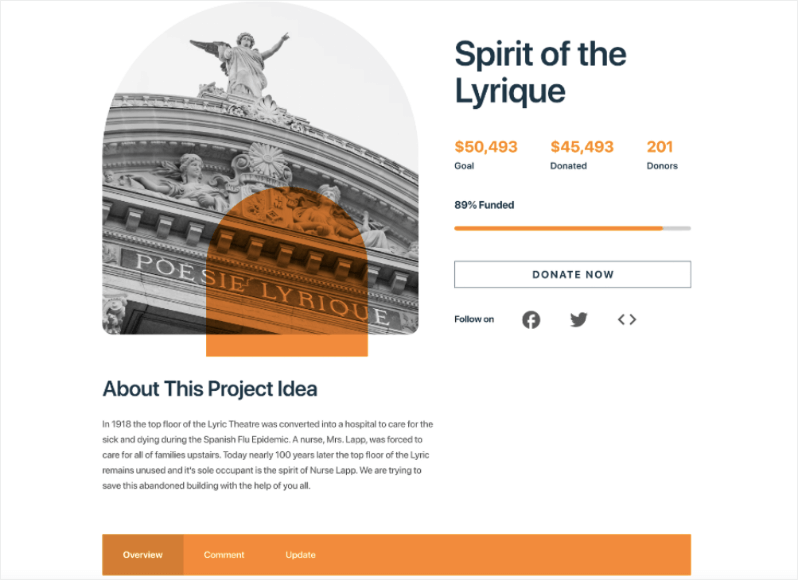
Sie können einmalige und wiederkehrende Spendenbeträge hinzufügen. Es integriert sich auch mit mehreren Zahlungs-Gateways, darunter Stripe, PayPal, PayFast, Payrexx, Mollie, Braintree und mehr. So ist es einfach einzurichten und für Benutzer einfach zu spenden.
Was die Spenderverwaltungsfunktionen betrifft: Wenn ein Spender eine Zahlung leistet, wird automatisch eine Spendenquittung erstellt. Der Spender kann sie herunterladen oder per E-Mail in seinen Posteingang senden lassen. Sehen Sie, wie diese PDF-Belege funktionieren »
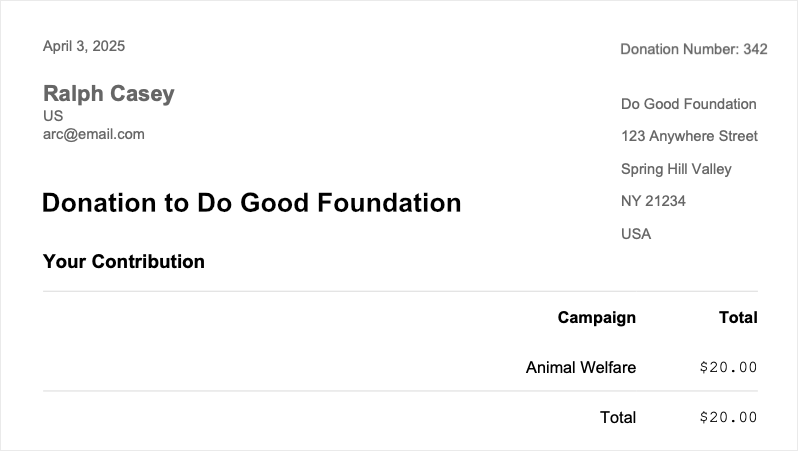
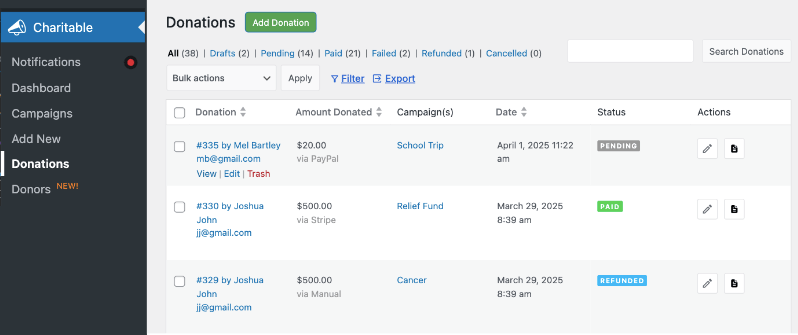
Zusätzlich wird automatisch ein neuer Spenden-Datensatz für sie erstellt. Dieser ist in Ihrem WordPress-Adminbereich verfügbar. Sie können jeden Datensatz anzeigen und bearbeiten, den Zahlungsstatus aktualisieren, die Quittung senden/herunterladen und vieles mehr. Was mir gefällt, ist, dass ich diese Datensätze nach Kampagne filtern kann und auch die gesamte Liste exportieren kann. Das hat die Steuererklärung zum Kinderspiel gemacht.
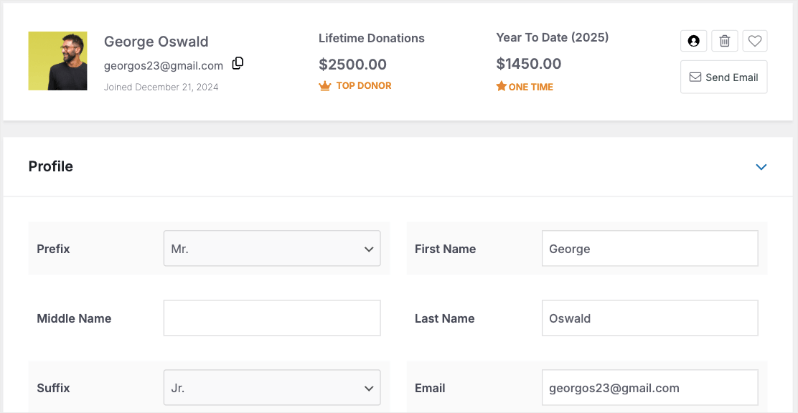
Wenn Sie das Pro-Plugin verwenden, erhalten Sie Zugriff auf die Spenderdatenbank. Sie können das Profil jedes Spenders einsehen und seine Spenden über die gesamte Lebenszeit verfolgen. Sehen Sie wie die Spenderdatenbank funktioniert »
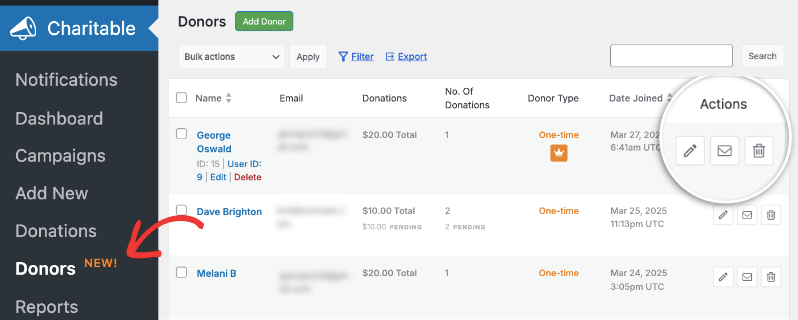
Sie können deren Profile bearbeiten, ihnen E-Mails senden, sie als Favoriten markieren und Ihre eigenen Notizen hinzufügen. Sie können sogar Spenderprofile und Spenden-Datensätze hinzufügen. Dies hat es uns ermöglicht, Offline-Spenden zu erfassen. So sind alle unsere Aufzeichnungen zentralisiert und ich kann sie auf einmal exportieren.
Das Kern-Plugin ist kostenlos, was mich anfangs hinsichtlich seiner Fähigkeiten misstrauisch machte. Aber es enthält alles, was die meisten kleinen bis mittleren gemeinnützigen Organisationen benötigen: Spendenformulare, Spenderverwaltung und detaillierte Berichte. Ja, Sie werden irgendwann die Premium-Funktionen wünschen (wir haben nach sechs Monaten aufgerüstet), aber Sie können mit der kostenlosen Version beginnen und bei Bedarf aufrüsten.
In der Lite-Version gibt es eine Transaktionsgebühr von 3 %. Diese entfällt, wenn Sie auf das Premium-Plugin upgraden. Was mir gefällt, ist der Preis. Es bietet Ihnen so ziemlich alle Funktionen, die andere Plattformen bieten, aber zu einem Bruchteil der Kosten. Der Basisplan beginnt bei 69 US-Dollar pro Jahr. Selbst der höchste Plan für 299 US-Dollar pro Jahr kostet 24 US-Dollar pro Monat, was immer noch viel weniger ist als bei anderen Plattformen.
Ich empfehle dringend den Pro-Plan für 199 US-Dollar pro Jahr. Er bietet Ihnen alles, was Sie brauchen, einschließlich wiederkehrender Spenden, Peer-to-Peer-Fundraising, Spenderteams und Automatisierungen.
Allerdings ist es nicht perfekt. Der größte Nachteil ist, dass Sie eine WordPress-Website benötigen, um es nutzen zu können.
Aber hier ist, warum es immer noch die Nr. 1 ist: Es tut genau das, was es verspricht, tut es gut und macht die Dinge nicht komplizierter. Wenn man dann noch die Kosteneinsparungen (sowohl bei Gebühren als auch bei monatlichen Abonnements) berücksichtigt, ist es kaum zu übertreffen. Wir haben drei andere Plattformen ausprobiert, bevor wir uns für Charitable entschieden haben, und keine konnte mit seiner Kombination aus Einfachheit, Funktionalität und Wert mithalten.
Für wen ist es am besten geeignet?
Charitable ist perfekt, wenn:
- Sie bereits auf WordPress sind oder bereit sind zu wechseln
- Sie Transaktionsgebühren vermeiden möchten
- Sie etwas Einfaches, aber Skalierbares benötigen
- Sie es leid sind, hohe monatliche Gebühren für Funktionen zu zahlen, die Sie nicht nutzen
- Sie möchten, dass Spender während des gesamten Spendenprozesses auf Ihrer Website bleiben
Profi-Tipp: Beginnen Sie mit der kostenlosen Version, um sie auszuprobieren. Wenn Sie feststellen, dass Sie mehr Funktionen wünschen, sind die Premium-Pläne immer noch günstiger als die meisten monatlichen Abonnement-Plattformen. Es gibt auch eine 14-tägige Geld-zurück-Garantie!
2. Bloomerang
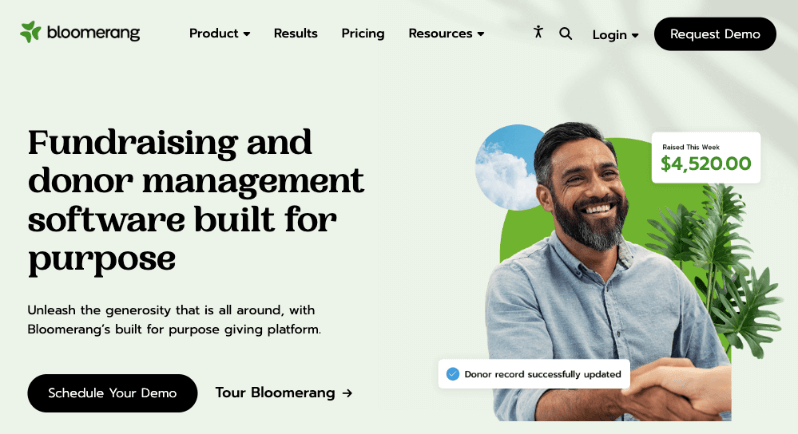
Nachdem ich Bloomerang getestet und Hunderte von aktuellen Nutzerbewertungen durchgesehen habe, kann ich Ihnen einige ehrliche Einblicke geben. Obwohl es als komplette Lösung für die Spenderverwaltung vermarktet wird, ist die Realität etwas nuancierter.
Beginnen wir mit dem, was die Benutzer lieben. Die Funktion der Spender-Timeline ist wirklich ausgezeichnet. Sie bietet Ihnen eine klare, visuelle Historie jeder Interaktion mit Ihren Spendern. Ihre E-Mail-Marketing-Tools sind robust, und der Fokus auf Spenderbindung zeigt sich wirklich in Funktionen wie dem Engagement-Meter und automatisierten Benachrichtigungen für säumige Spender.
Hier stoßen Benutzer (einschließlich mir) jedoch auf Hindernisse:
Das Preismodell ist ein großes Problem. Es beginnt bei 125 US-Dollar pro Monat, das sind 1500 US-Dollar pro Jahr! Außerdem basiert die Preisgestaltung auf der Anzahl der Datensätze in Ihrer Datenbank. Wenn Ihre Organisation wächst, wird Ihr Plan teurer.
Es mag eine leistungsstarke Plattform sein, aber die Lernkurve ist steil. Ich hatte das Gefühl, dass das Berichtssystem viel komplizierter war, als wir es brauchten.
Für wen ist es am besten geeignet?
Bloomerang eignet sich am besten für:
- Organisationen mit engagierten Datenbankmanagern
- Gemeinnützige Organisationen, die sich stark auf Kennzahlen zur Spenderbindung konzentrieren
- Teams, die bereit sind, Zeit in Schulungen zu investieren
- Mittelgroße Organisationen mit hohen Budgets
- Organisationen, die die Nachverfolgung der Spenderkommunikation priorisieren
3. DonorPerfect
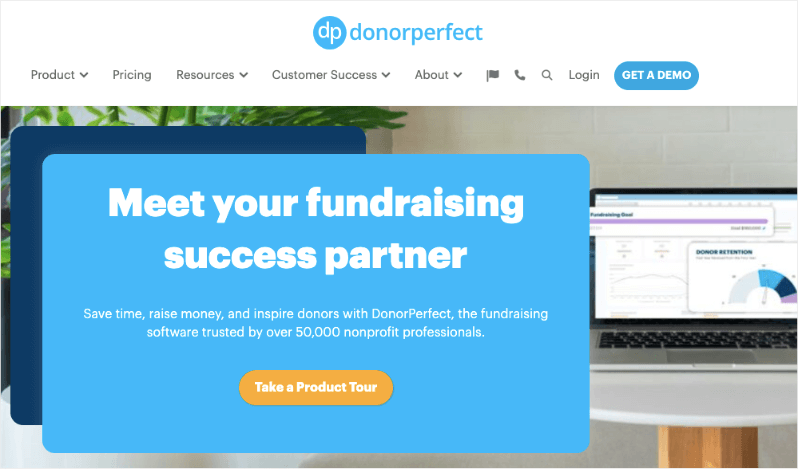
DonorPerfect ist ein umfassendes Spenderverwaltungssystem, das seit über 30 Jahren in der Branche tätig ist. Nachdem ich DonorPerfect in meiner früheren Organisation verwendet habe und nach aktuellen Benutzerdiskussionen zu urteilen, kann ich Ihnen sagen, dass es eine umfassende Spenderverwaltung ist – leistungsstark, aber manchmal zu komplex für sein eigenes Wohl.
Erstens schätze ich seine Tiefe. Die Reporting-Funktionen sind unglaublich, wenn man weiß, wie man sie benutzt. Sie können Daten praktisch auf jede erdenkliche Weise analysieren. Für Organisationen, die mehrere Fundraising-Kanäle (Zuschüsse, Veranstaltungen, Großspenden) verwalten, ist es umfassend.
Es beginnt bei 99 US-Dollar pro Monat, aber sie bieten nur kundenspezifische Preise basierend auf den Bedürfnissen Ihrer Organisation an.
Für wen ist es am besten geeignet?
DonorPerfect ist ideal für:
- Wachsende Organisationen mit komplexen Reporting-Anforderungen
- Non-Profits, die eine robuste Buchhaltungsanbindung benötigen
- Organisationen, die mehrere Fundraising-Kanäle verwalten
- Teams, die detaillierte Anpassungsoptionen benötigen
- Non-Profits, die nach einer langfristigen, skalierbaren Lösung suchen
4. Donorbox (Kostenlos & Kostenpflichtig)
Donorbox ist ein ausgezeichneter Ausgangspunkt, wenn Sie eine kostenlose Fundraising- und Spenderverwaltungslösung mit Wachstumspotenzial benötigen.
Der Einrichtungsprozess ist browserbasiert, nicht in Ihrem WordPress-Dashboard. Ich habe ein kostenloses Donorbox-Konto erstellt, einige Details eingegeben und das Formular mit einem einfachen Shortcode in eine WordPress-Seite eingebettet. In weniger als 20 Minuten erledigt.
Das ist großartig für diejenigen, die keine Fähigkeiten im Webdesign oder in der Webentwicklung haben.
Der kostenlose Plan ermöglicht es Ihnen, innerhalb von Minuten Spenden über ein anpassbares Formular anzunehmen. Donorbox unterstützt wiederkehrende Spenden, Spenderprofile und integriert sich mit CRMs wie Salesforce und Tools wie Zapier. Ihr kostenpflichtiger Plan (ab 26,58 $/Monat) schaltet zusätzliche Funktionen wie Text-to-Give und Prioritäts-Support frei.
Donorbox erhebt eine Plattformgebühr von 1,75 % auf Spenden, es sei denn, Sie upgraden. Es fehlen auch einige der tiefergehenden Tools zur Spenderbindung, die Sie in ausgereifteren CRMs finden.
Für wen ist es am besten geeignet?
- Neue Non-Profits oder Basisorganisationen
- Organisationen, die einfache Spendenformulare wünschen
- Gruppen, die die Möglichkeiten testen, bevor sie sich für ein vollständiges CRM entscheiden
- Fundraiser, die eine schnelle Stripe/PayPal-Integration benötigen
Donorbox ist erheblich teurer. Warum Tausende pro Jahr für monatliche und Plattformgebühren bezahlen, wenn Charitable Ihnen für weniger viel mehr bietet? Sie behalten mehr von Ihren Spenden, genießen leistungsstarke Fundraising-Tools und müssen sich nie um versteckte Gebühren kümmern!
Sehen Sie den Unterschied zwischen Donorbox und Charitable »
5. GiveWP (Kostenlose & kostenpflichtige Add-ons)

GiveWP ist zweifellos das beliebteste Spenden-Plugin für WordPress, und das aus gutem Grund. Es verwandelt Ihre WordPress-Website in eine leistungsstarke Fundraising-Plattform, ohne dass Drittanbietersysteme erforderlich sind.
Ich erwartete ein einfaches Spendenformular-Plugin. Was ich nicht erwartete, war, wie robust und professionell es sich anfühlte, als ob es für viele kleine bis mittelgroße Organisationen tatsächlich leichte Spender-CRMs ersetzen könnte.
Der Onboarding-Prozess ist übersichtlich. Nach der Aktivierung führt Sie GiveWP mit einem hilfreichen Einrichtungsassistenten durch die Erstellung Ihres ersten Spendenformulars. Sie können aus Vorlagen (wie einmalige oder wiederkehrende Spenden) wählen oder Ihr eigenes erstellen.
Innerhalb von 30 Minuten hatte ich:
- Ein Spendenformular, das zu meiner Website passt
- Stripe für Zahlungen verbunden
- Eine Testspende verarbeitet
- Automatisierte E-Mail-Belege angepasst
GiveWP ermöglicht es Ihnen, schöne Spendenformulare zu erstellen, Spenderaktivitäten zu verfolgen, wiederkehrende Spenden zu verwalten und Spendenbelege zu senden, alles von Ihrem WordPress-Dashboard aus. Es ist außerdem DSGVO-konform und integriert sich mit Stripe, PayPal und mehr.
Obwohl es jetzt reibungsloser läuft, war meine erste Stripe-Integration verwirrend. Ich musste mit Webhooks und Testspendenmodi herumspielen, bevor die Dinge richtig synchronisiert waren. Wenn Sie nicht technisch versiert sind, müssen Sie sich wahrscheinlich auf die Dokumentation oder den Support verlassen.
Das Basis-Plugin von GiveWP ist kostenlos – aber die wirklichen Funktionen (wiederkehrende Spenden, Spender-Dashboards, PDF-Belege, Peer-to-Peer-Fundraising) sind alle Premium.
Es ist kein vollständiger Spender-Beziehungsmanager. Es bietet keine tiefgehende Segmentierung, Spender-Journeys oder erweiterte Automatisierung. Wenn Sie es überwachsen, möchten Sie sich mit einer Plattform wie Bloomerang oder Kindful verbinden.
Für wen ist es am besten geeignet?
- WordPress-Nonprofits, die native Spendentools wünschen
- Organisationen, die anpassbare Formulare und Belege benötigen
- Teams, die ihre Daten besitzen und SaaS-Plattformen vermeiden möchten
- Fundraiser, die sich auf einmalige und wiederkehrende Spenden konzentrieren
Vergleichen Sie GiveWP mit Charitable »
Wie wählt man die richtige aus?
Die Wahl der richtigen Spenderverwaltungssoftware muss nicht kompliziert sein. Beginnen Sie damit, Ihren aktuellen Spenderverwaltungsprozess zu betrachten. Wie viele Spender haben Sie? Welche Aufgaben nehmen die meiste Zeit in Anspruch? Was ist Ihr monatliches Budget für Software? Diese Fragen leiten Ihre Entscheidung.
Betrachten Sie als Nächstes die technischen Fähigkeiten Ihres Teams. Einige Plattformen erfordern erhebliches Training, während andere benutzerfreundlicher sind. Wenn Sie kein dediziertes IT-Personal haben, sollten Sie sich für einfachere Lösungen entscheiden, die einen guten Kundensupport bieten.
Ihr Budget spielt eine entscheidende Rolle, aber schauen Sie nicht nur auf die monatliche Gebühr. Berücksichtigen Sie:
- Implementierungskosten
- Schulungskosten
- Zusätzliche Gebühren für unverzichtbare Funktionen
- Gebühren für die Zahlungsabwicklung
Denken Sie schließlich an das Wachstum. Während ein Basissystem jetzt funktionieren mag, überlegen Sie, wo Ihre Organisation in 2-3 Jahren stehen wird. Wählen Sie eine Plattform, die mit Ihnen wachsen kann, auch wenn Sie nicht sofort alle Funktionen benötigen.
Denken Sie daran: Die teuerste oder funktionsreichste Option ist nicht immer die beste Wahl. Konzentrieren Sie sich auf das, was Ihre aktuellen Herausforderungen löst und gleichzeitig Raum für Wachstum bietet. Beginnen Sie mit einer kostenlosen Testversion, wenn verfügbar, und überstürzen Sie die Entscheidung nicht – ein späterer Systemwechsel kann zeitaufwendig und teuer sein.
Fazit zur besten Spendersoftware
Spendenmanagement-Software ist eine bedeutende Investition für jede gemeinnützige Organisation, sowohl in Bezug auf Geld als auch auf Zeit. Nach ausgiebigen Tests und Praxiserfahrung ist Charitable meine Top-Empfehlung für die meisten Organisationen. Die Kombination aus null Transaktionsgebühren, WordPress-Integration und skalierbaren Funktionen macht es zu einer ausgezeichneten Wahl, insbesondere für diejenigen, die gerade erst ihre digitale Reise beginnen.
Wenn Ihre Anforderungen jedoch komplexer sind oder Sie eine größere Spenderbasis verwalten, bieten sowohl Bloomerang als auch DonorPerfect robuste Lösungen mit erweiterten Funktionen. Der Schlüssel liegt darin, die Software an Ihre spezifischen Bedürfnisse anzupassen, anstatt sich in Funktionsvergleichen zu verlieren.
Bevor Sie Ihre endgültige Entscheidung treffen:
- Nutzen Sie kostenlose Testversionen
- Beziehen Sie Ihr Team in den Testprozess ein
- Berechnen Sie die Gesamtkosten des Eigentums
- Berücksichtigen Sie Ihre Wachstumspläne für die nächsten 2-3 Jahre
Denken Sie daran: Die richtige Software sollte Ihr Leben einfacher machen, nicht komplizierter. Ob Sie sich für eine einfache Lösung wie Charitable oder eine umfassendere Plattform wie DonorPerfect entscheiden, das Ziel ist dasselbe – weniger Zeit für die Verwaltung und mehr Zeit für Ihre Mission aufwenden.
Möglicherweise möchten Sie auch das Ultimate Fundraising Kit erhalten, das mit bewährten Tipps für gemeinnützige Organisationen, sofort einsetzbaren Kampagnenideen, praxiserprobten Strategien, empfohlenen Tools und kostenlosen Ressourcen zur Steigerung Ihrer Spenden gefüllt ist. Es ist die perfekte Ergänzung für Ihre Giving Tuesday-Kampagnen oder Spendenaktionen zum Jahresende. Laden Sie das Kit hier herunter »
Häufig gestellte Fragen
1. Was ist eine Spendenmanagement-Software?
Spendenmanagement-Software hilft gemeinnützigen Organisationen, Spender zu verfolgen, zu binden und zu halten. Es ist wie ein CRM, das speziell für Fundraising entwickelt wurde, und ermöglicht es Ihnen, Spenden zu sammeln, Kontakte zu verwalten, Quittungen zu versenden, die Spendenhistorie zu verfolgen und die Beziehungen zu Unterstützern zu verbessern.
2. Was ist der Unterschied zwischen einem Spenden-Plugin und einem vollständigen CRM?
Ein Spenden-Plugin (wie GiveWP oder Donorbox) konzentriert sich auf die Verarbeitung von Spenden und die Verwaltung von Formularen. Ein vollständiges CRM (wie Bloomerang oder Neon CRM) umfasst erweiterte Spendersegmentierung, automatisierten Outreach, detaillierte Berichterstattung und Lebenszyklusverfolgung.
3. Gibt es wirklich kostenlose Spendenmanagement-Software?
Ja, aber mit Einschränkungen. Tools wie GiveWP (kostenlose Version), Charitable und Donorbox bieten kostenlose Tarife mit grundlegender Spendenabwicklung. Funktionen wie wiederkehrende Spenden, Integrationen oder detaillierte Berichte erfordern jedoch normalerweise ein kostenpflichtiges Upgrade.
4. Welche Spendersoftware ist am besten für WordPress-Benutzer geeignet?
Wenn Ihre Website auf WordPress läuft, ist Charitable die beste Option. Es wurde entwickelt, um direkt in Ihrem WordPress-Dashboard zu funktionieren, und gibt Ihnen die volle Kontrolle über Spendenformulare, Styling und Spenderdaten.
5. Benötige ich technische Fähigkeiten, um Spendersoftware zu verwenden?
Nicht unbedingt. Viele Tools (wie Donorbox oder Bloomerang) sind anfängerfreundlich und bieten visuelle Builder. Andere (wie GiveWP) bieten tiefere Anpassungsmöglichkeiten, erfordern aber möglicherweise einige WordPress- oder Technikkenntnisse.
6. Was ist die beste Software für wiederkehrende Spenden?
Charitable. Es bietet Ihnen Optionen, Spendenbeträge und -häufigkeiten vorzuschlagen. Sie können Spendern auch erlauben, ihre eigenen benutzerdefinierten Auswahlmöglichkeiten zu treffen. Es gibt auch ein Spender-Dashboard, in dem sich Spender anmelden und ihre Abonnements verwalten können. Dies verbessert die Kundenbindung und das Vertrauen.
7. Kann ich Spendersoftware mit E-Mail-Tools wie Mailchimp oder ConvertKit integrieren?
Ja. Die meisten Premium-Spenderplattformen bieten integrierte Integrationen oder Zapier-Unterstützung, um mit Ihrer E-Mail-Marketing-Software wie Mailchimp zu synchronisieren. Dies ermöglicht es Ihnen, Dankes-E-Mails, Newsletter und Spender-Nurturing-Sequenzen zu automatisieren.
8. Worauf sollte ich bei Spendersoftware achten, wenn ich wachse?
Wenn Ihre Organisation wächst, achten Sie auf:
- Detaillierte Berichte und Analysen
- Mehrbenutzerzugriff und Rollenberechtigungen
- Peer-to-Peer- oder Kampagnen-Fundraising
- Integrationen mit CRM- oder Buchhaltungssoftware
- Starke Tools zur Spendersegmentierung und -automatisierung
Die Wahl der richtigen Spenderverwaltungssoftware kann einen riesigen Unterschied machen, wie Ihre gemeinnützige Organisation Gelder sammelt, Beziehungen aufbaut und im Laufe der Zeit wächst.





Hinterlassen Sie eine Antwort