

Today we release Charitable 1.5, the first major release of 2017. This is a milestone update for Charitable, as it adds highly-requested features and improves many aspects of Charitable — above and under the hood.
Read below to find out what’s new.
Contributors
First of all, I would like to say thank you to the individuals who committed changes in this release. In no particular order: Jeroen Sormani, Rafe Colton, Kathy Darling, Nick Ciske, B. Scott and dsoares. Thank you all!
Of course, code is not the only way you can contribute to Charitable. To everyone who has left a comment on an issue, reported a bug, or helped out with translating Charitable, thank you!
Top 9 New Features in Charitable 1.5
69 issues were closed in this release (that’s a little over 23% of all issues ever reported for Charitable) and a good chunk of those were for new features. I’ll cover nine of the most important new features below, but for a full overview of everything that’s new, read the changelog.
Create and edit donations in the WordPress dashboard
Of all the new features in Charitable 1.5, this is the one that has been requested most often. You can now add new donations directly from your WordPress dashboard.
Existing donations can be edited with the same interface.
For more, read the detailed documentation.
Resend donation receipts (and other emails) from the dashboard
Ever had a donor lose their donation receipt?
Now you can easily resend a donor’s receipt via the WordPress dashboard. Just go to the donation, select the email in the Donation Actions you would like to resend and click on the “Resend Email” button.
Read the docs for a step by step guide to resending emails.
As an aside, the Donation Actions meta box is a new addition in 1.5. Right now it’s used exclusively for resending emails, but we expect to add more options here in the future.
Add your donation form to a page
Another popular request has been for an easy way to embed a donation form in a page. That is now possible with the [charitable_donation_form] shortcode:
[charitable_donation_form campaign_id=123]
Pretty easy, huh? If you need more details, read the docs.
New emails for offline donations
One very long-standing pain point for some Charitable users has been the lack of a good email notification system for offline donations. The receipt and admin notification for donations are only sent when a donation is marked as Paid, which happens automatically for every gateway except for Offline.
Offline donations remain Pending until they have been marked as Paid by an admin.
Rafe Colton solved this problem by introducing two new emails, the Offline Donation Receipt and Offline Donation Notification. These emails are only sent for offline donations which are pending. In the donation receipt, you can also display the offline payment instructions to help your donor know how to complete their donation.
Click here for more details about the emails.
See important campaign information at a glance
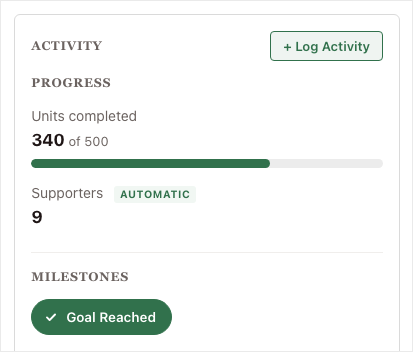
The Campaigns table in the WordPress dashboard has been redesigned to be tailored to campaigns. At a glance, you can now see how much a campaign has raised, when it ends and, if it is finished, whether it was successful.
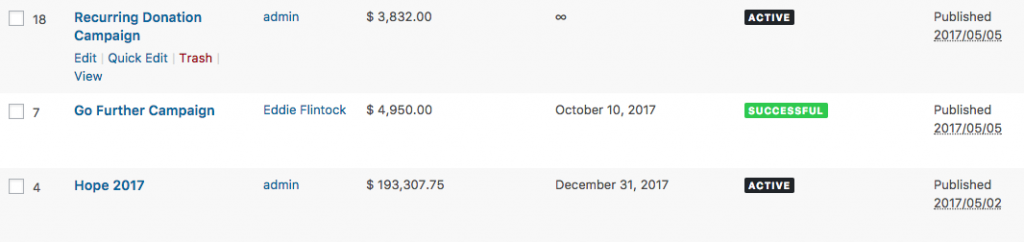
You will also see the campaign ID in the left column, which comes in handy when you need to know a particular campaign’s ID in a shortcode like [charitable_donation_form], [charitable_donors] or [campaigns], all of which accept campaign parameters.
Show donors anywhere with a shortcode
You can now display a list of your donors anywhere on your site with the [charitable_donors] shortcode. The shortcode allows you to show donors to all campaigns or one specific campaign, and you can also control what shows for each donor. By default it will show the donor’s avatar (or Gravatar), name and the amount they gave:

Enhanced donor accounts with email verification
Since version 1.4, Charitable has included a [charitable_my_donations] shortcode, which has provided an easy way for donors to view their donation history.
But there was one problem: It would only show donations you made while being logged in. If you made donations without being logged in but with the same email address as your account, those would not show.
To fix this, we set up a basic email verification process for registered users, which ensures that they have access to the email address they registered with before showing all donations associated with that email. Confirming your email address is a quick, easy process — just click a link and you’re done.
Add a logout link with a shortcode
Charitable has always included login, registration and profile forms. In version 1.4 we added a password reset process into the mix as well. But one piece that was still missing was a built-in way to add a logout link.
Thankfully, there is now a simple shortcode for that:
[charitable_logout]
Read the docs for more details about using the logout shortcode.
Take full advantage of Varnish Cache with Charitable
Varnish is a popular caching mechanism used by major web hosts like WP Engine and SiteGround. You may be using it without knowing it. And it may have been causing you headaches with Charitable.
The key problem we encountered with Varnish is that it could prevent user sessions from working as expected. One particularly nasty by-product of this was that donors would see a “You do not have access to this donation receipt” message immediately after donating. Hardly the impression you want to leave with donors.
Charitable 1.5 solves this issue by dynamically loading content (via AJAX) when we detect that user sessions are not working. That means that you can now take full advantage of Varnish to speed up your website, without negatively impacting your donors’ experience.
Updates for Developers
Not all changes are user-facing, and Charitable 1.5 includes a host of improvements designed to make developers’ lives easier and open new opportunities for building online fundraising experiences with Charitable.
Register new donation fields with the Donation Fields API
Before this release, if you wanted to add a new field to your donation form and show the value in emails, admin meta and donation exports, you had to use five separate hooks, with a different function for each. Besides being a pain, that left a lot of room for error, particularly for less experienced users who have added custom fields with little to no development knowledge.
In Charitable 1.5, you can register a new donation field in a single function called on the init hook:
function ed_charitable_register_new_donation_field() {
    $field = new Charitable_Donation_Field( 'national_id_number', array(
        'label'          => __( 'National ID Number', 'charitable' );
        'data_type'      => 'user',
        'donation_form'  => array(
            'show_after' => 'phone',
            'required'   => false,
        ),
        'admin_form'     => array(
            'show_after' => 'phone',
            'required'   => false,
        ),
        'show_in_meta'   => true,
        'show_in_export' => true,
        'email_tag'      => array(
            'description' => __( 'The donor\'s national ID number' , 'charitable' ),
        )
    ) );

    charitable()->donation_fields()->register_field( $field );
}

add_action( 'init', 'ed_charitable_register_new_donation_field' );
View the full, heavily commented code for a detailed outline of all the options available.
Easily get donor & donation counts with Charitable_Query classes
The Charitable_Query class is a foundation for both Charitable_Donations_Query and Charitable_Donor_Query, which allow you to get collections of donations and donors, respectively. But sometimes you don’t need to get the full collection; you just need the number of results.
We added a new option to Charitable_Query which allows you to easily get the count. Simply set output to count and form the rest of your query as per usual. For example, here’s a query that will get the number of donations made by the donor with ID 123 to the campaign with ID 4:
$query = new Charitable_Donations_Query( array(
    'campaign' => 4,
    'donor_id' => 123,
    'output' => 'count'
) );
$query->count();
Add new email fields with the Email Fields API
We discovered a huge performance issue related to how email fields were set up previously, so we took the opportunity to completely rewrite the way email fields work. That fixed the performance problem (settings pages that could take 15+ seconds loading in less than a second) and also opened up a more flexible way to add and edit email fields.
function ed_charitable_email_campaign_field_callback( $value, $args, $email ) {
    $campaign = $email->get_campaign();
    return $campaign->get( 'some_field' );
}

function ed_charitable_add_email_campaign_field( $fields ) {
    $fields['some_field'] = array(
        'description' => 'A description of this field',
        'preview'     => 'Placeholder value',
        'callback'    => 'ed_charitable_email_campaign_field_callback',
    );

    return $fields;
}

add_filter( 'charitable_email_campaign_fields', 'ed_charitable_add_email_campaign_field' );
Click here for the full documentation.
Set a minimum donation amount
You can now set a minimum donation amount for all campaigns with the charitable_minimum_donation_amount filter. For example, to set a minimum donation amount of $2:
function ed_charitable_set_minimum_donation_amount() {
    return 2;
 }

add_filter( 'charitable_minimum_donation_amount', 'ed_charitable_set_minimum_donation_amount' );
Detailed doc comments for hooks & filters
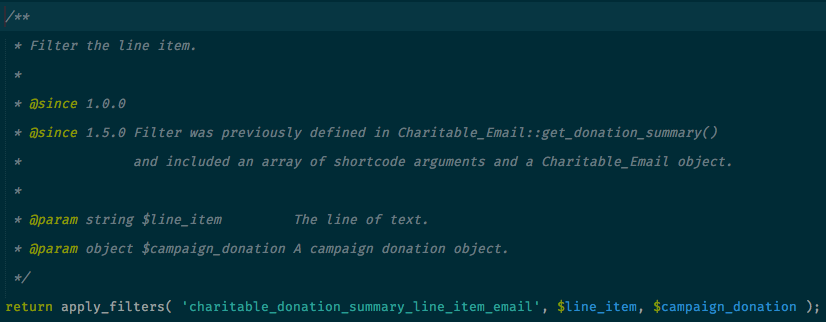
We’ve always been pretty hardcore about inline documentation, but with this release we really stepped that up. Many action and filter hooks now include detailed doc comments showing when the hook was introduced and the parameters that it sends. Here’s an example:
Other changes:
- An autoloader was added. Thanks to Kathy Darling for this one!
- Set whether a campaign can receive donations with the
charitable_campaign_can_receive_donationsfilter. - Use the
charitable_monetary_amountfilter for fine-grained control over how monetary amounts are displayed. - Added the Form View API. This separates how forms are rendered from how they are set up. It also improves performance.
- Added the Endpoint API, which allows you to register new endpoints through Charitable.
What Do You Think?
As you can see, this is an enormous update for Charitable. It’s taken us far longer to get here than I had hoped, but I am immensely proud of the improvements made. Many of these issues have been long-standing pain points for users, and it feels great to finally have a solid solution to those issues.
If you haven’t already, update Charitable via your dashboard today, and tell us what you think. Most of these improvements have been borne out of user feedback, and just like always, we want to hear what you think of these updates.
Share your thoughts in the comments below!




Leave a Reply