

TL;DR: We just released a huge update for Charitable. Highlights include better support for small screens, a new shortcode and complete user-facing login and registration workflow.
Charitable 1.4 is coming out today, nearly six months since we released version 1.3. That’s a long time between major releases – too long for my liking – but the result is that 1.4 is a big step forward for the project. Here’s a taste of what’s new in 1.4:
- Campaign grids (like the ones you add with the
[campaigns]shortcode), automatically scale gracefully on smaller screens. - So does the list of suggested donations in the donation form.
- You can use a new shortcode that lists a logged-in user’s history of donations.
- Your registered users can update & reset their password using a completely user-facing system (i.e. no wp-login access).
- The donation form runs some client-side validation tests now to help donors who have missed a field or entered an invalid credit card number.
- Picture fields in forms now feature a nice drag and drop interface (a nice update for people using Ambassadors or User Avatar).
Let’s take a closer look at some of these.
Responsive campaign grids
One of the most common issues that people mentioned with the campaign grids is that they were not responsive. On a mobile phone, that made them practically impossible to use. We’ve been helping customers out with a simple CSS-based solution, but building the solution straight into Charitable is obviously a big win for everyone.
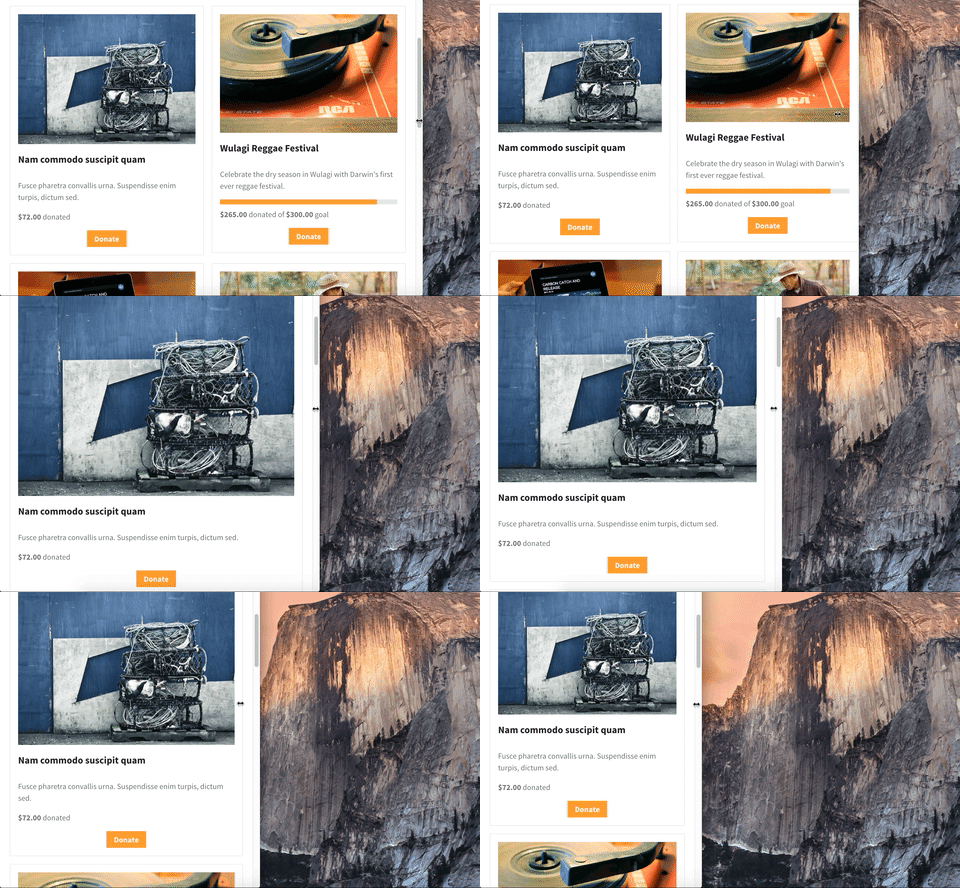
All the magic comes from the responsive parameter for the [campaigns] shortcode. If you just run with the default settings, the grid will automatically scale to a single-column layout on screens that are smaller than 768px (the size of an iPad).
Of course, every theme is different, so 768px might not be the perfect point at which to switch. You have full control over the point at which the grid will scale down. Here’s an example where I scale to a single column at 600px:
[campaigns responsive=600px]
Drag and drop picture fields
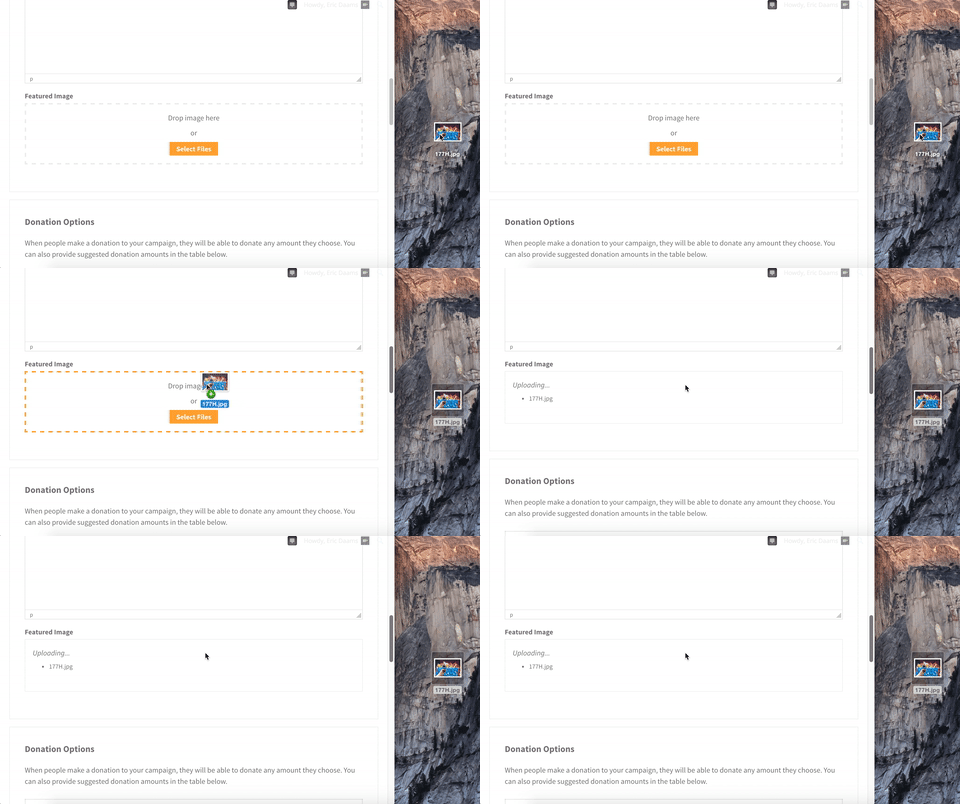
If you’re using Charitable Ambassadors to power a peer to peer fundraising or crowdfunding platform, your campaign creators will find it much easier to add their campaign image now.
We’ve gone from this:

To this:
New [charitable_my_donations] shortcode
At long last, Charitable now includes a clean, simple way for logged in users to see a history of their donations.
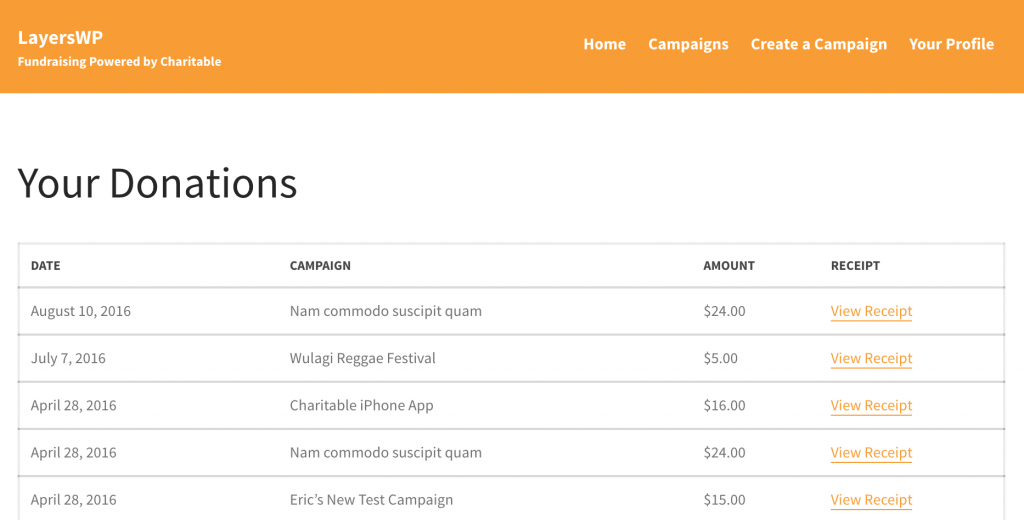
Setting it up is easy enough: Just create a new page and include the [charitable_my_donations] shortcode. Your users will need to login to access their donations.
Complete user-facing login & registration workflow
Charitable has always included login and registration shortcodes, but there were a few missing elements:
- To reset their password, users had to go through the default WordPress password reset process.
- Logged in donors or campaign creators were seeing the admin bar, which many found confusing or undesirable.
Thanks to a great push by @rafecolton from the Himalayan Institute, Charitable 1.4 now features a greatly improved user management system. It’s perfect if you are using Ambassadors to power a platform and you want the entire login and registration workflow to be integrated into the frontend.
People who contributed to Charitable 1.4
One of the most exciting aspects about this release of Charitable is that it included some significant contributions from people outside our 2-man team. I mentioned Rafe above; his colleagues @cyhtan and @NeptuneIllume also contributed; and @Kathy_Darling, who is working on our Recurring Donations extension, also made some significant changes.
Besides them, we’ve also had some great contributions to the Charitable translation project from hugo_mv (Spanish), mauroandres (Spanish – Argentina) and elstupid (Dutch), as well as others who contributed to the translations.
To everyone who has helped shape this version of Charitable – including you, our users – thank you! We hope you enjoy this latest iteration.
Changelog
- Scale the campaign grid gracefully when viewing on smaller screens. The
[campaigns]shortcode now supports aresponsiveparamater, which is enabled by default. You can set it to a specific px/em amount to change the breakpoint, or set it to0to disable responsive styling. #88 - Also provided appropriately responsive styling for suggested donation amounts on small screens. #159
- Added the
[charitable_my_donations]shortcode. Use this shortcode to allow logged in users to view a history of their donations, including links to the donation receipts. #14 - Added client-side validation for the donation form. This checks whether donors have filled out all the required fields, whether they’re donating more than $0 (because seriously, a $0 donation won’t go far :)) and whether they have used a valid credit card (if you’re using our Stripe or Authorize.Net extensions). #176 and #63
- Added a password reset process to provide a complete user-facing login and registration workflow. #89
- Include an
orderparamater for the[campaigns]shortcode, to reverse the direction in which campaigns are displayed. #64 - Allow campaigns in the
[campaigns]shortcode to be ordered by any of the orderby options for WP_Query. - Added drag and drop support for the Picture form field, which is used in the User Avatar and Ambassadors extensions. #111
- Improved how the plugin checks for updates to Charitable extensions, to keep the WordPress dashboard running smoothly. #133
- Added a
charitable_create_donation()function for developers who want to create donations programatically. #109 - Added a new
Charitable_Donations_Queryclass, which can be used by developers to retrieve donations from the database. #155 - Added a new
Charitable_Deprecatedclass, which is used to record any incorrect usage of Charitable functions or methods. - Switched to using the built-in edit.php admin page for listing Charitable donations, instead of relying on a custom admin page with a custom posts table. While there, we also simplified the interface and added colour-coding to the donation statuses. #110
- Include the donor’s phone number, address and the payment method in the donations export CSV. #154
- When multiple gateways are enabled, the default one is listed first in the donation form. #139
- Automatically cancel a donation when the donor returns from the gateway before completing it. This works with PayPal, PayUMoney and PayFast. #90 and #117
- Added a
Charitable_Donor::__toString()method, so that echoing the object simply prints out the donor name. - Added
charitable_sanitize_amount()function to convert any amount of type string into a float. - Trim the currency symbol from monetary amounts to prevent the symbol being treated as part of the amount. #145
- Trim the currency symbol from the suggested donation amounts when saving a campaign. #147
- When a donation fails and the user is redirected back to the donation form, they can re-attempt the same donation. Previously, a new donation would have been created, leaving a phantom pending donation behind. #106
- Prevent duplicate donations caused by clicking the donate button repeatedly. #164
- Fixed a bug related to empty content in the Layers theme. #9






Leave a Reply