
It’s here. After hundreds of hours of development, this weekend we are rolling out Ambassadors, version 2. Get ready to discover the best way to do peer to peer fundraising, period.
Read on for a behind the scenes look at how this release has evolved over time, and what it means for you & your non-profit.
Just want to know what’s new? Click here to skip straight to the release notes.
First, a quick catch-up…
One major reason why we decided to create Charitable was because we saw that non-profits were stuck with two less-than-ideal choices for their online donations.
On the one hand, they could use hosted fundraising platforms, which generally take a cut of each donation the non-profit receives. A 2% transaction fee might not sound too bad, but if your campaign takes off and you raise $100k, that’s $2000 gone to the platform. And 2% is a conservative figured — we learned from non-profits that they were losing as much as 10% of their donations to the platforms they were using. Ouch.
In the WordPress world, you had a handful of WordPress donation plugins, but none with full-fledged support for features like peer to peer fundraising. Besides Charitable, that’s still the case.
From the very start, our goal has been to create a WordPress donation plugin that helps non-profits raise more money while spending less.
The very first release of Charitable Ambassadors was back in October 2015 — just a few months after we launched Charitable itself. But even before we released Charitable, Ambassadors was already in active development.
Ambassadors 1.0 gave non-profits an out-of-the box way to start running peer to peer fundraising campaigns directly on their website. Hundreds of non-profits have used it since to help power their fundraising events. Walkathons, fun runs, marathons, jumpathons, polar plunges — we’ve seen non-profits use Charitable to collect donations for all sorts of awesome events!
What Ambassadors v1 was missing
Of course, there wouldn’t be an Ambassadors 2.0 if Ambassadors 1.0 wasn’t lacking in some way, right?
Ambassadors worked great if you were running an open-ended fundraising campaign. People could create a campaigns for your organization any time, organically growing your non-profit’s reach.
But as soon as you started running time-sensitive fundraising campaigns, Ambassadors was a bit more limited. When you’re running an event like a walkathon, you want your supporters to be able to create a fundraiser for that walkathon, and you want any donations they collect to automatically show up on the fundraising stats for the main walkathon campaign.
You also want to be able to repeat that process for all your fundraising campaigns, with each top-level campaign supported by a network of fundraisers raising money for that campaign.
Another key area where Ambassadors was lacking was in the ability to create fundraising teams. Of course, people could create a single campaign for their entire team, but that means you lose some of the network benefits of team fundraising. What you want instead is for each team member to be able to create their own fundraiser, sharing that across their network and growing your reach exponentially.
Over time we developed workarounds to help handle basic support for these features, but workarounds are exactly that — workarounds. They will never match having the feature natively, as a tightly integrated part of a cohesive product.
How Ambassadors v2 solves these problems (and more!)
So, you’ve read the backstory. Now let’s dive in and discover how Ambassadors 2.0 solves these problems.
Get people collecting donations for your fundraising campaigns
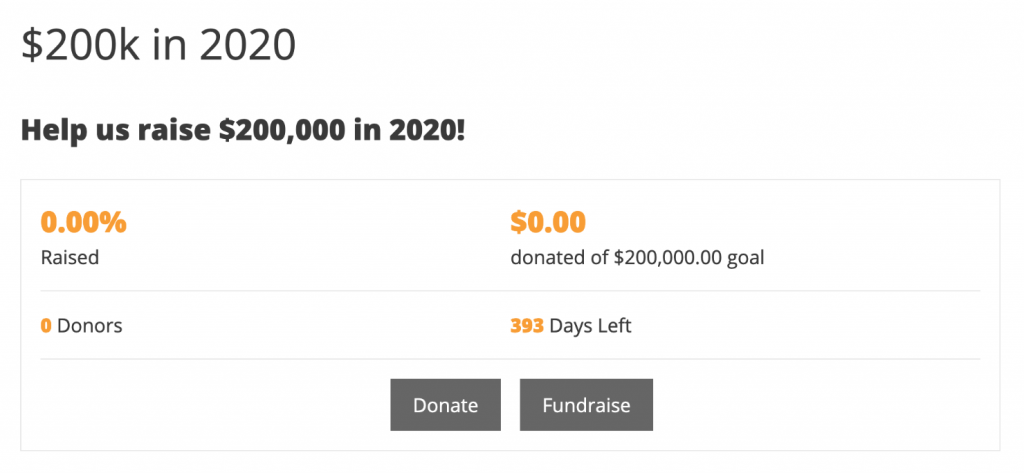
With Ambassadors 2.0, you can create top-level campaigns people can fundraise for.
Instead of only being able to support your campaign by making a donation, your supporters can create a fundraiser for your campaign.
Your supporters get their own fundraising page, which they can share with their network. A donation to their fundraiser will be automatically counted towards the fundraising stats for your campaign.
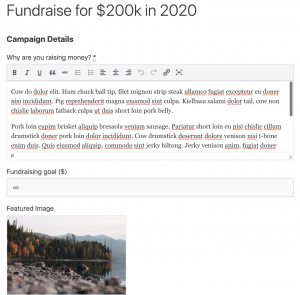
As the non-profit, you can tweak how much (or how little) the fundraiser has to do to set up their fundraising page. You can provide them with default text and a featured image for their fundraising page, and decide whether they can set things like a title or a goal.
The end result is that your supporters have a much quicker journey to creating their fundraiser.
Less friction means you end up with more fundraisers, a larger reach, and more donations. Win, win, win.
Grow your network exponentially with fundraising teams
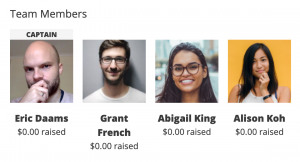
What’s better than getting someone to create a new fundraiser? Someone making one for themselves and all their friends!
That’s the power of team fundraising. Instead of setting up a fundraiser just for themselves, your supporter can now start their own fundraising team, and it’s only a tiny bit more work than creating a solo campaign.
Your supporter gives their team a name and then adds as many team members as they want. Once they submit their team, Charitable sends each of those team members an email asking them to confirm that they would like to join the team.
For the team members, it’s just two clicks and they’re done — Charitable handles all the rest.
Want to try it out? Try setting up a fundraiser on our demo.
Use email marketing to connect (and re-connect) with your supporters
Of course, growing a network of supporters is fantastic. But connecting with them through email marketing is key to keeping them invested in your organization’s work for the long term.
By combining Ambassadors with our Newsletter Connect extension, you can easily start adding campaign creators to your mailing list.
To keep things organized, you can have them added to a specific list just for campaign creators. Besides giving you the ability to tailor your emails to your them, this also means that you can start them on an email automation campaign.
For example, you can send your campaign creators an automated series of emails guiding them in the steps to running a successful fundraiser.
More emails for your campaign creators
Besides opening up all the possibilities of email marketing for your campaign creators, we also added a series of built-in emails you can use to connect with campaign creators after they add their campaign.
You can send them an email automatically when they first submit their campaign, when their campaign is approved, when their campaign is about to end, and after it has finished, as well as emails whenever someone donates to their campaign.
As with all emails built into Charitable, you can control the text and subject line of each email, and we provide a stack of variables you can use to personalize and fine-tune your emails.
Tailor the campaign form to your needs
Some products throw a million options at their users, in the name of flexibility. Unfortunately, that can make for a confusing mess.
With Charitable, we focus on keeping things simple for users. But sometimes, we discover that providing site admin with a little more choice will help give users a better experience.
The campaign creation form was one key area where we felt users would benefit from having more choice, so we have added a set of options for customizing different aspects of the form, allowing you to easily accomplish things that would have previously required some custom code.
That means that you can now easily control how campaign creators choose the category/tag for their campaign, how they set an end date, and whether they can add their own suggested donation options.
Just the release notes…
At a glance, here’s everything that’s new in Ambassadors 2.0.
- Fundraisers! Fundraisers are a special type of campaign created to raise funds for an existing campaign. This feature allows you to create parent campaigns which people can fundraise for. You can create as many parent campaigns as you would like. The fundraiser form is a simplified version of the front-end campaign form.
- Teams! When setting up a new fundraiser, your campaign creators can create teams and join other teams.
- Email marketing! Now you can automatically add campaign creators to your mailing list. This feature requires Newsletter Connect and uses the “contact consent” feature in Charitable.
- Tweak the campaign form with new admin settings. Easily tweak how campaign creators select categories or tags for their campaigns, how they set an end date, and whether they can provide their own suggested donation options.
- More emails: There are new emails available to send to campaign creators when their campaign is approved, when it has ended or when it requires action before it can be published (i.e. they need to log in, register or verify their email address). Admin can also receive an email when a campaign still requires some kind of action from its campaign creator.
- Solved a long-standing issue preventing non-logged-in users from creating a campaign. You can now set up the campaign creation flow to require users to create an account before they submit their campaign, or after. When a campaign creator submits a campaign without being logged in, they will be prompted to log in, register and/or verify their email address after they have submitted their fundraising campaign.
- Loads more bug fixes!
- Added Dutch translation.
Ready to use peer to peer fundraising for your non-profit?
With Ambassadors 2.0, Charitable will help your non-profit raise more money through peer to peer fundraising. And we’re doing it without the onerous price tag that normally comes with this kind of feature, so your non-profit can raise more money while spending less.
Ready to dive in?
Start collecting donations with WordPress today
Join 10,000+ non-profits raising more money online with Charitable.





Leave a Reply