
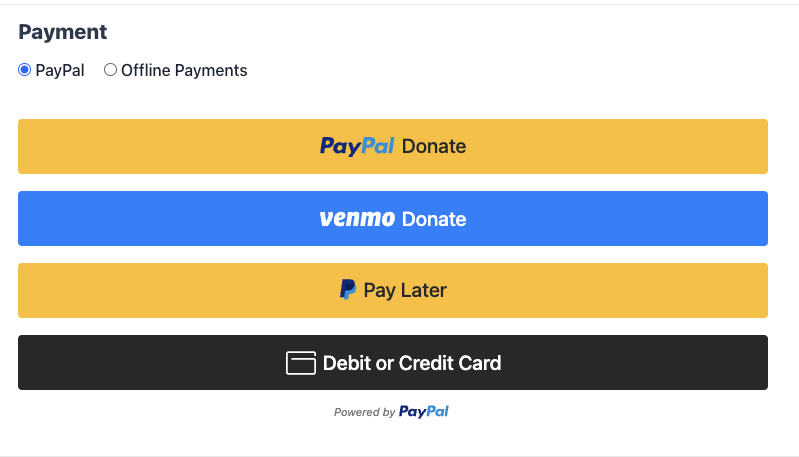
PayPal Commerce est une intégration PayPal unique et moderne qui permet à vos donateurs de payer avec PayPal, Venmo, Pay Later, cartes de crédit et de débit, Apple Pay et Google Pay via une seule connexion. Le bouton « Se connecter avec PayPal » en un clic gère la configuration, et les dons et les remboursements transitent par l'administration standard des dons de Charitable sans avoir besoin de se connecter à PayPal.
Disponible dans Charitable Pro 1.8.15+ et Charitable 1.8.11 (qui ne prend actuellement pas en charge les dons récurrents / la mise en coffre). Il a été testé de bout en bout dans des environnements sandbox et réels, et nous continuerons à affiner l'expérience en fonction des commentaires des clients.
Fonctionnalités clés
- Acceptez les dons via PayPal, Venmo, Pay Later, les cartes de crédit et de débit, Apple Pay et Google Pay grâce à une seule intégration.
- Connectez votre compte professionnel PayPal en un clic. Aucun développeur nécessaire.
- Proposez des dons ponctuels et récurrents à partir du même formulaire.
- Choisissez entre deux modes récurrents : abonnements gérés par PayPal, ou renouvellements gérés par Charitable utilisant les méthodes de paiement enregistrées.
- Laissez les donateurs récurrents enregistrer leur compte PayPal ou leur carte et la réutiliser pour les dons futurs.
- Remboursez et annulez les dons directement depuis l'administration WordPress.
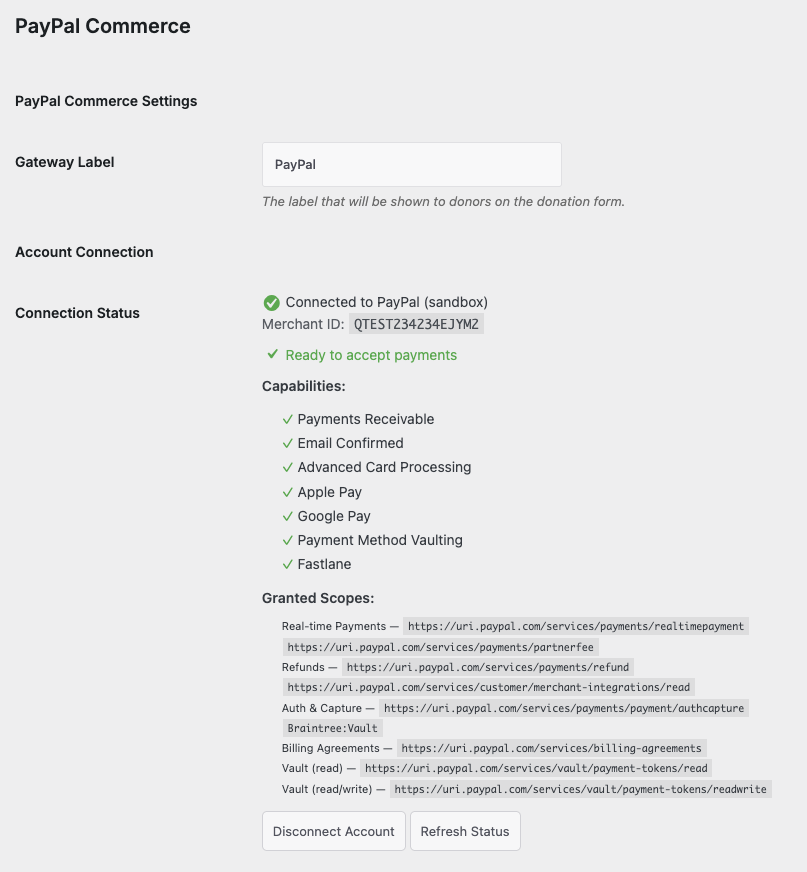
- Visualisez le statut en temps réel des capacités de PayPal (Paiements Recevables, Email Confirmé, Traitement des Cartes, Apple Pay, Google Pay, Mise en coffre des méthodes de paiement, Fastlane) dans le panneau de connexion.
- Les donateurs qui rencontrent une erreur côté PayPal voient des messages clairs et conviviaux avec une suggestion de récupération au lieu d'une alerte générique du navigateur.
Pourquoi utiliser PayPal Commerce ?
PayPal Commerce offre à vos donateurs le maximum de moyens de paiement sans que votre équipe ait à gérer plusieurs passerelles. Une seule connexion débloque PayPal, Venmo, le financement Pay Later, le traitement complet des cartes de crédit et de débit via les champs de carte conformes PCI de PayPal, et les portefeuilles modernes (Apple Pay, Google Pay) que tous les donateurs attendent sur un formulaire de don de l'ère 2026. Comparé à l'ancienne intégration PayPal Legacy, vous bénéficiez d'options de paiement plus riches, d'un paiement plus rapide et d'outils d'administration pour les remboursements et la gestion des récurrents sans jamais quitter WordPress.
Voyez-le en action
Exigences
- Charitable Lite 1.8.11 ou Charitable Pro 1.8.15 ou plus récent
- Un compte professionnel PayPal (vous pouvez en créer un pendant le flux de connexion)
- WordPress 6.0+ et PHP 7.4+
- L'extension PHP
gdouimagicksi vous prévoyez d'utiliser la génération de PDF de reçus (déjà requis par le cœur de Charitable)
Démarrage
Activation
- Dans votre administration WordPress, allez à Charitable → Paramètres → Passerelles de paiement.
- Trouvez PayPal Commerce dans la liste des passerelles et cliquez sur Activer.
- Cliquez sur Paramètres à côté de PayPal Commerce, puis cliquez sur le bouton Se connecter avec PayPal.
- PayPal s'ouvre dans une nouvelle fenêtre. Connectez-vous à votre compte professionnel PayPal (ou créez-en un) et approuvez la connexion.
- PayPal vous redirige vers WordPress. Le panneau de connexion affichera votre identifiant marchand et une liste de contrôle des capacités accordées.
C'est tout. Vous pouvez commencer à accepter les dons via PayPal Commerce immédiatement.
Mode Test vs Mode Réel
PayPal Commerce respecte le paramètre Mode test standard de Charitable. Lorsque le mode test est activé, les dons transitent par l'environnement sandbox de PayPal afin que vous puissiez valider l'intégralité du parcours du donateur sans utiliser d'argent réel. Désactivez le mode test lorsque vous êtes prêt à accepter des dons réels.
Les méthodes de paiement enregistrées sont limitées par commerçant : une carte que vous avez enregistrée en mode sandbox n'apparaîtra pas en mode réel, et vice versa.
Options de configuration
Après la connexion, la page Paramètres PayPal Commerce expose ces options. La plupart des paramètres par défaut sont judicieux pour une nouvelle installation, vous pouvez donc généralement les laisser tels quels.
Modes de paiement
| Paramètre | Type | Défaut | Description |
|---|---|---|---|
| Activer Venmo | Activer/Désactiver | Désactivé | Affichez le bouton Donner avec Venmo à côté de PayPal. Venmo est réservé aux États-Unis et nécessite la capacité de paiement différé sur votre compte PayPal. |
| Activer le paiement différé | Activer/Désactiver | Désactivé | Affichez le bouton de paiement différé de PayPal (Payez en 4 fois, Crédit PayPal). L'éligibilité est déterminée par PayPal au moment du paiement en fonction de la région du donateur et du montant du don. |
| Activer les champs de carte (ACDC) | Activer/Désactiver | Activé | Affichez les champs de carte de crédit et de débit conformes PCI de PayPal directement sur votre formulaire de don. Rebascule vers un bouton autonome « Carte de débit ou de crédit » si PayPal n'a pas encore activé les champs de carte sur votre compte. |
| Activer Apple Pay | Activer/Désactiver | Activé | Affichez le bouton Apple Pay sur Safari. Nécessite la capacité Apple Pay sur votre compte PayPal. |
| Activer Google Pay | Activer/Désactiver | Activé | Affichez le bouton Google Pay sur Chrome. Nécessite la capacité Google Pay sur votre compte PayPal. |
| Activer Fastlane | Activer/Désactiver | Activé | Permettez aux donateurs récurrents de finaliser leur achat avec Fastlane (l'option de paiement enregistré de PayPal pour les invités). |
| Comportement de Fastlane | Sélectionner | Invités uniquement | Choisissez quand Fastlane est proposé : invités uniquement, tous les donateurs, ou jamais. |
Méthodes de paiement enregistrées (coffre-fort)
| Paramètre | Type | Défaut | Description |
|---|---|---|---|
| Activer le coffre-fort de méthodes de paiement | Activer/Désactiver | Activé | Permettez aux donateurs d'enregistrer des comptes PayPal et des cartes sur le formulaire de don pour une utilisation lors de futurs dons. |
| Affichage de l'option de coffre-fort | Sélectionner | Opt-in | Choisissez comment l'option « Enregistrer ma méthode de paiement » apparaît au moment du paiement : opt-in (non cochée par défaut), opt-out (cochée par défaut), ou enregistrer toujours. |
| Expiration de la méthode enregistrée (jours) | Nombre | (vide) | Nombre de jours avant que les dons récurrents enregistrés non utilisés n'expirent automatiquement. Laissez vide pour aucune expiration. |
Dons récurrents
| Paramètre | Type | Défaut | Description |
|---|---|---|---|
| Coffre-fort automatique pour les dons récurrents | Activer/Désactiver | Activé | Enregistrez automatiquement le moyen de paiement du donateur lorsqu'il choisit un don récurrent. Requis pour que le cron de renouvellement puisse débiter les cycles ultérieurs. |
| Mode de traitement des dons récurrents | Radio | API d'abonnements PayPal | Choisissez comment les dons récurrents sont traités. Coffre-fort + Cron : votre site enregistre le jeton de paiement et déclenche chaque renouvellement. API d'abonnements PayPal : PayPal gère automatiquement le cycle de renouvellement (nécessite une licence Pro ; les sites Lite reviennent automatiquement à Coffre-fort + Cron avec des frais de plateforme minimes sur chaque renouvellement). |
Plongée en profondeur dans le mode récurrent
PayPal Commerce prend en charge deux manières distinctes de gérer les dons récurrents. Les deux fonctionnent avec la même expérience donateur, mais le flux en coulisses diffère.
Coffre-fort + Cron (géré par le marchand)
Lorsqu'un donateur choisit un don récurrent, votre site enregistre son compte PayPal ou sa carte sous forme de jeton sécurisé. À chaque cycle, le cron de Charitable déclenche un nouveau débit sur ce jeton via l'API Orders de PayPal. Vous conservez le contrôle total sur le comportement de relance, le recouvrement et les annulations via l'administration des dons récurrents de Charitable.
Fonctionne sur Lite et Pro. Les sites Lite paient des frais de plateforme minimes (3 %) sur chaque capture de renouvellement ; les sites Pro ne paient aucuns frais de plateforme.
API d'abonnements PayPal (gérée par PayPal)
Lorsqu'un donateur choisit un don récurrent, votre site crée un plan de facturation et un abonnement PayPal. PayPal gère automatiquement le cycle de renouvellement et informe votre site lorsque chaque cycle est facturé. Les donateurs peuvent également voir et gérer l'abonnement dans leur propre compte PayPal.
Disponible sur Pro uniquement. Les sites Lite qui sélectionnent ce mode reviennent automatiquement à Coffre-fort + Cron, de sorte que les donateurs ne voient jamais d'erreur.
Activation Pro sur les dons récurrents existants
Si vous activez Pro sur un site qui a déjà des dons récurrents Lite en cours, les frais de plateforme sont automatiquement supprimés lors du prochain renouvellement. Vous n'avez pas besoin de migrer l'abonnement, de demander au donateur de réapprouver, ou de prendre toute autre mesure. Le seuil de frais est vérifié à chaque renouvellement en fonction de votre état de licence actuel.
Remboursements et annulations
Les remboursements et les annulations sont émis depuis l'administration standard des dons Charitable. Vous n'avez pas besoin de vous connecter à PayPal.
Rembourser un don
- Ouvrez le don dans Charitable → Dons.
- Dans Actions sur le don, choisissez Remboursé et cochez « Rembourser automatiquement dans PayPal Commerce. ».
- Cliquez sur Mettre à jour le statut.
Si le remboursement réussit, le statut du don passe à Remboursé et l'ID du remboursement est enregistré dans le journal des dons. Si le remboursement échoue (par exemple, PayPal renvoie « solde insuffisant »), le statut du don est rétabli à Payé afin que vos enregistrements et PayPal restent synchronisés.
Annuler un don récurrent
- Ouvrez le don récurrent dans Charitable → Dons récurrents.
- Dans Actions sur le don, choisissez Annuler dans la passerelle.
- Cliquez sur Annuler le don récurrent.
L'annulation est envoyée à PayPal afin que le donateur ne soit plus facturé, et le message de don récurrent est défini sur Annulé dans WordPress.
Erreurs côté donateur
Lorsque PayPal ne parvient pas à traiter un don (le compte marchand est restreint, la carte est refusée, le pays n’est pas pris en charge, etc.), les donateurs voient un message clair et concis sur le formulaire de don avec une suggestion de résolution. Ils ne voient jamais de boîte de dialogue d’alerte générique du navigateur.
Exemples :
- « Les dons en ligne via PayPal sont temporairement indisponibles. Veuillez essayer une autre méthode de paiement ou nous contacter pour finaliser votre don. »
- « Votre méthode de paiement a été refusée. Veuillez essayer une autre carte ou utiliser votre solde PayPal. »
- « Les dons via PayPal ne sont pas pris en charge depuis votre pays. Veuillez essayer une autre méthode de paiement. »
Si le visiteur actuel est connecté en tant qu’administrateur (capacité manage_charitable_settings ou manage_options), le message intégré affiche en plus le texte d’erreur PayPal sous-jacent et l’ID de débogage PayPal afin que vous puissiez trier sans consulter les journaux.
Journaux
Chaque erreur de l’API PayPal est enregistrée dans Charitable → Outils → Journaux sous la source paypal_commerce. Chaque entrée comprend :
- Le message convivial affiché au donateur
- Le texte d’erreur brut de PayPal
- Le code d’erreur PayPal (par exemple,
PAYEE_ACCOUNT_RESTRICTED) - L’ID de débogage PayPal (pour les tickets de support avec PayPal)
- Contexte du don : montant, campagne, méthode de paiement
C’est le moyen le plus rapide de diagnostiquer le rapport d’un client indiquant « PayPal ne fonctionne pas ».
Dépannage
Les donateurs voient « Les dons en ligne via PayPal sont temporairement indisponibles. »
Ce message indique que PayPal a restreint votre compte marchand. Connectez-vous sur paypal.com avec votre compte professionnel, résolvez les éventuels problèmes de vérification ou de conformité en attente, puis revenez à Charitable → Paramètres → Passerelles de paiement → PayPal Commerce et cliquez sur Actualiser le statut pour confirmer que la restriction est levée.
L’onglet « Payer par carte » ne s’affiche pas ; seul un bouton « Carte de débit ou de crédit » apparaît.
PayPal n’a pas encore activé la capacité de traitement avancé des cartes (ACDC) sur votre compte. Le bouton Carte autonome accepte toujours les dons via une fenêtre contextuelle PayPal hébergée. Pour activer les champs de carte intégrés, connectez-vous à votre compte professionnel PayPal, terminez les étapes de vérification en attente, puis revenez au panneau de connexion et cliquez sur Actualiser le statut.
Après avoir déconnecté et reconnecté, la connexion affiche toujours l’ancien marchand.
Videz le cache d’objets de votre WordPress (ou redémarrez votre service PHP-FPM si un cache au niveau de l’hôte est impliqué). Le bouton Actualiser le statut force une nouvelle vérification des capacités auprès de PayPal.
Les dons récurrents ne sont jamais renouvelés.
Vérifiez que Mémoriser automatiquement pour les dons récurrents est activé et que le cron de WordPress s’exécute sur votre serveur. Pour le mode Mémoriser + Cron, le cron de renouvellement s’exécute quotidiennement et débite chaque don récurrent dû. Consultez Charitable → Outils → Journaux pour les entrées de paypal_commerce afin de voir si des tentatives de renouvellement ont été effectuées ou ont échoué.
Le bouton Rembourser affiche « Aucune ID de capture trouvée » sur un don par abonnement.
Cela peut se produire si vous tentez un remboursement dans les secondes qui suivent l'approbation de l'abonnement par le donateur, avant que PayPal n'ait enregistré la première transaction. Attendez quelques minutes et réessayez. Le plugin récupérera l'ID de capture de l'historique des transactions de PayPal au moment du remboursement.
Ressources pour les développeurs
Hooks et filtres
charitable_paypal_log_platform_fee_on_donation(filtre, par défautfalse). Retournetruepour ajouter une ligne « Frais de plateforme » au journal des dons à chaque capture. Utile pour les sites qui souhaitent une visibilité complète sur les frais de renouvellement de niveau Lite.charitable_paypal_platform_fee_percentage(filtre, par défaut3). Ajustez le pourcentage des frais de plateforme appliqués aux dons de niveau Lite.charitable_donation_cancellation_page(filtre). Personnalisez la page sur laquelle les donateurs arrivent après avoir annulé l'approbation d'un abonnement PayPal.charitable_donation_cancellation_args(filtre). Personnalisez les arguments de requête ajoutés à l'URL d'annulation du don.
WP-CLI
Le plugin est livré avec une commande WP-CLI spécifique à PayPal :
wp charitable paypal force-commerce-tier
Utilisez ceci si Charitable a détecté votre site comme un site Legacy PayPal (par exemple, s'il a importé des dons à partir d'un export hérité, ou d'un test de passerelle hérité abandonné) et que vous souhaitez opter pour PayPal Commerce à la place. Comprend un aperçu --dry-run et une confirmation requise --confirm-recurring-impact lorsque des dons récurrents hérités actifs sont présents.
Webhooks
Une fois connecté, le panneau de connexion affiche l'URL de webhook de votre site. Abonnez-vous à ces événements dans votre tableau de bord développeur PayPal :
CHECKOUT.ORDER.APPROVEDPAYMENT.CAPTURE.COMPLETEDPAYMENT.CAPTURE.DENIEDPAYMENT.CAPTURE.PENDINGPAYMENT.CAPTURE.REFUNDEDMERCHANT.ONBOARDING.COMPLETEDMERCHANT.PARTNER-CONSENT.REVOKED
Pour les comptes sandbox, vous pouvez également cliquer sur Créer automatiquement le webhook pour les enregistrer automatiquement.


