
Les abonnements à durée déterminée vous permettent de définir un don récurrent qui s'arrêtera automatiquement, soit après un nombre défini de paiements, soit à une date de fin spécifique, au lieu de continuer jusqu'à ce que quelqu'un l'annule manuellement. Lorsque le terme est atteint, Charitable complète l'abonnement pour vous, arrête la facturation auprès de la passerelle de paiement et peut envoyer un e-mail de confirmation au donateur.
Disponible dans le module complémentaire Charitable Dons récurrents 2.2.0 et versions ultérieures.
Fonctionnalités clés
- Définissez un don récurrent pour qu'il se termine après un nombre fixe de paiements.
- Ou définissez-le pour qu'il se termine à une date calendaire spécifique.
- Les abonnements se terminent automatiquement lorsque le terme est atteint, sans annulation manuelle.
- L'abonnement à la passerelle est annulé en même temps, de sorte que le donateur n'est jamais facturé au-delà du terme.
- Le terme est affiché dans l'écran d'administration des dons récurrents, le tableau de bord du donateur et le reçu de don.
- Un indicateur de progression montre combien de paiements ont été effectués par rapport à une limite de paiement.
- Fonctionne avec le flux de travail d'approbation des donateurs existant, de sorte qu'une modification du terme peut être approuvée par le donateur avant qu'elle ne s'applique.
Pourquoi utiliser les abonnements à durée déterminée ?
De nombreuses campagnes demandent aux sympathisants un engagement défini, tel qu'un engagement de 12 mois ou une campagne de financement qui dure une période déterminée. Auparavant, tous les dons récurrents étaient indéfinis, le personnel devait donc se souvenir de les annuler manuellement à la fin de l'engagement. Les abonnements à durée déterminée vous permettent de définir l'engagement une fois et de laisser Charitable y mettre fin à l'échéance, ce qui maintient la clarté de vos rapports et protège les donateurs contre les frais imprévus.
Voyez-le en action
Exigences
- Module complémentaire Charitable Dons récurrents 2.2.0 ou version ultérieure.
- Un abonnement Stripe. Les termes de l'abonnement sont configurés via l'écran Mettre à jour l'abonnement, qui prend actuellement en charge Stripe.
- Pour l'application de la date de fin exacte, Charitable Pro 1.8.16 ou version ultérieure (cela utilise la fonction native cancel_at de Stripe). Dans les versions antérieures, une mesure de sécurité intégrée complète toujours l'abonnement lors du premier renouvellement après l'atteinte du terme.
Comment définir un terme pour un don récurrent
Étape 1 : Mettre à jour l'abonnement
Dans votre administration WordPress, accédez à Charitable » Dons et ouvrez le don récurrent que vous souhaitez limiter. Dans le panneau de droite, ouvrez le menu déroulant Actions sur le don.
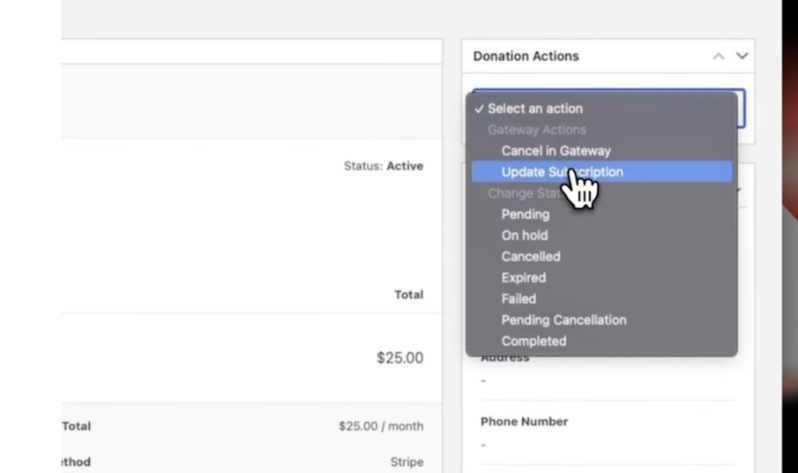
À partir de là, cliquez sur Mettre à jour l'abonnement.
Une fenêtre contextuelle apparaîtra, vous permettant de modifier le montant, la période de facturation, le terme de l'abonnement, et plus encore.
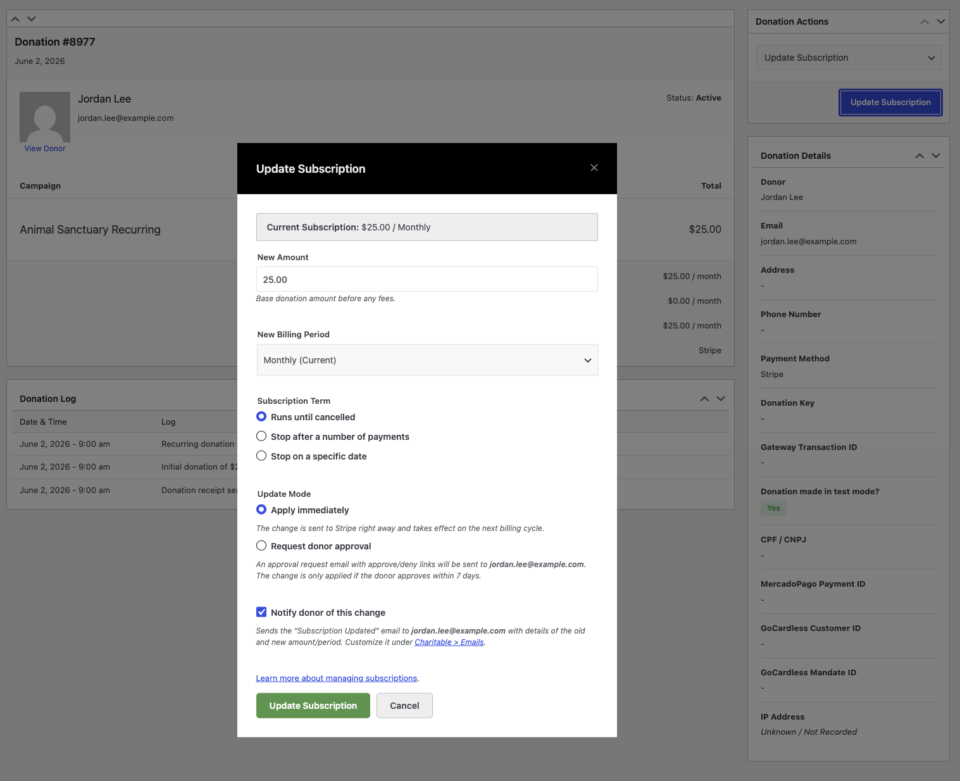
Étape 2 : Définir un terme d'abonnement
Vous pouvez choisir l'une des deux options pour définir le terme :
Arrêter après un nombre de paiements :
Entrez le nombre total de paiements (par exemple, 12). Charitable annulera automatiquement l'abonnement une fois ce nombre de prélèvements effectué. Ceci est idéal pour les campagnes de promesses de dons, les campagnes d'anniversaire et les dons échelonnés.
Arrêter à une date spécifique :
Sélectionnez une date calendaire spécifique (par exemple, 3 juin 2027). Charitable annulera l'abonnement à cette date. Cette option convient aux campagnes basées sur des projets avec une date de fin définie.
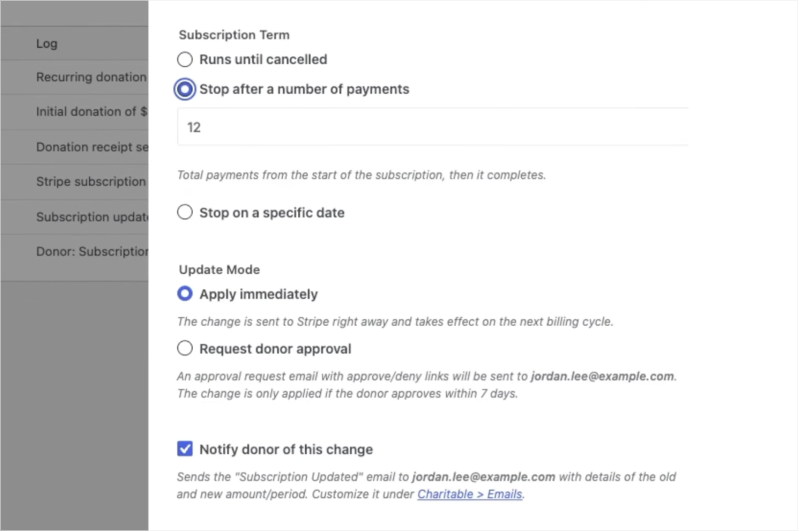
Étape 3 : Enregistrer et confirmer
- Cliquez sur Mettre à jour l'abonnement pour appliquer les modifications.
- Confirmez toutes les invites qui apparaissent.
- Charitable communiquera immédiatement le nouveau terme à Stripe. Le journal des dons sera mis à jour avec la confirmation, reflétant le nouveau plan et les détails du terme sur l'enregistrement de l'abonnement.
Étape 4 : Facultatif : Demander l'approbation du donateur pour les modifications
Si vous apportez des modifications au nom d'un donateur, telles que l'ajustement du montant ou du terme, vous pouvez sélectionner l'option Demander l'approbation du donateur avant d'enregistrer.
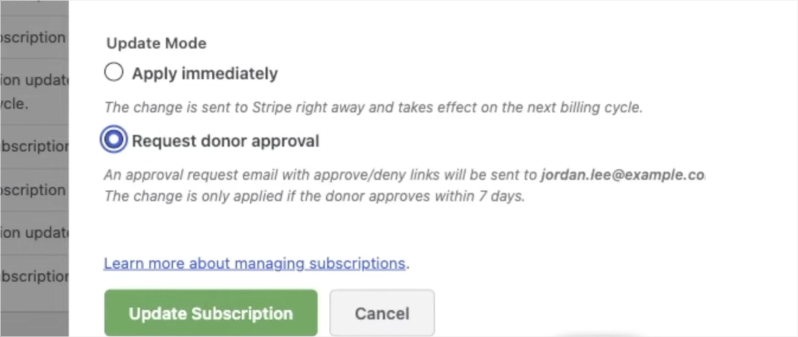
Cela envoie un e-mail au donateur avec les modifications proposées. Le donateur peut approuver ou refuser les modifications directement depuis l'e-mail, garantissant une piste d'audit claire et maintenant le contrôle du donateur sur ses dons.
Quand l'utiliser : Terme fixe vs. Indéfini
Tous les programmes de dons récurrents n'ont pas besoin d'un terme. Voici un guide rapide pour vous aider à décider quelle approche convient à chaque campagne.
| Scénario | Meilleure approche | Pourquoi |
|---|---|---|
| Campagne de promesses de dons annuelle (« Donnez 50 $/mois pendant 12 mois ») | Terme fixe : 12 paiements | L'engagement est défini à l'avance. Charitable y met fin automatiquement une fois la promesse de don remplie. |
| Campagne de financement avec une date limite | Terme fixe : date de fin spécifique | La campagne se termine à une date connue. Aucun donateur n'est débité après la fin de la campagne. |
| Fenêtre de don jumelé (« Nous égalerons chaque dollar pendant 6 mois ») | Terme fixe : 6 paiements | Le jumelage expire. Le don récurrent devrait expirer avec lui plutôt que de continuer sans jumelage. |
| Fonds commémoratif ou hommage lié à une année anniversaire | Terme fixe : date de fin spécifique | La campagne honore une période définie. Un terme fixe y met fin intentionnellement. |
| Défi pour les nouveaux donateurs (« Faites vos 3 premiers dons ») | Terme fixe : 3 paiements | Abaisse la barrière pour les nouveaux donateurs récurrents en rendant l'engagement gérable. |
| Donateurs mensuels de soutien sans fin définie | Indéfini | Le donateur a l'intention d'un soutien continu. Aucun terme nécessaire. |
| Soutien opérationnel ou de programme continu | Indéfini | Le besoin n'expire pas. Laissez la relation se poursuivre naturellement. |
Options de configuration
Types de termes d'abonnement
| Option | Ce qu'il fait | Entrée | Remarques |
|---|---|---|---|
| Exécuter jusqu'à annulation | Le paramètre historique par défaut. L'abonnement se poursuit jusqu'à ce qu'il soit annulé. | Aucun | Aucune fin n'est appliquée. |
| Arrêter après un certain nombre de paiements | L'abonnement se termine une fois le nombre total de paiements atteint. | Nombre entier, de 1 à 1000 | L'écran d'administration affiche un indicateur de progression « X paiements sur Y effectués ». |
| Arrêter à une date spécifique | L'abonnement se termine à la date choisie ou après. | Une date future | La date doit être dans le futur. Une date passée est rejetée. |
Ce qui se passe lorsque le terme est atteint
Lorsque le dernier paiement est effectué, ou que la date de fin est dépassée, Charitable : 1. Marque le don récurrent comme Terminé. 2. Annule l'abonnement auprès de la passerelle de paiement afin qu'aucun frais supplémentaire ne soit débité. 3. Envoie l'e-mail Don récurrent terminé, si cet e-mail est activé dans vos paramètres.
Où le terme apparaît
- Écran d'administration des dons récurrents : une ligne « Terme », avec un indicateur de progression des paiements pour les termes basés sur le nombre.
- Tableau de bord du donateur : une courte note telle que « pour 12 paiements » ou « jusqu'au 3 juin 2027 ».
- Reçu de don : la même note de terme.
Dépannage
L'abonnement ne s'est pas terminé à la date de fin exacte
L'annulation à jour exacte repose sur la fonction native `cancel_at` de Stripe, qui est définie par Charitable Pro 1.8.16 et les versions ultérieures. Sur les versions antérieures, le mécanisme de secours intégré termine l'abonnement lors du premier renouvellement après la date de fin, plutôt qu'à la date elle-même. Mettez à jour Charitable Pro pour une précision à la journée.
Les options de terme d'abonnement ne s'affichent pas
Les contrôles de terme apparaissent dans l'écran de mise à jour de l'abonnement pour les abonnements Stripe actifs. Les mises à jour d'abonnement sont actuellement prises en charge pour Stripe, donc les options de terme n'apparaîtront pas pour les autres passerelles.
L'e-mail « Don récurrent terminé » n'a pas été envoyé
Vérifiez que l'e-mail « Don récurrent terminé » est activé dans les paramètres d'e-mail de Charitable. L'e-mail ne se déclenche que lorsque l'abonnement est réellement terminé et que l'e-mail est activé.
Ressources pour les développeurs
Hooks et filtres
charitable_recurring_term_type— Filtre le type de terme résolu (unlimited,countouend_date) pour un don récurrent.charitable_recurring_end_date— Filtre l'horodatage de date de fin (secondes Unix, UTC) pour un terme de date de fin.charitable_recurring_renewal_donation_created— Se déclenche après la création d'un don de renouvellement. Le mécanisme de secours à terme fixe s'accroche ici pour terminer l'abonnement une fois le terme atteint.charitable_recurring_donation_completed— Se déclenche lorsqu'un abonnement est marqué comme terminé, ce que la passerelle utilise pour annuler l'abonnement.
Fonctions utiles
charitable_recurring_validate_term( $type, $value )— Valide et normalise un terme proposé, renvoyant un tableau ou une WP_Error.charitable_recurring_calculate_end_timestamp( $start_ts, $period, $interval, $count )— Renvoie l'horodatage UTC auquel un terme basé sur le nombre doit s'arrêter. Conscient du calendrier.charitable_recurring_get_term_label( $donation )— Renvoie une étiquette lisible par l'homme pour la durée d'un don, telle que « pour 12 paiements » ou « jusqu’au 3 juin 2027 ».
Ressources supplémentaires
- Modification des montants et des périodes de facturation des dons récurrents
- Aperçu des dons récurrents
- E-mails de dons récurrents
Liens utiles
🤝 Obtenez de l’aide quand vous en avez besoin
📑 Trouvez le guide dont vous avez besoin
Parcourez le Hub de documentation →
⬇️ Téléchargez des stratégies éprouvées, des idées de campagnes et des outils d'experts
Obtenez le Kit de collecte de fonds →
🔗 Laissez votre assistant IA faire le travail de collecte de fonds pour vous.
Connect Charitable à votre assistant IA →
💸 Obtenez des ressources gratuites pour la collecte de fonds
Rendez-vous sur le Hub de collecte de fonds Charitable →
🤔 Des questions sur Charitable ?
FAQ Charitable →
Besoin d'aide pour comprendre les termes et le jargon des organisations à but non lucratif ?
Consultez notre glossaire des organisations à but non lucratif→



