
Dans Charitable, vous pouvez choisir entre deux modèles de formulaire de don prédéfinis. Ces modèles sont conçus pour contenir tous les champs requis dont vous avez besoin dans votre formulaire de don.
Vous pouvez choisir d'afficher un modèle standard ou une vue minimale. Ce guide vous montrera comment trouver et changer vos modèles de formulaire de don.
Prérequis
Vous devez avoir la version 1.8.3.6 (ou supérieure) de Charitable installée et activée sur votre site WordPress.
Changer les modèles de formulaire de don
Dans votre tableau de bord WordPress, ouvrez l'onglet Charitable » Paramètres. Sous l'onglet Général, ouvrez la page Formulaire de don.
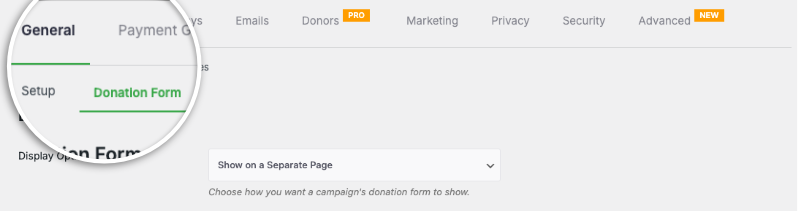
Ici, vous verrez le champ Modèle de formulaire où vous pouvez changer les modèles à l'aide du menu déroulant.
Par défaut, Charitable affiche le modèle de formulaire Standard.
La vue Minimale tente de réduire l'espace occupé par le formulaire de don. Elle est conçue pour vous offrir un formulaire de don plus compact.

L'apparence minimale convient mieux lorsque le formulaire de don se trouve sur une page séparée.
Une fois votre sélection effectuée, faites défiler vers le bas et cliquez sur le bouton Enregistrer les modifications.
Comment raccourcir le formulaire de don
Si vous trouvez que le formulaire de don est plus long que vous ne le souhaitez sur votre site Web, sur la même page de paramètres, juste en dessous des options de modèle de formulaire de don, il y a un champ « Afficher uniquement les champs requis ».
Réglez ceci sur « Oui ».
Cela fera du formulaire de don de Charitable un « formulaire court ».
Vous ne savez pas comment créer un formulaire de don ?
Regardez notre tutoriel ici :
Conseils et astuces pour la collecte de fonds
Nous partageons régulièrement des guides pratiques, des stratégies éprouvées et des conseils d'initiés pour vous aider à collecter plus de fonds et à établir des relations plus solides avec vos donateurs. Rejoignez des milliers d'organisations à but non lucratif qui reçoivent notre meilleur contenu directement :
- Rejoignez notre newsletter – Recevez des conseils hebdomadaires et des guides exclusifs dans votre boîte de réception
- Abonnez-vous à notre chaîne YouTube – Regardez des tutoriels étape par étape et des histoires de réussite
- Suivez-nous sur LinkedIn – Connectez-vous avec notre communauté et obtenez des informations quotidiennes sur les organisations à but non lucratif
- Suivez-nous sur TikTok – Vidéos instructives et amusantes pour vous aider à développer votre cause
FAQ sur les modèles de formulaire de don Charitable
Quels sont les modèles de formulaire de don disponibles dans Charitable ?
Dans Charitable, vous pouvez choisir entre deux modèles de formulaire de don prédéfinis : le modèle Standard et le modèle de vue Minimale.
Comment puis-je changer de modèle de formulaire de don dans Charitable ?
Pour changer de modèle, accédez au tableau de bord WordPress et allez dans Charitable » Paramètres. Sous l'onglet Général, ouvrez la page Formulaire de don, et utilisez le menu déroulant Modèle de formulaire pour sélectionner le modèle souhaité.
Quelle est la différence entre les modèles Standard et Minimal ?
Le modèle Standard inclut tous les champs requis dans une mise en page plus étendue. La vue Minimale est un design plus compact, réduisant l'espace et est idéale pour les formulaires de don placés sur des pages séparées.
Quelle version de Charitable dois-je utiliser pour ces modèles ?
Vous devez avoir la version 1.8.3.6 ou supérieure de Charitable installée et activée sur votre site WordPress.
Comment puis-je raccourcir le formulaire de don ?
Sur la même page de paramètres où vous choisissez le modèle, il y a une option « Afficher uniquement les champs requis » sous les options de modèle de formulaire de don. Réglez cette option sur « Oui » pour convertir le formulaire de don de Charitable en une version plus courte.
Puis-je personnaliser l’apparence de mes formulaires de don ?
Oui. Vous pouvez personnaliser les couleurs, les modèles de formulaire (standard ou minimal) et les options d'affichage des champs. Vous pouvez également utiliser du CSS personnalisé et des extraits de code.
J’ai modifié les paramètres mais ils ne s’affichent pas. Que dois-je faire ?
Cliquez toujours sur « Enregistrer les modifications » après avoir effectué des modifications. Si les modifications n’apparaissent toujours pas, essayez de vider le cache de votre site Web si vous utilisez un plugin de mise en cache.
Quelle est la différence entre afficher les formulaires de don « sur la même page » et « sur une page séparée » ?
- Même page : Le formulaire de don apparaît directement sur votre page de campagne
- Page séparée : Les donateurs sont redirigés vers une page de don dédiée
- Modale : Le formulaire apparaît dans une fenêtre contextuelle
Choisissez en fonction de vos préférences en matière d'expérience utilisateur et de conception de page.
Je suis complètement nouveau sur Charitable. Par où dois-je commencer ?
Suivez ce guide de démarrage ici et commencez par l'Assistant de configuration qui apparaît lorsque vous installez Charitable pour la première fois. Cela prend environ 5 minutes et vous guidera à travers les étapes de configuration essentielles, y compris la configuration des paiements et la création de votre première campagne. Si vous avez manqué l'assistant, vous pouvez accéder à tous ces paramètres manuellement via Charitable » Paramètres.
Où puis-je obtenir de l'aide en cas de problème ?
- Utilisateurs gratuits : Utilisez les forums de support de WordPress.org
- Utilisateurs Pro : Contactez directement le support pour une assistance prioritaire
- Documentation : Consultez la bibliothèque complète de documentation
- Communauté : Rejoignez la newsletter et suivez les canaux sociaux pour des astuces et des mises à jour
Existe-t-il des tutoriels vidéo ?
Oui ! Abonnez-vous à la chaîne YouTube Charitable pour des tutoriels étape par étape et des histoires de réussite.
Nous espérons que ces FAQ vous seront utiles !
Besoin d'aide ? Vous avez une question ? Si vous êtes un utilisateur lite/gratuit de Charitable, vous pouvez contacter notre équipe sur les forums de support de WordPress.org et notre équipe répondra rapidement. Si vous avez une licence active, n'hésitez pas à nous contacter directement pour un support prioritaire.


