
La mayor parte de sus donantes donan desde un teléfono y, en un teléfono, la parte más difícil de cualquier donación es escribir el número de una tarjeta. Cada campo adicional es una oportunidad de perder a un seguidor que tenía la intención de donar.
Con Charitable Mollie 1.1.0, sus donantes pueden omitir todo eso.
✨ ¡Apple Pay y Google Pay ahora son compatibles a través del checkout alojado de Mollie! ✨
Sus donantes pueden confirmar un regalo con una huella dactilar, un escaneo facial o un solo toque.
Si está utilizando Mollie, o está pensando en cambiarse a ella, Apple Pay y Google Pay ahora están integrados directamente en su proceso de pago.
Así es como funciona y por qué vale la pena activarlo hoy.
Por qué las billeteras de un toque cambian el resultado
Imagine a una donante navegando por Instagram un sábado por la mañana. Ve una publicación de fin de año de un refugio de animales local, toca el enlace y aterriza en la página de donaciones. Está lista para donar 25 $, ahora mismo, mientras lo piensa.
Luego, el formulario solicita un número de tarjeta, una fecha de vencimiento y un CVC. Empieza a escribir, su teléfono vibra con un mensaje, mira hacia otro lado y nunca vuelve. Esa no es una donante que no quería donar. Es una donante que se quedó sin paciencia con el formulario que se interponía entre ella y la causa.
Apple Pay y Google Pay eliminan esa fricción por completo.
La tarjeta ya está almacenada, cifrada y verificada en el dispositivo del donante, por lo que no hay nada que escribir ni que buscar.
Toca el botón de Apple Pay, confirma con Face ID y la donación se completa en segundos. 🎉
Para una base de donantes que prioriza el móvil, esa diferencia es la que separa una donación completada de una abandonada.
Esto es más importante en cualquier lugar donde un donante esté donando espontáneamente en lugar de sentarse a completar un formulario: enlaces de redes sociales, páginas de recaudación de fondos de persona a persona compartidas por un seguidor, campañas de texto a donación y las ventanas cortas y de alto tráfico alrededor de las donaciones de fin de año o el GivingTuesday.
En cualquier lugar donde un donante esté en su teléfono y moviéndose rápido, una billetera de un toque evita que abandone.
Cuándo sentirá la diferencia
Si la mayor parte de su tráfico proviene de un donante de escritorio que completa un formulario a su propio ritmo, esta actualización es algo bueno. Si sus donantes provienen de compartir en redes sociales, correos electrónicos en su teléfono, páginas de persona a persona o un código QR en un folleto, es mucho más que eso.
- Campañas de persona a persona y de embajadores: Los seguidores comparten enlaces directamente con amigos y familiares, quienes casi siempre los abren en un teléfono.
- Impulso de Giving Tuesday y fin de año: El tráfico aumenta rápidamente y cada segundo que un donante pasa escribiendo es un segundo en el que podría cerrar la pestaña.
- Campañas de códigos QR: Estos donantes ya tienen su teléfono en la mano. Un botón de billetera los encuentra exactamente donde están.
- Adquisición de donantes recurrentes: Una primera donación más rápida significa más donantes que se quedan el tiempo suficiente para convertirse en recurrentes.
Lo que el soporte de Apple Pay y Google Pay puede hacer
Aquí hay un vistazo rápido a todo lo que agrega esta actualización, la mayor parte sin que usted toque un solo formulario de donación.
- ⚡ Confirmación de un toque: Los donantes confirman con Face ID, Touch ID o una huella dactilar en lugar de escribir los detalles de la tarjeta.
- 🎯 Coincidencia automática de dispositivos: Apple Pay aparece en Safari e iOS, Google Pay aparece en Chrome y Android, sin necesidad de configurar nada en sus formularios.
- 👁️ Panel de estado en vivo: Un nuevo panel de Apple Pay y Google Pay dentro de la configuración de su pasarela Mollie muestra exactamente qué billeteras están activas en su cuenta.
- 🧩 Un empujón cuando algo no va bien: Si una billetera aún no está habilitada, recibirá un enlace directo para activarla en su Panel de Mollie, directamente desde Charitable.
- 🔄 Actualización bajo demanda: Un enlace “Actualizar desde Mollie” vuelve a comprobar el estado de su cuenta en cualquier momento, para que nunca esté viendo información desactualizada.
- 🤝 Cancelaciones predecibles: Un donante que se retira de un pago de Mollie ahora aterriza en su página de cancelación de donaciones en lugar de un destino inesperado.
- 🛠️ Enrutamiento de cancelación personalizado para desarrolladores: El nuevo filtro
charitable_mollie_cancel_urlle permite enviar a los donantes cancelados a cualquier URL que elija, con el objeto de donación disponible como contexto. - 💰 Sin carga adicional de PCI: Dado que las billeteras pasan por el checkout alojado de Mollie, no hay trabajo de cumplimiento adicional ni configuración de dominio de su parte.
Primeros pasos: Activar Apple Pay y Google Pay
Esto es todo lo que se necesita, y nada de ello afecta a su formulario de donación.
- Vaya a Charitable » Configuración » Pasarelas de pago y active la pasarela Mollie.
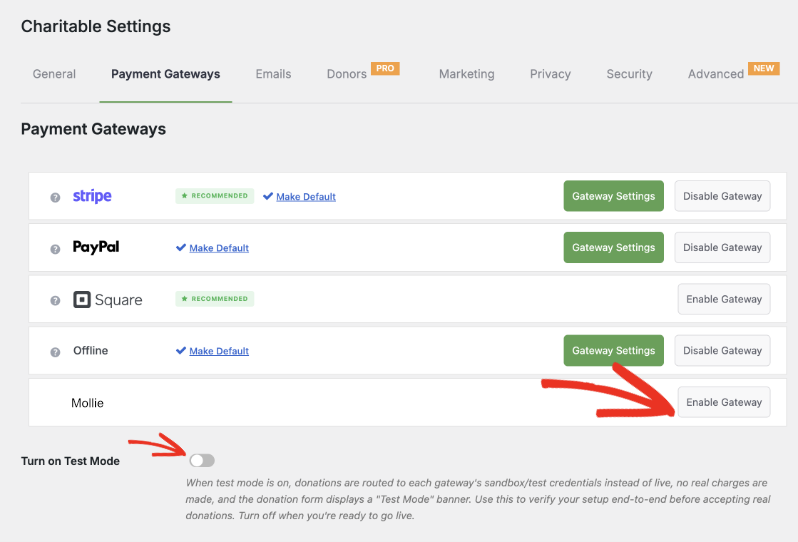
Abra la configuración de la pasarela de Mollie, introduzca sus claves API de Mollie y establezca la conexión. Utilice el Modo de prueba mientras configura esto, para poder confirmar que todo funciona antes de aceptar una donación real.
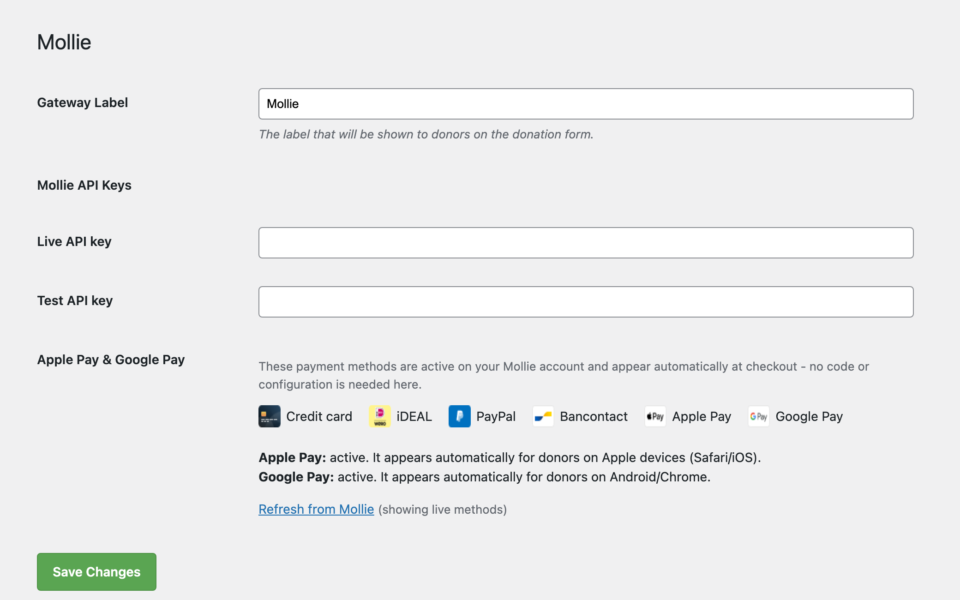
Inicie sesión en su Panel de Mollie y active Apple Pay y Google Pay en sus métodos de pago. Esta es la parte que vale la pena entender claramente: Apple Pay y Google Pay están activados y se muestran en el lado de Mollie. Mollie se encarga de mostrar el botón de la billetera y verificar al donante; la tarea de Charitable es simplemente enviar la donación a Mollie una vez que la confirman. No añade nada a su formulario de donación para que esto funcione.
De vuelta en Charitable » Configuración » Pasarelas de pago » Mollie, revise el nuevo panel de Apple Pay y Google Pay para confirmar que ambas billeteras se muestran como activas. Si una no está activa todavía, haga clic en el enlace proporcionado para saltar directamente a esa configuración en su Panel de Mollie.
Una vez que ambas billeteras se muestren como activas en ese panel y haya confirmado que una donación de prueba funciona, desactive el Modo de prueba. Apple Pay y Google Pay ahora aparecerán automáticamente para los visitantes correctos: sin necesidad de desarrollador y sin nada más que configurar.
Por qué le encantará esto
La configuración lleva minutos. El impacto no.
🧭 Siempre sabe qué está activo, directamente desde el panel de Charitable, con un enlace para arreglar cualquier cosa que no lo esté.
🚀 Menos donaciones abandonadas de visitantes móviles que no quieren escribir un número de tarjeta.
🔒 Los donantes confían en los pagos con wallet que ya usan a diario, por lo que más de ellos completan la donación.
🕐 La configuración se realiza en tu Panel de control de Mollie y en los ajustes de Charitable; nada cambia en tu formulario de donación.
Para agencias y desarrolladores
Página de cancelación personalizada
Necesitas redirigir los pagos cancelados a un lugar específico, como una página personalizada de "aún nos encantaría tu apoyo"? El nuevo filtro charitable_mollie_cancel_url te permite establecer una URL de cancelación personalizada por donación, con el objeto de donación disponible como contexto.
Construido sobre el Checkout Alojado de Mollie
Dado que Apple Pay y Google Pay funcionan a través del checkout alojado de Mollie, no hay carga adicional de PCI ni configuración de dispositivo o dominio de tu parte. Mollie se encarga de la conexión de las wallets, y Charitable muestra el estado para que tú mantengas el control.
Preguntas frecuentes
¿Necesito cambiar mis formularios de donación para admitir Apple Pay y Google Pay?
No. Una vez que las wallets estén habilitadas en tu Panel de control de Mollie, aparecerán automáticamente en el checkout para el dispositivo correcto. No hay nada que añadir o configurar en tu constructor de formularios de donación.
¿Qué navegadores y dispositivos muestran Apple Pay frente a Google Pay?
Apple Pay aparece para los visitantes en Safari e iOS. Google Pay aparece para los visitantes en Chrome y Android. Mollie detecta el dispositivo y muestra la opción correcta; un donante en un navegador no compatible simplemente verá tus otros métodos de pago.
¿Implica algún trabajo adicional de cumplimiento de PCI?
No. Apple Pay y Google Pay funcionan completamente a través del checkout alojado de Mollie, por lo que los datos de la tarjeta nunca tocan tu servidor. No se requiere ningún trabajo de cumplimiento adicional ni verificación de dominio de tu parte.
¿Puedo probar esto antes de aceptar donaciones en vivo?
Sí. Utiliza el Modo de prueba en la configuración de tu pasarela Mollie mientras configuras todo, confirma que las wallets se muestran como activas en el panel de Apple Pay y Google Pay, y realiza una donación de prueba antes de cambiar a pagos en vivo.
¿Qué sucede si un donante cancela un pago con wallet?
Se les redirige a tu página de cancelación de donaciones en lugar de a un destino inesperado, por lo que la experiencia se mantiene predecible incluso cuando un donante cambia de opinión a mitad del proceso.
¿Pueden los desarrolladores personalizar a dónde van los donantes cancelados?
Sí. El filtro charitable_mollie_cancel_url te permite enviar a los donantes cancelados a cualquier URL que elijas, con el objeto de donación disponible como contexto.
Empieza con Apple Pay y Google Pay
Mollie está disponible como pasarela de pago en todos los planes de Charitable Pro, Basic, Plus, Pro y Elite.
Si ya estás utilizando Mollie, actualiza a la versión 1.1.0, añade tus claves API en la configuración de la pasarela y habilita Apple Pay y Google Pay en tu Panel de control de Mollie.
Lee la documentación de configuración de Apple Pay y Google Pay »
Lee la documentación de la Pasarela Mollie »
¿Todavía no tienes Charitable Pro? Puedes obtener hasta un 50% de descuento al registrarte o actualizar a Charitable Pro. Queremos asegurarnos de que puedas probar las funciones avanzadas de recaudación de fondos como Donaciones Recurrentes, Recuperación de Donaciones y más a un costo significativamente reducido.
Únete a más de un millón de usuarios satisfechos de Charitable Pro hoy mismo. Cada compra viene con una garantía de devolución de dinero de 14 días, asegurando que estés respaldado en cada paso del camino.
Si tienes alguna pregunta o necesitas ayuda, nuestro equipo de soporte está listo para ayudarte a sacar el máximo provecho de estas nuevas funciones.
Mantente conectado para más recursos para organizaciones sin fines de lucro
Para más tutoriales y vídeos adaptados a organizaciones sin fines de lucro, suscríbete a nuestro canal de YouTube. Publicamos regularmente consejos de expertos, guías paso a paso sobre donaciones en línea, estrategias de recaudación de fondos y recursos prácticos para ayudar a tu organización a tener éxito.
🗞️ Recibe consejos semanales y guías exclusivas en tu bandeja de entrada
Únete a nuestro boletín →
🎥 Mira tutoriales paso a paso e historias de éxito
Suscríbete a nuestro canal de YouTube →
👩🏽💻 Conecta con nuestra comunidad y obtén información diaria sobre organizaciones sin fines de lucro
Síguenos en LinkedIn →
🥳 Reels divertidos e información sobre organizaciones sin fines de lucro
Síguenos en Instagram →
👀 Vídeos interesantes y divertidos para ayudarte a hacer crecer tu causa
Síguenos en TikTok→
🌎 Suscríbete y sigue para recibir consejos generales de recaudación de fondos
Obtén consejos de recaudación de fondos en TikTok →
Potentes recursos de recaudación de fondos
🤖 Usa Charitable con tu asistente de IA
⬇️ Descarga estrategias probadas, ideas de campañas y herramientas de expertos
Obtén el Kit de Recaudación de Fondos →
💸 Obtén recursos gratuitos de recaudación de fondos
Ve al Centro de Recaudación de Fondos de Charitable →
¿Tienes preguntas sobre Charitable?
Preguntas frecuentes de Charitable →
🏎️ Prueba Charitable
Crea tu demostración de Charitable →
Comprende la terminología y la jerga de las organizaciones sin fines de lucro
Glosario de organizaciones sin fines de lucro→
% ¿Buscas ofertas y descuentos para organizaciones sin fines de lucro?
Las mejores ofertas y descuentos para organizaciones sin fines de lucro →
¡Charitable tiene más de 1 millón de descargas!
Confiado por millones para impulsar campañas de recaudación de fondos exitosas. Prueba Charitable sin riesgos hoy mismo.
✅ Garantía de devolución de dinero en 14 días
✅ Precios transparentes
✅ Configuración sin código









Deja una respuesta