
No se puede negar cómo las redes sociales pueden ayudar a hacer o deshacer sus esfuerzos de recaudación de fondos. Esto es especialmente cierto para algunas de las plataformas más grandes, como Facebook. Una organización sin fines de lucro astuta se apoyará y aprovechará los millones de usuarios de Facebook para impulsar una campaña.
Sin embargo, la gran base de usuarios no es el único beneficio para ejecutar una campaña publicitaria de Facebook. Esa audiencia también puede convertirse en un brazo de marketing para usted, y podría ayudarle a llegar a más donantes potenciales sin ningún trabajo adicional por su parte.
En este tutorial, vamos a repasar todo el proceso de creación de anuncios de Facebook para organizaciones sin fines de lucro. De hecho, vamos a empezar directamente con el paso más importante: la planificación de sus anuncios.
Planificación de su campaña de Facebook: 6 preguntas clave
A lo largo de este tutorial, le mostraremos lo sencillo que es crear anuncios de Facebook para organizaciones sin fines de lucro. Sin embargo, requerirá algo de planificación y previsión.
Las siguientes secciones discutirán lo que debe pensar y tener preparado antes de empezar. Una vez que cubramos esto, veremos el proceso de creación de un anuncio de Facebook para una organización sin fines de lucro y la medición de su éxito.
¿1. ¿Cuál es el enfoque de su campaña de anuncios de Facebook?
La respuesta a esta pregunta debe ir más allá de: "Recibir donaciones de los usuarios". Por supuesto, este es el objetivo clave, pero considere a dónde canalizará las donaciones una vez que las reciba.
Para esta pregunta, primero defina las siguientes consideraciones:
- ¿Se trata de una campaña general de recaudación de fondos, o tiene una razón o campaña específica en mente?
- ¿Tiene un objetivo de donación que alcanzar, o la campaña tiene un final abierto?
Ambas cosas pueden parecer simplistas y fáciles de pasar por alto, pero pueden formar la columna vertebral de cada decisión que tome durante la campaña. Una vez que tenga establecidos tanto su razón como su objetivo, puede empezar a investigar cómo recopilará las donaciones de los usuarios.
¿2. ¿Cómo va a recopilar las donaciones?
Para esta parte del plan, piense en su método de recopilación. Esto podría ser a través de la propia Facebook, a través de una redirección a una página de destino en su sitio web, y todo tipo de otras configuraciones.
Si elige recopilar donaciones a través de Facebook, deberá inscribirse en Pagos de Facebook y comprobar su elegibilidad. Sin embargo, si desea recopilar donaciones a través de su sitio web, también necesita alguna funcionalidad adicional. Esto es algo que discutiremos con más detalle más adelante.
El Administrador de Anuncios de Facebook utiliza tres objetivos principales para ayudarle a definir su proceso de recaudación de fondos:
- Conciencia. Para nuestros propósitos, vamos a hacer que los visitantes sean conscientes de nuestra campaña a través de anuncios de Facebook. Sin embargo, puede elegir si se dirigirá a una amplia sección transversal de usuarios o a una porción definida de ellos.
- Consideración. Así es como Facebook define el método a través del cual solicitará donaciones, y también se relaciona con su objetivo. Por ejemplo, puede buscar impulsar instalaciones de aplicaciones, visualizaciones de vídeos, generación de leads o tráfico a su página y sitio web principal.
- Conversión. Esto considera cómo convertirás a los usuarios para que donen, ya sea a través de conversiones simples, visitas a una tienda en línea o a través de ventas de productos y catálogos.
El aspecto de la concienciación se relaciona con tu público objetivo, ya que necesitarás saber a quién dirigir tus anuncios finales. Veremos esto a continuación.
¿Quién es el público objetivo de tu campaña de anuncios de Facebook?
Para muchas organizaciones sin fines de lucro, es posible que ya sepas quién es tu público objetivo. Esto puede ser tan simple como suena, en el sentido de que necesitarás una idea aproximada del rango de edad y la ubicación de tu público propuesto.
Si bien puedes profundizar en conceptos como 'buyer personas' aquí, es posible que no lo necesites. Facebook ofrece un conjunto simple de parámetros aquí:
- Ubicación. Aquí es donde el usuario indica su ubicación principal.
- Edad. Definirás un rango aquí, y uno estrecho suele ser más óptimo.
- Género. Aquí, definirás si deseas dirigirte a personas que se identifican como hombres, mujeres o a todos los usuarios.
- Idioma. Tiene sentido que si deseas dirigirte a un idioma específico, tu anuncio deberá servir a ese mercado.
La mayoría de las respuestas aquí son intuitivas. Por ejemplo, un santuario de gatos en EE. UU. probablemente querrá dirigirse a usuarias locales de entre 25 y 55 años que hablen inglés. Esto es una generalización, por supuesto, pero necesitarás crear definiciones para poder ejecutar anuncios exitosos. A menudo, lo general no es mejor, aunque podrías considerar ejecutar varios anuncios para diferentes grupos de audiencia.
¿Dónde publicarás tus anuncios de Facebook?
Hablando de eso, también puedes elegir dónde publicar tu anuncio de Facebook. A menudo, tienes dos opciones:
- Deja que Facebook decida la ubicación en el sitio.
- Gestiona tú mismo la ubicación del anuncio.
La opción que elijas aquí es subjetiva. Sin embargo, argumentaríamos que tomar el control de la ubicación es una buena idea si tienes una visión definida.
Por otro lado, Facebook tendrá conocimiento de ubicaciones óptimas en sus páginas. Después de todo, también necesitará beneficiarse de tus anuncios, por lo que ofrecer ubicaciones deficientes no es de su mejor interés, ni del tuyo.
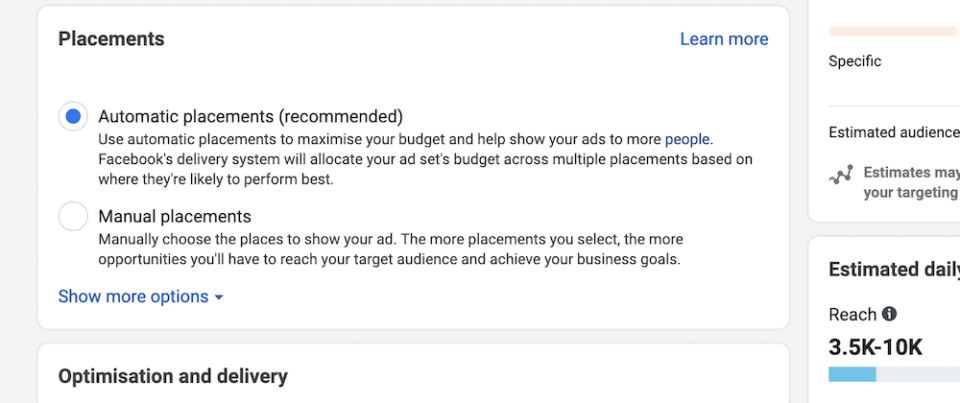
Como consideración adicional, tu presupuesto también podría determinar tu estrategia de ubicación. Hacerte cargo de esto podría aumentar tus costos debido a una ubicación no óptima, aunque la opción automatizada de Facebook podría poner tu presupuesto en su lista de prioridades.
¿Cuánto puedes gastar en tus anuncios de Facebook?
Dado que estamos hablando de dinero, es un buen momento para pensar en tu presupuesto y 'gasto publicitario'. Esto podría ser algo que ya tengas en mente, pero también vale la pena considerar tus recursos monetarios en el contexto de cómo Facebook los utiliza.
Facebook te permite establecer un presupuesto diario o de por vida, y no tienes que preocuparte por gastar de más. Si agotas el presupuesto que estableces en Facebook, tu anuncio dejará de ejecutarse.
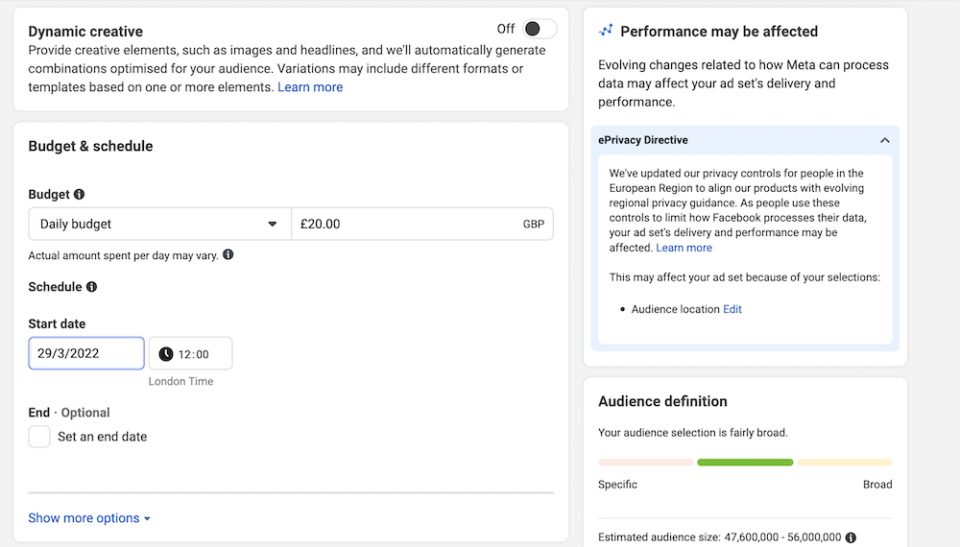
De nuevo, este aspecto dependerá de tu organización sin ánimo de lucro, tus recursos, el objetivo de tu campaña y casi todos los demás elementos combinados. Si tienes un presupuesto pequeño (como es el caso de muchas organizaciones sin ánimo de lucro), es posible que desees establecer un presupuesto de por vida aquí. Sin embargo, es probable que tengas más control sobre el alcance de tu campaña utilizando un presupuesto diario.
En cualquier caso, querrás establecer una fecha de finalización, incluso para una campaña perpetua. Esto te dará algunos 'puntos de quiebre' para analizar tu campaña y hacer ajustes para el futuro.
¿6. ¿Qué formato tendrán tus anuncios de Facebook?
Un anuncio de Facebook tiene varios formatos diferentes para elegir. Por ejemplo, puedes optar por una sola imagen, usar Stories, Messenger, mostrar un vídeo corto y más. Todos se mostrarán en el feed de noticias de los usuarios a los que te diriges.
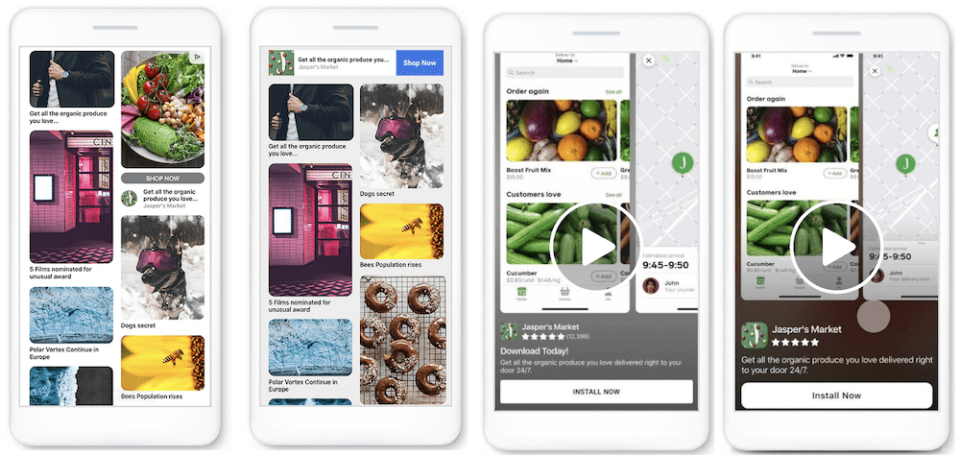
Existe la tentación de intentar distribuir tu campaña en todos los formatos disponibles, pero la variedad siempre es buena, hay inconvenientes a considerar:
- Es posible que no tengas el presupuesto de marketing digital para cubrir cada formato de manera optimizada.
- Algunos formatos pueden adaptarse mejor a tu público objetivo que otros.
Te sugerimos que elijas no más de dos formatos para tu campaña y crees copias de anuncios en torno a ellos. Esto puede parecer contradictorio, pero le dará a tu recaudación de fondos algo de enfoque. Independientemente de los formatos que elijas, asegúrate de clavar lo siguiente:
- Reduce tu texto a ideas cortas y digeribles. No tendrás mucho tiempo para captar la atención o transmitir tu mensaje.
- Utiliza imágenes que llamen la atención y que puedan incitar al lector a querer hacer clic para obtener más información.
- Utiliza una llamada a la acción (CTA) en negrita para dar a los usuarios una guía clara sobre cómo donar.
Con estos consejos en mente, estarás listo para iniciar el Administrador de anuncios de Facebook y diseñar tu nueva campaña.
Cómo crear una campaña de anuncios de Facebook en el Administrador de anuncios de Facebook
Antes de empezar, necesitarás una página de Facebook activa para tu negocio y una cuenta. Una vez que tengas esto listo, dirígete a la página dedicada a los anuncios de Facebook y haz clic en 'Crear un anuncio' en el menú desplegable. Esto debería llevarte al panel del Administrador de anuncios de Facebook:
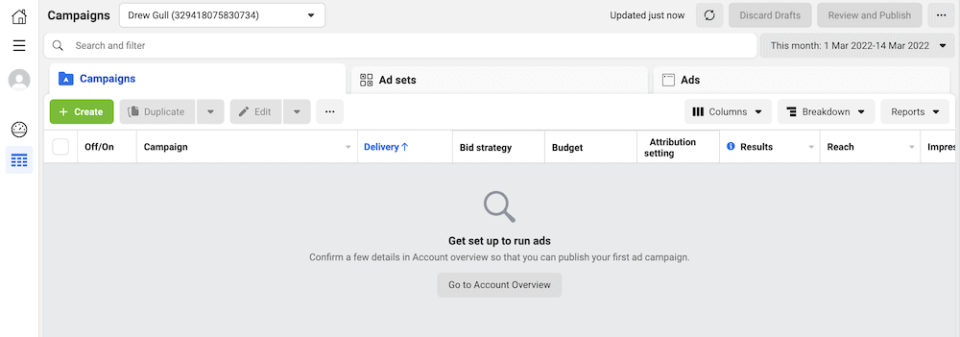
Aquí, puedes hacer clic en cualquiera de los botones que hacen referencia a la creación de un anuncio para iniciar el proceso. La primera tarea es elegir tu objetivo:
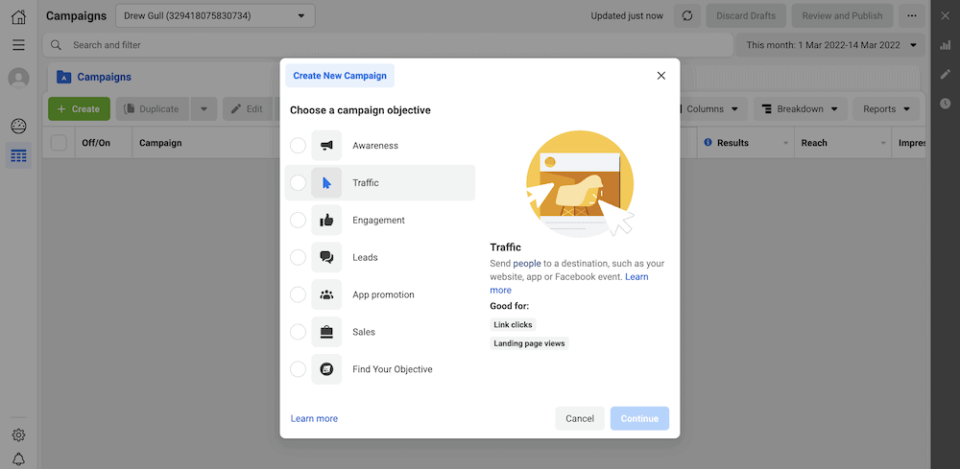
Esto te llevará a la nueva pantalla de campaña, donde elegirás un nombre y luego continuarás eligiendo un nombre de anuncio:
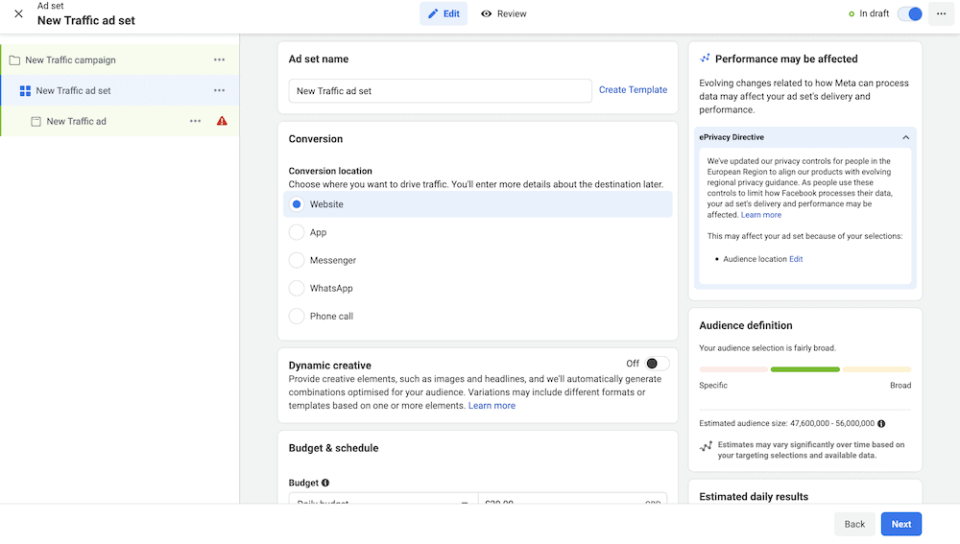
Desde aquí, elegirás un tipo de conversión y un presupuesto, y luego buscarás definir y refinar tu audiencia. Puedes profundizar aquí, incluyendo colocar un marcador en ubicaciones exactas para crear una audiencia personalizada:
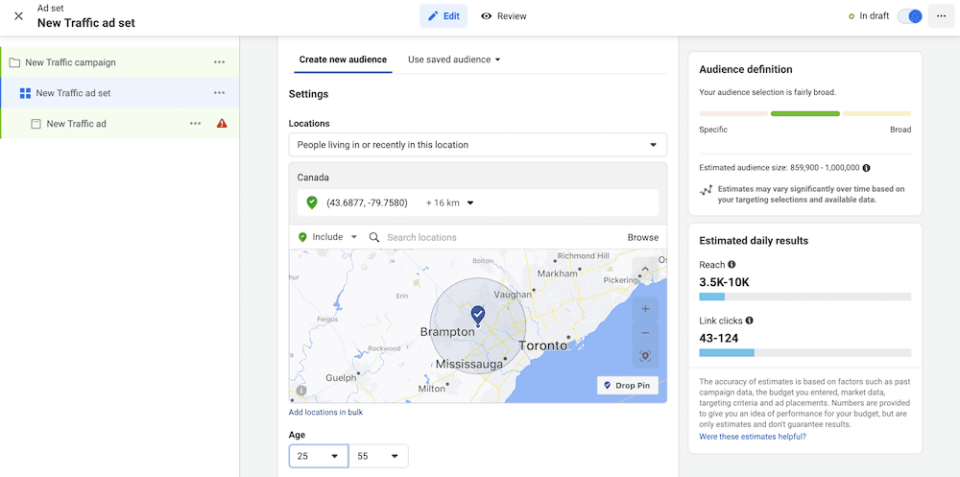
El siguiente conjunto de opciones te permite configurar el formato y los aspectos creativos de tu anuncio, como un título y una CTA:
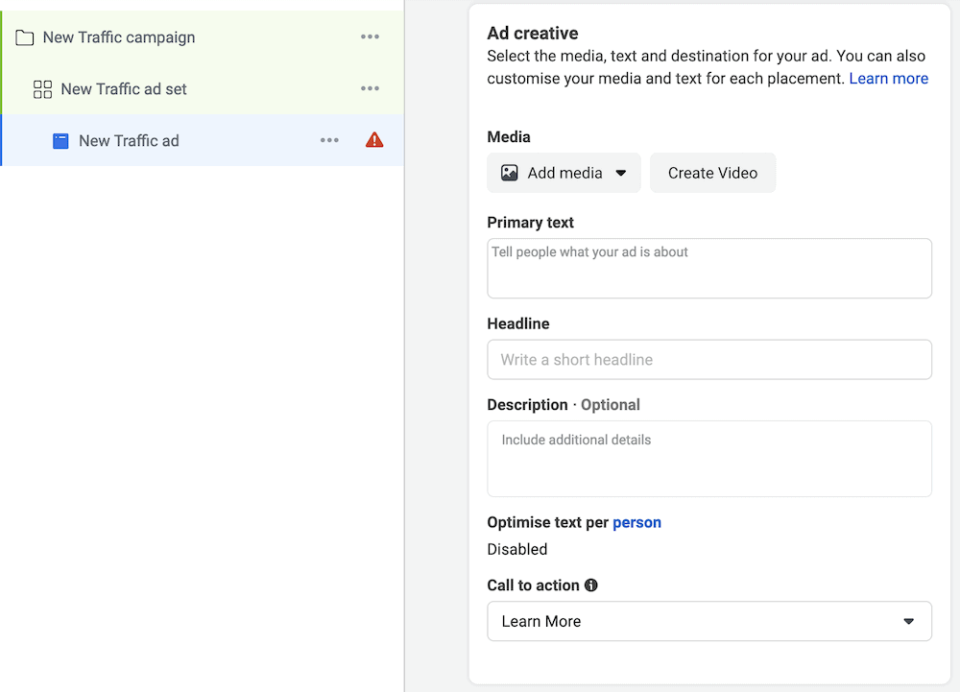
Sin embargo, para ver cómo se ven en la pantalla, querrás dirigirte a la página final.
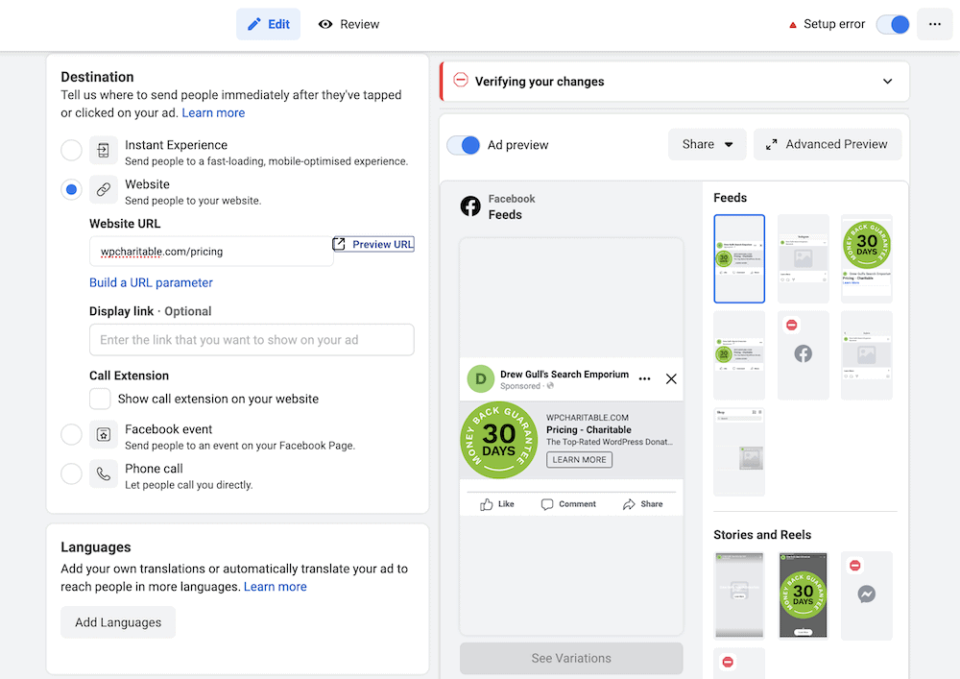
Aquí es donde establecerás un destino para el usuario. Determinarás esto en tu etapa de planificación, y si deseas dirigir a los usuarios a un sitio web externo para recaudar donaciones.
¿Cómo medir el éxito de tu campaña de anuncios de Facebook?
Una vez que lances tu campaña y empieces a ver algo de actividad, probablemente querrás determinar qué tan óptima es. Puedes hacerlo utilizando las diversas métricas dentro de Facebook Ads Manager:
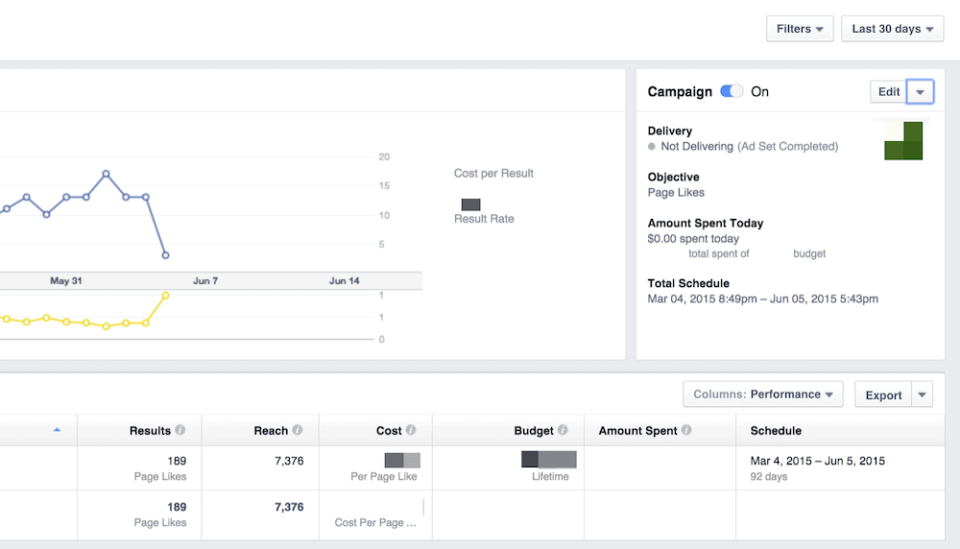
Con esta información, puedes ajustar tus campañas y aumentar tu tasa de conversión. El objetivo es reducir el 'Coste Por Clic' (CPC) resultante, y puedes hacerlo de varias maneras:
- Si refinas tu demografía, podrías ver menos alcance orgánico. Sin embargo, con una segmentación más definida, podrías aumentar la calidad de esas conversiones. Para tu organización sin ánimo de lucro, esto se traduce en más donaciones.
- Un formato diferente para tus campañas podría marcar la diferencia. El vídeo suele ser más lucrativo que las imágenes, por ejemplo.
- Podrías decidir alterar la ubicación de tus anuncios, o dejar que Facebook tome la decisión si elegiste controlar ese aspecto.
En este punto, podrías querer alterar el texto y los medios que utilizas, dado que has analizado todos los demás factores. En algunos casos, tus elementos visuales pueden marcar la diferencia entre el éxito y el fracaso de tu campaña.
A partir de aquí, tienes todo lo necesario para llevar a cabo una campaña de recaudación de fondos exitosa para tu organización sin ánimo de lucro dentro de Facebook Ads Manager. Sin embargo, vale la pena volver a un elemento que comentamos anteriormente en el artículo: A dónde diriges a tus usuarios.
Cómo Charitable puede ayudar a llevar usuarios de Facebook a tu sitio web
Si eliges dirigir a los usuarios a tu sitio web para que donen, necesitarás una forma de implementar esa funcionalidad. Charitable es un plugin de donaciones de WordPress de primer nivel que ayuda a los visitantes a donar dinero a tu causa.
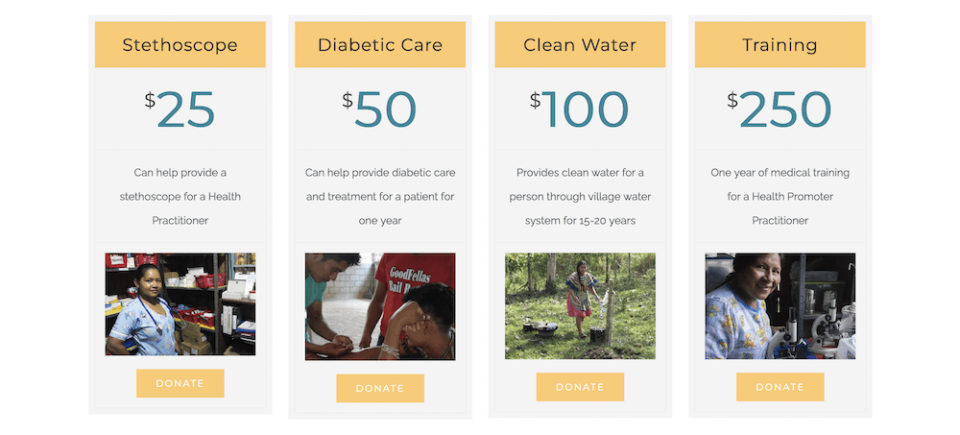
Proporciona una serie de potentes funciones:
- Una interfaz fácil de usar para ayudarte a crear campañas de recaudación de fondos en menos de cinco minutos.
- Formularios de donación que cumplen con las leyes de privacidad modernas, como el Reglamento General de Protección de Datos (RGPD).
- Gestión de campañas y plugins a través del familiar panel de control de WordPress.
- Una selección de pasarelas de pago, como PayPal, Stripe, Braintree, Authorize.net, y más.
- Conexiones a una serie de otros servicios y soluciones. Por ejemplo, puedes conectarte a servicios de marketing por correo electrónico como MailChimp, almacenamiento y entrega de archivos como Easy Digital Downloads, y otros.
- Puedes configurar recaudación de fondos entre pares, donaciones recurrentes, suscriptores, crowdfunding automático y una miríada de otros formatos.
Charitable también ofrece una garantía de devolución de dinero sin riesgos para todos los planes. Con 119 $, el nivel Essentials contiene casi todas las funciones que ofrece Charitable. Sin embargo, el plan Growth incluye alivio de comisiones, Gift Aid y más.
Conclusión
Los anuncios de Facebook pueden ayudar a una organización sin ánimo de lucro a llegar a más personas y a obtener un mayor número de donaciones. Sin embargo, no querrás mantener a esos nuevos patrocinadores en la plataforma de redes sociales para siempre. Un mejor enfoque es enviarlos desde Facebook a tu propio sitio web. De esta manera, puedes controlar mejor cómo un usuario dona a tu organización sin ánimo de lucro.
Un sitio web de WordPress es una forma fantástica de captar donaciones para tu causa. Independientemente de si eres elegible para solicitar donaciones a través de Facebook, tu propio sitio web no tendrá esas restricciones. Es más, puedes aumentar el conocimiento de tu marca a través de tu propio sitio web.
Si bien podrías ver un menor número de conversiones, tendrás un mayor número de 'conversiones' de calidad en forma de donantes. Charitable puede ser un engranaje integral en la rueda. Los planes Essential y Growth te permiten implementar una serie de características clave:
- Una serie de pasarelas de pago para elegir, como Stripe, Braintree, Authorize.net y más.
- La capacidad de colocar formularios de donación en casi cualquier lugar de tu sitio web.
- Una forma de conectar a los donantes con tus cuentas de boletines para enviarles más detalles sobre campañas y tu organización sin fines de lucro.
- La opción de configurar donaciones recurrentes y anónimas.
- Alivio de tarifas, soporte de Gift Aid y más.
Hay un plan de precios de Charitable para casi todas las organizaciones sin fines de lucro. ¡Además, obtienes una garantía de devolución de dinero de 30 días en todas las compras!





Deja una respuesta