
En Charitable, puedes elegir entre dos plantillas de formularios de donación predefinidas. Estas plantillas están diseñadas para tener todos los campos necesarios que necesitas en tu formulario de donación.
Puedes elegir mostrar una plantilla estándar o una vista mínima. Esta guía te mostrará cómo encontrar y cambiar las plantillas de tus formularios de donación.
Requisitos previos
Necesitas tener instalada y activada la versión 1.8.3.6 (o superior) de Charitable en tu sitio de WordPress.
Cambiar las plantillas de formularios de donación
En tu panel de WordPress, abre la pestaña Charitable » Ajustes. En la pestaña General, abre la página Formulario de donación.
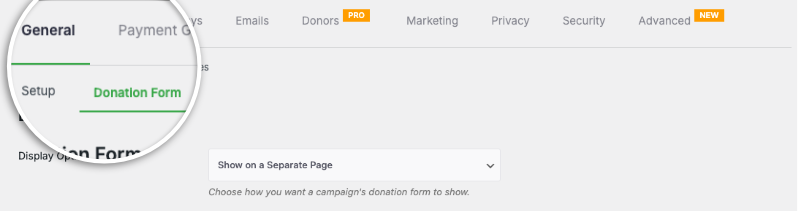
Aquí, verás el campo Plantilla de formulario donde puedes cambiar las plantillas usando el menú desplegable.
Por defecto, Charitable muestra la plantilla de formulario Estándar.
La vista Mínima intenta reducir el espacio ocupado por el formulario de donación. Está diseñada para ofrecerte un formulario de donación más compacto.

La vista mínima es más adecuada cuando el formulario de donación se encuentra en una página separada.
Una vez que hayas hecho tu selección, desplázate hacia abajo y haz clic en el botón Guardar cambios.
Cómo hacer el formulario de donación más corto
Si encuentras que el formulario de donación es más largo de lo que te gustaría en tu sitio web, en la misma página de ajustes, justo debajo de las opciones de plantilla del formulario de donación, hay un campo “Mostrar solo campos obligatorios”.
Establece esto en “Sí”.
Esto hará que el formulario de donación de Charitable sea un “formulario corto”.
¿No estás seguro de cómo crear un formulario de donación?
Mira nuestro tutorial aquí:
Consejos y asesoramiento para la recaudación de fondos
Compartimos regularmente guías prácticas, estrategias probadas y consejos de expertos para ayudarte a recaudar más fondos y construir relaciones más sólidas con los donantes. Únete a miles de organizaciones sin fines de lucro que reciben nuestro mejor contenido directamente:
- Únase a nuestro boletín – Reciba consejos semanales y guías exclusivas en su bandeja de entrada
- Suscríbase a nuestro canal de YouTube – Vea tutoriales paso a paso e historias de éxito
- Síganos en LinkedIn – Conéctese con nuestra comunidad y obtenga información diaria sobre organizaciones sin fines de lucro
- Síganos en TikTok – Vídeos informativos y divertidos para ayudarle a hacer crecer su causa
Preguntas frecuentes sobre las plantillas de formularios de donación de Charitable
¿Cuáles son las plantillas de formularios de donación disponibles en Charitable?
En Charitable, puedes elegir entre dos plantillas de formularios de donación predefinidas: la plantilla Estándar y la plantilla de vista Mínima.
¿Cómo puedo cambiar entre las plantillas de formularios de donación en Charitable?
Para cambiar las plantillas, navega al panel de WordPress y ve a Charitable » Ajustes. En la pestaña General, abre la página Formulario de donación y usa el menú desplegable Plantilla de formulario para seleccionar la plantilla deseada.
¿Cuál es la diferencia entre las plantillas Estándar y Mínima?
La plantilla Estándar incluye todos los campos obligatorios en un diseño más amplio. La vista Mínima es un diseño más compacto, que reduce el espacio y es ideal para formularios de donación colocados en páginas separadas.
¿Qué versión de Charitable necesito para usar estas plantillas?
Necesitas tener instalada y activada la versión 1.8.3.6 o superior de Charitable en tu sitio de WordPress.
¿Cómo puedo hacer el formulario de donación más corto?
En la misma página de ajustes donde eliges la plantilla, hay una opción “Mostrar solo campos obligatorios” debajo de las opciones de plantilla del formulario de donación. Establece esta opción en “Sí” para convertir el formulario de donación de Charitable en una versión más corta.
ilde{1}Puedo personalizar la apariencia de mis formularios de donaci ilde{³}n?
Sí. Puedes personalizar colores, plantillas de formularios (estándar o mínima) y opciones de visualización de campos. También puedes usar CSS personalizado y fragmentos de código.
Hice cambios en la configuraci ilde{³}n pero no se reflejan. ilde{1}Qu ilde{n} debo hacer?
Haz siempre clic en "Guardar Cambios" despu ilde{n}s de realizar cualquier modificaci ilde{³}n. Si los cambios a ilde{1}n no aparecen, intenta borrar la cach ilde{n} de tu sitio web si est ilde{1}s usando un plugin de cach ilde{n}.
¿Cuál es la diferencia entre mostrar los formularios de donación "en la misma página" y "en una página separada"?
- Misma página: El formulario de donación aparece directamente en tu página de campaña
- Página separada: Los donantes son redirigidos a una página de donación dedicada
- Modal: El formulario aparece en una ventana emergente
Elige según tu preferencia de experiencia de usuario y diseño de página.
Soy completamente nuevo en Charitable. ¿Por dónde debo empezar?
Sigue esta guía de inicio aquí y comienza con el Asistente de configuración que aparece la primera vez que instalas Charitable. Tarda unos 5 minutos y te guiará a través de los pasos de configuración esenciales, incluida la configuración de pagos y la creación de tu primera campaña. Si te perdiste el asistente, puedes acceder a todas estas configuraciones manualmente a través de Charitable » Ajustes.
¿Dónde puedo obtener ayuda si tengo problemas?
- Usuarios gratuitos: Utiliza los foros de soporte de WordPress.org
- Usuarios Pro: Ponte en contacto directamente con el soporte para recibir asistencia prioritaria
- Documentación: Consulta la completa biblioteca de documentación
- Comunidad: Únete al boletín y sigue los canales sociales para obtener consejos y actualizaciones
¿Hay tutoriales en vídeo disponibles?
¡Sí! Suscríbete al canal de YouTube de Charitable para obtener tutoriales paso a paso e historias de éxito.
¡Esperamos que estas preguntas frecuentes te ayuden!
Necesitas soporte? Tienes alguna pregunta? Si eres un usuario lite/gratuito de Charitable, puedes contactar a nuestro equipo en los foros de soporte de WordPress.org y nuestro equipo responderá a tiempo. Si tienes una licencia activa, no dudes en contactarnos directamente para soporte prioritario.


