
Entre todas las cosas que implica dirigir una organización sin ánimo de lucro, hay una que realmente no me gusta hacer y es gestionar todas las donaciones que entran y los donantes que se añaden a una lista en constante crecimiento. Hace diez años, mi organización solo recibía un puñado de donaciones, y era fácil gestionarlo todo manualmente.
Pero con el paso de los años, a medida que crecíamos, el seguimiento de las donaciones se convirtió rápidamente en un caos. Esto significaba que todo el equipo tenía que sentarse junto y pasar horas poniéndolo todo en orden, enviando los recibos de donación que habíamos pasado por alto y cuadrando las cuentas.
Eran horas perdidas que podríamos haber dedicado a cosas más impactantes.
Esto nos impulsó a invertir en un software de gestión de donantes, y todo el equipo está contento de haberlo hecho. El software funciona prácticamente solo, y nosotros simplemente podemos exportar o imprimir informes, resúmenes y recibos.
¿La guinda del pastel? Nuestros donantes tienen sus propios perfiles donde pueden gestionar sus donaciones, descargar recibos y declaraciones anuales, y personalizar sus perfiles.
No, a través de este proceso, aprendí lo difícil que es encontrar una buena plataforma. Algunas ofrecían grandes funcionalidades, pero eran tan caras que estaban fuera de presupuesto. Otras estaban dentro del presupuesto y no tenían las funcionalidades que necesitábamos. Así que encontrar la que era 'la adecuada' fue una tarea difícil.
Quiero compartir las mejores que encontré. Compartiré mis experiencias y opiniones aquí. Exploremos el mejor software de gestión de donantes.
¿Qué hay en esta guía?
Aquí tienes una tabla de contenidos para ayudarte a navegar por esta publicación:
- ¿Realmente necesitas un software de gestión de donantes?
- Los mejores softwares de gestión de donantes analizados
- ¿Cómo elegir el adecuado?
- Veredicto sobre el mejor software de gestión de donantes
Primero, evaluemos rápidamente si realmente necesitas un software de gestión de donantes para empezar.
Si aún no has configurado tu sitio de WordPress, consulta primero esta guía sencilla sobre Cómo crear un sitio web de caridad sin ánimo de lucro.
¿Realmente necesitas un software de gestión de donantes?
Si estás haciendo malabares con varios archivos de Excel o registros escritos a mano, cruzando constantemente datos y dedicando horas a actualizaciones manuales, eso es una señal de alarma. Cuando tareas básicas como enviar notas de agradecimiento o hacer un seguimiento de las donaciones recurrentes se vuelven abrumadoras, es hora de considerar una mejora.
Estas fueron las principales señales de advertencia que vi antes del software de gestión de donantes:
- Dedicábamos más de 3-4 horas semanales a la administración de donantes
- Pasamos por alto seguimientos importantes a donantes y renovaciones de donaciones recurrentes
- Tuvimos dificultades para generar los recibos fiscales de fin de año
- Simplemente no pudimos rastrear eficazmente los patrones de donación y el historial de donantes
Tu tiempo es valioso, y estas tareas administrativas no deberían consumir horas que podrían dedicarse a trabajo crítico para la misión. Si cumples alguno de los siguientes criterios, te recomendaría sin duda invertir en un software de gestión de donantes:
- 📈 Tu organización está creciendo y el número de donantes aumenta
- 💰 Recibes donaciones a través de múltiples canales (sitio web, correo, eventos)
- 📝 Necesitas generar recibos fiscales e informes regularmente
- 🧑🏽💻 Tu equipo necesita acceso compartido a la información de los donantes
- 🔄 Gestionas programas de donaciones recurrentes
Sin embargo, es posible que no necesites un software dedicado si estás empezando, tienes menos de 20 donantes habituales o tu sistema actual gestiona eficazmente tu proceso de donación simple. Aunque es mejor optimizar tus donaciones desde el principio. La mayoría de las herramientas te permiten exportar tus datos y llevarlos contigo a donde vayas. Así que siempre puedes empezar con una herramienta gratuita y luego migrar a una plataforma más potente cuando llegue el momento.
La conclusión: El software de gestión de donantes no se trata solo de organizarse, sino de escalar tu impacto. Si dedicas más tiempo a gestionar donaciones que a establecer relaciones con los donantes, es hora de hacer el cambio. El software adecuado se amortiza por sí solo gracias al tiempo ahorrado y a la mejora de las relaciones con los donantes.
Los mejores softwares de gestión de donantes analizados
1. Charitable
Personalmente he usado Charitable durante dos años, y se ha ganado el puesto número 1 en nuestra lista por una buena razón. Permíteme explicarte por qué.
¿La mayor ventaja? Es la integración perfecta con WordPress. Cuando lo instalamos por primera vez, era escéptico sobre un "plugin simple" que gestionara nuestras donaciones. Pero en cuestión de horas, teníamos nuestro primer formulario de donación funcionando en nuestro sitio web. Sin sistemas complicados de terceros, sin confusiones de redirección de donantes: todo sucede directamente en nuestro sitio.
Puedes crear hermosas campañas en minutos. Aquí tienes una muestra de lo que creé para esta publicación:
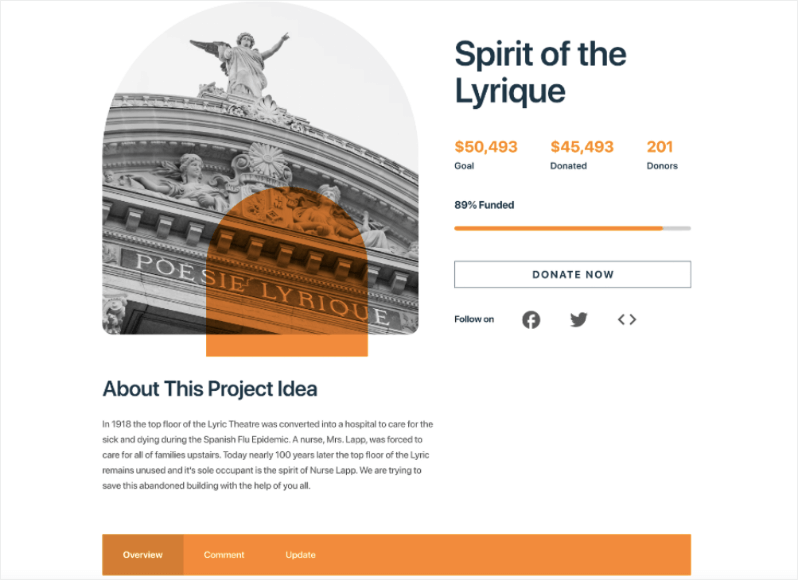
Puedes añadir importes de donación únicos y recurrentes. También se integra con múltiples pasarelas de pago, incluyendo Stripe, PayPal, PayFast, Payrexx, Mollie, Braintree y más. Así que es fácil de configurar y fácil para los usuarios donar.
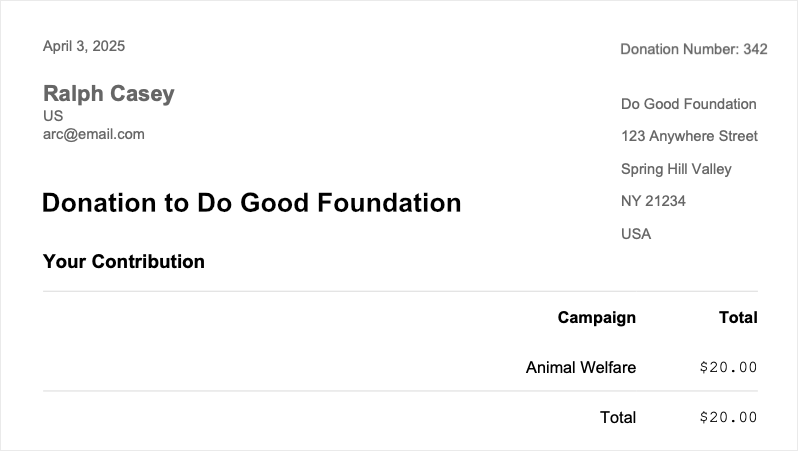
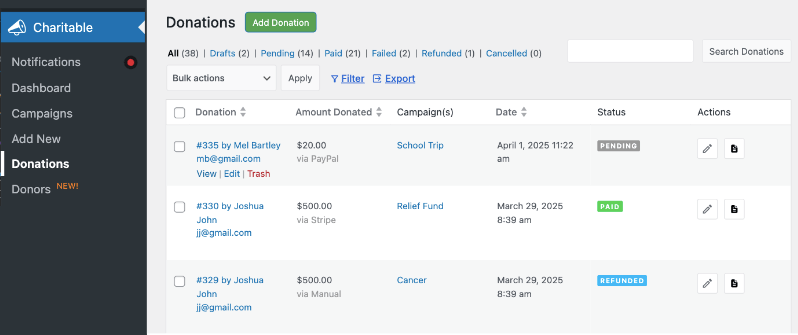
En cuanto a las funciones de gestión de donantes, cuando un donante realiza un pago, se crea automáticamente un recibo de donación. El donante puede descargarlo o enviarlo por correo electrónico a su bandeja de entrada. Mira cómo funcionan estos recibos PDF »
Además, se crea automáticamente un nuevo registro de donación para ellos. Esto está disponible dentro de tu panel de administración de WordPress. Puedes ver y editar cada registro, actualizar el estado del pago, enviar/descargar el recibo y mucho más. La parte que me encanta es que puedo filtrar estos registros por campaña, y también puedo exportar la lista completa. Ha facilitado las declaraciones de impuestos.
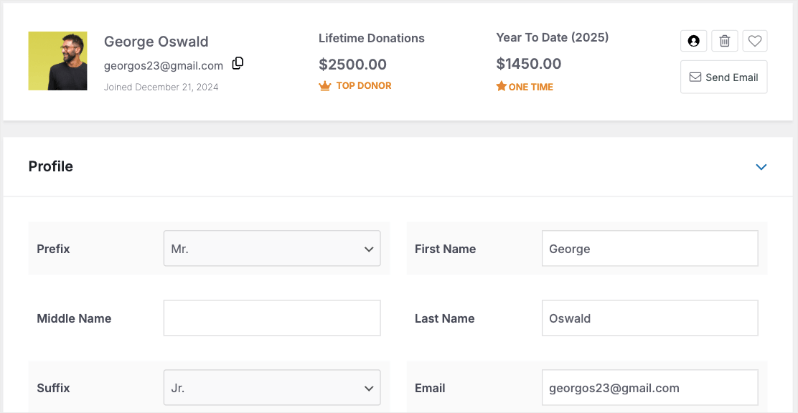
Si estás utilizando el plugin pro, tendrás acceso a la base de datos de donantes. Puedes ver el perfil de cada donante y sus donaciones de por vida. Mira cómo funciona la base de datos de donantes »
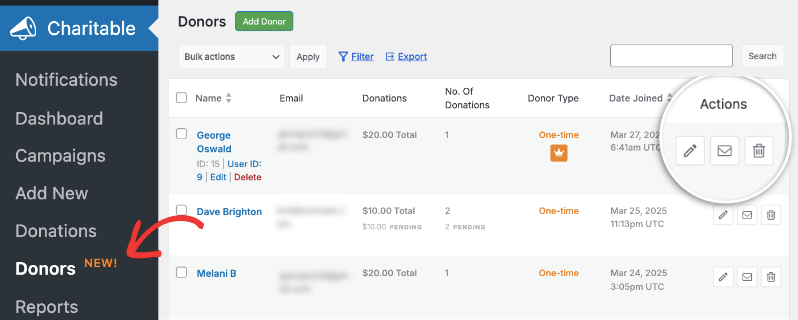
Puedes editar sus perfiles, enviarles correos electrónicos, marcarlos como favoritos y añadir tus propias notas. Incluso puedes añadir perfiles de donantes y registros de donaciones. Esto nos ha permitido registrar donaciones offline. De esa manera, todos nuestros registros están centralizados y puedo exportarlos de una sola vez.
El plugin principal es gratuito, lo que inicialmente me hizo sospechar de sus capacidades. Pero incluye todo lo que la mayoría de las organizaciones sin fines de lucro pequeñas y medianas necesitan: formularios de donación, gestión de donantes e informes detallados. Sí, eventualmente querrás las funciones premium (nosotros actualizamos después de seis meses), pero puedes empezar con la versión gratuita y escalar cuando estés listo.
Ahora, en la versión lite, hay una comisión de transacción del 3%. Esto desaparece cuando actualizas al plugin premium. Lo que me encanta es el precio. Te ofrece prácticamente las mismas funciones que otras plataformas, pero por una fracción del costo. El plan básico comienza en $69 al año. Incluso el plan más alto a $299 al año equivale a $24 al mes, lo que sigue siendo mucho menos que otras plataformas.
Recomiendo encarecidamente el plan Pro por $199 al año. Te ofrece todo lo que necesitas, incluyendo donaciones recurrentes, recaudación de fondos peer-to-peer, equipos de donación y automatizaciones.
Dicho esto, no es perfecto. El mayor inconveniente es que necesitas un sitio web de WordPress para usarlo.
Pero aquí está la razón por la que sigue siendo el número 1: hace exactamente lo que promete, lo hace bien y no complica las cosas. Además, cuando tienes en cuenta el ahorro de costos (tanto en comisiones como en suscripciones mensuales), es difícil de superar. Probamos tres plataformas más antes de decidirnos por Charitable, y ninguna igualó su combinación de simplicidad, funcionalidad y valor.
¿Para quién es mejor?
Charitable es perfecto si:
- Ya estás en WordPress o dispuesto a cambiar
- Quieres evitar las comisiones de transacción
- Necesitas algo simple pero escalable
- Estás harto de pagar altas cuotas mensuales por funciones que no utilizas
- Quieres que los donantes permanezcan en tu sitio web durante todo el proceso de donación
Consejo Pro: Empieza con la versión gratuita para probarla. Si te encuentras deseando más funciones, los planes premium siguen siendo más baratos que la mayoría de las plataformas de suscripción mensual. ¡También hay una garantía de devolución de dinero de 14 días!
2. Bloomerang
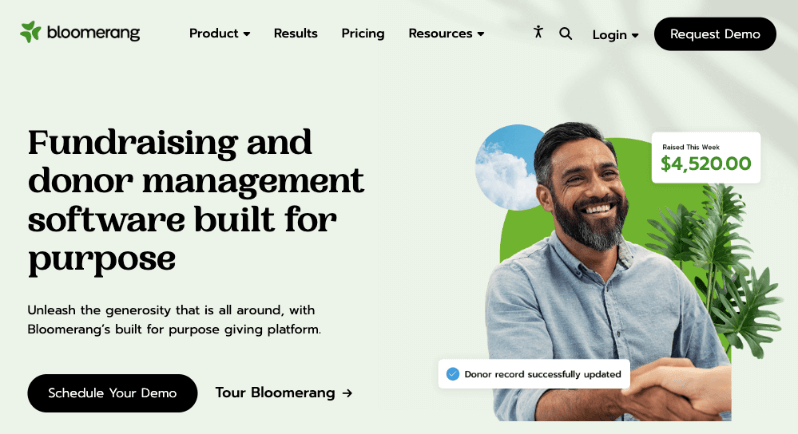
Después de probar Bloomerang y revisar cientos de reseñas recientes de usuarios, tengo algunas ideas honestas para compartir. Si bien se comercializa como una solución completa de gestión de donantes, la realidad es un poco más matizada.
Empecemos con lo que aman los usuarios. La función de línea de tiempo del donante es realmente excelente. Te ofrece un historial claro y visual de cada interacción con tus donantes. Sus herramientas de marketing por correo electrónico son robustas, y el enfoque en la retención de donantes realmente se nota en funciones como el medidor de participación y las alertas automatizadas para donantes inactivos.
Sin embargo, aquí es donde los usuarios (incluido yo mismo) encuentran obstáculos:
El modelo de precios es un gran problema. ¡Comienza en $125 al mes, lo que equivale a $1500 al año! Además, el precio se basa en el número de registros en tu base de datos. Si tu organización crece, tu plan se vuelve más caro.
Puede ser una plataforma potente, pero la curva de aprendizaje es pronunciada. Sentí que su sistema de informes era mucho más complicado de lo que necesitábamos.
¿Para quién es mejor?
Bloomerang funciona mejor para:
- Organizaciones con gestores de bases de datos dedicados
- Organizaciones sin ánimo de lucro centradas en gran medida en las métricas de retención de donantes
- Equipos dispuestos a invertir tiempo en formación
- Organizaciones de tamaño mediano con presupuestos elevados
- Organizaciones que priorizan el seguimiento de la comunicación con los donantes
3. DonorPerfect
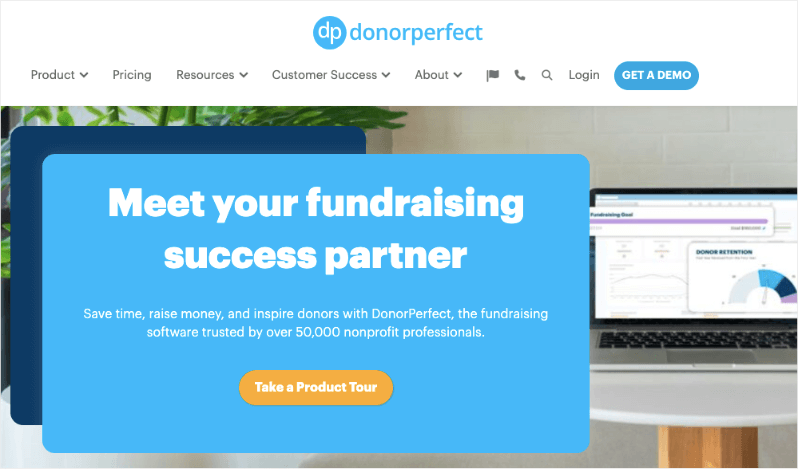
DonorPerfect es un sistema integral de gestión de donantes que lleva más de 30 años en el sector. Habiendo utilizado DonorPerfect en mi organización anterior y tras recientes discusiones con usuarios, puedo decir que es una gestión integral de donantes: potente pero a veces demasiado compleja para su propio bien.
En primer lugar, aprecio su profundidad. Las capacidades de generación de informes son increíbles si sabes cómo utilizarlas. Puedes segmentar y analizar datos de prácticamente cualquier manera imaginable. Para organizaciones que manejan múltiples canales de recaudación de fondos (subvenciones, eventos, grandes donaciones), es muy completo.
Comienza en 99 $ al mes, pero solo ofrecen precios personalizados según las necesidades de su organización.
¿Para quién es mejor?
DonorPerfect es ideal para:
- Organizaciones en crecimiento con complejas necesidades de informes
- Organizaciones sin ánimo de lucro que necesitan una sólida integración contable
- Organizaciones que gestionan múltiples canales de recaudación de fondos
- Equipos que requieren opciones de personalización detalladas
- Organizaciones sin ánimo de lucro que buscan una solución escalable a largo plazo
4. Donorbox (Gratis y de pago)
Donorbox es un excelente punto de partida si necesita una solución de gestión de donantes y recaudación de fondos gratuita con margen de crecimiento.
El proceso de configuración se realiza a través del navegador, no dentro de su panel de WordPress. Creé una cuenta gratuita de Donorbox, rellené algunos detalles e incrusté el formulario en una página de WordPress utilizando un simple shortcode. Hecho en menos de 20 minutos.
Esto es genial para aquellos que no tienen habilidades de diseño o desarrollo web.
El plan gratuito le permite empezar a aceptar donaciones en minutos a través de un formulario personalizable. Donorbox admite donaciones recurrentes, perfiles de donantes y se integra con CRM como Salesforce y herramientas como Zapier. Su plan de pago (a partir de 26,58 $/mes) desbloquea funciones adicionales como texto para donar y soporte prioritario.
Donorbox cobra una comisión de plataforma del 1,75 % sobre las donaciones, a menos que actualice. También carece de algunas de las herramientas de participación de donantes más profundas que encontrará en CRM más maduros.
¿Para quién es mejor?
- Nuevas organizaciones sin ánimo de lucro o campañas de base
- Organizaciones que desean formularios de donación sencillos
- Grupos que prueban las aguas antes de comprometerse con un CRM completo
- Recaudadores de fondos que necesitan una integración rápida de Stripe/PayPal
Donorbox es significativamente más caro. ¿Por qué pagar miles al año en tarifas mensuales y de plataforma cuando Charitable le ofrece mucho más por menos? ¡Usted se queda con más de sus donaciones, disfruta de potentes herramientas de recaudación de fondos y nunca se preocupa por las tarifas ocultas!
Ver la diferencia entre Donorbox y Charitable »
5. GiveWP (Complementos gratuitos y de pago)

GiveWP es, sin duda, el plugin de donaciones más popular para WordPress, y por una buena razón. Convierte su sitio de WordPress en una potente plataforma de recaudación de fondos sin necesidad de sistemas de terceros.
Esperaba un plugin básico de formularios de donación. Lo que no esperaba era lo robusto y profesional que se sentía, como si realmente pudiera reemplazar a los CRM de donantes ligeros para muchas organizaciones pequeñas y medianas.
El proceso de incorporación es limpio. Una vez activado, GiveWP te guía en la creación de tu primer formulario de donación con un útil asistente de configuración. Puedes elegir entre plantillas (como donaciones únicas o recurrentes) o crear la tuya propia.
En 30 minutos, tenía:
- Un formulario de donación diseñado para que coincida con mi sitio
- Stripe conectado para los pagos
- Una donación de prueba procesada
- Recibos de correo electrónico automatizados y personalizados
GiveWP te permite crear hermosos formularios de donación, rastrear la actividad de los donantes, administrar donaciones recurrentes y enviar recibos de donación, todo desde tu panel de WordPress. También cumple con el GDPR y se integra con Stripe, PayPal y más.
Aunque ahora es más fluido, mi primera integración con Stripe fue confusa. Tuve que jugar con webhooks y modos de donación de prueba antes de que las cosas se sincronizaran correctamente. Si no eres experto en tecnología, espera tener que recurrir a su documentación o soporte.
El plugin base de GiveWP es gratuito, pero las funciones reales (donaciones recurrentes, paneles de donantes, recibos en PDF, recaudación de fondos de persona a persona) son todas de pago.
No es un gestor completo de relaciones con donantes. No realiza segmentación profunda, recorridos de donantes ni automatización avanzada. Si se te queda pequeño, querrás conectarte a una plataforma como Bloomerang o Kindful.
¿Para quién es mejor?
- Organizaciones sin fines de lucro de WordPress que desean herramientas de donación nativas
- Organizaciones que necesitan formularios y recibos personalizables
- Equipos que desean ser dueños de sus datos y evitar plataformas SaaS
- Recaudadores de fondos centrados en donaciones únicas y recurrentes
Compara GiveWP con Charitable »
¿Cómo elegir el adecuado?
Elegir el software de gestión de donantes adecuado no tiene por qué ser complicado. Empieza por analizar tu proceso actual de gestión de donantes. ¿Cuántos donantes tienes? ¿Qué tareas te consumen más tiempo? ¿Cuál es tu presupuesto mensual para software? Estas preguntas guiarán tu decisión.
A continuación, considera la capacidad técnica de tu equipo. Algunas plataformas requieren una formación considerable, mientras que otras son más fáciles de usar. Si no tienes personal de TI dedicado, querrás optar por soluciones más sencillas que ofrezcan un buen soporte al cliente.
Tu presupuesto juega un papel crucial, pero no te limites a mirar la tarifa mensual. Considera:
- Costos de implementación
- Gastos de formación
- Tarifas adicionales por funciones imprescindibles
- Comisiones de procesamiento de pagos
Finalmente, piensa en el crecimiento. Aunque un sistema básico pueda funcionar ahora, considera dónde estará tu organización en 2 o 3 años. Elige una plataforma que pueda crecer contigo, incluso si no necesitas todas sus funciones de inmediato.
Recuerda: La opción más cara o con más funciones no siempre es la mejor. Céntrate en lo que resuelve tus desafíos actuales y te proporciona margen de crecimiento. Empieza con una prueba gratuita cuando esté disponible y no te apresures en la decisión; cambiar de sistema más adelante puede ser un proceso largo y costoso.
Veredicto sobre el mejor software de gestión de donantes
El software de gestión de donantes es una inversión importante para cualquier organización sin fines de lucro, tanto en términos de dinero como de tiempo. Después de pruebas exhaustivas y experiencia en el mundo real, Charitable se presenta como mi principal recomendación para la mayoría de las organizaciones. Su combinación de cero comisiones por transacción, integración con WordPress y funciones escalables lo convierte en una excelente opción, especialmente para aquellos que recién comienzan su viaje digital.
Sin embargo, si sus necesidades son más complejas o está gestionando una base de donantes más grande, tanto Bloomerang como DonorPerfect ofrecen soluciones sólidas con funciones avanzadas. La clave es adaptar el software a sus necesidades específicas en lugar de dejarse atrapar por comparaciones de funciones.
Antes de tomar su decisión final:
- Aproveche las pruebas gratuitas
- Involucre a su equipo en el proceso de prueba
- Calcule el costo total de propiedad
- Considere sus planes de crecimiento para los próximos 2-3 años
Recuerde: El software adecuado debe facilitarle la vida, no complicársela. Ya sea que elija una solución simple como Charitable o una plataforma más completa como DonorPerfect, el objetivo es el mismo: dedicar menos tiempo a la administración y más tiempo a su misión.
También puede desear obtener el Kit de Recaudación de Fondos Definitivo repleto de consejos probados para organizaciones sin fines de lucro, ideas de campañas listas para usar, estrategias probadas en batalla, herramientas recomendadas y recursos gratuitos para aumentar sus donaciones. Es el complemento perfecto para sus campañas de Giving Tuesday o sus recaudaciones de fin de año. Descargue el Kit Aquí »
Preguntas frecuentes
1. ¿Qué es el software de gestión de donantes?
El software de gestión de donantes ayuda a las organizaciones sin fines de lucro a rastrear, involucrar y retener donantes. Es como un CRM diseñado específicamente para la recaudación de fondos, que le permite recaudar donaciones, gestionar contactos, enviar recibos, rastrear el historial de donaciones y mejorar las relaciones con los simpatizantes.
2. ¿Cuál es la diferencia entre un plugin de donaciones y un CRM completo?
Un plugin de donaciones (como GiveWP o Donorbox) se centra en procesar donaciones y gestionar formularios. Un CRM completo (como Bloomerang o Neon CRM) incluye segmentación avanzada de donantes, alcance automatizado, informes detallados y seguimiento del ciclo de vida.
3. ¿Existe algún software de gestión de donantes verdaderamente gratuito?
Sí, pero con limitaciones. Herramientas como GiveWP (versión gratuita), Charitable y Donorbox ofrecen niveles gratuitos con procesamiento básico de donaciones. Sin embargo, funciones como donaciones recurrentes, integraciones o informes detallados suelen requerir una actualización de pago.
4. ¿Qué software de donantes es mejor para usuarios de WordPress?
Si su sitio web funciona con WordPress, Charitable es la mejor opción. Está diseñado para funcionar directamente dentro de su panel de WordPress, lo que le brinda control total sobre los formularios de donaciones, el estilo y los datos de los donantes.
5. ¿Necesito habilidades técnicas para usar software de donantes?
No necesariamente. Muchas herramientas (como Donorbox o Bloomerang) son fáciles de usar para principiantes y ofrecen constructores visuales. Otras (como GiveWP) ofrecen una personalización más profunda, pero pueden requerir conocimientos de WordPress o técnicos.
6. ¿Cuál es el mejor software para donaciones recurrentes?
Charitable. Te da opciones para sugerir importes y frecuencias de donación. También puedes permitir que los donantes elijan sus propias opciones personalizadas. También hay un panel de donantes donde los donantes pueden iniciar sesión y gestionar sus suscripciones. Esto mejora la retención y la confianza.
7. ¿Puedo integrar el software de donantes con herramientas de correo electrónico como Mailchimp o ConvertKit?
Sí. La mayoría de las plataformas de donantes premium ofrecen integraciones incorporadas o soporte de Zapier para sincronizar con tu software de marketing por correo electrónico como Mailchimp. Esto te permite automatizar correos de agradecimiento, boletines y secuencias de nutrición de donantes.
8. ¿Qué debo buscar en un software de donantes a medida que crezco?
A medida que tu organización crezca, busca:
- Informes y análisis detallados
- Acceso multiusuario y permisos de roles
- Recaudación de fondos entre pares o por campañas
- Integraciones con software CRM o de contabilidad
- Sólidas herramientas de segmentación y automatización de donantes
Elegir el software de gestión de donantes adecuado puede marcar una diferencia enorme en cómo tu organización sin fines de lucro recauda fondos, construye relaciones y crece con el tiempo.





Deja una respuesta