

Ya está aquí. Tras cientos de horas de desarrollo, este fin de semana lanzamos Ambassadors, versión 2. Prepárate para descubrir la mejor forma de hacer recaudación de fondos entre pares, sin más.
Sigue leyendo para ver un vistazo entre bastidores de cómo ha evolucionado esta versión con el tiempo y qué significa para ti y tu organización sin ánimo de lucro.
¿Solo quieres saber qué hay de nuevo? Haz clic aquí para saltar directamente a las notas de la versión.
Primero, una rápida puesta al día…
Una de las principales razones por las que decidimos crear Charitable fue porque vimos que las organizaciones sin ánimo de lucro estaban atrapadas con dos opciones, ambas menos que ideales, para sus donaciones en línea.
Por un lado, podían usar plataformas de recaudación de fondos alojadas, que generalmente se quedan con una parte de cada donación que recibe la organización sin ánimo de lucro. Una comisión de transacción del 2% puede no sonar tan mal, pero si tu campaña despega y recaudas 100.000 $, son 2.000 $ que se van a la plataforma. Y el 2% es una cifra conservadora: nos enteramos por organizaciones sin ánimo de lucro que perdían hasta el 10% de sus donaciones en las plataformas que utilizaban. Ay.
En el mundo de WordPress, tenías un puñado de plugins de donación para WordPress, pero ninguno con soporte completo para características como la recaudación de fondos entre pares. Aparte de Charitable, ese sigue siendo el caso.
Desde el principio, nuestro objetivo ha sido crear un plugin de donación para WordPress que ayude a las organizaciones sin ánimo de lucro a recaudar más dinero y gastar menos.
La primera versión de Charitable Ambassadors fue en octubre de 2015, apenas unos meses después de lanzar Charitable. Pero incluso antes de lanzar Charitable, Ambassadors ya estaba en desarrollo activo.
Ambassadors 1.0 ofreció a las organizaciones sin ánimo de lucro una forma lista para usar de empezar a ejecutar campañas de recaudación de fondos entre pares directamente en su sitio web. Cientos de organizaciones sin ánimo de lucro lo han utilizado desde entonces para impulsar sus eventos de recaudación de fondos. Caminatas, carreras populares, maratones, saltatones, inmersiones polares... ¡hemos visto a organizaciones sin ánimo de lucro usar Charitable para recaudar donaciones para todo tipo de eventos geniales!
Lo que a Ambassadors v1 le faltaba
Por supuesto, no habría un Ambassadors 2.0 si Ambassadors 1.0 no tuviera alguna carencia, ¿verdad?
Ambassadors funcionaba muy bien si estabas ejecutando una campaña de recaudación de fondos abierta. La gente podía crear una campaña para tu organización en cualquier momento, haciendo crecer orgánicamente el alcance de tu organización sin ánimo de lucro.
Pero tan pronto como empezabas a ejecutar campañas de recaudación de fondos con plazos definidos, Ambassadors era un poco más limitado. Cuando organizas un evento como una caminata, quieres que tus seguidores puedan crear una recaudación de fondos para esa caminata, y quieres que las donaciones que recauden aparezcan automáticamente en las estadísticas de recaudación de fondos de la campaña principal de la caminata.
También quieres poder repetir ese proceso para todas tus campañas de recaudación de fondos, con cada campaña de nivel superior respaldada por una red de recaudadores de fondos que recaudan dinero para esa campaña.
Otra área clave en la que faltaba Ambassadors era la capacidad de crear equipos de recaudación de fondos. Por supuesto, la gente podía crear una única campaña para todo su equipo, pero eso significa que se pierden algunos de los beneficios de red de la recaudación de fondos en equipo. Lo que se quiere en su lugar es que cada miembro del equipo pueda crear su propia recaudación de fondos, compartiéndola en su red y aumentando su alcance exponencialmente.
Con el tiempo, desarrollamos soluciones alternativas para ayudar a manejar el soporte básico de estas funciones, pero las soluciones alternativas son exactamente eso: soluciones alternativas. Nunca igualarán tener la función de forma nativa, como parte integral de un producto cohesivo.
Cómo Ambassadors v2 resuelve estos problemas (¡y más!)
Así que has leído la historia de fondo. Ahora, sumérgete y descubre cómo Ambassadors 2.0 resuelve estos problemas.
Consigue que la gente recaude donaciones para tus campañas de recaudación de fondos
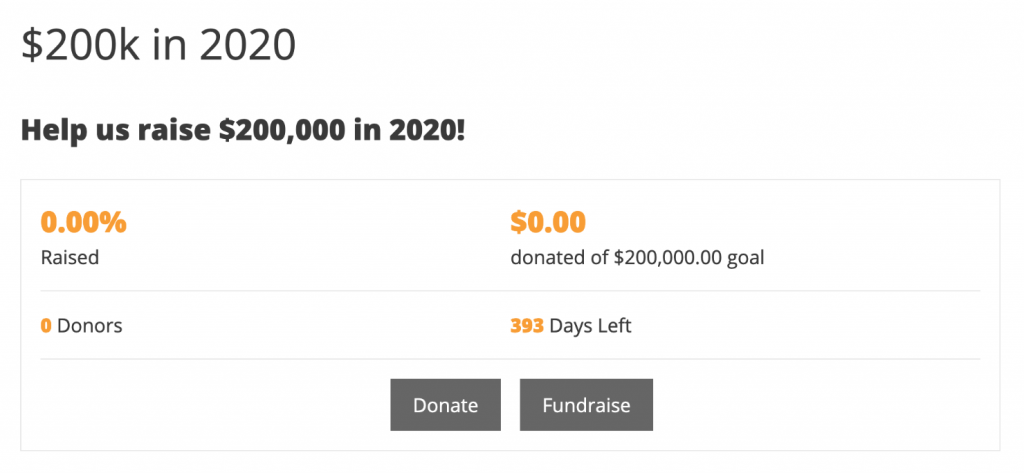
Con Ambassadors 2.0, puedes crear campañas de nivel superior para las que la gente pueda recaudar fondos.
En lugar de solo poder apoyar tu campaña haciendo una donación, tus seguidores pueden crear una recaudación de fondos para tu campaña.
Tus seguidores obtienen su propia página de recaudación de fondos, que pueden compartir con su red. Una donación a su recaudación de fondos se contará automáticamente para las estadísticas de recaudación de fondos de tu campaña.
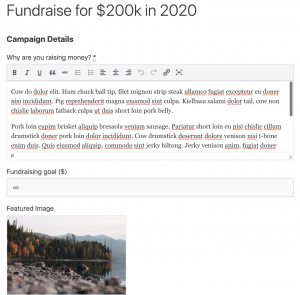
Como organización sin ánimo de lucro, puedes ajustar cuánto (o cuánto poco) tiene que hacer el recaudador de fondos para configurar su página de recaudación de fondos. Puedes proporcionarles texto predeterminado y una imagen destacada para su página de recaudación de fondos, y decidir si pueden establecer cosas como un título o un objetivo.
El resultado final es que tus seguidores tienen un camino mucho más rápido para crear su recaudación de fondos.
Menos fricción significa que terminas con más recaudaciones de fondos, un mayor alcance y más donaciones. Ganar, ganar, ganar.
Haz crecer tu red exponencialmente con equipos de recaudación de fondos

¿Qué es mejor que conseguir que alguien cree una nueva recaudación de fondos? ¡Que alguien cree una para sí mismo y para todos sus amigos!
Ese es el poder de la recaudación de fondos en equipo. En lugar de configurar una recaudación de fondos solo para ellos mismos, tu seguidor ahora puede iniciar su propio equipo de recaudación de fondos, y es solo un poco más de trabajo que crear una campaña individual.
Tu seguidor le da un nombre a su equipo y luego agrega tantos miembros como quiera. Una vez que envían su equipo, Charitable envía a cada uno de esos miembros un correo electrónico pidiéndoles que confirmen si desean unirse al equipo.
Para los miembros del equipo, son solo dos clics y listo; Charitable se encarga del resto.
¿Quieres probarlo? Intenta configurar una recaudación de fondos en nuestra demostración.
Usa el marketing por correo electrónico para conectar (y reconectar) con tus seguidores
Por supuesto, hacer crecer una red de seguidores es fantástico. Pero conectar con ellos a través del marketing por correo electrónico es clave para mantenerlos interesados en el trabajo de tu organización a largo plazo.
Al combinar Ambassadors con nuestra extensión Newsletter Connect, puedes empezar fácilmente a añadir creadores de campañas a tu lista de correo.
Para mantener las cosas organizadas, puedes hacer que se agreguen a una lista específica solo para los creadores de campañas. Además de darte la capacidad de adaptar tus correos electrónicos a ellos, esto también significa que puedes iniciarlos en una campaña de automatización de correo electrónico.
Por ejemplo, puedes enviar a los creadores de tus campañas una serie automatizada de correos electrónicos guiándolos en los pasos para ejecutar una recaudación de fondos exitosa.
Más correos electrónicos para los creadores de tus campañas
Además de abrir todas las posibilidades del marketing por correo electrónico para los creadores de tus campañas, también hemos agregado una serie de correos electrónicos integrados que puedes usar para conectarte con los creadores de campañas después de que agreguen la suya.
Puedes enviarles un correo electrónico automáticamente cuando envíen su campaña por primera vez, cuando su campaña sea aprobada, cuando su campaña esté a punto de finalizar y después de que haya terminado, así como correos electrónicos cada vez que alguien done a su campaña.
Al igual que con todos los correos electrónicos integrados en Charitable, puedes controlar el texto y la línea de asunto de cada correo electrónico, y proporcionamos una pila de variables que puedes usar para personalizar y ajustar tus correos electrónicos.
Adapta el formulario de campaña a tus necesidades
Algunos productos ofrecen un millón de opciones a sus usuarios, en nombre de la flexibilidad. Desafortunadamente, eso puede resultar en un lío confuso.
Con Charitable, nos enfocamos en mantener las cosas simples para los usuarios. Pero a veces, descubrimos que brindar al administrador del sitio un poco más de opciones ayudará a brindar a los usuarios una mejor experiencia.
El formulario de creación de campañas fue un área clave donde sentimos que los usuarios se beneficiarían de tener más opciones, por lo que hemos agregado un conjunto de opciones para personalizar diferentes aspectos del formulario, lo que te permite lograr fácilmente cosas que anteriormente habrían requerido algo de código personalizado.
Eso significa que ahora puedes controlar fácilmente cómo los creadores de campañas eligen la categoría/etiqueta para su campaña, cómo establecen una fecha de finalización y si pueden agregar sus propias opciones de donación sugeridas.
Solo las notas de la versión…
De un vistazo, aquí tienes todo lo nuevo en Ambassadors 2.0.
- ¡Recaudaciones de fondos! Las recaudaciones de fondos son un tipo especial de campaña creada para recaudar fondos para una campaña existente. Esta función te permite crear campañas principales para las que las personas pueden recaudar fondos. Puedes crear tantas campañas principales como desees. El formulario de recaudación de fondos es una versión simplificada del formulario de campaña de front-end.
- ¡Equipos! Al configurar una nueva recaudación de fondos, los creadores de tus campañas pueden crear equipos y unirse a otros equipos.
- ¡Marketing por correo electrónico! Ahora puedes agregar automáticamente a los creadores de campañas a tu lista de correo. Esta función requiere Newsletter Connect y utiliza la función de "consentimiento de contacto" en Charitable.
- Ajusta el formulario de campaña con nuevas configuraciones de administrador. Ajusta fácilmente cómo los creadores de campañas seleccionan categorías o etiquetas para sus campañas, cómo establecen una fecha de finalización y si pueden proporcionar sus propias opciones de donación sugeridas.
- Más correos electrónicos: Hay nuevos correos electrónicos disponibles para enviar a los creadores de campañas cuando su campaña sea aprobada, cuando haya finalizado o cuando requiera acción antes de poder publicarse (es decir, que necesiten iniciar sesión, registrarse o verificar su dirección de correo electrónico). El administrador también puede recibir un correo electrónico cuando una campaña todavía requiere algún tipo de acción por parte de su creador.
- Se ha resuelto un problema persistente que impedía a los usuarios no registrados crear una campaña. Ahora puede configurar el flujo de creación de campañas para que los usuarios deban crear una cuenta antes de enviar su campaña, o después. Cuando un creador de campaña envía una campaña sin haber iniciado sesión, se le pedirá que inicie sesión, se registre y/o verifique su dirección de correo electrónico después de haber enviado su campaña de recaudación de fondos.
- ¡Muchas más correcciones de errores!
- Traducción al holandés añadida.
¿Listo para usar la recaudación de fondos entre pares para tu organización sin fines de lucro?
Con Embajadores 2.0, Charitable ayudará a tu organización sin fines de lucro a recaudar más dinero a través de la recaudación de fondos entre pares. Y lo hacemos sin el precio excesivo que normalmente viene con este tipo de función, para que tu organización sin fines de lucro pueda recaudar más dinero gastando menos.
¿Listo para empezar?
Empieza a recaudar donaciones con WordPress hoy mismo
Únete a más de 10.000 organizaciones sin ánimo de lucro que recaudan más dinero en línea con Charitable.





Deja una respuesta