
Ob Sie Ihre eigene Wohltätigkeitsorganisation leiten oder Spenden für eine von Ihnen unterstützte Wohltätigkeitsorganisation sammeln, die Erstellung einer mehrsprachigen Website für Spenden an Wohltätigkeitsorganisationen kann Ihnen helfen, Ihre Reichweite auf potenzielle Kunden auf der ganzen Welt auszudehnen. Ganz zu schweigen davon, dass es eine großartige Möglichkeit ist, eine Plattform aufzubauen, auf der Spender, Sponsoren und Freiwillige Informationen erhalten und miteinander zusammenarbeiten können.
Neben der Verbesserung der Benutzererfahrung kann eine mehrsprachige Website für Spenden an Wohltätigkeitsorganisationen auch dazu beitragen, die Online-Sichtbarkeit Ihrer Wohltätigkeitsorganisation zu verbessern. Vor diesem Hintergrund erklären wir in diesem Artikel, wie Sie eine mehrsprachige Website für Spenden an Wohltätigkeitsorganisationen mit zwei Plugins – Weglot und Charitable – einrichten und konfigurieren können.
Warum Sprachlokalisierung für Websites von Wohltätigkeitsorganisationen wichtig ist
Der Hauptvorteil der Erstellung einer mehrsprachigen Website für Spenden an Wohltätigkeitsorganisationen besteht darin, dass Sie die Reichweite Ihrer Wohltätigkeitsorganisation erhöhen können. Infolgedessen können Sie effektiv mehr Bewusstsein für Ihre Wohltätigkeitsorganisation oder Ihren Zweck schaffen.
Darüber hinaus ist es erwähnenswert, dass eine mehrsprachige Website es mehr Menschen auf der ganzen Welt erleichtert, etwas über Ihren Zweck zu erfahren. Tatsächlich sprechen von den 7,5 Milliarden Einwohnern der Welt nur 1,5 Milliarden (fast 20 %) Englisch. Davon sprechen nur 360 Millionen Englisch als ihre Muttersprache.
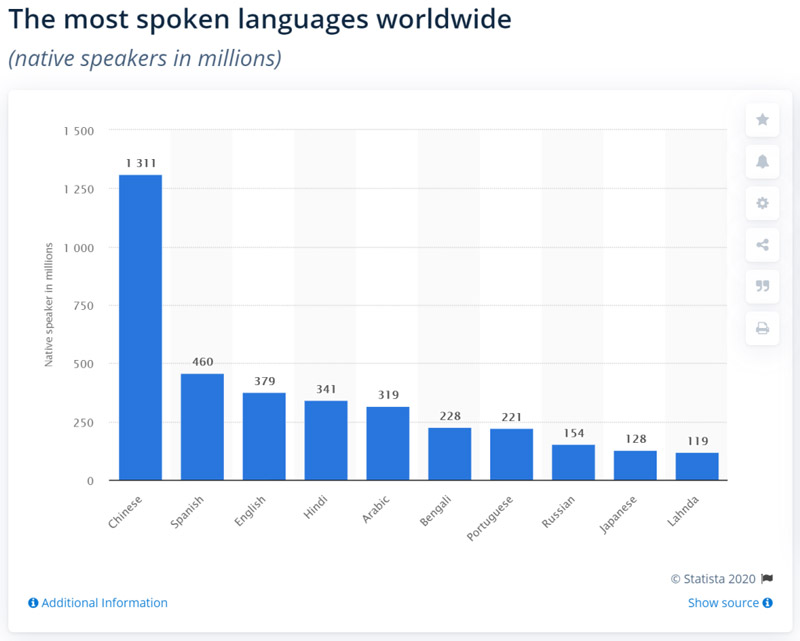
Wenn Sie die Inhalte Ihrer Wohltätigkeits-Website in mehrere Sprachen übersetzen, erleichtern Sie es bestehenden Spendern und Sponsoren, sich an Veranstaltungen und Aktivitäten zu beteiligen und ermöglichen es potenziellen neuen Spendern, mehr über Ihren Zweck zu erfahren.
Darüber hinaus können Menschen, die über Suchmaschinen nach Wohltätigkeitsorganisationen in ihrer Muttersprache suchen, auch Ihre Website für Spenden an Wohltätigkeitsorganisationen finden. Dies ist eine großartige Möglichkeit, die Sichtbarkeit in Suchmaschinen zu erhöhen.
Natürlich ist es wichtig sicherzustellen, dass Sie Ihre Website-Inhalte in die richtige nicht-englische Sprache übersetzen. Der beste Ausgangspunkt ist die Analyse Ihres vorhandenen Traffics. Wenn Sie beispielsweise viel Traffic aus Südamerika erhalten, sollten Sie spanische und portugiesische Übersetzungen anbieten.
So erstellen Sie eine mehrsprachige Website für Spenden an Wohltätigkeitsorganisationen
Weglot ist ein WordPress-Übersetzungs-Plugin, mit dem Sie eine mehrsprachige Website erstellen können, indem Sie alle Ihre Inhalte in verschiedene Sprachen übersetzen. Dies umfasst Inhalte, die von WordPress-Themes, Plugins oder Add-ons generiert werden, die Sie auf Ihrer Website verwenden – einschließlich Formular-Plugins.
Weglot lässt sich nahtlos in das Charitable-Plugin integrieren, sodass Sie einfach eine mehrsprachige Website für Spenden an Wohltätigkeitsorganisationen erstellen können. Es verfügt über einen integrierten Sprachumschalter, mit dem Besucher aus den verschiedenen von Ihnen angebotenen Sprachen wählen können.
Weglot verwendet maschinelle Übersetzung, um die Inhalte Ihrer Website in 108 verschiedene Sprachen zu übersetzen. Darüber hinaus können Sie Ihre Übersetzungen direkt über das Weglot-Dashboard manuell verwalten.
Hier sind die Schritte, die Sie unternehmen müssen, um eine mehrsprachige Website für Spenden an Wohltätigkeitsorganisationen zu erstellen:
Schritt #1: Installieren Sie das Charitable-Plugin
Der einfachste Weg, das Charitable-Plugin zu installieren, ist über das WordPress-Dashboard. Melden Sie sich auf Ihrer Website an und gehen Sie zu Plugins > Neues hinzufügen. Geben Sie dann Charitable in die Suchleiste ein.
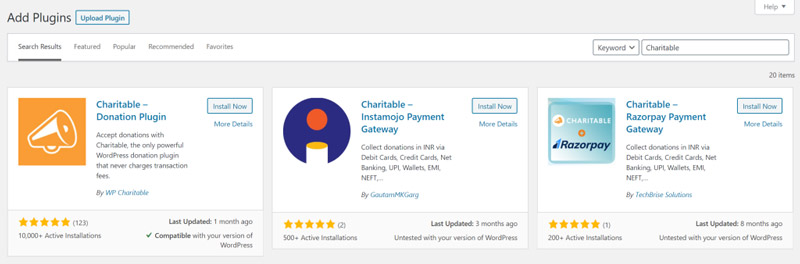
Sie sollten Charitable – Donations Plugin in den Suchergebnissen sehen. Klicken Sie auf die Schaltfläche Jetzt installieren, um fortzufahren. Sobald Sie das Plugin installiert haben, müssen Sie es aktivieren. Klicken Sie nach Abschluss der Installation auf die Schaltfläche Aktivieren.
Das Charitable-Plugin ermöglicht es Ihnen, Spenden (über PayPal und Offline-Zahlungsmethoden) für Ihre Wohltätigkeits-Website anzunehmen. Sobald Sie das Plugin eingerichtet haben, können Sie eine neue Kampagne erstellen, ein Spendenziel festlegen und empfohlene Spendenbeträge festlegen. Das Charitable-Plugin ermöglicht es Ihnen auch, Spenden direkt von Ihrer WordPress-Website aus zu verwalten.
Schritt #2: Weglot-Plugin und Sprachen einrichten
Nachdem Sie das Charitable-Plugin erfolgreich installiert und aktiviert haben, sehen wir uns an, wie Sie das Weglot-Plugin und die Sprachen konfigurieren können, die Sie den Website-Besuchern anbieten möchten.
Das erste, was Sie tun müssen, ist, das Weglot-Plugin auf Ihrer WordPress-Website zu installieren und zu aktivieren. Sobald dies erledigt ist, melden Sie sich für ein Weglot-Konto an. Sie erhalten einen API-Schlüssel, der Ihre WordPress-Site mit dem Weglot-Dienst verbindet.
Navigieren Sie dann im Seitenmenü zum Abschnitt Weglot und konfigurieren Sie die folgenden Einstellungen auf dem Bildschirm Hauptkonfiguration.
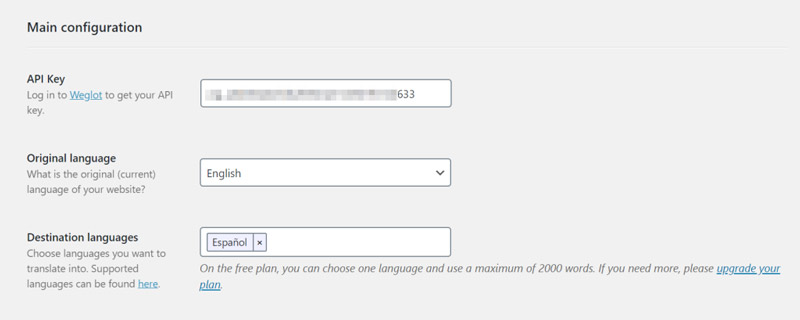
- Kopieren Sie den API-Schlüssel, den Sie erhalten haben, und fügen Sie ihn in das Textfeld API-Schlüssel ein.
- Wählen Sie die Originalsprache Ihrer Wohltätigkeits-Website. Dies ist die Sprache, in der Sie Inhalte ursprünglich veröffentlichen, z. B. Englisch.
- Wählen Sie im Abschnitt Zielsprachen die Sprachen aus, in die Sie die Inhalte Ihrer Website übersetzen möchten. Hier ist eine vollständige Liste der verfügbaren Sprachen, aus denen Sie wählen können.
Wenn Sie fertig sind, klicken Sie auf die Schaltfläche Änderungen speichern am unteren Bildschirmrand, um fortzufahren. Weglot übersetzt nun automatisch alle Inhalte Ihrer Website – einschließlich der von Themes und Plugins generierten Inhalte – in Ihre ausgewählten Zielsprachen.
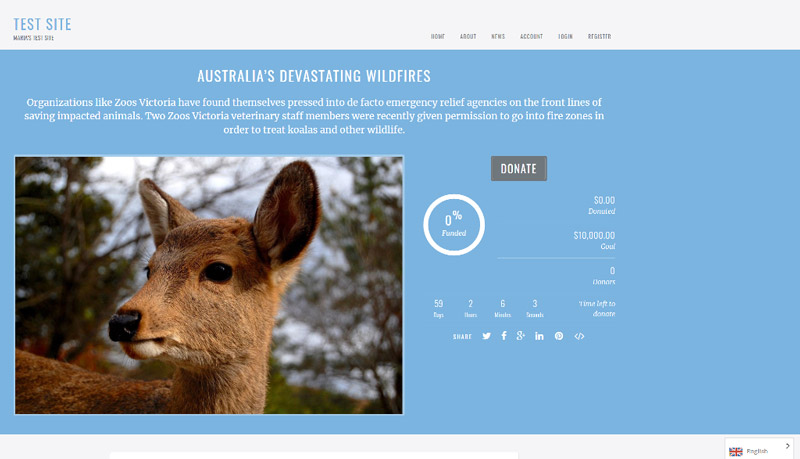
Zusätzlich wird unten rechts auf der Frontend-Ansicht Ihrer Wohltätigkeits-Website ein Sprachumschalter hinzugefügt. Ihre Website-Besucher können den Sprachumschalter verwenden, um ihre bevorzugte (oder Muttersprache) auszuwählen.
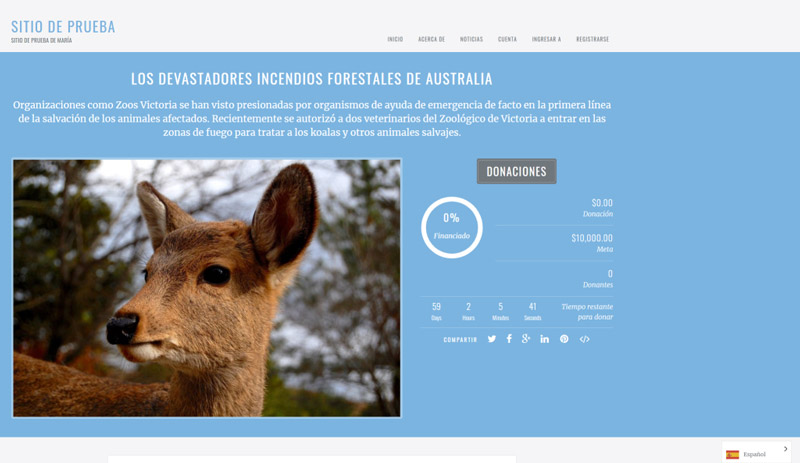
Schritt #3: Übersetzungen verfeinern
Weglot übersetzt Ihre gesamte Website nach der Einrichtung automatisch in die ausgewählten Zielsprachen. Es ermöglicht Ihnen jedoch auch, die automatisch generierten Übersetzungen auf zwei verschiedene Arten manuell zu ändern – entweder über den Listen-Editor oder den visuellen Editor.
Sie können auf den Listen-Editor zugreifen, indem Sie sich bei Ihrem Weglot-Dashboard anmelden und zum Tab Übersetzungen gehen. Er sollte ungefähr so aussehen:
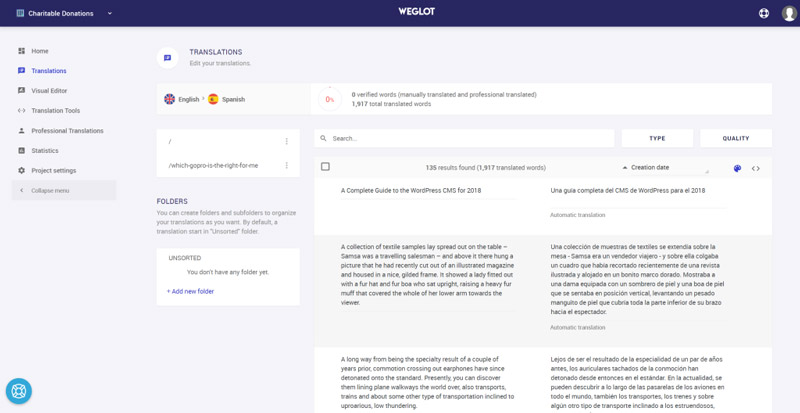
Der Listen-Editor bietet Ihnen eine nebeneinander liegende Ansicht des Originalinhalts Ihrer Website zusammen mit dem übersetzten Inhalt. Sie können eine Übersetzung manuell ändern, indem Sie klicken und tippen, oder Sie können einen professionellen Drittanbieter-Übersetzungsdienst nutzen, um dies für Sie zu tun.
Alternativ können Sie den visuellen Editor von Weglot verwenden, indem Sie zum Tab Visueller Editor navigieren. Dies zeigt Ihnen eine Live-Vorschau des Front-Ends Ihrer Website.
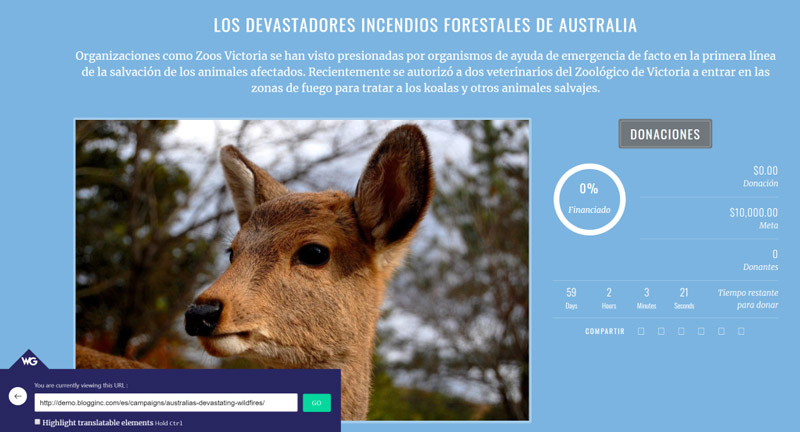
Sie können jeden Inhalt übersetzen, indem Sie mit der Maus darüber fahren und auf das Stiftsymbol klicken. Wenn Sie auf das grüne Stiftsymbol klicken, öffnet sich ein Popup-Fenster, in dem Sie die Übersetzung ändern können.
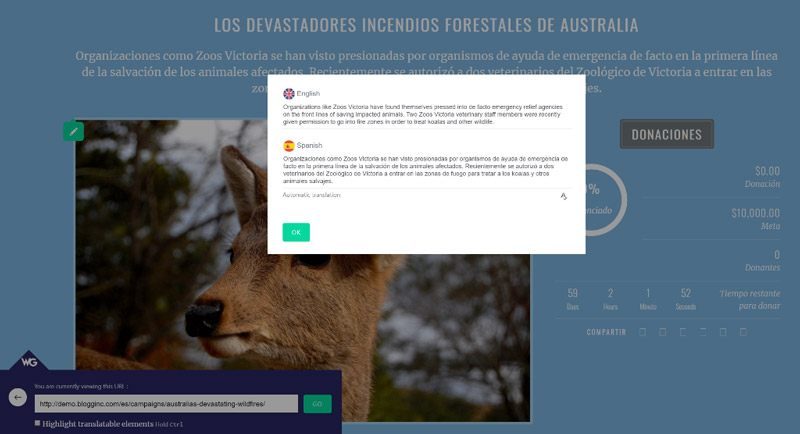
Unabhängig von der gewählten Übersetzungsmethode werden alle Ihre Übersetzungen automatisch mit Ihrer mehrsprachigen WordPress-Website für Spenden von Wohltätigkeitsorganisationen synchronisiert.
Schritt Nr. 4: Passen Sie den Sprachumschalter im Front-End an
Sobald Sie das Weglot WordPress-Plugin aktivieren, wird automatisch ein schwebender Sprachumschalter in der unteren rechten Ecke Ihrer Website hinzugefügt. Sie haben auch die Möglichkeit, dessen Position zu ändern, indem Sie eine der vier von Weglot angebotenen Platzierungsoptionen wählen:
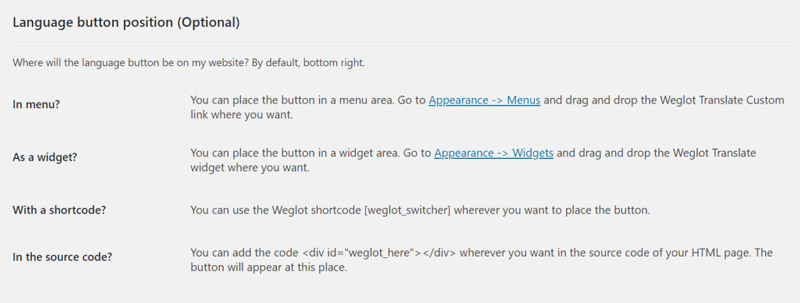
- Als Menüpunkt (in Ihrer Hauptnavigation)
- Im Quellcode Ihrer Website
- Als Widget in einem Widget-Bereich
- In einem Shortcode auf Ihrer Website
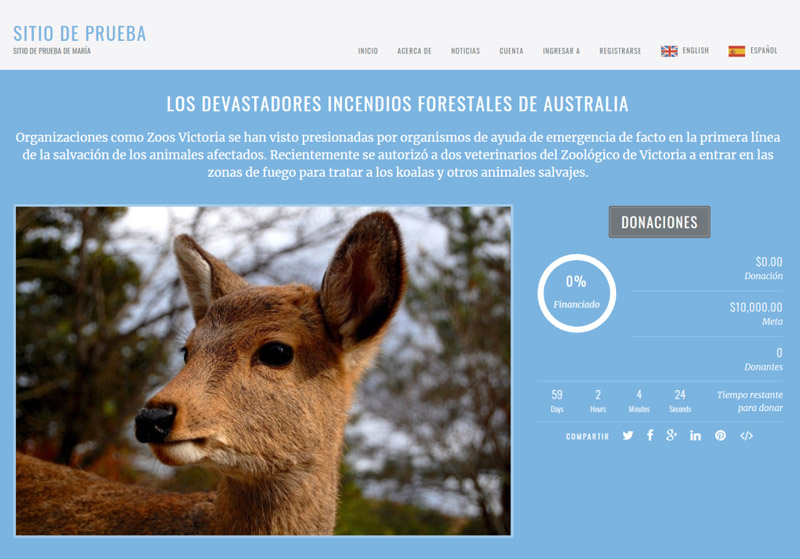
Hier ist zum Beispiel, wie der Sprachumschalter angezeigt wird, wenn Sie ihn in das Navigationsmenü Ihrer Website verschieben.
Schlussfolgerung
Eine mehrsprachige Website für Wohltätigkeitsorganisationen ist eine großartige Möglichkeit, mit potenziellen Spendern in Kontakt zu treten, neue Sponsoren zu gewinnen und das Bewusstsein für Ihre Anliegen zu schärfen. Darüber hinaus verbessert sie die Benutzererfahrung Ihrer Website, da die Leute Ihre Inhalte lesen und mit Ihrer Website in ihrer bevorzugten Sprache interagieren können.
Mit dem Charitable-Plugin für WordPress in Verbindung mit Weglot können Sie einen Schritt in die richtige Richtung machen. Charitable ermöglicht es Ihnen, eine Website für Wohltätigkeitsorganisationen zu erstellen, und das Weglot-Plugin übersetzt Ihre Inhalte automatisch (einschließlich Inhalte, die von Themes und Plugins generiert werden).
Welche Sprachen werden Sie auf Ihrer mehrsprachigen Website für Wohltätigkeitsorganisationen anbieten? Teilen Sie es uns mit, indem Sie unten kommentieren.
Über die Autorin: Elizabeth Pokorny ist Content Managerin bei Weglot.





Hinterlassen Sie eine Antwort