
Das Erstellen von Spendenformularen sollte einfach und unkompliziert sein. Ich habe mit Backend-Buildern gekämpft, bei denen man Formulare erstellt und sich dann fragt, wie sie tatsächlich auf der Frontend-Oberfläche für echte Spender aussehen werden. Das müssen wir nicht mehr tun.
Mit dem visuellen Spendenformular-Builder von Charitable gestalten Sie Ihr Formular genau so, wie Spender es sehen werden. Sie müssen lediglich Felder per Drag & Drop ziehen und per Klick bearbeiten – kein Raten mehr. Dies gibt Ihnen die vollständige Kontrolle, um die Benutzererfahrung zu optimieren und gleichzeitig Ihren eigenen Prozess reibungslos und schnell zu gestalten.
Dieses 10-minütige Tutorial zeigt Ihnen, wie Sie einfach ein Spendenformular erstellen. Sie lernen, wie Sie den Formular-Builder verwenden, Felder wie vorgeschlagene Beträge und Spenderdetails hinzufügen, alles visuell anpassen und ein für Stripe- oder PayPal-Zahlungen bereites Formular veröffentlichen. Lassen Sie uns gemeinsam eines erstellen.
Auswahl des richtigen Formular-Builders
Es gibt viele Online-Formular-Builder, aber die meisten gemeinnützigen Organisationen benötigen mehr als nur ein Kontaktformular, das zufällig Online-Zahlungen akzeptiert. Sie benötigen ein Werkzeug, das für Fundraising entwickelt wurde, eines, das wiederkehrende Spenden, Spenderdetails, Kampagnenziele und Datenschutzkonformität ohne zusätzliche Plugins oder Gebühren handhabt.
Deshalb sticht Charitable hervor. Es bietet Ihnen zwei visuelle Builder, die zusammenarbeiten:
- Der Campaign Visual Builder für vollständige Fundraising-Seiten (Fortschrittsbalken, Spenderwände, Erfolgsgeschichten)
- Der Donation Form Visual Builder zum genauen Anpassen, wie Spender ihre Zahlungsdetails eingeben und spenden
Charitable ist die perfekte Wahl für dieses Tutorial, da es alles kombiniert, was gemeinnützige Organisationen benötigen, in einem einzigen zuverlässigen Plugin – kein Addon-Chaos oder versteckte Gebühren.
- Visuelle Builder für alles: Kampagnenseiten und Online-Spendenformulare verfügen beide über Drag-and-Drop-Oberflächen mit Live-Vorschauen, sodass Sie das gesamte Erlebnis ohne Code steuern.
- Entwickelt für gemeinnützige Organisationen: Wiederkehrende Spenden, Spenderverwaltung, Fortschrittsziele und Peer-to-Peer-Kampagnen sind alle in das Plugin integriert. Sie müssen nicht mehrere Tools jonglieren.
- Keine Transaktionsgebühren: Behalten Sie 100 % der Stripe/PayPal-Spenden (Charitable Pro entfernt jegliche Lite-Gebühr).
- Bewährt in echten Kampagnen: Ich habe es auf Dutzenden von Websites getestet, wo es andere Plugins übertraf und echte Ergebnisse erzielte.
- Kostenloser Start: Die Kernversion ist kostenlos und bietet Ihnen alle wesentlichen Fundraising-Funktionen. Charitable Pro (ab 69 $/Jahr) schaltet erweiterte Funktionen frei, ohne die Bank zu sprengen.
Andere Plugins funktionieren für einfache Bedürfnisse, aber Charitable skaliert von Ihrer ersten 100-Dollar-Aktion bis zu 100.000-Dollar-Giving-Tuesday-Kampagnen. Lassen Sie uns mit dem Werkzeug bauen, das Sie nicht im Stich lässt.
Für dieses Tutorial verwenden wir Charitable, da es Ihnen ermöglicht, professionelle Spenden-Erlebnisse in wenigen Minuten zu erstellen, die tatsächlich konvertieren, egal ob Sie Ihren ersten Spendenaufruf starten oder eine 50.000-Dollar-Matching-Kampagne durchführen.
Die visuellen Builder von Charitable
Charitable bietet Ihnen zwei leistungsstarke Drag-and-Drop-Tools, die perfekt zusammenarbeiten:
Kampagnen-Visual-Kampagnen-Builder
Mit dem Kampagnen-Builder können Sie Vorlagen oder Layouts auswählen, um vollständige Spenden-Seiten zu gestalten. Hier erzählen Sie Ihre Geschichte, zeigen Wirkung, setzen ein Ziel mit einer Fortschrittsanzeige, präsentieren Spender-Listen oder Spender-Kommentare, fügen Videos hinzu und betten das eigentliche Spendenformular ein.
Hier ist eine Kampagne, die ich mit Charitable erstellt habe:
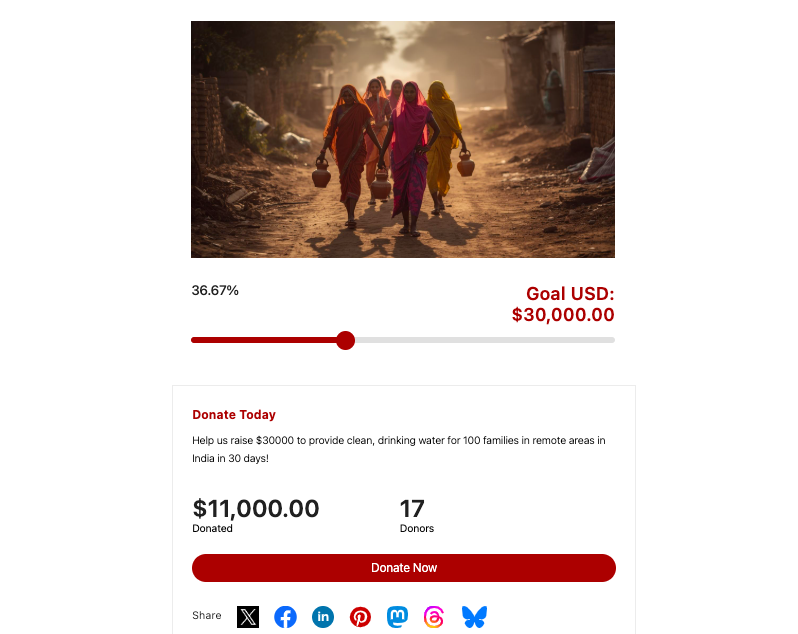
Jede Kampagne hat:
- Kampagneninhalt: Beschreibung, Bilder, Videos, Updates, um zum Spenden zu inspirieren.
- Zielverfolgung: Visueller Fortschrittsbalken, der das Erreichte/Gesamte anzeigt, schließt automatisch, wenn das Ziel erreicht ist.
- Spender-Engagement: Öffentliche Kommentare, Bestenlisten oder anonymisierte Gesamtsummen.
- Integriertes Spendenformular: Angetrieben durch den Visual Form Builder, den wir als Nächstes verwenden werden.
Sie können unbegrenzt viele Kampagnen für fast jede Spendenaktion erstellen, die Sie benötigen, einschließlich Notfälle, Jahresfonds, Veranstaltungen oder Peer-to-Peer-Spendenaktionen.
Spendenformular-Visual-Builder
Wenn ein Spender auf die Schaltfläche „Jetzt spenden“ in der Kampagne klickt, wird ihm ein Spendenformular angezeigt.
Hier geben Spender ihren Namen ein, wählen einen Betrag, wählen eine Zahlungsmethode und klicken auf „Spenden“. Zusammen bilden die Kampagnen-Seite und das Spendenformular eine Conversion-Engine: Die Kampagnen-Seite erzählt die Geschichte und baut Begeisterung auf, aber das Formular besiegelt den Deal.
Hier ist ein Spendenformular für gemeinnützige Organisationen von Charitable:
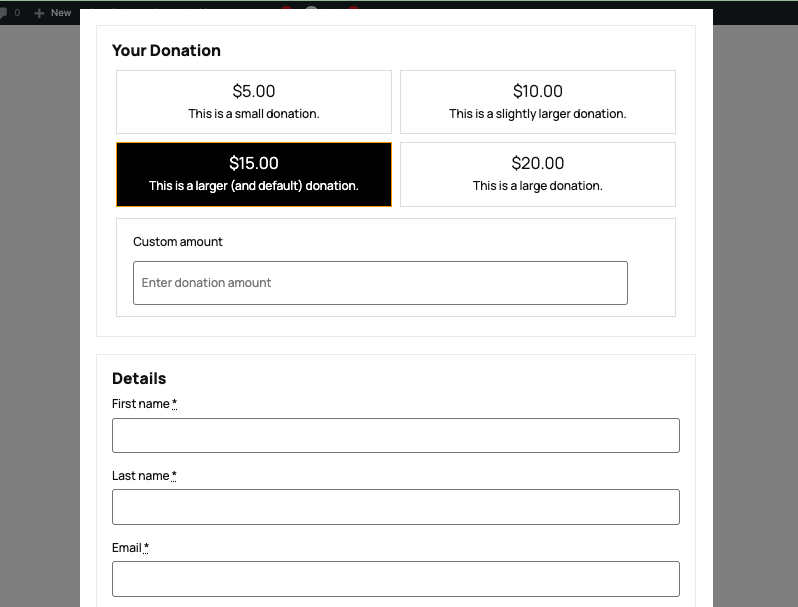
Sie können das tatsächliche Spenden-Erlebnis innerhalb jeder Kampagne anpassen. Fügen Sie Felder hinzu, ordnen Sie Layouts neu an, legen Sie vorgeschlagene Beträge fest und sehen Sie eine Vorschau, wie Spender Ihr Formular sehen und damit interagieren werden.
Beide Builder ermöglichen es Ihnen, visuell mit Echtzeit-Vorschauen zu arbeiten, sodass das, was Sie sehen, dem entspricht, was Spender erleben.
In dieser Anleitung zeige ich Ihnen, wie Sie eine Kampagne erstellen, den Formular-Builder öffnen, Felder wie vorgeschlagene Beträge und Spenderdetails hinzufügen, visuell anpassen und ein für Stripe- oder PayPal-Zahlungen bereites Formular veröffentlichen. Lassen Sie uns gemeinsam eines erstellen.
So erstellen Sie ein Spendenformular
Schritt 1: Charitable installieren und aktivieren
Um zu beginnen, melden Sie sich bei Ihrem WordPress-Dashboard an und gehen Sie zu Plugins » Neues hinzufügen.
Suchen Sie nach „Charitable“ in der Suchleiste. Achten Sie auf das offizielle Plugin (über 10.000 aktive Installationen, 5-Sterne-Bewertung).
Klicken Sie auf „Jetzt installieren“ und dann auf „Aktivieren“. Damit erhalten Sie sofort die kostenlose Kernversion – keine Kreditkarte erforderlich.
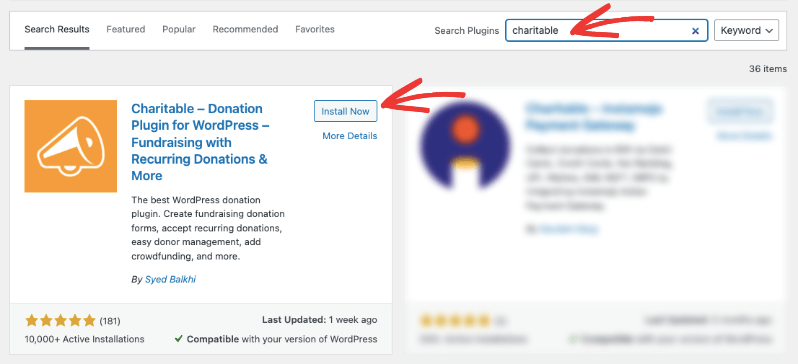
Damit erhalten Sie Charitable Lite mit allen wesentlichen Funktionen, die Sie für den Einstieg benötigen. Für das Pro-Plugin besuchen Sie die offizielle Website, wählen Sie Ihren Plan und registrieren Sie sich für ein Konto.
Was Sie mit Pro erhalten (ab 69 $/Jahr):
- Wiederkehrende Spenden (monatliche/jährliche Kontrollkästchen)
- Vollständige Spenderverwaltung mit Profilen und Self-Service-Dashboards
- Peer-to-Peer-Fundraising und Crowdfunding
- Gebührenerstattung (Spender decken Stripe-Gebühren), Gift Aid (UK)
- Weitere Zahlungsgateways und anonyme Spenden
- Spender-Bestenlisten, Kommentare und Social Proof
- Erweiterte Berichte, PDF-/Jahresbelege, E-Mail-Integrationen
- Prioritätsunterstützung und Premium-Funktionen wie Automatisierung
- …und vieles mehr.
Wenn Charitable installiert und aktiviert ist, erstellen wir Ihre erste Kampagne.
Schritt 2: Erstellen Sie Ihre erste Kampagne
Das Erstellen einer Kampagne ist so einfach und erfordert nur wenige Klicks. Öffnen Sie Charitable » Neu hinzufügen im linken Menü Ihres WordPress.
Nennen Sie sie etwas Spezifisches wie „Nothilfefonds“ oder „Weihnachts-Spendenaktion“.
Wählen Sie als Nächstes eine Vorlage oder ein Layout aus, um zu beginnen.
Sobald Sie dies getan haben, öffnet sich der Kampagnen-Builder, in dem Sie den Inhalt anpassen können.
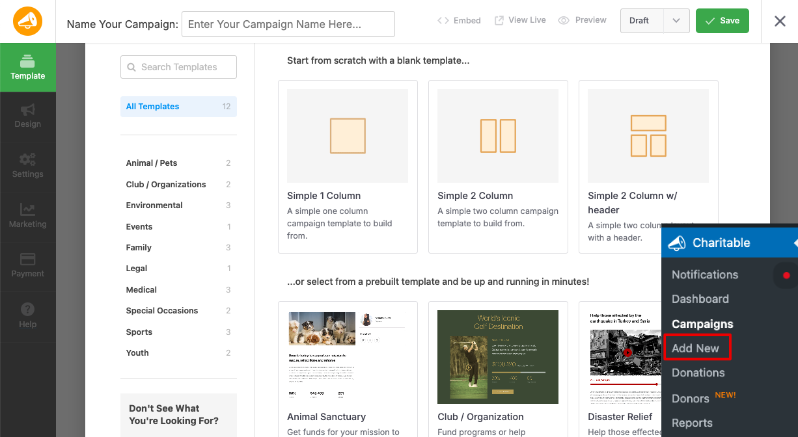
Wenn Sie eine Kampagne in Charitable erstellen oder öffnen, sehen Sie eine Live-Vorschau Ihrer Kampagnenseite. Dies ist der visuelle Kampagnen-Builder.
Sie können Blöcke per Drag & Drop verschieben, neue Abschnitte hinzufügen und Elemente wie Ihre Überschrift, Beschreibung, Bild und Ziel/Fortschrittsbalken neu anordnen, um sie an Ihre Geschichte und Layout-Präferenzen anzupassen. Es fühlt sich an, als würden Sie eine Landingpage bearbeiten, nicht ein Backend-Formular.
Wenn Sie auf einen Block oder ein Feld in dieser Vorschau klicken, öffnen sich dessen Einstellungen im linken Bereich. Hier können Sie den Text bearbeiten, Bilder ändern, die Ausrichtung anpassen, Rahmen, Abstände und Farben optimieren und Anzeigeoptionen steuern. Wenn Sie mit dem Aussehen der Kampagne zufrieden sind, klicken Sie auf Speichern, damit Ihre Designänderungen gespeichert werden.
Schritt 3: Passen Sie das Spendenformular an
Jetzt ist es an der Zeit, das eigentliche Spendenformular anzupassen. Klicken Sie im selben Kampagnen-Editor im äußersten linken Menü auf den Tab Formular. Dies öffnet den visuellen Spendenformular-Builder, in dem Sie die Felder gestalten, die Spender beim Spenden ausfüllen.
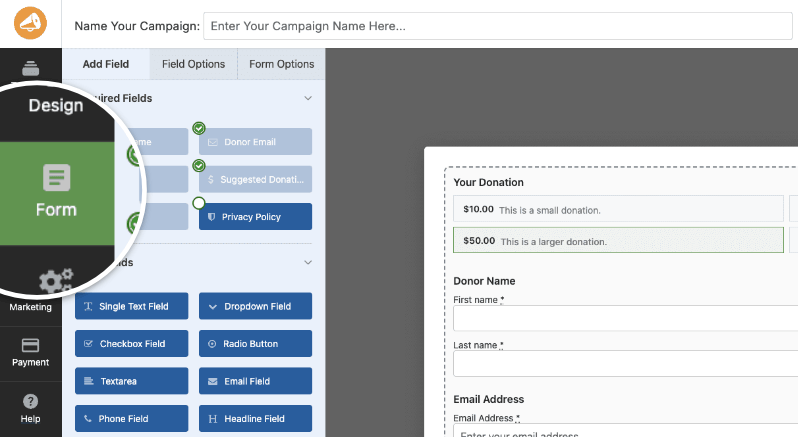
- Auf der linken Seite finden Sie alle verfügbaren Felder: Pflichtfelder (wie Spendername, E-Mail, Zahlung), Standardfelder (wie Text, Dropdowns, Kontrollkästchen) und Pro-Felder (wie Spenderkommentare und Empfehlungscodes).
- Auf der rechten Seite sehen Sie genau, wie das Formular für Ihre Spender im Frontend angezeigt wird.
Befolgen Sie diese einfachen Schritte, um Ihr Formular anzupassen.
Felder hinzufügen: Ziehen Sie jedes Feld vom linken Bereich direkt in Ihre Formularvorschau. Fügen Sie zum Beispiel oben ein Überschriftenfeld mit der Aufschrift „Spende abschließen“ hinzu. Oder ziehen Sie ein Spenderkommentarfeld ein, damit Personen eine Nachricht hinterlassen können. Sie könnten auch ein Dropdown-Feld hinzufügen, das fragt: „Wie sind Sie auf uns aufmerksam geworden?“
Felder neu anordnen: Greifen Sie die Ziehgriffe eines beliebigen Feldes und verschieben Sie es nach oben oder unten. Halten Sie den Fluss einfach und natürlich, wie diese Reihenfolge: Spendername, Spender-E-Mail, Vorgeschlagene Spendenbeträge, Zahlung und Spenderkommentar (falls gewünscht).
Felder bearbeiten: Klicken Sie auf ein beliebiges Feld in der Vorschau. Die Einstellungen öffnen sich auf der linken Seite. Hier können Sie die Beschriftung ändern. Tauschen Sie zum Beispiel „Spendenbetrag“ gegen „Wählen Sie Ihren Geschenkbetrag“. Dann können Sie auch die Ausrichtung, Abstände anpassen oder bei Bedarf benutzerdefiniertes CSS hinzufügen.
Um Ihr Formular so zu gestalten, dass es für Ihre Spender hilfreich ist, können Sie Platzhaltertext wie „Vollständigen Namen eingeben“ oder Hilfetext darunter hinzufügen, um Spender zu leiten. Sie können auch entscheiden, ob es erforderlich oder optional ist.
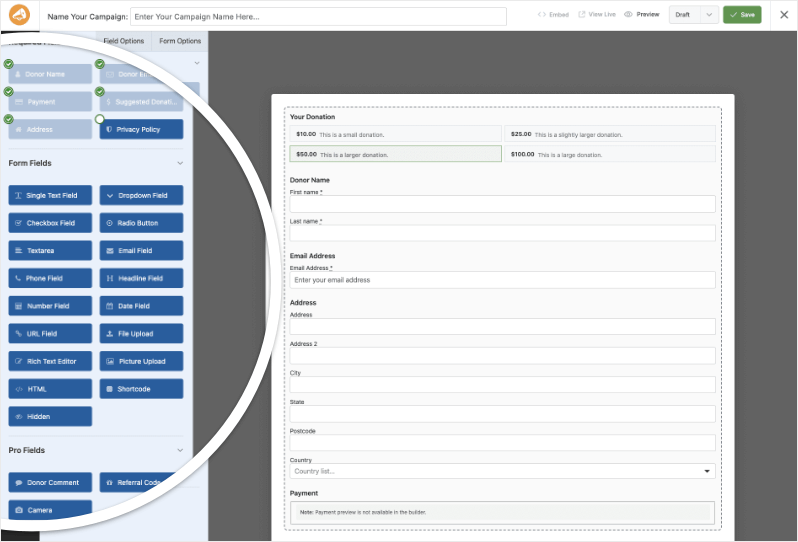
Während Sie diese Änderungen vornehmen, aktualisiert sich das Formular in der Vorschau live, sodass Sie immer genau sehen, was die Spender erleben werden.
Wenn es sauber und einfach aussieht, klicken Sie auf Speichern. Jetzt hat Ihre Kampagne eine benutzerdefinierte Seite und ein perfektes Spendenformular, das zum Testen bereit ist.
Schritt 4: Zahlungs-Gateway verbinden
Jetzt müssen Sie Stripe oder PayPal verbinden, damit Ihr Formular Zahlungen sicher verarbeitet. Charitable macht dies einfach und schnell.
Gehen Sie in Ihrem WordPress-Menü zu Charitable » Einstellungen » Zahlungs-Gateways. Je nach Ihrem Plan sehen Sie hier die für Sie verfügbaren Gateways:
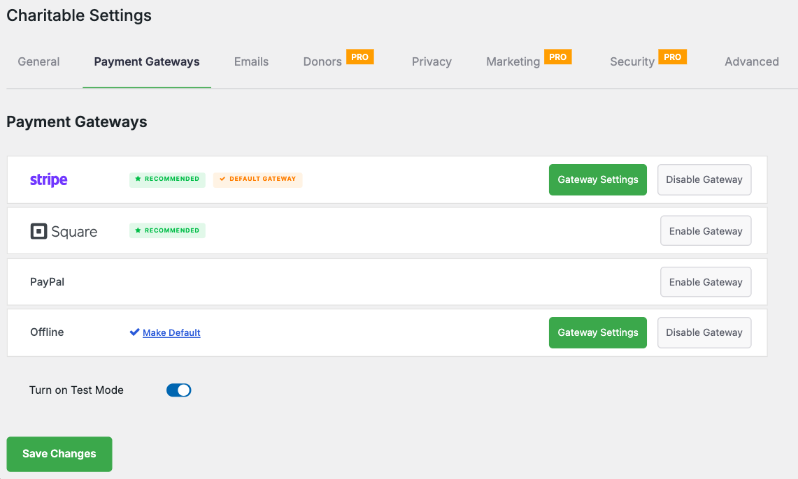
Zuerst empfehle ich, den Testmodus zu aktivieren, während Sie Ihr Gateway einrichten und testen.
Sie können Gateways mit einem einzigen Klick aktivieren und deaktivieren. Wenn sie aktiviert sind, sehen Sie einen grünen Button mit der Aufschrift „Gateway-Einstellungen“. Dieser führt Sie zur Einstellungsseite, auf der Sie Ihre API-Schlüssel hinzufügen oder sich bei Ihrem Zahlungs-Gateway-Konto anmelden können, um die Verbindung herzustellen.
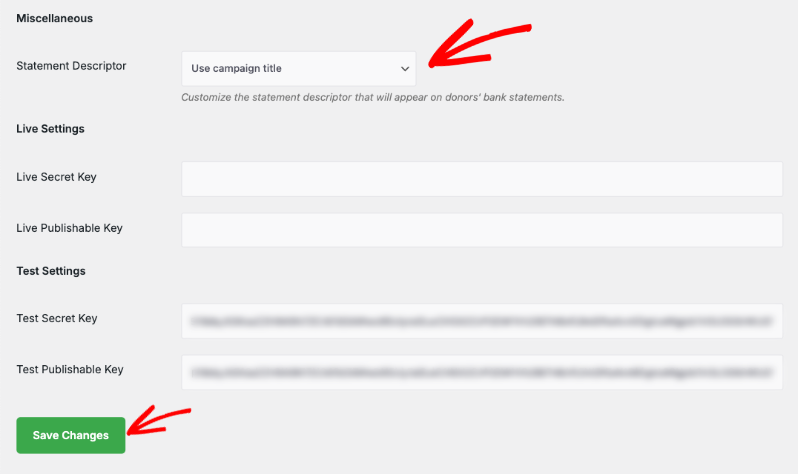
Stellen Sie sicher, dass Sie Ihre Änderungen speichern.
Folgen Sie dieser Anleitung für weitere Details, wie Sie Ihr Gateway verbinden »
Schritt 5: Optimieren Sie Ihre Kampagne
Hier sind einige Tipps und Funktionen, mit denen Sie das Erlebnis Ihrer Spender optimieren können. Ein reibungsloses Erlebnis stellt sicher, dass Spender ihren Beitrag abschließen, Ihre Sache teilen und auch wieder spenden.
Festlegen eines klaren Spendenziels und -termins
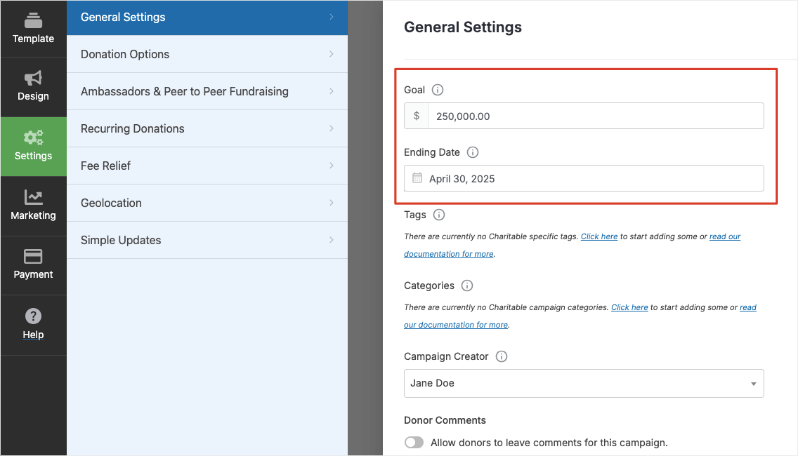
Das Festlegen eines klaren Spendenziels und -termins hilft, Spender zu motivieren und sorgt für ein gesundes Gefühl der Dringlichkeit. Wählen Sie ein Ziel, das realistisch, aber dennoch inspirierend für Ihre Kampagne ist, damit die Unterstützer genau wissen, worauf sie hinarbeiten, und Sie eine einfache Möglichkeit haben, den Erfolg zu messen.
Öffnen Sie in Ihrer Charitable-Kampagne den Tab Einstellungen im linken Menü. Geben Sie unter Allgemeine Einstellungen den Gesamtbetrag ein, den Sie sammeln möchten, z. B. 30.000 €.
Direkt darunter verwenden Sie die Option Enddatum, um festzulegen, wann die Kampagne enden soll, einschließlich des genauen Datums und der Uhrzeit. Für einen Black-Friday-Ansturm könnten Sie ein oder zwei Tage vorher beginnen und ein oder zwei Tage danach enden, um sowohl frühe als auch späte Spender zu erfassen.
Sobald Ihr Ziel und Ihr Enddatum festgelegt sind, zeigt Ihre Kampagnenseite den Spendern automatisch an, wie nah Sie dem Ziel sind und wie viel Zeit noch bleibt. Als Nächstes gibt es noch einige weitere Optionen, mit denen Sie Ihre Kampagne optimieren und Ihren Arbeitsablauf rationalisieren können.
Vorgeschlagene Beträge verwenden
Charitable hilft Ihnen, jeden Spendenmoment optimal zu nutzen, mit Funktionen, die speziell für Non-Profit-Organisationen entwickelt wurden. Diese Tools leiten Spender zu größeren Geschenken und halten sie langfristig engagiert.
Beginnen Sie mit vorgeschlagenen Beträgen. Legen Sie im Tab Einstellungen » Spendenoptionen Beträge fest, die sich für Ihre Kampagne richtig anfühlen – wie 25 €, 50 €, 100 € oder 500 €. Diese Schaltflächen erleichtern es Spendern, schnell auszuwählen, ohne tippen zu müssen.
Spenden mit leistungsstarken Funktionen steigern
Charitable bietet auch leistungsstarke Extras zur Steigerung der Ergebnisse:
- Wiederkehrende Spenden: Fügen Sie ein Kontrollkästchen hinzu, damit Spender einmalige Geschenke in monatliche Unterstützung umwandeln.
- Spendenaktionen von Freunden: Ermöglichen Sie Unterstützern, ihre eigenen Kampagnen zu erstellen, um ihre Netzwerke zu erreichen.
- Einfache Updates: Veröffentlichen Sie Live-Fortschrittsnotizen direkt auf der Kampagnenseite, um Begeisterung zu wecken.
- Geolokalisierung: Zeigen Sie Kampagnen auf einer Karte an, um mit lokalen Spendern in Kontakt zu treten.
- Gebührenbefreiung: Lassen Sie Spender die Stripe/PayPal-Gebühren übernehmen, damit jeder Cent Ihrer Sache zugutekommt.
Mit E-Mail-Marketing verbinden
Verbinden Sie sich im Tab Marketing mit E-Mail-Tools wie Mailchimp oder Constant Contact. So können Sie gezielte Spendenaufrufe und sofortige Dankesschreiben ohne zusätzlichen Aufwand versenden.
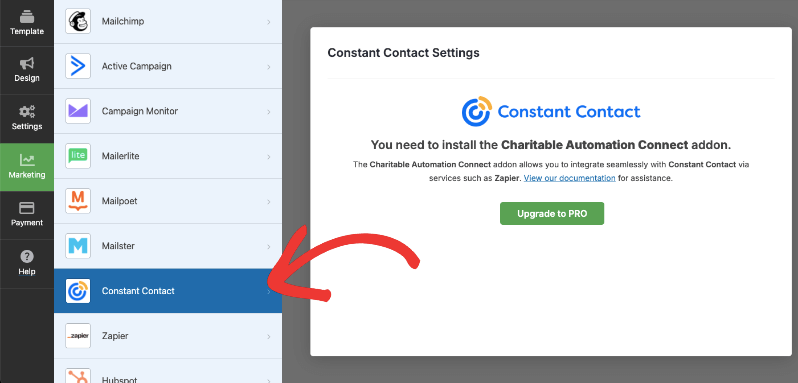
Der Vorgang ist einfach. Befolgen Sie einfach die Anweisungen auf dem Bildschirm.
Lesen Sie vielleicht Die besten WordPress-Plugins für bessere Spenderkommunikation
Schritt 6: Veröffentlichen Sie Ihr Spendenformular
Wenn Sie mit Ihrer Kampagne und Ihrem Formular zufrieden sind, ist es an der Zeit, sie für Spender live zu schalten.
Schauen Sie in die obere rechte Ecke des Builders. Klicken Sie zuerst auf Speichern, um alle Ihre Änderungen zu sichern. Verwenden Sie dann das Dropdown-Menü daneben und wählen Sie Veröffentlichen.
Ihre Kampagne ist live.
Sie können Ihre Kampagne mit den vorgefertigten Blöcken, die im Gutenberg- oder Block-Editor verfügbar sind, zu jeder Seite oder jedem Beitrag hinzufügen. Sie können auch Kampagnen-Shortcodes verwenden, um die Kampagne überall einzubetten, wo Sie sie benötigen.
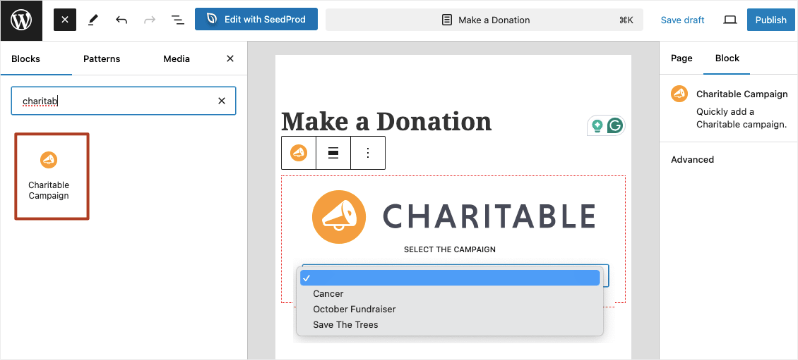
Spender können diese Kampagnenseite besuchen, Ihre Geschichte und Fortschrittsanzeige sehen und über das von Ihnen erstellte benutzerdefinierte Formular spenden.
Ich empfehle, noch einmal zu testen auf Mobilgeräten und Desktops. Sie nehmen jetzt in weniger als 10 Minuten echte Spenden entgegen!
Erfolg Ihres Spendenformulars verfolgen
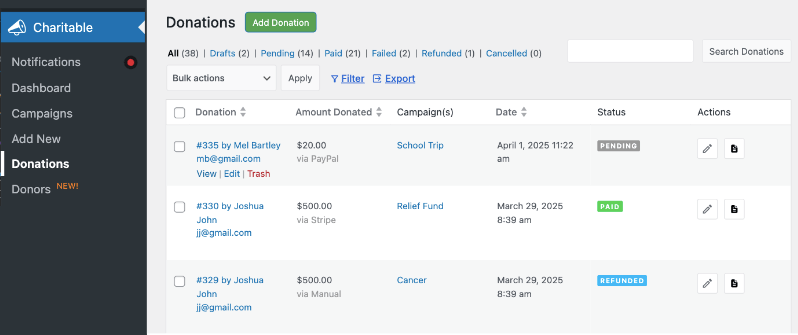
Um zu verstehen, wie gut Ihre Spendenaktionen laufen, verfolgen Sie den Fortschritt Ihrer Kampagne und analysieren Sie die Ergebnisse. Sie können alle Ihre Spendenaufzeichnungen unter Charitable » Spenden einsehen.
Sie können auch vorgefertigte Berichte und Analysen unter Charitable » Berichte einsehen.
Top-Spender: Identifizieren Sie Ihre großzügigsten Unterstützer, damit Sie sie persönlich anerkennen und einbinden können, um Loyalität aufzubauen.
Wiederkehrende Spender: Verfolgen Sie, wer regelmäßig spendet, was hilft, im Laufe der Zeit ein stetiges Einkommen zu erzielen.
Durchschnittlicher Spendenbetrag: Sehen Sie die typische Höhe der Spende, um Ihre vorgeschlagenen Beträge und Spendenaufrufe für bessere Ergebnisse anzupassen.
Gesamtspenden: Überwachen Sie, wie viel Sie bisher gesammelt haben, und bleiben Sie auf Kurs mit Ihren Zielen.
Rückerstattungen: Behalten Sie den Überblick über alle zurückerstatteten Spenden, um genaue Aufzeichnungen zu führen.
Spendenaufschlüsselung: Gewinnen Sie Einblicke nach Kampagne, Datum oder Spendertyp, um zu verstehen, was funktioniert.
Zahlungsmethoden: Überprüfen Sie, welche Gateways Spender bevorzugen, damit Sie Ihre Checkout-Optionen optimieren können.
Echtzeit-Aktivität: Verfolgen Sie Spenden, sobald sie eingehen, damit Sie Live-Updates teilen und Begeisterung wecken können.
LYBUNT- und SYBUNT-Berichte: Verwenden Sie die Berichte „Last Year But Unfortunately Not This“ (LYBUNT) und „Some Year But Unfortunately Not This“ (SYBUNT), um Spender wieder zu aktivieren, die zuvor gespendet haben, aber in letzter Zeit nicht mehr.
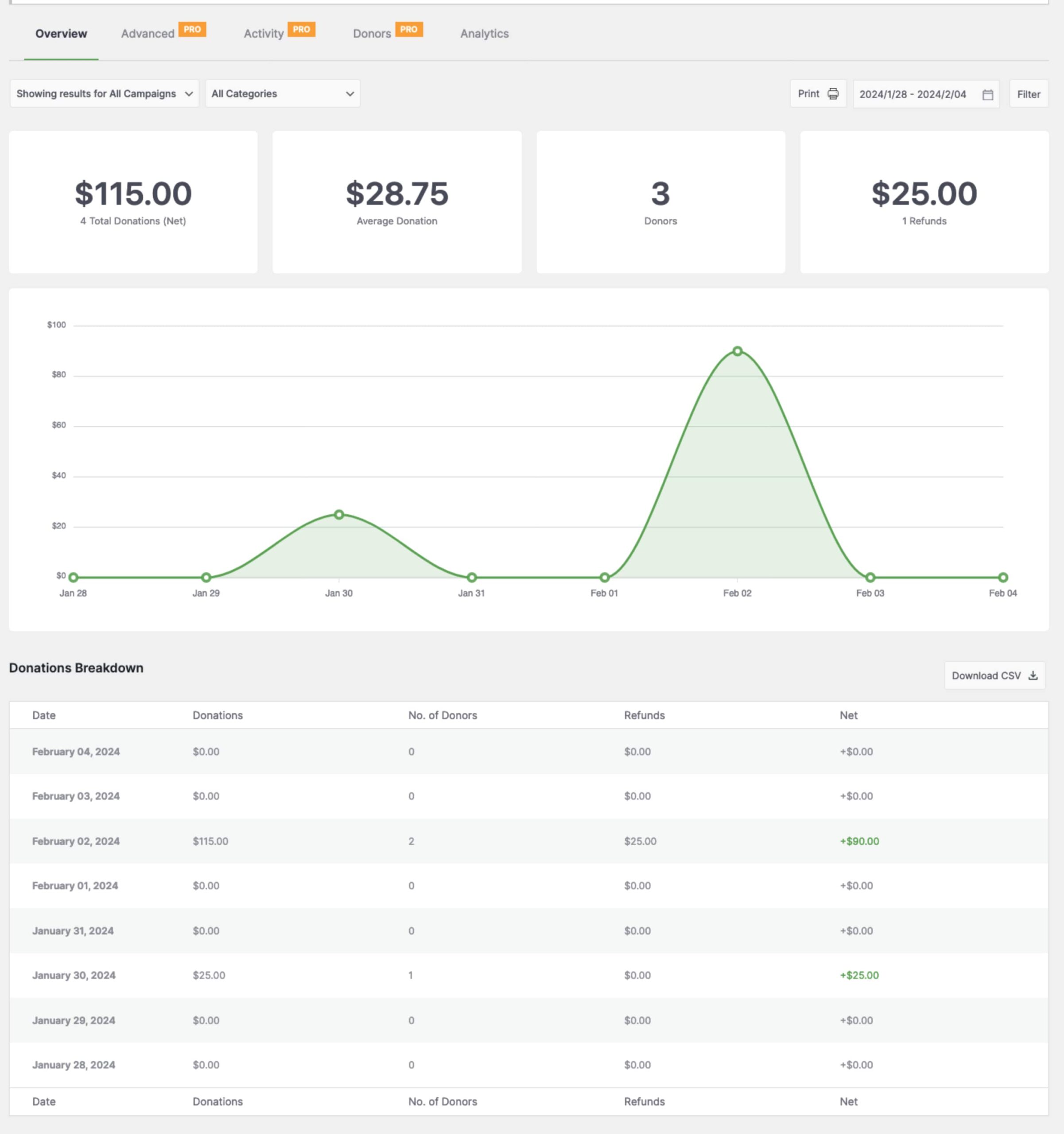
Während Charitable diese Kern-Einblicke abdeckt, verbinden Sie es mit Google Analytics oder E-Mail-Plattformen für tiefere Daten wie Traffic-Quellen. Nutzen Sie diese Berichte, um Erfolge zu feiern, wiederholte Spenden zu fördern und noch stärkere Kampagnen zu planen.
Sehen Sie warum datengesteuerte Fundraiser-Aktionen das Raten jedes Mal schlagen »
Nächste Schritte
Sie haben nun in weniger als 10 Minuten ein vollständiges, professionelles Spendenformular mit den visuellen Buildern von Charitable erstellt. Von der Installation des Plugins über die Anpassung von Feldern, die Verbindung von Zahlungen bis zur Veröffentlichung Ihrer Kampagne – alles funktioniert zusammen, um eine reibungslose Erfahrung für Spender und Ihr Team zu schaffen.
Beginnen Sie, Ihren Kampagnenlink überall zu teilen – E-Mail-Listen, soziale Medien, die Seitenleiste Ihrer Homepage. Denken Sie daran, immer ein paar Spenden im Live-Modus zu testen.
Wenn Sie bereit sind zu skalieren, upgraden Sie auf Pro für wiederkehrende Spenden, Spender-Dashboards und Peer-to-Peer-Fundraising.
Sie können sich noch heute risikofrei mit einer 14-tägigen Geld-zurück-Garantie anmelden.
Das ist alles. Möglicherweise möchten Sie auch unsere anderen Anleitungen lesen:
- Das ultimative Giving Tuesday Toolkit
- Der ultimative Leitfaden für Non-Profits zur Maximierung der Spenden zum Jahresende
FAQs zum Erstellen eines Spendenformulars
Benötige ich Programmierkenntnisse, um den Campaign Visual Builder zu verwenden?
Nein, der Visual Builder ist für alle Benutzer konzipiert – egal, ob Sie Anfänger oder fortgeschrittener Benutzer sind. Sie können Felder visuell per Drag & Drop ziehen und konfigurieren, ohne Code schreiben zu müssen. Optionale benutzerdefinierte CSS-Klassen sind verfügbar, wenn Sie Ihre eigenen Stile hinzufügen möchten.
Funktionieren meine bestehenden Kampagnen und Formulare mit dem neuen Builder?
Ja, alle bestehenden Kampagnen und Spendenformulare funktionieren weiterhin wie bisher. Sie können sie im Visual Builder öffnen, um das Formular nach Belieben visuell anzupassen oder zu verbessern.
Kann ich den Builder verwenden, um mehrere Kampagnen zu erstellen?
Absolut. Es gibt keine Begrenzung für die Anzahl der Kampagnen, die Sie erstellen können, jede mit ihrem eigenen einzigartigen Formular-Design und ihren eigenen Einstellungen über den Builder.
Wie erstelle ich kostenlos eine Spendenseite?
Charitable ermöglicht es Ihnen, kostenlose Spendenseiten und -formulare auf Ihrer Website zu erstellen. Sie können Google Forms verwenden, wenn Sie keine Website haben.
Wie erstelle ich ein Spendenformular für die Schule?
Sie können den Spendenformular-Builder von Charitable oder WPForms verwenden, um ein Formular für die Schule und für beliebige Projekte oder Veranstaltungen zu erstellen.
Sind Pro-Felder im Visual Builder verfügbar?
Ja. Wenn Sie Charitable Pro haben, können Sie erweiterte Felder wie Spenderkommentare und Empfehlungscodes hinzufügen, um leistungsstarke Engagement-Funktionen freizuschalten.
Wie füge ich das Kampagnenformular zu meinen Website-Seiten hinzu?
Nachdem Sie Ihr Formular erstellt und gespeichert haben, verwenden Sie den Einbettungsassistenten oder den Shortcode im Kampagnen-Editor, um das Formular nahtlos auf Beiträgen, Seiten oder Widgets zu platzieren.
Kann ich das Spendenformular vor der Veröffentlichung in der Vorschau anzeigen?
Ja, der Builder zeigt eine Live-Vorschau Ihres Formulars an, die sich sofort aktualisiert, wenn Sie Änderungen vornehmen, sodass Sie immer genau wissen, wie es für Spender aussehen wird.
Was ist der Unterschied zwischen Charitable Lite und Pro?
Charitable Lite ist kostenlos, beinhaltet aber eine Transaktionsgebühr von 3 %. Pro-Pläne eliminieren diese Gebühr und beinhalten erweiterte Funktionen wie wiederkehrende Spenden, Spenderverwaltung, Peer-to-Peer-Fundraising und mehr Zahlungs-Gateways.
Siehe Charitable Lite vs Pro »
Wo erhalte ich Unterstützung, wenn ich Probleme habe?
- Kostenlose Benutzer: Nutzen Sie die Support-Foren von WordPress.org
- Pro-Benutzer: Kontaktieren Sie den Support direkt für prioritäre Unterstützung
- Dokumentation: Sehen Sie sich die umfassende Dokumentationsbibliothek an
- Community: Treten Sie dem Newsletter bei und folgen Sie den sozialen Kanälen für Tipps und Updates
Gibt es Video-Tutorials?
Ja! Abonnieren Sie den Charitable YouTube-Kanal für Schritt-für-Schritt-Anleitungen und Erfolgsgeschichten.
Mehr Tipps zum Fundraising und Ratschläge für gemeinnützige Organisationen?
Wir teilen regelmäßig praktische Anleitungen, bewährte Strategien und Insider-Tipps, um Ihnen zu helfen, mehr Spenden zu sammeln und stärkere Spenderbeziehungen aufzubauen. Schließen Sie sich Tausenden von gemeinnützigen Organisationen an, die unsere besten Inhalte direkt erhalten:
- Abonnieren Sie unseren Newsletter – Erhalten Sie wöchentliche Tipps und exklusive Anleitungen in Ihrem Posteingang
- Abonnieren Sie unseren YouTube-Kanal – Sehen Sie sich Schritt-für-Schritt-Anleitungen und Erfolgsgeschichten an
- Folgen Sie uns auf LinkedIn – Vernetzen Sie sich mit unserer Community und erhalten Sie tägliche Einblicke in Non-Profit-Organisationen
- Folgen Sie uns auf TikTok – Aufschlussreiche & unterhaltsame Videos, die Ihnen helfen, Ihre Sache voranzubringen
- Folgen Sie uns auf Instagram – Lustige Reels und Tipps für gemeinnützige Organisationen
Kein Schnickschnack, nur umsetzbare Ratschläge von Menschen, die die Herausforderungen verstehen, denen Sie täglich gegenüberstehen.





Hinterlassen Sie eine Antwort