Dokumentation für Wohltätigkeitsorganisationen

Erfahren Sie, wie Sie mit klaren Schritt-für-Schritt-Anleitungen das Beste aus Charitable herausholen.

Setting Up the User Dashboard

When you have Charitable’s Ambassadors extension installed, you can take advantage of a new menu to group together pages that relate specifically to logged in users, such as the profile form or campaign creation form.

Creating the User Dashboard Menu

Note: This guide assumes that you have already installed Charitable and set up peer to peer fundraising settings.

  1. Go to Appearance > Menus.
  2. Click the Create a new menu link at the top of page.
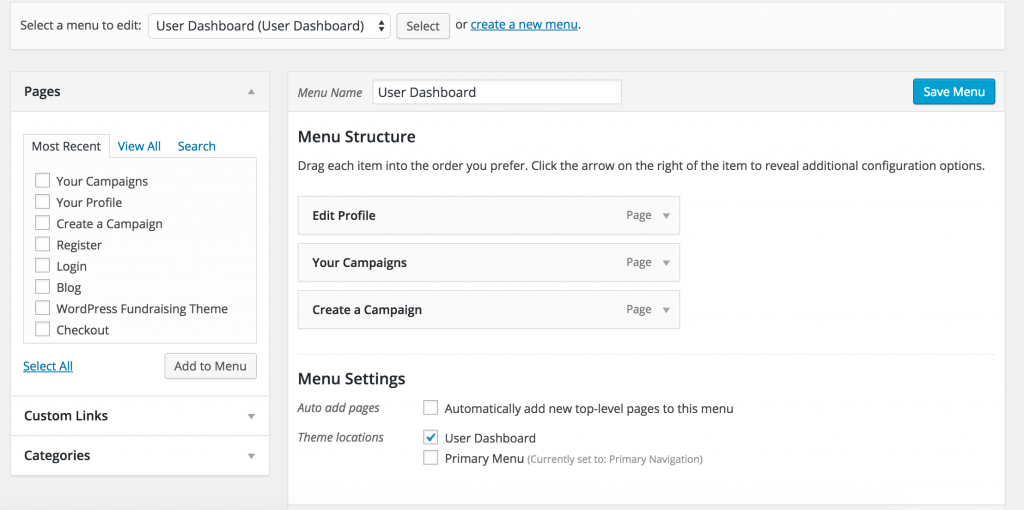
  3. Drag and drop the pages that you would like to form a part of your user dashboard into the Menu Structure area. See our demo site’s setup below:

    User Dashboard Menu
    User Dashboard Menu
  4. In the Menu Settings area, tick User Dashboard for the “Theme locations” setting.
  5. Click Save Menu.

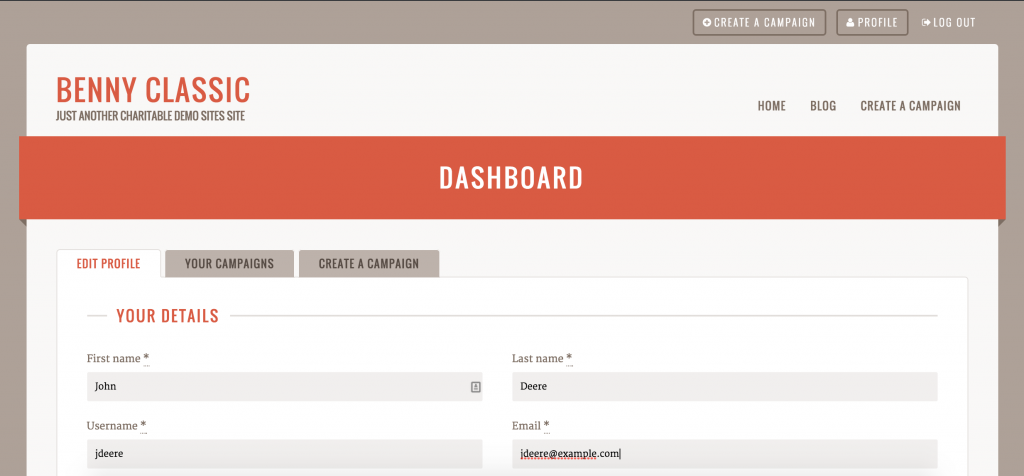
If you are using Reach, you can now access your user dashboard by visiting your website and clicking on the Profile button in the header. This takes you to your dashboard:

Benny's User Dashboard
Reachs User Dashboard

Nächste Schritte

Haben Sie noch Fragen? Wir helfen Ihnen gerne weiter!

Zuletzt geändert:

Was ist neu bei Charitable

Die neuesten Updates anzeigen
🔔 Abonnieren Sie, um unsere neuesten Updates zu erhalten
📧 E-Mails abonnieren

E-Mail-Abonnement

Abonnieren Sie unseren Newsletter

Wir werden Sie nicht spammen. Wir senden nur eine E-Mail, wenn wir glauben, dass sie Ihnen wirklich hilft. Abmeldung jederzeit möglich!

Verbesserung Zahlungen

📱 Turn Mobile Scrollers Into Donors: Meet Charitable’s Mollie Upgrade

Losing mobile supporters because they hate typing out long card numbers on their phones? Charitable’s updated Mollie integration features:

⚡ One-Tap Wallet Checkout: Enable donors to complete their gifts instantly using Apple Pay or Google Pay with a simple face scan, fingerprint, or tap.

💰 No Extra PCI Burden: Skip complex domain verification and security compliance since all wallet transactions run safely through Mollie’s hosted checkout.

🛠️ Custom Cancel Routing: Keep the experience predictable by automatically sending donors who back out to your cancellation page, or use developer filters to route them to a custom page.

Visit this page to learn more.

ambassadors improved Neu

Moderation and Directory Screens In Ambassadors 3.0

Ambassadors 3.0 has new features: moderation and directory screens… now easily see those who are earning donations on your peer to peer network – including campaign creators that might need to be verified – all in one place. Generate reports, email ambassadors and campaign creators directly and more.

🚀 See when campaign creators and ambassadors have updated their campaigns, what donors/donation they have brought in and more.

🎉 Manually add ambassadors and campaign creators, and approve them in one-click!

Besuchen Sie diese Seite, um mehr zu erfahren.

Neu Zahlungen

⚡ Unlock India-Based Donations: Meet Charitable’s Native Razorpay Integration

Trying to collect donations in India? Charitable’s native Razorpay integration features:

⚡ Instant UPI Integration: Accept fast, local donations directly inside your form via apps like PhonePe, Google Pay, Paytm, and BHIM without sending donors away from your site.

📲 Auto-Generated Campaign QRs: Instantly render scannable QR codes encoding a UPI deep link directly on your public campaign pages and sidebars for an effortless “scan-to-give” experience.

💰 Dual Local & Global Reach: Headline your campaigns in INR while seamlessly accepting major international currencies like USD, EUR, GBP, and CAD to maximize global support.

🔁 Seamless Recurring Giving: Fully integrates with the Charitable Recurring addon to manage automatic monthly subscriptions directly through Razorpay without extra code.

↩️ Automatic Two-Way Sync: Keep your books perfectly clean with two-way refund syncing—issue a refund inside WordPress or your Razorpay dashboard and both sides update automatically.

🔒 Webhook-Verified Security: Automatically protect your donation records using HMAC-signed webhook verification to ensure every status update represents real money cleared on the rails.

Besuchen Sie diese Seite, um mehr zu erfahren.

Integration Neu

🎉 New Built-in PushEngage Integration

Struggling with falling email open rates and rising ad costs just to keep your supporters engaged? Charitable’s built-in PushEngage integration features:

🔔 Zero-Fee Direct Messaging: Deliver crisp, instant pop-up notifications straight to your donors’ desktops and mobile devices.

⏱️ Four Smart Automated Triggers: Automatically send updates for immediate donation thank yous, full-list campaign launches, urgent “ending soon” alerts, and goal milestone celebrations.

📈 Group Momentum Broadcasts: Turn private milestones into public wins by automatically broadcasting alerts to your entire subscriber list the moment a campaign hits 50%, 75%, or 100% of its goal.

📊 Automatic Analytics Tracking: Monitor exactly where your incoming notification traffic is coming from with built-in attribution that requires zero complex configuration.

Besuchen Sie diese Seite, um mehr zu erfahren.

Neu Sicherheit

💂‍♂️ Neues DonationGuard 🛡️ Schützt Ihre Spenden automatisch!

Machen Sie sich Sorgen über Karten-Testangriffe oder Spam-Bots, die Ihre Spendenformulare überfluten, aber Sie möchten das Spenden-Erlebnis für Ihre echten Unterstützer nicht beeinträchtigen? Die DonationGuard-Funktionen von Charitable:

🛡️ Echtzeit-Bot-Erkennung: Überwacht aktiv jede Spendeneinreichung auf fünf verschiedene Angriffssignale, ohne Ihre menschlichen Spender zu verlangsamen.

📊 Intelligente Traffic-Bewertung: Bewertet sofort die Aktivität anhand einer erlernten Basislinie der normalen Spendenrhythmen Ihrer Website, um heimliche, langsame Karten-Tests zu erkennen.

🚨 Schweregrad-gestufte Warnungen: Öffnet sofort strukturierte „Angriffsdatensätze“ und benachrichtigt Sie per E-Mail und Admin-Benachrichtigungen, sobald eine Kampagne unter Beschuss gerät.

🎯 Ein-Klick-Abwehr: Setzen Sie sofortige Sicherheit mit der Voreinstellung „Empfohlene Einstellungen“ ein, um Honeypot-, Time Trap- und Rate Limit-Module gleichzeitig zu aktivieren.

🚫 Automatisierte Blocklisten: Stoppen Sie wiederholte Täter dauerhaft, indem Sie verdächtige E-Mail-Adressen automatisch basierend auf Ihren benutzerdefinierten Regeln blockieren.

Besuchen Sie diese Seite, um mehr zu erfahren.