
Befristete Abonnements ermöglichen es Ihnen, eine wiederkehrende Spende so einzustellen, dass sie automatisch endet, entweder nach einer festgelegten Anzahl von Zahlungen oder an einem bestimmten Enddatum, anstatt bis zur manuellen Kündigung durch jemanden zu laufen. Wenn die Laufzeit erreicht ist, schließt Charitable das Abonnement für Sie ab, stoppt die Abrechnung beim Zahlungs-Gateway und kann dem Spender eine Bestätigung per E-Mail senden.
Verfügbar im Charitable Recurring Donations Addon 2.2.0 und neuer.
Hauptmerkmale
- Legen Sie fest, dass eine wiederkehrende Spende nach einer festen Anzahl von Zahlungen endet.
- Oder legen Sie fest, dass sie an einem bestimmten Kalenderdatum endet.
- Abonnements werden automatisch abgeschlossen, wenn die Laufzeit erreicht ist, ohne manuelle Kündigung.
- Das Abonnement des Gateways wird gleichzeitig gekündigt, sodass dem Spender nie mehr als die Laufzeit berechnet wird.
- Die Laufzeit wird im Admin-Bildschirm für wiederkehrende Spenden, im Spender-Dashboard und auf der Spendenquittung angezeigt.
- Eine Fortschrittsanzeige zeigt an, wie viele Zahlungen in Richtung eines Zahlungslimits geleistet wurden.
- Funktioniert mit dem bestehenden Genehmigungs-Workflow für Spender, sodass eine Laufzeitänderung vom Spender genehmigt werden kann, bevor sie wirksam wird.
Warum befristete Abonnements verwenden?
Viele Kampagnen bitten Unterstützer um eine definierte Zusage, z. B. eine 12-monatige Zusage oder eine Kapitalbeschaffungskampagne, die für einen bestimmten Zeitraum läuft. Zuvor lief jede wiederkehrende Spende auf unbestimmte Zeit, sodass das Personal jede manuell kündigen musste, wenn die Zusage endete. Befristete Abonnements ermöglichen es Ihnen, die Zusage einmal festzulegen und Charitable sie planmäßig beenden zu lassen, was Ihre Berichterstattung übersichtlich hält und Spender vor unerwarteten Abbuchungen schützt.
Sehen Sie es in Aktion
Voraussetzungen
- Charitable Recurring Donations Addon 2.2.0 oder neuer.
- Ein Stripe-Abonnement. Abonnementlaufzeiten werden über den Bildschirm Abonnement aktualisieren konfiguriert, der derzeit Stripe unterstützt.
- Für die Durchsetzung des Enddatums bis zum genauen Tag ist Charitable Pro 1.8.16 oder neuer erforderlich (dies verwendet das native cancel_at von Stripe). In früheren Versionen schließt ein integrierter Backstop das Abonnement immer noch bei der ersten Verlängerung nach Erreichen der Laufzeit ab.
So legen Sie eine Laufzeit für eine wiederkehrende Spende fest
Schritt 1: Abonnement aktualisieren
Gehen Sie in Ihrem WordPress-Admin zu Charitable » Spenden und öffnen Sie die wiederkehrende Spende, die Sie begrenzen möchten. Öffnen Sie im rechten Bereich das Dropdown-Menü Aktionen für Spenden.
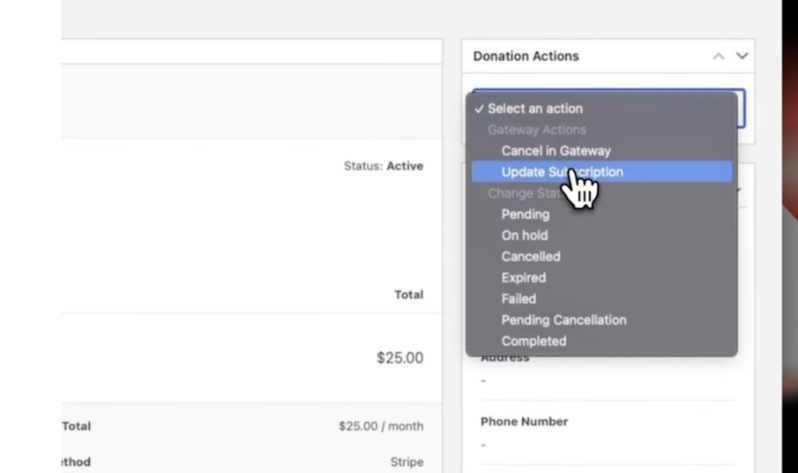
Klicken Sie von hier aus auf Abonnement aktualisieren.
Ein Popup wird angezeigt, in dem Sie den Betrag, den Abrechnungszeitraum, die Abonnementlaufzeit und mehr ändern können.
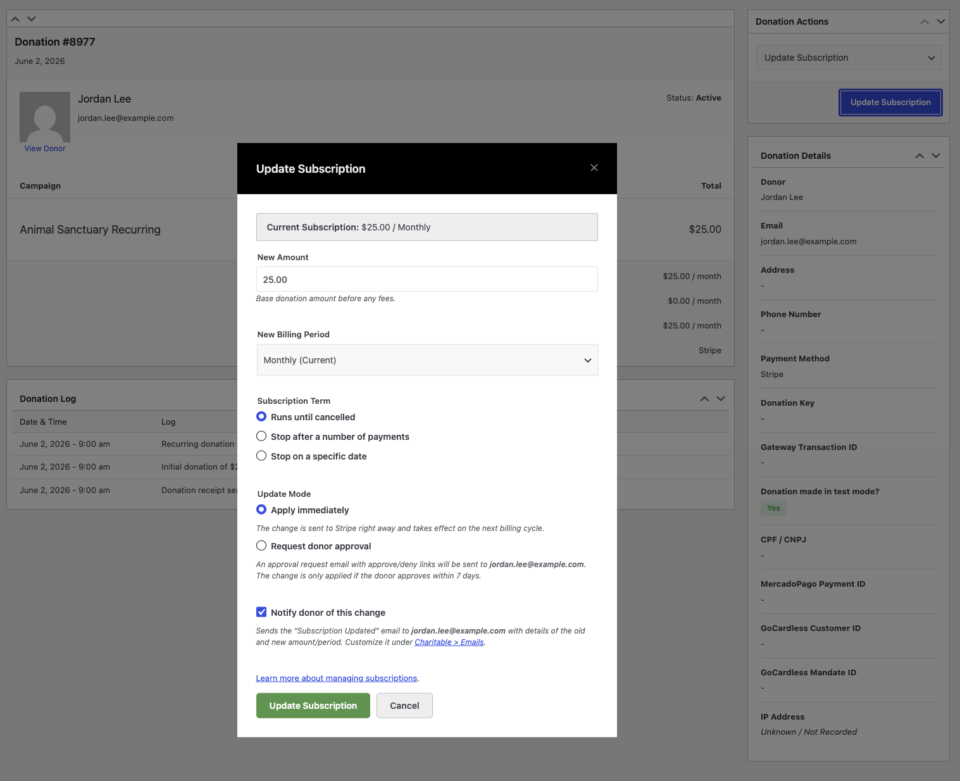
Schritt 2: Eine Abonnementlaufzeit festlegen
Sie können eine von zwei Optionen zum Festlegen der Laufzeit wählen:
Stopp nach einer Anzahl von Zahlungen:
Geben Sie die Gesamtzahl der Zahlungen ein (z. B. 12). Charitable wird das Abonnement automatisch kündigen, sobald diese Anzahl von Abbuchungen abgeschlossen ist. Dies ist ideal für Spendenaktionen, Jubiläumskampagnen und Ratenzahlungen.
Stopp an einem bestimmten Datum:
Wählen Sie ein bestimmtes Kalenderdatum (z. B. 3. Juni 2027). Charitable wird das Abonnement an diesem Datum kündigen. Diese Option eignet sich für projektbasierte Kampagnen mit einem definierten Enddatum.
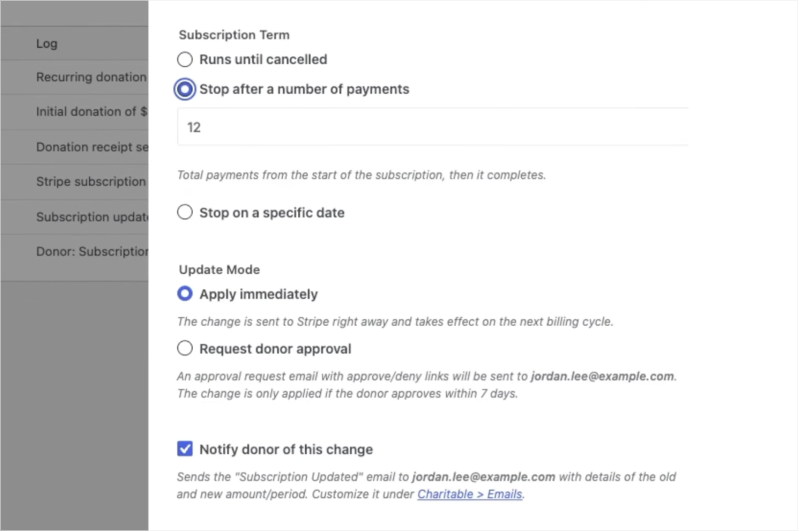
Schritt 3: Speichern und Bestätigen
- Klicken Sie auf Abonnement aktualisieren , um die Änderungen zu übernehmen.
- Bestätigen Sie alle angezeigten Aufforderungen.
- Charitable wird den neuen Begriff sofort an Stripe kommunizieren. Das Spendenprotokoll wird mit einer Bestätigung aktualisiert und spiegelt den neuen Plan und die Details des Begriffs im Abonnementdatensatz wider.
Schritt 4: Optional: Spendergenehmigung für Änderungen anfordern
Wenn Sie Änderungen im Namen eines Spenders vornehmen, z. B. den Betrag oder die Laufzeit anpassen, können Sie die Option Spendergenehmigung anfordern auswählen, bevor Sie speichern.
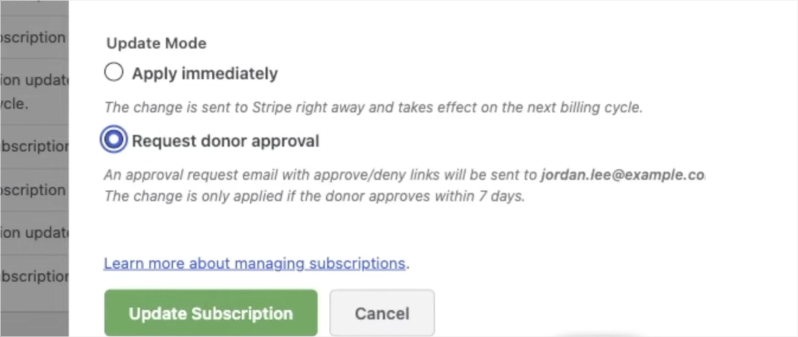
Dies sendet eine E-Mail an den Spender mit den vorgeschlagenen Änderungen. Der Spender kann die Änderungen direkt aus der E-Mail genehmigen oder ablehnen, was eine klare Nachverfolgung gewährleistet und die Kontrolle des Spenders über seine Spenden aufrechterhält.
Wann Sie dies verwenden würden: Feste Laufzeit vs. Unbefristet
Nicht jedes Programm für wiederkehrende Spenden benötigt eine Laufzeit. Hier ist eine kurze Anleitung, die Ihnen hilft zu entscheiden, welcher Ansatz für jede Kampagne geeignet ist.
| Szenario | Bester Ansatz | Warum |
|---|---|---|
| Jährliche Spendenaktion („50 $/Monat für 12 Monate spenden“) | Feste Laufzeit: 12 Zahlungen | Die Verpflichtung wird im Voraus definiert. Charitable beendet sie automatisch, wenn die Spendenaufforderung erfüllt ist. |
| Kapitalbeschaffungskampagne mit einer Finanzierungsfrist | Feste Laufzeit: spezifisches Enddatum | Die Kampagne endet an einem bekannten Datum. Nach Ende der Kampagne werden keine Spender mehr belastet. |
| Matching-Geschenk-Fenster („Wir verdoppeln jeden Dollar für 6 Monate“) | Feste Laufzeit: 6 Zahlungen | Das Matching läuft ab. Das wiederkehrende Geschenk sollte mit ablaufen, anstatt ungematcht fortzufahren. |
| Gedenk- oder Ehrungsfonds, der an ein Jubiläumsjahr gebunden ist | Feste Laufzeit: spezifisches Enddatum | Die Kampagne ehrt einen definierten Zeitraum. Eine feste Laufzeit beendet sie mit Absicht. |
| Neue Spender-Herausforderung („Machen Sie Ihre ersten 3 Geschenke“) | Feste Laufzeit: 3 Zahlungen | Senkt die Hürde für erstmalige wiederkehrende Spender, indem die Verpflichtung überschaubar erscheint. |
| Monatliche Dauerspender ohne definiertes Ende | Unbefristet | Der Spender beabsichtigt fortlaufende Unterstützung. Keine Laufzeit erforderlich. |
| Laufende operative oder programmatische Unterstützung | Unbefristet | Der Bedarf läuft nicht ab. Lassen Sie die Beziehung natürlich weiterlaufen. |
Konfigurationsoptionen
Abonnementlaufzeit-Typen
| Option | Was es tut | Eingabe | Notizen |
|---|---|---|---|
| Lauf bis zur Kündigung | Der historische Standard. Das Abonnement läuft bis zur Kündigung weiter. | Keine | Es wird kein Ende angewendet. |
| Stopp nach einer Anzahl von Zahlungen | Das Abonnement wird abgeschlossen, sobald die Gesamtzahl der Zahlungen erreicht ist. | Ganze Zahl, 1 bis 1000 | Der Admin-Bildschirm zeigt eine Fortschrittsanzeige „X von Y bezahlten Zahlungen“. |
| Stopp an einem bestimmten Datum | Das Abonnement endet am oder nach dem gewählten Datum. | Ein zukünftiges Datum | Das Datum muss in der Zukunft liegen. Ein vergangenes Datum wird abgelehnt. |
Was passiert, wenn die Laufzeit erreicht ist
Wenn die letzte Zahlung erfolgt ist oder das Enddatum überschritten wurde, wird Charitable Folgendes tun: 1. Die wiederkehrende Spende als Abgeschlossen markieren. 2. Das Abonnement beim Zahlungs-Gateway kündigen, damit keine weiteren Abbuchungen erfolgen. 3. Die E-Mail Wiederkehrende Spende abgeschlossen senden, falls diese E-Mail in Ihren Einstellungen aktiviert ist.
Wo die Laufzeit erscheint
- Admin-Bildschirm für wiederkehrende Spenden: eine Laufzeit-Zeile mit einer Fortschrittsanzeige für zählerbasierte Laufzeiten.
- Spender-Dashboard: ein kurzer Hinweis wie „für 12 Zahlungen“ oder „bis 3. Juni 2027“.
- Spendenquittung: derselbe Laufzeit-Hinweis.
Fehlerbehebung
Das Abonnement wurde nicht am exakten Enddatum abgeschlossen
Die exakte Tageskündigung hängt von Stripes nativem `cancel_at` ab, das von Charitable Pro 1.8.16 und neueren Versionen gesetzt wird. In früheren Versionen schließt die integrierte Rückfallebene das Abonnement am ersten Verlängerungsdatum nach Ablauf des Enddatums ab, anstatt am Tag selbst. Aktualisieren Sie Charitable Pro für taggenaue Präzision.
Die Optionen für die Abonnementlaufzeit werden nicht angezeigt
Laufzeit-Steuerelemente erscheinen im Bildschirm „Abonnement aktualisieren“ für aktive Stripe-Abonnements. Abonnement-Aktualisierungen werden derzeit für Stripe unterstützt, daher werden die Laufzeit-Optionen nicht für andere Gateways angezeigt.
Die E-Mail „Wiederkehrende Spende abgeschlossen“ wurde nicht gesendet
Bestätigen Sie, dass die E-Mail „Wiederkehrende Spende abgeschlossen“ unter den E-Mail-Einstellungen von Charitable aktiviert ist. Die E-Mail wird nur ausgelöst, wenn das Abonnement tatsächlich abgeschlossen wird und die E-Mail aktiviert ist.
Entwicklerressourcen
Hooks & Filter
charitable_recurring_term_type— Filtert den aufgelösten Laufzeittyp (unlimited,countoderend_date) für eine wiederkehrende Spende.charitable_recurring_end_date— Filtert den Zeitstempel des Enddatums (Unix-Sekunden, UTC) für eine Laufzeit mit Enddatum.charitable_recurring_renewal_donation_created— Wird ausgelöst, nachdem eine Verlängerungsspende erstellt wurde. Die Rückfallebene mit fester Laufzeit hängt sich hier ein, um das Abonnement abzuschließen, sobald die Laufzeit erreicht ist.charitable_recurring_donation_completed— Wird ausgelöst, wenn ein Abonnement als abgeschlossen markiert wird, was das Gateway zur Kündigung des Abonnements verwendet.
Nützliche Funktionen
charitable_recurring_validate_term( $type, $value )— Validiert und normalisiert eine vorgeschlagene Laufzeit und gibt ein Array oder einen WP_Error zurück.charitable_recurring_calculate_end_timestamp( $start_ts, $period, $interval, $count )— Gibt den UTC-Zeitstempel zurück, zu dem eine zählerbasierte Laufzeit enden soll. Kalenderabhängig.charitable_recurring_get_term_label( $donation )— Gibt eine lesbare Bezeichnung für die Laufzeit einer Spende zurück, z. B. „für 12 Zahlungen“ oder „bis 3. Juni 2027“.
Zusätzliche Ressourcen
- Ändern von wiederkehrenden Spendenbeträgen und Abrechnungsperioden
- Übersicht über wiederkehrende Spenden
- E-Mails für wiederkehrende Spenden
Hilfreiche Links
🤝 Holen Sie sich Hilfe, wenn Sie sie brauchen
📑 Finden Sie die Anleitung, die Sie benötigen
Durchsuchen Sie den Dokumentations-Hub →
⬇️ Laden Sie bewährte Strategien, Kampagnenideen und Experten-Tools herunter
Holen Sie sich das Fundraising-Kit →
🔗 Lassen Sie Ihren KI-Assistenten die Fundraising-Arbeit für Sie erledigen.
Verbinden Sie Charitable mit Ihrem KI-Assistenten →
💸 Holen Sie sich kostenlose Fundraising-Ressourcen
Besuchen Sie den Charitable Fundraising Hub →
🤔 Haben Sie Fragen zu Charitable?
Charitable FAQs →
Benötigen Sie Hilfe beim Verständnis von Begriffen und Fachjargon für gemeinnützige Organisationen?
Siehe unser Glossar für gemeinnützige Organisationen→



