
Der Spenden-Feed zeigt eine Live-Liste von Spenden, die auf jeder Seite oder in jedem Beitrag gescrollt werden kann – damit Sie Transparenz schaffen, Besucher inspirieren und Social Proof für Ihre Kampagnen aufbauen können. Er ist ab dem Charitable Pro Plugin 1.8.13+ verfügbar.
Der Spenden-Feed ist sowohl als Shortcode als auch als Gutenberg-Block verfügbar und vollständig anpassbar: Wählen Sie zwischen einer Listen-/Tabellenansicht oder einem Kartenraster, steuern Sie genau, welche Spenderinformationen angezeigt werden, wenden Sie Farbthemen an und aktivieren Sie AJAX-Paginierung – alles, ohne eine Zeile Code anfassen zu müssen.
Inhaltsverzeichnis
Hauptmerkmale
Erstens erhalten Sie zwei Arten von Ansichten – die Listen- und Tabellenansicht mit Spaltenüberschriften und ein responsives Kartenraster – umschaltbar mit einer einzigen Einstellung.
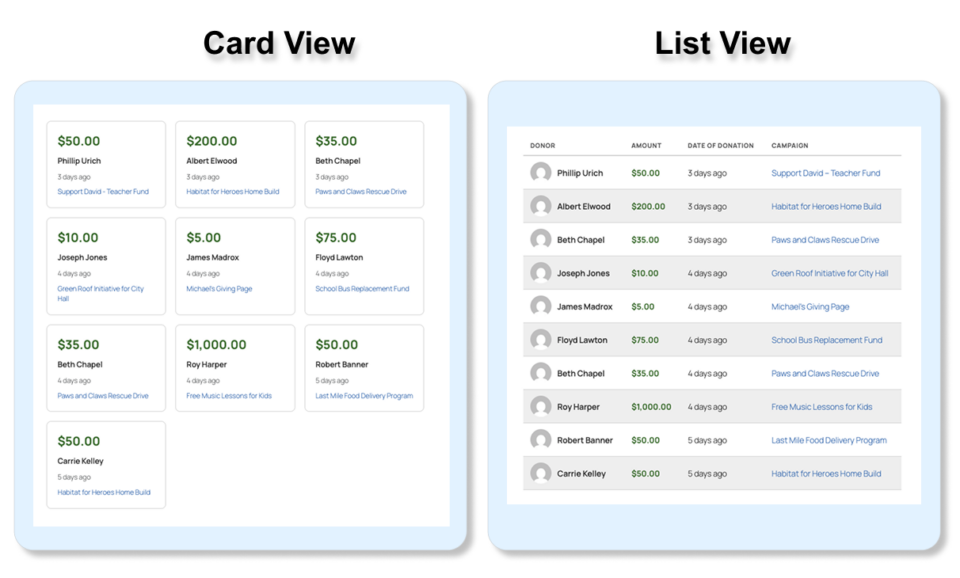
Weitere Funktionen umfassen:
- Flexible Anzeigeoptionen: Zeigen Sie Avatare, Vornamen, Nachnamen, Spendenbetrag, Datum, Kommentar, Kampagnennamen und Spenderstandort unabhängig voneinander an oder blenden Sie sie aus.
- Intelligente Filterung: Filtern Sie nach Kampagne, Datumsbereich (einschließlich benutzerdefinierter Von-/Bis-Daten), Mindestbetrag, Spendername-Suche oder einer bestimmten Liste von Spenden-IDs.
- Spendergruppierung: Fassen Sie optional mehrere Spenden desselben Spenders zu einem einzigen Eintrag zusammen, der deren Gesamtbetrag anzeigt, mit einem „Gesamt“-Badge.
- AJAX-Paginierung: Nummerierte Seiten oder eine Schaltfläche „Mehr laden“ – beide vollständig AJAX-gesteuert ohne Seitenneuladungen.
- Umschalter für Tabellenkopfzeile: Blenden Sie optional die Spaltenkopfzeile in der Listenansicht aus, um ein saubereres eingebettetes Aussehen zu erzielen.
- Farbthemen: Sieben unabhängige Farbsteuerungen (Primär-/Akzentfarbe, Betrag, Rahmen, Hintergrund alternierender Zeilen, Hintergrund beim Überfahren, Kopfzeilentext, Sekundärtext).
- Schriftgröße und Karten-Ausrichtung: Skalierung der Schriftgröße pro Block und Links-/Mittel-/Rechtsausrichtung der Karten im Kartenraster.
- Spenderstandort: Zeigen Sie Stadt, Bundesland und/oder Land unter dem Spendername an – jedes Feld einzeln umschaltbar.
- Unterstützung für anonyme Spenden: Anonyme Spenden zeigen einen Platzhalternamen und -avatar;
include_anonymoussteuert, ob sie überhaupt angezeigt werden. - Entwickler-Filter-Hooks: Neun
apply_filters()-Hooks in der Abfrage-, Daten-, Anzeige- und Ausgabelogik für vollständige Anpassung durch Entwickler.
Warum einen Spenden-Feed verwenden?
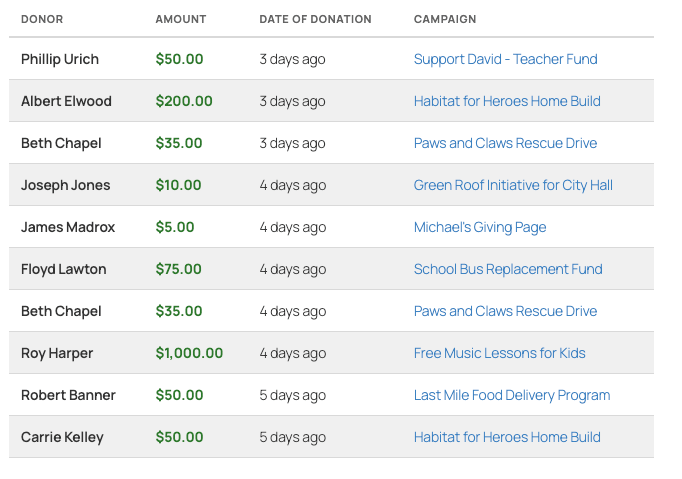
Ein Spenden-Feed zeigt Besuchern, dass echte Menschen spenden – und das gerade jetzt. Diese Art von Social Proof kann die Konversionsraten auf Kampagnen- und Fundraising-Seiten sinnvoll erhöhen.
- Transparenz: Lassen Sie Unterstützer die Auswirkungen der Gemeinschaft um sie herum sehen.
- Social Proof: Das Ansehen eines Stroms von Spenden ermutigt zögerliche Besucher zum Spenden.
- Anerkennung: Spender schätzen es, wenn ihre Beiträge öffentlich anerkannt werden.
- Engagement: Ein Live-Feed auf einer Homepage oder Kampagnenseite hält Inhalte frisch und aktiv.
- Vertrauen: Sichtbare Spenderaktivität signalisiert, dass Ihre Organisation aktiv und gut unterstützt wird.
Anwendungsfälle
- Zeigen Sie aktuelle Spenden auf einer kampagnenspezifischen Seite an, um den Schwung zu verdeutlichen.
- Binden Sie einen seitenweiten Feed auf der Startseite ein, um Ihre gesamte Spendergemeinschaft zu feiern.
- Zeigen Sie einen gefilterten Spenden-Feed oberhalb eines bestimmten Betrags an, um Großspenden hervorzuheben.
- Verwenden Sie die Kartenansicht in einer Seitenleiste oder einem Widget-Bereich für einen kompakten „Spenderwand“-Effekt.
- Verwenden Sie
donation_ids, um bestimmte Spenden für eine kuratierte Präsentation auszuwählen. - Verwenden Sie
groupby_donor, um eine vereinfachte Spenderliste zu erstellen, die Gesamtbeträge anstelle einzelner Transaktionen anzeigt. - Zeigen Sie den Feed anonymisiert an (mit
show_first_name=0 show_last_name=0) für datenschutzbewusste Kampagnen.
Sehen Sie es in Aktion
Ein Video wird bald hier gepostet – schauen Sie bald wieder vorbei!
Erste Schritte
Voraussetzungen
- Charitable Pro (Version 1.8.13 oder neuer)
- WordPress 6.2 oder neuer
- PHP 7.4 oder neuer
Aktivierung
Der Shortcode und Block „Donations Feed“ sind sofort nach der Aktivierung von Charitable Pro verfügbar – keine zusätzlichen Schritte erforderlich. Der Shortcode-Tag lautet [charitable_donations_feed] und der Block erscheint im Block-Editor unter der Kategorie Widgets als Donations Feed.
Verwendungsmethoden
Shortcode
Fügen Sie den Shortcode zu jeder Seite, jedem Beitrag, Widget oder jeder Vorlagendatei hinzu:
[charitable_donations_feed]Dies rendert den Feed mit allen Standardeinstellungen – Listenansicht, die 10 neuesten Spenden, alle Felder angezeigt.
Einfaches Beispiel mit gängigen Optionen:
[charitable_donations_feed view="card" number="12" cards_per_row="4" orderby="amount"]Filterung auf eine bestimmte Kampagne:
[charitable_donations_feed campaign="42" number="5" show_campaign="0"]Verwendung in einer PHP-Vorlage:
echo do_shortcode( '[charitable_donations_feed view="list" number="20" pagination="on"]' );WordPress Gutenberg-Block
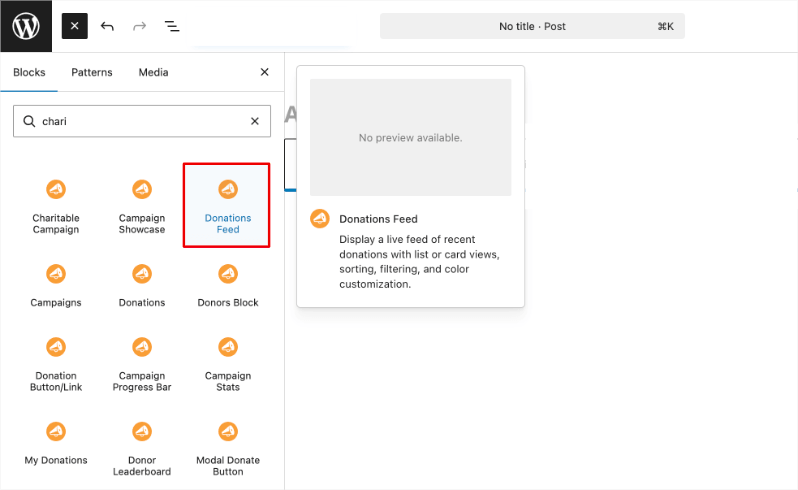
- Öffnen Sie den WordPress-Block-Editor auf einer beliebigen Seite oder einem Beitrag.
- Klicken Sie auf den + -Inserter und suchen Sie nach Donations Feed.
- Klicken Sie auf den Block, um ihn einzufügen. Eine Live-Server-Vorschau wird sofort gerendert.
- Öffnen Sie die Blockeinstellungen-Seitenleiste (rechtes Feld), um alle Optionen zu konfigurieren:
- Inhaltspanel – Ansichtstyp, Titel, Beschreibung, Anzahl der Spenden und Karten pro Zeile (nur Kartenansicht).
- Filterpanel – Kampagne, Sortieren nach, Reihenfolge, Datumsbereich, Mindestbetrag, Spendername-Suche und spezifische Spenden-IDs.
- Anzeigefelder-Panel – Sichtbarkeit von Tabellenkopfzeile, Avatar, Vor-/Nachname, Betrag, Datum, Kommentare, Kampagnenname, Standort (mit Unter-Toggles für Stadt/Bundesland/Land) umschalten.
- Paginierungs-Panel – Paginierung aktivieren und zwischen nummerierten Seiten oder einer „Mehr laden“-Schaltfläche wählen.
- Styling-Panel – Abwechselnde Zeilenfarben, Schriftgröße und Karten-Ausrichtung.
- Farben-Panel – Sieben einzelne Farbwähler für vollständige Theme-Kontrolle.
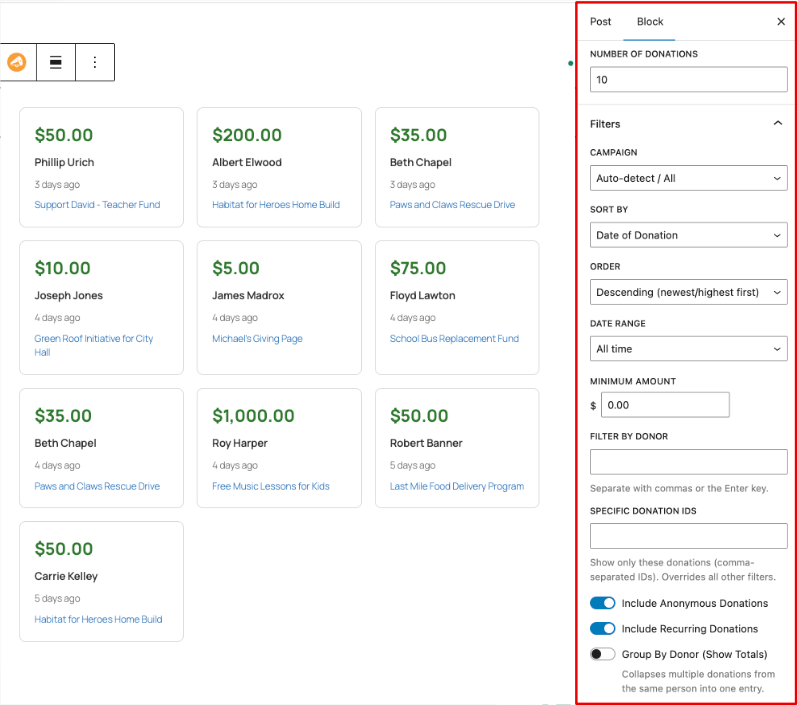
Die Blockvorschau aktualisiert sich in Echtzeit, während Sie die Einstellungen in der Seitenleiste ändern.
Vollständige Parameterreferenz
Hinweis: Alle booleschen Parameter akzeptieren
1/0,true/false,yes/nooderon/off.
Kernparameter
Ansicht
- Typ: String
- Standard:
Liste - Optionen:
list|card - Beschreibung: Steuert das allgemeine Layout.
liststellt eine responsive Tabelle mit Spaltenüberschriften dar.cardstellt ein CSS-Raster aus einzelnen Spendenkarten dar. - Beispiel:
view="card"
Nummer
- Typ: Integer
- Standard:
10 - Beschreibung: Die maximale Anzahl der pro Seite anzuzeigenden Spenden. Wenn die Paginierung aktiviert ist, ist dies die Anzahl, die pro Seite angezeigt wird.
- Beispiel:
number="20"
Karten pro Zeile
- Typ: Integer
- Standard:
3 - Beschreibung: Gilt nur, wenn
view="card". Legt die Anzahl der Spalten im Kartenraster fest. Auf Tablet-Bildschirmen (≤900px) kollabiert das Raster automatisch auf 2 Spalten; auf Mobilgeräten (≤480px) kollabiert es auf 1. - Beispiel:
cards_per_row="4"
card_alignment
- Typ: String
- Standard:
links - Optionen:
left|center|right - Beschreibung: Gilt nur, wenn
view="card". Richtet den Text und Inline-Elemente innerhalb jeder Karte aus. - Beispiel:
card_alignment="center"
font_size
- Typ: Integer
- Standard:
14 - Beschreibung: Legt die Basisschriftgröße in Pixel für allen Text innerhalb des Feeds fest. Kindelemente, die in
em-Einheiten dimensioniert sind, skalieren proportional. - Beispiel:
font_size="16"
Filterparameter
kampagne
- Typ: String (numerische ID)
- Standard: (automatische Erkennung)
- Beschreibung: Filtert Spenden einer einzelnen Kampagne anhand ihrer WordPress-Post-ID. Wenn auf einer Kampagnenseite verwendet, wird die Kampagne automatisch erkannt und dieser Parameter kann weggelassen werden. Übergeben Sie einen leeren String für alle Kampagnen.
- Beispiel:
campaign="42"
orderby
- Typ: String
- Standard:
Datum - Optionen:
date|amount|first_name|last_name|campaign_name - Beschreibung: Das Feld, das zum Sortieren der Spendenergebnisse verwendet wird.
- Beispiel:
orderby="amount"
order
- Typ: String
- Standard:
DESC - Optionen:
DESC|ASC - Beschreibung: Sortierrichtung.
DESCzeigt die neuesten/höchsten zuerst an;ASCzeigt die ältesten/niedrigsten zuerst an. - Beispiel:
order="ASC"
date_range
- Typ: String
- Standard:
all_time - Optionen:
all_time|last_7_days|last_30_days|last_year|custom - Beschreibung: Begrenzt die Ergebnisse auf Spenden innerhalb eines Zeitfensters. Verwenden Sie
custommitdate_fromunddate_to, um einen genauen Bereich anzugeben. - Beispiel:
date_range="last_30_days"
date_from
- Typ: String (JJJJ-MM-TT)
- Standard: (leer)
- Beschreibung: Startdatum für einen benutzerdefinierten Datumsbereich. Wird nur verwendet, wenn
date_range="custom". - Beispiel:
date_from="2025-01-01"
date_to
- Typ: String (JJJJ-MM-TT)
- Standard: (leer)
- Beschreibung: Enddatum für einen benutzerdefinierten Datumsbereich. Wird nur verwendet, wenn
date_range="custom". - Beispiel:
date_to="2025-12-31"
mindestbetrag
- Typ: Float
- Standard:
0 - Beschreibung: Zeigt nur Spenden ab diesem Betrag an. Nützlich, um bedeutende Beiträge hervorzuheben. Setzen Sie auf
0, um alle Beträge einzuschließen. - Beispiel:
minimum_amount="25"
include_anonymous
- Typ: Boolean
- Standard:
1 - Beschreibung: Ob Spenden, die als anonym markiert sind, eingeschlossen werden sollen. Wenn aktiviert, werden anonyme Spender mit einem Platzhalternamen („Anonym“) und einem generischen Avatar angezeigt.
- Beispiel:
include_anonymous="0"
include_recurring
- Typ: Boolean
- Standard:
1 - Beschreibung: Ob wiederkehrende Spendenzahlungen im Feed enthalten sein sollen.
- Beispiel:
include_recurring="0"
groupby_donor
- Typ: Boolean
- Standard:
0 - Beschreibung: Wenn aktiviert, werden mehrere Spenden desselben Spenders zu einem einzigen Eintrag zusammengefasst, der deren kumulierten Gesamtbetrag anzeigt. Auf gruppierten Einträgen wird ein „Gesamt“-Badge angezeigt. Nützlich, um eine Spenderliste anstelle eines Transaktionsprotokolls zu erstellen.
- Beispiel:
groupby_donor="1"
donor_search
- Typ: String
- Standard: (leer)
- Beschreibung: Filtert Ergebnisse nach einem bestimmten Spender anhand des Namens (Teilübereinstimmung bei Vorname, Nachname oder vollständigem Namen). Wenn ein numerischer Wert angegeben wird, wird dieser als Spender-ID für eine genaue Übereinstimmung behandelt.
- Beispiel:
donor_search="Jane"oderdonor_search="42"
donation_ids
- Typ: String (kommagetrennte Ganzzahlen)
- Standard: (leer)
- Beschreibung: Zeigt nur die angegebenen Spenden-IDs an. Dies überschreibt alle anderen Filterparameter (Kampagne, Datumsbereich, Mindestbetrag usw.) – es werden nur die aufgelisteten Spenden angezeigt.
- Beispiel:
donation_ids="101,205,308"
Anzeigeparameter
show_header
- Typ: Boolean
- Standard:
1 - Beschreibung: Zeigt die Spaltenüberschriftenzeile (SPENDER, BETRAG, SPENDENDATUM, KOMMENTAR) in der Listenansicht an oder blendet sie aus. Hat keine Auswirkung in der Kartenansicht.
- Beispiel:
show_header="0"
show_avatar
- Typ: Boolean
- Standard:
1 - Beschreibung: Zeigt das Gravatar/Profilbild des Spenders an oder blendet es aus. Anonyme Spender zeigen ein generisches Silhouette-Bild an.
- Beispiel:
show_avatar="0"
showvorname
- Typ: Boolean
- Standard:
1 - Beschreibung: Zeigt den Vornamen des Spenders an oder blendet ihn aus. Kann unabhängig von
show_last_nameverwendet werden, um aus Datenschutzgründen nur einen Vornamen anzuzeigen. - Beispiel:
show_first_name="0"
shownachname
- Typ: Boolean
- Standard:
1 - Beschreibung: Zeigt den Nachnamen des Spenders an oder blendet ihn aus. Kombinieren Sie mit
show_first_name="0", um alle Namensinformationen auszublenden. - Beispiel:
show_last_name="0"
show_amount
- Typ: Boolean
- Standard:
1 - Beschreibung: Zeigt den Spendenbetrag an oder blendet ihn aus. Formatiert gemäß den aktiven Währungseinstellungen der Website.
- Beispiel:
show_amount="0"
show_date
- Typ: Boolean
- Standard:
1 - Beschreibung: Zeigt das Spendendatum an oder blendet es aus. Wird als relative Zeit (z. B. „vor 3 Tagen“) angezeigt, wobei das vollständige Datum/die vollständige Uhrzeit beim Überfahren mit der Maus als Tooltip angezeigt wird.
- Beispiel:
show_date="0"
kommentar_anzeigen
- Typ: Boolean
- Standard:
1 - Beschreibung: Zeigt Spenderkommentare an oder blendet sie aus. Wenn ein Kommentar
comment_wordsüberschreitet, wird er mit einer „Weiterlesen“-Schaltfläche gekürzt (ohne Seitenneuladen). - Beispiel:
kommentar_anzeigen="0"
kommentar_woerter
- Typ: Integer
- Standard:
20 - Beschreibung: Maximale Anzahl von Wörtern, die angezeigt werden, bevor ein Spenderkommentar mit einem „Weiterlesen“-Link gekürzt wird. Gilt nur, wenn
show_comment="1". - Beispiel:
kommentar_woerter="30"
kampagne_anzeigen
- Typ: Boolean
- Standard:
0 - Beschreibung: Zeigt den Kampagnennamen für jede Spende an oder blendet ihn aus. Nützlich, wenn ein website-weiter Feed angezeigt wird, der mehrere Kampagnen umfasst. Die Position wird durch
campaign_displaygesteuert. - Beispiel:
kampagne_anzeigen="1"
kampagnen_anzeige
- Typ: String
- Standard:
spalte - Optionen:
column|inline - Beschreibung: Gilt nur, wenn
show_campaign="1"in der Listenansicht.columnfügt der Tabelle eine eigene Kampagnenspalte hinzu.inlinezeigt den Kampagnennamen unter dem Spendernamen in kleinerer Schrift an. - Beispiel:
kampagnen_anzeige="inline"
standort_anzeigen
- Typ: Boolean
- Standard:
0 - Beschreibung: Zeigt den primären Adressstandort des Spenders (Stadt, Bundesland/Kanton und/oder Land) unter seinem Namen an oder blendet ihn aus. Der Standort wird aus der primären hinterlegten Adresse des Spenders übernommen. Verwenden Sie
show_city,show_stateundshow_country, um einzelne Komponenten zu steuern. - Beispiel:
standort_anzeigen="1"
stadt_anzeigen
- Typ: Boolean
- Standard:
1 - Beschreibung: Zeigt den Stadtteil des Spenderstandorts an oder blendet ihn aus. Gilt nur, wenn
show_location="1". - Beispiel:
stadt_anzeigen="0"
bundesland_anzeigen
- Typ: Boolean
- Standard:
1 - Beschreibung: Zeigt den Bundesland-/Kantonsteil des Spenderstandorts an oder blendet ihn aus. Gilt nur, wenn
show_location="1". - Beispiel:
bundesland_anzeigen="0"
land_anzeigen
- Typ: Boolean
- Standard:
1 - Beschreibung: Zeigt den Landesteil des Spenderstandorts an oder blendet ihn aus. Gilt nur, wenn
show_location="1". Nützlich für Organisationen, die nur in einem Land tätig sind, wo das Land redundant ist. - Beispiel:
land_anzeigen="0"
Paginierungsparameter
paginierung
- Typ: Boolean
- Standard:
0(aus) - Beschreibung: Aktiviert die AJAX-gesteuerte Paginierung. Wenn aktiviert, verwenden Sie
pagination_type, um zwischen nummerierten Seiten und einer Schaltfläche „Mehr laden“ zu wählen. - Beispiel:
paginierung="1"
paginierungs_typ
- Typ: String
- Standard:
seiten - Optionen:
pages|load_more - Beschreibung: Gilt nur, wenn
pagination="1".pageszeigt nummerierte Seitenlinks mit Vorher/Nächste und einer Zusammenfassung „Anzeige von X bis Y von Z Spenden“.load_morezeigt eine einzelne Schaltfläche, die den nächsten Stapel von Ergebnissen unter der vorhandenen Liste anhängt. - Beispiel:
paginierungs_typ="load_more"
Titel- und Textparameter
Titel
- Typ: String
- Standard: (leer)
- Beschreibung: Optionale Überschrift, die über dem Feed angezeigt wird. Gerendert als
<h2>-Element mit der Klassecharitable-donations-feed-title. - Beispiel:
titel="Neueste Spenden"
description
- Typ: String
- Standard: (leer)
- Beschreibung: Optionale Unterüberschrift oder Einführungstext, der unter der Überschrift und über dem Feed angezeigt wird.
- Beispiel:
description="Vielen Dank an alle, die beigetragen haben!"
css_class
- Typ: String
- Standard: (leer)
- Beschreibung: Eine oder mehrere zusätzliche CSS-Klassen, die dem äußersten Wrapper
<div>hinzugefügt werden. Verwenden Sie diese, um benutzerdefinierte Stile aus Ihrem Theme anzuwenden. - Beispiel:
css_class="mein-feed sidebar-feed"
Styling-Parameter
alt_rows
- Typ: Boolean
- Standard:
1(ein) - Beschreibung: Aktiviert abwechselnde Zeilenhintergrundfarben in der Listenansicht. Die alternative Hintergrundfarbe wird durch den
color_bg_alt-Parameter oder die CSS-Variable gesteuert. - Beispiel:
alternative_zeilen="0"
Parameter zur Farbanpassung
Alle Farbparameter akzeptieren jeden gültigen CSS-Farbwert: Hexadezimal (#3A81C1), rgb(), hsl() oder benannte Farben. Geben Sie eine leere Zeichenfolge an, um die Standardeinstellung zu verwenden.
color_primary
- Typ: Zeichenfolge (CSS-Farbe)
- Standard:
#3A81C1 - Beschreibung: Primäre/Akzentfarbe. Wird für Hintergründe von Paginierungs-Schaltflächen, Kampagnenlinks und die Farbe des Links „Mehr lesen“ verwendet.
- Beispiel:
farbe_primaer="#e05c1a"
farbe_betrag
- Typ: Zeichenfolge (CSS-Farbe)
- Standard:
#2c7a2c - Beschreibung: Farbe des Spendenbetrags (standardmäßig grün, um einen positiven Wert zu vermitteln).
- Beispiel:
farbe_betrag="#1a6e8e"
color_border
- Typ: Zeichenfolge (CSS-Farbe)
- Standard:
#d9d9d9 - Beschreibung: Farbe von Zeilenteilern, Kartenrändern und Rändern von Paginierungs-Schaltflächen.
- Beispiel:
farbe_rand="#cccccc"
color_bg_alt
- Typ: Zeichenfolge (CSS-Farbe)
- Standard:
#f0f0f0 - Beschreibung: Hintergrundfarbe von abwechselnden Zeilen (Listenansicht) oder der Hintergrund der gruppierten Abzeichen.
- Beispiel:
color_bg_alt="#f5f0e8"
color_bg_hover
- Typ: Zeichenfolge (CSS-Farbe)
- Standard:
#f5f5f5 - Beschreibung: Hintergrundfarbe, die beim Überfahren einer Zeile (Listenansicht) oder einer Karte (Kartenansicht) mit der Maus angewendet wird.
- Beispiel:
color_bg_hover="#eaf4fb"
FarbeTextKopfzeile
- Typ: Zeichenfolge (CSS-Farbe)
- Standard:
#636364 - Beschreibung: Farbe der Spaltenkopfzeilenbeschriftungen (SPENDER, BETRAG usw.) und aller Unterbeschriftungen mit
Schriftgröße: 11px. - Beispiel:
Farbe_Text_Kopfzeile="#444444"
FarbeTextInfo
- Typ: Zeichenfolge (CSS-Farbe)
- Standard:
#797b7c - Beschreibung: Farbe des sekundären Textes – relative Daten, Spenderstandort, Kampagnenname im Inline-Modus und Kommentartext.
- Beispiel:
Farbe_Text_Info="#888888"
Beispiele
Standard – Alle Standardeinstellungen
[charitable_donations_feed]Zeigt die 10 neuesten Spenden von allen Kampagnen an, Listenansicht, alle Felder sichtbar, keine Paginierung.
Kartenraster für eine Kampagnenseite
[charitable_donations_feed view="card" cards_per_row="3" card_alignment="center" number="9"]Wichtige Spender hervorheben
[charitable_donations_feed minimum_amount="100" orderby="amount" order="DESC" number="5" title="Our Champions" description="These donors have gone above and beyond."]Anonym-freundlich mit nur Vornamen
[charitable_donations_feed show_last_name="0" include_anonymous="1" show_comment="0" number="15"]Spenderliste (Gruppierte Summen)
[charitable_donations_feed groupby_donor="1" orderby="amount" number="20" show_date="0" show_comment="0" title="Our Donors"]Fasst alle Spenden pro Person zu einem Eintrag zusammen, der ihren kumulierten Gesamtbetrag anzeigt, sortiert von höchstem zu niedrigstem Betrag.
Mehr laden Paginierung, letzte 30 Tage
[charitable_donations_feed pagination="1" pagination_type="load_more" number="10" date_range="last_30_days"]Kampagnenspezifischer Feed mit Standort
[charitable_donations_feed campaign="88" show_location="1" show_city="1" show_state="1" show_country="0" show_campaign="0"]Kuratiertes Schaufenster spezifischer Spenden
[charitable_donations_feed donation_ids="101,205,308,412" show_header="0" view="card" cards_per_row="4"]Benutzerdefiniertes Farbschema
[charitable_donations_feed color_primary="#c0392b" color_amount="#c0392b" color_border="#f0c0bb" color_bg_alt="#fdf5f5" color_bg_hover="#fce8e8"]Anpassung
Vorlagenüberschreibungen
Der Spenden-Feed verwendet zwei Vorlagendateien, die aus Ihrem aktiven Theme überschrieben werden können:
Plugin-Vorlagenpfade:charitable-pro/templates/donations-feed/donations-feed-list.php (Listenansicht) charitable-pro/templates/donations-feed/donations-feed-cards.php (Kartenansicht)
Zum Überschreiben kopieren Sie es in Ihr Theme:ihr-theme/charitable/donations-feed/donations-feed-list.php ihr-theme/charitable/donations-feed/donations-feed-cards.php
Variablen, die in Vorlagen verfügbar sind:
| Variable | Typ | Beschreibung |
|---|---|---|
$donations | Array | Array von Spenderdaten-Arrays (siehe unten) |
$total_count | Ganzzahl | Gesamtzahl der übereinstimmenden Spenden (für Paginierungsberechnungen) |
$args | Array | Normalisierte Shortcode-/Blockargumente |
Verfügbare Schlüssel im $donation -Array:
| Schlüssel | Beschreibung |
|---|---|
donation_id | WordPress-Post-ID der Spende |
donor_id | Charitable-Spender-ID |
name | Anzeigename (vorformatiert, berücksichtigt anonyme Einstellung) |
raw_first_name | Vorname (roh, für bedingte Anzeige) |
raw_last_name | Nachname (roh, für bedingte Anzeige) |
amount | Spendenbetrag (Gleitkommazahl) |
Datum | Spendedatum in GMT (Y-m-d H:i:s) |
comment | Kommentar des Spenders (roher Text) |
avatar_html | Vollständiger <img> -HTML für den Spender-Avatar |
is_anonymous | Boolean – ob die Spende anonym ist |
is_grouped | Boolean – ob dies ein gruppierter Gesamteintrag ist |
campaign_name | Kampagnentitel |
campaign_link | URL zur Kampagnenseite |
location | Array mit den Schlüsseln city, state, country |
CSS-Anpassung
Der Feed verwendet klassenbasierte BEM-Stilklassen. Wichtige Klassen:
Wrapper:css .charitable-donations-feed /* äußerster Wrapper (alle Ansichten) */ .charitable-donations-feed-list /* Listenansicht-Modifikator */ .charitable-donations-feed-cards /* Kartenansicht-Modifikator */ .charitable-donations-feed-alt-rows /* Modifikator für abwechselnde Zeilen (Listenansicht) */
Listenansicht:css .charitable-donations-feed-table /* das <table>-Element */ .charitable-donations-feed-col-donor /* Spalte Spender th/td */ .charitable-donations-feed-col-amount /* Spalte Betrag th/td */ .charitable-donations-feed-col-date /* Spalte Datum th/td */ .charitable-donations-feed-col-campaign /* Spalte Kampagne th/td */ .charitable-donations-feed-col-comment /* Spalte Kommentar th/td */ .charitable-donations-feed-row /* jede <tr> */ .charitable-donations-feed-donor-info /* Flex-Container: Avatar + Name */ .charitable-donations-feed-donor-name /* Spendername Text */ .charitable-donations-feed-donor-location /* Stadt/Bundesland/Land-Zeile */
Kartenansicht:css .charitable-donations-feed-cards-grid /* CSS Grid Container */ .charitable-donations-feed-card /* einzelne Karte */ .charitable-donations-feed-card-amount /* Betrags-Hero in der Karte */ .charitable-donations-feed-card-donor /* Spenderzeile in der Karte */ .charitable-donations-feed-card-date /* Datum in der Karte */ .charitable-donations-feed-card-campaign /* Kampagnenname in der Karte */ .charitable-donations-feed-card-comment /* Kommentarblock in der Karte */
Beispiel: Füge einen linken Randakzent zu Karten hinzu:css .charitable-donations-feed-card { border-left: 4px solid #3A81C1; }
CSS-Variablen
Alle visuellen Standardeinstellungen werden durch CSS-Benutzerdefinierte Eigenschaften auf dem .charitable-donations-feed Wrapper gesteuert. Überschreibe sie global oder beschränke sie auf eine bestimmte Instanz mit ihrer eindeutigen id.
| Variable | Standard | Steuerelemente |
|---|---|---|
--charitable-df-primary | #3A81C1 | Akzentfarbe (Links, Schaltflächen) |
--charitable-df-amount | #2c7a2c | Spendenbetrag Text |
--charitable-df-border | #d9d9d9 | Zeilentrenner, Kartenränder |
--charitable-df-bg-alt | #f0f0f0 | Abwechselnder Zeilenhintergrund |
--charitable-df-bg-hover | #f5f5f5 | Hintergrund bei Zeilen-/Karten-Hover |
--charitable-df-text-header | #636364 | Spaltenüberschriften |
--charitable-df-text-info | #797b7c | Sekundärer/Meta-Text |
--charitable-df-font-size | 14px | Basisschriftgröße |
--charitable-df-cards-per-row | 3 | Kartenraster-Spalten |
Globale Überschreibungsbeispiel:css .charitable-donations-feed { --charitable-df-primary: #c0392b; --charitable-df-amount: #c0392b; --charitable-df-border: #f0c0bb; }
Instanzspezifische Überschreibung (verwenden Sie das Feld Benutzerdefinierte CSS-Klasse des Blocks oder eine eindeutige Wrapper): „`css
mein-homepage-feed {
--charitable-df-font-size: 16px;
--charitable-df-bg-alt: transparent;
} “`
WordPress-Filter und Hooks
Der Spenden-Feed stellt neun Filter-Hooks für Entwickler bereit, die die Abfragelogik anpassen, Spenden-Daten vor dem Rendern ändern oder die Ausgabe-HTML modifizieren müssen.
charitable_donations_feed_query_args
Filtert das normalisierte Argument-Array unmittelbar nach der Analyse und Validierung der Shortcode-/Blockattribute. Verwenden Sie dies, um jede Einstellung programmatisch zu überschreiben – zum Beispiel, um eine Kampagne oder einen Mindestbetrag für alle Feed-Instanzen zu erzwingen.
Parameter:
| Parameter | Typ | Beschreibung |
|---|---|---|
$args | Array | Das vollständige normalisierte Argument-Array |
Beispiel:
// Always force-enable groupby_donor for all feeds.
add_filter( 'charitable_donations_feed_query_args', function( $args ) {
    $args['groupby_donor'] = true;
    return $args;
} );
charitable_donations_feed_where_clauses
Filtert das SQL WHERE-Klausel-Array, bevor die Datenbankabfrage ausgeführt wird. Jedes Element im Array ist ein vollständiger SQL-Fragment (sicher, bereits vorbereitet). Verwenden Sie dies, um benutzerdefinierte Bedingungen hinzuzufügen – zum Beispiel, um Ergebnisse auf ein bestimmtes Spendersegment zu beschränken.
Parameter:
| Parameter | Typ | Beschreibung |
|---|---|---|
$where | Array | Array von SQL WHERE-Klausel-Strings |
$args | Array | Das normalisierte Argument-Array |
Beispiel:
// Exclude donations with a specific meta value.
add_filter( 'charitable_donations_feed_where_clauses', function( $where, $args ) {
    global $wpdb;
    $where[] = $wpdb->prepare(
        "d.donation_id NOT IN ( SELECT donation_id FROM {$wpdb->postmeta} WHERE meta_key = '_hide_from_feed' AND meta_value = '1' )"
    );
    return $where;
}, 10, 2 );
charitable_donations_feed_donation_data
Filtert das Daten-Array für eine einzelne Spende unmittelbar nach dem Erstellen aus der Datenbankzeile. Verwenden Sie dies, um benutzerdefinierte Felder anzuhängen, Anzeige-Werte zu ändern oder externe Daten an jeden Eintrag anzuhängen.
Parameter:
| Parameter | Typ | Beschreibung |
|---|---|---|
$data | Array | Das Spenden-Daten-Array (siehe Vorlagenvariablen oben) |
$row | object | Das rohe Datenbankzeilenobjekt |
Beispiel:
// Add a custom badge field based on donation amount.
add_filter( 'charitable_donations_feed_donation_data', function( $data, $row ) {
    $data['badge'] = $data['amount'] >= 500 ? 'Major Donor' : '';
    return $data;
}, 10, 2 );
charitable_donations_feed_donations
Filtert das vollständige Array von Spenden-Daten, nachdem alle Zeilen verarbeitet wurden. Verwenden Sie dies, um das Endergebnis neu zu sortieren, Duplikate zu entfernen oder zu kürzen, bevor es an die Vorlage übergeben wird.
Parameter:
| Parameter | Typ | Beschreibung |
|---|---|---|
$donations | Array | Array aller Spenden-Daten-Arrays für diese Seite |
$args | Array | Das normalisierte Argument-Array |
Beispiel:
// Shuffle the donations for a randomized display.
add_filter( 'charitable_donations_feed_donations', function( $donations, $args ) {
    if ( ! empty( $args['randomize'] ) ) {
        shuffle( $donations );
    }
    return $donations;
}, 10, 2 );
charitable_donations_feed_display_name
Filtert den Anzeigenamen-String für einen Spender, bevor er in das Spenden-Daten-Array eingefügt wird. Verwenden Sie dies, um anzupassen, wie Namen erscheinen – zum Beispiel, um Initialen, einen Benutzernamen oder ein benutzerdefiniertes Format zu verwenden.
Parameter:
| Parameter | Typ | Beschreibung |
|---|---|---|
$name | Zeichenkette | Der formatierte Anzeigename |
$donor_id | Ganzzahl | Die Charitable-Spender-ID |
$donation_id | Ganzzahl | Die ID des WordPress-Spendenbeitrags |
$anonymous | bool | Ob die Spende anonym ist |
Beispiel:
// Show only first name + last initial.
add_filter( 'charitable_donations_feed_display_name', function( $name, $donor_id, $donation_id, $anonymous ) {
    if ( $anonymous ) {
        return $name;
    }
    $parts = explode( ' ', $name, 2 );
    if ( isset( $parts[1] ) ) {
        return $parts[0] . ' ' . substr( $parts[1], 0, 1 ) . '.';
    }
    return $name;
}, 10, 4 );
charitable_donations_feed_avatar_html
Filtert den vollständigen <img> HTML-String für den Avatar eines Spenders. Verwenden Sie dies, um ein benutzerdefiniertes Bild einzufügen, CSS-Klassen hinzuzufügen oder den Avatar durch ein anderes Element zu ersetzen.
Parameter:
| Parameter | Typ | Beschreibung |
|---|---|---|
$html | Zeichenkette | Der vollständige <img> HTML-Code |
$donor_id | Ganzzahl | Die Charitable-Spender-ID |
$donation_id | Ganzzahl | Die ID des WordPress-Spendenbeitrags |
$size | Ganzzahl | Angefordert Größe des Avatars in Pixeln |
Beispiel:
// Replace the avatar with a custom icon for VIP donors.
add_filter( 'charitable_donations_feed_avatar_html', function( $html, $donor_id, $donation_id, $size ) {
    if ( charitable_is_vip_donor( $donor_id ) ) {
        return '<img src="' . esc_url( get_stylesheet_directory_uri() . '/images/vip-badge.png' ) . '" width="' . $size . '" height="' . $size . '" class="charitable-donations-feed-avatar-img vip" alt="VIP Donor" />';
    }
    return $html;
}, 10, 4 );
charitable_donations_feed_donor_location
Filtert das Array der Standortdaten für einen Spender, bevor es dem Spenden-Eintrag hinzugefügt wird. Verwenden Sie dies, um Standortwerte zu überschreiben, Ländercodes in Namen zu übersetzen oder Fallback-Werte hinzuzufügen.
Parameter:
| Parameter | Typ | Beschreibung |
|---|---|---|
$Standort | Array | Array mit den Schlüsseln city, state, country |
$donor_id | Ganzzahl | Die Charitable-Spender-ID |
Beispiel:
// Convert country codes to full names using a lookup.
add_filter( 'charitable_donations_feed_donor_location', function( $location, $donor_id ) {
    $country_names = array( 'US' => 'United States', 'CA' => 'Canada', 'GB' => 'United Kingdom' );
    if ( isset( $country_names[ $location['country'] ] ) ) {
        $location['country'] = $country_names[ $location['country'] ];
    }
    return $location;
}, 10, 2 );
charitable_donations_feed_args
Filtert das endgültige Argumenten-Array unmittelbar vor der Ausführung der Datenbankabfrage, nach allen Normalisierungs- und Abwärtskompatibilitätsverarbeitungen. Dies ist die letzte Möglichkeit, Argumente zu ändern, bevor sie die Abfrage beeinflussen.
Parameter:
| Parameter | Typ | Beschreibung |
|---|---|---|
$args | Array | Das vollständig normalisierte Argumenten-Array |
Beispiel:
// Programmatically restrict feeds on a specific page to the last 30 days.
add_filter( 'charitable_donations_feed_args', function( $args ) {
    if ( is_page( 'donate' ) && 'all_time' === $args['date_range'] ) {
        $args['date_range'] = 'last_30_days';
    }
    return $args;
} );
charitable_donations_feed_css_variables
Filtert den Inline-CSS-Variablen-String, der in das style -Attribut des Feeds eingefügt wird. Verwenden Sie dies, um zusätzliche CSS-Custom-Properties anzuhängen oder bestehende programmatisch zu überschreiben.
Parameter:
| Parameter | Typ | Beschreibung |
|---|---|---|
$css_string | Zeichenkette | Die Inline-CSS-Variablendeklarationen (z. B. --charitable-df-primary: #c00;) |
$args | Array | Das normalisierte Argument-Array |
Beispiel:
// Automatically match the primary color to the active campaign's accent color.
add_filter( 'charitable_donations_feed_css_variables', function( $css_string, $args ) {
    if ( ! empty( $args['campaign'] ) ) {
        $accent = get_post_meta( $args['campaign'], '_campaign_accent_color', true );
        if ( $accent ) {
            $css_string .= ' --charitable-df-primary: ' . sanitize_hex_color( $accent ) . ';';
        }
    }
    return $css_string;
}, 10, 2 );
Fehlerbehebung
Feed zeigt keine Spenden an
- Bestätigen Sie, dass mindestens eine Spende mit
Status: Abgeschlossenin Ihrer Datenbank vorhanden ist. - Überprüfen Sie, ob der Parameter
campaign(falls gesetzt) mit einer gültigen Kampagnen-Post-ID übereinstimmt. - Wenn Sie
donation_idsverwenden, stellen Sie sicher, dass die IDs durch Kommas getrennte ganze Zahlen ohne Leerzeichen sind. - Wenn Sie
minimum_amountverwenden, prüfen Sie, ob Spenden den Schwellenwert erreichen. - Wenn Sie einen benutzerdefinierten
date_range="custom"verwenden, stellen Sie sicher, dassdate_fromunddate_toimYYYY-MM-DD-Format vorliegen.
Spendernamen werden in der Listenansicht abgeschnitten
- Dies wird typischerweise durch ein Theme-Stylesheet verursacht, das die Regel
white-space: nowrapfür die Spalten Spender überschreibt. Fügen Sie Folgendes zu Ihrem Theme-CSS hinzu:.charitable-donations-feed-list .charitable-donations-feed-donor-info { width: max-content; }
Paginierung funktioniert nicht
- Stellen Sie sicher, dass
pagination="on"(oder aktivieren Sie sie in den Blockeinstellungen). - Vergewissern Sie sich für die Schaltfläche „Mehr laden“, dass die Aktion
charitable_donations_feed_ajaxnicht durch ein Sicherheitspaket oder eine Firewall blockiert wird. - Überprüfen Sie die Browserkonsole auf JavaScript-Fehler, die darauf hinweisen könnten, dass das
charitable_donations_feedJS-Objekt auf der Seite nicht definiert ist.
Kartenansicht respektiert cards_per_row nicht
- Diese Einstellung wird als CSS-benutzerdefinierte Eigenschaft (
--charitable-df-cards-per-row) eingefügt. Wenn ein Theme einegrid-template-columns-Regel hat, die auf.charitable-donations-feed-cards-gridzielt, kann diese die Variable überschreiben. Untersuchen Sie dies mit den Browser-Entwicklertools und fügen Sie bei Bedarf eine spezifischere Regel hinzu.
Standort ist leer, obwohl der Spender eine Adresse hat
- Die Standortfunktion liest die primäre Adresse des Spenders aus
charitable_donormeta. Wenn der Spender eine Spende abgeschlossen hat, ohne Adressfelder einzugeben, ist die Adresse leer. Standortfelder sind standardmäßig im Spendenformular optional.
FAQs
Kann ich den Feed für mehrere bestimmte Kampagnen gleichzeitig anzeigen? Nicht direkt – der Parameter campaign akzeptiert eine einzelne Kampagnen-ID. Verwenden Sie donation_ids, um Spenden aus mehreren Kampagnen von Hand auszuwählen, oder lassen Sie campaign ganz weg, um alle Kampagnen anzuzeigen, und verwenden Sie show_campaign="1", um den Kampagnennamen neben jedem Eintrag anzuzeigen.
Zeigt der Spenden-Feed Spenden in Echtzeit ohne Seitenaktualisierung an? Der Feed ist kein Live-WebSocket-Stream – er spiegelt den Zustand der Datenbank beim Laden der Seite (oder bei einer Paginierungsanfrage) wider. Für ein „nahezu Echtzeit“-Erlebnis verwenden Sie eine kurze TTL für den Seiten-Cache oder deaktivieren Sie das Seiten-Caching auf Seiten mit dem Feed.
Kann ich den Spenden-Feed in einem Sidebar-Widget verwenden? Ja. Verwenden Sie das Shortcode-Widget (in WordPress integriert) oder jedes Widget, das Shortcodes unterstützt. Die Kartenansicht mit cards_per_row="1" funktioniert gut in einer schmalen Sidebar.
Funktioniert groupby_donor mit dem Spender-Suchfilter? Ja. Wenn groupby_donor aktiviert ist, filtert die Spendersuche weiterhin nach Name/Spender-ID, aber der angezeigte Betrag ist der Gesamtbetrag des Spenders über alle übereinstimmenden Spenden.
Kann ich den Shortcode in einem Page Builder (Elementor, Divi, WPBakery) verwenden? Ja. Charitable Pro enthält native Integrationen für Elementor und Divi. Für WPBakery oder andere Builder verwenden Sie ein Shortcode-Element/-Modul und fügen Sie den Shortcode direkt ein.
Werden anonyme Spenden Informationen anzeigen? Wenn include_anonymous="1" (Standard) aktiviert ist, erscheinen anonyme Spenden mit dem Platzhalternamen „Anonym“ und einem generischen Silhouette-Avatar. Alle anderen Felder (Betrag, Datum, Kommentar) werden normal angezeigt. Setzen Sie include_anonymous="0", um sie vollständig auszuschließen.
Zusätzliche Ressourcen
- Dokumentation zur Spender-Bestenliste – Zugehörige Funktion: Rangierte Spenderanzeige mit Trophäensymbolen.
- Charitable Vorlagensystem – So überschreiben Sie Vorlagen aus Ihrem Theme.
- Charitable CSS-Anpassung – Allgemeine Anleitung zum Styling der Charitable-Ausgabe.
Änderungsprotokoll
| Version | Änderungen |
|---|---|
| 1.8.13 | Erste Veröffentlichung des Spenden-Feed-Shortcodes und des Gutenberg-Blocks. |


