
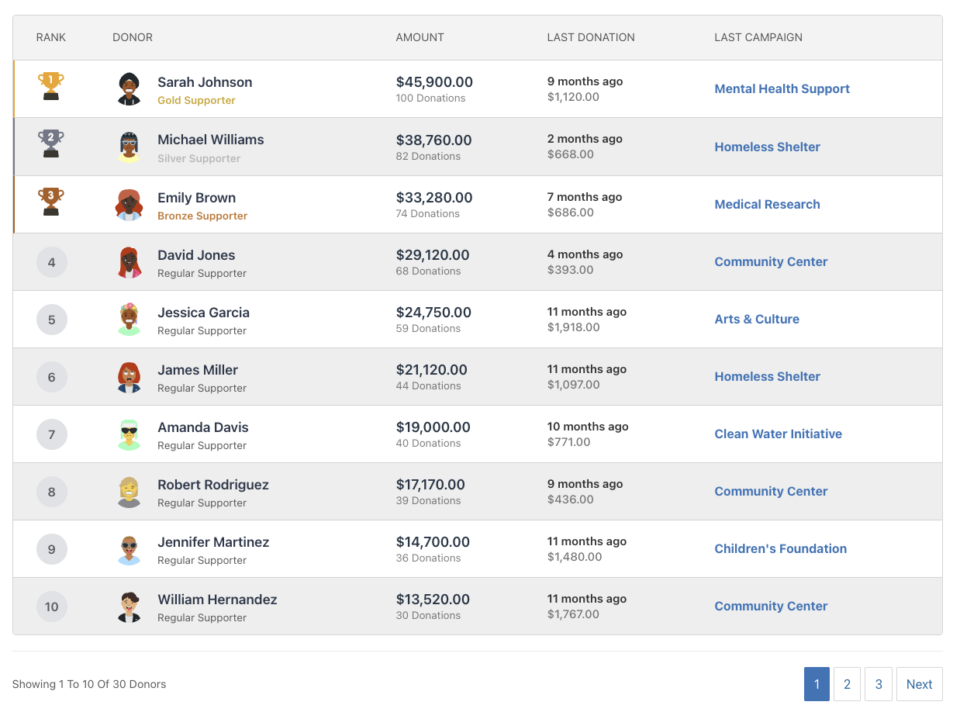
Die Spender-Bestenliste -Funktion in Charitable Pro ermöglicht es Ihnen, eine Rangliste Ihrer Top-Spender anzuzeigen, ihre Großzügigkeit zu würdigen und andere zur Beteiligung zu ermutigen. Diese Funktion bietet mehrere Möglichkeiten, Spenderleistungen zu präsentieren, von einfachen Shortcodes bis hin zur vollständigen Gutenberg-Blockintegration und nahtloser Unterstützung des Kampagnen-Builders.
Inhaltsverzeichnis
Hauptmerkmale
- Zwei Ansichtstypen: Listen-/Tabellenansicht und Kartenansicht
- Flexible Anzeigeoptionen: Avatare, Beträge, Spendenanzahl, Informationen zur letzten Spende und mehr anzeigen oder ausblenden
- Kampagnenspezifisch oder Website-weit: Spender für eine bestimmte Kampagne oder für alle Kampagnen anzeigen
- Paginierungsunterstützung: Große Spenderlisten mit AJAX-gestützter Paginierung verwalten
- Anpassbares Styling: Farben, Icons und Titel überschreiben, um sie an Ihre Marke anzupassen
- Unterstützung für wiederkehrende Spenden: Lebenszeitgesamtsummen aus wiederkehrenden Spenden einschließen
- Team-Integration: Unterstützung für teamorientiertes Fundraising von Charitable Ambassadors
- Responsives Design: Mobilfreundliche Layouts, die sich an jede Bildschirmgröße anpassen
- Admin-Benachrichtigungen: Hilfreiche Meldungen für Administratoren, wenn keine Daten verfügbar sind
Warum eine Spender-Bestenliste verwenden?
Eine Spender-Bestenliste erfüllt mehrere wichtige Zwecke:
- Anerkennung: Ihre großzügigsten Unterstützer öffentlich anerkennen und feiern
- Engagement: Ein Gemeinschaftsgefühl und freundschaftlichen Wettbewerb schaffen
- Transparenz: Spendern zeigen, wie ihre Beiträge im Vergleich zu anderen abschneiden
- Motivation: Zusätzliche Spenden fördern, indem die Top-Beitragenden hervorgehoben werden
- Gamification: Dem Spenden ein Element von Leistung und Status hinzufügen
Anwendungsfälle
- Kampagnenseiten: Zeige Top-Spender für eine bestimmte Spendenkampagne an
- Startseite: Zeige seitenweite Top-Beitragende an
- Dankesseiten: Würdige Spender, nachdem sie eine Spende abgeschlossen haben
- Jahresberichte: Hebe die Top-Unterstützer des Jahres hervor
- Veranstaltungsseiten: Zeige Ranglisten für veranstaltungsbasierte Spendenaktionen an
- Team-Spendenaktionen: Zeige Ranglisten der Teammitglieder an (mit Wohltätigkeitsbotschaftern)
Sehen Sie es in Aktion
Erste Schritte
Voraussetzungen
- Charitable Pro Plugin (Version 1.8.9.3 oder neuer)
- WordPress 5.0 oder neuer (für Gutenberg-Block-Unterstützung)
- PHP 7.4 oder neuer
Aktivierung
Die Funktion „Spender-Rangliste“ ist in Charitable Pro enthalten und automatisch verfügbar, sobald das Plugin aktiviert ist. Es ist keine zusätzliche Einrichtung erforderlich.
Verwendungsmethoden
Die Spender-Rangliste kann auf drei Arten zu Ihrer Website hinzugefügt werden:
Shortcode
Die flexibelste Methode, mit der Sie Ranglisten überall dort hinzufügen können, wo Shortcodes unterstützt werden.
Grundlegende Verwendung:
[charitable_donor_leaderboard]
Mit Parametern:
[charitable_donor_leaderboard view="card" number="12" campaign="123"]
Wo Shortcodes verwendet werden sollen
- Seiten-/Beitragsinhalt: Direkt im WordPress-Editor hinzufügen
- Widgets: In Text-Widgets oder HTML-Widgets verwenden
- Theme-Vorlagen: Über PHP hinzufügen:
<?php echo do_shortcode('[charitable_donor_leaderboard]'); ?> - Seitenersteller: Die meisten Seitenersteller unterstützen Shortcodes
- Benutzerdefinierter Code: In jeder PHP-Vorlagendatei verwenden
Shortcode-Tag
Das Shortcode-Tag lautet: charitable_donor_leaderboard
Hinweis: Aus Gründen der Abwärtskompatibilität funktioniert das alte Tag charitable_leaderboard möglicherweise weiterhin, aber charitable_donor_leaderboard ist das empfohlene Tag für die Zukunft.
WordPress Gutenberg-Block
Die Spender-Rangliste ist als natives WordPress-Block verfügbar, sodass sie einfach über den Block-Editor hinzugefügt und konfiguriert werden kann.
Hinzufügen des Blocks
- Öffnen Sie den Seiten- oder Beitragseditor in WordPress
- Klicken Sie auf die Schaltfläche +, um einen neuen Block hinzuzufügen
- Suchen Sie nach „Spender-Rangliste“ oder „Rangliste“
- Klicken Sie auf den Block Spender-Rangliste, um ihn einzufügen
Blockeinstellungen
Der Block bietet eine visuelle Oberfläche zur Konfiguration aller Einstellungen der Rangliste:
- Ansichtstyp: Wechseln Sie zwischen Listen- und Kartenansicht
- Kampagne: Wählen Sie eine bestimmte Kampagne oder „Alle Kampagnen“
- Anzahl der Spender: Legen Sie fest, wie viele Spender angezeigt werden sollen
- Anzeigeoptionen: Schalten Sie die Sichtbarkeit von Avataren, Beträgen, Zählungen usw. um
- Styling: Passen Sie Farben, Symbole und Titel an
- Erweitert: Legen Sie Datumsbereiche, Mindestbeträge und mehr fest
Blockvorschau
Der Block-Editor zeigt eine Live-Vorschau Ihrer Rangliste mit Platzhalterdaten an, sodass Sie sehen können, wie sie vor der Veröffentlichung aussehen wird.
Kampagnen-Builder-Feld
Die Spender-Rangliste kann mit dem Visual Campaign Builder direkt zu Kampagnenseiten hinzugefügt werden.
Hinzufügen zu einer Kampagne
- Bearbeiten Sie Ihre Kampagne in WordPress
- Navigieren Sie zur Registerkarte Kampagnen-Builder
- Klicken Sie in der linken Seitenleiste auf Felder hinzufügen
- Suchen Sie im Abschnitt Pro-Felder (nach dem Team-Feld) nach Rangliste
- Klicken Sie, um das Feld zu Ihrer Kampagne hinzuzufügen
Feldkonfiguration
Der Kampagnen-Builder bietet ein Einstellungsfenster für das Ranglistenfeld:
- Ansichtstyp: Listen- oder Kartenansicht
- Anzahl der Spender: Wie viele angezeigt werden sollen
- Paginierung: Paginierung aktivieren oder deaktivieren
- Anzeigeeinstellungen: Steuern Sie, welche Informationen angezeigt werden
- Titeleiinstellungen: Titel anpassen oder ausblenden
- Layout: Breite und Ausrichtung anpassen
Automatischer Kampagnenkontext
Bei Verwendung im Kampagnen-Builder wird die Rangliste automatisch so eingestellt, dass die Spender der aktuellen Kampagne angezeigt werden. Dies kann bei Bedarf überschrieben werden.
Vollständige Parameterreferenz
Kernparameter
Ansicht
- Typ: Zeichenkette
- Standard:
list - Optionen:
list|card - Beschreibung: Bestimmt das Anzeigeformat
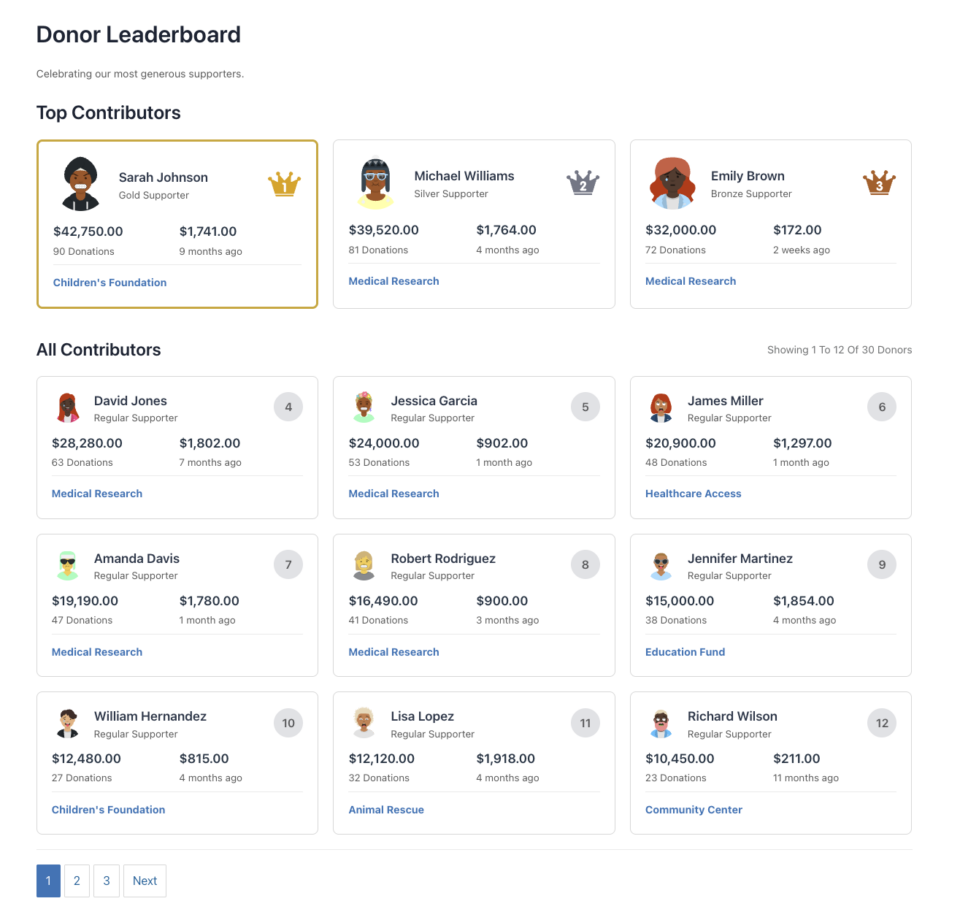
list: Tabellen-/Listenansicht mit Spaltencard: Kartenbasierte Rasteransicht mit den Top 3 hervorgehoben
- Beispiel:
view="card"
kampagne
- Typ: String/Integer
- Standard:
all - Optionen:
all|current| Kampagnen-ID (Integer) - Beschreibung: Spender welcher Kampagne angezeigt werden sollen
all: Alle Kampagnen der Websitecurrent: Aktuelle Kampagne (nützlich im Kampagnen-Builder)123: Spezifische Kampagnen-ID
- Beispiel:
campaign="123"odercampaign="current"
Nummer
- Typ: Integer
- Standard:
10(Listenansicht) |12(Kartenansicht) - Beschreibung: Anzahl der pro Seite anzuzeigenden Spender
- Hinweis: Kartenansicht verwendet standardmäßig 12 (Top 3 + 9 im Raster), wenn nicht anders angegeben
- Beispiel:
number="20"
paginierung
- Typ: String/Boolean
- Standard:
on - Optionen:
on|off|1|0|true|false - Beschreibung: Paginierung aktivieren oder deaktivieren
- Beispiel:
pagination="off"
paged
- Typ: Integer
- Standard: Automatisch aus der URL erkannt
- Beschreibung: Aktuelle Seitenzahl (normalerweise automatisch gesetzt, kann aber manuell angegeben werden)
- Beispiel:
paged="2"
Filterparameter
mindestbetrag
- Typ: Float
- Standard:
1 - Beschreibung: Mindestspendenbetrag, der auf der Bestenliste angezeigt wird
- Beispiel:
minimum_amount="50"
include_anonymous
- Typ: Ganzzahl/Boolean
- Standard:
0(false) - Optionen:
0|1|true|false - Beschreibung: Anonyme Spender in die Bestenliste aufnehmen
- Beispiel:
include_anonymous="1"
date_range
- Typ: Zeichenkette
- Standard:
all_time - Optionen:
all_time|this_year|this_month|this_week|custom - Beschreibung: Zeitraum für Spenden
- Hinweis: Verwenden Sie
date_fromunddate_tofür benutzerdefinierte Bereiche - Beispiel:
date_range="this_year"
date_from
- Typ: Zeichenkette (JJJJ-MM-TT)
- Standard:
"" - Beschreibung: Startdatum für benutzerdefinierten Datumsbereich
- Beispiel:
date_from="2024-01-01"
date_to
- Typ: Zeichenkette (JJJJ-MM-TT)
- Standard:
"" - Beschreibung: Enddatum für benutzerdefinierten Datumsbereich
- Beispiel:
date_to="2024-12-31"
Parameter für wiederkehrende Spenden
include_recurring
- Typ: Ganzzahl/Boolean
- Standard:
1(true) - Optionen:
0|1|true|false - Beschreibung: Wiederkehrende Spenden in die Gesamtsummen einbeziehen
- Beispiel:
include_recurring="1"
recurring_lifetime
- Typ: Ganzzahl/Boolean
- Standard:
1(true) - Optionen:
0|1|true|false - Beschreibung: Lebenszeit-Gesamtsummen aus wiederkehrenden Spenden einbeziehen
- Beispiel:
recurring_lifetime="1"
recurring_status
- Typ: Zeichenkette
- Standard:
all - Optionen:
alle|aktiv|storniert|abgeschlossen - Beschreibung: Welche wiederkehrenden Spendenstatusse eingeschlossen werden sollen
- Beispiel:
recurring_status="aktiv"
Team-/Botschafterparameter
Erfordert die Erweiterung Charitable Ambassadors
team_id
- Typ: Integer
- Standard:
0 - Beschreibung: Nur Spender eines bestimmten Teams anzeigen
- Beispiel:
team_id="5"
parent_campaign
- Typ: Integer
- Standard:
0 - Beschreibung: Übergeordnete Kampagnen-ID für team-basierte Kampagnen
- Beispiel:
parent_campaign="100"
team_members_only
- Typ: Ganzzahl/Boolean
- Standard:
0(false) - Optionen:
0|1|true|false - Beschreibung: Nur Teammitglieder anzeigen (keine individuellen Spender)
- Beispiel:
team_members_only="1"
Anzeigeparameter
show_avatar
- Typ: Ganzzahl/Boolean
- Standard:
1(true) - Optionen:
0|1|true|false - Beschreibung: Spender-Avatare anzeigen
- Beispiel:
show_avatar="0"
show_name
- Typ: Ganzzahl/Boolean
- Standard:
1(true) - Optionen:
0|1|true|false - Beschreibung: Spender-Namen anzeigen
- Hinweis: Wird immer angezeigt, kann aber über CSS ausgeblendet werden
- Beispiel:
show_name="1"
show_amount
- Typ: Ganzzahl/Boolean
- Standard:
1(true) - Optionen:
0|1|true|false - Beschreibung: Gesamte Spendenbeträge anzeigen
- Beispiel:
show_amount="1"
show_donation_count
- Typ: Ganzzahl/Boolean
- Standard:
1(true) - Optionen:
0|1|true|false - Beschreibung: Anzahl der Spenden anzeigen
- Beispiel:
show_donation_count="1"
show_last_donation
- Typ: Ganzzahl/Boolean
- Standard:
1(true) - Optionen:
0|1|true|false - Beschreibung: Datum und Betrag der letzten Spende anzeigen
- Beispiel:
show_last_donation="0"
show_last_campaign
- Typ: Ganzzahl/Boolean
- Standard:
1(true) - Optionen:
0|1|true|false - Beschreibung: Zeigt die zuletzt gespendete Kampagne an
- Beispiel:
show_last_campaign="1"
show_supporter_level
- Typ: Ganzzahl/Boolean
- Standard:
1(true) - Optionen:
0|1|true|false - Beschreibung: Zeigt das Unterstützerniveau an (Gold, Silber, Bronze, Regelmäßig)
- Beispiel:
show_supporter_level="1"
Sortierparameter
orderby
- Typ: Zeichenkette
- Standard:
amount - Optionen:
amount|date|name - Beschreibung: Wie Spender sortiert werden
amount: Nach Gesamtspendenbetrag (Standard)date: Nach der neuesten Spendename: Alphabetisch nach Spendername
- Beispiel:
orderby="date"
order
- Typ: Zeichenkette
- Standard:
DESC - Optionen:
DESC|ASC - Beschreibung: Sortierreihenfolge (absteigend oder aufsteigend)
- Beispiel:
order="ASC"
Titel- und Textparameter
Titel
- Typ: Zeichenkette
- Standard:
"Spender-Bestenliste" - Beschreibung: Haupttitel/Überschrift für die Bestenliste
- Hinweis: Leer lassen, um den Titel auszublenden
- Beispiel:
title="Unsere Top-Unterstützer"odertitle=""zum Ausblenden
description
- Typ: Zeichenkette
- Standard:
"Wir feiern unsere großzügigsten Unterstützer." - Beschreibung: Untertitel/Beschreibungstext unter dem Titel
- Hinweis: Leer lassen, um die Beschreibung auszublenden
- Beispiel:
description="Danke an alle, die beigetragen haben!"oderdescription=""zum Ausblenden
top_contributors_title
- Typ: Zeichenkette
- Standard:
"Top-Beitragende" - Beschreibung: Titel für die Top-3-Sektion (nur Kartenansicht)
- Hinweis: Leer lassen, um auszublenden
- Beispiel:
top_contributors_title="Ruhmeshalle"
all_contributors_title
- Typ: Zeichenkette
- Standard:
"Alle Mitwirkenden" - Beschreibung: Titel für die Sektion der übrigen Spender (nur Kartenansicht)
- Hinweis: Leer lassen, um auszublenden
- Beispiel:
all_contributors_title="Alle Unterstützer"
Styling-Parameter
css_class
- Typ: Zeichenkette
- Standard:
"" - Beschreibung: Zusätzliche CSS-Klassen, die dem Leaderboard-Container hinzugefügt werden sollen
- Beispiel:
css_class="my-custom-class another-class"
alt_rows
- Typ: String/Boolean
- Standard:
on - Optionen:
on|off|1|0|true|false - Beschreibung: Aktiviert abwechselnde Zeilenfarben (Listenansicht)
- Beispiel:
alt_rows="off"
cards_per_row
- Typ: Integer
- Standard:
3 - Beschreibung: Anzahl der Karten pro Zeile (nur Kartenansicht)
- Beispiel:
cards_per_row="4"
Benutzerdefinierte Icon-Parameter
trophy_1st
- Typ: String (URL)
- Standard:
""(verwendet Standard-SVG) - Beschreibung: Benutzerdefinierte Bild-URL für die Trophäe des 1. Platzes (Listenansicht)
- Beispiel:
trophy_1st="https://example.com/custom-trophy-1st.png"
trophy_2nd
- Typ: String (URL)
- Standard:
""(verwendet Standard-SVG) - Beschreibung: Benutzerdefinierte Bild-URL für die Trophäe des 2. Platzes (Listenansicht)
- Beispiel:
trophy_2nd="https://example.com/custom-trophy-2nd.png"
trophy_3rd
- Typ: String (URL)
- Standard:
""(verwendet Standard-SVG) - Beschreibung: Benutzerdefinierte Bild-URL für die Trophäe des 3. Platzes (Listenansicht)
- Beispiel:
trophy_3rd="https://example.com/custom-trophy-3rd.png"
crown_1st
- Typ: String (URL)
- Standard:
""(verwendet Standard-SVG) - Beschreibung: Benutzerdefinierte Bild-URL für die Krone des 1. Platzes (Kartenansicht)
- Beispiel:
crown_1st="https://example.com/custom-crown-1st.png"
crown_1st
- Typ: String (URL)
- Standard:
""(verwendet Standard-SVG) - Beschreibung: Benutzerdefinierte Bild-URL für die Krone des 1. Platzes (Kartenansicht)
- Beispiel:
crown_2nd="https://example.com/custom-crown-2nd.png"
crown_2nd
- Typ: String (URL)
- Standard:
""(verwendet Standard-SVG) - Beschreibung: Benutzerdefinierte Bild-URL für die Krone des 2. Platzes (Kartenansicht)
- Beispiel:
crown_3rd="https://example.com/custom-crown-3rd.png"
Parameter zur Farbanpassung
Alle Farbparameter akzeptieren Hex-Farbcodes (mit oder ohne #).
color_primary
- Typ: String (Hex-Farbe)
- Standard:
#3A81C1 - Beschreibung: Primärfarbe für den aktiven Zustand der Paginierung und Links
- Beispiel:
color_primary="#FF5733"
color_rank_gold
- Typ: String (Hex-Farbe)
- Standard:
#f1ac2c - Beschreibung: Randfarbe für den Rang des 1. Platzes
- Beispiel:
color_rank_gold="#FFD700"
color_rank_silver
- Typ: String (Hex-Farbe)
- Standard:
#7e8491 - Beschreibung: Randfarbe für den Rang des 2. Platzes
- Beispiel:
color_rank_silver="#C0C0C0"
color_rank_bronze
- Typ: String (Hex-Farbe)
- Standard:
#b76626 - Beschreibung: Randfarbe für den Rang des 3. Platzes
- Beispiel:
color_rank_bronze="#CD7F32"
color_text_header
- Typ: String (Hex-Farbe)
- Standard:
#636364 - Beschreibung: Farbe für den Text der Tabellenüberschrift
- Beispiel:
color_text_header="#333333"
color_text_info
- Typ: String (Hex-Farbe)
- Standard:
#797b7c - Beschreibung: Farbe für Infotexte (z. B. „Anzeige X bis Y“)
- Beispiel:
color_text_info="#666666"
color_border
- Typ: String (Hex-Farbe)
- Standard:
#d9d9d9 - Beschreibung: Rahmenfarbe für Tabellen und Karten
- Beispiel:
color_border="#CCCCCC"
color_bg_rank
- Typ: String (Hex-Farbe)
- Standard:
#e5e6e9 - Beschreibung: Hintergrundfarbe für Rangnummernkreise
- Beispiel:
color_bg_rank="#F0F0F0"
color_bg_alt
- Typ: String (Hex-Farbe)
- Standard:
#f0f0f0 - Beschreibung: Hintergrundfarbe für abwechselnde Zeilen
- Beispiel:
color_bg_alt="#F5F5F5"
color_bg_hover
- Typ: String (Hex-Farbe)
- Standard:
#f0f0f0 - Beschreibung: Hintergrundfarbe für Karten-Hover-Zustand
- Beispiel:
color_bg_hover="#FAFAFA"
Beispiele
Grundlegende Beispiele
Einfache Rangliste
[charitable_donor_leaderboard]
Zeigt die Standard-Rangliste mit 10 Spendern in Listenansicht an.
Kartenansicht
[charitable_donor_leaderboard view="card"]Zeigt 12 Spender im Kartenansicht-Format an.
Kampagnenspezifisch
[charitable_donor_leaderboard campaign="123"]
Zeigt die Top-Spender für die Kampagnen-ID 123 an.
Aktuelle Kampagne
[charitable_donor_leaderboard campaign="current"]
Zeigt Spender für die aktuelle Kampagne an (nützlich in Kampagnenvorlagen).
Erweiterte Beispiele
Top 20 Spender, keine Paginierung
[charitable_donor_leaderboard number="20" pagination="off"]
Top-Spender dieses Jahres
[charitable_donor_leaderboard date_range="this_year" orderby="amount" order="DESC"]
Benutzerdefinierter Datumsbereich
[charitable_donor_leaderboard date_range="custom" date_from="2024-01-01" date_to="2024-12-31"]
Mindestspenden von 100 $
[charitable_donor_leaderboard minimum_amount="100"]
Benutzerdefinierte Stile
[charitable_donor_leaderboard
    title="Our Generous Supporters"
    description="Thank you for your contributions!"
    color_primary="#FF5733"
    color_rank_gold="#FFD700"
    css_class="my-leaderboard"]
Kartenansicht mit benutzerdefinierten Titeln
[charitable_donor_leaderboard
    view="card"
    top_contributors_title="Hall of Fame"
    all_contributors_title="All Supporters"
    cards_per_row="4"]
Bestimmte Spalten ausblenden
[charitable_donor_leaderboard
    show_last_donation="0"
    show_last_campaign="0"
    show_supporter_level="0"]
Benutzerdefinierte Symbole
[charitable_donor_leaderboard
    trophy_1st="https://example.com/gold-trophy.png"
    trophy_2nd="https://example.com/silver-trophy.png"
    trophy_3rd="https://example.com/bronze-trophy.png"]
Team-Bestenliste (erfordert Botschafter)
[charitable_donor_leaderboard
    team_id="5"
    team_members_only="1"]
Nur wiederkehrende Spenden
[charitable_donor_leaderboard
    include_recurring="1"
    recurring_status="active"]
Reale Anwendungsfälle
Homepage-Bestenliste
[charitable_donor_leaderboard
    view="card"
    number="12"
    title="Our Top Supporters"
    description="Celebrating those who make our mission possible"]
Kampagnen-Seiten-Bestenliste
[charitable_donor_leaderboard
    campaign="current"
    view="list"
    number="10"
    title="Campaign Leaders"]
Abschnitt Jahresbericht
[charitable_donor_leaderboard
    date_range="this_year"
    number="50"
    pagination="on"
    title="2024 Top Donors"]
Minimale Bestenliste (ohne Extras)
[charitable_donor_leaderboard
    show_avatar="0"
    show_donation_count="0"
    show_last_donation="0"
    show_last_campaign="0"
    show_supporter_level="0"
    title=""
    description=""]
Anpassung
Vorlagenüberschreibungen
Um das Erscheinungsbild der Bestenliste anzupassen, kopieren Sie die Vorlagen in Ihr Theme:
your-theme/
└── charitable/
    └── leaderboard/
        ├── leaderboard-list.php
        └── leaderboard-cards.php
Vorlagenpfade:
- Listenansicht:
charitable-pro/templates/leaderboard/leaderboard-list.php - Kartenansicht:
charitable-pro/templates/leaderboard/leaderboard-cards.php
Verfügbare Vorlagenvariablen:
$donors: Array von Spenderobjekten mit Spendeninformationen$total_donors: Gesamtzahl der Spender, die die Kriterien erfüllen$args: Alle Shortcode-Parameter
CSS-Anpassung
Die Bestenliste enthält umfassende CSS-Klassen zur Gestaltung:
Hauptcontainer-Klassen
.charitable-leaderboard: Haupt-Wrapper.charitable-leaderboard-list: Listen-/Tabellenansicht.charitable-leaderboard-cards: Kartenansicht.charitable-leaderboard-alt-rows: Wenn abwechselnde Zeilen aktiviert sind
Listenansicht-Klassen
.charitable-leaderboard-table: Tabellenelement.charitable-leaderboard-rank: Rangspalte.charitable-leaderboard-donor: Spender-Spalte.charitable-leaderboard-amount: Betragsspalte.charitable-leaderboard-last-donation: Letzte Spenden-Spalte.charitable-leaderboard-last-campaign: Letzte Kampagnen-Spalte
Kartenansicht-Klassen
.charitable-leaderboard-card: Einzelne Karte.charitable-leaderboard-card-top: Container für die Top 3 Karten.charitable-leaderboard-card-all: Container für die restlichen Karten.charitable-leaderboard-card-avatar: Avatar-Bild.charitable-leaderboard-card-info: Spenderinformationen.charitable-leaderboard-card-stats: Statistikbereich
Beispiel für benutzerdefiniertes CSS
/* Custom leaderboard styling */
.charitable-leaderboard {
    margin: 40px 0;
}

.charitable-leaderboard-title {
    font-size: 2em;
    color: #333;
}

.charitable-leaderboard-table {
    border: 2px solid #000;
}

.charitable-leaderboard-card {
    box-shadow: 0 4px 6px rgba(0,0,0,0.1);
}
CSS-Variablen
Die Rangliste verwendet CSS-Custom-Properties (Variablen) zur Farbanpassung. Diese werden automatisch aus den Shortcode-Parametern generiert:
--charitable-lb-primary: #3A81C1;
--charitable-lb-rank-gold: #f1ac2c;
--charitable-lb-rank-silver: #7e8491;
--charitable-lb-rank-bronze: #b76626;
--charitable-lb-text-header: #636364;
--charitable-lb-text-info: #797b7c;
--charitable-lb-border: #d9d9d9;
--charitable-lb-bg-rank: #e5e6e9;
--charitable-lb-bg-alt: #f0f0f0;
--charitable-lb-bg-hover: #f0f0f0;
--charitable-lb-cards-per-row: 3; /* Card view only */
Sie können diese in der CSS-Datei Ihres Themes überschreiben:
.charitable-leaderboard {
    --charitable-lb-primary: #FF5733;
    --charitable-lb-rank-gold: #FFD700;
}
WordPress-Filter und Hooks
Filter
charitable_donor_leaderboard_shortcode
Filtern Sie die vollständige Ausgabe des Ranglisten-Shortcodes.
Parameter:
$content(string): Die HTML-Ausgabe$args(array): Alle Shortcode-Parameter
Beispiel:
add_filter( 'charitable_donor_leaderboard_shortcode', 'my_custom_leaderboard_wrapper', 10, 2 );

function my_custom_leaderboard_wrapper( $content, $args ) {
    // Add custom wrapper
    $wrapper = '<div class="my-custom-leaderboard-wrapper">';
    $wrapper .= $content;
    $wrapper .= '</div>';

    return $wrapper;
}
charitable_leaderboard_supporter_level_labels
Filtern Sie die Bezeichnungen für Unterstützerstufen (Gold, Silber, Bronze, Regelmäßig).
Parameter:
$labels(array): Array von Stufenbezeichnungengold=> “Gold-Unterstützer”silver=> “Silber-Unterstützer”bronze=> “Bronze-Unterstützer”regular=> “Regelmäßiger Unterstützer”
$level(string): Aktuell angezeigte Stufe
Beispiel:
add_filter( 'charitable_leaderboard_supporter_level_labels', 'custom_supporter_labels', 10, 2 );

function custom_supporter_labels( $labels, $level ) {
    // Change labels
    $labels['gold'] = __( 'Platinum Member', 'textdomain' );
    $labels['silver'] = __( 'Gold Member', 'textdomain' );
    $labels['bronze'] = __( 'Silver Member', 'textdomain' );
    $labels['regular'] = __( 'Friend', 'textdomain' );

    return $labels;
}
charitable_campaign_builder_leaderboard_field_display
Filtern Sie die Ausgabe des Kampagnen-Builders.
Parameter:
$html(string): Die HTML-Ausgabe$campaign_data(array): Kampagnendaten und Einstellungen
Beispiel:
add_filter( 'charitable_campaign_builder_leaderboard_field_display', 'custom_campaign_leaderboard', 10, 2 );

function custom_campaign_leaderboard( $html, $campaign_data ) {
    // Add custom content before leaderboard
    $custom_html = '<div class="campaign-leaderboard-intro">';
    $custom_html .= '<p>Check out our top supporters!</p>';
    $custom_html .= '</div>';

    return $custom_html . $html;
}
Aktionen
Derzeit gibt es keine spezifischen Aktionen für die Leaderboard-Funktion, aber Sie können Standard-WordPress-Hooks verwenden:
wp_enqueue_scripts (für benutzerdefinierte Skripte)
add_action( 'wp_enqueue_scripts', 'my_leaderboard_scripts' );

function my_leaderboard_scripts() {
    if ( has_shortcode( get_post()->post_content, 'charitable_donor_leaderboard' ) ) {
        wp_enqueue_script( 'my-custom-leaderboard-js', 'path/to/script.js', array( 'jquery' ) );
    }
}
Fehlerbehebung
Leaderboard wird nicht angezeigt
Problem: Das Leaderboard wird angezeigt, zeigt aber keine Spender an.
Lösungen:
- Prüfen Sie, ob Sie Spenden in Ihrer Datenbank haben
- Überprüfen Sie, ob die Kampagnen-ID korrekt ist (wenn Sie den
campaign-Parameter verwenden) - Prüfen Sie den
minimum_amount-Parameter – er könnte zu hoch sein - Stellen Sie sicher, dass
include_anonymouskorrekt eingestellt ist, wenn Sie anonyme Spenden haben - Prüfen Sie die Datumsbereichsfilter – sie könnten alle Spenden ausschließen
- Wenn Sie ein Administrator sind, sehen Sie eine Meldung, die erklärt, warum es leer ist
Paginierung funktioniert nicht
Problem: Paginierungslinks funktionieren nicht oder zeigen Fehler an.
Lösungen:
- Stellen Sie sicher, dass AJAX aktiviert ist (sollte standardmäßig der Fall sein)
- Prüfen Sie die Browserkonsole auf JavaScript-Fehler
- Stellen Sie sicher, dass der Nonce korrekt übergeben wird
- Stellen Sie sicher, dass
pagination="on"gesetzt ist - Stellen Sie sicher, dass jQuery auf der Seite geladen wird
Styling-Probleme
Problem: Das Leaderboard passt nicht zu Ihrem Theme.
Lösungen:
- Fügen Sie benutzerdefiniertes CSS hinzu, um Standardstile zu überschreiben
- Verwenden Sie den
css_class-Parameter, um Ihre eigenen Klassen hinzuzufügen - Prüfen Sie auf Theme-CSS-Konflikte (verwenden Sie den Browser-Inspektor)
- Überschreiben Sie Vorlagen in Ihrem Theme-Verzeichnis
Performance-Probleme
Problem: Das Leaderboard lädt langsam.
Lösungen:
- Caching aktivieren (Bestenliste verwendet WordPress Transients)
- Reduzieren Sie den Parameter
number, wenn zu viele Spender angezeigt werden - Verwenden Sie Datumsbereichsfilter, um den Abfrageumfang einzuschränken
- Bestenlisten-Cache löschen: Einstellungen > Erweitert > Cache löschen
- Erwägen Sie die Verwendung von Paginierung für große Spenderlisten
Währungsformatierung
Problem: Währungsbeträge werden nicht korrekt angezeigt.
Lösungen:
- Überprüfen Sie die Währungseinstellungen von Charitable: Einstellungen > Allgemein
- Stellen Sie sicher, dass das Währungssymbol und das Format korrekt eingestellt sind
- Die Bestenliste verwendet die Funktion
charitable_format_money()
Wiederkehrende Spenden werden nicht angezeigt
Problem: Wiederkehrende Spendenbeträge sind nicht enthalten.
Lösungen:
- Stellen Sie sicher, dass
include_recurring="1"gesetzt ist - Überprüfen Sie den Parameter
recurring_status - Verifizieren Sie, dass die Charitable Recurring Erweiterung aktiv ist
- Prüfen Sie, ob wiederkehrende Spenden in der Datenbank vorhanden sind
FAQs
Kann ich mehrere Bestenlisten auf einer Seite verwenden?
Ja! Sie können mehrere Bestenlisten mit unterschiedlichen Parametern auf derselben Seite hinzufügen.
Funktioniert die Bestenliste mit Page Buildern?
Ja, der Shortcode funktioniert mit den meisten Page Buildern (Elementor, Beaver Builder, Divi usw.). Der Gutenberg-Block funktioniert nativ im Block-Editor.
Kann ich die Unterstützerstufen anpassen?
Ja, verwenden Sie den Filter charitable_leaderboard_supporter_level_labels, um die Bezeichnungen zu ändern.
Wie werden Spender eingestuft?
Standardmäßig werden Spender nach dem gesamten Spendenbetrag (absteigend) eingestuft. Sie können dies mit dem Parameter orderby ändern.
Was passiert bei Gleichstand?
Spender mit demselben Gesamtbetrag werden nach dem Spendedatum (neuestes zuerst) und dann alphabetisch eingestuft.
Kann ich nur aktive wiederkehrende Spender anzeigen?
Ja, verwenden Sie include_recurring="1" recurring_status="active".
Wie lösche ich den Bestenlisten-Cache?
Gehen Sie zu Einstellungen > Erweitert > Sonstiges und klicken Sie auf „Cache löschen“. Dadurch werden alle Bestenlisten-Transients gelöscht.
Kann ich benutzerdefinierte Bilder für Trophäen/Kronen verwenden?
Ja, verwenden Sie die Parameter trophy_1st, trophy_2nd, trophy_3rd, crown_1st, crown_2nd und crown_3rd mit Bild-URLs.
Funktioniert die Rangliste auf Mobilgeräten?
Ja, die Rangliste ist vollständig responsiv. Die Listenansicht wird auf Mobilgeräten in ein kartenähnliches Layout umgewandelt.
Kann ich die Rangliste für Nicht-Administratoren ausblenden, wenn sie leer ist?
Ja, das ist das Standardverhalten. Nur Administratoren sehen eine Nachricht, wenn keine Daten vorhanden sind. Reguläre Benutzer sehen nichts.
Wie integriere ich mich mit den Teams von Charitable Ambassadors?
Verwenden Sie die Parameter team_id und team_members_only. Erfordert die Charitable Ambassadors-Erweiterung.
Kann ich nach dem Spendenstatus filtern?
Die Rangliste schließt fehlgeschlagene und zurückerstattete Spenden automatisch aus. Nur abgeschlossene Spenden werden berücksichtigt.
Wie oft wird die Rangliste zwischengespeichert?
Ranglistenabfragen werden standardmäßig 24 Stunden lang zwischengespeichert. Der Cache wird gelöscht, wenn Spenden getätigt werden oder wenn er manuell gelöscht wird.
Zusätzliche Ressourcen
Support
- Dokumentation: Charitable Dokumentation
- Support-Foren: WP Charitable Support
Verwandte Funktionen
- Spenderwand: Ähnliche Funktion zur Anzeige aktueller Spender
- Kampagnen-Builder: Visueller Kampagnen-Seiten-Builder
- Charitable Ambassadors: Team-Fundraising und Peer-to-Peer-Kampagnen
- Charitable Recurring: Unterstützung für wiederkehrende Spenden
Änderungsprotokoll
Version 1.8.9.3
- Erste Veröffentlichung der Funktion „Spender-Rangliste“
- Unterstützung für Shortcodes
- Integration von Gutenberg-Blöcken
- Kampagnen-Builder-Feld
- Listen- und Kartenansichtstypen
- Vollständige Parameteranpassung
- AJAX-Paginierung
- Unterstützung für wiederkehrende Spenden
- Team-/Botschafter-Integration
- Optionen für benutzerdefiniertes Styling
Zuletzt aktualisiert: 2024


