Dokumentation für Wohltätigkeitsorganisationen

Erfahren Sie, wie Sie mit klaren Schritt-für-Schritt-Anleitungen das Beste aus Charitable herausholen.

Charitable Ambassadors [legacy]

This documentation applies to Charitable Ambassadors versions before 2.0. For the current documentation, see:

Charitable Botschafter

Charitable Ambassadors transforms your website into a peer-to-peer fundraising or crowdfunding platform.

Installation

Installing Charitable Ambassadors is the same as installing any other Charitable extension. If you’re not sure how to do that, we recommend first reading our guide to installing Charitable extensions.

Creating the Ambassador Pages

Once Charitable Ambassadors is installed, you need to create two new pages. In addition, you should set up the login, registration and profile pages.

Campaign Submission Page

  1. Click Pages Add New.
  2. Inside the content area of your page, add this shortcode: [charitable_submit_campaign]
  3. Add a title to your page and click Publish.
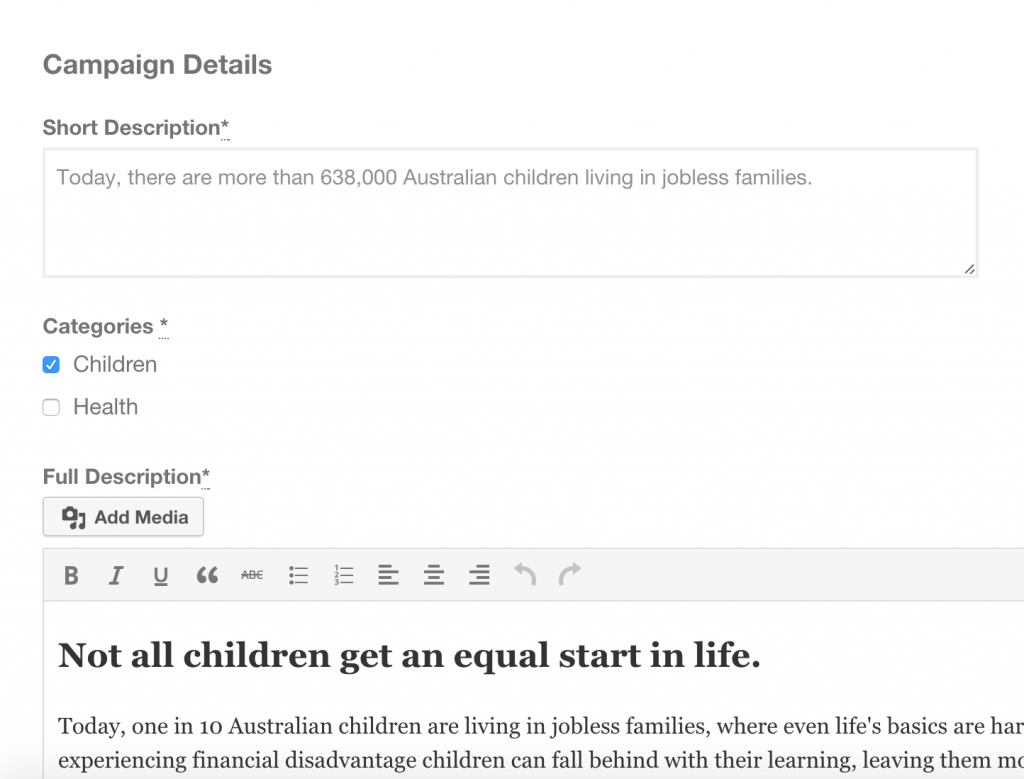
Campaign submission form
The frontend submission form added with charitable submit campaign

My Campaigns Page

This creates a page that will be accessible to logged in users and allows them to see a list of their campaigns.

  1. Click Pages > Add New.
  2. Inside the content area of your page, add this shortcode: [charitable_my_campaigns]
  3. Add a title to your page and click Publish.
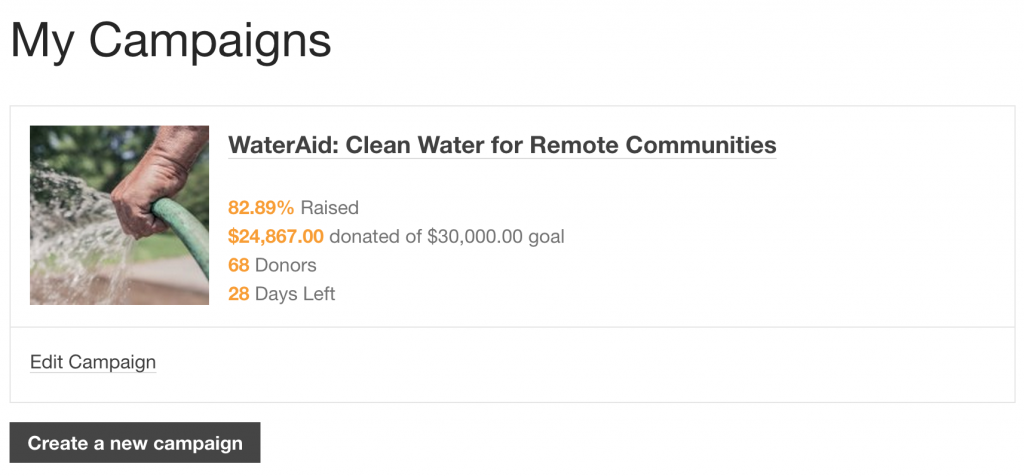
Fundraiser dashboard
The fundraisers list of campaigns added with the charitable my campaigns shortcode

My Donations Received Page

This creates a page that will be accessible to logged in users and allows them to see a list of donations they have received towards their campaigns.

  1. Click Pages > Add New.
  2. Inside the content area of your page, add this shortcode: [charitable_creator_donations]
  3. Add a title to your page and click Publish.

Update Charitable Settings

After creating all of these pages, you can go to the Charitable settings area to link each of them to their corresponding setting.

  1. Go to Charitable > Settings.
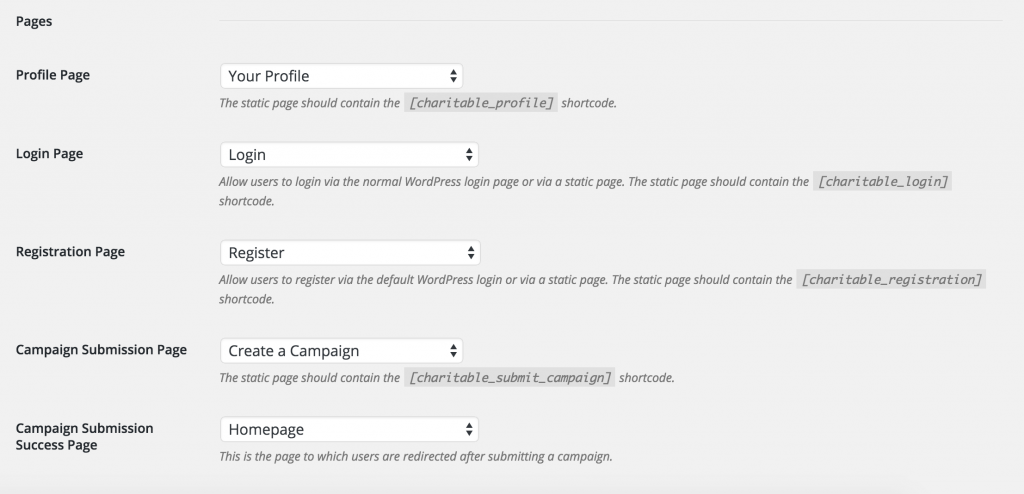
  2. Inside the General tab, scroll down to the Pages section. For each setting, select the page you just created. For the “Campaign Submission Success Page” section, choose a page that you would like your users to be redirected to after submitting a campaign.
  3. Click Save Changes.
Charitable page settings

Submission Form Settings

After setting up your pages, you can set up rules for your campaign creators.

  1. Still within the Charitable settings area, click on the Ambassadors tab.
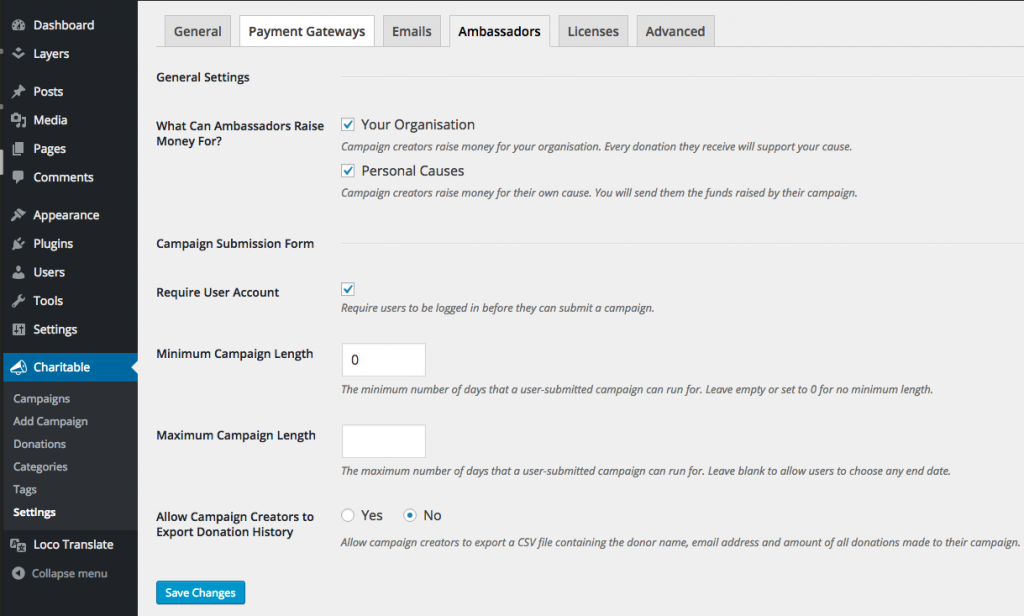
  2. You will see settings like what is pictured below:
    Charitable Ambassadors settings page
  3. After updating your settings, click Save Changes.

Haben Sie noch Fragen? Wir helfen Ihnen gerne weiter!

Zuletzt geändert:

Was ist neu bei Charitable

Die neuesten Updates anzeigen
🔔 Abonnieren Sie, um unsere neuesten Updates zu erhalten
📧 E-Mails abonnieren

E-Mail-Abonnement

Abonnieren Sie unseren Newsletter

Wir werden Sie nicht spammen. Wir senden nur eine E-Mail, wenn wir glauben, dass sie Ihnen wirklich hilft. Abmeldung jederzeit möglich!

ambassadors improved Neu

Moderation and Directory Screens In Ambassadors 3.0

Ambassadors 3.0 has new features: moderation and directory screens… now easily see those who are earning donations on your peer to peer network – including campaign creators that might need to be verified – all in one place. Generate reports, email ambassadors and campaign creators directly and more.

🚀 See when campaign creators and ambassadors have updated their campaigns, what donors/donation they have brought in and more.

🎉 Manually add ambassadors and campaign creators, and approve them in one-click!

Besuchen Sie diese Seite, um mehr zu erfahren.

Neu Zahlungen

⚡ Unlock India-Based Donations: Meet Charitable’s Native Razorpay Integration

Trying to collect donations in India? Charitable’s native Razorpay integration features:

⚡ Instant UPI Integration: Accept fast, local donations directly inside your form via apps like PhonePe, Google Pay, Paytm, and BHIM without sending donors away from your site.

📲 Auto-Generated Campaign QRs: Instantly render scannable QR codes encoding a UPI deep link directly on your public campaign pages and sidebars for an effortless “scan-to-give” experience.

💰 Dual Local & Global Reach: Headline your campaigns in INR while seamlessly accepting major international currencies like USD, EUR, GBP, and CAD to maximize global support.

🔁 Seamless Recurring Giving: Fully integrates with the Charitable Recurring addon to manage automatic monthly subscriptions directly through Razorpay without extra code.

↩️ Automatic Two-Way Sync: Keep your books perfectly clean with two-way refund syncing—issue a refund inside WordPress or your Razorpay dashboard and both sides update automatically.

🔒 Webhook-Verified Security: Automatically protect your donation records using HMAC-signed webhook verification to ensure every status update represents real money cleared on the rails.

Besuchen Sie diese Seite, um mehr zu erfahren.

Integration Neu

🎉 New Built-in PushEngage Integration

Struggling with falling email open rates and rising ad costs just to keep your supporters engaged? Charitable’s built-in PushEngage integration features:

🔔 Zero-Fee Direct Messaging: Deliver crisp, instant pop-up notifications straight to your donors’ desktops and mobile devices.

⏱️ Four Smart Automated Triggers: Automatically send updates for immediate donation thank yous, full-list campaign launches, urgent “ending soon” alerts, and goal milestone celebrations.

📈 Group Momentum Broadcasts: Turn private milestones into public wins by automatically broadcasting alerts to your entire subscriber list the moment a campaign hits 50%, 75%, or 100% of its goal.

📊 Automatic Analytics Tracking: Monitor exactly where your incoming notification traffic is coming from with built-in attribution that requires zero complex configuration.

Besuchen Sie diese Seite, um mehr zu erfahren.

Neu Sicherheit

💂‍♂️ Neues DonationGuard 🛡️ Schützt Ihre Spenden automatisch!

Machen Sie sich Sorgen über Karten-Testangriffe oder Spam-Bots, die Ihre Spendenformulare überfluten, aber Sie möchten das Spenden-Erlebnis für Ihre echten Unterstützer nicht beeinträchtigen? Die DonationGuard-Funktionen von Charitable:

🛡️ Echtzeit-Bot-Erkennung: Überwacht aktiv jede Spendeneinreichung auf fünf verschiedene Angriffssignale, ohne Ihre menschlichen Spender zu verlangsamen.

📊 Intelligente Traffic-Bewertung: Bewertet sofort die Aktivität anhand einer erlernten Basislinie der normalen Spendenrhythmen Ihrer Website, um heimliche, langsame Karten-Tests zu erkennen.

🚨 Schweregrad-gestufte Warnungen: Öffnet sofort strukturierte „Angriffsdatensätze“ und benachrichtigt Sie per E-Mail und Admin-Benachrichtigungen, sobald eine Kampagne unter Beschuss gerät.

🎯 Ein-Klick-Abwehr: Setzen Sie sofortige Sicherheit mit der Voreinstellung „Empfohlene Einstellungen“ ein, um Honeypot-, Time Trap- und Rate Limit-Module gleichzeitig zu aktivieren.

🚫 Automatisierte Blocklisten: Stoppen Sie wiederholte Täter dauerhaft, indem Sie verdächtige E-Mail-Adressen automatisch basierend auf Ihren benutzerdefinierten Regeln blockieren.

Besuchen Sie diese Seite, um mehr zu erfahren.

GiveWP Migrationen Neu

🧤 White Glove Migrationsservice für GiveWP

Erwägen Sie den Wechsel Ihrer Spendenplattform von GiveWP zu Charitable, möchten aber nicht riskieren, Ihre Daten zu verlieren oder eine komplexe technische Einrichtung selbst vorzunehmen? Der White Glove Migrationsservice von Charitable bietet:

👥 Makellose Spenderzuordnung: Übertragen Sie Ihre gesamte Unterstützerdatenbank sicher und ohne Datenverlust.

📊 Vollständige Finanzhistorie: Bewahren Sie sorgfältig jede historische Transaktion für eine kontinuierliche, genaue Berichterstattung auf.

🔄 Nahtlose wiederkehrende Spenden: Übertragen Sie aktive Dauerabonnements sicher, ohne Ihre Einnahmen zu unterbrechen oder Ihre Spender zu zwingen, ihre Informationen zu aktualisieren.

💳 Keine Gateway-Unterbrechungen: Nutzen Sie weiterhin Stripe, PayPal oder jeden anderen mit GiveWP kompatiblen Prozessor, den Sie bereits lieben.

🚀 Experten-Technik-Setup: Lehnen Sie sich zurück, während unser Team die schwere Arbeit übernimmt, Ihre Formulare zu installieren und zu konfigurieren – außerdem erhalten qualifizierte Benutzer ein ganzes Jahr lang kostenloses Charitable Pro.

Besuchen Sie diese Seite, um mehr zu erfahren.