
Chez Charitable, notre mission est d'offrir à vos donateurs une expérience de don aussi fluide et transparente que possible.
Nous comprenons que même la plus petite friction peut empêcher un don potentiel, c'est pourquoi nous sommes ravis de présenter la prochaine étape de notre évolution : permettre aux donateurs de donner sans quitter la page.
🎉 Le Bouton de Don Modal !
Vos donateurs restent exactement là où ils sont – sur votre site, immergés dans votre histoire et engagés dans votre cause. Cette amélioration minimise les distractions et permet à chaque élan de générosité de se traduire directement par un impact réel.
Les petites réductions de friction se cumulent avec le temps. Un chemin plus fluide signifie plus de dons complétés, plus de campagnes financées, plus de personnes que vous pouvez aider.
Découvrez le Bouton de Don Modal
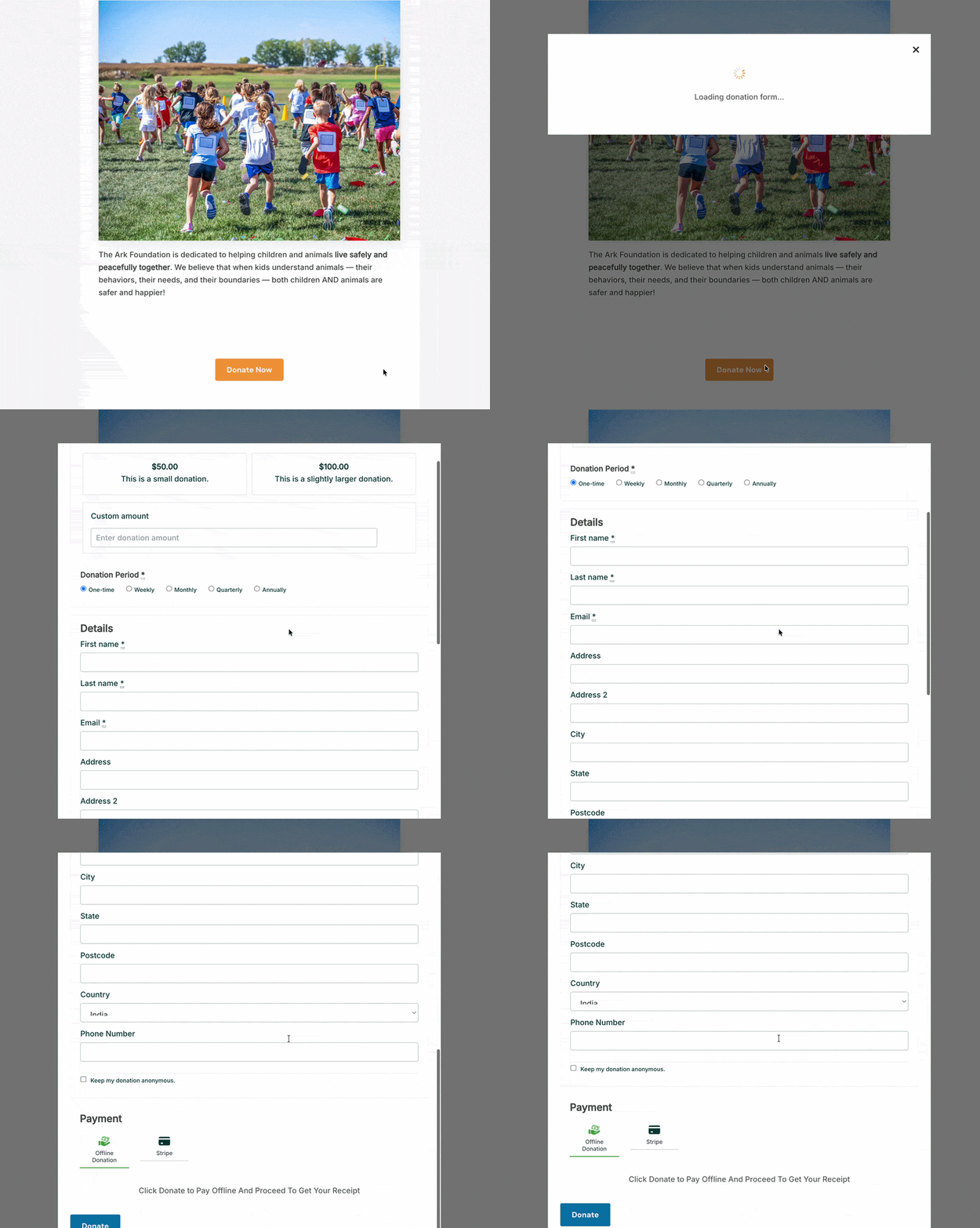
Le Bouton de Don Modal est un nouveau bloc pour l'éditeur de blocs WordPress. Déposez-le sur n'importe quelle page ou publication, et lorsqu'un visiteur clique dessus, votre formulaire de don apparaît directement sous forme de superposition modale, sans chargement de nouvelle page, sans redirection et sans interruption de l'expérience dans laquelle le donateur était déjà.
Des dons qui n'emmènent vos donateurs nulle part ailleurs que vers l'avant.
Voici ce que cela signifie concrètement pour votre collecte de fonds.
Pourquoi cela change l'expérience
Lorsqu'une personne est engagée avec votre contenu, elle est dans un état d'esprit prêt à agir. Elle a lu votre appel, s'est connectée à votre cause, a ressenti quelque chose. L'envoyer vers une URL différente à ce moment-là introduit une pause, petite mais réelle : un moment où elle doit se réorienter, traiter une page entièrement nouvelle et réaffirmer l'action qu'elle était déjà prête à entreprendre. Certains donateurs effectuent cette transition sans hésitation. D'autres non.
Le Bouton de Don Modal comble cet écart. Le donateur clique, le formulaire apparaît sur le même écran, il complète son don, et la page est toujours là lorsque la fenêtre modale se ferme. C'est une expérience continue au lieu d'un parcours en deux étapes.
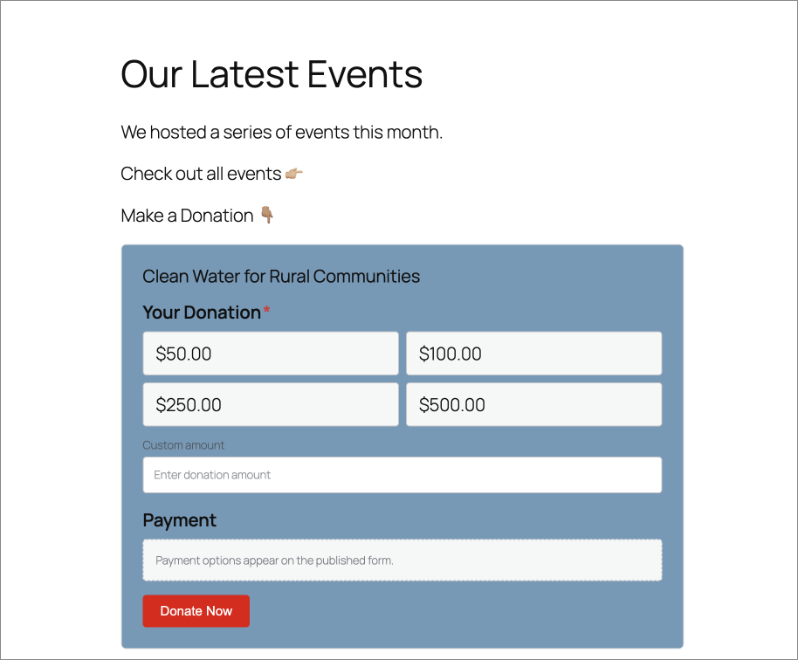
Voici un exemple concret. Une église publie un résumé hebdomadaire du sermon du dimanche. Le message se termine par un appel à donner. Avec le Bouton de Don Modal en place, cliquer sur « Donner maintenant » ouvre le formulaire de don directement sur cet article de blog, sans rediriger le membre de la congrégation vers un nouvel endroit. Il le remplit en moins d'une minute, ferme la fenêtre modale, et revient à sa lecture. Il n'a jamais perdu le fil.
Le même schéma fonctionne pour une association de parents d'élèves organisant une collecte de fin d'année, un refuge pour animaux partageant une histoire de succès d'adoption, ou une organisation à but non lucratif ajoutant un bouton de don directement dans la section principale de sa page d'accueil. Le bouton va là où se trouvent déjà vos donateurs, et le formulaire suit. C'est toute l'idée.
Voyez-le en action :
Ce que le Bouton de Don Modal peut faire
Voici un aperçu de ce que vous pouvez configurer, la plupart en moins d'une minute :
- Placez-le n'importe où sur votre site. En-tête, pied de page, barre latérale, articles de blog, pages de campagne. Toute page où vous pouvez ajouter un bloc WordPress, vous pouvez y ajouter ce bouton. Il n'est pas limité aux pages de dons dédiées.
- Choisissez la campagne qu'il soutient. Une simple liste déroulante dans les paramètres du bloc vous permet de sélectionner la campagne liée à ce bouton. Chaque bouton est connecté à une campagne, ainsi les donateurs savent toujours exactement où va leur don.
- Définissez votre propre texte de bouton. L'étiquette par défaut est « Faire un don maintenant », mais vous pouvez écrire tout ce qui convient au contexte : « Soutenez notre travail », « Donnez aujourd'hui », « Aidez-nous à atteindre notre objectif », ou tout ce qui convient à la page sur laquelle il se trouve.
- Choisissez l'action du bouton. Ouvrez une fenêtre modale directement sur la page, ou envoyez les donateurs vers la page de campagne complète. Les deux options sont disponibles et configurables par bouton.
- Contrôlez l'en-tête de la modale. Affichez le titre de la campagne et l'image mise en avant en haut de la modale pour un contexte visuel et un renforcement, ou laissez l'en-tête vide pour un aspect minimaliste et sans distraction.
- Adaptez-le au style de votre site. Ajustez la couleur d'arrière-plan, la couleur du texte, les effets de survol, le remplissage, la taille et les classes CSS personnalisées. Le bouton doit donner l'impression d'avoir été conçu pour votre site, et non d'y avoir été ajouté.
Comment le configurer
Vous n'avez pas besoin d'un développeur pour le mettre en ligne. Voici tout ce qu'il faut :
Ouvrez n'importe quelle page ou publication dans l'Éditeur de blocs WordPress. Cliquez sur l'icône + pour ajouter un nouveau bloc et recherchez « Bouton de don modal ». Cliquez pour l'insérer.
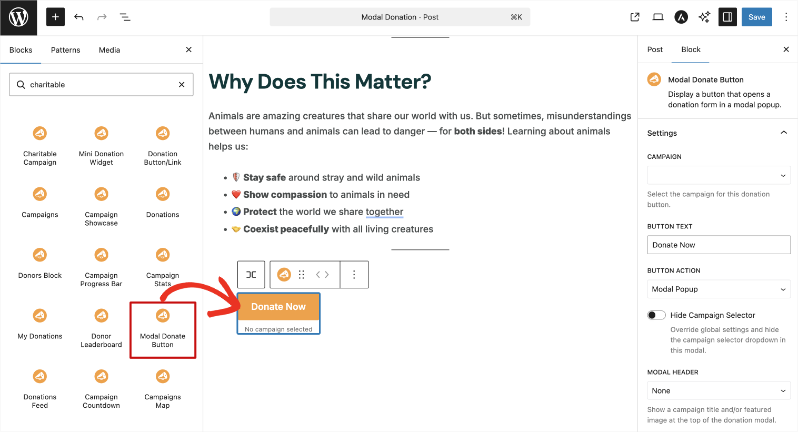
Dans le panneau des paramètres du bloc à droite, utilisez la liste déroulante Campagne pour sélectionner la campagne que ce bouton soutient.
Dans le champ Texte du bouton, entrez votre étiquette préférée, ou laissez l'étiquette par défaut « Faire un don maintenant » telle quelle.
Sous Action du bouton, choisissez Fenêtre modale pour ouvrir le formulaire en superposition sur la page actuelle, ou Lien direct pour rediriger les donateurs vers la page de campagne.
Sous En-tête de la modale, choisissez d'afficher le titre et l'image de la campagne ou de laisser l'en-tête vide.
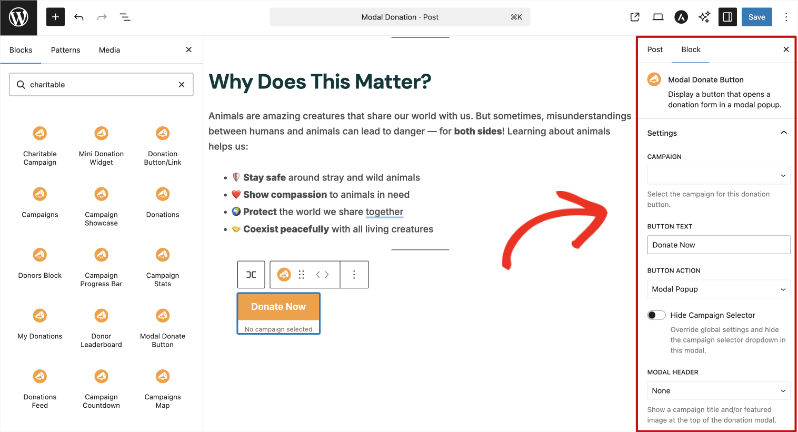
Utilisez les panneaux Couleur, Taille et espacement, et Avancé pour styliser le bouton afin qu'il corresponde au design de votre site.
Cliquez sur Mettre à jour ou Publier pour enregistrer.
C'est tout. De l'insertion du bloc à la mise en place d'un bouton de don stylisé sur votre page, l'ensemble du processus prend moins d'une minute. Pas de code. Pas de développeur nécessaire.
Pourquoi vous allez adorer ça
La configuration est rapide. L'impact ne l'est pas.
- 🎯 Les donateurs restent concentrés. Pas de redirection signifie pas d'intention brisée. La décision de donner reste active dès le premier clic jusqu'à l'écran de confirmation.
- ⚡ Fonctionne sur n'importe quelle page, pas seulement les pages de campagne. Votre page d'accueil, vos articles de blog, vos résumés d'événements, votre barre latérale. N'importe quelle page peut désormais être un lieu pour donner.
- 🎨 Image de marque complète. Un contrôle de style complet signifie que le bouton s'intègre au design de votre site sans aucun travail CSS supplémentaire de votre part.
- 📱 Entièrement responsive. La modale fonctionne sur les téléphones, tablettes et ordinateurs de bureau sans aucune configuration supplémentaire.
- ⏱️ En ligne en moins d'une minute. Aucun développeur requis. Aucun code. Juste un bloc et quelques paramètres.
Obtenez le bouton de don modal avec Charitable Pro
Le bouton de don modal est disponible sur tous les plans Charitable Pro, à partir de 69 $/an pour un seul site. Chaque plan est assorti d'une garantie de remboursement de 14 jours, sans poser de questions. Si ce n'est pas ce qu'il vous faut, vous obtiendrez un remboursement intégral.
Vous utilisez déjà Charitable Pro ? Le bloc est prêt à être utilisé dès maintenant. Ouvrez l'éditeur de blocs sur n'importe quelle page ou publication et recherchez « Bouton de don modal ». Il est là.
Vous n'êtes pas encore sur un plan payant ? C'est le bon moment pour passer à la version supérieure. Vous obtiendrez le bouton de don modal, ainsi que tout ce qui est inclus dans votre niveau de plan, sans aucun risque à l'essayer.
Commencez à supprimer les obstacles dès aujourd'hui
Le bouton de don modal est l'un de ces changements difficiles à remarquer lorsqu'il fonctionne bien, car l'expérience de don semble tout simplement juste. C'est un petit ajout qui a un effet réel sur la fluidité avec laquelle les donateurs peuvent aller jusqu'au bout.
Déjà sur Charitable Pro ?
Consultez la documentation du bouton de don modal pour commencer. Des questions ? Notre équipe de support est là pour vous aider.
Restez connecté pour plus de ressources pour les organisations à but non lucratif
Pour plus de tutoriels et de vidéos adaptés aux organisations à but non lucratif, abonnez-vous à notre chaîne YouTube. Nous publions régulièrement des conseils d'experts, des guides étape par étape sur les dons en ligne, des stratégies de collecte de fonds et des ressources pratiques pour aider votre organisation à réussir.
🗞️ Recevez des conseils hebdomadaires et des guides exclusifs dans votre boîte de réception
Rejoignez notre newsletter →
🎥 Regardez des tutoriels étape par étape et des histoires de réussite
Abonnez-vous à notre chaîne YouTube →
👩🏽💻 Connectez-vous avec notre communauté et obtenez des informations quotidiennes sur les organisations à but non lucratif
Suivez-nous sur LinkedIn →
🥳 Reels amusants et informations sur les organisations à but non lucratif
Suivez-nous sur Instagram →
👀 Vidéos perspicaces et amusantes pour vous aider à développer votre cause
Suivez-nous sur TikTok→
🌎 Abonnez-vous et suivez pour des conseils généraux sur la collecte de fonds
Obtenez des conseils sur la collecte de fonds sur TikTok →
Ressources puissantes pour la collecte de fonds
⬇️ Téléchargez des stratégies éprouvées, des idées de campagnes et des outils d'experts
Obtenez le kit de collecte de fonds →
💸 Obtenez des ressources gratuites pour la collecte de fonds
Rendez-vous sur le Hub de collecte de fonds Charitable →
🤔 Des questions sur Charitable ?
FAQ Charitable →
🏎️ Essayez Charitable
Créez votre démo Charitable →
Comprendre les termes et le jargon des organisations à but non lucratif
Glossaire des organisations à but non lucratif→
% Vous recherchez des offres et des réductions pour les organisations à but non lucratif ?
Meilleures offres et réductions pour les organisations à but non lucratif →



Laisser un commentaire