
Vous avez configuré Google Analytics, l'avez connecté à Charitable et vous vous êtes senti satisfait d'avoir des données.
- Ensuite, un donateur a effectué une transaction PayPal Standard.
- Ou un administrateur a marqué un chèque hors ligne comme Payé trois jours après sa réception.
- Ou un webhook Stripe a confirmé le renouvellement d'un abonnement pendant la nuit sans qu'aucun navigateur n'intervienne.
Ces dons n'ont jamais atteint Google Analytics.
Vous avez pris des décisions de collecte de fonds sur la base de données incomplètes, et vous ne le saviez peut-être pas.
L'écart n'est pas un problème de configuration.
Le suivi côté navigateur et sa limitation majeure : il ne peut voir que ce qui se passe dans un navigateur.
Pour tout don confirmé hors site ou de serveur à serveur, il n'y a rien que le snippet de suivi puisse capturer.
Présentation du module Google Analytics mis à jour
Le module Google Analytics pour Charitable a été entièrement reconstruit. À partir de Charitable Pro 1.8.13, il ajoute le suivi côté serveur, la prise en charge complète de Google Consent Mode v2, l'attribution UTM et un modèle d'événements reconstruit qui correspond à ce que GA4 a été conçu pour recevoir.
Données de dons complètes. Toutes les passerelles. Toutes les méthodes de confirmation.
Voici ce qui change concrètement.
Comment ça marche
Le module mis à jour déclenche un événement purchase côté serveur directement vers GA4 en utilisant le protocole de mesure au moment où le statut d'un don passe à Payé.
Aucun navigateur requis.
- Si un donateur effectue une transaction PayPal Standard hors site, vous la voyez dans GA4.
- Si un donateur envoie un chèque par courrier et qu'un administrateur le marque comme Payé depuis le tableau de bord WordPress, vous le voyez.
- Si un webhook Stripe confirme un renouvellement à 2h du matin, vous le voyez.
Le module empêche également le double comptage.
Si un don est complété sur site (le navigateur déclenche l'événement) et qu'un webhook le confirme plus tard (le serveur déclenche à nouveau), un seul événement purchase atteint GA4. La déduplication est intégrée.
Voici ce que cela signifie pour une organisation réelle.
Une école organise une campagne de bourses d'études au printemps. 40 % des dons proviennent de PayPal Standard.
Avec le module précédent, ces donateurs disparaissaient simplement de Google Analytics.
La directrice du développement ne pouvait pas dire si sa newsletter par e-mail ou ses publications sur les réseaux sociaux généraient plus de transactions PayPal, alors elle a continué à financer les deux, sans savoir ce qui fonctionnait.
Avec le suivi côté serveur, chaque confirmation PayPal arrive dans GA4 avec la source UTM du donateur jointe.
Elle peut maintenant voir que l'e-mail génère trois fois plus de dons complétés que les réseaux sociaux. Elle réoriente ses efforts, et la campagne d'automne rapporte significativement plus.
Côté confidentialité, le module est livré avec une prise en charge complète de Google Consent Mode v2. Google a commencé à l'appliquer pour le trafic de l'EEE en mars 2024.
Les signaux de consentement sont déclenchés dans l'en-tête de la page avant le chargement de gtag.js, et le module s'intègre avec Cookiebot, CookieYes, Complianz, Iubenda et OneTrust via l'API WP Consent.
Les adresses IP des donateurs sont toujours anonymisées avant que quoi que ce soit ne soit envoyé à Google. Rien de tout cela ne nécessite de configuration supplémentaire ; c'est intégré par défaut dans le fonctionnement du module.
Ce que le module complémentaire Google Analytics peut faire
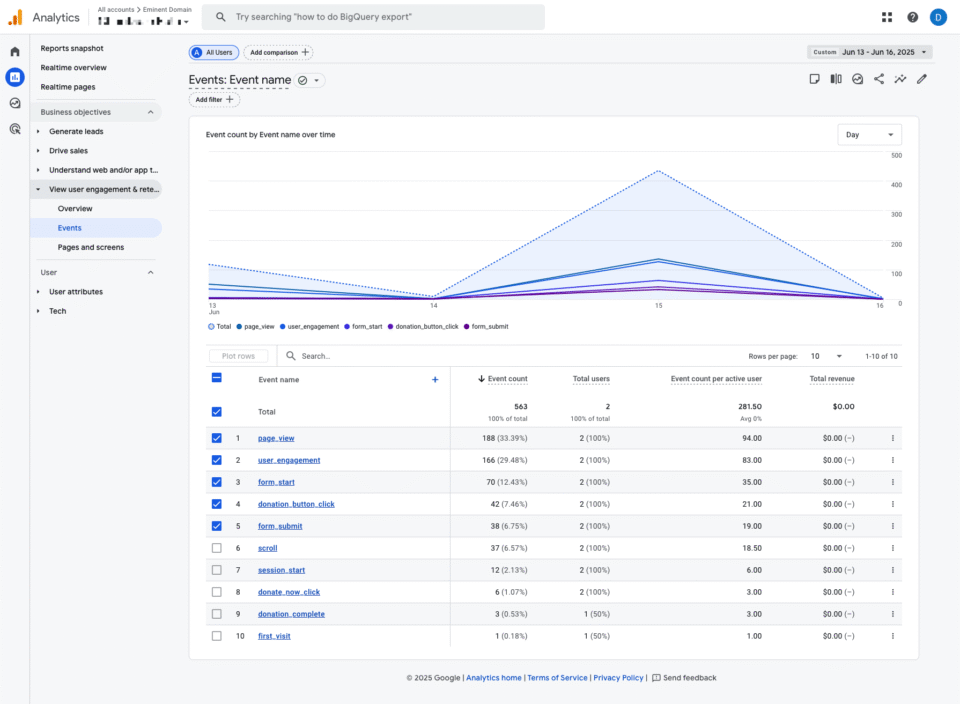
Voici un aperçu de tout ce que le module complémentaire mis à jour apporte à votre site, la plupart étant actif dès que vous enregistrez vos paramètres.
- Suivi des dons côté serveur – Envoie un événement
purchaseconfirmé à GA4 au moment où un don atteint le statut Payé, quel que soit la passerelle de paiement ou si le navigateur du donateur est toujours ouvert. PayPal Standard, les webhooks Stripe et les dons hors ligne confirmés par l'administrateur sont tous pris en compte. - Attribution UTM sur chaque don – Capture les paramètres UTM de l'URL d'arrivée du donateur dans un cookie tiers de 30 jours, les joint à l'enregistrement du don et les transmet à GA4. Voyez exactement quel e-mail, publication sur les réseaux sociaux ou publicité a généré chaque don complété, pas seulement chaque visite de page.
- Format d'événement e-commerce GA4 – Suit les dons comme des événements
purchaseavec l'ID de transaction, la valeur, la devise et la campagne en tant qu'élément de ligne. Les remboursements déclenchent un événementrefundcorrespondant, gardant ainsi vos totaux de revenus GA4 précis automatiquement. - Google Consent Mode v2 – Déclenche les quatre signaux de consentement requis avant le chargement de gtag.js. Sans cela, les utilisateurs de l'EEE qui refusent disparaissent entièrement de GA4. Avec cela, GA4 reçoit toujours des conversions modélisées et des pings sans cookie. Fonctionne avec Cookiebot, CookieYes, Complianz, Iubenda et OneTrust via l'API WP Consent.
- Panneau Google Analytics sur chaque don – Chaque enregistrement de don dans votre administration WordPress affiche un panneau Google Analytics rétractable avec les données UTM source du donateur, l'ID client et l'ID de session GA4, l'état du consentement au moment du don et un horodatage pour chaque événement déclenché.
- Identité du donateur hachée – Les e-mails des donateurs sont normalisés et hachés SHA-256 avant de devenir l'ID utilisateur GA4, permettant la liaison de sessions inter-appareils sans exposer les informations personnelles identifiables dans vos rapports.
- Exclusion du suivi basée sur les rôles – Ignorez le suivi pour les administrateurs, les éditeurs ou tout rôle WordPress de votre choix. Vos propres tests n'augmenteront pas vos rapports.
- Bouton Tester la connexion – Envoyez un événement de test directement depuis les paramètres de Charitable et confirmez votre configuration dans DebugView de GA4 en quelques secondes. Si quelque chose est mal configuré, vous verrez un message d'erreur spécifique plutôt que juste le silence.
- Compatibilité Site Kit et MonsterInsights – Le module complémentaire détecte automatiquement les deux plugins et leur délègue le chargement de gtag.js, évitant ainsi le double chargement sans aucune configuration manuelle.
Mise en place
Voici tout ce qu'il faut pour commencer. Aucun développeur nécessaire.
Allez dans Plugins » Plugins installés dans votre administration WordPress et mettez à jour si nécessaire. (Mettez à jour vers Charitable Pro 1.8.13 ou une version supérieure)
Allez dans Charitable » Modules complémentaires, trouvez Google Analytics, et cliquez sur Installer et Activer.
Connectez-vous à Google Analytics et allez dans Admin » Flux de données. Sélectionnez votre flux web et Trouvez votre ID de mesure GA4. L'ID de mesure commence par G- et apparaît dans le coin supérieur droit des détails du flux.
Accédez à Charitable » Paramètres » Avancé et collez l’ID dans le champ Google Analytics. Cliquez sur Enregistrer les modifications.

De retour dans GA4, accédez à Admin » Flux de données » Secrets de l’API du protocole de mesure et cliquez sur Créer.
Copiez la valeur du secret et collez-la dans le champ Secret de l’API du protocole de mesure GA4 dans les paramètres de Charitable. Enregistrez à nouveau. Cela active le suivi côté serveur (recommandé).
Il est maintenant temps de tester votre connexion. Sur le même écran de paramètres, cliquez sur Envoyer un événement test à GA4. Ouvrez GA4 » Admin » DebugView et observez l’apparition de l’événement test. Il apparaît généralement en moins de 30 secondes. Une coche verte dans Charitable confirme le succès.
C’est la configuration complète. Les rapports standard dans GA4 (comme les Achats e-commerce et l’Acquisition de trafic) commencent à se remplir dans les 24 à 48 heures. Realtime et DebugView se mettent à jour en environ 30 secondes.
Pourquoi vous allez adorer ça
La configuration prend moins de cinq minutes. Ce que vous en retirez ne cesse de porter ses fruits.
- 📊 Voyez ce qui motive réellement les dons – L’attribution UTM relie vos campagnes d’e-mailing, vos publications sur les réseaux sociaux et vos publicités directement aux dons effectués, et pas seulement aux vues de page.
- 🔒 Conformité de la confidentialité prête à l’emploi – Le mode Consentement v2, l’anonymisation de l’IP et l’intégration à l’API WP Consent fonctionnent sans configuration supplémentaire, vous couvrant par défaut pour les exigences de l’EEE.
- 🔄 Totaux des revenus précis, automatiquement – Les remboursements déclenchent un événement correspondant dans GA4, de sorte que vos revenus déclarés restent corrects sans corrections manuelles.
- 🧪 Vérifiez avant de lancer – Le bouton de test de connexion vous donne une confirmation réelle que les données circulent, et pas seulement une supposition basée sur les paramètres enregistrés.
- 👤 Données propres dès le premier jour – Les exclusions de rôles excluent l’activité des administrateurs et des éditeurs de vos rapports de donateurs, de sorte que les chiffres que vous lisez reflètent réellement le comportement des donateurs.
Disponible sur Charitable Pro
Le module complémentaire Google Analytics est inclus dans le plan Charitable Pro, à partir de 199 $/an pour un seul site. Cela inclut le support prioritaire, la collecte de fonds pair-à-pair, les automatisations et tout ce qui se trouve dans les niveaux Basic et Plus. Si vous avez besoin de l’exécuter sur un maximum de cinq sites, le plan Elite coûte 299 $/an.
Chaque plan est assorti d’une garantie de remboursement de 14 jours. Aucune question posée.
Commencez à suivre chaque don
Le suivi des dons qui prend en compte chaque passerelle de paiement, chaque méthode de confirmation et chaque fenêtre d’attribution vous donne le type de données qui rend chaque autre décision marketing plus pertinente.
Si vous utilisez déjà Charitable Pro 1.8.13 ou une version supérieure, installez le module complémentaire mis à jour et suivez les étapes de configuration ci-dessus, ou lisez la documentation complète pour les options avancées, y compris les filtres développeur, l’attribution premier contact UTM et les paramètres d’événements personnalisés.
Des questions ? L’équipe de support est disponible depuis votre tableau de bord de compte.
Restez connecté pour plus de ressources pour les organisations à but non lucratif
Pour plus de tutoriels et de vidéos adaptés aux organisations à but non lucratif, abonnez-vous à notre chaîne YouTube. Nous publions régulièrement des conseils d'experts, des guides étape par étape sur les dons en ligne, des stratégies de collecte de fonds et des ressources pratiques pour aider votre organisation à réussir.
🗞️ Recevez des conseils hebdomadaires et des guides exclusifs dans votre boîte de réception
Rejoignez notre newsletter →
🎥 Regardez des tutoriels étape par étape et des histoires de réussite
Abonnez-vous à notre chaîne YouTube →
👩🏽💻 Connectez-vous avec notre communauté et obtenez des informations quotidiennes sur les organisations à but non lucratif
Suivez-nous sur LinkedIn →
🥳 Reels amusants et informations sur les organisations à but non lucratif
Suivez-nous sur Instagram →
👀 Vidéos perspicaces et amusantes pour vous aider à développer votre cause
Suivez-nous sur TikTok→
🌎 Abonnez-vous et suivez pour des conseils généraux sur la collecte de fonds
Obtenez des conseils sur la collecte de fonds sur TikTok →
Ressources puissantes pour la collecte de fonds
⬇️ Téléchargez des stratégies éprouvées, des idées de campagnes et des outils d'experts
Obtenez le kit de collecte de fonds →
💸 Obtenez des ressources gratuites pour la collecte de fonds
Rendez-vous sur le Hub de collecte de fonds Charitable →
🤔 Des questions sur Charitable ?
FAQ Charitable →
🏎️ Essayez Charitable
Créez votre démo Charitable →
Comprendre les termes et le jargon des organisations à but non lucratif
Glossaire des organisations à but non lucratif→
% Vous recherchez des offres et des réductions pour les organisations à but non lucratif ?
Meilleures offres et réductions pour les organisations à but non lucratif →



Laisser un commentaire