
Le Mini Widget de Dons est un formulaire de don compact et intégrable qui permet aux visiteurs de donner à une campagne spécifique directement depuis n'importe quelle page ou publication. Aucune page de campagne complète requise.
Ajoutez-le à votre page d'accueil, une page de destination, une barre latérale ou un article de blog et transformez n'importe quel contenu en opportunité de collecte de fonds. Disponible dans Charitable Pro 1.8.13.1+.
Pas encore utilisateur de Charitable Pro ? Inscrivez-vous aujourd'hui et bénéficiez jusqu'à 50 % de réduction sur votre plan. Nous sommes convaincus que vous aimerez collecter des fonds avec Charitable. Si, pour une raison quelconque, Charitable ne vous convient pas, nous vous rembourserons votre achat grâce à notre garantie de remboursement de 14 jours. Obtenez Charitable Pro dès maintenant »
Ce que contient ce guide
- Fonctionnalités clés
- Pourquoi utiliser le Mini Widget de Dons ?
- Voyez-le en action
- Exigences
- Démarrage
- Options de configuration / Référence des paramètres
- Exemple de shortcode
- Personnalisation
- Dépannage
- Ressources pour les développeurs
- Ressources supplémentaires
- Restez connecté pour plus de ressources pour les organisations à but non lucratif
Fonctionnalités clés
Le Mini Widget de Dons est conçu pour rendre le don rapide, flexible et sans friction. Que vous l'intégriez sur votre page d'accueil, un article de blog ou une page de destination, chaque fonctionnalité est conçue pour réduire les obstacles et maintenir les donateurs concentrés sur le don. Voici ce qu'il apporte à vos pages de collecte de fonds :
- Placez un widget de don n'importe où en utilisant un bloc Gutenberg ou un shortcode
- Affichez des boutons de montant de don prédéfinis pour les dons ponctuels et mensuels
- Affichez des déclarations d'impact qui se mettent à jour lorsque les donateurs sélectionnent différents montants
- Onglets optionnels Mensuel / Don unique lors de l'utilisation avec Charitable Recurring
- Le bouton CTA ouvre une modale ou redirige vers la page de don de la campagne
- Champ de saisie "Autre" pour les dons personnalisés
- Définissez une couleur d'accentuation personnalisée, une largeur, un alignement et un titre de widget
- Support de remplacement de modèle pour un contrôle HTML complet
Ensemble, ces fonctionnalités vous offrent une expérience de don entièrement fonctionnelle dans un package compact et intégrable. Aucune page de campagne dédiée requise, aucune navigation supplémentaire, et aucune friction inutile – juste une expérience de don propre et ciblée qui fonctionne partout où votre public se trouve déjà.
Pourquoi utiliser le Mini Widget de Dons ?
La plupart des plugins de don exigent que les donateurs accèdent à une page de campagne dédiée avant de pouvoir donner. Le Mini Widget de Dons supprime cette barrière en intégrant une expérience de don complète exactement là où votre public est déjà engagé : sur votre page d'accueil, dans un article de blog, ou aux côtés d'un contenu convaincant. Il maintient le processus de don rapide, ciblé et sans friction.
Voyez-le en action
Exigences
- Charitable Pro 1.8.13.1 ou version ultérieure
- Pour l'onglet récurrent Mensuel/Don unique : le module complémentaire Charitable Recurring doit être actif
Démarrage
Ajout du bloc
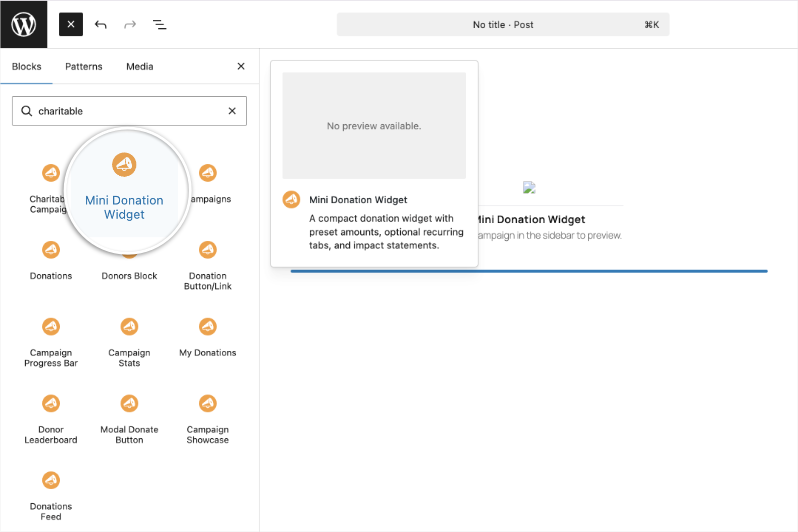
- Ouvrez n'importe quelle page ou publication dans l'éditeur de blocs WordPress.
- Cliquez sur + pour ajouter un nouveau bloc et recherchez Mini Widget de Dons.
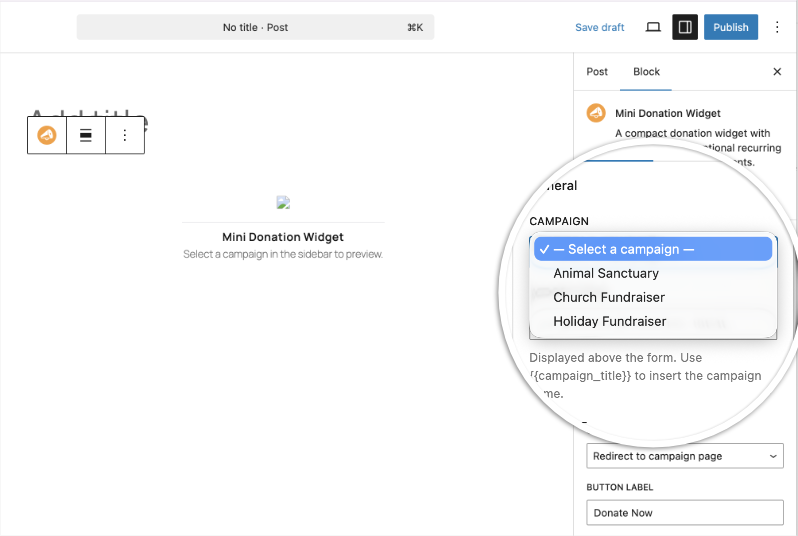
- Sélectionnez une campagne dans le menu déroulant Campagne dans le panneau des paramètres du bloc.
- Configurez vos montants préférés, le mode CTA et les options de style dans la barre latérale.
Utilisation du Shortcode
Ajoutez [charitable_mini_widget campaign_id="123"] à n'importe quelle page, publication, zone de widget ou modèle prenant en charge les shortcodes. Remplacez 123 par l'ID de publication de votre campagne.
Options de configuration / Référence des paramètres
Paramètres principaux
| Paramètre | Type | Défaut | Description |
|---|---|---|---|
id_campagne | entier | (obligatoire) | L'ID de publication de la campagne à laquelle faire un don. |
mode_appel_action | chaîne de caractères | redirection | Comportement du bouton de don. redirect envoie le donateur vers la page de don de la campagne ; modal ouvre le formulaire dans une fenêtre pop-up. |
libellé_appel_action | chaîne de caractères | Faire un don maintenant | Le texte de l'étiquette sur le bouton de don. |
Paramètres récurrents / onglets
| Paramètre | Type | Défaut | Description |
|---|---|---|---|
récurrent | booléen | faux | Définissez sur true pour afficher les onglets Mensuel et Faire un don une fois. Nécessite Charitable Recurring. |
mensuel | chaîne de caractères | Mensuel | Étiquette personnalisée pour l'onglet mensuel. |
donner_une_fois | chaîne de caractères | Faire un don une fois | Étiquette personnalisée pour l'onglet unique. |
Paramètres du montant
| Paramètre | Type | Défaut | Description |
|---|---|---|---|
montants_mensuels | chaîne de caractères | 10,25,50,100 | Montants prédéfinis séparés par des virgules pour l'onglet mensuel. |
défaut_mensuel | chaîne de caractères | 25 | Le montant mensuel présélectionné. Doit être dans monthly_amounts. |
afficher_autre_mensuel | booléen | faux | Afficher un bouton « Autre » permettant un montant mensuel personnalisé. |
montants_une_fois | chaîne de caractères | 25,50,100,250 | Montants prédéfinis séparés par des virgules pour l'onglet unique. |
défaut_une_fois | chaîne de caractères | 50 | Le montant unique présélectionné. Doit être dans onetime_amounts. |
afficher_autre_une_fois | booléen | faux | Afficher un bouton « Autre » permettant un montant unique personnalisé. |
Paramètres de l'énoncé d'impact
Les énoncés d'impact par montant sont mis à jour dynamiquement lorsque les donateurs cliquent sur différents boutons de montant.
| Paramètre | Type | Défaut | Description |
|---|---|---|---|
impact_mensuel_{amount} | chaîne de caractères | (vide) | Texte d'impact affiché lorsque le montant mensuel donné est sélectionné. Exemple : monthly_impact_25="nourrit une famille pendant un mois" |
impact_une_fois_{amount} | chaîne de caractères | (vide) | Texte d'impact affiché lorsque le montant unique donné est sélectionné. Exemple : onetime_impact_100="couvre les fournitures scolaires pour 10 enfants" |
Paramètres de validation
| Paramètre | Type | Défaut | Description |
|---|---|---|---|
montant_min | nombre | (aucun) | Montant personnalisé minimum autorisé lorsque « Autre » est activé. |
montant_max | nombre | (aucun) | Montant personnalisé maximum autorisé lorsque « Autre » est activé. |
Paramètres d'affichage
| Paramètre | Type | Défaut | Description |
|---|---|---|---|
afficher_devise | booléen | faux | Affiche le code ISO de la devise (par ex. USD) à côté des montants prédéfinis. |
couleur_accent | chaîne de caractères | (défaut du thème) | Couleur hexadécimale pour le style des boutons et des accents, par ex. #e63946. |
alignement_widget | chaîne de caractères | centre | Alignement du widget : gauche, centre, ou droite. |
largeur_widget | chaîne de caractères | (auto) | Valeur CSS de largeur maximale pour le conteneur du widget, par ex. 400px ou 100%. |
titre_widget | chaîne de caractères | (aucun) | Titre facultatif au-dessus du widget. Utilisez {{campaign_title}} pour insérer le nom de la campagne dynamiquement. |
alignement_impact | chaîne de caractères | (aucun) | Alignement du texte pour les déclarations d'impact : gauche, centre, ou droite. |
classe | chaîne de caractères | (aucun) | Classe(s) CSS supplémentaire(s) ajoutée(s) à l'élément wrapper du widget. |
Exemple de shortcode
[charitable_mini_widget
  campaign_id="42"
  cta_mode="modal"
  recurring="true"
  monthly_amounts="10,25,50,100"
  monthly_default="25"
  monthly_impact_10="provides clean water for a week"
  monthly_impact_25="feeds a family for a month"
  monthly_impact_50="sponsors a child's education"
  monthly_impact_100="funds a medical checkup"
  monthly_show_other="true"
  onetime_amounts="25,50,100,250"
  onetime_default="50"
  widget_title="Support {{campaign_title}}"
  accent_color="#e63946"
  widget_width="420px"
  widget_align="center"
]
Personnalisation
Variable CSS
Remplacez la couleur d'accent globalement ou par instance en utilisant la propriété personnalisée CSS :
.charitable-mini-widget {
    --charitable-mini-widget-accent: #e63946;
}
Remplacement de modèle
Pour personnaliser le HTML du widget, copiez le modèle dans votre thème :
yourtheme/charitable-pro/shortcodes/mini-widget.phpDépannage
Le widget n'apparaît pas sur le site public
Vérifiez que le campaign_id est défini et correspond à une campagne publiée. Les éditeurs verront un message d'erreur si l'ID est manquant ou invalide ; les visiteurs ne verront rien. Vérifiez que Charitable Pro 1.8.13.1 ou une version ultérieure est actif.
L'onglet Mensuel n'apparaît pas
L'onglet récurrent n'apparaît que lorsque le paramètre recurring est défini sur true et que le module complémentaire Charitable Recurring est installé et actif. Si Recurring n'est pas actif, le widget revient silencieusement au mode unique.
Les déclarations d'impact ne se mettent pas à jour lorsque je clique sur un montant
Vérifiez que le montant dans vos clés monthly_impact_{amount} ou onetime_impact_{amount} correspond exactement à la valeur dans monthly_amounts ou onetime_amounts (y compris la précision décimale). impact_50 et impact_50.00 sont traités comme des clés différentes.
Le widget affiche une boîte de substitution dans Divi ou WPBakery
C'est le comportement attendu en mode aperçu du constructeur de pages visuelles. Le widget s'affiche correctement sur le front-end publié.
Le bouton CTA n'ouvre pas de fenêtre modale
Assurez-vous que cta_mode est défini sur modal. Le mode modal nécessite la fonctionnalité de fenêtre modale/bouton de don de Charitable incluse dans Charitable Pro.
Ressources pour les développeurs
Hooks et filtres
charitable_mini_widget_shortcode_output: Filtre la sortie HTML finale du widget. Reçoit la chaîne HTML et le tableau$argsanalysé.
Classes CSS
| Classe | Élément |
|---|---|
.mini-widget-charitable | Conteneur racine |
.mini-widget-charitable__titre | Titre de widget optionnel |
.mini-widget-charitable__onglets | Barre d'onglets Mensuel/Don unique |
.mini-widget-charitable__onglet--actif | Onglet actuellement actif |
.mini-widget-charitable__montants | Groupe de boutons de montant |
.mini-widget-charitable__montant--selectionné | Bouton de montant actuellement sélectionné |
.mini-widget-charitable__montant--autre | Bouton de montant « Autre » |
.mini-widget-charitable__impact | Zone de déclaration d'impact |
.mini-widget-charitable__appel_action | Bouton de don |
Remplacement de modèle
Copiez charitable-pro/shortcodes/mini-widget.php dans yourtheme/charitable-pro/shortcodes/mini-widget.php pour personnaliser entièrement le balisage du widget.
Ressources supplémentaires
- Bouton de don de campagne: bouton de don en un clic sans montants prédéfinis
- Charitable Recurring: requis pour les onglets mensuel/don unique
- Mise en avant des campagnes: affiche plusieurs campagnes dans une grille ou un carrousel
- Formulaires de don: formulaires de don en ligne complets
Pas encore un utilisateur Charitable Pro ? Inscrivez-vous dès aujourd'hui et bénéficiez de jusqu'à 50 % de réduction sur votre forfait. Nous sommes convaincus que vous aimerez collecter des fonds avec Charitable. Si, pour une raison quelconque, Charitable ne vous convient pas, nous vous rembourserons votre achat grâce à notre garantie de remboursement de 14 jours.
Restez connecté pour plus de ressources pour les organisations à but non lucratif
Pour plus de tutoriels et de vidéos adaptés aux organisations à but non lucratif, abonnez-vous à notre chaîne YouTube. Nous publions régulièrement des conseils d'experts, des guides étape par étape sur les dons en ligne, des stratégies de collecte de fonds et des ressources pratiques pour aider votre organisation à réussir.
🗞️ Recevez des conseils hebdomadaires et des guides exclusifs dans votre boîte de réception
Rejoignez notre newsletter →
🎥 Regardez des tutoriels étape par étape et des histoires de réussite
Abonnez-vous à notre chaîne YouTube →
👩🏽💻 Connectez-vous avec notre communauté et obtenez des informations quotidiennes sur les organisations à but non lucratif
Suivez-nous sur LinkedIn →
🥳 Reels amusants et informations sur les organisations à but non lucratif
Suivez-nous sur Instagram →
👀 Vidéos perspicaces et amusantes pour vous aider à développer votre cause
Suivez-nous sur TikTok→
🌎 Abonnez-vous et suivez pour des conseils généraux sur la collecte de fonds
Obtenez des conseils sur la collecte de fonds sur TikTok →
Ressources puissantes pour la collecte de fonds
⬇️ Téléchargez des stratégies éprouvées, des idées de campagnes et des outils d'experts
Obtenez le kit de collecte de fonds →
💸 Obtenez des ressources gratuites pour la collecte de fonds
Rendez-vous sur le Hub de collecte de fonds Charitable →
🤔 Des questions sur Charitable ?
FAQ Charitable →
🏎️ Essayez Charitable
Créez votre démo Charitable →
Comprendre les termes et le jargon des organisations à but non lucratif
Glossaire des organisations à but non lucratif→
% Vous recherchez des offres et des réductions pour les organisations à but non lucratif ?
Meilleures offres et réductions pour les organisations à but non lucratif →


