
La fonctionnalité Classement des donateurs de Charitable Pro vous permet d'afficher une liste classée de vos meilleurs donateurs, célébrant leur générosité et encourageant les autres à contribuer. Cette fonctionnalité offre plusieurs façons de présenter les réalisations des donateurs, des simples shortcodes à l'intégration complète des blocs Gutenberg et à un support transparent du constructeur de campagnes.
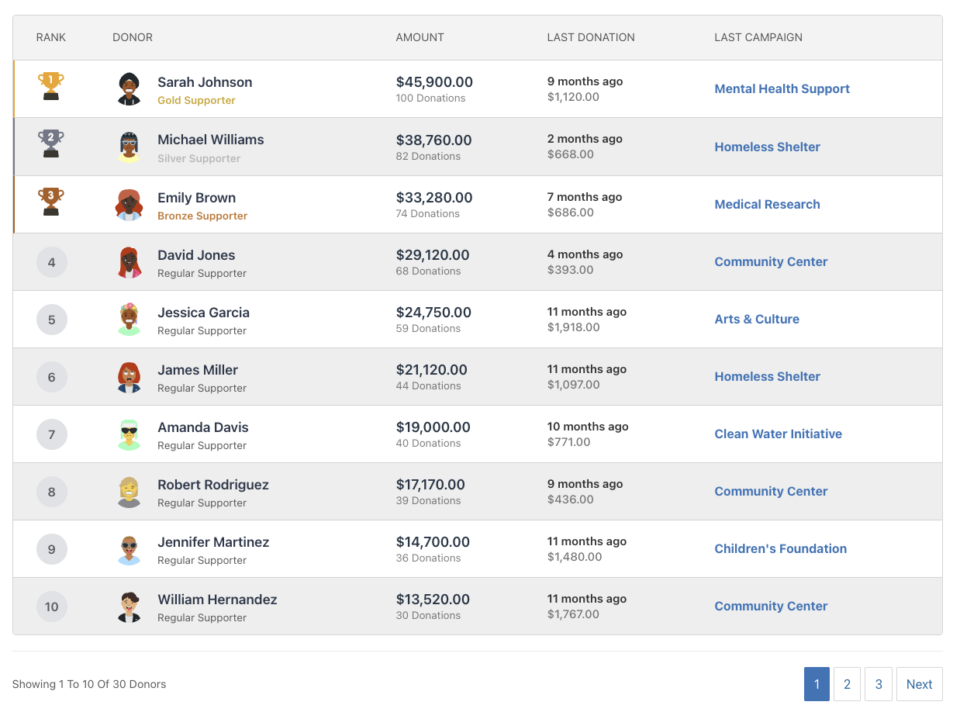
Table des matières
Fonctionnalités clés
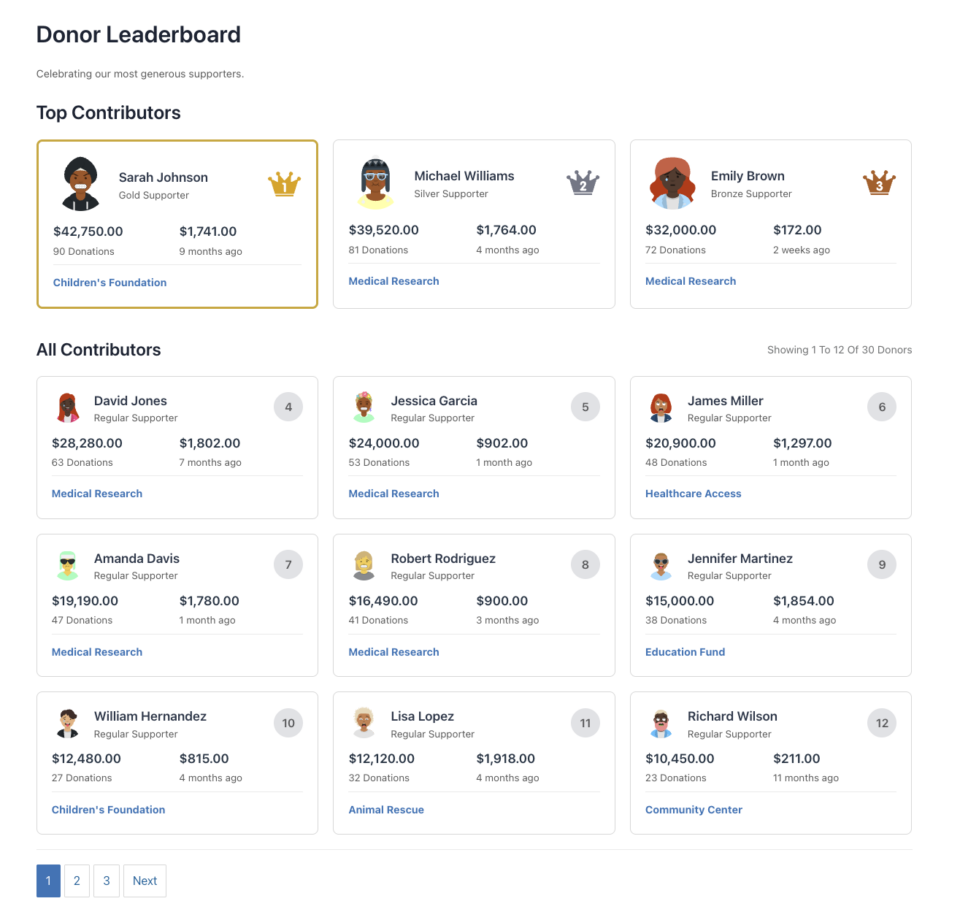
- Deux types de vues : Vue liste/tableau et vue carte
- Options d'affichage flexibles : Afficher ou masquer les avatars, les montants, le nombre de dons, les informations sur le dernier don, et plus encore
- Spécifique à une campagne ou à l'ensemble du site : Afficher les donateurs pour une campagne spécifique ou pour toutes les campagnes
- Support de la pagination : Gérez les longues listes de donateurs avec une pagination alimentée par AJAX
- Style personnalisable : Remplacez les couleurs, les icônes et les titres pour correspondre à votre marque
- Support des dons récurrents : Incluez les totaux à vie des dons récurrents
- Intégration d'équipe : Support pour la collecte de fonds basée sur les équipes de Charitable Ambassadors
- Design réactif : Des mises en page adaptées aux mobiles qui s'ajustent à toute taille d'écran
- Notifications administrateur : Messages utiles pour les administrateurs lorsqu'aucune donnée n'est disponible
Pourquoi utiliser un classement des donateurs ?
Un classement des donateurs remplit plusieurs objectifs importants :
- Reconnaissance : Reconnaissez et célébrez publiquement vos supporters les plus généreux
- Engagement : Créez un sentiment de communauté et une compétition amicale
- Transparence : Montrez aux donateurs comment leurs contributions se comparent aux autres
- Motivation : Encouragez des dons supplémentaires en présentant les meilleurs contributeurs
- Gamification : Ajoutez un élément de réussite et de statut au don
Cas d'utilisation
- Pages de campagne : Affichez les meilleurs donateurs pour une campagne de collecte de fonds spécifique
- Page d'accueil : Affichez les meilleurs contributeurs de l'ensemble du site
- Pages de remerciement : Reconnaissez les donateurs après qu'ils aient terminé un don
- Rapports annuels : Mettez en avant les meilleurs supporters de l'année
- Pages d'événements : Affichez les classements pour la collecte de fonds basée sur les événements
- Collecte de fonds par équipe : Affichez les classements des membres de l'équipe (avec Charitable Ambassadors)
Voyez-le en action
Démarrage
Exigences
- Le plugin Charitable Pro (version 1.8.9.3 ou ultérieure)
- WordPress 5.0 ou ultérieur (pour le support des blocs Gutenberg)
- PHP 7.4 ou version ultérieure
Activation
La fonctionnalité Tableau des donateurs est incluse dans Charitable Pro et est automatiquement disponible une fois le plugin activé. Aucune configuration supplémentaire n'est requise.
Méthodes d'utilisation
Le Tableau des donateurs peut être ajouté à votre site de trois manières :
Raccourci
La méthode la plus flexible, vous permettant d'ajouter des tableaux de classement partout où les shortcodes sont pris en charge.
Utilisation de base :
[charitable_donor_leaderboard]
Avec paramètres :
[charitable_donor_leaderboard view="card" number="12" campaign="123"]
Où utiliser les shortcodes
- Contenu de page/article : Ajouter directement dans l'éditeur WordPress
- Widgets : Utiliser dans les widgets Texte ou HTML
- Modèles de thème : Ajouter via PHP :
<?php echo do_shortcode('[charitable_donor_leaderboard]'); ?> - Constructeurs de pages : La plupart des constructeurs de pages prennent en charge les shortcodes
- Code personnalisé : Utiliser dans n'importe quel fichier de modèle PHP
Balise de shortcode
La balise de shortcode est : charitable_donor_leaderboard
Remarque : Pour des raisons de compatibilité ascendante, l'ancienne balise charitable_leaderboard peut toujours fonctionner, mais charitable_donor_leaderboard est la balise recommandée pour l'avenir.
Bloc Gutenberg WordPress
Le Tableau des donateurs est disponible en tant que bloc WordPress natif, ce qui facilite son ajout et sa configuration via l'éditeur de blocs.
Ajout du bloc
- Ouvrez l'éditeur de page ou d'article dans WordPress
- Cliquez sur le bouton + pour ajouter un nouveau bloc
- Recherchez « Tableau des donateurs » ou « Leaderboard »
- Cliquez sur le bloc Tableau des donateurs pour l'insérer
Paramètres du bloc
Le bloc fournit une interface visuelle pour configurer tous les paramètres du tableau de classement :
- Type d'affichage : Basculez entre les vues Liste et Carte
- Campagne : Sélectionnez une campagne spécifique ou « Toutes les campagnes »
- Nombre de donateurs : Définissez le nombre de donateurs à afficher
- Options d'affichage : Activez/désactivez la visibilité des avatars, montants, nombres, etc.
- Style : Personnalisez les couleurs, les icônes et les titres
- Avancé : Définissez des plages de dates, des montants minimums, et plus encore
Aperçu du bloc
L'éditeur de blocs affiche un aperçu en direct de votre classement avec des données fictives, vous permettant de voir à quoi il ressemblera avant de le publier.
Champ du constructeur de campagne
Le classement des donateurs peut être ajouté directement aux pages de campagne à l'aide du générateur de campagnes visuelles.
Ajout à une campagne
- Modifiez votre campagne dans WordPress
- Accédez à l'onglet Générateur de campagnes
- Cliquez sur Ajouter des champs dans la barre latérale gauche
- Recherchez Classement dans la section Champs Pro (après le champ Équipe)
- Cliquez pour ajouter le champ à votre campagne
Configuration du champ
Le générateur de campagnes fournit un panneau de configuration pour le champ de classement :
- Type d'affichage : Vue Liste ou Carte
- Nombre de donateurs : Combien afficher
- Pagination : Activer ou désactiver la pagination
- Paramètres d'affichage : Contrôlez les informations affichées
- Paramètres de titre : Personnalisez ou masquez les titres
- Mise en page : Ajustez la largeur et l'alignement
Contexte automatique de la campagne
Lorsqu'il est utilisé dans le générateur de campagnes, le classement affiche automatiquement par défaut les donateurs de la campagne en cours. Cela peut être remplacé si nécessaire.
Référence complète des paramètres
Paramètres principaux
vue
- Type : Chaîne de caractères
- Défaut :
list - Options :
list|card - Description : Détermine le format d'affichage
list: Vue tableau/liste avec colonnescard: Mise en page en grille basée sur des cartes avec les 3 meilleurs en vedette
- Exemple :
view="card"
campagne
- Type : Chaîne de caractères/Entier
- Par défaut :
all - Options :
all|current| ID de campagne (entier) - Description : Les donateurs de quelle campagne afficher
all: Toutes les campagnes sur le sitecurrent: Campagne actuelle (utile dans le générateur de campagnes)123: ID de campagne spécifique
- Exemple :
campaign="123"oucampaign="current"
nombre
- Type : Entier
- Défaut :
10(vue liste) |12(vue carte) - Description : Nombre de donateurs à afficher par page
- Note : La vue carte utilise par défaut 12 (3 principaux + 9 en grille) si non spécifié
- Exemple :
number="20"
pagination
- Type : Chaîne/Booléen
- Défaut :
on - Options :
on|off|1|0|true|false - Description : Activer ou désactiver la pagination
- Exemple :
pagination="off"
paginé
- Type : Entier
- Défaut : Détecté automatiquement depuis l'URL
- Description : Numéro de page actuel (généralement défini automatiquement, mais peut être spécifié manuellement)
- Exemple :
paged="2"
Paramètres de filtrage
minimum_amount
- Type : Flottant
- Défaut :
1 - Description : Montant minimum total du don pour apparaître dans le classement
- Exemple :
minimum_amount="50"
include_anonymous
- Type : Entier/Booléen
- Défaut :
0(faux) - Options :
0|1|true|false - Description: Inclure les donateurs anonymes dans le classement
- Exemple :
include_anonymous="1"
date_range
- Type : Chaîne de caractères
- Défaut :
all_time - Options :
all_time|this_year|this_month|this_week|custom - Description: Période de temps pour les dons
- Note: Utiliser avec
date_frometdate_topour les plages personnalisées - Exemple:
date_range="this_year"
date_from
- Type: String (AAAA-MM-JJ)
- Défaut:
"" - Description: Date de début pour la plage de dates personnalisée
- Exemple:
date_from="2024-01-01"
date_to
- Type: String (AAAA-MM-JJ)
- Défaut:
"" - Description: Date de fin pour la plage de dates personnalisée
- Exemple:
date_to="2024-12-31"
Paramètres des dons récurrents
include_recurring
- Type : Entier/Booléen
- Défaut:
1(vrai) - Options :
0|1|true|false - Description: Inclure les dons récurrents dans les totaux
- Exemple:
include_recurring="1"
récurrent_durée_de_vie
- Type : Entier/Booléen
- Défaut:
1(vrai) - Options :
0|1|true|false - Description: Inclure les totaux à vie des dons récurrents
- Exemple:
recurring_lifetime="1"
récurrent_statut
- Type : Chaîne de caractères
- Par défaut :
all - Options:
tous|actif|annulé|terminé - Description: Quels statuts de dons récurrents inclure
- Exemple:
recurring_status="active"
Paramètres d'équipe/ambassadeur
Nécessite l'extension Charitable Ambassadors
id_equipe
- Type : Entier
- Défaut:
0 - Description : Afficher uniquement les donateurs d'une équipe spécifique
- Exemple :
team_id="5"
campagne_parente
- Type : Entier
- Défaut:
0 - Description : ID de la campagne parente pour les campagnes basées sur les équipes
- Exemple :
parent_campaign="100"
réservé_aux_membres_de_l_équipe
- Type : Entier/Booléen
- Défaut :
0(faux) - Options :
0|1|true|false - Description : Afficher uniquement les membres de l'équipe (pas les donateurs individuels)
- Exemple :
team_members_only="1"
Paramètres d'affichage
show_avatar
- Type : Entier/Booléen
- Défaut:
1(vrai) - Options :
0|1|true|false - Description : Afficher les avatars des donateurs
- Exemple :
show_avatar="0"
afficher_nom
- Type : Entier/Booléen
- Défaut:
1(vrai) - Options :
0|1|true|false - Description : Afficher les noms des donateurs
- Note : Toujours affiché, mais peut être masqué via CSS
- Exemple :
show_name="1"
show_amount
- Type : Entier/Booléen
- Défaut:
1(vrai) - Options :
0|1|true|false - Description : Afficher les montants totaux des dons
- Exemple :
show_amount="1"
afficher_nombre_de_dons
- Type : Entier/Booléen
- Défaut:
1(vrai) - Options :
0|1|true|false - Description : Afficher le nombre de dons
- Exemple :
show_donation_count="1"
afficher_dernier_don
- Type : Entier/Booléen
- Défaut:
1(vrai) - Options :
0|1|true|false - Description : Afficher la date et le montant du dernier don
- Exemple :
show_last_donation="0"
afficher_dernière_campagne
- Type : Entier/Booléen
- Défaut:
1(vrai) - Options :
0|1|true|false - Description : Afficher la dernière campagne à laquelle le donateur a contribué
- Exemple :
show_last_campaign="1"
afficher_niveau_de_soutien
- Type : Entier/Booléen
- Défaut:
1(vrai) - Options :
0|1|true|false - Description : Afficher le niveau de soutien (Or, Argent, Bronze, Régulier)
- Exemple :
show_supporter_level="1"
Paramètres de tri
trier_par
- Type : Chaîne de caractères
- Défaut:
montant - Options:
montant|date|nom - Description: Comment trier les donateurs
montant: Par montant total du don (défaut)date: Par date de don la plus récentenom: Par ordre alphabétique du nom du donateur
- Exemple:
trier_par="date"
ordre
- Type : Chaîne de caractères
- Défaut:
DESC - Options:
DESC|ASC - Description: Ordre de tri (descendant ou ascendant)
- Exemple:
ordre="ASC"
Paramètres de titre et de texte
titre
- Type : Chaîne de caractères
- Défaut:
"Classement des donateurs" - Description: Titre principal du classement
- Note: Laisser vide pour masquer le titre
- Exemple:
titre="Nos meilleurs supporters"outitre=""pour masquer
description
- Type : Chaîne de caractères
- Défaut:
"Célébrons nos donateurs les plus généreux." - Description: Sous-titre/texte de description sous le titre
- Note: Laisser vide pour masquer la description
- Exemple:
description="Merci à tous ceux qui ont contribué !"oudescription=""pour masquer
titre_meilleurs_contributeurs
- Type : Chaîne de caractères
- Défaut:
"Meilleurs Contributeurs" - Description: Titre de la section des 3 meilleurs (vue carte uniquement)
- Note: Laisser vide pour masquer
- Exemple:
titre_meilleurs_contributeurs="Temple de la renommée"
titre_tous_contributeurs
- Type : Chaîne de caractères
- Défaut:
"Tous les Contributeurs" - Description: Titre de la section des donateurs restants (vue carte uniquement)
- Note: Laisser vide pour masquer
- Exemple:
all_contributors_title="Tous les contributeurs"
Paramètres de style
css_class
- Type : Chaîne de caractères
- Défaut:
"" - Description: Classes CSS supplémentaires à ajouter au conteneur du classement
- Exemple:
css_class="ma-classe-perso une-autre-classe"
alt_rows
- Type : Chaîne/Booléen
- Défaut :
on - Options :
on|off|1|0|true|false - Description: Activer les couleurs alternées des lignes (vue liste)
- Exemple:
alt_rows="off"
cartes_par_ligne
- Type : Entier
- Défaut:
3 - Description: Nombre de cartes par ligne (vue carte uniquement)
- Exemple:
cards_per_row="4"
Paramètres d'icônes personnalisées
trophée_1er
- Type: Chaîne (URL)
- Défaut:
""(utilise le SVG par défaut) - Description: URL de l'image personnalisée pour le trophée de 1ère place (vue liste)
- Exemple:
trophy_1st="https://example.com/custom-trophy-1st.png"
trophée_2ème
- Type: Chaîne (URL)
- Défaut:
""(utilise le SVG par défaut) - Description: URL de l'image personnalisée pour le trophée de 2ème place (vue liste)
- Exemple:
trophy_2nd="https://example.com/custom-trophy-2nd.png"
trophée_3ème
- Type: Chaîne (URL)
- Défaut:
""(utilise le SVG par défaut) - Description: URL de l'image personnalisée pour le trophée de 3ème place (vue liste)
- Exemple:
trophy_3rd="https://example.com/custom-trophy-3rd.png"
couronne_1er
- Type: Chaîne (URL)
- Défaut:
""(utilise le SVG par défaut) - Description: URL de l'image personnalisée pour la couronne de 1ère place (vue carte)
- Exemple:
crown_1st="https://example.com/custom-crown-1st.png"
couronne_2ème
- Type: Chaîne (URL)
- Défaut:
""(utilise le SVG par défaut) - Description: URL de l'image personnalisée pour la couronne de 2ème place (vue carte)
- Exemple:
crown_2nd="https://example.com/custom-crown-2nd.png"
couronne_3ème
- Type: Chaîne (URL)
- Défaut:
""(utilise le SVG par défaut) - Description: URL de l'image personnalisée pour la couronne de 3ème place (vue carte)
- Exemple:
crown_3rd="https://example.com/custom-crown-3rd.png"
Paramètres de personnalisation des couleurs
Tous les paramètres de couleur acceptent les codes hexadécimaux (avec ou sans #).
color_primary
- Type: Chaîne (couleur hexadécimale)
- Défaut:
#3A81C1 - Description: Couleur primaire pour l'état actif de la pagination et les liens
- Exemple:
color_primary="#FF5733"
couleur_rang_or
- Type: Chaîne (couleur hexadécimale)
- Défaut:
#f1ac2c - Description: Couleur de bordure pour le classement de 1ère place
- Exemple:
color_rank_gold="#FFD700"
couleur_rang_argent
- Type: Chaîne (couleur hexadécimale)
- Défaut:
#7e8491 - Description: Couleur de bordure pour le classement de 2ème place
- Exemple:
color_rank_silver="#C0C0C0"
couleur_rang_bronze
- Type: Chaîne (couleur hexadécimale)
- Défaut:
#b76626 - Description: Couleur de bordure pour le classement de 3ème place
- Exemple:
color_rank_bronze="#CD7F32"
couleur_texte_en_tete
- Type: Chaîne (couleur hexadécimale)
- Défaut:
#636364 - Description: Couleur du texte de l'en-tête du tableau
- Exemple:
color_text_header="#333333"
couleur_texte_info
- Type: Chaîne (couleur hexadécimale)
- Défaut:
#797b7c - Description: Couleur du texte d'information (par ex. « Affichage de X à Y »)
- Exemple:
color_text_info="#666666"
color_border
- Type: Chaîne (couleur hexadécimale)
- Défaut:
#d9d9d9 - Description: Couleur de bordure pour les tableaux et les cartes
- Exemple:
color_border="#CCCCCC"
couleur_fond_rang
- Type: Chaîne (couleur hexadécimale)
- Défaut:
#e5e6e9 - Description: Couleur d'arrière-plan pour les cercles de numéro de rang
- Exemple:
color_bg_rank="#F0F0F0"
couleur_fond_alt
- Type: Chaîne (couleur hexadécimale)
- Défaut:
#f0f0f0 - Description: Couleur d'arrière-plan pour les lignes alternées
- Exemple:
color_bg_alt="#F5F5F5"
couleur_fond_survol
- Type: Chaîne (couleur hexadécimale)
- Défaut:
#f0f0f0 - Description: Couleur d'arrière-plan pour l'état de survol de la carte
- Exemple:
color_bg_hover="#FAFAFA"
Exemples
Exemples de base
Classement simple
[charitable_donor_leaderboard]
Affiche le classement par défaut avec 10 donateurs en vue liste.
Vue Carte
[charitable_donor_leaderboard view="card"]Affiche 12 donateurs au format carte.
Spécifique à la campagne
[charitable_donor_leaderboard campaign="123"]
Montre les meilleurs donateurs pour la campagne ID 123.
Campagne actuelle
[charitable_donor_leaderboard campaign="current"]
Montre les donateurs de la campagne actuelle (utile dans les modèles de campagne).
Exemples avancés
Top 20 des donateurs, sans pagination
[charitable_donor_leaderboard number="20" pagination="off"]
Top Donateurs de cette année
[charitable_donor_leaderboard date_range="this_year" orderby="amount" order="DESC"]
Plage de dates personnalisée
[charitable_donor_leaderboard date_range="custom" date_from="2024-01-01" date_to="2024-12-31"]
Dons minimum de 100 $
[charitable_donor_leaderboard minimum_amount="100"]
Style personnalisé
[charitable_donor_leaderboard
    title="Our Generous Supporters"
    description="Thank you for your contributions!"
    color_primary="#FF5733"
    color_rank_gold="#FFD700"
    css_class="my-leaderboard"]
Vue Carte avec titres personnalisés
[charitable_donor_leaderboard
    view="card"
    top_contributors_title="Hall of Fame"
    all_contributors_title="All Supporters"
    cards_per_row="4"]
Masquer des colonnes spécifiques
[charitable_donor_leaderboard
    show_last_donation="0"
    show_last_campaign="0"
    show_supporter_level="0"]
Icônes personnalisées
[charitable_donor_leaderboard
    trophy_1st="https://example.com/gold-trophy.png"
    trophy_2nd="https://example.com/silver-trophy.png"
    trophy_3rd="https://example.com/bronze-trophy.png"]
Classement de l'équipe (nécessite des ambassadeurs)
[charitable_donor_leaderboard
    team_id="5"
    team_members_only="1"]
Dons récurrents uniquement
[charitable_donor_leaderboard
    include_recurring="1"
    recurring_status="active"]
Cas d'utilisation concrets
Classement de la page d'accueil
[charitable_donor_leaderboard
    view="card"
    number="12"
    title="Our Top Supporters"
    description="Celebrating those who make our mission possible"]
Classement de la page de campagne
[charitable_donor_leaderboard
    campaign="current"
    view="list"
    number="10"
    title="Campaign Leaders"]
Section du rapport annuel
[charitable_donor_leaderboard
    date_range="this_year"
    number="50"
    pagination="on"
    title="2024 Top Donors"]
Classement minimal (sans extras)
[charitable_donor_leaderboard
    show_avatar="0"
    show_donation_count="0"
    show_last_donation="0"
    show_last_campaign="0"
    show_supporter_level="0"
    title=""
    description=""]
Personnalisation
Remplacement de modèles
Pour personnaliser l'apparence du classement, copiez les modèles dans votre thème :
your-theme/
└── charitable/
    └── leaderboard/
        ├── leaderboard-list.php
        └── leaderboard-cards.php
Emplacements des modèles :
- Vue liste :
charitable-pro/templates/leaderboard/leaderboard-list.php - Vue carte :
charitable-pro/templates/leaderboard/leaderboard-cards.php
Variables de modèle disponibles :
$donors: Tableau d'objets de donateurs avec données de dons$total_donors: Nombre total de donateurs correspondant aux critères$args: Tous les paramètres du shortcode
Personnalisation CSS
Le classement comprend des classes CSS complètes pour la mise en forme :
Classes du conteneur principal
.charitable-leaderboard: Conteneur principal.charitable-leaderboard-list: Vue liste/tableau.charitable-leaderboard-cards: Vue carte.charitable-leaderboard-alt-rows: Lorsque les lignes alternées sont activées
Classes de la vue liste
.charitable-leaderboard-table: Élément de tableau.charitable-leaderboard-rank: Colonne de classement.charitable-leaderboard-donor: Colonne de donateur.charitable-leaderboard-amount: Colonne de montant.charitable-leaderboard-last-donation: Colonne du dernier don.charitable-leaderboard-last-campaign: Colonne de la dernière campagne
Classes de la vue carte
.charitable-leaderboard-card: Carte individuelle.charitable-leaderboard-card-top: Conteneur des 3 meilleures cartes.charitable-leaderboard-card-all: Conteneur des cartes restantes.charitable-leaderboard-card-avatar: Image d'avatar.charitable-leaderboard-card-info: Informations sur le donateur.charitable-leaderboard-card-stats: Section des statistiques
Exemple de CSS personnalisé
/* Custom leaderboard styling */
.charitable-leaderboard {
    margin: 40px 0;
}

.charitable-leaderboard-title {
    font-size: 2em;
    color: #333;
}

.charitable-leaderboard-table {
    border: 2px solid #000;
}

.charitable-leaderboard-card {
    box-shadow: 0 4px 6px rgba(0,0,0,0.1);
}
Variables CSS
Le classement utilise des propriétés CSS personnalisées (variables) pour la personnalisation des couleurs. Celles-ci sont générées automatiquement à partir des paramètres du shortcode :
--charitable-lb-primary: #3A81C1;
--charitable-lb-rank-gold: #f1ac2c;
--charitable-lb-rank-silver: #7e8491;
--charitable-lb-rank-bronze: #b76626;
--charitable-lb-text-header: #636364;
--charitable-lb-text-info: #797b7c;
--charitable-lb-border: #d9d9d9;
--charitable-lb-bg-rank: #e5e6e9;
--charitable-lb-bg-alt: #f0f0f0;
--charitable-lb-bg-hover: #f0f0f0;
--charitable-lb-cards-per-row: 3; /* Card view only */
Vous pouvez les remplacer dans le CSS de votre thème :
.charitable-leaderboard {
    --charitable-lb-primary: #FF5733;
    --charitable-lb-rank-gold: #FFD700;
}
Filtres et Hooks WordPress
Filtres
code_court_classement_donateur_benevole
Filtrer la sortie complète du shortcode du classement.
Paramètres :
$content(string) : La sortie HTML$args(array) : Tous les paramètres du shortcode
Exemple :
add_filter( 'charitable_donor_leaderboard_shortcode', 'my_custom_leaderboard_wrapper', 10, 2 );

function my_custom_leaderboard_wrapper( $content, $args ) {
    // Add custom wrapper
    $wrapper = '<div class="my-custom-leaderboard-wrapper">';
    $wrapper .= $content;
    $wrapper .= '</div>';

    return $wrapper;
}
etiquettes_niveaux_supporteur_classement_benevole
Filtrer les étiquettes de niveau de soutien (Or, Argent, Bronze, Régulier).
Paramètres :
$labels(array) : Tableau des étiquettes de niveaugold=> “Soutien Or”silver=> “Soutien Argent”bronze=> “Soutien Bronze”regular=> “Soutien Régulier”
$level(string) : Niveau actuel affiché
Exemple :
add_filter( 'charitable_leaderboard_supporter_level_labels', 'custom_supporter_labels', 10, 2 );

function custom_supporter_labels( $labels, $level ) {
    // Change labels
    $labels['gold'] = __( 'Platinum Member', 'textdomain' );
    $labels['silver'] = __( 'Gold Member', 'textdomain' );
    $labels['bronze'] = __( 'Silver Member', 'textdomain' );
    $labels['regular'] = __( 'Friend', 'textdomain' );

    return $labels;
}
affichage_champ_classement_constructeur_campagne_benevole
Filtrer la sortie du champ du constructeur de campagne.
Paramètres :
$html(string) : La sortie HTML$campaign_data(array) : Données et paramètres de la campagne
Exemple :
add_filter( 'charitable_campaign_builder_leaderboard_field_display', 'custom_campaign_leaderboard', 10, 2 );

function custom_campaign_leaderboard( $html, $campaign_data ) {
    // Add custom content before leaderboard
    $custom_html = '<div class="campaign-leaderboard-intro">';
    $custom_html .= '<p>Check out our top supporters!</p>';
    $custom_html .= '</div>';

    return $custom_html . $html;
}
Actions
Actuellement, il n'y a pas d'actions spécifiques pour la fonctionnalité de classement, mais vous pouvez utiliser les hooks WordPress standard :
wp_enqueue_scripts (pour les scripts personnalisés)
add_action( 'wp_enqueue_scripts', 'my_leaderboard_scripts' );

function my_leaderboard_scripts() {
    if ( has_shortcode( get_post()->post_content, 'charitable_donor_leaderboard' ) ) {
        wp_enqueue_script( 'my-custom-leaderboard-js', 'path/to/script.js', array( 'jquery' ) );
    }
}
Dépannage
Classement non affiché
Problème : Le classement s'affiche mais aucun donateur n'est visible.
Solutions :
- Vérifiez si vous avez des dons dans votre base de données
- Vérifiez que l'ID de la campagne est correct (si vous utilisez le paramètre
campaign) - Vérifiez le paramètre
minimum_amount– il est peut-être trop élevé - Assurez-vous que
include_anonymousest correctement défini si vous avez des dons anonymes - Vérifiez les filtres de plage de dates – ils pourraient exclure tous les dons
- Si vous êtes administrateur, vous verrez un message expliquant pourquoi c'est vide
Pagination ne fonctionne pas
Problème : Les liens de pagination ne fonctionnent pas ou affichent des erreurs.
Solutions :
- Assurez-vous que AJAX est activé (devrait l'être par défaut)
- Vérifier la console du navigateur pour les erreurs JavaScript
- Vérifiez que le nonce est transmis correctement
- Vérifiez que
pagination="on"est défini - Assurez-vous que jQuery est chargé sur la page
Problèmes de style
Problème : Le classement ne correspond pas à votre thème.
Solutions :
- Ajoutez du CSS personnalisé pour remplacer les styles par défaut
- Utilisez le paramètre
css_classpour ajouter vos propres classes - Vérifiez les conflits CSS du thème (utilisez l'inspecteur du navigateur)
- Remplacez les modèles dans le répertoire de votre thème
Problèmes de performance
Problème : Le classement se charge lentement.
Solutions :
- Activez la mise en cache (le classement utilise les transients WordPress)
- Réduisez le paramètre
numbersi vous affichez trop de donateurs - Utilisez les filtres de plage de dates pour limiter la portée de la requête
- Effacez le cache du classement : Paramètres > Avancé > Effacer le cache
- Envisagez d'utiliser la pagination pour les grandes listes de donateurs
Formatage de la devise
Problème : Les montants de devise ne s'affichent pas correctement.
Solutions :
- Vérifiez les paramètres de devise de Charitable : Paramètres > Général
- Assurez-vous que le symbole et le format de la devise sont correctement définis
- Le classement utilise la fonction
charitable_format_money()
Dons récurrents non affichés
Problème : Totaux des dons récurrents non inclus.
Solutions :
- Assurez-vous que
include_recurring="1"est défini - Vérifiez le paramètre
recurring_status - Vérifiez que l'extension Charitable Recurring est active
- Vérifiez que des dons récurrents existent dans la base de données
FAQ
Puis-je utiliser plusieurs classements sur une seule page ?
Oui ! Vous pouvez ajouter plusieurs classements avec des paramètres différents sur la même page.
Le classement fonctionne-t-il avec les constructeurs de pages ?
Oui, le shortcode fonctionne avec la plupart des constructeurs de pages (Elementor, Beaver Builder, Divi, etc.). Le bloc Gutenberg fonctionne nativement dans l'éditeur de blocs.
Puis-je personnaliser les niveaux de donateurs ?
Oui, utilisez le filtre charitable_leaderboard_supporter_level_labels pour modifier les étiquettes.
Comment les donateurs sont-ils classés ?
Par défaut, les donateurs sont classés par montant total des dons (décroissant). Vous pouvez modifier cela avec le paramètre orderby.
Que se passe-t-il en cas d'égalité ?
Les donateurs ayant le même montant total sont classés par date de don (le plus récent d'abord), puis par ordre alphabétique.
Puis-je afficher uniquement les donateurs récurrents actifs ?
Oui, utilisez include_recurring="1" recurring_status="active".
Comment puis-je vider le cache du classement ?
Allez dans Paramètres > Avancé > Divers, et cliquez sur « Vider le cache ». Cela videra tous les transitoires du classement.
Puis-je utiliser des images personnalisées pour les trophées/couronnes ?
Oui, utilisez les paramètres trophy_1st, trophy_2nd, trophy_3rd, crown_1st, crown_2nd, et crown_3rd avec des URL d'images.
Le classement fonctionne-t-il sur mobile ?
Oui, le classement est entièrement responsive. La vue liste se convertit en une disposition de type carte sur les appareils mobiles.
Puis-je masquer le classement pour les non-administrateurs lorsqu'il est vide ?
Oui, c'est le comportement par défaut. Seuls les administrateurs voient un message lorsqu'il n'y a pas de données. Les utilisateurs réguliers ne voient rien.
Comment puis-je intégrer les équipes de Charitable Ambassadors ?
Utilisez les paramètres team_id et team_members_only. Nécessite l'extension Charitable Ambassadors.
Puis-je filtrer par statut de don ?
Le classement exclut automatiquement les dons échoués et remboursés. Seuls les dons complétés sont inclus.
À quelle fréquence le classement est-il mis en cache ?
Les requêtes de classement sont mises en cache pendant 24 heures par défaut. Le cache est vidé lors des dons ou lorsqu'il est vidé manuellement.
Ressources supplémentaires
Support
- Documentation: Documentation Charitable
- Forums de support: Support WP Charitable
Fonctionnalités associées
- Mur des donateurs : Fonctionnalité similaire pour afficher les donateurs récents
- Constructeur de campagnes : Constructeur visuel de pages de campagne
- Ambassadeurs Charitable : Collecte de fonds en équipe et campagnes de pair à pair
- Charitable Recurring : Prise en charge des dons récurrents
Journal des modifications
Version 1.8.9.3
- Version initiale de la fonctionnalité de classement des donateurs
- Prise en charge des shortcodes
- Intégration des blocs Gutenberg
- Champ du constructeur de campagnes
- Types d'affichage Liste et Carte
- Personnalisation complète des paramètres
- Pagination AJAX
- Prise en charge des dons récurrents
- Intégration équipe/ambassadeur
- Options de style personnalisées
Dernière mise à jour : 2024


