
L'ajout de champs personnalisés à vos formulaires de don Charitable vous permet de collecter des informations supplémentaires auprès des donateurs au-delà des champs standards. Que vous ayez besoin de collecter des codes de parrainage, des messages de dédicace ou des détails spécifiques sur le donateur, vous pouvez facilement ajouter ces champs à l'aide d'extraits de code.
Ce guide vous montrera comment ajouter des champs personnalisés dans vos formulaires de don.
Dans ce guide
Exemple de démarrage rapide
Voici un exemple pratique pour vous aider à démarrer. Consultez cet extrait de code » Collecter le numéro d'identification national.
Cet extrait de code montre comment ajouter un champ de numéro d'identification national à votre formulaire de don :
Vous pouvez utiliser cet extrait de code et le personnaliser selon vos besoins :
- Remplacez chaque occurrence de « national_id_number » par « votre_champ ».
- Remplacez chaque occurrence de « Numéro d'identification national » par l'étiquette de votre champ.
Maintenant que vous avez une idée des extraits de code, nous allons vous montrer comment ajouter et personnaliser des extraits de code.
Comment ajouter un extrait de code
Si vous êtes nouveau dans le développement PHP ou WordPress, nous vous recommandons d'utiliser le plugin WPCode pour insérer des extraits de code en toute sécurité et facilement sur votre site Web. Charitable propose actuellement plus de 130 extraits de code dans la bibliothèque du plugin WPCode que vous pouvez utiliser. Visitez notre bibliothèque ici :
Bibliothèque d'extraits de code Charitable »
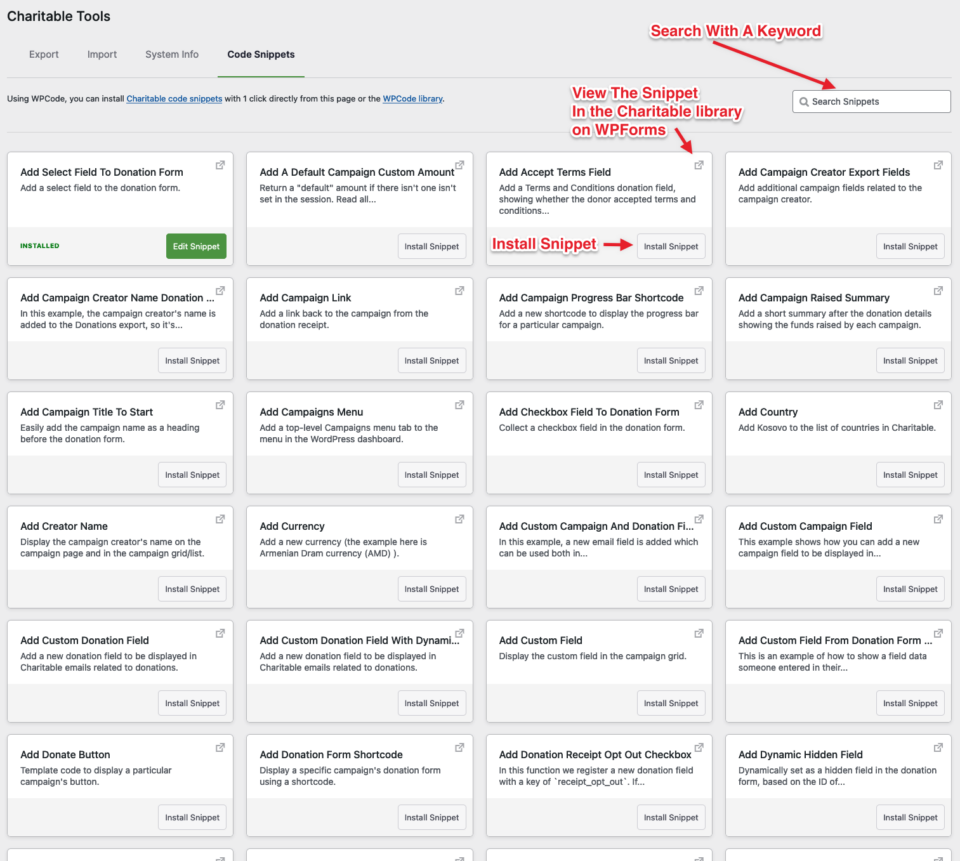
Pour ceux qui sont un peu plus familiers avec le développement WordPress, vous pouvez utiliser les extraits pour créer de simples plugins autonomes. Lisez la documentation WordPress sur la création d’un plugin.
Alternativement, vous pouvez ajouter les extraits directement au fichier functions.php de votre thème ou thème enfant.
Veuillez prendre connaissance de nos recommandations et suggestions pour des pratiques sûres d'utilisation des extraits de code afin d'éviter les erreurs fatales et les problèmes : Personnalisation des formulaires de don avec des extraits de code à l'aide de WPCode »
Il existe de nombreux autres extraits de code qui vont au-delà de la création d'une zone de texte sur un formulaire de don et qui permettent de personnaliser davantage vos campagnes et vos formulaires de don. N'hésitez pas à explorer la bibliothèque sur le site Web de WPCode ou dans l'écran du plugin Charitable.
Vous avez une idée d'extrait de code qui n'existe pas encore ? Contactez-nous et nous l'ajouterons !
Vous pourriez également être intéressé par la documentation de WPCode pour en savoir plus sur le fonctionnement de leur plugin et les fonctionnalités supplémentaires que vous pouvez attribuer aux extraits de code, y compris les extraits de code Charitable.
Recevez des conseils de collecte de fonds et des conseils pour les organisations à but non lucratif
Nous partageons régulièrement des guides pratiques, des stratégies éprouvées et des conseils d'initiés pour vous aider à collecter plus de fonds et à établir des relations plus solides avec vos donateurs. Rejoignez des milliers d'organisations à but non lucratif qui reçoivent notre meilleur contenu directement :
- Rejoignez notre newsletter – Recevez des conseils hebdomadaires et des guides exclusifs dans votre boîte de réception
- Abonnez-vous à notre chaîne YouTube – Regardez des tutoriels étape par étape et des histoires de réussite
- Suivez-nous sur LinkedIn – Connectez-vous avec notre communauté et obtenez des informations quotidiennes sur les organisations à but non lucratif
- Suivez-nous sur TikTok – Vidéos instructives et amusantes pour vous aider à développer votre cause
- Suivez-nous sur Instagram – Reels amusants et conseils pour les organisations à but non lucratif
Pas de blabla, juste des conseils concrets de personnes qui comprennent les défis auxquels vous êtes confrontés chaque jour.
FAQ : Ajout de champs personnalisés aux formulaires de don Charitable
Que sont les champs personnalisés et pourquoi en aurais-je besoin ?
Les champs personnalisés vous permettent de collecter des informations supplémentaires auprès des donateurs au-delà du nom, de l'e-mail et du montant du don standard. Les utilisations courantes incluent :
- La collecte de codes de parrainage ou de codes promotionnels
- L'ajout de champs « En mémoire de » ou de dédicaces
- La collecte de commentaires sur la façon dont les donateurs ont entendu parler de votre campagne
- L'inclusion de cases à cocher pour les abonnements à la newsletter
- L'ajout d'informations sur l'entreprise pour les donateurs d'entreprise
Ai-je besoin d'une expérience en codage pour ajouter des champs personnalisés ?
Non. Bien que les champs personnalisés puissent être ajoutés par le code, WPCode fournit une solution conviviale qui ne nécessite aucune connaissance en programmation. Vous pouvez installer des extraits pré-construits en quelques clics.
L'ajout de champs personnalisés affectera-t-il mes taux de conversion des dons ?
Cela dépend de la mise en œuvre. Les champs facultatifs ont généralement un impact minimal, tandis que trop de champs obligatoires inutiles peuvent réduire les conversions. Nous recommandons :
- Rendre les champs supplémentaires facultatifs lorsque c'est possible
- Garder les formulaires concis et conviviaux
- Tester différentes configurations pour voir ce qui fonctionne pour votre public
WPCode est-il gratuit à utiliser ?
Oui ! WPCode offre une version gratuite qui inclut l'accès à de nombreux extraits de code. Il existe également une version premium avec des fonctionnalités supplémentaires, mais la version gratuite est suffisante pour la plupart des besoins en champs personnalisés.
Les champs personnalisés fonctionneront-ils avec mon thème WordPress ?
Les champs personnalisés devraient fonctionner avec n'importe quel thème WordPress correctement codé. Cependant, vous devrez peut-être ajouter du CSS personnalisé pour correspondre au style de votre thème. Si vous rencontrez des problèmes d'affichage, contactez notre équipe de support.
Comment installer WPCode ?
- Allez dans Charitable → Outils → Extraits de code
- Si WPCode n'est pas installé, vous verrez une invite d'installation
- Cliquez sur le bouton d'installation pour installer et activer automatiquement WPCode
- Une fois activé, vous verrez les extraits de code disponibles
Je ne vois pas l'onglet Extraits de code. Qu'est-ce qui ne va pas ?
Cela signifie généralement :
- Votre version de Charitable est obsolète (mettez à jour vers 1.8.1.7+)
- Vous n'avez pas les autorisations d'administrateur
- Il y a un conflit de plugins (essayez de désactiver temporairement les autres plugins)
Comment trouver le bon extrait de code pour mes besoins ?
Utilisez la fonctionnalité de recherche dans l'onglet Extraits de code. Recherchez des termes tels que :
- « champ texte » pour les entrées de texte supplémentaires
- « case à cocher » pour les options d’adhésion
- « liste déroulante » pour les menus de sélection
- « zone de texte » pour les saisies de texte plus longues
Puis-je modifier les extraits de code ?
Absolument ! La plupart des extraits incluent des commentaires et une documentation pour guider la personnalisation. Vous pouvez modifier :
- Les étiquettes et descriptions des champs
- Le positionnement des champs sur le formulaire
- Si les champs sont obligatoires ou facultatifs
- Les types de champs (texte, zone de texte, liste déroulante, etc.)
Où les soumissions de champs personnalisés apparaissent-elles ?
Les données des champs personnalisés apparaissent dans :
- Les détails des dons dans votre administration WordPress
- Les notifications par e-mail (si configurées)
- Les rapports d’exportation (si activés dans les paramètres de l’extrait)
Puis-je ajouter plusieurs champs personnalisés à un seul formulaire ?
Oui ! Vous pouvez installer et activer plusieurs extraits de code pour ajouter plusieurs champs personnalisés à vos formulaires de don.
Existe-t-il des tutoriels vidéo ?
Oui ! Abonnez-vous à la chaîne YouTube Charitable pour des tutoriels étape par étape et des histoires de réussite.
Besoin d'aide ? Vous avez une question ? Si vous êtes un utilisateur lite/gratuit de Charitable, vous pouvez contacter notre équipe sur les forums de support de WordPress.org et notre équipe répondra rapidement. Si vous avez une licence active, n'hésitez pas à nous contacter directement pour un support prioritaire.


