AUTOMATION CONNECT
Connect and integrate with 3000+ apps
Send donation, donor, and campaign events to any platform… with a visual editor, conditional delivery, and asynchronous webhook performance built in.






Now Recently Updated (2.0 Release!)
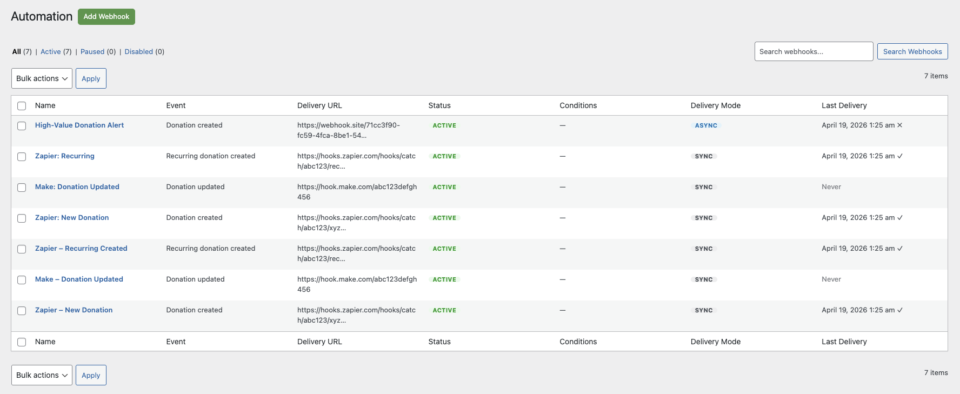
Connect Charitable to Zapier, Make.com, n8n, HubSpot, Slack, Mailchimp, your own custom endpoint, or any other platform that accepts HTTP webhooks. The 2.0 release is a complete rebuild around a new webhook engine, a tabbed React-based editor, and a delivery model that won’t slow down your donation page.
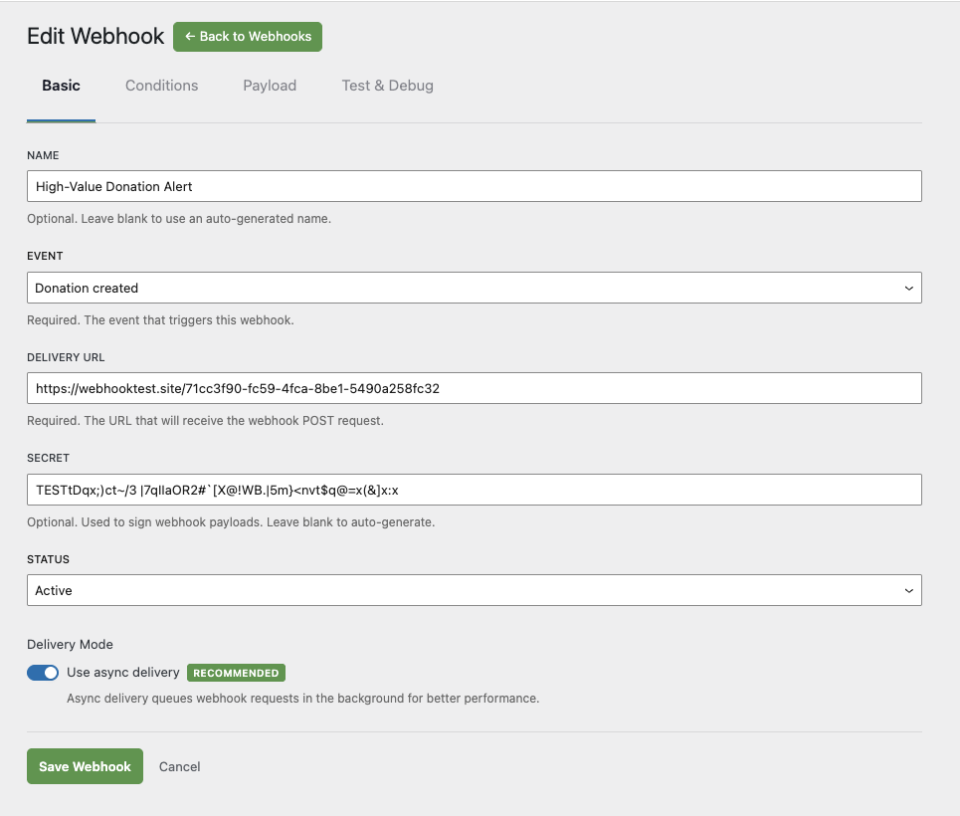
A visual webhook editor
A redesigned editor with four tabs – Basic, Conditions, Payload, and Test – replaces the old single-form workflow. Set your delivery URL, choose an event, attach rules, customize what gets sent, and fire a test request, all without leaving the page.
One-click templates for 7 platforms
Start from a pre-configured template instead of a blank slate. Each template fills in the right defaults – event, delivery shape, helpful instructions – for the platform you’re connecting to.
- Zapier (Webhooks by Zapier – Catch Hook trigger)
- Make.com (Custom Webhook module)
- n8n (Webhook node)
- Pabbly Connect (Webhook trigger)
- HubSpot (workflow webhook action)
- Mailchimp (newsletter opt-in pre-filtered)
- Slack (Incoming Webhook for channel notifications)
Or pick Start from scratch and configure everything yourself.
Conditional delivery
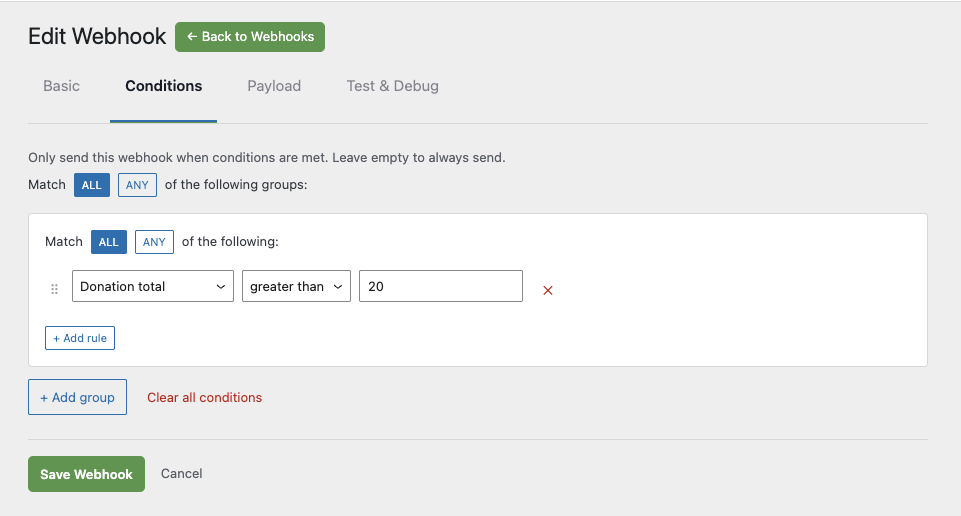
Fire webhooks only when the event matches your rules. The new condition builder supports nested AND/OR groups across donation, recurring donation, and campaign fields, including:
- Donation total (
>,<,=) - Campaign or campaign category
- Payment gateway
- Donation status
- Donor country
- Newsletter opt-in
- Anonymous donations
- Test mode
- Recurring period
- Campaign creator
Combine rules to build conditions like “big donations from US donors who opted in to the newsletter” without writing a line of code.
Asynchronous delivery
New subscriptions deliver asynchronously by default, using Action Scheduler to dispatch webhooks in the background. Donation pages no longer wait for third-party platforms to respond before completing – the donor sees their thank-you page immediately, and the webhook fires moments later.
Existing 1.x subscriptions keep running in synchronous mode. Switch any one of them to async whenever you’re ready, one subscription at a time.
Customize what gets sent
The new Payload tab lets you choose exactly which fields are included in each webhook request, and in what order. Drop the fields your integration doesn’t need, keep your payloads small, and reorder them to match what your receiving platform expects.
Charitable’s other extensions (Ambassadors, Recurring Donations, Fee Relief, Anonymous Donations, Gift Aid, Newsletter Connect) automatically contribute their own fields, and developers can register custom payload fields.
See exactly what’s happening
Every subscription has its own delivery log showing recent send attempts, HTTP response codes, and success/failure status. When something goes wrong, you can see why – no need to dig through server logs.
The Test tab in the editor sends a sample request to your delivery URL on demand, so you can verify the integration before any real donation triggers it.
Works with your existing extensions
Automation Connect 2.0 plugs into the rest of the Charitable ecosystem the same way it always has. Plugins like Ambassadors, Recurring Donations, Fee Relief, Anonymous Donations, Gift Aid, and Newsletter Connect add their own fields to outgoing webhooks automatically, with no extra configuration required.
Get started in four steps
- Click Add Webhook and pick a template – Zapier, Make.com, n8n, Pabbly Connect, HubSpot, Mailchimp, Slack, or “Start from scratch.”
- Paste your platform’s webhook URL into the Delivery URL field on the Basic tab.
- (Optional) On the Conditions tab, add rules so the webhook fires only when an event matches.
- (Optional) On the Payload tab, choose which fields to include. Click Send Test on the Test tab to verify it works, then save and activate.
That’s it. Your webhook is live.
Frequently asked questions
Do I need a paid Zapier plan to use this?
No. Zapier’s “Catch Hook” trigger is part of the free tier. The same is true for Make.com, n8n, and Pabbly Connect – their free plans include webhook triggers.
Can I retry a failed webhook?
Yes. Open the subscription, view its delivery log, and resend. You can also use the Test tab to fire a fresh request whenever you want.
What happens if my host can’t run async deliveries reliably?
Set the subscription’s delivery mode to Sync in the editor. The webhook will fire immediately on the request that triggered it, the same way 1.x worked.
Will my existing 1.x webhooks still work after upgrading?
Yes. Existing subscriptions are migrated automatically and keep running in legacy synchronous mode. Switch any of them to async whenever you’re ready – one subscription at a time, no all-or-nothing migration.
What Charitable plan do I need?
Charitable Pro plan or higher. Licenses get a 30-day grace period after expiry before delivery stops, so you have time to renew.
Does this work with platforms not in the template list?
Yes. Pick Start from scratch and paste any HTTPS endpoint. Anything that accepts an HTTP POST with a JSON body will work – that includes most modern automation platforms, CRMs, and custom internal services.
Connect Charitable to anything
Whether you’re piping new donations into a CRM, pinging Slack when a peer-to-peer fundraiser hits goal, syncing newsletter opt-ins into Mailchimp, or building a custom internal pipeline, Automation Connect 2.0 gets the data where it needs to go – quickly, reliably, and on your terms.
Get started with Automation Connect
You’ll find everything you need to get started with Automation Connect in our detailed setup guide.
It covers everything you need to know to start creating automated workflows powered by Charitable and your automation platform.