
Nos complace destacar una actualización pequeña pero revolucionaria en Charitable: ¡la integración completa con la nueva Barra de Comandos de WordPress 6.9!
Si eres un guerrero del teclado que gestiona donaciones, campañas e informes, esto te permite saltar a las pantallas de Charitable en segundos, sin necesidad de ratón. Está integrada directamente en el núcleo de WordPress, y Charitable Pro ahora añade nuestras acciones más utilizadas para una navegación ultrarrápida.
Disponible hoy en la última versión de Charitable Pro 1.8.11.5+ (requiere WordPress 6.9+).
Omite la navegación por menús, haz las cosas más rápido
¿Cuántas veces haces clic en los menús de administración de WordPress para crear una nueva campaña o consultar tus últimas donaciones? Con la integración de la Barra de Comandos, puedes omitir el menú y encontrar lo que necesitas con atajos de teclado.
Para abrir la Barra de Comandos, pulsa Cmd + K en Mac o Ctrl + K en Windows. Luego escribe algo como 'páginas'. Verás una lista de opciones entre las que puedes elegir. Selecciona la que quieras y pulsa Intro para ir directamente allí.
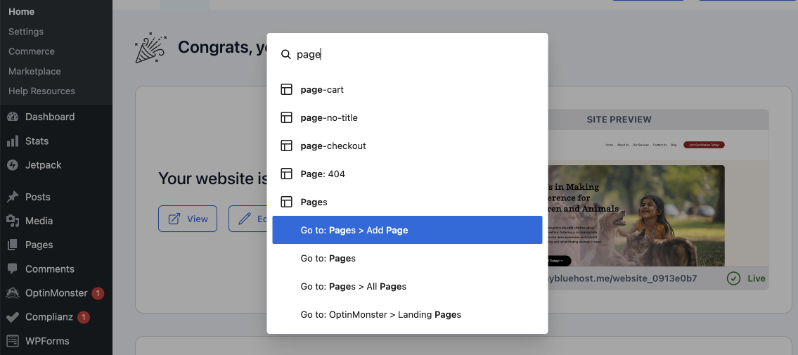
Esto hace que navegar por tu panel de administración de WordPress sea mucho más rápido y fácil.
¡En Charitable, también nos hemos subido al carro!
Hemos integrado las opciones de Charitable en esta Barra de Comandos.
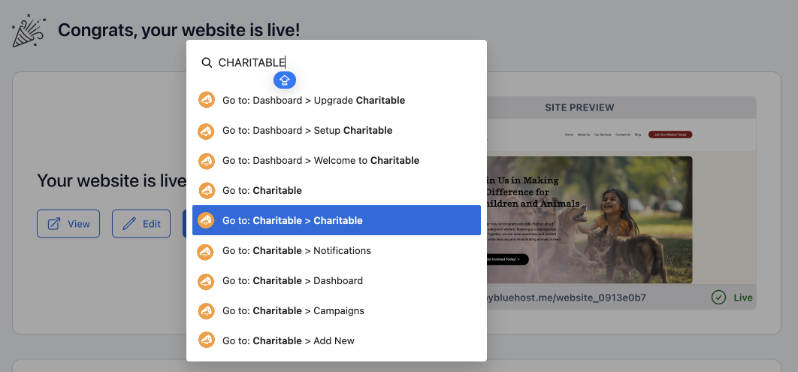
Así que ahora, en lugar de navegar por el menú con el ratón, puedes pulsar Cmd + K en Mac o Ctrl + K en Windows.
Escribe 'charitable' y verás opciones como 'Crear Nueva Donación' o tu panel de control.
La mejor manera de aprender sobre esta nueva función es viéndola en acción. He hecho un vídeo para ti aquí:
Verlo en acción: Nuevas opciones de Charitable disponibles en la Barra de Comandos
7 comandos esenciales al alcance de tu mano
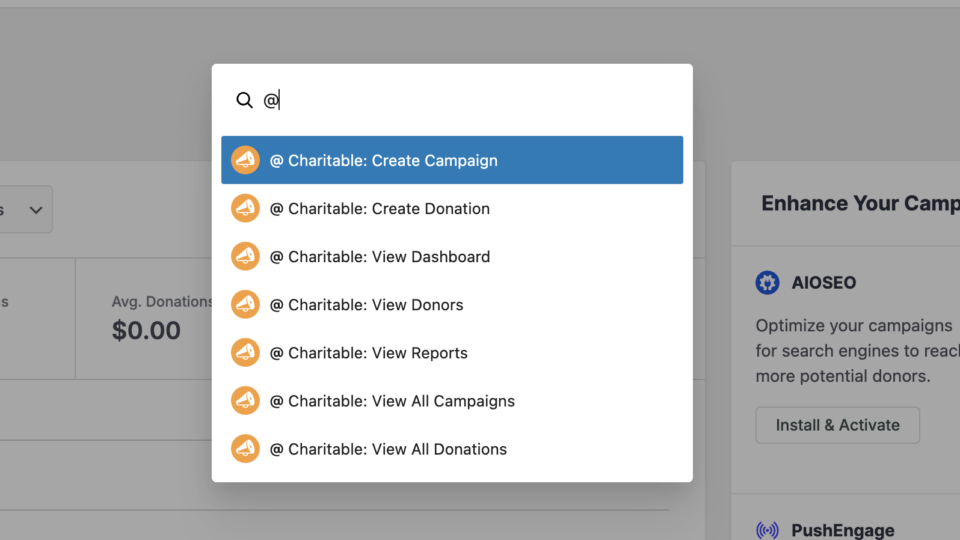
Hemos seleccionado cuidadosamente las funciones administrativas de Charitable de uso más frecuente y las hemos puesto a disposición a través de la Barra de Comandos.
- Crear Campaña - Salta directamente al creador de campañas
- Crear Donación - Añade donaciones manualmente en segundos
- Ver Panel de Control - Accede a tu resumen de recaudación de fondos
- Ver Donantes - Revisa la información y el historial de los donantes
- Ver Informes - Consulta tus análisis de recaudación de fondos
- Ver Todas las Campañas - Gestiona tu lista de campañas
- Ver Todas las Donaciones - Monitoriza la actividad de las donaciones
Aquí tienes algunos consejos para ti.
- ¡La búsqueda difusa funciona!: No tienes que escribir la ortografía exacta. Escribe "Dontae" y verás las opciones de donaciones de Charitable.
- Acceso universal: Funciona desde *cualquier* pantalla de WordPress, no solo desde Charitable.
- No se necesita ratón: Usa la flecha hacia abajo para seleccionar, pulsa Intro. Eso es todo.
- Acceso rápido a Charitable: Cmd/Ctrl+K y luego @ (Shift+2) muestra nuestros comandos al instante
Diseñado para el flujo de trabajo de tu equipo
Los diferentes miembros del equipo necesitan distintos niveles de acceso. La integración de la Paleta de Comandos respeta tus permisos existentes de WordPress, por lo que los miembros del personal solo ven los comandos que están autorizados a usar.
- Los coordinadores de voluntarios pueden crear campañas pero no acceder a los informes
- Los miembros del equipo de finanzas obtienen acceso completo a las donaciones y a la generación de informes
- Los administradores ven todos los comandos disponibles
¿Quieres más funciones increíbles como esta?
Para obtener herramientas aún más potentes para impulsar tu recaudación de fondos, considera actualizar a Charitable Pro. Obtendrás acceso a funciones como:
- Formularios personalizables
- Plantillas + Constructor Visual
- Gestión de Donaciones
- Informes listos para usar
- Recibos en PDF
- Correos Electrónicos Personalizados
- Panel del Donante
- Comentarios y Tablas de clasificación
- Donaciones recurrentes
- Alivio de comisiones
- Integraciones de correo electrónico
- Peer-to-Peer y Crowdfunding
… ¡y mucho más! ¿Listo para probar Charitable Pro?
Regístrate hoy y obtén hasta un 50% de descuento en tu plan. Estamos seguros de que te encantará recaudar fondos con Charitable. Si por alguna razón Charitable no es adecuado para ti, te reembolsaremos tu compra con nuestra garantía de devolución de dinero de 14 días.
¡Charitable tiene más de 1 millón de descargas!
Confiado por millones para impulsar campañas de recaudación de fondos exitosas. Prueba Charitable sin riesgos hoy mismo.
✅ Garantía de devolución de dinero en 14 días
✅ Precios transparentes
✅ Configuración sin código
Mantente conectado para más recursos para organizaciones sin fines de lucro
Para obtener más tutoriales y vídeos adaptados a organizaciones sin ánimo de lucro, suscríbete a nuestro canal de YouTube. Publicamos regularmente consejos de expertos, guías paso a paso sobre migraciones como este cambio de GiveWP a Charitable, estrategias de recaudación de fondos y recursos prácticos para ayudar a tu organización a tener éxito.
🗞️ Recibe consejos semanales y guías exclusivas en tu bandeja de entrada
Únete a nuestro boletín →
🎥 Mira tutoriales paso a paso e historias de éxito
Suscríbete a nuestro canal de YouTube →
👩🏽💻 Conecta con nuestra comunidad y obtén información diaria sobre organizaciones sin fines de lucro
Síguenos en LinkedIn →
🥳 Reels divertidos e información sobre organizaciones sin fines de lucro
Síguenos en Instagram →
👀 Vídeos interesantes y divertidos para ayudarte a hacer crecer tu causa
Síguenos en TikTok→
🌎 Suscríbete y sigue para recibir consejos generales de recaudación de fondos
Obtén consejos de recaudación de fondos en TikTok →
¡Nos encantaría saber de ti!
Las herramientas de seguridad en Charitable Pro 1.8.11 son parte de nuestro compromiso de democratizar la tecnología de recaudación de fondos. Nuestro objetivo es simple: queremos que te centres en tu misión, no en limpiar donaciones de spam.
¿Cómo te están funcionando estas nuevas funciones? Estamos dedicados a evolucionar Charitable basándonos en tus necesidades reales. Ya sea que tengas comentarios sobre la nueva integración de la Paleta de Comandos o ideas sobre lo que deberíamos abordar a continuación, por favor ponte en contacto. Tu opinión da forma directamente a nuestra hoja de ruta para 2026.







Deja una respuesta