Documentación de Charitable

Aprende a sacar el máximo partido a Charitable con instrucciones claras y paso a paso.

Setting Up the User Dashboard

When you have Charitable’s Ambassadors extension installed, you can take advantage of a new menu to group together pages that relate specifically to logged in users, such as the profile form or campaign creation form.

Creating the User Dashboard Menu

Note: This guide assumes that you have already installed Charitable and set up peer to peer fundraising settings.

  1. Go to Appearance > Menus.
  2. Click the Create a new menu link at the top of page.
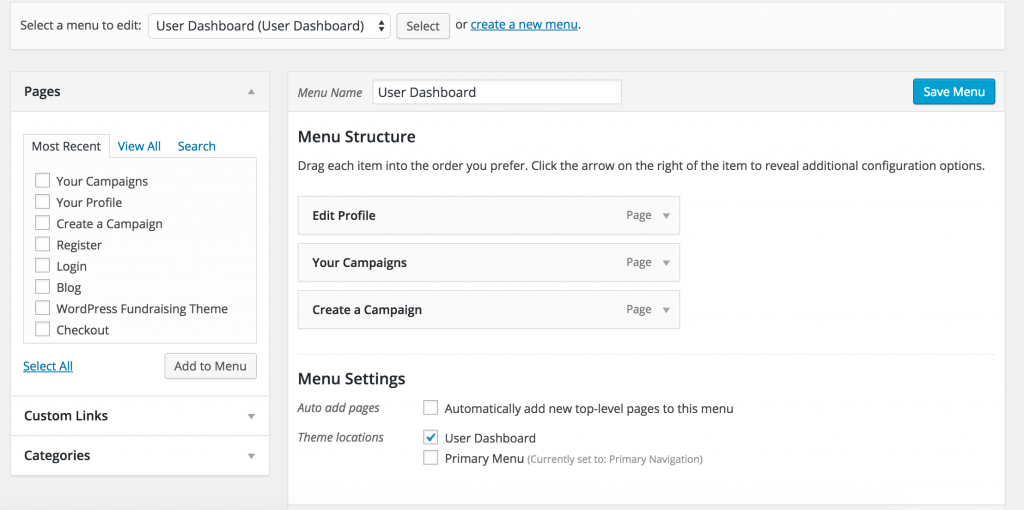
  3. Drag and drop the pages that you would like to form a part of your user dashboard into the Menu Structure area. See our demo site’s setup below:

    User Dashboard Menu
    User Dashboard Menu
  4. In the Menu Settings area, tick User Dashboard for the “Theme locations” setting.
  5. Click Save Menu.

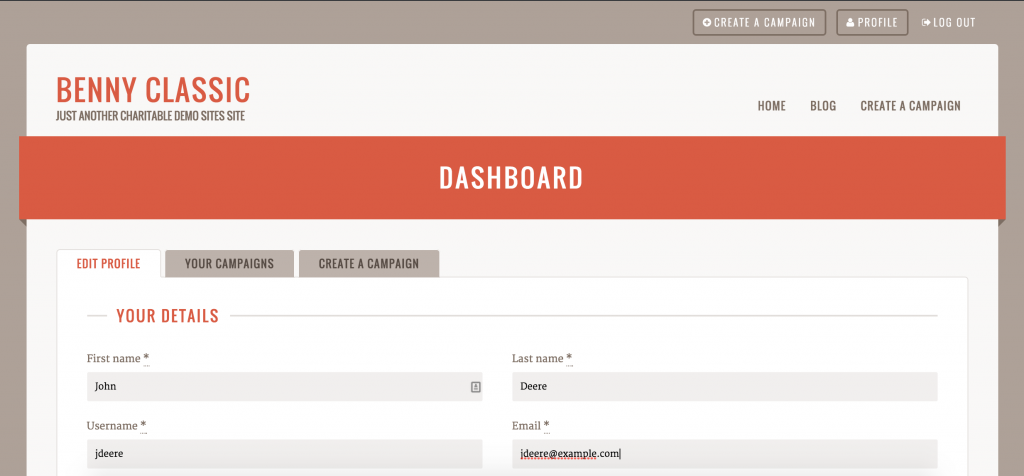
If you are using Reach, you can now access your user dashboard by visiting your website and clicking on the Profile button in the header. This takes you to your dashboard:

Benny's User Dashboard
Reachs User Dashboard

Próximos pasos

¿Todavía tienes preguntas? ¡Estamos aquí para ayudarte!

Última modificación:

Novedades en Benéfico

Ver las últimas actualizaciones
🔔 Suscríbete para recibir nuestras últimas actualizaciones
📧 Suscribirse a correos electrónicos

Suscripción por correo electrónico

Únete a nuestro boletín

No te enviaremos spam. Solo enviamos un correo electrónico cuando creemos que realmente te ayudará. ¡Date de baja en cualquier momento!

Mejora Pagos

📱 Turn Mobile Scrollers Into Donors: Meet Charitable’s Mollie Upgrade

Losing mobile supporters because they hate typing out long card numbers on their phones? Charitable’s updated Mollie integration features:

⚡ One-Tap Wallet Checkout: Enable donors to complete their gifts instantly using Apple Pay or Google Pay with a simple face scan, fingerprint, or tap.

💰 No Extra PCI Burden: Skip complex domain verification and security compliance since all wallet transactions run safely through Mollie’s hosted checkout.

🛠️ Custom Cancel Routing: Keep the experience predictable by automatically sending donors who back out to your cancellation page, or use developer filters to route them to a custom page.

Visit this page to learn more.

ambassadors improved Nuevo

Moderation and Directory Screens In Ambassadors 3.0

Ambassadors 3.0 has new features: moderation and directory screens… now easily see those who are earning donations on your peer to peer network – including campaign creators that might need to be verified – all in one place. Generate reports, email ambassadors and campaign creators directly and more.

🚀 See when campaign creators and ambassadors have updated their campaigns, what donors/donation they have brought in and more.

🎉 Manually add ambassadors and campaign creators, and approve them in one-click!

Visita esta página para obtener más información.

Nuevo Pagos

⚡ Unlock India-Based Donations: Meet Charitable’s Native Razorpay Integration

Trying to collect donations in India? Charitable’s native Razorpay integration features:

⚡ Instant UPI Integration: Accept fast, local donations directly inside your form via apps like PhonePe, Google Pay, Paytm, and BHIM without sending donors away from your site.

📲 Auto-Generated Campaign QRs: Instantly render scannable QR codes encoding a UPI deep link directly on your public campaign pages and sidebars for an effortless “scan-to-give” experience.

💰 Dual Local & Global Reach: Headline your campaigns in INR while seamlessly accepting major international currencies like USD, EUR, GBP, and CAD to maximize global support.

🔁 Seamless Recurring Giving: Fully integrates with the Charitable Recurring addon to manage automatic monthly subscriptions directly through Razorpay without extra code.

↩️ Automatic Two-Way Sync: Keep your books perfectly clean with two-way refund syncing—issue a refund inside WordPress or your Razorpay dashboard and both sides update automatically.

🔒 Webhook-Verified Security: Automatically protect your donation records using HMAC-signed webhook verification to ensure every status update represents real money cleared on the rails.

Visita esta página para obtener más información.

Integración Nuevo

🎉 New Built-in PushEngage Integration

Struggling with falling email open rates and rising ad costs just to keep your supporters engaged? Charitable’s built-in PushEngage integration features:

🔔 Zero-Fee Direct Messaging: Deliver crisp, instant pop-up notifications straight to your donors’ desktops and mobile devices.

⏱️ Four Smart Automated Triggers: Automatically send updates for immediate donation thank yous, full-list campaign launches, urgent “ending soon” alerts, and goal milestone celebrations.

📈 Group Momentum Broadcasts: Turn private milestones into public wins by automatically broadcasting alerts to your entire subscriber list the moment a campaign hits 50%, 75%, or 100% of its goal.

📊 Automatic Analytics Tracking: Monitor exactly where your incoming notification traffic is coming from with built-in attribution that requires zero complex configuration.

Visita esta página para obtener más información.

Nuevo Seguridad

💂‍♂️ ¡Nuevo DonationGuard 🛡️ Protege automáticamente tus donaciones!

¿Te preocupan los ataques de prueba de tarjetas o los bots de spam que inundan tus formularios de donaciones, pero no quieres arruinar la experiencia de donación para tus donantes reales? Las características de DonationGuard de Charitable incluyen:

🛡️ Detección de bots en tiempo real: Supervisa activamente cada envío de donación en busca de cinco señales de ataque distintas sin ralentizar a tus donantes humanos.

📊 Puntuación inteligente del tráfico: Evalúa instantáneamente la actividad frente a una base de referencia aprendida de los ritmos normales de donación de tu sitio para detectar pruebas de tarjetas sigilosas y de goteo lento.

🚨 Alertas por nivel de gravedad: Abre inmediatamente "Registros de ataques" estructurados y te notifica por correo electrónico y alertas de administrador en el momento en que una campaña comienza a recibir ataques.

🎯 Defensa con un clic: Implementa seguridad instantánea utilizando el ajuste preestablecido "Configuración recomendada" para activar los módulos Honeypot, Time Trap y Rate Limit a la vez.

🚫 Listas de bloqueo automatizadas: detenga permanentemente a los infractores reincidentes bloqueando automáticamente las direcciones de correo electrónico sospechosas según sus reglas personalizadas.

Visita esta página para obtener más información.