
Requisitos: Charitable Pro 1.8.16+ Charitable Ambassadors 3.1.0+
La pestaña Opciones de donación en la página Mis campañas permite a cada creador de campaña ver cada donación a su propia recaudación de fondos, filtrar y ordenar la lista, exportar un CSV y, opcionalmente, enviar un agradecimiento personal a cada donante. Nada de esto requiere acceso de administrador de WordPress: todo el flujo se encuentra en el panel del embajador en el front-end.
Para las organizaciones sin fines de lucro que ejecutan programas de persona a persona, la victoria es doble. Los creadores obtienen la herramienta de reconocimiento que siguen pidiendo ("¿puedo agradecer a mis donantes yo mismo?"), y los administradores mantienen intacta la relación principal con el donante (las respuestas se envían al creador, no a la bandeja de entrada del administrador).
Cuándo usarlo
- Otorgar a los creadores la propiedad de las relaciones con los donantes. La mayoría de los embajadores *quieren* agradecer a las personas que apoyaron su recaudación de fondos, solo necesitan una herramienta que lo haga con un solo clic.
- Reducir la carga de trabajo administrativa. Si los creadores pueden agradecer a los donantes por sí mismos, sus administradores dejan de ser el cuello de botella para cada reconocimiento personal.
- Exportar datos por recaudación de fondos sin exponer la tabla completa de donaciones del sitio. Cada creador obtiene un CSV limitado a su propia recaudación de fondos.
- Ejecutar campañas recurrentes dirigidas por el creador. Las donaciones recurrentes activas aparecen en la tira de KPI para que un creador pueda ver quién todavía lo apoya mes a mes.
Cómo se benefician los creadores
Llega una donación a las 15:00. El embajador solía esperar hasta que usted (el administrador) enviara un correo electrónico de agradecimiento genérico esa noche, o no revisaba nada porque no tenía visibilidad. Ahora el embajador abre Mis campañas > Donaciones, ve la nueva donación en la parte superior de la lista y hace clic en Enviar agradecimiento. El donante recibe una nota personal del embajador en cuestión de minutos, con la respuesta del donante dirigida a la bandeja de entrada del embajador, no a la suya.
El cambio de comportamiento importa. Los donantes que reciben un agradecimiento personal dentro de las 24 horas son drásticamente más propensos a donar nuevamente, y a donar cantidades mayores cuando lo hacen. Al acercar el reconocimiento al evento de la donación y personalizarlo a través del creador real, se multiplica la buena voluntad que generó la donación en sí.
Cómo encontrarlo
Front-end del embajador > Mis campañas > Pestaña Donaciones
Una vez que haya habilitado las Donaciones en el administrador (ver más abajo), cada embajador verá una nueva pestaña en su página Mis campañas junto a "Mis campañas". La tira de pestañas es accesible con el teclado (use las teclas de flecha para moverse entre las pestañas).

Lo que ven los creadores
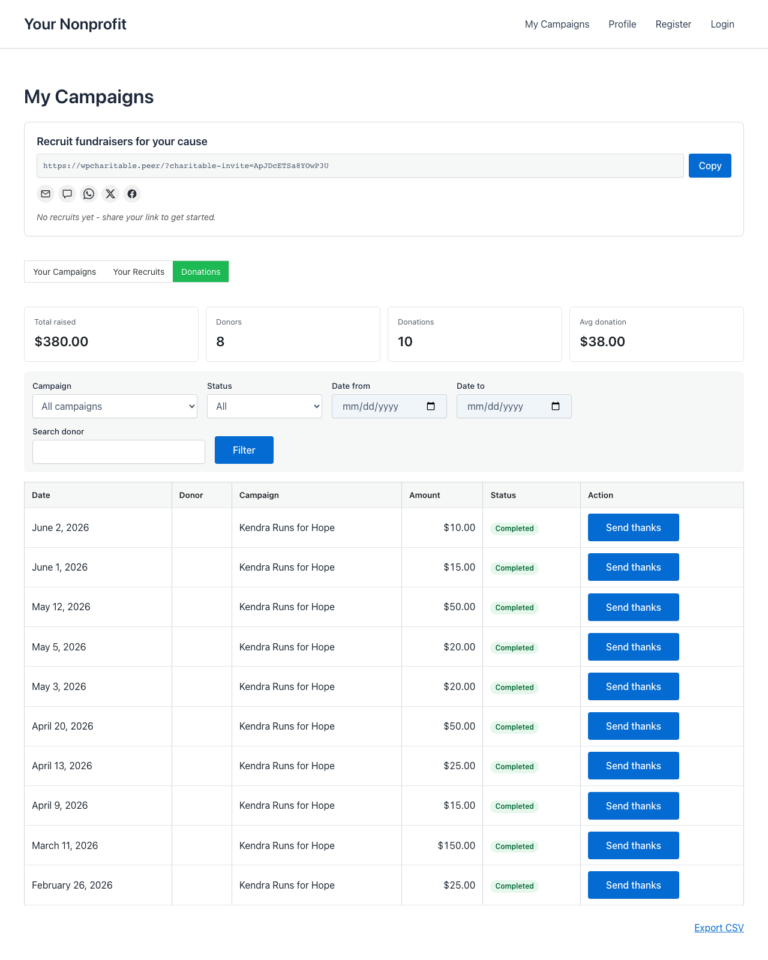
En la parte superior de la pestaña Donaciones hay una tira de KPI: cinco números que resumen la actividad de recaudación de fondos del creador de un vistazo:
| KPI | Significado en lenguaje claro |
|---|---|
| Total recaudado | El monto total que han recaudado las campañas del creador. Se excluyen las donaciones reembolsadas y pendientes. |
| Donantes | Número de donantes únicos. Un donante que donó dos veces todavía cuenta como uno. |
| Donaciones | Número total de donaciones completadas. |
| Donación media | Total recaudado dividido por el número de donaciones. |
| Recurrente activo | Número de planes de donación recurrentes aún activos. Solo se muestra cuando el complemento Donaciones recurrentes está habilitado. |
Debajo de los KPI, la lista de donaciones. Cada fila muestra el nombre del donante (o “Anónimo” si el donante eligió permanecer anónimo), el monto de la donación, la fecha de la donación en la zona horaria local del sitio, la campaña a la que se realizó la donación y una insignia de estado (Completado / Pendiente / Fallido / Reembolsado).

Filtrado y ordenación
La barra de herramientas encima de la lista tiene dos controles:
| Control | Opciones |
|---|---|
| Rango de fechas | Todo el tiempo, Últimos 7 días, Últimos 30 días, Últimos 90 días. |
| Estado | Completado, Pendiente, Fallido, Reembolsado. El valor predeterminado es Completado. |
La paginación respeta el filtro actual, por lo que un creador que filtra por “Últimos 7 días, Completado” solo ve esas filas en todas las páginas.
Exportar un CSV
El botón Exportar CSV en la parte superior de la lista transmite un CSV de las donaciones actualmente filtradas al navegador del creador. El archivo incluye las mismas columnas que la lista en pantalla, además del ID de la donación y el correo electrónico del donante cuando el donante no era anónimo.
La exportación CSV es segura contra inyecciones de fórmulas: cualquier celda que comience con =, +, -, @, o un carácter de control se antepone con una comilla simple para que Excel y Google Sheets la muestren como texto en lugar de evaluarla como una fórmula.
Enviar agradecimiento – correos electrónicos personales de agradecimiento
Si usted (el administrador) habilita los correos electrónicos de agradecimiento, cada fila de donación tendrá un botón Enviar agradecimiento. Hacer clic en él abre una ventana modal con un correo electrónico de plantilla que el creador puede revisar y enviar.
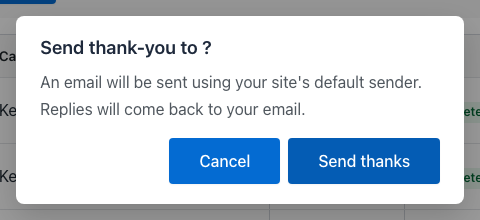
Lo que el creador puede hacer en la ventana modal:
- Revisar el asunto y el cuerpo de la plantilla (configurado por el administrador – ver más abajo).
- Editar el cuerpo antes de enviarlo. Las etiquetas inteligentes como
{donor_name}y{campaign_title}ya están sustituidas en este punto; lo que ve el creador es lo que verá el donante. - Enviar. El correo electrónico se envía inmediatamente. El botón de la fila de donación cambia a una insignia verde “Agradecido” para que el creador pueda ver de un vistazo a qué donantes ya se ha puesto en contacto.
Se incluyen algunas medidas de seguridad prácticas:
- Protección contra concurrencia. Si el creador hace clic en Enviar agradecimiento dos veces en rápida sucesión, solo se procesa el primer envío; el segundo se ignora silenciosamente. No hay correos electrónicos duplicados.
- Límite de velocidad. Un creador puede enviar como máximo un correo electrónico de agradecimiento por donación, y como máximo 60 correos electrónicos de agradecimiento por hora. Más allá de eso, el botón muestra un mensaje amigable de “por favor, reduce la velocidad”.
- Enrutamiento de respuestas. La cabecera
Reply-Todel correo electrónico se establece en la dirección de correo electrónico del propio creador, por lo que cualquier respuesta llega a la bandeja de entrada del creador, no a la del administrador. La direcciónFromsigue siendo el remitente predeterminado de su sitio.
Configuración del administrador
Toda la función está desactivada por defecto. Para activarla:
Administrador de WordPress > Charitable > Embajadores > Ajustes > Mis Campañas
Hay dos configuraciones que rigen esta función:
| Configuración | Lo que controla |
|---|---|
| Mostrar Pestaña de Donaciones | Si la pestaña de Donaciones aparece o no en la página Mis Campañas. Desactivada por defecto; actívala para habilitar la pestaña. |
| Permitir a los Creadores Enviar Agradecimientos | Si el botón Enviar Agradecimiento aparece en cada fila de donación. Desactivado por defecto; habilítalo solo después de haber revisado la plantilla de correo electrónico (siguiente sección). |
Luego la plantilla de correo electrónico:
Administrador de WordPress > Charitable > Embajadores > Ajustes > Correos electrónicos
Busca la fila Agradecimiento al Creador. Haz clic para editar el asunto y el cuerpo. La plantilla admite las siguientes etiquetas inteligentes:
| Etiqueta | Sustituciones para |
|---|---|
{nombre_donante} | El nombre para mostrar del donante, o “Anónimo” si optó por no hacerlo. |
{nombre_primero_donante} | Solo el nombre de pila del donante. |
{cantidad_donacion} | La cantidad de la donación con el símbolo de la moneda. |
{titulo_campana} | La campaña a la que se hizo la donación. |
{nombre_creador} | El nombre del propietario de la recaudación de fondos. Se usa en las despedidas. |
{nombre_sitio} | El nombre de tu sitio. |
El plugin incluye una plantilla predeterminada razonable para que no necesites escribir una desde cero. Revisa la redacción, ajusta el tono para que coincida con tu marca y guarda.

Consejos
- Lánzalo gradualmente. Primero habilita la pestaña de Donaciones y deja que los creadores vean sus listas de donantes durante una o dos semanas. Solo después de eso, activa Enviar Agradecimientos. Esto da tiempo a los creadores para asimilar la nueva visibilidad antes de ponerles un botón de envío en la mano.
- Establece expectativas en tu correo electrónico de incorporación. Cuando un nuevo embajador se registra, infórmale sobre la pestaña de Donaciones. La encontrarán eventualmente por su cuenta, pero un aviso previo mejora la experiencia de la primera semana.
- Edita la plantilla, no la reemplaces. El cuerpo predeterminado utiliza etiquetas inteligentes en lugares que coinciden con la forma en que los donantes esperan que suene un agradecimiento. Modifica la redacción, pero mantén la estructura (saludo, gratitud, lo que la donación permite, despedida).
- Supervisa los primeros agradecimientos. Durante la primera semana después de habilitar Enviar Agradecimientos, revisa algunos correos electrónicos enviados para ver el tono. Si un creador está siendo demasiado informal o no se ajusta a la marca, una indicación rápida y gentil (“Oye, solo para que lo sepas, nuestros seguidores tienden a esperar un tono un poco más formal”) es mucho más fácil que revertir la función.
Manejo de anonimato
Los donantes pueden marcar una donación como anónima al finalizar la compra. Cuando lo hacen:
- Su nombre aparece como “Anónimo” en la lista de donaciones del creador y en la exportación CSV.
- Su correo electrónico se omite del CSV.
- El botón Enviar Agradecimiento está oculto para esa fila; no hay forma de que el creador envíe un correo electrónico a un donante anónimo a través de esta herramienta.
- La identidad del donante también está oculta en la autocompletación de búsqueda de donantes que se utiliza en otras partes del plugin.
El anonimato se aplica en la capa de acceso a datos, no solo en la interfaz de usuario, por lo que un creador no puede eludirlo inspeccionando el código fuente de la página o accediendo directamente al punto final AJAX.
Referencia del desarrollador
Comportamiento del shortcode
La pestaña Donaciones se representa dentro del shortcode existente [charitable_my_campaigns] – no hay un shortcode separado. La barra de pestañas cambia entre dos modos de vista a través de un argumento de consulta cap_view:
?cap_view=campaigns(predeterminado): la lista original de las propias campañas del creador.?cap_view=donations: la nueva vista de donaciones.
El shortcode lee la configuración Show Donations Tab antes de representar la barra; con la configuración desactivada, solo se muestra la vista original.
Filtros
| Filtro | Predeterminado | Propósito |
|---|---|---|
charitable_ambassadors_creator_donations_enabled | lee la configuración | Conmutador maestro para toda la función. Devuelve false para ocultarla. |
charitable_ambassadors_creator_donations_send_thanks_enabled | lee la configuración | Conmutador para el botón Enviar agradecimiento. |
charitable_ambassadors_creator_donations_per_page | 20 | Tamaño de página para la lista de donaciones. |
charitable_ambassadors_creator_donations_rate_limit | 60 | Número máximo de correos electrónicos de agradecimiento que un creador individual puede enviar por hora. |
charitable_ambassadors_creator_donations_date_window_years | 10 | Hasta dónde pueden llegar los filtros. Aumente si necesita exportaciones históricas de más de 10 años. |
charitable_ambassadors_creator_donations_csv_columns | matriz | La lista de columnas CSV. Agregue o elimine columnas filtrando la matriz. |
charitable_ambassadors_creator_thank_you_smart_tags | matriz | Agregue etiquetas inteligentes personalizadas. Devuelva una matriz indexada por nombre de etiqueta con una callback para la sustitución. |
Acciones
| Acción | Se dispara cuando | Argumentos |
|---|---|---|
charitable_ambassadors_creator_thank_you_sent | El creador envía con éxito un correo electrónico de agradecimiento. | $donation_id, $creator_id, $donor_id |
charitable_ambassadors_creator_donations_csv_exported | Un creador exporta un CSV de sus donaciones. | $creator_id, $filter_args, $row_count |
Clases y puntos finales AJAX
| Símbolo | Rol |
|---|---|
Charitable_Ambassadors_Creator_Donations_Repo | Clase de acceso a datos. Posee los métodos query(), aggregates() y owns_donation(). Todo el enmascaramiento de anonimato ocurre aquí. |
Charitable_Ambassadors_Creator_Donations_Ajax | Enrutador AJAX. Maneja las solicitudes de filtro, paginación, envío de agradecimientos y exportación CSV. |
Charitable_Email_Creator_Thank_You | La subclase Charitable_Email para la plantilla de agradecimiento. Añade la capa de etiquetas inteligentes sobre la canalización de correo estándar de Charitable. |
wp_ajax_charitable_ambassadors_creator_donations_query | Acción AJAX: lista filtrada + paginada. |
wp_ajax_charitable_ambassadors_creator_donations_export | Acción AJAX: transmisión CSV. |
wp_ajax_charitable_ambassadors_creator_donations_thank | Acción AJAX: enviar un único correo electrónico de agradecimiento. |
Los tres puntos finales AJAX comprueban is_user_logged_in() + verifican que el usuario actual posea la(s) campaña(s) a las que están limitadas las filas de donación. El anonimato se aplica en la capa del repositorio; los puntos finales AJAX son simples envoltorios.
Anulaciones de plantilla
El shortcode se renderiza a través de las anulaciones de plantilla estándar de Charitable. Para personalizar la interfaz de usuario de la pestaña Donaciones desde tu tema:
your-theme/charitable-pro/charitable-ambassadors/shortcodes/my-campaigns/donations-tab.php
your-theme/charitable-pro/charitable-ambassadors/emails/creator-thank-you.php
Ejemplos de personalización
Permitir solo a los embajadores verificados enviar agradecimientos:
add_filter( 'charitable_ambassadors_creator_donations_send_thanks_enabled', function ( $enabled ) {
    if ( ! $enabled ) {
        return false;
    }
    return (bool) get_user_meta( get_current_user_id(), '_charitable_user_verified', true );
} );
Aumentar el límite de tasa de agradecimiento a 200 por hora:
add_filter( 'charitable_ambassadors_creator_donations_rate_limit', function () {
    return 200;
} );
Añadir una etiqueta inteligente personalizada para la ciudad del donante:
add_filter( 'charitable_ambassadors_creator_thank_you_smart_tags', function ( $tags ) {
    $tags['donor_city'] = array(
        'description' => __( 'The donor city, from billing address.', 'your-theme' ),
        'callback'    => function ( $donation ) {
            return (string) get_post_meta( $donation->ID, 'donor_address_city', true );
        },
    );
    return $tags;
} );
Añadir una columna CSV para la pasarela de donación:
add_filter( 'charitable_ambassadors_creator_donations_csv_columns', function ( $columns ) {
    $columns['gateway'] = array(
        'header'   => __( 'Gateway', 'your-theme' ),
        'callback' => function ( $donation ) {
            return (string) get_post_meta( $donation->ID, 'donation_gateway', true );
        },
    );
    return $columns;
} );
Relacionado
- Mis Campañas – El Panel del Embajador – la página principal que aloja la pestaña Donaciones.
- Plantillas de Correo Electrónico – la lista completa de correos electrónicos transaccionales que envían los Embajadores.
- Exportaciones CSV – todas las exportaciones CSV del plugin, incluida esta.
- Permisos – qué capacidad controla qué.
Lista de activos (para el editor de documentación)
| Nombre de archivo | Qué capturar | Texto alternativo sugerido |
|---|---|---|
01-donations-tab.png | La pestaña Donaciones en Mis Campañas, tira de KPI + las primeras 4-5 filas de donaciones visibles. | La pestaña Donaciones en la página Mis Campañas, mostrando los KPI en la parte superior y una lista de donaciones filtrable debajo. |
02-tab-strip.png | Primer plano de la tira de pestañas Mis Campañas, pestaña "Donaciones" resaltada. | La página Mis Campañas ahora muestra dos pestañas: Mis Campañas y Donaciones. |
03-donation-row.png | Primer plano de una fila de donación individual, botón Enviar Agradecimiento visible a la derecha. | Una fila de donación con nombre del donante, importe, fecha, campaña, estado y un botón Enviar Agradecimiento a la derecha. |
04-send-thanks-modal.png | La ventana modal Enviar agradecimiento se abre sobre la lista de donaciones, con el asunto y el cuerpo visibles. | La ventana modal Enviar agradecimiento, con el nombre del donante pre-rellenado, la línea de asunto y el cuerpo del correo electrónico editable |
05-email-template.png | El editor de plantillas de correo electrónico de agradecimiento del creador en el administrador (Configuración > Correos electrónicos). | El editor de plantillas de correo electrónico de agradecimiento del creador en el administrador, que muestra los campos de asunto y cuerpo con referencias a etiquetas inteligentes |
Notas
Las cinco capturas de pantalla necesitan que el entorno de pruebas tenga:
- La pestaña Donaciones + la configuración de Enviar agradecimiento ambas habilitadas en Embajadores > Configuración > Mis Campañas.
- Al menos una cuenta de embajador iniciada con 3+ donaciones completadas en su propia recaudación de fondos.
- Una plantilla de correo electrónico de agradecimiento del creador configurada (los valores predeterminados funcionan; capturar tal cual).
- Al menos una donación anónima en la lista para que el documento pueda mostrar cómo se renderiza esa fila (opcional pero ideal).
05-email-template.png es del lado del administrador; las otras cuatro se toman mientras se inicia sesión como embajador (use User Switching para cambiar de administrador a un embajador preconfigurado).


